park assist TESLA MODEL Y 2020 Owner´s Manual
[x] Cancel search | Manufacturer: TESLA, Model Year: 2020, Model line: MODEL Y, Model: TESLA MODEL Y 2020Pages: 232, PDF Size: 7.68 MB
Page 3 of 232

Overview................................................................2
Interior Overview.............................................................................2
Exterior Overview............................................................................3
Touchscreen Overview..................................................................4
Opening and Closing.........................................8
Keys.......................................................................................................8
Doors...................................................................................................13
Windows............................................................................................15
Rear Trunk.........................................................................................16
Front Trunk.......................................................................................18
Interior Storage and Electronics...............................................21
Seating and Safety Restraints.....................25
Front and Rear Seats...................................................................25
Seat Belts.........................................................................................29
Child Safety Seats.........................................................................32
Airbags..............................................................................................37
Driving..................................................................44
Driver Profiles.................................................................................44
Steering Wheel..............................................................................46
Mirrors...............................................................................................48
Starting and Powering Off........................................................49
Gears...................................................................................................51
Lights.................................................................................................53
Car Status.........................................................................................56
Wipers and Washers....................................................................59
Braking and Stopping.................................................................60
Traction Control.............................................................................63
Park Assist.......................................................................................64
Vehicle Hold....................................................................................66
Getting Maximum Range...........................................................67
Rear View Camera........................................................................69
Dashcam...........................................................................................70
Pedestrian Warning System......................................................72
Towing and Accessories.............................................................73
Cold Weather Best Practices....................................................79
Autopilot...............................................................81
About Autopilot..............................................................................81
Tra
Page 62 of 232

Braking SystemsWARNING: Properly functioning braking systems
are critical to ensure safety. If you experience a
problem with the brake pedal, brake caliper, or
any component of a Model Y braking system,
contact Tesla immediately.
Model Y has an anti-lock braking system (ABS) that
prevents the wheels from locking when you apply
maximum brake pressure. This improves steering
control during heavy braking in most road conditions.
During emergency braking conditions, the ABS
constantly monitors the speed of each wheel and varies
the brake pressure according to the grip available.
The alteration of brake pressure can be felt as a pulsing sensation through the brake pedal. This demonstrates that the ABS is operating and is not a cause for concern. Keep
firm and steady pressure on the brake
pedal while experiencing the pulsing.
The ABS indicator briefly flashes yellow
on the
touchscreen when you first start
Model Y. If this indicator lights up at any
other time, an ABS fault has occurred
and the ABS is not operating. Contact
Tesla. The braking system remains fully
operational and is not
affected by an
ABS failure. However, braking distances may increase. Drive cautiously and avoid
heavy braking.
If the touchscreen displays this red brake
indicator at any time other than
briefly
when you first start Model Y, a brake
system fault is detected, or the level of
the brake
fluid is low. Contact Tesla
immediately. Apply steady pressure and
keep the brakes
firm to bring the vehicle
to a stop when safe to do so.
If the touchscreen displays this yellow
brake indicator at any time, a brake booster fault is detected. Apply steady
pressure and keep the brakes
firm to
bring the vehicle to a stop when safe to do so. Hydraulic Boost Compensation will be active (see
Hydraulic Boost
Compensation on page 61).
Emergency Braking
In an emergency, fully press the brake pedal and
maintain
firm pressure, even on low traction surfaces.
The ABS varies the braking pressure to each wheel
according to the amount of traction available. This prevents wheels from locking and ensures that you stop as safely as possible.
WARNING: Do not pump the brake pedal. Doing
so interrupts operation of the ABS and can
increase braking distance.
WARNING: Always maintain a safe distance from
the vehicle in front of you and be aware of
hazardous driving conditions. While the ABS can
improve stopping distance, it cannot overcome
the laws of physics. It also does not prevent the
danger of hydroplaning (where a layer of water
prevents direct contact between the tires and the
road).
Automatic Emergency Braking is designed to automatically brake in situations where a collision is
considered imminent (see
Automatic Emergency
Braking on page 115).
WARNING: Automatic Emergency Braking is not
designed to prevent a collision. At best, it can
minimize the impact of a frontal collision by
attempting to reduce your driving speed.
Depending on Automatic Emergency Braking to
avoid a collision can result in serious injury or
death.
CAUTION: In emergency situations, if the brakes
are not functioning properly, press and hold the
Park button on the drive stalk to bring the vehicle
to a stop. Do not use this method to stop the
vehicle unless absolutely necessary.
Brake Disc Wiping
To ensure your brakes remain responsive in cold and
wet weather,
Model Y is equipped with brake disc
wiping. When cold and wet weather is detected, this
feature repeatedly applies an imperceptible amount of brake force to clear away water from the surface of the brake discs.
Hydraulic Fade Compensation
Your vehicle is also equipped with hydraulic fade
compensation. This feature assists in monitoring brake
system pressure and ABS activity for instances of lower
brake performance. If lower brake performance is
detected (for example, as a result of brake fade, or cold
or wet conditions), you may feel the brake pedal pull away from your foot, detect some noise, and notice a strong increase in vehicle braking. Continue to press the
brake pedal without releasing or "pumping" them
Page 63 of 232

WARNING: Always maintain a safe driving
distance from the vehicle in front of you and
exercise caution when driving conditions are
hazardous. Do not rely on brake disc wiping or
hydraulic fade compensation to act as a
substitute for adequately applying the brakes.
Hydraulic Boost Compensation
Model Y is equipped with a brake booster that provides
a mechanical advantage that
effectively activates the
brakes when the brake pedal is pressed. Hydraulic boost
compensation provides mechanical assist in the event of a brake booster failure. If a brake booster failure is detected, the brake pedal may feel harder to press and you may hear some noise when you press the brake
pedal. To stop the vehicle, apply adequate steady force on the brake pedal without releasing or "pumping" them. Exercise caution while driving and maintain a safe
distance as brake pedal responsiveness and braking performance may be degraded.
Regenerative Braking
Whenever Model Y is moving and your foot is off the
accelerator, regenerative braking slows down
Model Y
and feeds any surplus energy back to the Battery.
By anticipating your stops and reducing or removing
pressure from the accelerator pedal to slow down, you
can take advantage of regenerative braking to increase
driving range. Of course, this is no substitute for regular
braking when needed for safety.
NOTE: If regenerative braking is aggressively slowing
Model Y (such as when your foot is completely off the
accelerator pedal at highway speeds), the brake lights turn on to alert others that you are slowing down.
NOTE: Installing winter tires with aggressive compound
and tread design may result in temporarily-reduced regenerative braking power. However, your vehicle is
designed to continuously recalibrate itself, and after changing tires it will increasingly restore regenerative braking power after some moderate-torque straight-line accelerations. For most drivers this occurs after a short period of normal driving, but drivers who normally
accelerate lightly may need to use slightly harder accelerations while the recalibration is in progress.
WARNING: In snowy or icy conditions Model Y
may experience traction loss during regenerative
braking.
The amount of energy fed back to the Battery using regenerative braking can depend on the current state of the Battery. For example, regenerative braking may be
limited if the Battery is already fully charged or if the
ambient temperature is too cold.
NOTE: If regenerative braking is limited, a dashed line
displays on the energy bar (see
Driving Status on page
57).
Stopping Mode
Regenerative braking decelerates Model Y whenever you
release the accelerator pedal when driving. You can
choose what you want
Model Y to do once the driving
speed has been reduced to a very low speed (almost at
a stop) and both the accelerator pedal and brake pedal
are released. While in Park, touch
Controls > Driving >
Stopping Mode and choose from these options:
Page 66 of 232
How Park Assist Works
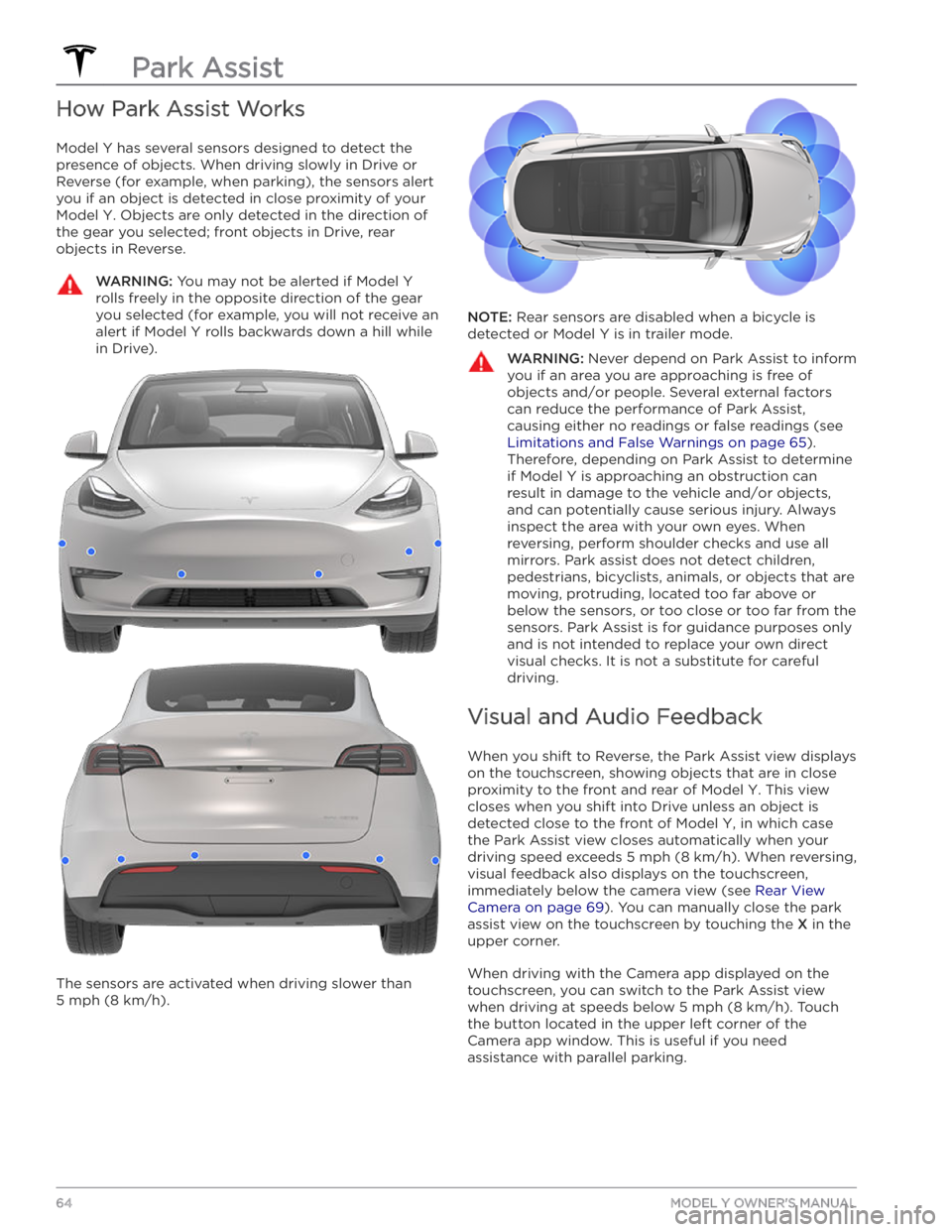
Model Y has several sensors designed to detect the
presence of objects. When driving slowly in Drive or
Reverse (for example, when parking), the sensors alert
you if an object is detected in close proximity of your
Model Y. Objects are only detected in the direction of
the gear you selected; front objects in Drive, rear objects in Reverse.
WARNING: You may not be alerted if Model Y
rolls freely in the opposite direction of the gear
you selected (for example, you will not receive an
alert if Model Y rolls backwards down a hill while
in Drive).
The sensors are activated when driving slower than
5 mph (8 km/h).
NOTE: Rear sensors are disabled when a bicycle is
detected or
Model Y is in trailer mode.
WARNING: Never depend on Park Assist to inform
you if an area you are approaching is free of
objects and/or people. Several external factors
can reduce the performance of Park Assist,
causing either no readings or false readings (see
Limitations and False Warnings on page 65).
Therefore, depending on Park Assist to determine
if Model Y is approaching an obstruction can
result in damage to the vehicle and/or objects,
and can potentially cause serious injury. Always
inspect the area with your own eyes. When
reversing, perform shoulder checks and use all
mirrors. Park assist does not detect children,
pedestrians, bicyclists, animals, or objects that are
moving, protruding, located too far above or
below the sensors, or too close or too far from the
sensors. Park Assist is for guidance purposes only
and is not intended to replace your own direct
visual checks. It is not a substitute for careful
driving.
Visual and Audio Feedback
When you shift to Reverse, the Park Assist view displays on the
touchscreen, showing objects that are in close
proximity to the front and rear of
Model Y. This view
closes when you shift into Drive unless an object is detected close to the front of
Model Y, in which case
the Park Assist view closes automatically when your driving speed exceeds
5 mph (8 km/h). When reversing,
visual feedback also displays on the touchscreen, immediately below the camera view (see
Rear View
Camera on page 69). You can manually close the park
assist view on the touchscreen by touching the
X in the
upper corner.
When driving with the Camera app displayed on the touchscreen, you can switch to the Park Assist view
when driving at speeds below
5 mph (8 km/h). Touch
the button located in the upper left corner of the Camera app window. This is useful if you need
assistance with parallel parking.
Park Assist
64MODEL Y OWNER
Page 67 of 232
If chimes are turned on (see Controlling Audible
Feedback on page 65), an audible beep sounds as you
approach an object. You can temporarily mute the chime by pressing the scroll button on the left side of the steering wheel or by touching the mute button on the bottom left corner of the Park Assist view.
NOTE: If a sensor is unable to provide feedback, the
touchscreen displays an alert message.
CAUTION: Keep sensors clean from dirt, debris,
snow, and ice. Avoid using a high pressure power
washer on the sensors and do not clean a sensor
with a sharp or abrasive object that can scratch or
damage its surface.
CAUTION: Do not install accessories or stickers on
or near the parking sensors.
Controlling Audible Feedback
You can use Park Assist with or without audible feedback. To turn chimes on or
off, touch Controls >
Safety & Security > Park Assist Chimes.
To mute the chimes temporarily, press the scroll button on the left side of the steering wheel or touch the mute button in the corner of the Park Assist view. The chimes
are muted until you shift into a
different gear or drive
over
5 mph (8 km/h).
Limitations and False Warnings
The parking sensors may not function correctly in these situations:
Page 71 of 232
Camera Location
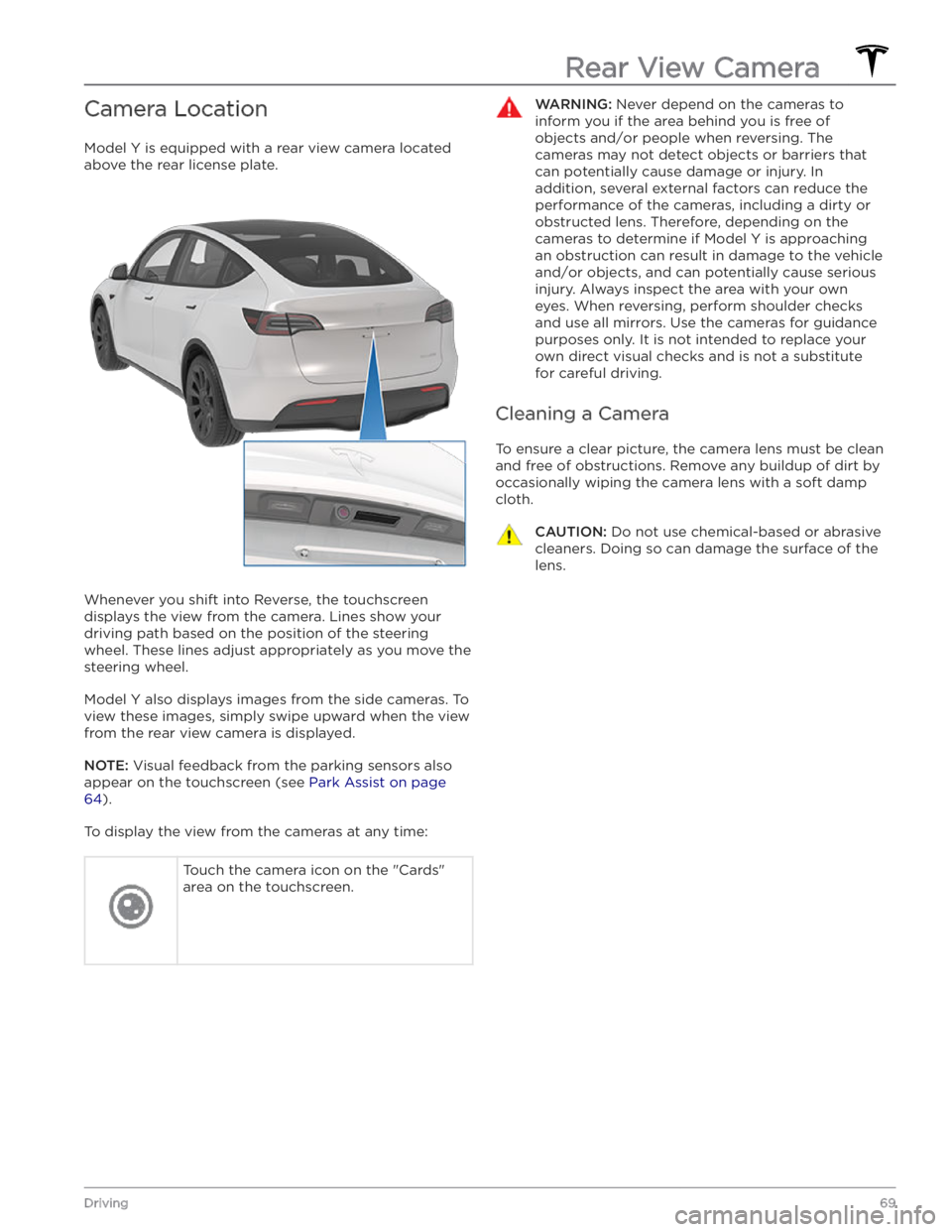
Model Y is equipped with a rear view camera located
above the rear license plate.
Whenever you shift into Reverse, the touchscreen displays the view from the camera. Lines show your
driving path based on the position of the steering wheel. These lines adjust appropriately as you move the
steering wheel.
Model Y also displays images from the side cameras. To
view these images, simply swipe
upward when the view
from the rear view camera is displayed.
NOTE: Visual feedback from the parking sensors also
appear on the
touchscreen (see Park Assist on page
64).
To display the view from the cameras at any time:
Touch the camera icon on the "Cards"
area on the touchscreen.WARNING: Never depend on the cameras to
inform you if the area behind you is free of
objects and/or people when reversing. The
cameras may not detect objects or barriers that
can potentially cause damage or injury. In
addition, several external factors can reduce the
performance of the cameras, including a dirty or
obstructed lens. Therefore, depending on the
cameras to determine if Model Y is approaching
an obstruction can result in damage to the vehicle
and/or objects, and can potentially cause serious
injury. Always inspect the area with your own
eyes. When reversing, perform shoulder checks
and use all mirrors. Use the cameras for guidance
purposes only. It is not intended to replace your
own direct visual checks and is not a substitute
for careful driving.
Cleaning a Camera
To ensure a clear picture, the camera lens must be clean
and free of obstructions. Remove any buildup of dirt by
occasionally wiping the camera lens with a soft damp cloth.
CAUTION: Do not use chemical-based or abrasive
cleaners. Doing so can damage the surface of the
lens.
Rear View Camera
69Driving
Page 123 of 232
Driving
Acceleration: Adjust the amount of acceleration. Chill
limits acceleration for a slightly smoother and gentler
ride, whereas
Standard or Sport (depending on vehicle
configuration) provides the normal level of acceleration.
NOTE: When Chill is selected, Chill displays on the
touchscreen above the driving speed.
Steering Mode: Adjust the amount of effort required to
turn the steering wheel.
Sport feels more responsive
whereas
Comfort feels easier to drive and park (see
Adjusting Steering Effort on page 46).
Stopping Mode: Choose how you want Model Y to
behave once regenerative braking has reduced the driving speed to a very low speed, a driving gear is still
engaged, and both the accelerator and brake pedals are
released. See
Stopping Mode on page 61. You can adjust
this setting only when
Model Y is in Park.
Slip Start: Turn Slip Start ON to disable traction control
and allow wheels to spin to make it easier to dislodge the vehicle when stuck in mud, snow, ice, etc. (see
Traction Control on page 63).
Off-Road Assist: Turn Off-Road Assist ON to disable
traction control and allow wheels to spin when driving
off-road (see Traction Control on page 63).
Trailer Mode: (Available only if equipped with the tow
package) Must always be active when towing a trailer.
Some Autopilot features and rear sensor functionality may not be available. See
Trailer Mode on page 75).
Autopilot
Autopilot features that provide a safer and more
convenient driving experience. Some Autopilot features
are not controlled through
Controls. See About
Autopilot on page 81 for more information.
Page 128 of 232
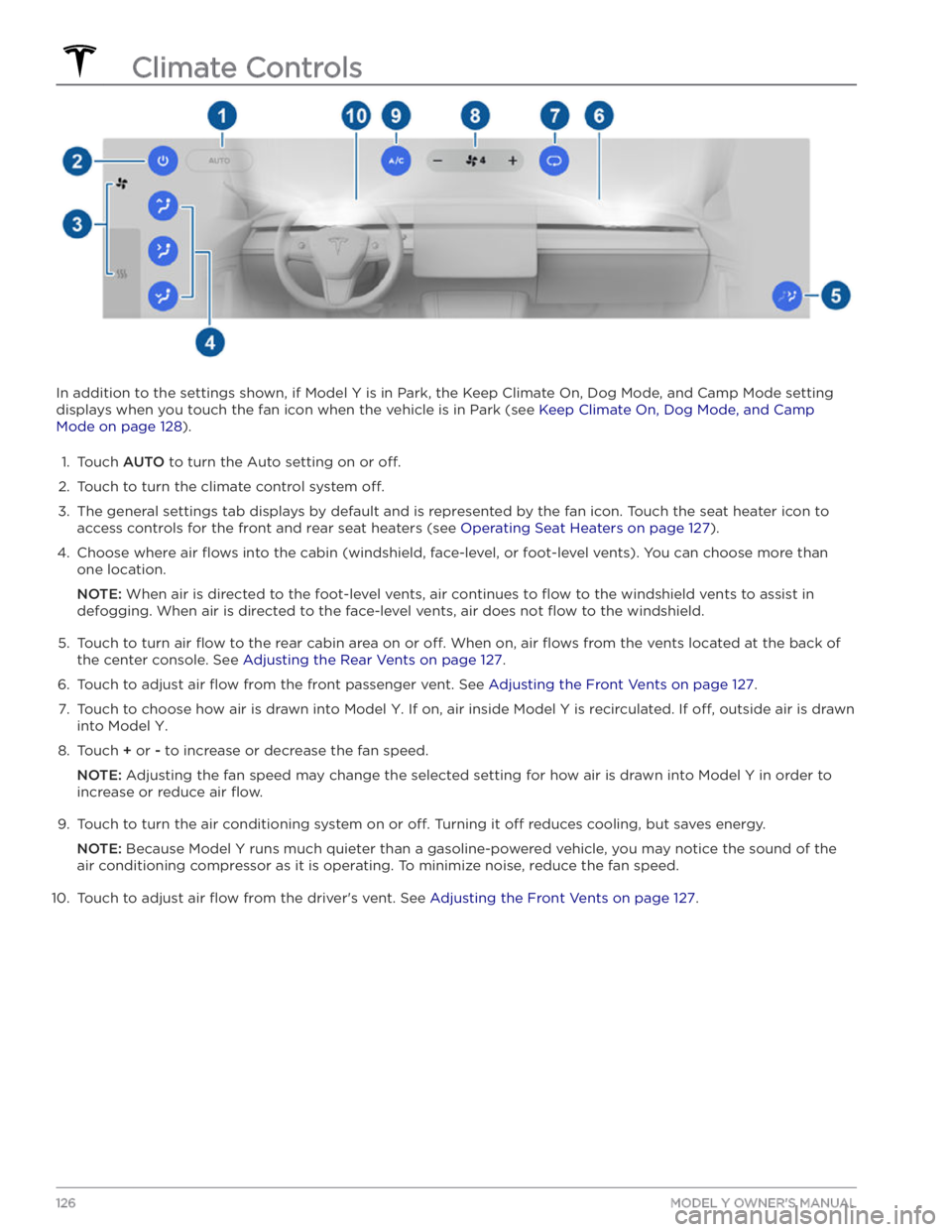
In addition to the settings shown, if Model Y is in Park, the Keep Climate On, Dog Mode, and Camp Mode setting
displays when you touch the fan icon when the vehicle is in Park (see
Keep Climate On, Dog Mode, and Camp
Mode on page 128).
1.
Touch AUTO to turn the Auto setting on or off.
2.
Touch to turn the climate control system off.
3.
The general settings tab displays by default and is represented by the fan icon. Touch the seat heater icon to
access controls for the front
and rear seat heaters (see Operating Seat Heaters on page 127).
4.
Choose where air flows into the cabin (windshield, face-level, or foot-level vents). You can choose more than
one location.
NOTE: When air is directed to the foot-level vents, air continues to flow to the windshield vents to assist in
defogging. When air is directed to the face-level vents, air does not
flow to the windshield.
5.
Touch to turn air flow to the rear cabin area on or off. When on, air flows from the vents located at the back of
the center console. See
Adjusting the Rear Vents on page 127.
6.
Touch to adjust air flow from the front passenger vent. See Adjusting the Front Vents on page 127.
7.
Touch to choose how air is drawn into Model Y. If on, air inside Model Y is recirculated. If off, outside air is drawn
into
Model Y.
8.
Touch + or - to increase or decrease the fan speed.
NOTE: Adjusting the fan speed may change the selected setting for how air is drawn into Model Y in order to
increase or reduce air
flow.
9.
Touch to turn the air conditioning system on or off. Turning it off reduces cooling, but saves energy.
NOTE: Because Model Y runs much quieter than a gasoline-powered vehicle, you may notice the sound of the
air conditioning compressor as it is operating. To minimize noise, reduce the fan speed.
10.
Touch to adjust air flow from the driver
Page 195 of 232

DO NOT TRANSPORT WITH
WHEELS ON THE GROUND
The rear motor in Model Y generates power when the
wheels spin. Always transport
Model Y with all four tires
off the ground. Ensure that the tires are unable to spin
at any time during transport.
WARNING: NEVER TRANSPORT YOUR VEHICLE
WITH THE TIRES IN A POSITION WHERE THEY
CAN SPIN. DOING SO CAN LEAD TO
SIGNIFICANT DAMAGE AND OVERHEATING. IN
RARE CASES EXTREME OVERHEATING MAY
CAUSE THE SURROUNDING COMPONENTS TO
IGNITE.
Do not transport Model Y using any method that is not
specified by Tesla. Adhere to the instructions provided
in the following sections and observe all warnings and
cautions provided. Damage caused by improper
transporting of your vehicle is not covered by the
warranty.
NOTE: Tesla is not liable or responsible for reimbursing
services not dispatched through Tesla Roadside Assistance.
Approved Methods for Transporting
NOTE: The tires are allowed to rotate slowly (under 3
mph or 5 km/h) and for a very short distance (less than
30 feet or 10 meters) only when Transport Mode is
enabled (see
Activate Transport Mode on page )
while the vehicle is being winched onto a
flatbed truck
or pulled out of a parking space for repositioning.
Exceeding these boundaries can lead to
significant
damage and overheating that is not covered by the
warranty.
A flatbed truck or comparable transport vehicle is the
recommended method of transporting
Model Y. The
vehicle can face either direction when using a
flatbed.
If Model Y must be transported without a flatbed truck,
then wheel lifts and dollies must be used to ensure that
all four wheels are
off of the ground. This method may
only be used for a maximum of
35 miles (55 km), and
must not exceed the manufacturer speed rating of the
dollies. With this method, Tesla recommends the vehicle
facing forward so that the front wheels are lifted and the rear wheels are on dollies.
CAUTION: Enable Transport Mode (see Activate
Transport Mode on page ) before winching
Model Y onto a flatbed truck (see Pull Onto
Flatbed Truck From Front on page and Pull
Onto Flatbed Truck From Rear on page ). If
Transport Mode is not available or the
touchscreen is not accessible, self-loading dollies
or tire skates must be used to load the vehicle
into the approved transportation position. Tesla is
not responsible for any damage caused by or
during the transport of Model Y, including
personal property damage or damage caused by
using self-loading dollies or tire skates.
WARNING: Model Y is equipped with high voltage
components that may be compromised as a result
of a collision (see High Voltage Components on
page 154). Before transporting Model Y, it is
important to assume these components are
energized. Always follow high voltage safety
precautions (wearing personal protection
equipment, etc.) until emergency response
professionals have evaluated the vehicle and can
accurately confirm that all high voltage systems
are no longer energized. Failure to do so may
result in serious injury.
Activate Transport Mode
Transport Mode keeps the parking brake disengaged
while winching
Model Y onto a flatbed truck. When
active, Transport Mode displays a message indicating that the vehicle will remain free-rolling. The following
are required to enable Transport Mode:
Page 225 of 232

A
ABS (Anti-lock Braking System): 60
absolute speed limit: 117
access panel, removing: 174
accessories: 23
plugging into power socket: 23
accessories, towing: 73
adjacent lane speed: 111
aero covers: 166
air circulation: 125
air conditioning: 125
air distribution: 125
air filter: 128
air vents: 127
airbags: 37
alarm: 142
all-season tires: 168
Always Show Estimated Round Trip Energy: 132
ambient lights: 53
anti-lock braking (ABS): 60
application launcher: 4
audio: 46, 135, 137
equalizer: 137
immersive sound: 137
playing files: 135
steering wheel scroll button: 46
volume control: 135
auto fold: 48
auto high beam: 54
Auto Lane Change: 91
auto tilt: 48
AUTO wipers: 59
automatic emergency braking: 115
automatic navigation: 130
Autopark: 103
autopilot: 111
blind spot collision warning: 111
side collision warning: 111
Autopilot: 81, 84, 89, 91, 103, 105, 114, 117
Auto Lane Change: 91
automatic emergency braking: 114
Autopark: 103
Autosteer: 89
collision avoidance assist: 114
forward collision warning: 114
overtake acceleration: 84
overview: 81
speed assist: 117
speed limit warning: 117
staying within speed limits: 117
Summon: 105
Tra