child seat TESLA MODEL Y 2021 Owner´s Manual
[x] Cancel search | Manufacturer: TESLA, Model Year: 2021, Model line: MODEL Y, Model: TESLA MODEL Y 2021Pages: 250, PDF Size: 8.4 MB
Page 3 of 250

Overview................................................................2
Exterior Overview............................................................................2
Interior Overview.............................................................................3
Touchscreen Overview..................................................................4
Opening and Closing.........................................6
Keys.......................................................................................................6
Doors....................................................................................................11
Windows............................................................................................13
Rear Trunk.........................................................................................14
Front Trunk.......................................................................................16
Interior Storage and Electronics..............................................19
Seating and Safety Restraints.....................23
Front and Rear Seats...................................................................23
Seat Belts.........................................................................................29
Child Safety Seats.........................................................................32
Airbags..............................................................................................38
Driving..................................................................45
Driver Profiles.................................................................................45
Steering Wheel..............................................................................47
Mirrors...............................................................................................49
Starting and Powering Off........................................................50
Gears..................................................................................................52
Lights.................................................................................................53
Car Status.........................................................................................56
Wipers and Washers....................................................................59
Braking and Stopping.................................................................60
Traction Control.............................................................................63
Park Assist.......................................................................................64
Vehicle Hold....................................................................................66
Getting Maximum Range...........................................................67
Rear View Camera........................................................................69
Dashcam...........................................................................................70
Pedestrian Warning System......................................................73
Towing and Accessories.............................................................74
Cold Weather Best Practices...................................................80
Autopilot..............................................................83
About Autopilot.............................................................................83
Traffic-Aware Cruise Control....................................................86
Autosteer...........................................................................................91
Navigate on Autopilot.................................................................96
Traffic Light and Stop Sign Control.......................................99
Autopark.........................................................................................106
Summon..........................................................................................108
Smart Summon...............................................................................111
Lane Assist......................................................................................114
Collision Avoidance Assist.........................................................117
Speed Assist..................................................................................120
Using the Touchscreen..................................122
Controls...........................................................................................122
Climate Controls...........................................................................128
Maps and Navigation..................................................................133
Media and Audio..........................................................................138
Phone................................................................................................141
Calendar..........................................................................................143
Using Voice Commands............................................................144
Security Settings.........................................................................145
HomeLink Universal Transceiver............................................149
Connecting to Wi-Fi...................................................................152
Software Updates........................................................................153
Mobile App.....................................................................................154
Charging.............................................................156
Electric Vehicle Components..................................................156
Battery Information....................................................................158
Charging Instructions.................................................................159
Maintenance.....................................................164
Maintenance Schedule..............................................................164
Tire Care and Maintenance......................................................166
Cleaning...........................................................................................172
Wiper Blades and Washer Jets..............................................175
Fluid Reservoirs............................................................................176
Jacking and Lifting......................................................................178
Parts and Accessories................................................................179
Specifications....................................................181
Identification Labels....................................................................181
Vehicle Loading............................................................................182
Dimensions and Weights..........................................................184
Subsystems....................................................................................187
Wheels and Tires.........................................................................189
Roadside Assistance......................................196
Contacting Tesla Roadside Assistance...............................196
Instructions for Transporters...................................................197
Consumer Information..................................201
Entertainment and Toybox......................................................201
About this Owner Information..............................................203
Disclaimers...................................................................................204
Reporting Safety Defects........................................................206
Declarations of Conformity....................................................207
Troubleshooting Alerts............................................................209
Index....................................................................241
Contents
Page 28 of 250
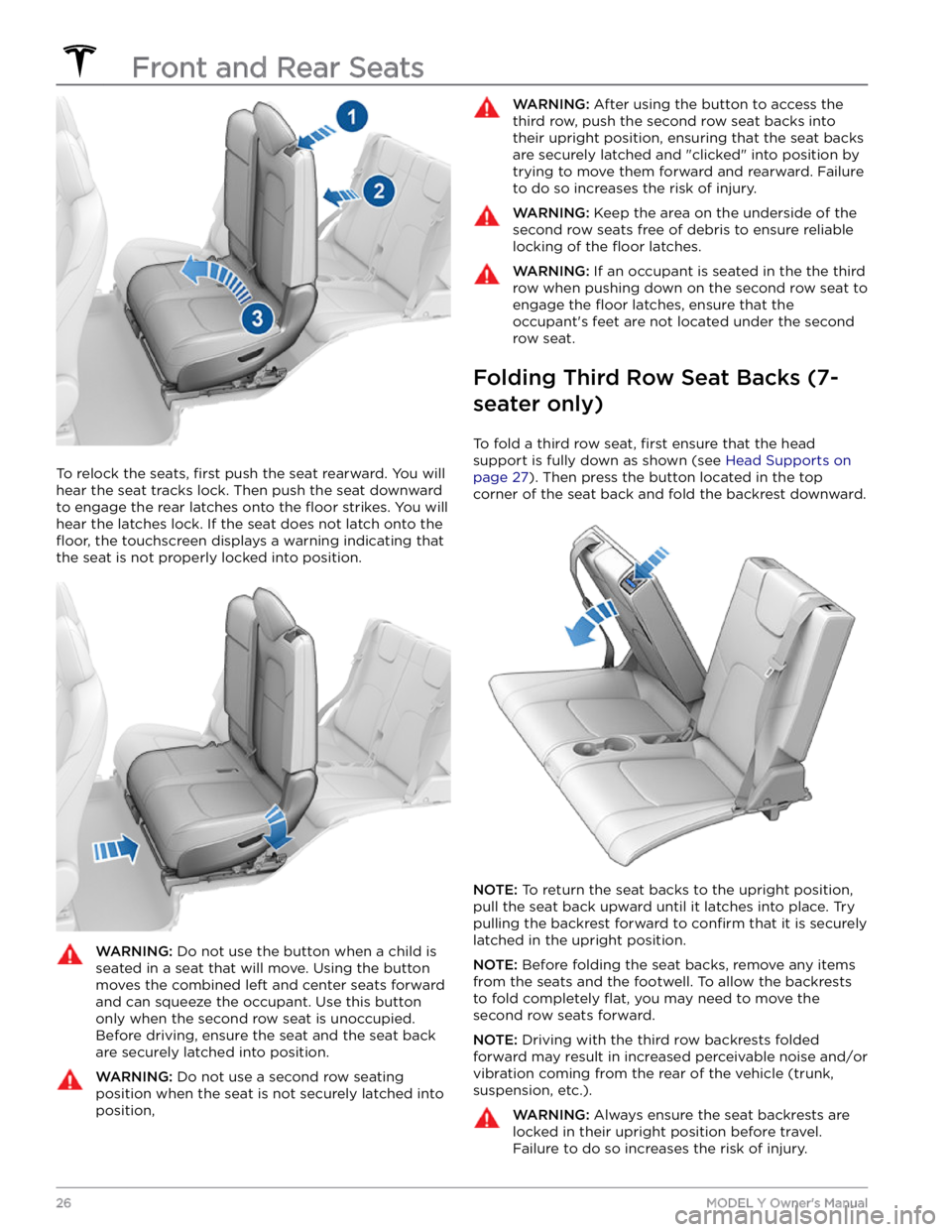
To relock the seats, first push the seat rearward. You will
hear the seat tracks lock. Then push the seat downward
to engage the rear latches onto the
floor strikes. You will
hear the latches lock. If the seat does not latch onto the
floor, the touchscreen displays a warning indicating that
the seat is not properly locked into position.
WARNING: Do not use the button when a child is
seated in a seat that will move. Using the button
moves the combined left and center seats forward
and can squeeze the occupant. Use this button
only when the second row seat is unoccupied.
Before driving, ensure the seat and the seat back
are securely latched into position.
WARNING: Do not use a second row seating
position when the seat is not securely latched into
position,
WARNING: After using the button to access the
third row, push the second row seat backs into
their upright position, ensuring that the seat backs
are securely latched and "clicked" into position by
trying to move them forward and rearward. Failure
to do so increases the risk of injury.
WARNING: Keep the area on the underside of the
second row seats free of debris to ensure reliable
locking of the floor latches.
WARNING: If an occupant is seated in the the third
row when pushing down on the second row seat to
engage the floor latches, ensure that the
occupant
Page 29 of 250
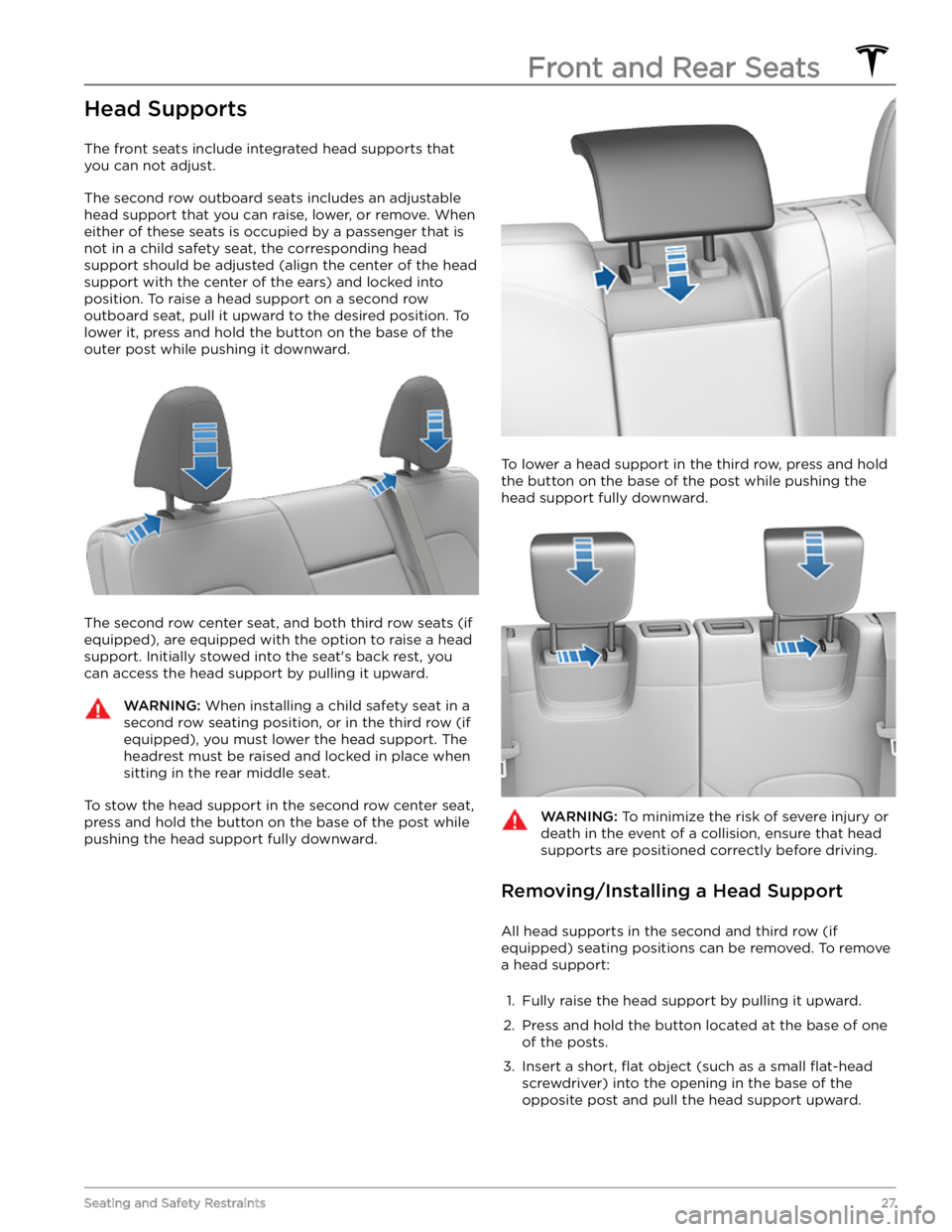
Head Supports
The front seats include integrated head supports that
you can not adjust.
The second row outboard seats includes an adjustable head support that you can raise, lower, or remove. When
either of these seats is occupied by a passenger that is
not in a child safety seat, the corresponding head support should be adjusted (align the center of the head support with the center of the ears) and locked into
position. To raise a head support on a second row
outboard seat, pull it upward to the desired position. To lower it, press and hold the button on the base of the outer post while pushing it downward.
The second row center seat, and both third row seats (if
equipped), are equipped with the option to raise a head
support. Initially stowed into the seat
Page 31 of 250
Wearing Seat Belts
Using seat belts and child safety seats is the most
effective way to protect occupants if a collision occurs.
Therefore, wearing a seat belt is required by law in most jurisdictions.
Both the driver and passenger seats are equipped with three-point inertia reel seat belts. Inertia reel belts are automatically tensioned to allow occupants to move
comfortably during normal driving conditions.
To
securely hold child safety seats, all passenger seating
positions are equipped with an automatic locking
retractor (ALR) feature that, by fully extracting the seat
belt (beyond the length needed for a typical adult
occupant), locks the belt into place until the seat belt is
unbuckled.
The seat belt reel automatically locks to prevent
movement of occupants if
Model Y experiences a force
associated with hard acceleration, braking, cornering, or
an impact in a collision.
Seat Belt Reminders
The seat belt reminder on the touchscreen
alerts you if a seat belt for an occupied driver or passenger seat is unbuckled. If
the belt remains unbuckled, the reminder
flashes and an intermittent chime sounds.
If all occupants are buckled up and the
reminder stays on, re-buckle seat belts to
ensure they are correctly latched. Also
remove any heavy objects (such as a
briefcase) from an unoccupied seat. If the
reminder light continues to stay on,
contact Tesla.
You can temporarily mute a seat belt reminder
associated with a rear seating position. This is useful in situations when you are carrying an object in a rear seat
that triggers the seat belt reminder alert. To mute the reminder, touch the associated seat on the seat belt reminder card that displays on the touchscreen when a seat belt reminder alert is active. When a reminder is muted, the seat belt reminder icon is replaced by a seat icon. Touch the seat again to unmute the reminder. The reminder is disabled for the current drive only.
WARNING: Seat belts must be worn by passengers
in all seating positions. Do not disable a seat belt
reminder when the seating position is occupied by
a passenger.
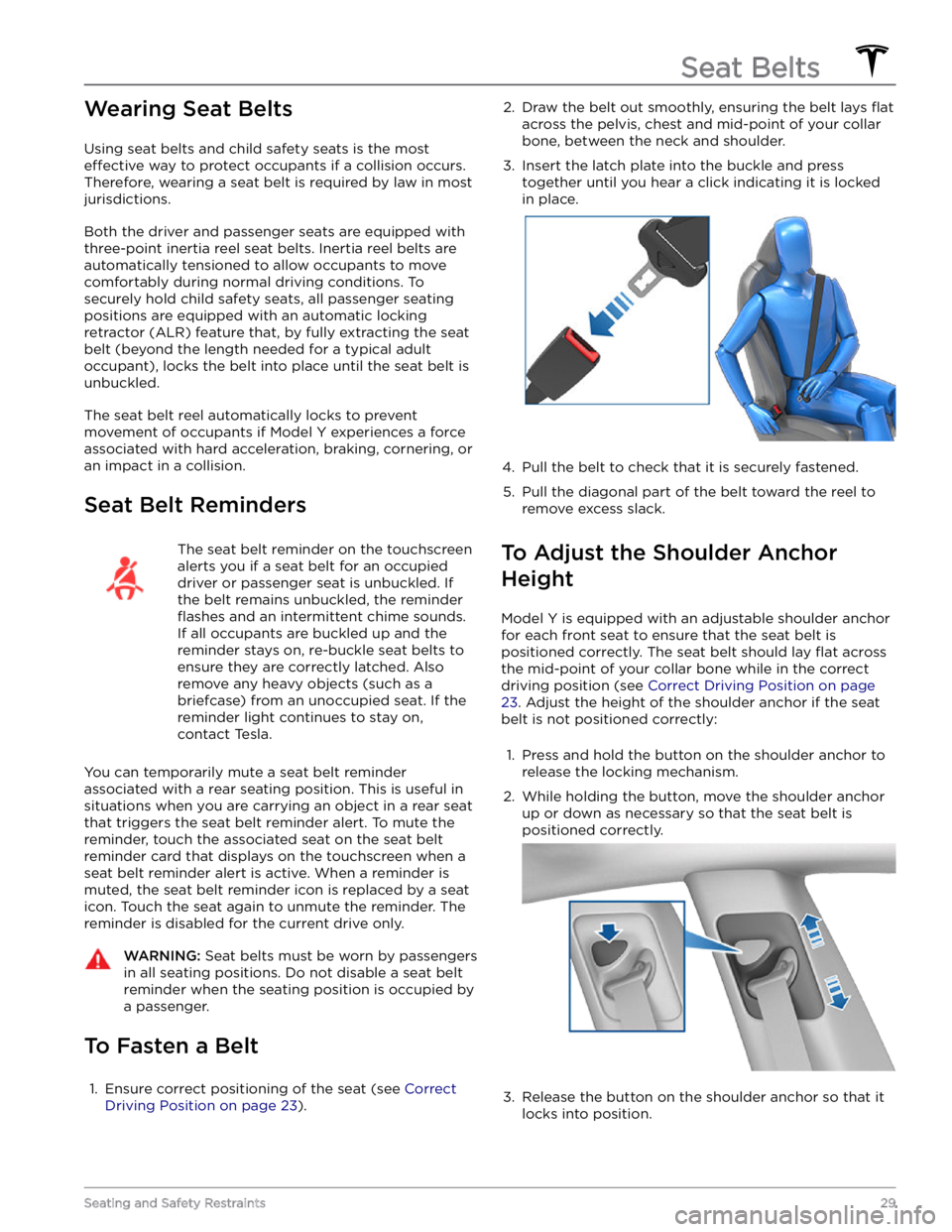
To Fasten a Belt
1.
Ensure correct positioning of the seat (see Correct
Driving Position on page 23).
2. Draw the belt out smoothly, ensuring the belt lays flat
across the pelvis, chest and mid-point of your collar
bone, between the neck and shoulder.
3.
Insert the latch plate into the buckle and press together until you hear a click indicating it is locked
in place.
4.
Pull the belt to check that it is securely fastened.
5.
Pull the diagonal part of the belt toward the reel to
remove excess slack.
To Adjust the Shoulder Anchor
Height
Model Y is equipped with an adjustable shoulder anchor
for each front seat to ensure that the seat belt is positioned correctly. The seat belt should lay
flat across
the mid-point of your collar bone while in the correct driving position
(see Correct Driving Position on page
23. Adjust the height of the shoulder anchor if the seat
belt is not positioned correctly:
1.
Press and hold the button on the shoulder anchor to release the locking mechanism.
2.
While holding the button, move the shoulder anchor up or down as necessary so that the seat belt is
positioned correctly.
3.
Release the button on the shoulder anchor so that it
locks into position.
Seat Belts
29Seating and Safety Restraints
Page 33 of 250
2. With the belt unfastened, unreel the webbing to its limit. Check that unreeling is free from snags, and
visually check the webbing for wear. Allow the webbing to retract, checking that retraction is
smooth and complete.3.
With the webbing half unreeled, hold the tongue plate and pull forward quickly. The mechanism should lock automatically and prevent further unreeling.
If a seat belt fails any of these tests, contact Tesla immediately.
For information about cleaning seat belts, see Seat Belts
on page 173.
Seat Belt Warnings
WARNING: Seat belts should be worn by all
occupants at all times, even if driving for a very
short distance. Failure to do so increases the risk
of injury or death if a collision occurs.
WARNING: Secure small children in a suitable child
safety seat as described in the Child Safety Seat
topic. Always follow the child safety seat
manufacturer
Page 34 of 250
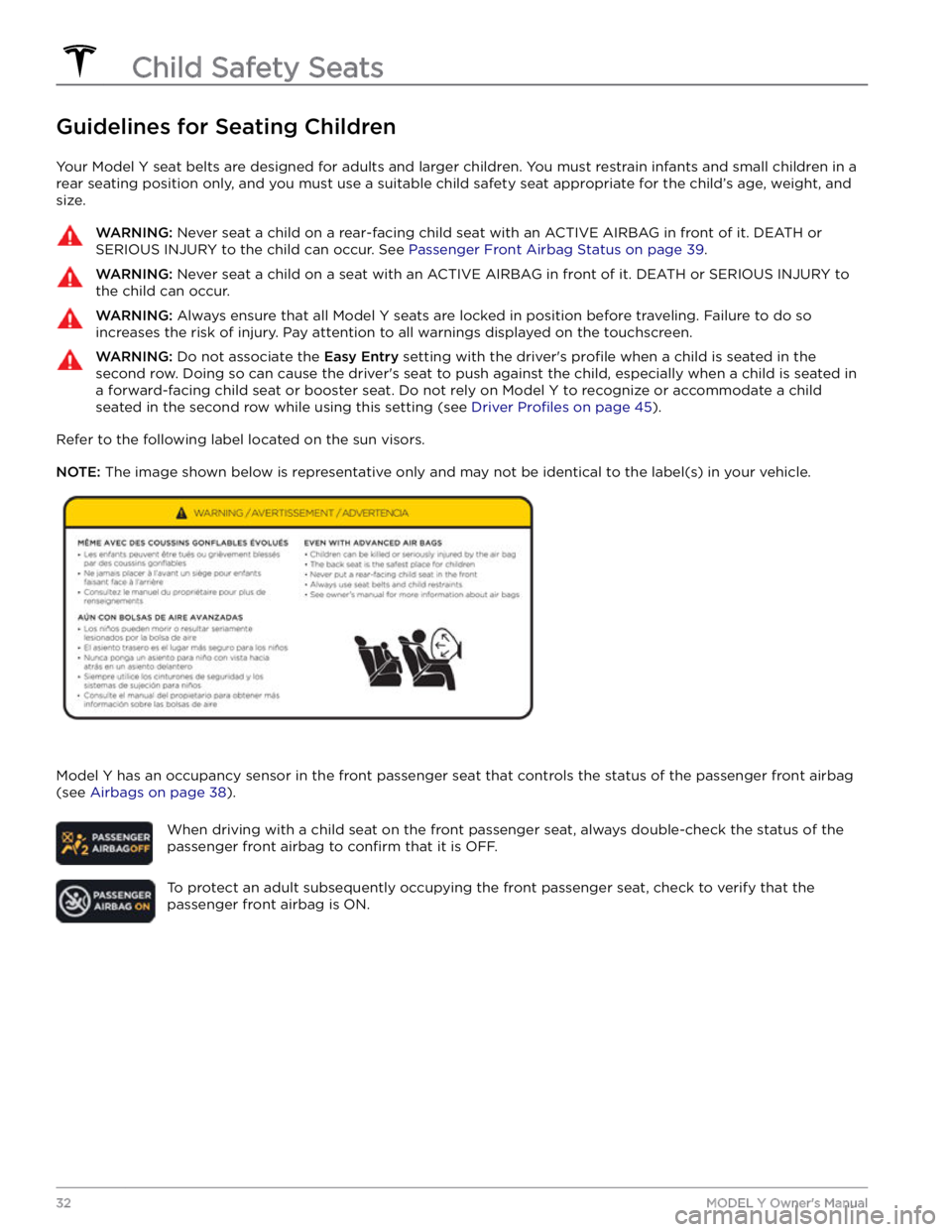
Guidelines for Seating Children
Your Model Y seat belts are designed for adults and larger children. You must restrain infants and small children in a
rear seating position only, and you must use a suitable child safety seat appropriate for the child
Page 35 of 250
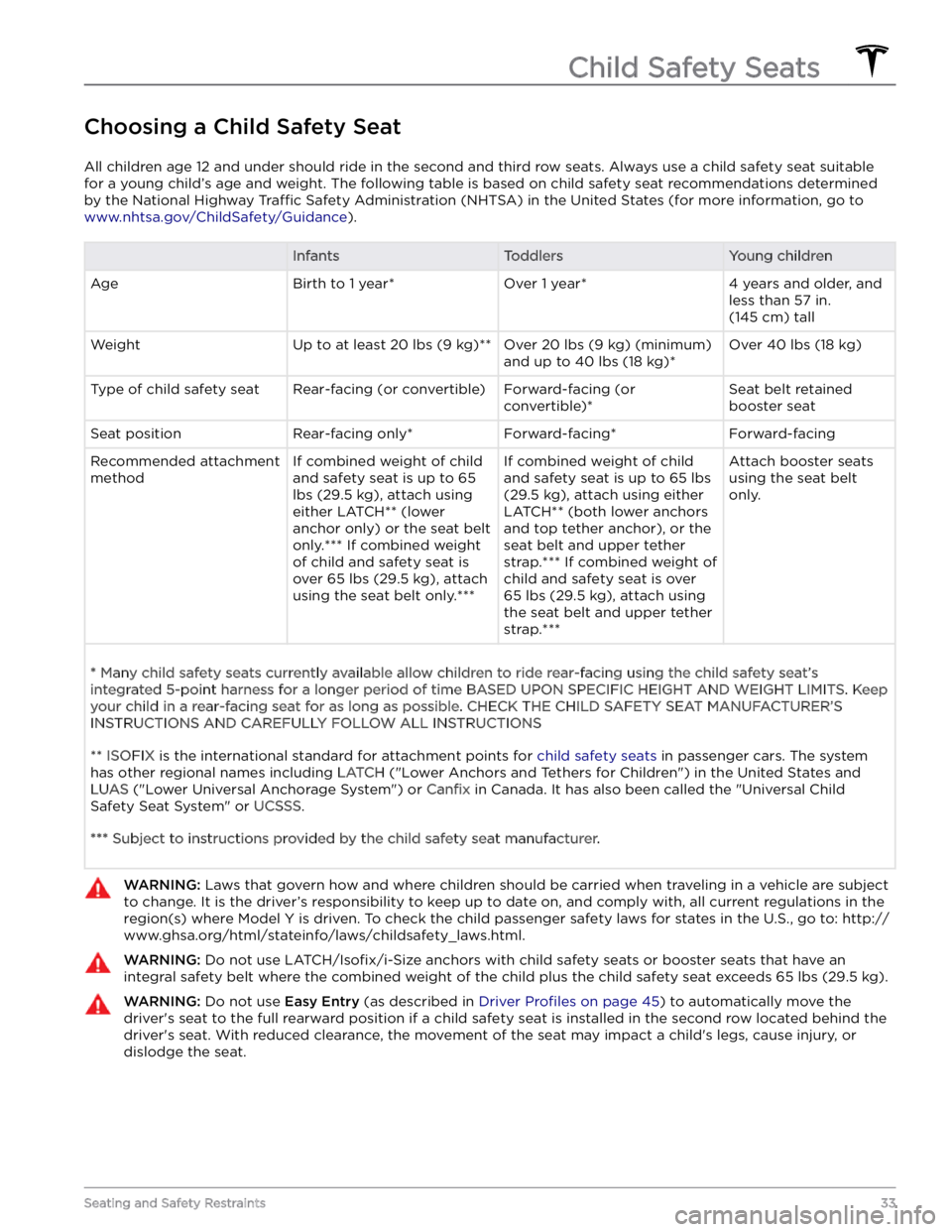
Choosing a Child Safety Seat
All children age 12 and under should ride in the second and third row seats. Always use a child safety seat suitable
for a young child
Page 36 of 250
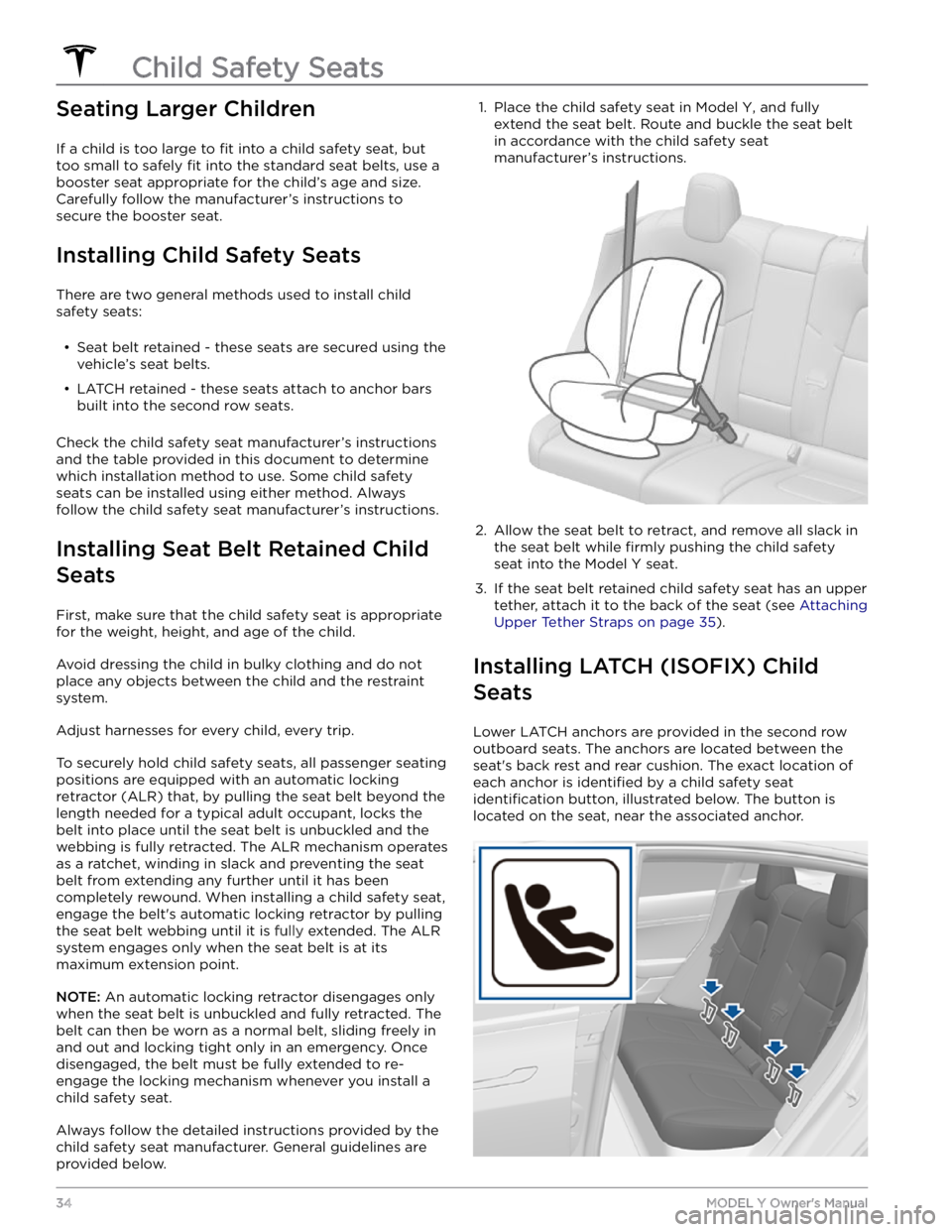
Seating Larger Children
If a child is too large to fit into a child safety seat, but
too small to safely
fit into the standard seat belts, use a
booster seat appropriate for the child
Page 37 of 250
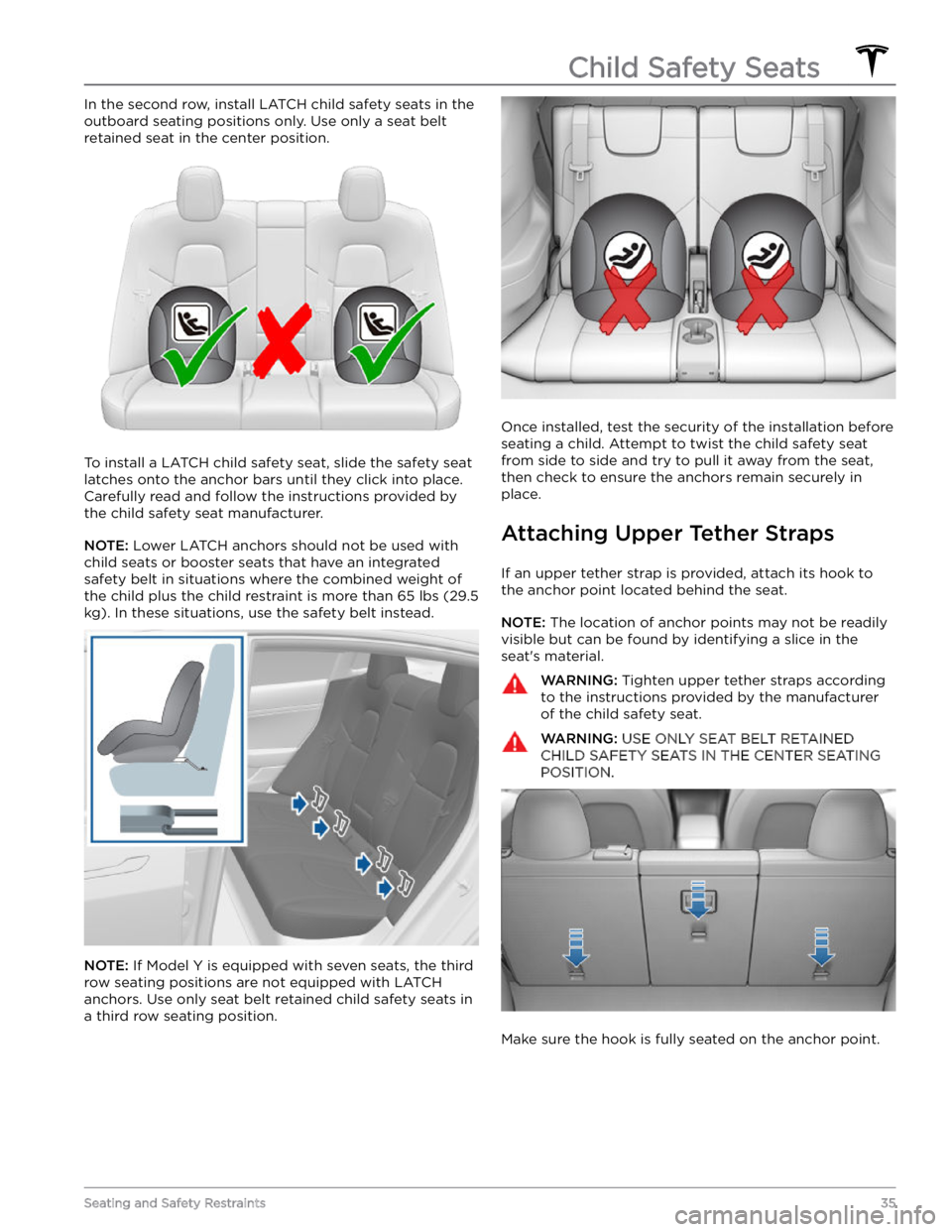
In the second row, install LATCH child safety seats in the
outboard seating positions only. Use only a seat belt
retained seat in the center position.
To install a LATCH child safety seat, slide the safety seat
latches onto the anchor bars until they click into place. Carefully read and follow the instructions provided by
the child safety seat manufacturer.
NOTE: Lower LATCH anchors should not be used with
child seats or booster seats that have an integrated safety belt in situations where the combined weight of
the child plus the child restraint is more than
65 lbs (29.5
kg). In these situations, use the safety belt instead.
NOTE: If Model Y is equipped with seven seats, the third
row seating positions are not equipped with
LATCH
anchors. Use only seat belt retained child safety seats in a third row seating position.
Once installed, test the security of the installation before
seating a child. Attempt to twist the child safety seat from side to side and try to pull it away from the seat, then check to ensure the anchors remain securely in place.
Attaching Upper Tether Straps
If an upper tether strap is provided, attach its hook to the anchor point located behind the seat.
NOTE: The location of anchor points may not be readily
visible but can be found by identifying a slice in the seat
Page 38 of 250
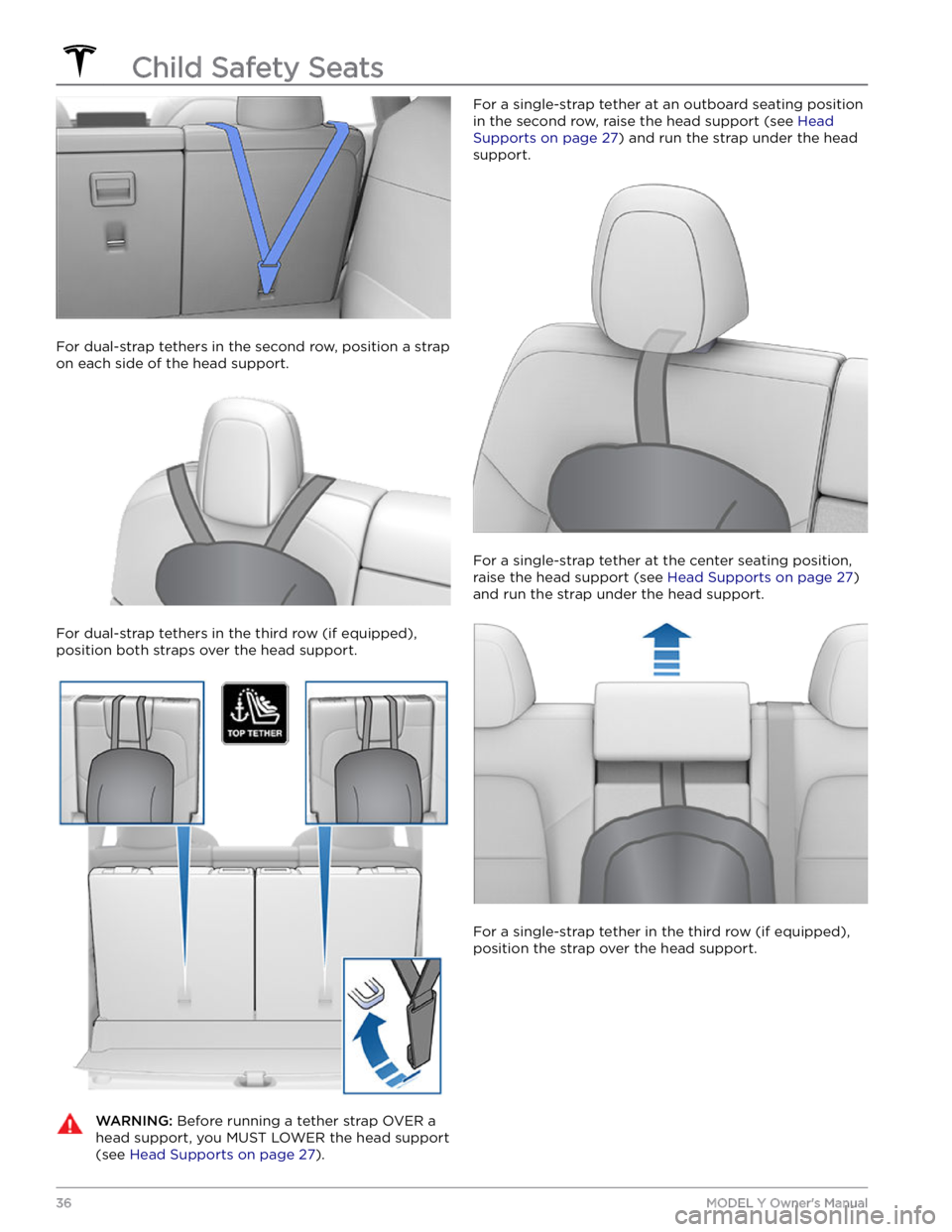
For dual-strap tethers in the second row, position a strap
on each side of the head support.
For dual-strap tethers in the third row (if equipped), position both straps over the head support.
WARNING: Before running a tether strap OVER a
head support, you MUST LOWER the head support
(see Head Supports on page 27).
For a single-strap tether at an outboard seating position
in the second row, raise the head support
(see Head
Supports on page 27) and run the strap under the head
support.
For a single-strap tether at the center seating position, raise the head support
(see Head Supports on page 27)
and run the strap under the head support.
For a single-strap tether in the third row (if equipped),
position the strap over the head support.
Child Safety Seats
36MODEL Y Owner