driver TESLA MODEL Y 2022 Owner´s Manual
[x] Cancel search | Manufacturer: TESLA, Model Year: 2022, Model line: MODEL Y, Model: TESLA MODEL Y 2022Pages: 250, PDF Size: 8.4 MB
Page 3 of 250

Overview................................................................2
Exterior Overview............................................................................2
Interior Overview.............................................................................3
Touchscreen Overview..................................................................4
Opening and Closing.........................................6
Keys.......................................................................................................6
Doors....................................................................................................11
Windows............................................................................................13
Rear Trunk.........................................................................................14
Front Trunk.......................................................................................16
Interior Storage and Electronics..............................................19
Seating and Safety Restraints.....................23
Front and Rear Seats...................................................................23
Seat Belts.........................................................................................29
Child Safety Seats.........................................................................32
Airbags..............................................................................................38
Driving..................................................................45
Driver Profiles.................................................................................45
Steering Wheel..............................................................................47
Mirrors...............................................................................................49
Starting and Powering Off........................................................50
Gears..................................................................................................52
Lights.................................................................................................53
Car Status.........................................................................................56
Wipers and Washers....................................................................59
Braking and Stopping.................................................................60
Traction Control.............................................................................63
Park Assist.......................................................................................64
Vehicle Hold....................................................................................66
Getting Maximum Range...........................................................67
Rear View Camera........................................................................69
Dashcam...........................................................................................70
Pedestrian Warning System......................................................73
Towing and Accessories.............................................................74
Cold Weather Best Practices...................................................80
Autopilot..............................................................83
About Autopilot.............................................................................83
Traffic-Aware Cruise Control....................................................86
Autosteer...........................................................................................91
Navigate on Autopilot.................................................................96
Traffic Light and Stop Sign Control.......................................99
Autopark.........................................................................................106
Summon..........................................................................................108
Smart Summon...............................................................................111
Lane Assist......................................................................................114
Collision Avoidance Assist.........................................................117
Speed Assist..................................................................................120
Using the Touchscreen..................................122
Controls...........................................................................................122
Climate Controls...........................................................................128
Maps and Navigation..................................................................133
Media and Audio..........................................................................138
Phone................................................................................................141
Calendar..........................................................................................143
Using Voice Commands............................................................144
Security Settings.........................................................................145
HomeLink Universal Transceiver............................................149
Connecting to Wi-Fi...................................................................152
Software Updates........................................................................153
Mobile App.....................................................................................154
Charging.............................................................156
Electric Vehicle Components..................................................156
Battery Information....................................................................158
Charging Instructions.................................................................159
Maintenance.....................................................164
Maintenance Schedule..............................................................164
Tire Care and Maintenance......................................................166
Cleaning...........................................................................................172
Wiper Blades and Washer Jets..............................................175
Fluid Reservoirs............................................................................176
Jacking and Lifting......................................................................178
Parts and Accessories................................................................179
Specifications....................................................181
Identification Labels....................................................................181
Vehicle Loading............................................................................182
Dimensions and Weights..........................................................184
Subsystems....................................................................................187
Wheels and Tires.........................................................................189
Roadside Assistance......................................196
Contacting Tesla Roadside Assistance...............................196
Instructions for Transporters...................................................197
Consumer Information..................................201
Entertainment and Toybox......................................................201
About this Owner Information..............................................203
Disclaimers...................................................................................204
Reporting Safety Defects........................................................206
Declarations of Conformity....................................................207
Troubleshooting Alerts............................................................209
Index....................................................................241
Contents
Page 5 of 250
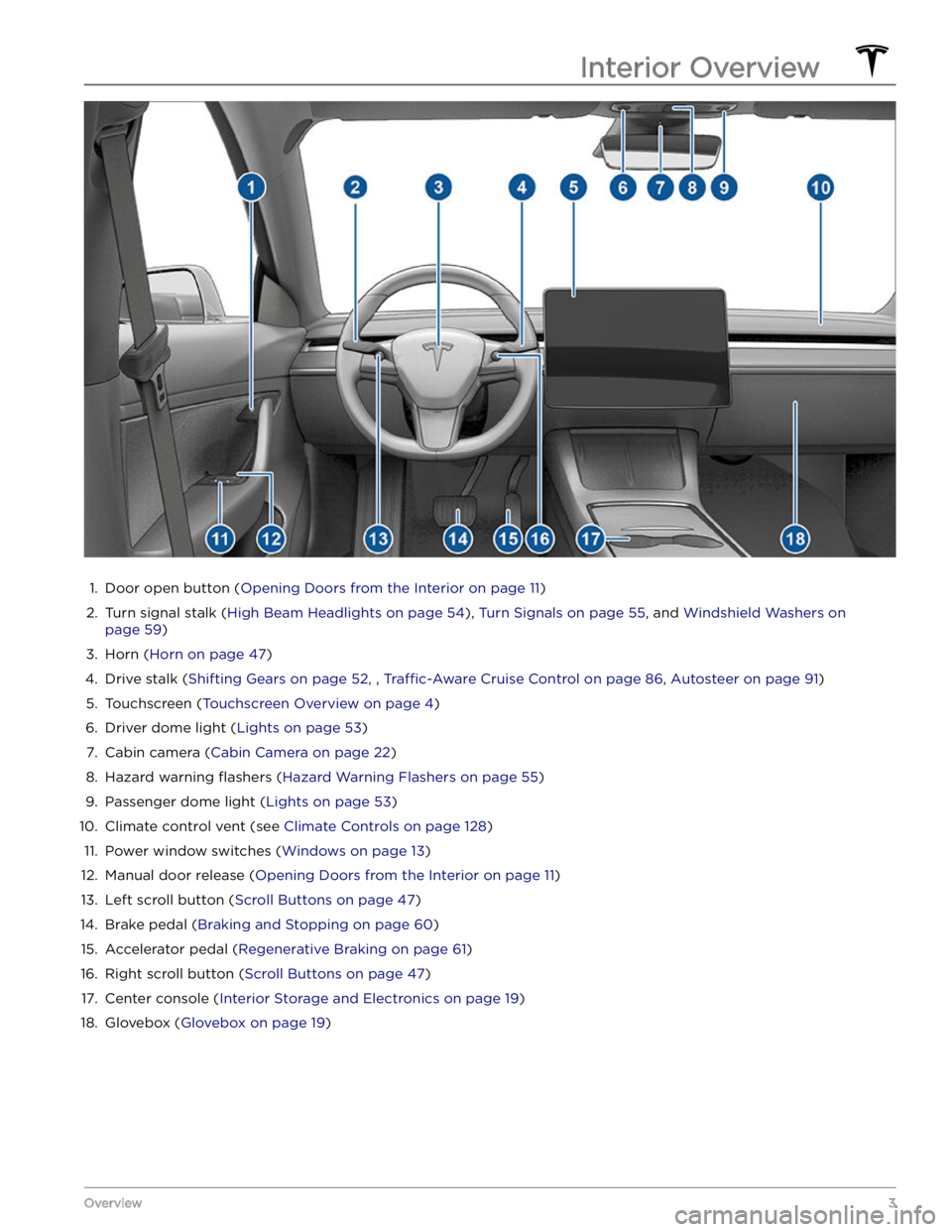
1.
Door open button (Opening Doors from the Interior on page 11)
2.
Turn signal stalk (High Beam Headlights on page 54), Turn Signals on page 55, and Windshield Washers on
page 59)
3.
Horn (Horn on page 47)
4.
Drive stalk (Shifting Gears on page 52, , Traffic-Aware Cruise Control on page 86, Autosteer on page 91)
5.
Touchscreen (Touchscreen Overview on page 4)
6.
Driver dome light (Lights on page 53)
7.
Cabin camera (Cabin Camera on page 22)
8.
Hazard warning flashers (Hazard Warning Flashers on page 55)
9.
Passenger dome light (Lights on page 53)
10.
Climate control vent (see Climate Controls on page 128)
11.
Power window switches (Windows on page 13)
12.
Manual door release (Opening Doors from the Interior on page 11)
13.
Left scroll button (Scroll Buttons on page 47)
14.
Brake pedal (Braking and Stopping on page 60)
15.
Accelerator pedal (Regenerative Braking on page 61)
16.
Right scroll button (Scroll Buttons on page 47)
17.
Center console (Interior Storage and Electronics on page 19)
18.
Glovebox (Glovebox on page 19)
Interior Overview
3Overview
Page 6 of 250
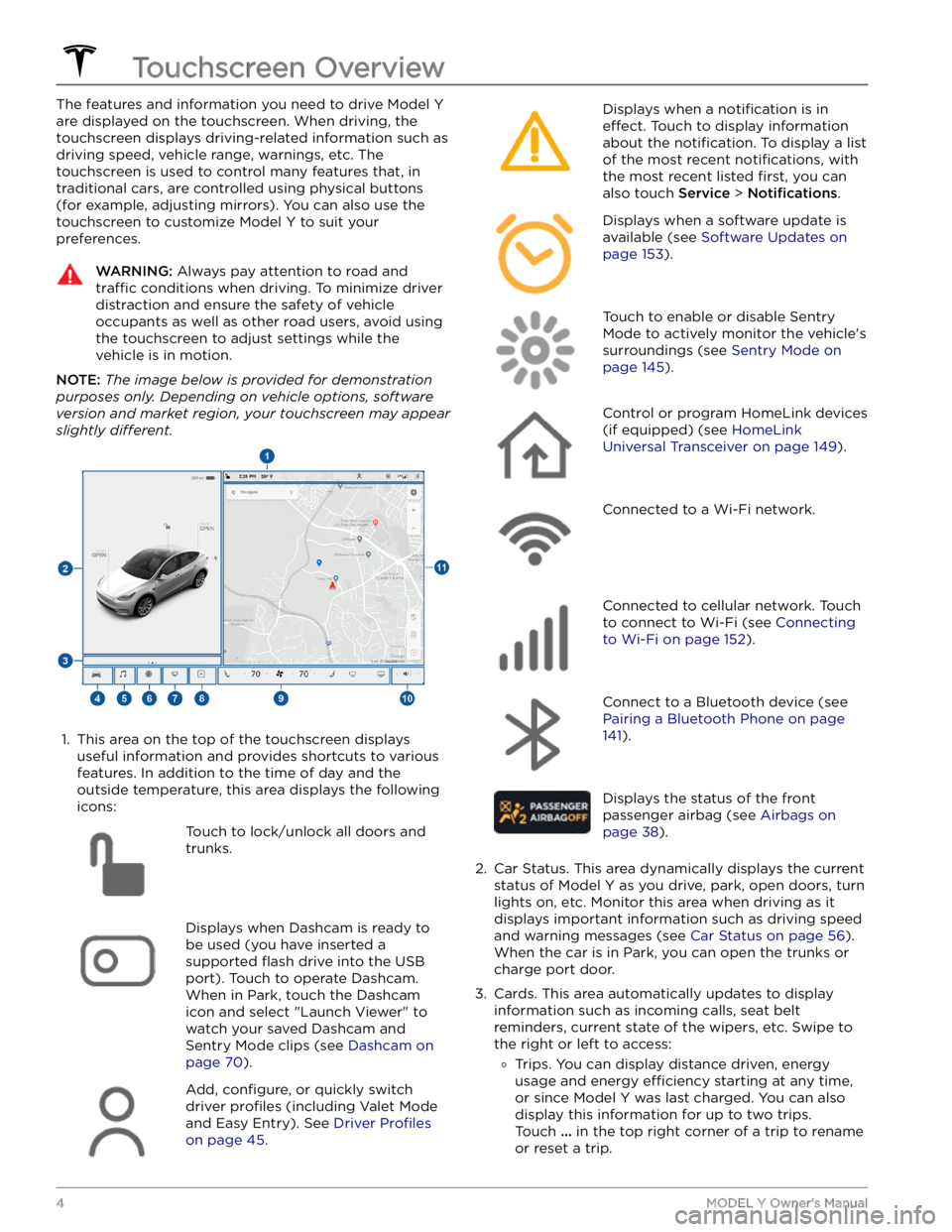
The features and information you need to drive Model Y
are displayed on the touchscreen. When driving, the
touchscreen displays driving-related information such as driving speed, vehicle range, warnings, etc. The touchscreen is used to control many features that, in traditional cars, are controlled using physical buttons (for example, adjusting mirrors). You can also use the touchscreen to customize
Model Y to suit your
preferences.
WARNING: Always pay attention to road and
traffic conditions when driving. To minimize driver
distraction and ensure the safety of vehicle
occupants as well as other road users, avoid using
the touchscreen to adjust settings while the
vehicle is in motion.
NOTE: The image below is provided for demonstration
purposes only. Depending on vehicle options, software
version and market region, your touchscreen may appear
slightly different.
1.
This area on the top of the touchscreen displays useful information and provides shortcuts to various
features. In addition to the time of day
and the
outside temperature, this area displays the following
icons:
Touch to lock/unlock all doors and
trunks.Displays when Dashcam is ready to be used (you have inserted a supported
flash drive into the USB
port). Touch to operate Dashcam
.
When in Park, touch the Dashcam
icon and select "Launch Viewer" to
watch your saved Dashcam and
Sentry Mode clips (see Dashcam on
page 70).
Add, configure, or quickly switch
driver
profiles (including Valet Mode
and Easy Entry). See
Driver Profiles
on page 45.
Displays when a notification is in
effect. Touch to display information
about the
notification. To display a list
of the most recent
notifications, with
the most recent listed
first, you can
also touch
Service > Notifications.
Displays when a software update is
available (see
Software Updates on
page 153).
Touch to enable or disable Sentry
Mode to actively monitor the vehicle
Page 9 of 250
NOTE: Although Bluetooth typically communicates over
distances of up to approximately
30 feet (9 meters),
performance can vary based on the phone you are
using, environmental interference, etc.
NOTE: If multiple vehicles are linked to your Tesla
account, you must ensure that the vehicle you want the
mobile app to access is currently selected on the mobile app.
Key Card
Tesla provides you with two Model Y key cards, designed
to
fit in your wallet.
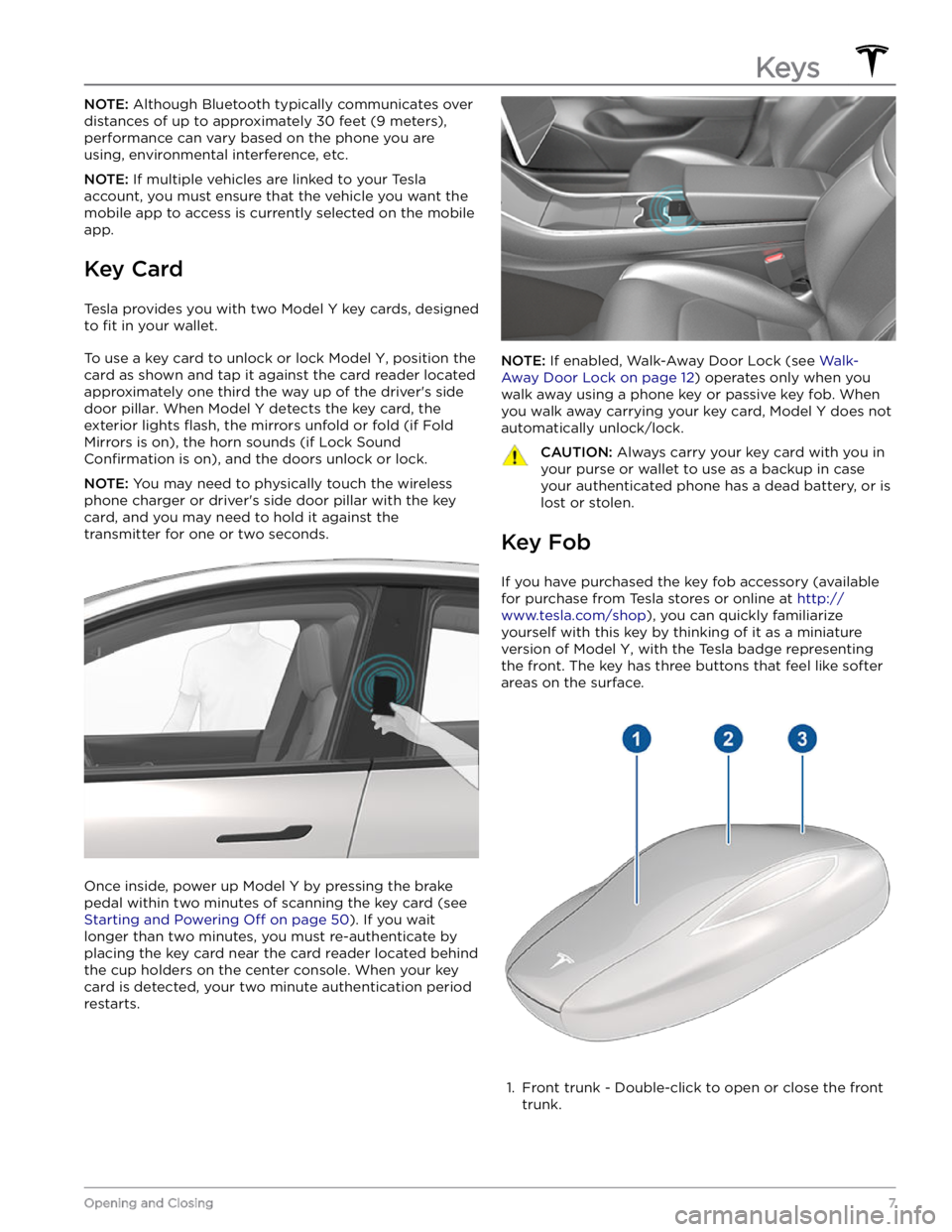
To use a key card to unlock or lock Model Y, position the
card as shown and tap it against the card reader located
approximately one third the way up of the driver
Page 10 of 250
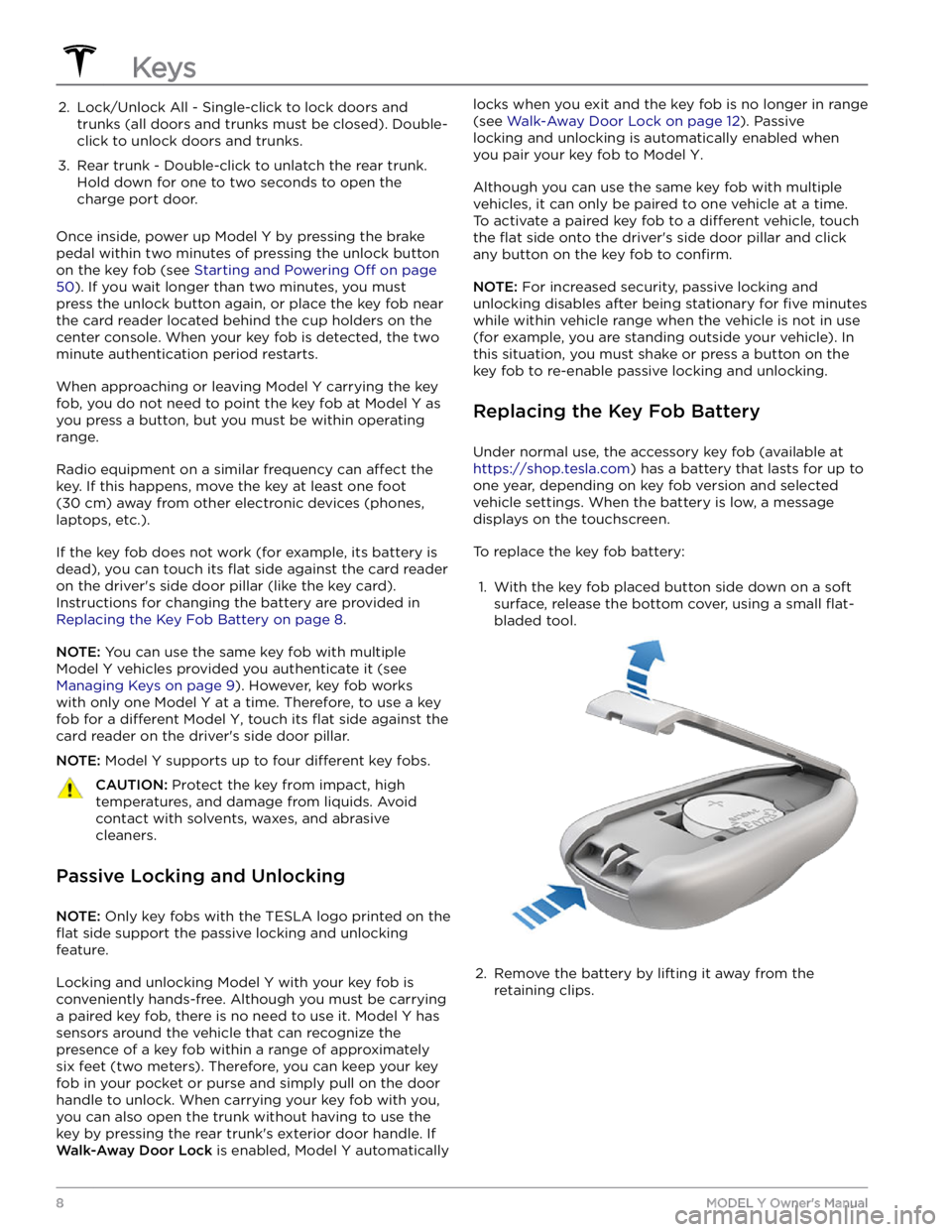
2. Lock/Unlock All - Single-click to lock doors and trunks (all doors and trunks must be closed). Double-
click to unlock doors and trunks.3.
Rear trunk - Double-click to unlatch the rear trunk. Hold down for one to two seconds to open the
charge port door.
Once inside, power up Model Y by pressing the brake
pedal within two minutes of pressing the unlock button
on the key fob (see
Starting and Powering Off on page
50). If you wait longer than two minutes, you must
press the unlock button again, or place the key fob near
the card reader located
behind the cup holders on the
center console. When your key fob is detected, the two
minute authentication period restarts.
When approaching or leaving Model Y carrying the key
fob, you do not need to point the key fob at
Model Y as
you press a button, but you must be within operating range.
Radio equipment on a similar frequency can affect the
key. If this happens, move the key at least
one foot
(30 cm) away from other electronic devices (phones,
laptops, etc.).
If the key fob does not work (for example, its battery is dead), you can touch its
flat side against the card reader
on the driver
Page 31 of 250
Wearing Seat Belts
Using seat belts and child safety seats is the most
effective way to protect occupants if a collision occurs.
Therefore, wearing a seat belt is required by law in most jurisdictions.
Both the driver and passenger seats are equipped with three-point inertia reel seat belts. Inertia reel belts are automatically tensioned to allow occupants to move
comfortably during normal driving conditions.
To
securely hold child safety seats, all passenger seating
positions are equipped with an automatic locking
retractor (ALR) feature that, by fully extracting the seat
belt (beyond the length needed for a typical adult
occupant), locks the belt into place until the seat belt is
unbuckled.
The seat belt reel automatically locks to prevent
movement of occupants if
Model Y experiences a force
associated with hard acceleration, braking, cornering, or
an impact in a collision.
Seat Belt Reminders
The seat belt reminder on the touchscreen
alerts you if a seat belt for an occupied driver or passenger seat is unbuckled. If
the belt remains unbuckled, the reminder
flashes and an intermittent chime sounds.
If all occupants are buckled up and the
reminder stays on, re-buckle seat belts to
ensure they are correctly latched. Also
remove any heavy objects (such as a
briefcase) from an unoccupied seat. If the
reminder light continues to stay on,
contact Tesla.
You can temporarily mute a seat belt reminder
associated with a rear seating position. This is useful in situations when you are carrying an object in a rear seat
that triggers the seat belt reminder alert. To mute the reminder, touch the associated seat on the seat belt reminder card that displays on the touchscreen when a seat belt reminder alert is active. When a reminder is muted, the seat belt reminder icon is replaced by a seat icon. Touch the seat again to unmute the reminder. The reminder is disabled for the current drive only.
WARNING: Seat belts must be worn by passengers
in all seating positions. Do not disable a seat belt
reminder when the seating position is occupied by
a passenger.
To Fasten a Belt
1.
Ensure correct positioning of the seat (see Correct
Driving Position on page 23).
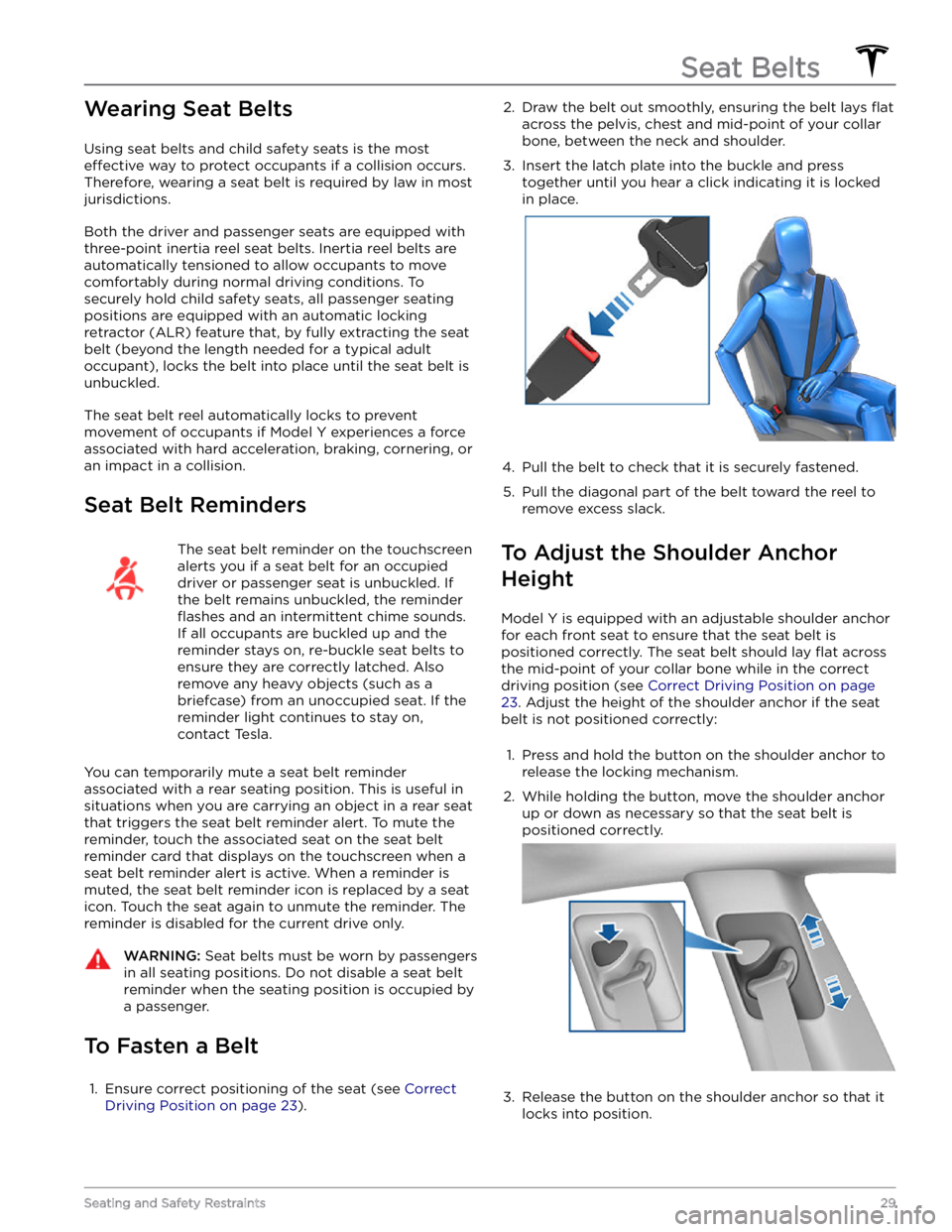
2. Draw the belt out smoothly, ensuring the belt lays flat
across the pelvis, chest and mid-point of your collar
bone, between the neck and shoulder.
3.
Insert the latch plate into the buckle and press together until you hear a click indicating it is locked
in place.
4.
Pull the belt to check that it is securely fastened.
5.
Pull the diagonal part of the belt toward the reel to
remove excess slack.
To Adjust the Shoulder Anchor
Height
Model Y is equipped with an adjustable shoulder anchor
for each front seat to ensure that the seat belt is positioned correctly. The seat belt should lay
flat across
the mid-point of your collar bone while in the correct driving position
(see Correct Driving Position on page
23. Adjust the height of the shoulder anchor if the seat
belt is not positioned correctly:
1.
Press and hold the button on the shoulder anchor to release the locking mechanism.
2.
While holding the button, move the shoulder anchor up or down as necessary so that the seat belt is
positioned correctly.
3.
Release the button on the shoulder anchor so that it
locks into position.
Seat Belts
29Seating and Safety Restraints
Page 40 of 250
Location of Airbags
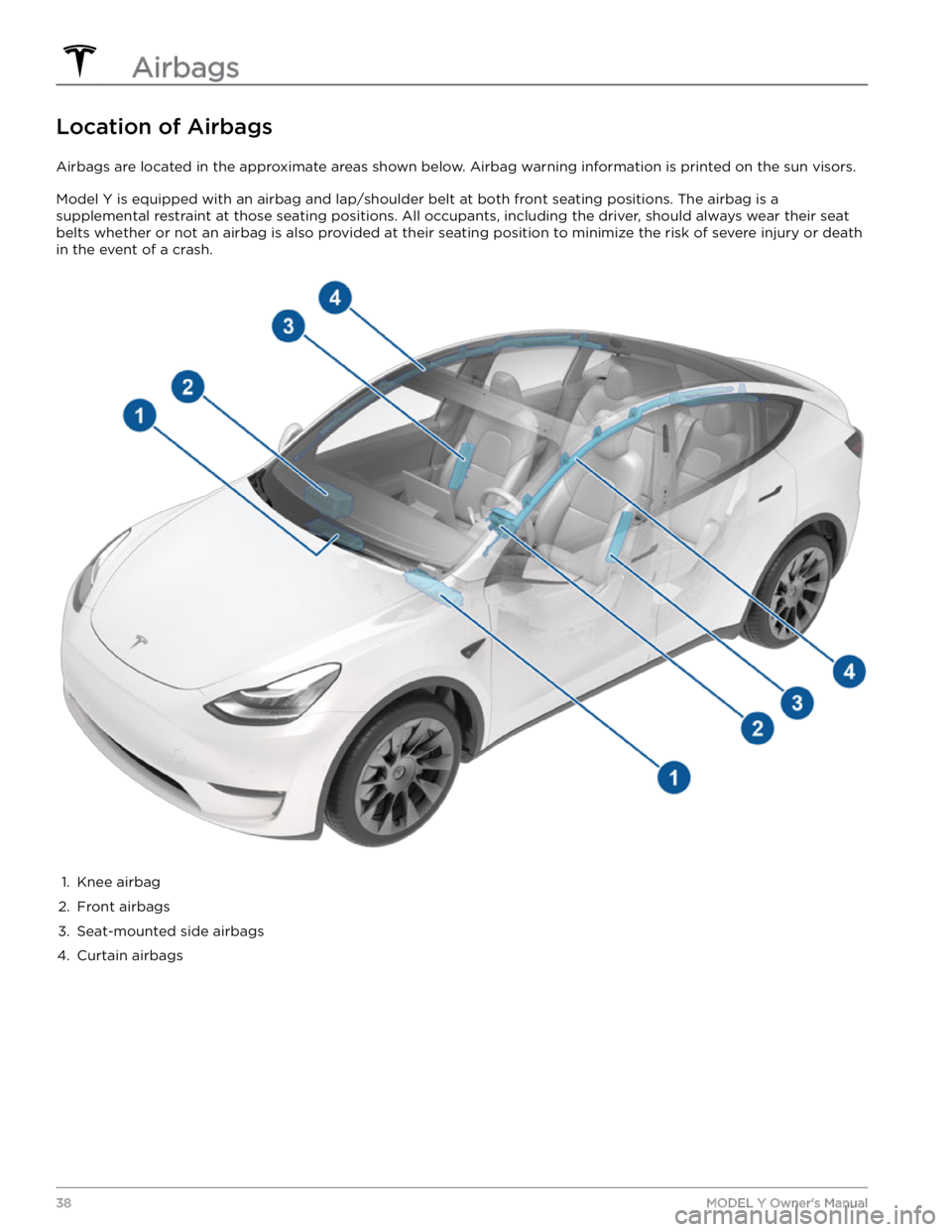
Airbags are located in the approximate areas shown below. Airbag warning information is printed on the sun visors.
Model Y is equipped with an airbag and lap/shoulder belt at both front seating positions. The airbag is a
supplemental restraint at those seating positions. All occupants, including the driver, should always wear their seat belts whether or not an airbag is also provided at their seating position to minimize the risk of severe injury or death
in the event of a crash.
1.
Knee airbag
2.
Front airbags
3.
Seat-mounted side airbags
4.
Curtain airbags
Airbags
38MODEL Y Owner
Page 43 of 250

WARNING: If seating a child in the front passenger seat is legally permissible in your market region, it is the
driver
Page 46 of 250
Inflation EffectsWARNING: When airbags inflate, a fine powder is
released. This powder can irritate the skin and
should be thoroughly flushed from the eyes and
from any cuts or abrasions.
After inflation, the airbags deflate to provide a gradual
cushioning
effect for the occupants and to ensure the
driver
Page 47 of 250
Creating a Driver Profile
When you first adjust the driver