battery TESLA MODEL Y 2023 User Guide
[x] Cancel search | Manufacturer: TESLA, Model Year: 2023, Model line: MODEL Y, Model: TESLA MODEL Y 2023Pages: 298, PDF Size: 10.28 MB
Page 132 of 298
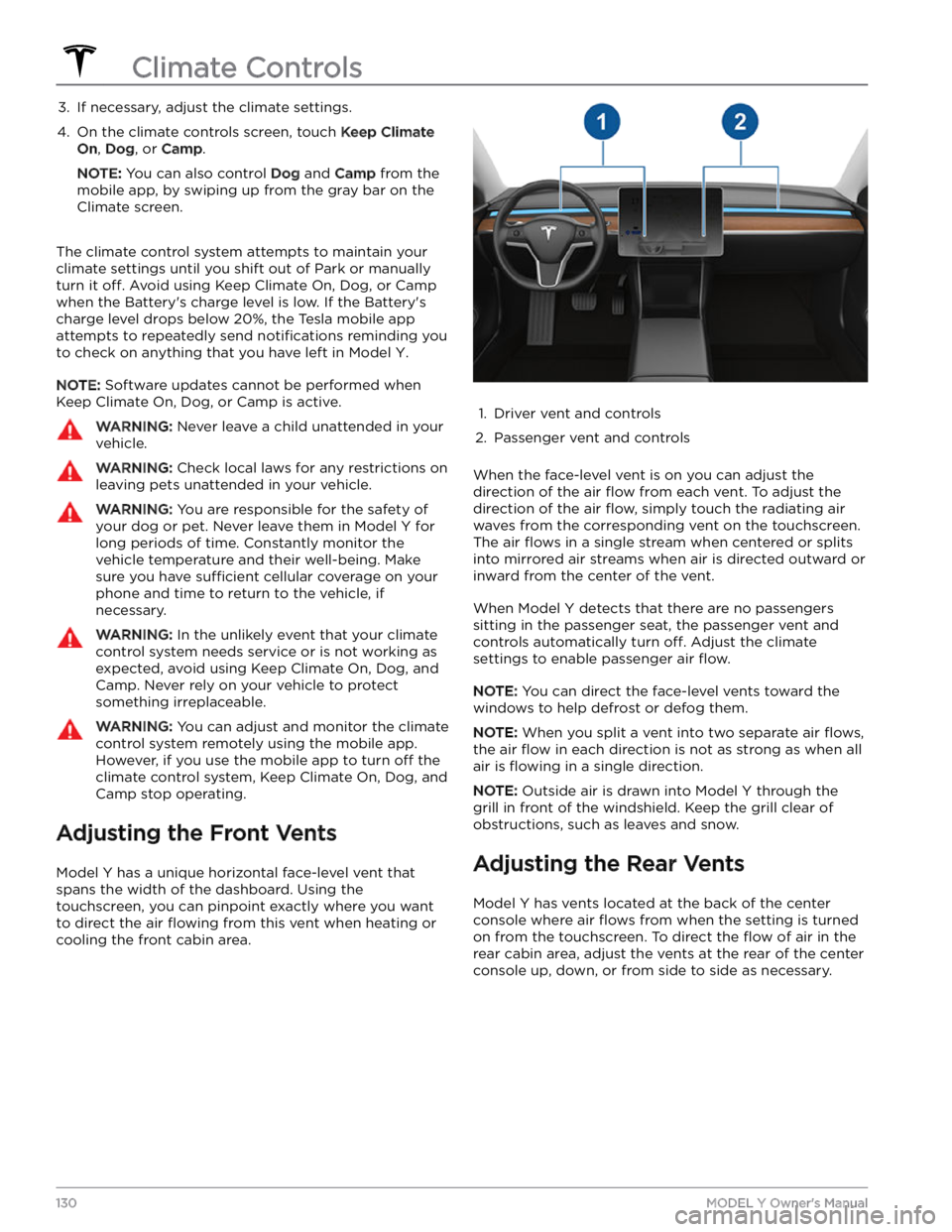
3. If necessary, adjust the climate settings.4.
On the climate controls screen, touch Keep Climate
On, Dog, or Camp.
NOTE: You can also control Dog and Camp from the
mobile app, by swiping up from the gray bar on the
Climate screen.
The climate control system attempts to maintain your climate settings until you shift out of Park or manually
turn it
off. Avoid using Keep Climate On, Dog, or Camp
when the Battery
Page 167 of 298

High Voltage Components
1.
High Voltage Cabling
2.
Heat Pump Assembly
3.
Front Motor (Dual Motor vehicles only)
4.
High Voltage Battery
5.
High Voltage Cabling
6.
Service Access Panel for High Voltage Components (Penthouse)
7.
Rear Motor
8.
High Voltage Busbars
9.
Charge Port
WARNING: The high voltage system has no user serviceable parts. Do not disassemble, remove or replace high
voltage components, cables or connectors. High voltage cables are typically colored orange for easy
identification.
WARNING: Read and follow all instructions provided on the labels that are attached to Model Y. These labels
are there for your safety.
WARNING: In the unlikely event that a fire occurs, immediately contact your local fire emergency responders.Charging Equipment
Charging equipment designed specifically to charge
your
Model Y is available from Tesla.
For information on the charging equipment available for
your region, go to http://shop.tesla.com.
Page 169 of 298

About the High Voltage Battery
Model Y has one of the most sophisticated battery
systems in the world. The most important way to preserve the high voltage Battery is to
LEAVE YOUR
VEHICLE PLUGGED IN when you are not using it. This is
particularly important if you are not planning to drive
Model Y for several weeks.
NOTE: When left idle and unplugged, your vehicle
periodically uses energy from the Battery for system
tests and recharging the
low voltage battery when
necessary.
There is no advantage to waiting until the Battery
Page 170 of 298

NOTE: Although Tesla recommends charging to 100% at
least once per week, remember that regenerative
braking is reduced while driving with a fully charged
battery. See
Regenerative Braking on page 66.
Submerged Vehicle
As with any electric vehicle, if your Tesla has been
exposed to
flooding, extreme weather events or has
otherwise been submerged in water (especially in salt water), treat it as if it
Page 173 of 298
NOTE: To prevent unauthorized unplugging of the
charge cable, the charge cable latch remains locked and
Model Y must be unlocked or able to recognize your
authenticated phone before you can disconnect the
charge cable.
To disconnect the charge cable:
1.
Press and hold the button on the connector handle to release the latch.
NOTE: You can also release the latch using the
lightning icon on the car status overview on the
touchscreen or mobile app, or by pressing and holding the rear trunk button on the key fob.
2.
Pull the connector from the charge port. The charge
port door automatically closes.
To disconnect the charge cable when using an adapter at a public charge station:
1.
Unlock Model Y.
2.
While holding the public charging handle in one hand and the adapter in the other hand, press and hold the button on the public charging handle and pull both
outwards, removing the handle and adapter at the same time.
NOTE: If the charging station handle separates from
the adapter, leaving the adapter in
Model Y, use the
touchscreen to unlock the charge port.
3.
Press and hold the button on the charging handle
again to release the adapter from the public charging handle.
NOTE: The charge port door automatically closes within
approximately 10 seconds of removing the connector from the charge port.
CAUTION: Tesla strongly recommends leaving
Model Y plugged in when not in use. This
maintains the Battery at the optimum level of
charge.
CAUTION: Model Y does not shift out of Park if the
charge port is unable to determine whether a
charging cable is plugged in. Ensure the charging
cable is unplugged and follow the instructions on
the touchscreen to proceed (see Park on page 56).
Charge Settings
Access charge settings by touching Controls > Charging
when Model Y is in Park. You can also touch the battery
icon on the touchscreen to access charge settings.
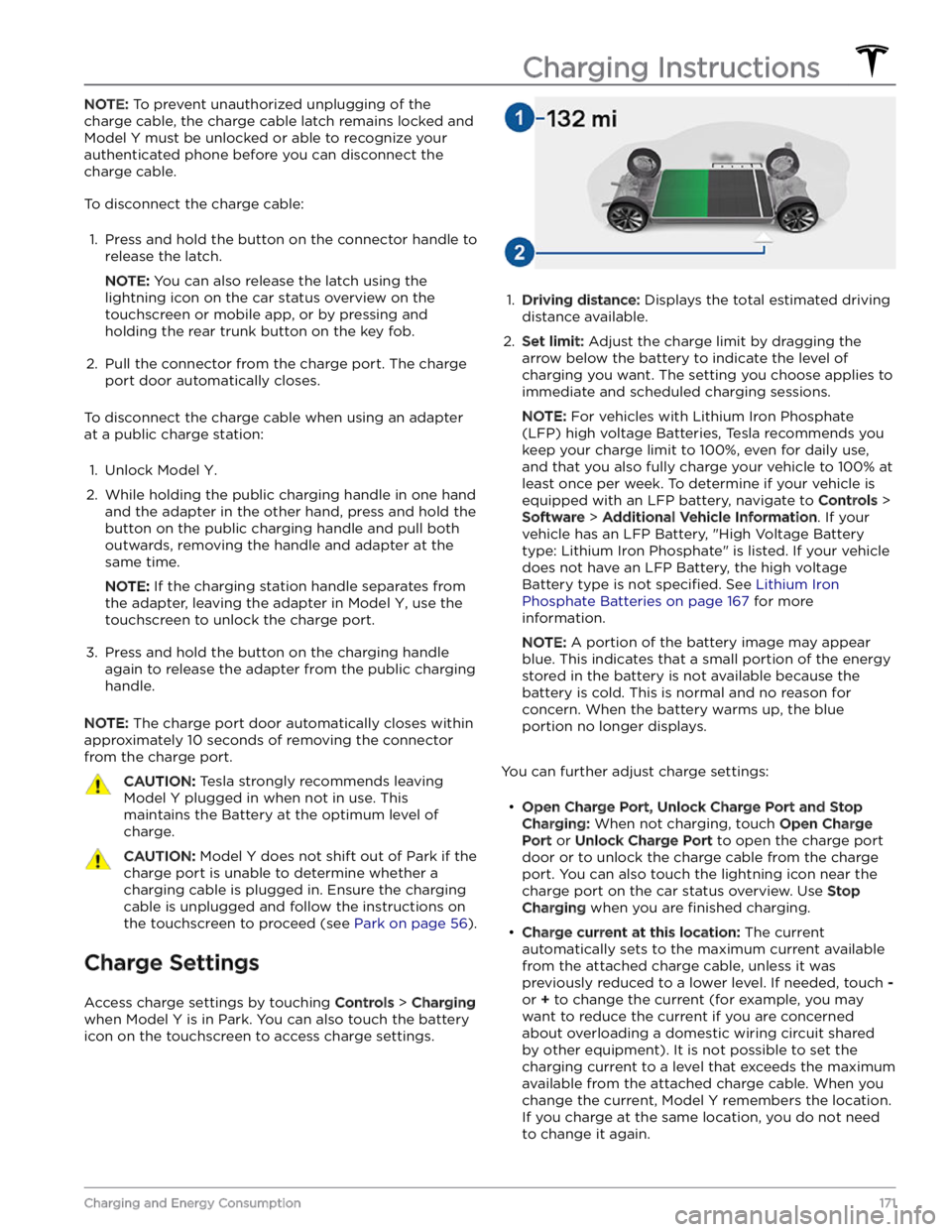
1.
Driving distance: Displays the total estimated driving
distance available.
2.
Set limit: Adjust the charge limit by dragging the
arrow below the battery to indicate the level of charging you want. The setting you choose applies to immediate and scheduled charging sessions.
NOTE: For vehicles with Lithium Iron Phosphate
(LFP) high voltage Batteries, Tesla recommends you keep your charge limit to 100%, even for daily use,
and that you also fully charge your vehicle to 100% at
least once per week. To determine if your vehicle is
equipped with an LFP battery, navigate to
Controls >
Software > Additional Vehicle Information. If your
vehicle has an LFP Battery, "High Voltage Battery type: Lithium Iron Phosphate" is listed. If your vehicle
does not have an LFP Battery, the high voltage Battery type is not
specified. See Lithium Iron
Phosphate Batteries on page 167 for more
information.
NOTE: A portion of the battery image may appear
blue. This indicates that a small portion of the energy
stored in the battery is not available because the battery is cold. This is normal and no reason for concern. When the battery warms up, the blue portion no longer displays.
You can further adjust charge settings:
Page 176 of 298

Toggle between Scheduled Departure and Scheduled Charging by touching
Controls > Charging > Switch to
Scheduled Charging/Scheduled Departure when Model
Y is in Park.
NOTE: Scheduled Charging/Scheduled Departure
settings are also available on the Climate Controls screen and in the Tesla mobile app.
Think of Scheduled Charging as "When do I want
charging to start?" and think of
Scheduled Departure
Off-Peak Charging which is "When do I want charging to
be complete?"
Scheduled Charging can be used together with
Scheduled Departure Preconditioning but not with
Scheduled Departure Off-Peak Charging.
Scheduled Charging/Scheduled Departure settings are
automatically saved for each location.
NOTE: If you plug in Model Y with both Off-Peak
Charging and Scheduled Charging deselected, your
vehicle charges immediately.
Using Scheduled Charging
Use Scheduled Charging to specify a daily time in which
you want
Model Y to start charging.
With Scheduled Charging selected, enable the feature
then set a daily time to start charging.
NOTE: Scheduled Charging starts charging immediately
if
Model Y is plugged in up to six hours after the
scheduled start time. However, if
Model Y is plugged in
after six hours of the scheduled charging time, charging may not start until the scheduled time on the next day.
Using Scheduled Departure
Use Scheduled Departure to set a daily time when you
want
Model Y to be ready to drive. Model Y
automatically calculates when it needs to start preconditioning and/or charging. This ensures that charging is complete and/or the cabin climate and Battery are preconditioned by your departure time.
When Scheduled Departure is displayed, touch
Schedule to set a daily time when you want Model Y to
be ready to drive. Specify a time, then touch
Settings to
enable one or both of the following departure features.
When plugging in with
Off-Peak Charging enabled, the
vehicle
briefly draws power (you may hear clicking) to
calculate the necessary charging start time.
After you
Page 178 of 298

Range Assurance
The driving range displayed in Model Y is an estimate of
the remaining battery energy based on EPA-rated
consumption. It may not account for your personal
driving patterns or external conditions. The displayed range on the
touchscreen may decrease faster than the
actual distance driven.
To view estimated range based
on your recent energy consumption, open the Energy
app to display the graph.
NOTE: Rated driving range is based on EPA-rated
consumption in the United States, which deviates from tests advertised and performed in other jurisdictions.
Model Y helps protect you against running out of energy.
Your vehicle continuously monitors its energy level and proximity to known charging locations.
Touch Chargers in the Navigation search
bar to toggle between types of chargers,
including Superchargers and destination charging sites.
When you are at risk of driving beyond the range of
known charging locations, the touchscreen displays a message giving you the opportunity to display a list of
charging locations that are within range. When you
select a charging location from the list,
Model Y provides
navigation instructions and the turn-by-turn direction list displays the predicted amount of energy that will remain when you arrive at the charging destination.
Trip Planner (if available in your market region) routes
you through Supercharger locations to minimize the amount of time you spend charging and driving. To
enable, touch
Controls > Navigation > Trip Planner (see
Trip Planner on page 157).
Energy App
The Energy app provides a visual representation of your
vehicle
Page 180 of 298
NOTE: In addition to cooling the interior, the air
conditioning compressor also cools the Battery.
Therefore, in hot weather, the air conditioning compressor can turn on even if you turned it
off. This is
normal because the system
Page 182 of 298

4. Power off the vehicle by navigating to Controls >
Safety > Power Off on the touchscreen.
5.
Disconnect the first responder loop by sliding the red
locking tab toward you and pressing the black tab.
6.
With a 10mm socket, loosen the nut that secures the
negative (-) terminal clamp to the negative (-) post on the lead-acid battery. Release the terminal clamp from the negative (-) post.
7.
With a 10mm socket, release the terminal cover and loosen the nut that secures the positive (+) terminal
clamp to the positive (+) post on the lead-acid
battery. Release the terminal clamp from the positive
(+) post and cover the terminal clamp with a dry rag.
CAUTION: Do not allow the positive (+)
terminal clamp to contact nearby components
like the lead-acid battery hold down bracket or
A/C cooling lines.
8.
Unplug the vent tube hose from the negative (-)
terminal side of the lead-acid battery.
9.
Loosen the nut on the battery hold down on the top of the lead-acid battery with a 10mm socket. To
release the battery hold down, unhook and slide the
strap back. If needed, tilt the battery hold down
backward so it does not slip into the vehicle.
10.
Using the battery handle, carefully remove the lead- acid battery, taking care not to touch or damage the surrounding components.
Maintenance Service Intervals
180MODEL Y Owner
Page 183 of 298

WARNING: When lifting out the lead-acid
battery, stand in front of the vehicle and use
proper lifting technique. The lead-acid battery
weighs approximately 25 lb (12 kg). Failure to
do so may cause serious injury.
11.
Inspect the new lead-acid battery to ensure it has a
red plug in the casing on the positive (+) terminal
side. If the new lead-acid battery does not have a red plug, use a small trim tool to transfer the red plug
from the old battery to the new one.
CAUTION: Dispose of the old lead-acid battery
according to local laws, such as dropping it off
at a battery recycling facility. Keep the lead-
acid battery upright and place it on a towel or
piece of cardboard when transporting it.
Installation:
1. Carefully maneuver the new lead-acid battery into
place, taking care not to touch or damage nearby
components.2.
Install the lead-acid battery hold down and use a 10mm socket to tighten the nut that secures it to the 12V battery. Torque the nut to 6 Nm (4.4 ft-lb).
3.
Reconnect the first responder loop.
4.
Remove the protective caps from the positive (+) and negative (-) posts on the new low voltage lead-acid battery.
5.
Connect the positive (+) terminal by positioning the
clamp over the positive (+) post. Using a 10mm socket, torque the nut to 6 Nm (4.4 ft-lb).
Maintenance Service Intervals
181Maintenance