brake TESLA ROADSTER 2008 User Guide
[x] Cancel search | Manufacturer: TESLA, Model Year: 2008, Model line: ROADSTER, Model: TESLA ROADSTER 2008Pages: 115, PDF Size: 46.35 MB
Page 50 of 115
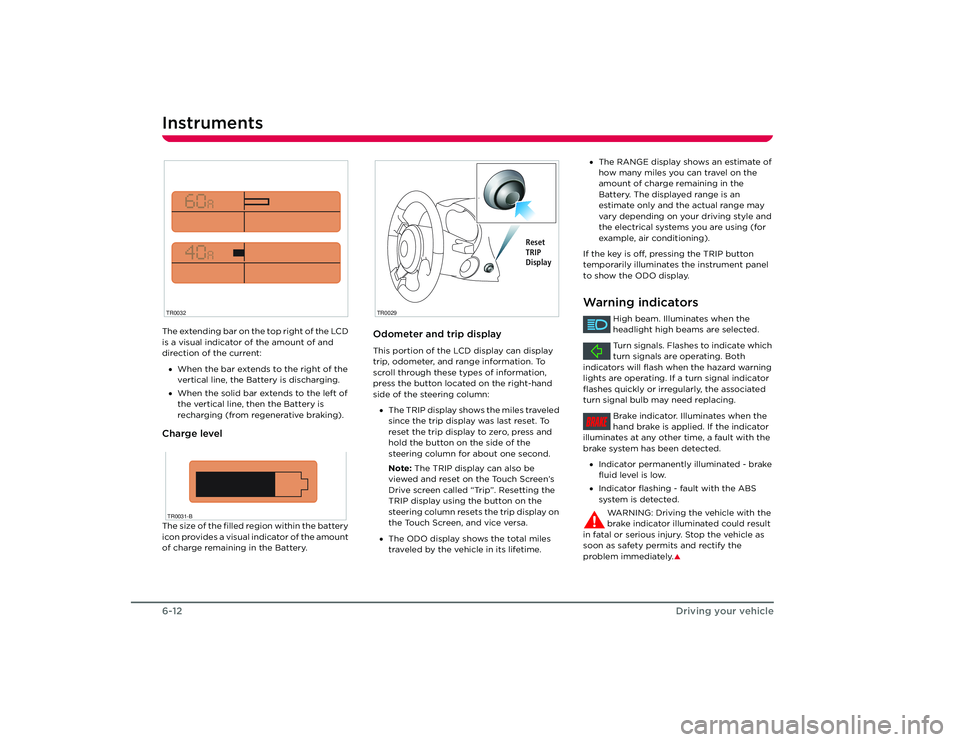
Instruments6-12Driving your vehicleThe extending bar on the top right of the LCD
is a visual indicator of the amount of and
direction of the current:
• When the bar extends to the right of the
vertical line, the Battery is discharging.
• When the solid bar extends to the left of
the vertical line, then the Battery is
recharging (from regenerative braking).Charge levelThe size of the filled region within the battery
icon provides a visual indicator of the amount
of charge remaining in the Battery.
Odometer and trip displayThis portion of the LCD display can display
trip, odometer, and range information. To
scroll through these types of information,
press the button located on the right-hand
side of the steering column:
• The TRIP display shows the miles traveled
since the trip display was last reset. To
reset the trip display to zero, press and
hold the button on the side of the
steering column for about one second.
Note: The TRIP display can also be
viewed and reset on the Touch Screen’s
Drive screen called “Trip”. Resetting the
TRIP display using the button on the
steering column resets the trip display on
the Touch Screen, and vice versa.
• The ODO display shows the total miles
traveled by the vehicle in its lifetime.
TR0032TR0031-B
TR0029
Reset
TRIP
Display
•The RANGE display shows an estimate of
how many miles you can travel on the
amount of charge remaining in the
Battery. The displayed range is an
estimate only and the actual range may
vary depending on your driving style and
the electrical systems you are using (for
example, air conditioning).
If the key is off, pressing the TRIP button
temporarily illuminates the instrument panel
to show the ODO display.Warning indicators
High beam. Illuminates when the
headlight high beams are selected.
Turn signals. Flashes to indicate which
turn signals are operating. Both
indicators will flash when the hazard warning
lights are operating. If a turn signal indicator
flashes quickly or irregularly, the associated
turn signal bulb may need replacing.
Brake indicator. Illuminates when the
hand brake is applied. If the indicator
illuminates at any other time, a fault with the
brake system has been detected.
• Indicator permanently illuminated - brake
fluid level is low.
• Indicator flashing - fault with the ABS
system is detected.
WARNING: Driving the vehicle with the
brake indicator illuminated could result
in fatal or serious injury. Stop the vehicle as
soon as safety permits and rectify the
problem immediately.
S
BRAKE
Roadster OHB.book Page 12 Thursday, October 2, 2008 8:59 AM
Page 69 of 115
9-1
Maintenance and careMaintenanceGeneral information 8-2
Routine maintenance 8-2
Owner maintenance 8-2
Opening and closing the hood 8-3
Fluid reservoirs Fluid reservoir locations 8-4
Brake fluid 8-4
Windshield washer fluid 8-5
Battery coolant 8-5
Windshield wiper and washer Checking the wiper blade 8-6
Replacing the wiper blade 8-6
Windshield washer jets 8-6
Cleaning and vehicle care Environmental precautions 8-7
Cleaning the vehicle exterior 8-7
Polishing the body 8-8
Using a car cover 8-8
Paint damage and rectification 8-8
Cleaning the vehicle interior 8-8
Roadster OHB.book Page 1 Th ursday, October 2, 2008 8:59 AM
Page 70 of 115
Maintenance9-2
Maintenance and care
Maintenance and care
MaintenanceGeneral informationRegular maintenance is the key to ensuring
the continued reliability and efficiency of
your vehicle.
Maintenance is the owner's responsibility and
you must ensure that the appropriate
maintenance is carried out when required
and according to the recommendations
specified by Tesla Motors.Routine maintenanceTake your vehicle to Tesla Motors at the
regularly scheduled maintenance intervals of
every 12 months, or every 12,000 miles,
whichever comes first.
Maintenance and service must be performed
by Tesla-certified technicians. Damages or
failures caused by maintenance or repairs
performed by non-Tesla certified technicians
are not covered under the New Vehicle
Limited Warranty.
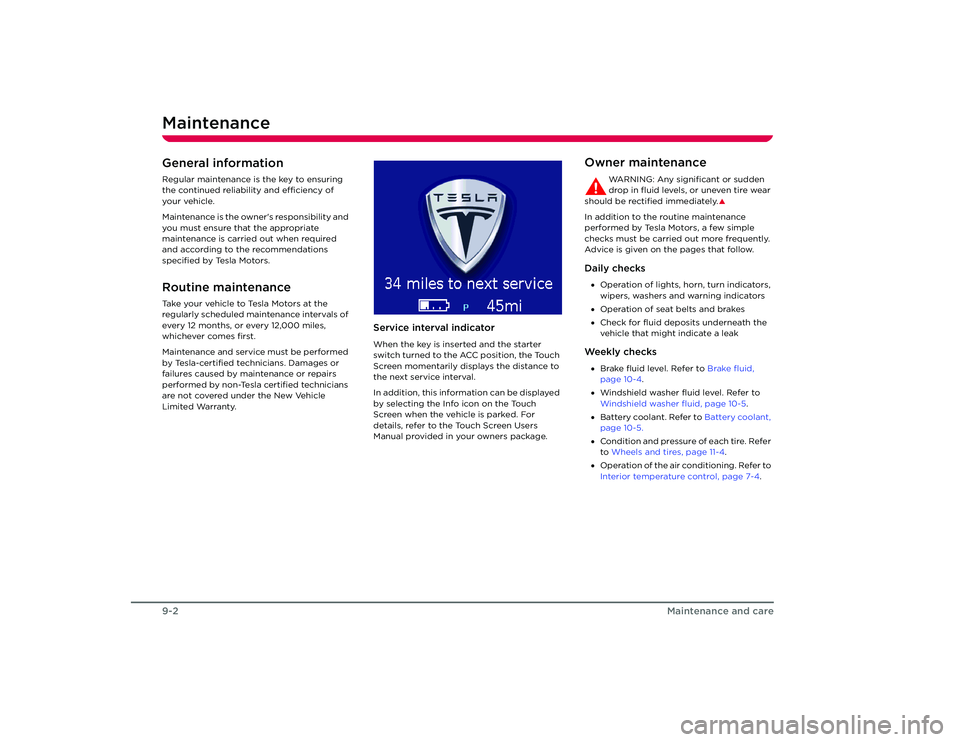
Service interval indicatorWhen the key is inserted and the starter
switch turned to the ACC position, the Touch
Screen momentarily displays the distance to
the next service interval.
In addition, this information can be displayed
by selecting the Info icon on the Touch
Screen when the vehicle is parked. For
details, refer to the Touch Screen Users
Manual provided in your owners package.
Owner maintenance
WARNING: Any significant or sudden
drop in fluid levels, or uneven tire wear
should be rectified immediately.
S
In addition to the routine maintenance
performed by Tesla Motors, a few simple
checks must be carried out more frequently.
Advice is given on the pages that follow.Daily checks• Operation of lights, horn, turn indicators,
wipers, washers and warning indicators
• Operation of seat belts and brakes
• Check for fluid deposits underneath the
vehicle that might indicate a leakWe e k l y c h e c k s•Brake fluid level. Refer to Brake fluid,
page 10-4 .
• Windshield washer fluid level. Refer to
Windshield washer fluid, page 10-5 .
• Battery coolant. Refer to Battery coolant,
page 10-5.
• Condition and pressure of each tire. Refer
to Wheels and tires, page 11-4 .
• Operation of the air conditioning. Refer to
Interior temperature control, page 7-4.
Roadster OHB.book Page 2 Th ursday, October 2, 2008 8:59 AM
Page 72 of 115
Fluid reservoirs9-4
Maintenance and care
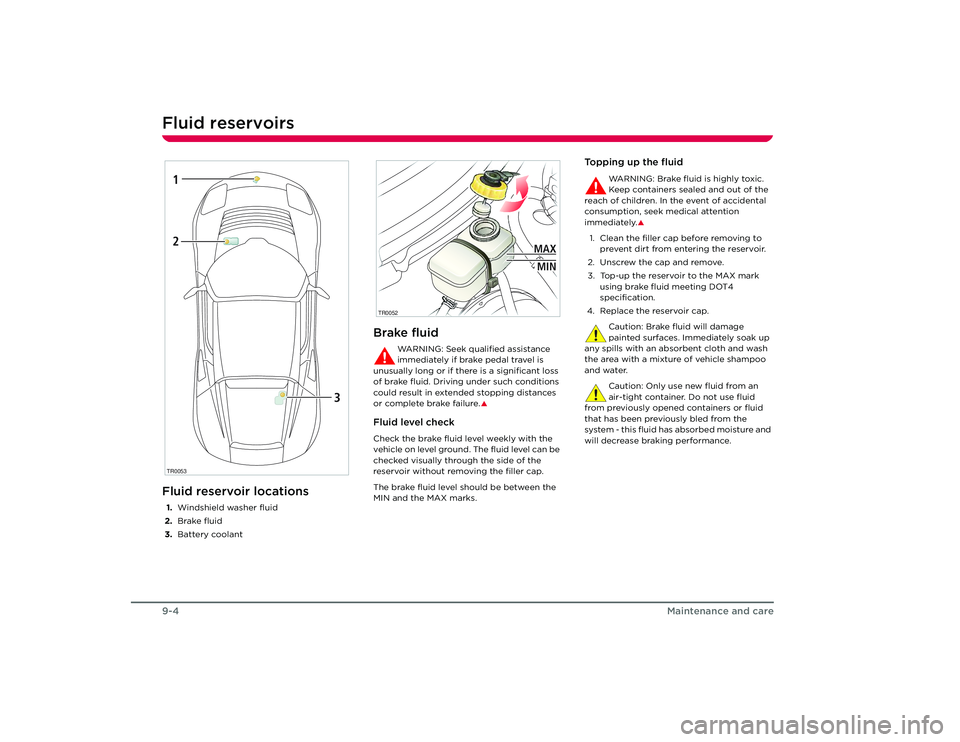
Fluid reservoirsFluid reservoir locations1.Windshield washer fluid
2. Brake fluid
3. Battery coolant
Brake fluid
WARNING: Seek qualified assistance
immediately if brake pedal travel is
unusually long or if there is a significant loss
of brake fluid. Driving under such conditions
could result in extended stopping distances
or complete brake failure.
S
Fluid level checkCheck the brake fluid level weekly with the
vehicle on level ground. The fluid level can be
checked visually through the side of the
reservoir without removing the filler cap.
The brake fluid level should be between the
MIN and the MAX marks.
Topping up the fluid
WARNING: Brake fluid is highly toxic.
Keep containers sealed and out of the
reach of children. In the event of accidental
consumption, seek medical attention
immediately.
S
1. Clean the filler cap before removing to prevent dirt from entering the reservoir.
2. Unscrew the cap and remove.
3. Top-up the reservoir to the MAX mark using brake fluid meeting DOT4
specification.
4. Replace the reservoir cap.
Caution: Brake fluid will damage
painted surfaces. Immediately soak up
any spills with an absorbent cloth and wash
the area with a mixtur e of vehicle shampoo
and water.
Caution: Only use new fluid from an
air-tight container. Do not use fluid
from previously opened containers or fluid
that has been previously bled from the
system - this fluid has absorbed moisture and
will decrease braking performance.
TR00531
2
3
TR0052
MAXMIN
Roadster OHB.book Page 4 Th ursday, October 2, 2008 8:59 AM
Page 82 of 115
Wheels10-6
Roadside emergencies
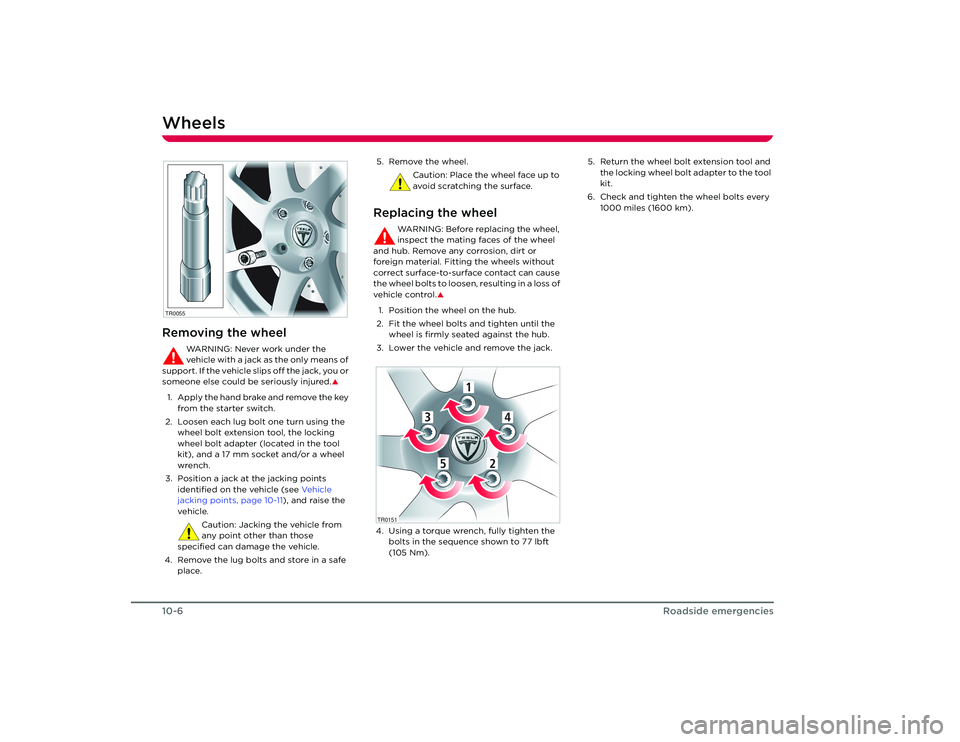
WheelsRemoving the wheel
WARNING: Never work under the
vehicle with a jack as the only means of
support. If the vehicle slips off the jack, you or
someone else could be seriously injured.
S
1. Apply the hand brake and remove the key from the starter switch.
2. Loosen each lug bolt one turn using the wheel bolt extension tool, the locking
wheel bolt adapter (located in the tool
kit), and a 17 mm socket and/or a wheel
wrench.
3. Position a jack at the jacking points identified on the vehicle (see Ve h i c l e
jacking points, page 10-11 ), and raise the
vehicle.
Caution: Jacking the vehicle from
any point other than those
specified can damage the vehicle.
4. Remove the lug bolts and store in a safe place. 5. Remove the wheel.
Caution: Place the wheel face up to
avoid scratching the surface.
Replacing the wheel
WARNING: Before replacing the wheel,
inspect the mating faces of the wheel
and hub. Remove any corrosion, dirt or
foreign material. Fitting the wheels without
correct surface-to-surface contact can cause
the wheel bolts to loosen, resulting in a loss of
vehicle control.
S
1. Position the wheel on the hub.
2. Fit the wheel bolts and tighten until the wheel is firmly seated against the hub.
3. Lower the vehicle and remove the jack.
4. Using a torque wrench, fully tighten the bolts in the sequence shown to 77 lbft
(105 Nm). 5. Return the wheel bolt extension tool and
the locking wheel bolt adapter to the tool
kit.
6. Check and tighten the wheel bolts every 1000 miles (1600 km).
TR0055
1
4
3
5
2
1
4
3
5
2
TR0151
Roadster OHB.book Page 6 Th ursday, October 2, 2008 8:59 AM
Page 84 of 115
Fuse replacement10-8
Roadside emergencies
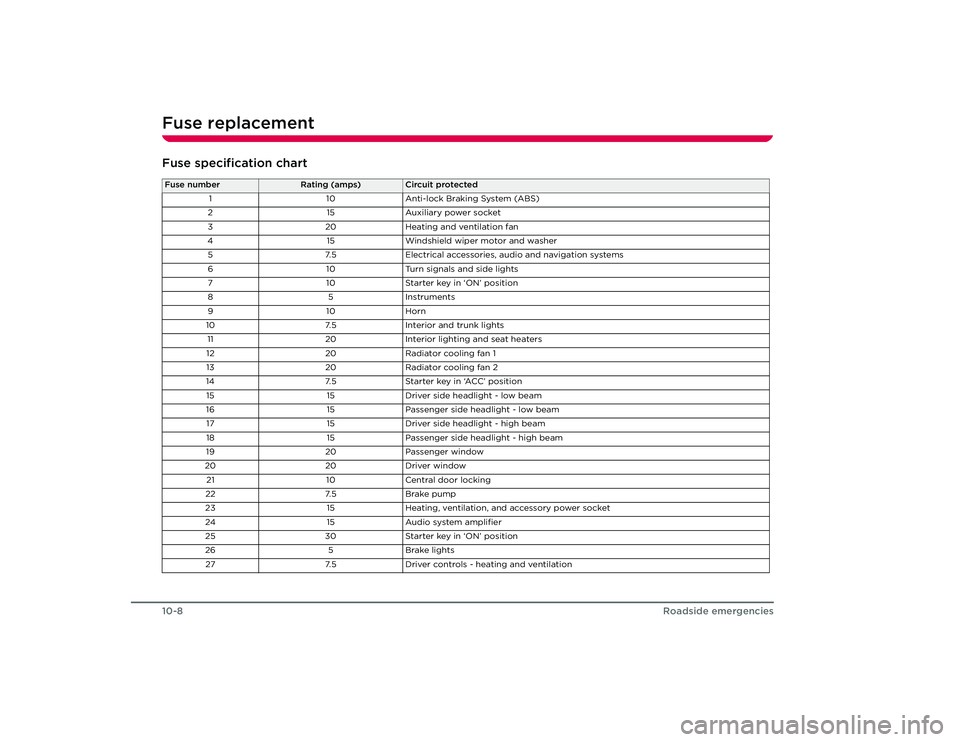
Fuse specification chartFuse number
Rating (amps)
Circuit protected
1 10Anti-lock Braking System (ABS)
2 15Auxiliary power socket
3 20Heating and ventilation fan
4 15Windshield wiper motor and washer
5 7.5Electrical accessories, audio and navigation systems
6 10Turn signals and side lights
7 10Starter key in ‘ON’ position
85 In stru m en ts
91 0Horn
10 7.5Interior and trunk lights
11 20Interior lighting and seat heaters
12 20Radiator cooling fan 1
13 20Radiator cooling fan 2
14 7.5Starter key in ‘ACC’ position
15 15Driver side headlight - low beam
16 15Passenger side headlight - low beam
17 15Driver side headlight - high beam
18 15Passenger side headlight - high beam
19 20Passenger window
20 20Driver window
21 10Central door locking
22 7.5Brake pump
23 15Heating, ventilation, and accessory power socket
24 15Audio system amplifier
25 30Starter key in ‘ON’ position
26 5Brake lights
27 7.5Driver controls - heating and ventilation
Roadster OHB.book Page 8 Th ursday, October 2, 2008 8:59 AM
Page 85 of 115
Bulb replacement
10-9
Roadside emergencies
Bulb replacementReplacing a bulbAlways check the operation of all exterior
lights before driving the vehicle. Replace a
bulb only with one of the same type and
specification.Light Emitting Diode (LED) lightsThe following lights on your vehicle use the
latest LED technology and if any of these
lights stop working, it must be replaced by
Te s l a M o t o r s :
• Front side marker light
• Rear side marker light
• Reverse lights
• Tail/brake lights
• Rear turn signals
Unlike traditional filament bulbs, these lights
have a long life and low power consumption
while providing the same amount of
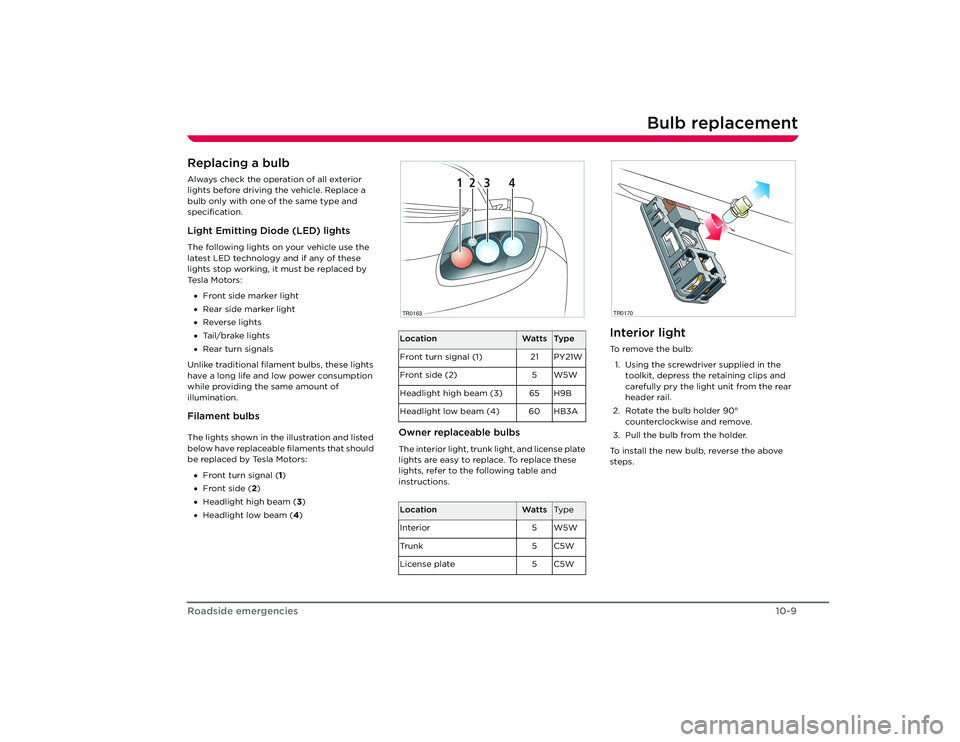
illumination.Filament bulbsThe lights shown in the illustration and listed
below have replaceable filaments that should
be replaced by Tesla Motors:
• Front turn signal ( 1)
• Front side (2 )
• Headlight high beam ( 3)
• Headlight low beam (4 )
Owner replaceable bulbsThe interior light, trunk light, and license plate
lights are easy to replace. To replace these
lights, refer to the following table and
instructions.
Interior lightTo r e m o v e t h e b u l b :
1. Using the screwdriver supplied in the toolkit, depress the retaining clips and
carefully pry the light unit from the rear
header rail.
2. Rotate the bulb holder 90° counterclockwise and remove.
3. Pull the bulb from the holder.
To install the new bulb, reverse the above
steps.
Location
Watts
Ty p e
Front turn signal (1) 21 PY21W
Front side (2) 5 W5W
Headlight high beam (3) 65 H9B
Headlight low beam (4) 60 HB3A
Location
Watts
Ty p e
Interior 5 W5W
Tr u n k 5 C 5 W
License plate 5 C5W
1
2
3
4
1
2
3
4
TR0163
TR0170
Roadster OHB.book Page 9 Th ursday, October 2, 2008 8:59 AM
Page 89 of 115
Vehicle recovery
10-13
Roadside emergencies
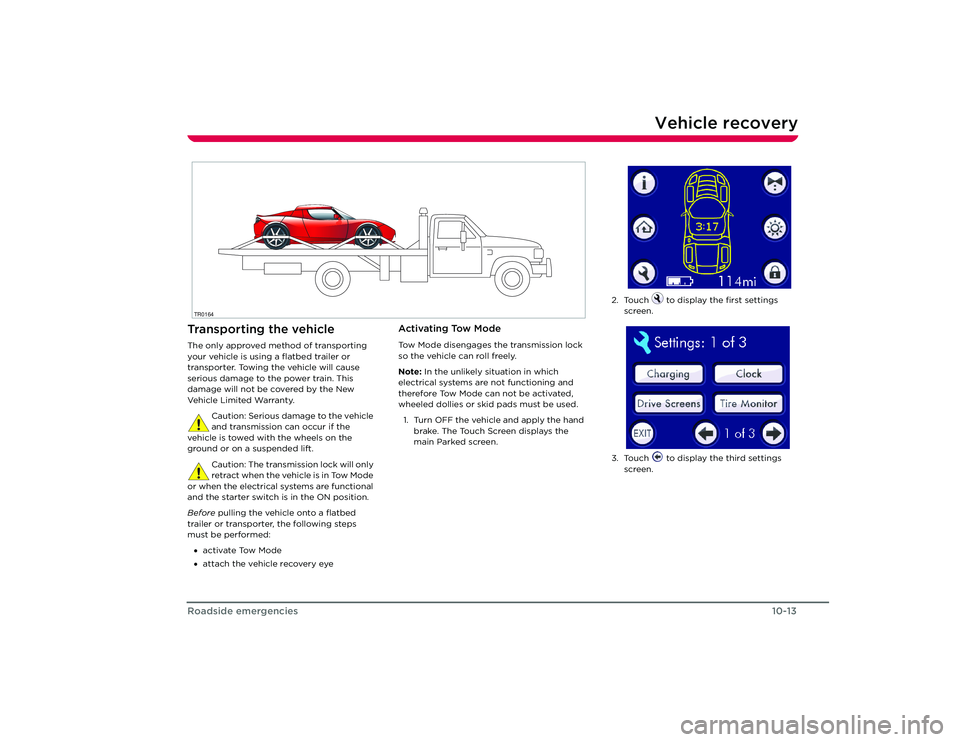
Vehicle recoveryTransporting the vehicleThe only approved method of transporting
your vehicle is using a flatbed trailer or
transporter. Towing the vehicle will cause
serious damage to the power train. This
damage will not be covered by the New
Ve h i c l e L i m i t e d Wa r ra n t y.
Caution: Serious damage to the vehicle
and transmission can occur if the
vehicle is towed with the wheels on the
ground or on a suspended lift.
Caution: The transmission lock will only
retract when the vehicle is in Tow Mode
or when the electrical systems are functional
and the starter switch is in the ON position.
Before pulling the vehicle onto a flatbed
trailer or transporter, the following steps
must be performed:
• activate Tow Mode
• attach the vehicle recovery eye
Activating Tow ModeTow Mode disengages the transmission lock
so the vehicle can roll freely.
Note: In the unlikely situation in which
electrical systems are not functioning and
therefore Tow Mode can not be activated,
wheeled dollies or skid pads must be used.
1. Turn OFF the vehicle and apply the hand brake. The Touch Screen displays the
main Parked screen.
TR0164
2. Touch to display the first settings screen.
3. Touch to display the third settings screen.
Roadster OHB.book Page 13 Thursday, October 2, 2008 8:59 AM
Page 90 of 115
Vehicle recovery10-14
Roadside emergencies
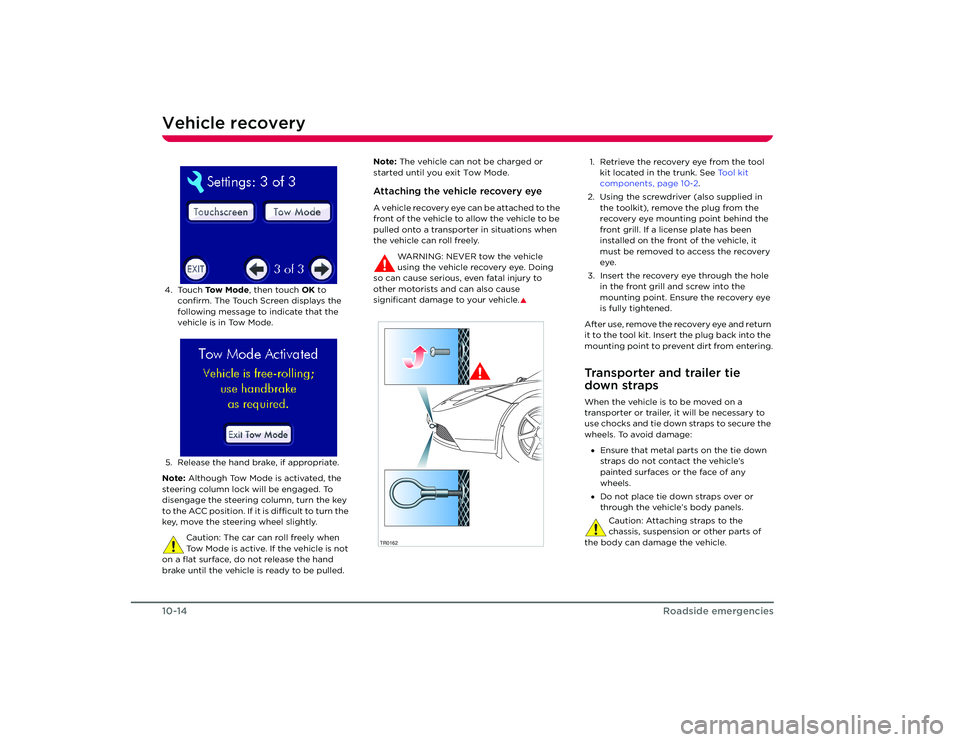
4. Touch To w M o d e , then touch OK to
confirm. The Touch Screen displays the
following message to indicate that the
vehicle is in Tow Mode.
5. Release the hand brake, if appropriate.
Note: Although Tow Mode is activated, the
steering column lock will be engaged. To
disengage the steering column, turn the key
to the ACC position. If it is difficult to turn the
key, move the steering wheel slightly.
Caution: The car can roll freely when
Tow Mode is active. If the vehicle is not
on a flat surface, do not release the hand
brake until the vehicle is ready to be pulled. Note:
The vehicle can not be charged or
started until you exit Tow Mode.
Attaching the vehicle recovery eyeA vehicle recovery eye can be attached to the
front of the vehicle to allow the vehicle to be
pulled onto a transporter in situations when
the vehicle can roll freely.
WARNING: NEVER tow the vehicle
using the vehicle recovery eye. Doing
so can cause serious, even fatal injury to
other motorists and can also cause
significant damage to your vehicle.
S
1. Retrieve the recovery eye from the tool kit located in the trunk. See Tool kit
components, page 10-2.
2. Using the screwdriver (also supplied in the toolkit), remove the plug from the
recovery eye mounting point behind the
front grill. If a license plate has been
installed on the front of the vehicle, it
must be removed to access the recovery
eye.
3. Insert the recovery eye through the hole in the front grill and screw into the
mounting point. Ensure the recovery eye
is fully tightened.
After use, remove the recovery eye and return
it to the tool kit. Insert the plug back into the
mounting point to prevent dirt from entering.Transporter and trailer tie
down strapsWhen the vehicle is to be moved on a
transporter or trailer, it will be necessary to
use chocks and tie down straps to secure the
wheels. To avoid damage: • Ensure that metal parts on the tie down
straps do not contact the vehicle’s
painted surfaces or the face of any
wheels.
• Do not place tie down straps over or
through the vehicle’s body panels.
Caution: Attaching straps to the
chassis, suspension or other parts of
the body can damage the vehicle.
TR0162
Roadster OHB.book Page 14 Thursday, October 2, 2008 8:59 AM
Page 91 of 115
11-1
Technical specifications
Vehicle identificationVehicle Identification Number 11-2
Safety compliance certification label 1 1-3
Wheels and tires Specifications and tire pressures 11-4
Tire markings 11-5
Tire placard/label 11-7
Uniform tire quality grading 11-7
Tire care 11-8
Tire Pressure Monitoring System 11 -11
Dynamic tire pressure monitoring 11-12
Wheels and tires glossary 11-13
Approved fluids and capacities Fluid specifications 11-14
Capacities 11-14
Vehicle dimensions and weights Exterior dimensions 11-15
Vehicle weights 11-16
Subsystem specifications Motor 11-17
Transmission 11-17
Steering 11-17
Front suspension 11-18
Rear suspension 11-18
Brakes 11-18
Electrical 11-19
Battery 11-19
Roadster OHB.book Page 1 Thursday, October 2, 2008 8:59 AM