lock TESLA ROADSTER 2008 User Guide
[x] Cancel search | Manufacturer: TESLA, Model Year: 2008, Model line: ROADSTER, Model: TESLA ROADSTER 2008Pages: 115, PDF Size: 46.35 MB
Page 26 of 115
Doors
4-5
Doors, locks, and security
Drive away lockingFor your security, the doors lock and the
trunk release switch is inhibited whenever
your vehicle’s speed exceeds 5 mph.
The trunk release button is reactivated when
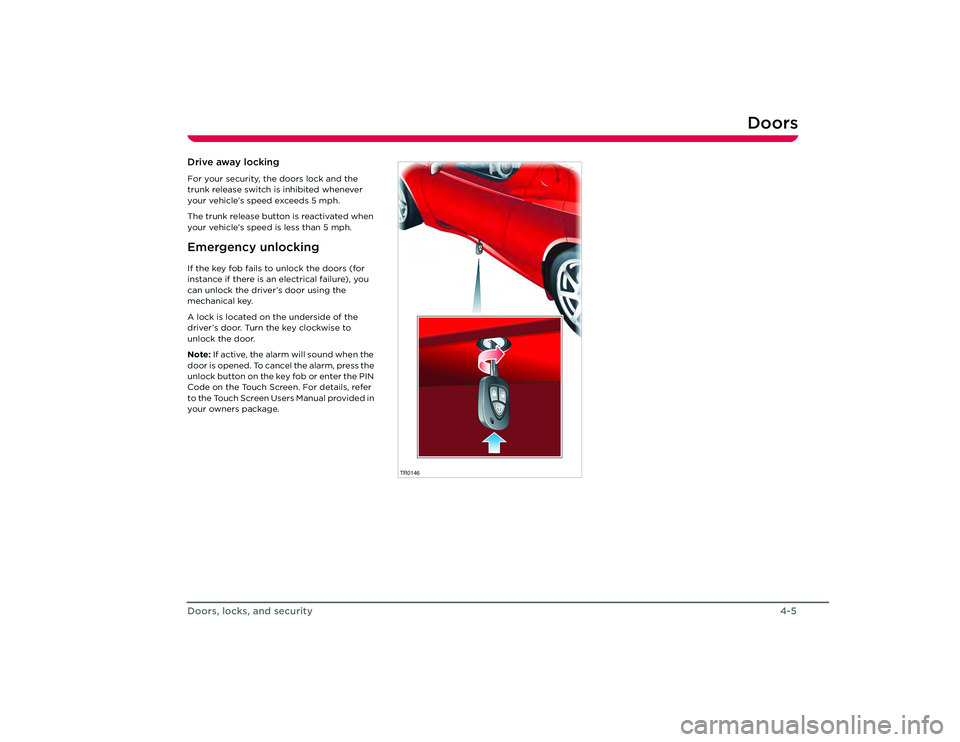
your vehicle’s speed is less than 5 mph.Emergency unlockingIf the key fob fails to unlock the doors (for
instance if there is an electrical failure), you
can unlock the driver’s door using the
mechanical key.
A lock is located on the underside of the
driver’s door. Turn the key clockwise to
unlock the door.
Note: If active, the alarm will sound when the
door is opened. To cancel the alarm, press the
unlock button on the key fob or enter the PIN
Code on the Touch Screen. For details, refer
to the Touch Screen Users Manual provided in
your owners package.
TR0146
Roadster OHB.book Page 5 Th ursday, October 2, 2008 8:59 AM
Page 27 of 115
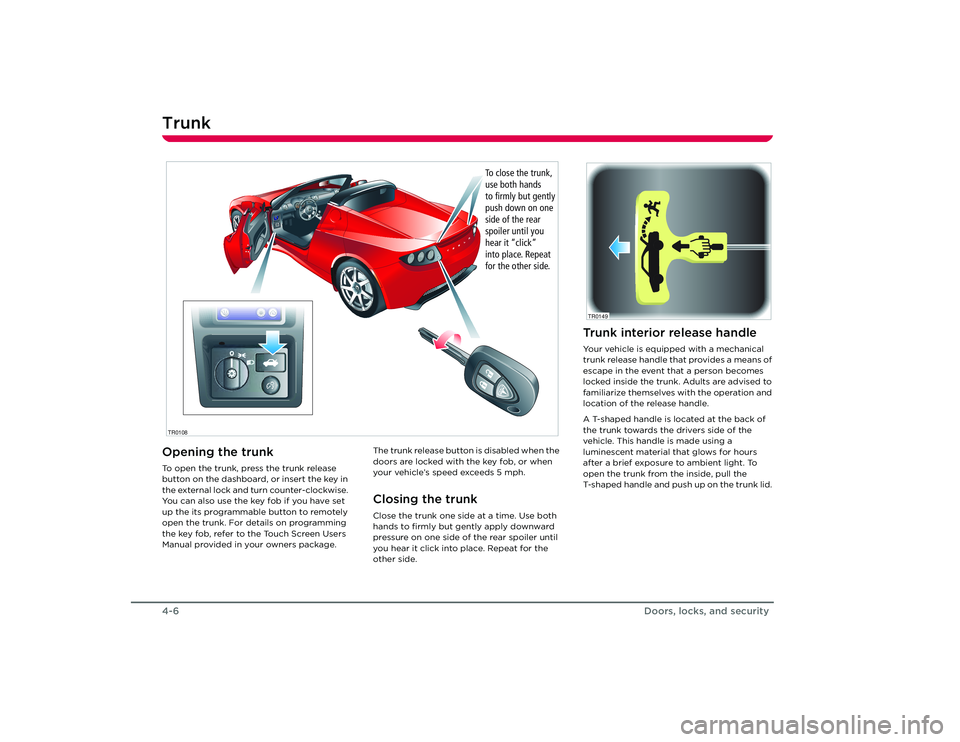
Trunk4-6Doors, locks, and securityTr u n kOpening the trunkTo open the trunk, press the trunk release
button on the dashboard, or insert the key in
the external lock and turn counter-clockwise.
You can also use the key fob if you have set
up the its programmable button to remotely
open the trunk. For details on programming
the key fob, refer to the Touch Screen Users
Manual provided in your owners package.The trunk release button is disabled when the
doors are locked with the key fob, or when
your vehicle’s speed exceeds 5 mph.
Closing the trunkClose the trunk one side at a time. Use both
hands to firmly but gently apply downward
pressure on one side of
the rear spoiler until
you hear it click into place. Repeat for the
other side.
T C2
R
1
BR
AK E FA
UL
T
C R
U I
S Emp
h
rp
mx
1 0
001
50
1
4
0
13
0
1
20
1
10
1
00
5 0
4 0
3 0
2 0
10 9
0
60 8
0
7
0
0
0
1
2
3
4
5
6
7
8
9
10
11
12
13
1 4
1 5TCP
RN 1 2
2:0
0PM
2:00PM
TR0108
To close the trunk,
use both hands
to firmly but gently
push down on one
side of the rear
spoiler until you
hear it “click”
into place. Repeat
for the other side.
Trunk interior release handleYour vehicle is equipped with a mechanical
trunk release handle that provides a means of
escape in the event that a person becomes
locked inside the trunk. Adults are advised to
familiarize themselves with the operation and
location of the release handle.
A T-shaped handle is located at the back of
the trunk towards the drivers side of the
vehicle. This handle is made using a
luminescent material that glows for hours
after a brief exposure to ambient light. To
open the trunk from the inside, pull the
T-shaped handle and push up on the trunk lid. TR0149
Roadster OHB.book Page 6 Th ursday, October 2, 2008 8:59 AM
Page 28 of 115
Vehicle security
4-7
Doors, locks, and security
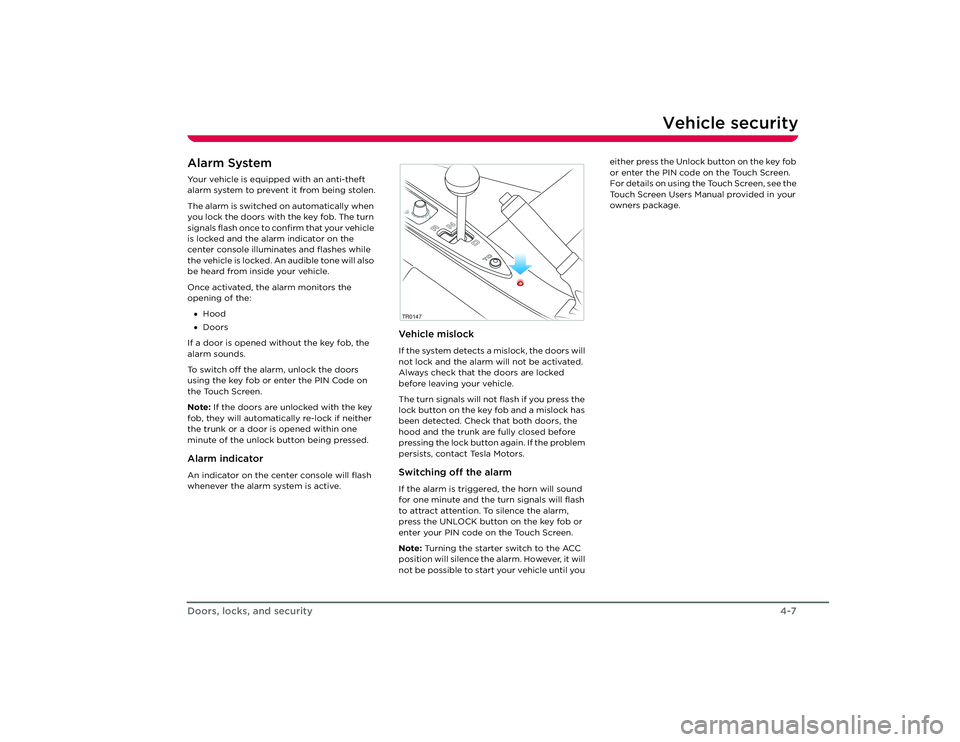
Vehicle securityAlarm SystemYour vehicle is equipped with an anti-theft
alarm system to prevent it from being stolen.
The alarm is switched on automatically when
you lock the doors with the key fob. The turn
signals flash once to confirm that your vehicle
is locked and the alarm indicator on the
center console illuminates and flashes while
the vehicle is locked. An audible tone will also
be heard from inside your vehicle.
Once activated, the alarm monitors the
opening of the:
• Hood
• Doors
If a door is opened without the key fob, the
alarm sounds.
To switch off the alarm, unlock the doors
using the key fob or enter the PIN Code on
the Touch Screen.
Note: If the doors are unlocked with the key
fob, they will automatically re-lock if neither
the trunk or a door is opened within one
minute of the unlock button being pressed.Alarm indicatorAn indicator on the center console will flash
whenever the alarm system is active.
Ve h i c l e m i s l o c kIf the system detects a mislock, the doors will
not lock and the alarm will not be activated.
Always check that the doors are locked
before leaving your vehicle.
The turn signals will not flash if you press the
lock button on the key fob and a mislock has
been detected. Check that both doors, the
hood and the trunk are fully closed before
pressing the lock button again. If the problem
persists, contact Tesla Motors.Switching off the alarmIf the alarm is triggered, the horn will sound
for one minute and the turn signals will flash
to attract attention. To silence the alarm,
press the UNLOCK button on the key fob or
enter your PIN code on the Touch Screen.
Note: Turning the starter switch to the ACC
position will silence the alarm. However, it will
not be possible to start your vehicle until you either press the Unlock button on the key fob
or enter the PIN code on the Touch Screen.
For details on using the Touch Screen, see the
Touch Screen Users Manual provided in your
owners package.TR0147
Roadster OHB.book Page 7 Th
ursday, October 2, 2008 8:59 AM
Page 29 of 115
Vehicle security4-8
Doors, locks, and security
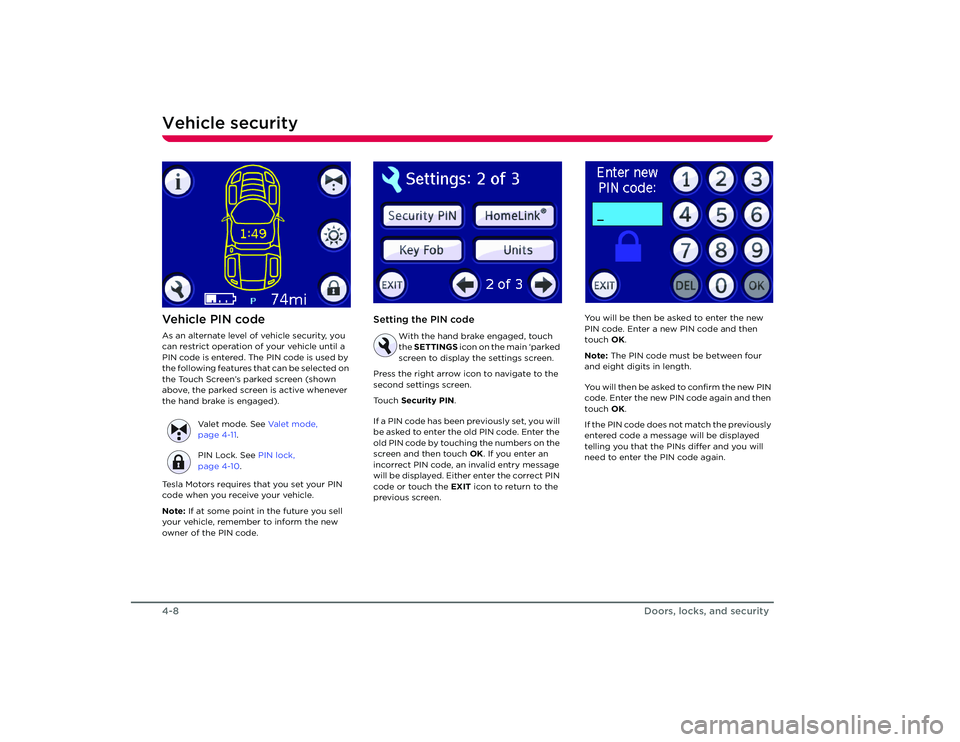
Ve h i c l e P I N c o d eAs an alternate level of vehicle security, you
can restrict operation of your vehicle until a
PIN code is entered. The PIN code is used by
the following features that can be selected on
the Touch Screen’s parked screen (shown
above, the parked screen is active whenever
the hand brake is engaged).
Tesla Motors requires that you set your PIN
code when you receive your vehicle.
Note: If at some point in the future you sell
your vehicle, remember to inform the new
owner of the PIN code.
Setting the PIN code
With the hand brake engaged, touch
the SETTINGS icon on the main ‘parked
screen to display the settings screen.
Press the right arrow icon to navigate to the
second settings screen.
Touch Security PIN .
If a PIN code has been previously set, you will
be asked to enter the old PIN code. Enter the
old PIN code by touching the numbers on the
screen and then touch OK. If you enter an
incorrect PIN code, an invalid entry message
will be displayed. Either enter the correct PIN
code or touch the EXIT icon to return to the
previous screen. You will be then be asked to enter the new
PIN code. Enter a new PIN code and then
touch
OK.
Note: The PIN code must be between four
and eight digits in length.
You will then be asked to confirm the new PIN
code. Enter the new PIN code again and then
touch OK.
If the PIN code does not match the previously
entered code a message will be displayed
telling you that the PINs differ and you will
need to enter the PIN code again.
Valet mode. See
Va l e t m o d e ,
page 4-11 .
PIN Lock. See PIN lock,
page 4-10 .
Roadster OHB.book Page 8 Th ursday, October 2, 2008 8:59 AM
Page 30 of 115
Vehicle security
4-9
Doors, locks, and security
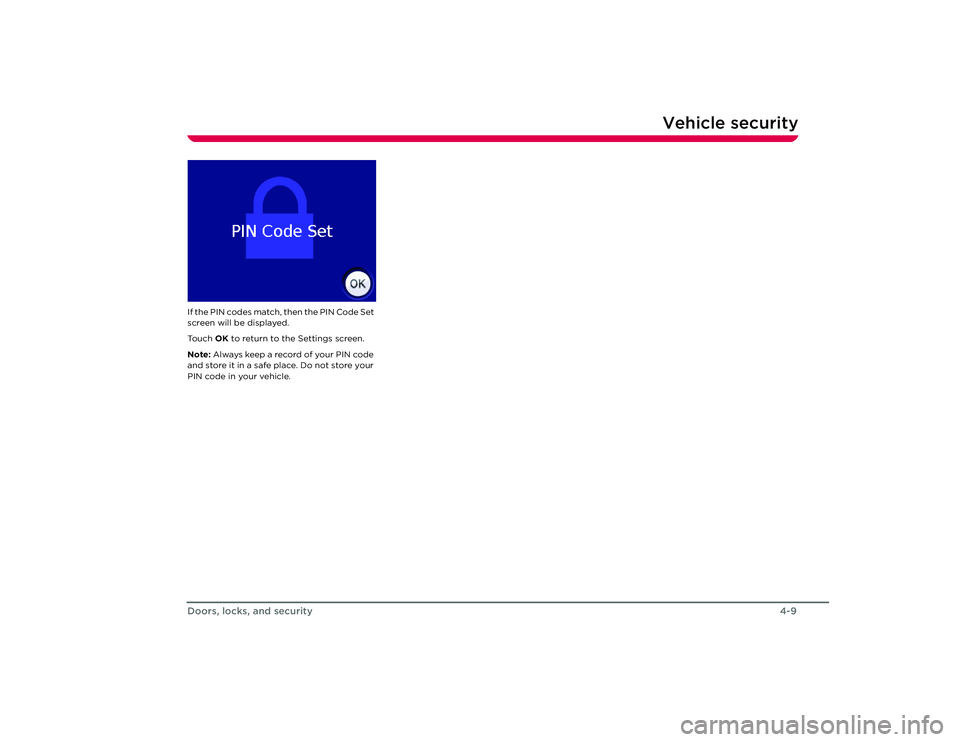
If the PIN codes match, then the PIN Code Set
screen will be displayed.
To u c h OK to return to the Settings screen.
Note: Always keep a reco rd of your PIN code
and store it in a safe place. Do not store your
PIN code in your vehicle.
Roadster OHB.book Page 9 Th ursday, October 2, 2008 8:59 AM
Page 31 of 115
Vehicle security4-10
Doors, locks, and security
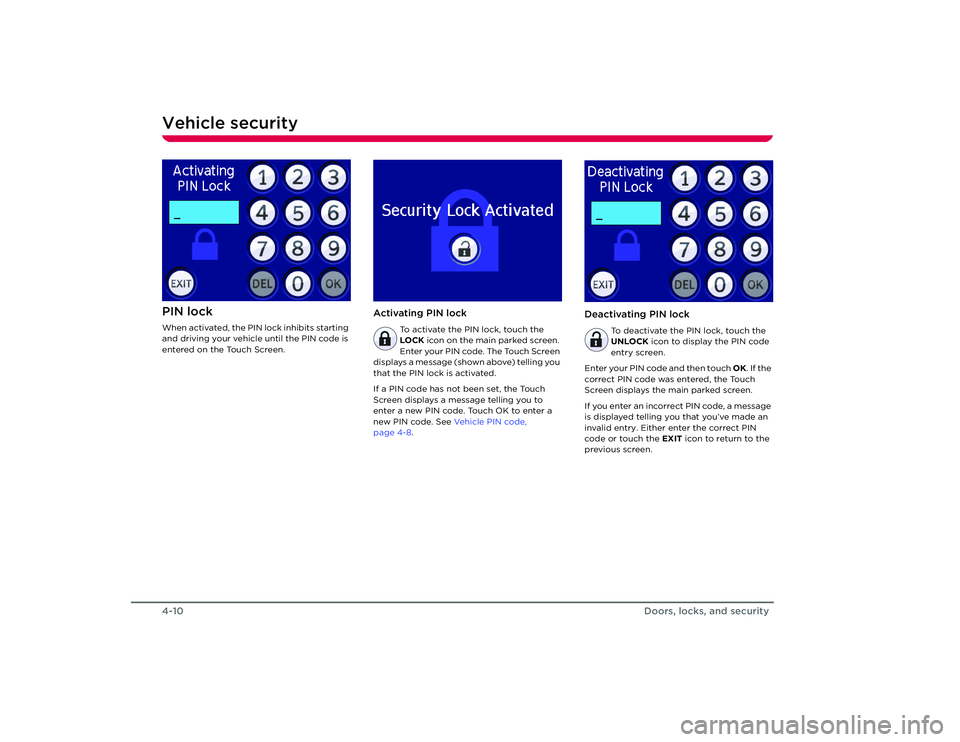
PIN lockWhen activated, the PIN lock inhibits starting
and driving your vehicle until the PIN code is
entered on the Touch Screen.
Activating PIN lock
To activate the PIN lock, touch the
LOCK icon on the main parked screen.
Enter your PIN code. The Touch Screen
displays a message (shown above) telling you
that the PIN lock is activated.
If a PIN code has not been set, the Touch
Screen displays a message telling you to
enter a new PIN code. Touch OK to enter a
new PIN code. See Ve h i c l e P I N c o d e ,
page 4-8.
Deactivating PIN lock
To deactivate the PIN lock, touch the
UNLOCK icon to display the PIN code
entry screen.
Enter your PIN code and then touch OK. If the
correct PIN code was entered, the Touch
Screen displays the main parked screen.
If you enter an incorrect PIN code, a message
is displayed telling you that you’ve made an
invalid entry. Either enter the correct PIN
code or touch the EXIT icon to return to the
previous screen.
Roadster OHB.book Page 10 Thursday, October 2, 2008 8:59 AM
Page 32 of 115
Vehicle security
4-11
Doors, locks, and security
Va l e t m o d eFor your peace of mind, your vehicle has a
unique valet mode for those times that your
vehicle is parked by another person.
When valet mode is active, your vehicle’s
power is limited and the Touch Screen
displays activity information about the
vehicle. Operation of the Touch Screen is
restricted to the valet mode screen which
displays information on how your vehicle was
used while in valet mode.
Valet mode can only be deactivated by
entering the vehicle’s PIN code. Activating Valet mode
To activate valet mode, touch the bow
tie icon on the Touch Screen’s main
parked screen.
Provided a vehicle PIN code has been set,
you’ll be prompted to enter your PIN code.
Enter your PIN code and touch OK. The Touch
Screen displays the Valet Mode Activated
screen.
If a PIN code has not been set, the Touch
Screen displays a message telling you to
enter a new PIN code. Touch OK to enter a
new PIN code. See Ve h i c l e P I N c o d e ,
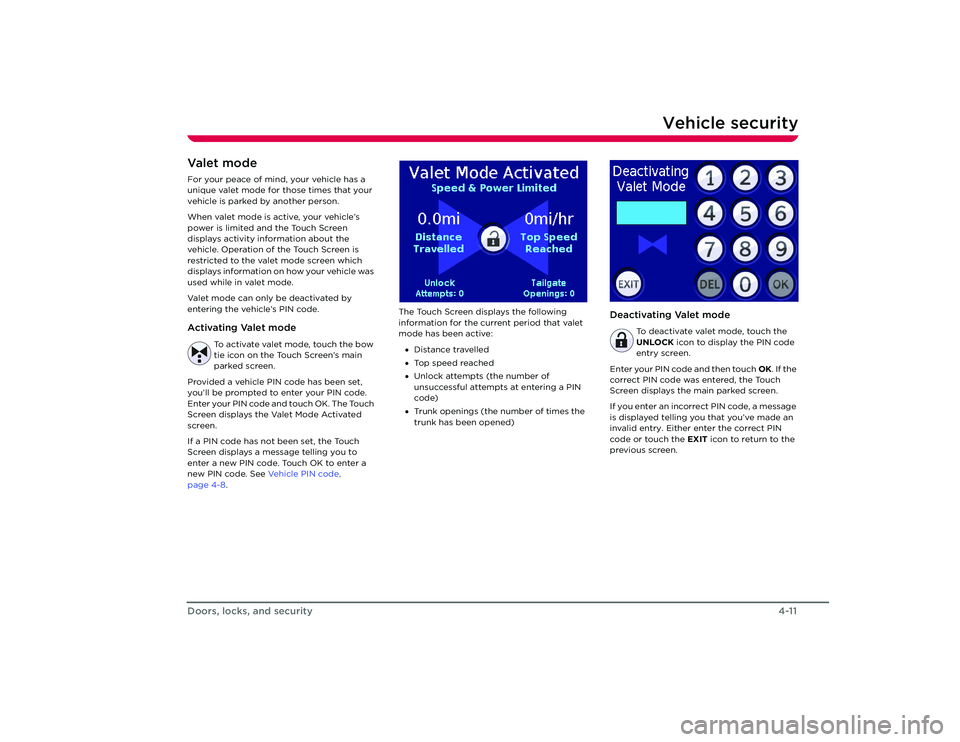
page 4-8 . The Touch Screen displays the following
information for the curr
ent period that valet
mode has been active:
• Distance travelled
• Top speed reached
• Unlock attempts (the number of
unsuccessful attempts at entering a PIN
code)
• Trunk openings (the number of times the
trunk has been opened)
Deactivating Valet mode
To deactivate valet mode, touch the
UNLOCK icon to display the PIN code
entry screen.
Enter your PIN code and then touch OK. If the
correct PIN code was entered, the Touch
Screen displays the main parked screen.
If you enter an incorrect PIN code, a message
is displayed telling you that you’ve made an
invalid entry. Either enter the correct PIN
code or touch the EXIT icon to return to the
previous screen.
Roadster OHB.book Page 11 Thursday, October 2, 2008 8:59 AM
Page 39 of 115
6-1
Driving your vehicle
Driving basicsKey positions 6-2
Steering column lock 6-2
Starting the vehicle 6-3
Selecting gears 6-3
Driving tips 6-3
Hand brake 6-5
Braking 6-5
Anti-lock Braking System (ABS) 6-5
Traction control 6-6
Switches and controls Exterior lights 6-7
Turn signals 6-8
Windshield wiper and washer 6-8
Cruise control 6-9
Hazard warning 6-10
Horn 6-10
Instruments LCD panel 6-11
Warning indicators 6-12
Gear position indicators 6-13
Instrument panel lighting 6-14
Roadster OHB.book Page 1 Thursday, October 2, 2008 8:59 AM
Page 40 of 115
Driving basics6-2
Driving your vehicle
Driving your vehicle
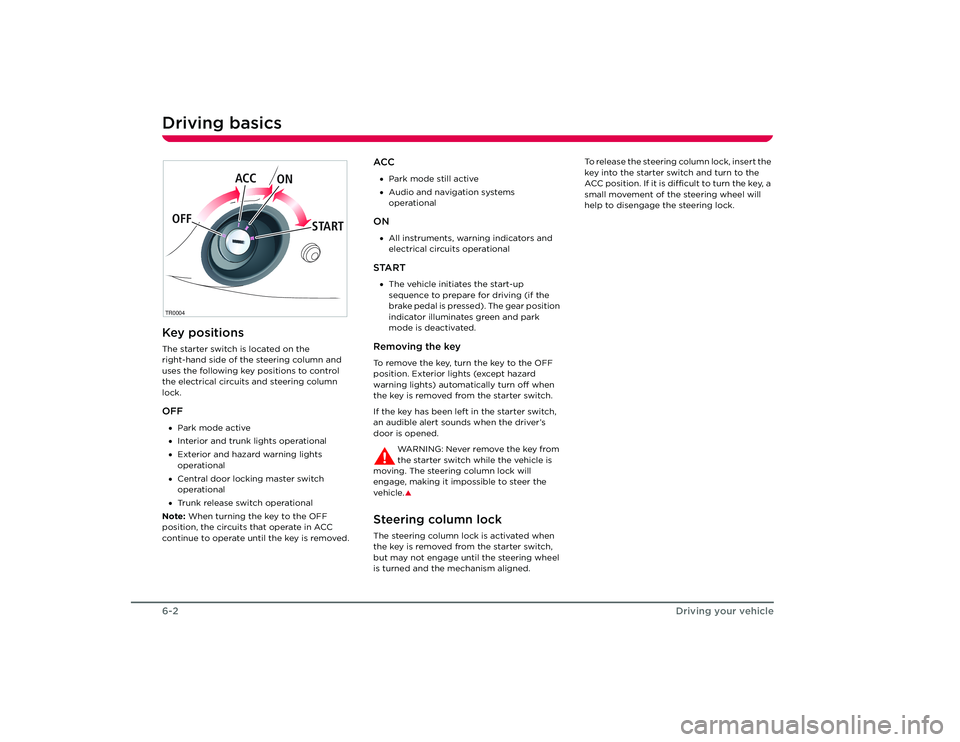
Driving basicsKey positionsThe starter switch is located on the
right-hand side of the steering column and
uses the following key positions to control
the electrical circuits and steering column
lock.OFF•Park mode active
• Interior and trunk lights operational
• Exterior and hazard warning lights
operational
• Central door locking master switch
operational
• Trunk release switch operational
Note: When turning the key to the OFF
position, the circuits that operate in ACC
continue to operate until the key is removed.
ACC• Park mode still active
• Audio and navigation systems
operationalON•All instruments, warning indicators and
electrical circuits operationalSTART•The vehicle initiates the start-up
sequence to prepare for driving (if the
brake pedal is pressed). The gear position
indicator illuminates green and park
mode is deactivated.Removing the keyTo remove the key, turn the key to the OFF
position. Exterior lights (except hazard
warning lights) automatically turn off when
the key is removed from the starter switch.
If the key has been left in the starter switch,
an audible alert sounds when the driver’s
door is opened.
WARNING: Never remove the key from
the starter switch while the vehicle is
moving. The steering column lock will
engage, making it impossible to steer the
vehicle.
S
Steering column lockThe steering column lock is activated when
the key is removed from the starter switch,
but may not engage until the steering wheel
is turned and the mechanism aligned. To release the steering column lock, insert the
key into the starter switch and turn to the
ACC position. If it is difficult to turn the key, a
small movement of the steering wheel will
help to disengage the steering lock.
TR0004OFF
ACC
ON
STARTRoadster OHB.book Page 2 Th ursday, October 2, 2008 8:59 AM
Page 41 of 115
Driving basics
6-3
Driving your vehicle
Starting the vehicleFollow these steps to prepare the vehicle for
driving:
1. Tesla recommends selecting the N gear position.
2. Press and hold down the brake pedal.
3. Insert the key into the starter switch, turn it to the START position, and release.
When released, the key automatically
returns to the ON position and, if the
start-up sequence is successful, the N
indicator will illuminate green and you’ll
hear an audible tone. .
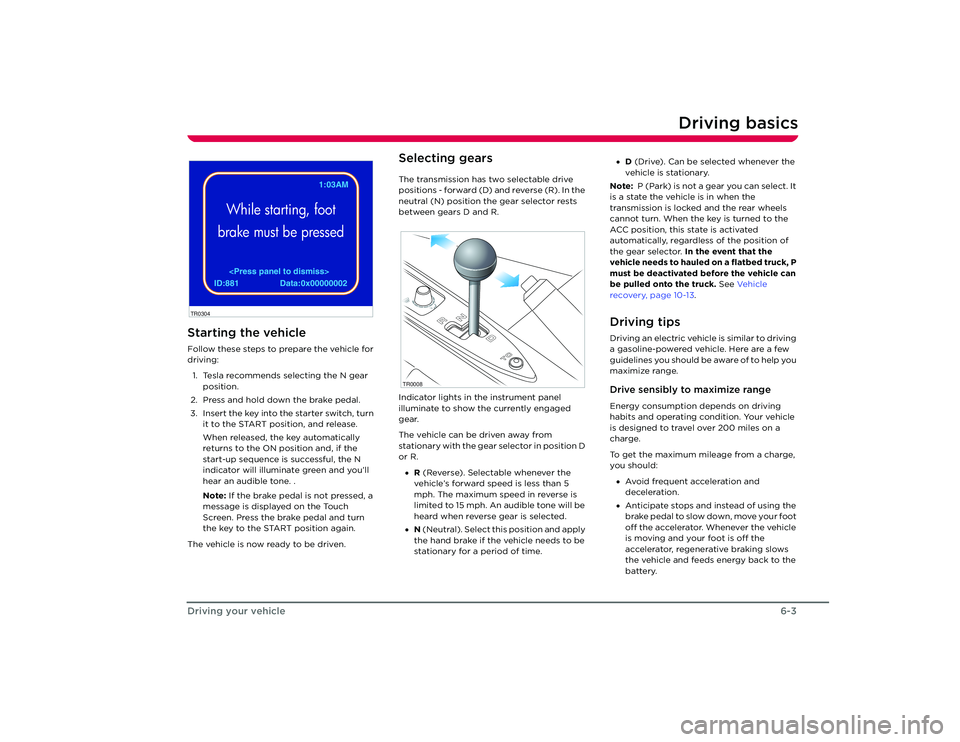
Note: If the brake pedal is not pressed, a
message is displayed on the Touch
Screen. Press the brake pedal and turn
the key to the START position again.
The vehicle is now ready to be driven.
Selecting gearsThe transmission has two selectable drive
positions - forward (D) and reverse (R). In the
neutral (N) position the gear selector rests
between gears D and R.
Indicator lights in the instrument panel
illuminate to show the currently engaged
gear.
The vehicle can be driven away from
stationary with the gear selector in position D
or R. • R (Reverse). Selectable whenever the
vehicle’s forward speed is less than 5
mph. The maximum speed in reverse is
limited to 15 mph. An audible tone will be
heard when reverse gear is selected.
• N (Neutral). Select th is position and apply
the hand brake if the vehicle needs to be
stationary for a period of time. •
D (Drive). Can be selected whenever the
vehicle is stationary.
Note: P (Park) is not a gear you can select. It
is a state the vehicle is in when the
transmission is locked and the rear wheels
cannot turn. When the key is turned to the
ACC position, this state is activated
automatically, regardless of the position of
the gear selector. In the event that the
vehicle needs to hauled on a flatbed truck, P
must be deactivated before the vehicle can
be pulled onto the truck. See Ve h i c l e
recovery, page 10-13 .
Driving tipsDriving an electric vehicle is similar to driving
a gasoline-powered vehicle. Here are a few
guidelines you should be aware of to help you
maximize range.Drive sensibly to maximize rangeEnergy consumption depends on driving
habits and operating condition. Your vehicle
is designed to travel over 200 miles on a
charge.
To get the maximum mileage from a charge,
you should:
• Avoid frequent acceleration and
deceleration.
• Anticipate stops and instead of using the
brake pedal to slow down, move your foot
off the accelerator. Whenever the vehicle
is moving and your foot is off the
accelerator, regenerative braking slows
the vehicle and feeds energy back to the
battery.
EST.
PIN Code Chang brakedWhile starting, foot
brake must be pressed
ID:881 Data:0x00000002 1:03AM
TR0304
TR0008
Roadster OHB.book Page 3 Th ursday, October 2, 2008 8:59 AM