lock TESLA ROADSTER 2008 Owners Manual
[x] Cancel search | Manufacturer: TESLA, Model Year: 2008, Model line: ROADSTER, Model: TESLA ROADSTER 2008Pages: 115, PDF Size: 46.35 MB
Page 4 of 115
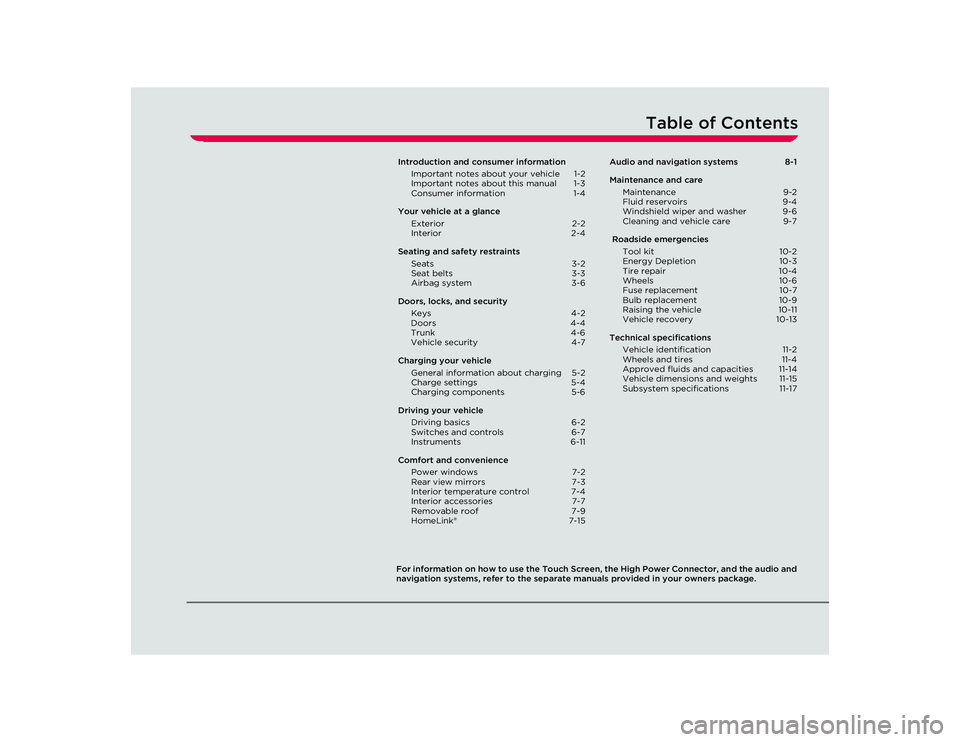
Table of Contents
For information on how to use the Touch Screen, the High Power Connector, and the audio and
navigation systems, refer to the separate manuals provided in your owners package.Introduction and consumer information
Important notes about your vehicle 1-2
Important notes about this manual 1-3
Consumer information 1-4
Your vehicle at a glance Exterior 2-2
Interior 2-4
Seating an d safety restraints
Seats 3-2
Seat belts 3-3
Airbag system 3-6
Doors, locks, and s ecurity
Keys 4-2
Do ors
4-4
Trunk 4-6
Vehicle security 4-7
Charging your vehicle General information about charging 5-2
Charge settings 5-4
Charging components 5-6
Driving your vehicle Driving basics 6-2
Switches and controls 6-7
Instruments 6-11
Comfort and convenience Power windows 7-2
Rear view mirrors 7-3
Interior temperature control 7-4
Interior accessories 7-7
Removable roof 7-9
HomeLink® 7-15Audio and navigation systems
8-1
Maintenance and care Maintenance 9-2
Fluid reservoirs 9-4
Windshield wiper and washer 9-6
Cleaning and vehicle care 9-7
Roadside emergencies Tool kit 10-2
Energy Depletion 10-3
Tire repair 10-4
Wheels 10-6
Fuse replacement 10-7
Bulb replacement 10-9
Raising the vehicle 10-11
Vehicle recovery 10-13
Technical specifications Vehicle identification 11-2
Wheels and tires 11-4
Approved fluids and capacities 11-14
Vehicle dimensions and weights 11-15
Subsystem specifications 11-17
Roadster OHB.book Page 1 Thursday, October 2, 2008 8:59 AM
Page 11 of 115
Exterior
2-3
Your vehicle at a glance
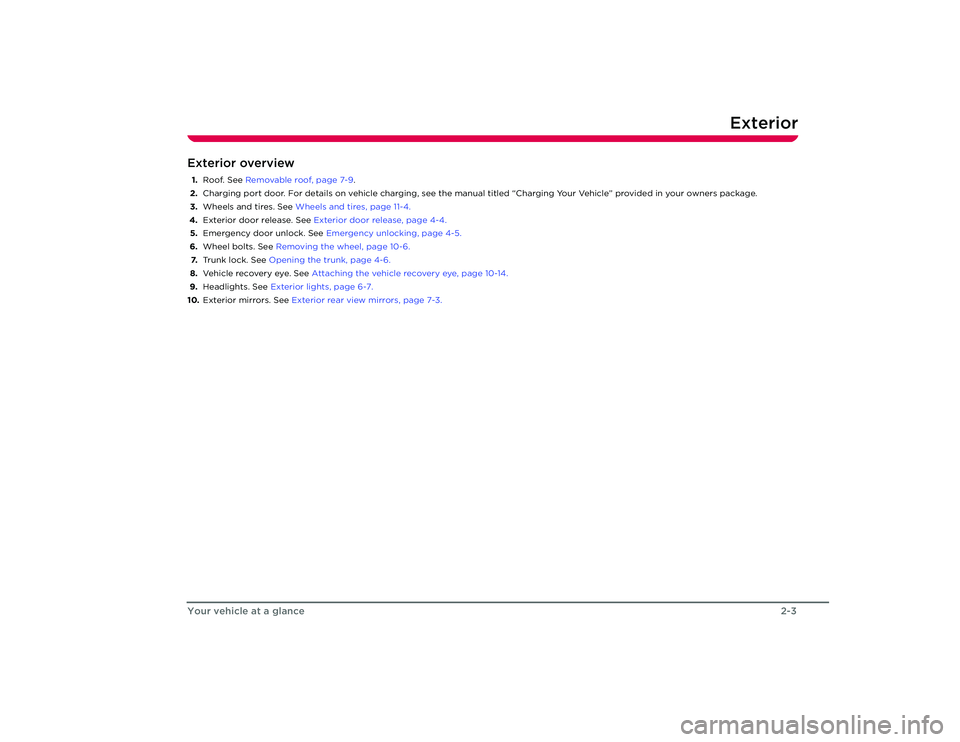
Exterior overview1. Roof. See Removable roof, page 7-9 .
2. Charging port door. For details on vehicle charging, see the manual titled “Charging Your Vehicle” provided in your owners pack age.
3. Wheels and tires. See Wheels and tires, page 11-4.
4. Exterior door release. See Exterior door release, page 4-4.
5. Emergency door unlock. See Emergency unlocking, page 4-5.
6. Wheel bolts. See Removing the wheel, page 10-6.
7. Trunk lock. See Opening the trunk, page 4-6.
8. Vehicle recovery eye. See Attaching the vehicle recovery eye, page 10-14.
9. Headlights. See Exterior lights, page 6-7.
10. Exterior mirrors. See Exterior rear view mirrors, page 7-3.
Roadster OHB.book Page 3 Th ursday, October 2, 2008 8:59 AM
Page 13 of 115
Interior
2-5
Your vehicle at a glance
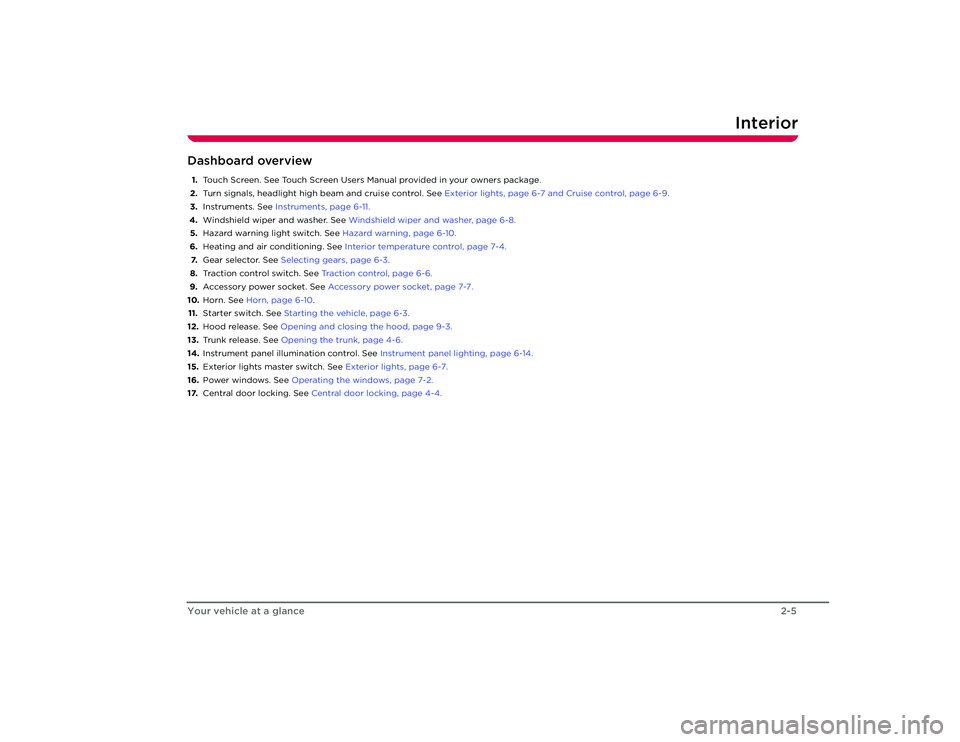
Dashboard overview1. Touch Screen. See Touch Scr een Users Manual provided in your owners package .
2. Turn signals, headlight high beam and cruise control. See Exterior lights, page 6-7 and Cruise control, page 6-9.
3. Instruments. See Instruments, page 6-11.
4. Windshield wiper and washer. See Windshield wiper and washer, page 6-8.
5. Hazard warning light switch. See Hazard warning, page 6-10.
6. Heating and air conditioning. See Interior temperature control, page 7-4.
7. Gear selector. See Selecting gears, page 6-3.
8. Traction control switch. See Traction control, page 6-6.
9. Accessory power socket. See Accessory power socket, page 7-7.
10. Horn. See Horn, page 6-10 .
11. Starter switch. See Starting the vehicle, page 6-3.
12. Hood release. See Opening and closing the hood, page 9-3.
13. Trunk release. See Opening the trunk, page 4-6.
14. Instrument panel illumination control. See Instrument panel lighting, page 6-14.
15. Exterior lights master switch. See Exterior lights, page 6-7.
16. Power windows. See Operating the windows, page 7-2.
17. Central door locking. See Central door locking, page 4-4.
Roadster OHB.book Page 5 Th ursday, October 2, 2008 8:59 AM
Page 15 of 115
Seats3-2Seating and safety restra
ints
Seating and Safety Restraints
Seat adjustment
WARNING: Never adjust the driver’s
seat while your vehicle is moving.
U n ex p e c t e d o r s u d d e n s e at m ove m e n t co u l d
result in an accident.
S
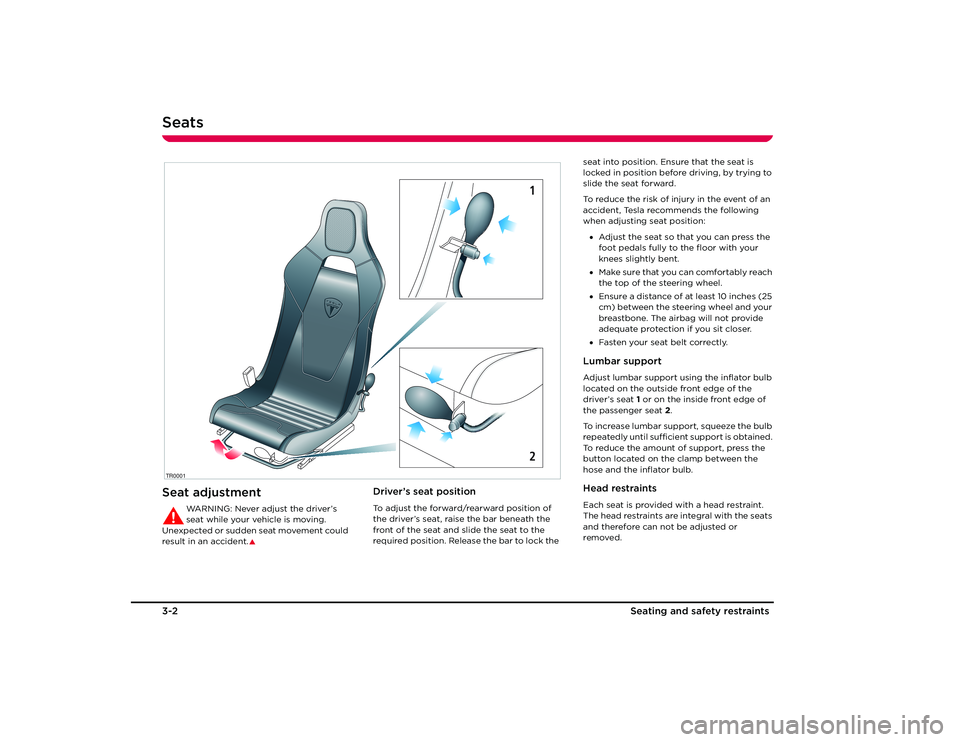
Driver’s seat positionTo adjust the forward/rearward position of
the driver’s seat, raise the bar beneath the
front of the seat and slide the seat to the
required position. Release the bar to lock the
TR0001
12
seat into position. Ensure that the seat is
locked in position before driving, by trying to
slide the seat forward.
To reduce the risk of injury in the event of an
accident, Tesla recommends the following
when adjusting seat position:
• Adjust the seat so that you can press the
foot pedals fully to the floor with your
knees slightly bent.
• Make sure that you can comfortably reach
the top of the steering wheel.
• Ensure a distance of at least 10 inches (25
cm) between the steering wheel and your
breastbone. The airbag will not provide
adequate protection if you sit closer.
• Fasten your seat belt correctly.Lumbar supportAdjust lumbar support using the inflator bulb
located on the outside front edge of the
driver’s seat 1 or on the inside front edge of
the passenger seat 2 .
To increase lumbar support, squeeze the bulb
repeatedly until sufficie nt support is obtained.
To reduce the amount of support, press the
button located on the clamp between the
hose and the inflator bulb.Head restraintsEach seat is provided with a head restraint.
The head restraints are integral with the seats
and therefore can not be adjusted or
removed.
Roadster OHB.book Page 2 Th ursday, October 2, 2008 8:59 AM
Page 16 of 115
Seat belts
3-3
Seating and s afety restraints
Seat beltsGeneral information
WARNING: Seat belts should be worn
by all occupants, for every journey no
matter how short. Failure to do so greatly
increases the risk of death or serious injury in
the event of an accident.
S
It is an established fact that seat belts provide
good protection in accidents. Therefore
wearing a seat belt is required by law in most
states.
Both the driver and passenger seating
positions are equipped with three-point
inertia reel seat belts. Inertia reel belts are
tensioned automatically and allow freedom
of movement during normal driving
conditions.
The belt reel automatically locks, preventing
movement of occupants, whenever your
vehicle experiences the force associated with
hard acceleration, braking, cornering or on
impact in a collision. The reel may also lock
when driving on steep hills or slopes.Seat belt safety instructions
WARNING: Ensure that all seat belts are
worn correctly. An improperly worn
seat belt increases the risk of death or serious
injury in the event of a collision.
S
WARNING: Seat belts are designed to
bear upon the bony structure of the
body, and should be worn low across the
pelvis, over the shoulder and across the
chest. Avoid wearing the lap section of the
belt across the abdominal area.
S
WARNING: Always adjust the belt to
remove slack. Seat belts worn too loose
can result in injuries because they allow
excessive forward movement in an
accident.
S
WARNING: Do not wear seat belts over
hard, fragile or sharp items in clothing,
such as pens, keys, eyeglasses, etc. In an
impact, the pressure from the seat belt on
such items can cause them to break, which in
turn may cause serious injury.
S
WARNING: Seat belts should not be
worn with any part of the strap
twisted.SWA R N I N G : E a c h b e l t a s s e m b l y m u s t b e
used by only one occupant. It is
dangerous to put the belt around a child
being carried on an occupant’s lap.
S
WARNING: It is essential that seat belts
that have been worn in an accident are
replaced, even if damage to the assembly is
not obvious. The belt anchors must also be
checked.
S
WA R N I N G : C a r e m u s t b e t a k e n t o a v o i d
contaminating the seat belt webbing,
and seat belt mechanisms with any
chemicals, liquids, grit, dirt or cleaning
products. If a seat belt fails to retract or latch
into the buckle, it must be replaced
immediately.
S
WARNING: No modifications or
additions should be made that prevent
the seat belt mechanism from taking up slack, or that prevent the seat belt being
adjusted to remove slack. A slack belt greatly
reduces the level of occupant protection.
S
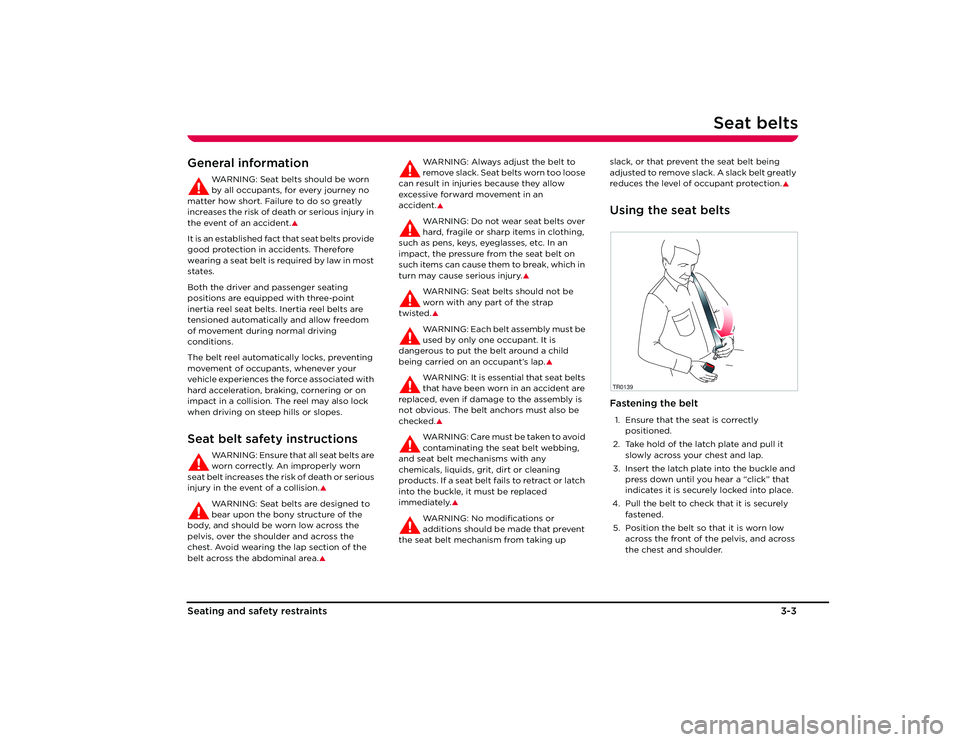
Using the seat beltsFastening the belt1. Ensure that the seat is correctly
positioned.
2. Take hold of the latch plate and pull it slowly across your chest and lap.
3. Insert the latch plate into the buckle and press down until you hear a “click” that
indicates it is securely locked into place.
4. Pull the belt to check that it is securely fastened.
5. Position the belt so that it is worn low across the front of the pelvis, and across
the chest and shoulder.TR0139
Roadster OHB.book Page 3 Th ursday, October 2, 2008 8:59 AM
Page 17 of 115
Seat belts3-4
Seating and safety restraints
6. Pull the diagonal part of the belt towards the retractor to remove excess slack.Releasing the beltRelease the seat belts by pressing the red
button on the buckle. The belt retracts
automatically.Seat belt reminder
The seat belt warning indicator in the
instrument panel illuminates
whenever the driver’s seat belt is unbuckled.
Also, an audible sound will be heard for six
seconds if the starter switch is turned to the
ON position and the drivers seat belt is
unbuckled.
Wearing seat belts during
pregnancy
WARNING: Pregnant woman should
always wear seat belts to protect
themselves and th eir unborn child.
S
WARNING: Never place anything
between you and the seat belt to
cushion the impact in the event of an
accident.
S
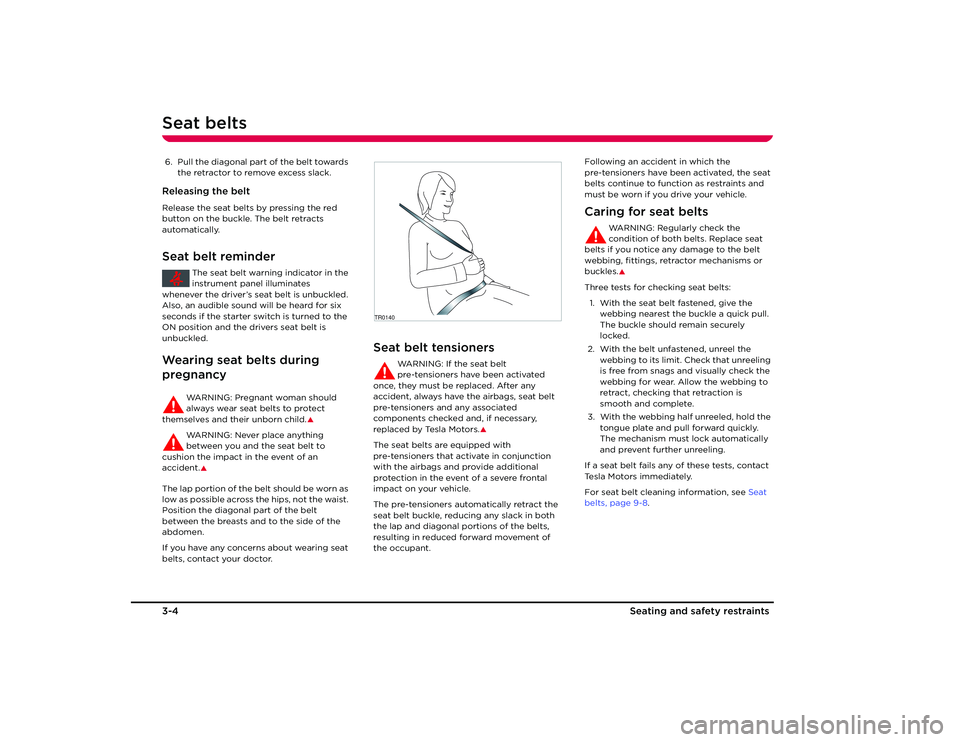
The lap portion of the belt should be worn as
low as possible across the hips, not the waist.
Position the diagonal part of the belt
between the breasts and to the side of the
abdomen.
If you have any concerns about wearing seat
belts, contact your doctor.
Seat belt tensioners
WARNING: If the seat belt
pre-tensioners have been activated
once, they must be replaced. After any
accident, always have the airbags, seat belt
pre-tensioners and any associated
components checked and, if necessary,
replaced by Tesla Motors.
S
The seat belts are equipped with
pre-tensioners that activate in conjunction
with the airbags and provide additional
protection in the event of a severe frontal
impact on your vehicle.
The pre-tensioners automatically retract the
seat belt buckle, reducing any slack in both
the lap and diagonal portions of the belts,
resulting in reduced forward movement of
the occupant. Following an accident in which the
pre-tensioners have been activated, the seat
belts continue to function as restraints and
must be worn if you drive your vehicle.
Caring for seat belts
WARNING: Regularly check the
condition of both belts. Replace seat
belts if you notice any damage to the belt
webbing, fittings, retractor mechanisms or
buckles.S
Three tests for checking seat belts:
1. With the seat belt fastened, give the webbing nearest the buckle a quick pull.
The buckle should remain securely
locked.
2. With the belt unfastened, unreel the webbing to its limit. Check that unreeling
is free from snags and visually check the
webbing for wear. Allow the webbing to
retract, checking that retraction is
smooth and complete.
3. With the webbing half unreeled, hold the tongue plate and pull forward quickly.
The mechanism must lock automatically
and prevent further unreeling.
If a seat belt fails any of these tests, contact
Tesla Motors immediately.
For seat belt cleaning information, see Seat
belts, page 9-8 .
TR0140
Roadster OHB.book Page 4 Th ursday, October 2, 2008 8:59 AM
Page 22 of 115
4-1
Doors, locks, and security
Keys
About your keys 4-2
Using the key fob 4-2
Doors Exterior door release 4-4
Interior door release 4-4
Central door locking 4-4
Emergency unlocking 4-5
Trunk Opening the trunk 4-6
Closing the trunk 4-6
Trunk interior release handle 4-6
Vehicle security Alarm System 4-7
Vehicle PIN code 4-8
PIN lock 4-10
Valet mode 4-11
Roadster OHB.book Page 1 Thursday, October 2, 2008 8:59 AM
Page 23 of 115
Keys4-2
Doors, locks, and security
Doors, Locks, and Security
KeysAbout your keys
Caution: The key fob contains delicate
electronic circuits and must be
protected from impact, water damage
and high temperatures. Avoid contact with
solvents, waxes and abrasive cleaners.
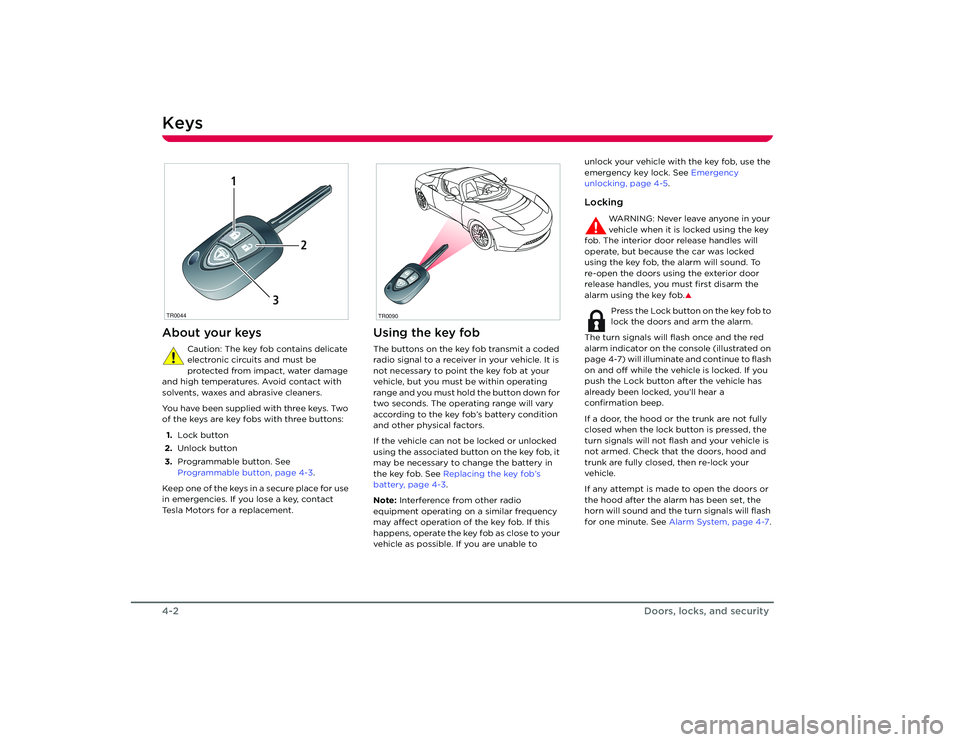
You have been supplied with three keys. Two
of the keys are key fobs with three buttons:
1. Lock button
2. Unlock button
3. Programmable button. See
Programmable button, page 4-3 .
Keep one of the keys in a secure place for use
in emergencies. If you lose a key, contact
Tesla Motors for a replacement.
Using the key fobThe buttons on the key fob transmit a coded
radio signal to a receiver in your vehicle. It is
not necessary to point the key fob at your
vehicle, but you must be within operating
range and you must hold the button down for
two seconds. The operating range will vary
according to the key fob’s battery condition
and other physical factors.
If the vehicle can not be locked or unlocked
using the associated button on the key fob, it
may be necessary to change the battery in
the key fob. See Replacing the key fob’s
battery, page 4-3 .
Note: Interference from other radio
equipment operating on a similar frequency
may affect operation of the key fob. If this
happens, operate the key fob as close to your
vehicle as possible. If you are unable to unlock your vehicle with the key fob, use the
emergency key lock. See
Emergency
unlocking, page 4-5 .
Locking
WARNING: Never leave anyone in your
vehicle when it is locked using the key
fob. The interior door release handles will
operate, but because the car was locked
using the key fob, the alarm will sound. To
re-open the doors using the exterior door
release handles, you must first disarm the
alarm using the key fob.
S
Press the Lock button on the key fob to
lock the doors and arm the alarm.
The turn signals will flash once and the red
alarm indicator on the console (illustrated on
page 4-7) will illuminate and continue to flash
on and off while the vehicle is locked. If you
push the Lock button after the vehicle has
already been locked, you’ll hear a
confirmation beep.
If a door, the hood or the trunk are not fully
closed when the lock button is pressed, the
turn signals will not flash and your vehicle is
not armed. Check that the doors, hood and
trunk are fully closed, then re-lock your
vehicle.
If any attempt is made to open the doors or
the hood after the alarm has been set, the
horn will sound and the turn signals will flash
for one minute. See Alarm System, page 4-7 .
TR0044
1
2
3
TR0090
Roadster OHB.book Page 2 Th ursday, October 2, 2008 8:59 AM
Page 24 of 115
Keys
4-3
Doors, locks, and security
Unlocking
Press the Unlock button on the key fob
to unlock the doors and disarm the
alarm.
The turn signals flash twice and the red alarm
indicator on the console extinguishes.
Note: If neither door or trunk are opened
within one minute, the doors will
automatically re-lock and the alarm will arm.
Programmable button
This button can be programmed to
perform one of the following functions:
• Alarm
The horn sounds and the exterior lights
flash for one minute. Press again to cancel
the alarm.
• Trunk release
Opens the trunk.
• Open or close a HomeLink
® device
Operates devices such as a garage door
or gate.
To program this button, use the Touch
Screen. Refer to the Touch Screen Users
Manual, provided in your owners package.
To activate the programmed function, press
and hold the button for two seconds.
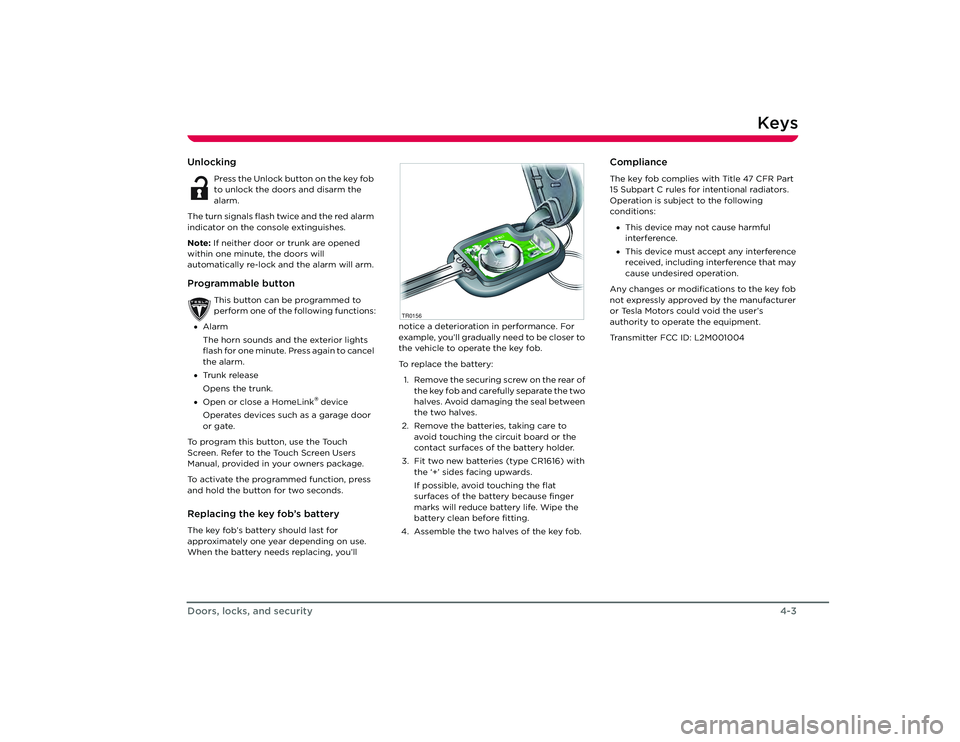
Replacing the key fob’s batteryThe key fob’s battery should last for
approximately one year depending on use.
When the battery needs replacing, you’ll notice a deterioration in performance. For
example, you’ll gradually need to be closer to
the vehicle to operate the key fob.
To replace the battery:
1. Remove the securing screw on the rear of the key fob and carefully separate the two
halves. Avoid damaging the seal between
the two halves.
2. Remove the batteries, taking care to avoid touching the circuit board or the
contact surfaces of the battery holder.
3. Fit two new batteries (type CR1616) with the ‘+’ sides facing upwards.
If possible, avoid touching the flat
surfaces of the battery because finger
marks will reduce battery life. Wipe the
battery clean before fitting.
4. Assemble the two halves of the key fob.
ComplianceThe key fob complies with Title 47 CFR Part
15 Subpart C rules for intentional radiators.
Operation is subject to the following
conditions:
• This device may not cause harmful
interference.
• This device must accept any interference
received, including interference that may
cause undesired operation.
Any changes or modifications to the key fob
not expressly approved by the manufacturer
or Tesla Motors could void the user’s
authority to operate the equipment.
Transmitter FCC ID: L2M001004
TR0156
Roadster OHB.book Page 3 Th ursday, October 2, 2008 8:59 AM
Page 25 of 115
Doors4-4
Doors, locks, and security
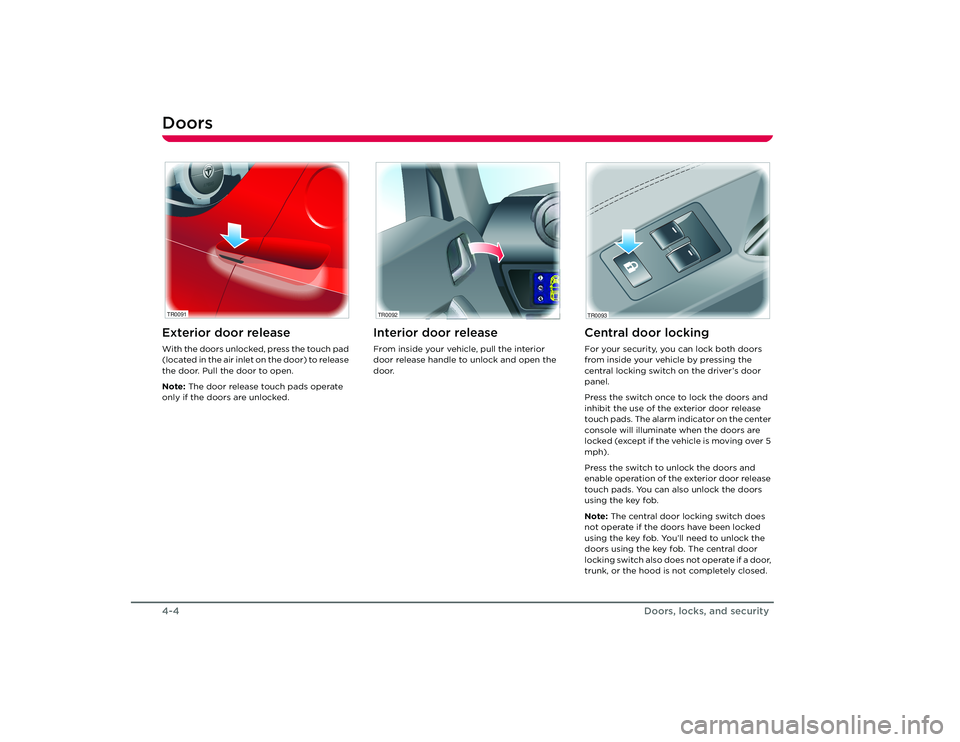
DoorsExterior door releaseWith the doors unlocked, press the touch pad
(located in the air inlet on the door) to release
the door. Pull the door to open.
Note: The door release touch pads operate
only if the doors are unlocked.
Interior door releaseFrom inside your vehicle, pull the interior
door release handle to unlock and open the
door.
Central door lockingFor your security, you can lock both doors
from inside your vehicle by pressing the
central locking switch on the driver’s door
panel.
Press the switch once to lock the doors and
inhibit the use of the exterior door release
touch pads. The alarm indicator on the center
console will illuminate when the doors are
locked (except if the vehicle is moving over 5
mph).
Press the switch to unlock the doors and
enable operation of the exterior door release
touch pads. You can also unlock the doors
using the key fob.
Note: The central door locking switch does
not operate if the doors have been locked
using the key fob. You’ll need to unlock the
doors using the key fob. The central door
locking switch also does not operate if a door,
trunk, or the hood is not completely closed.
TR0091
TR0092
TR0093
Roadster OHB.book Page 4 Th ursday, October 2, 2008 8:59 AM