steering TESLA ROADSTER 2008 User Guide
[x] Cancel search | Manufacturer: TESLA, Model Year: 2008, Model line: ROADSTER, Model: TESLA ROADSTER 2008Pages: 115, PDF Size: 46.35 MB
Page 50 of 115
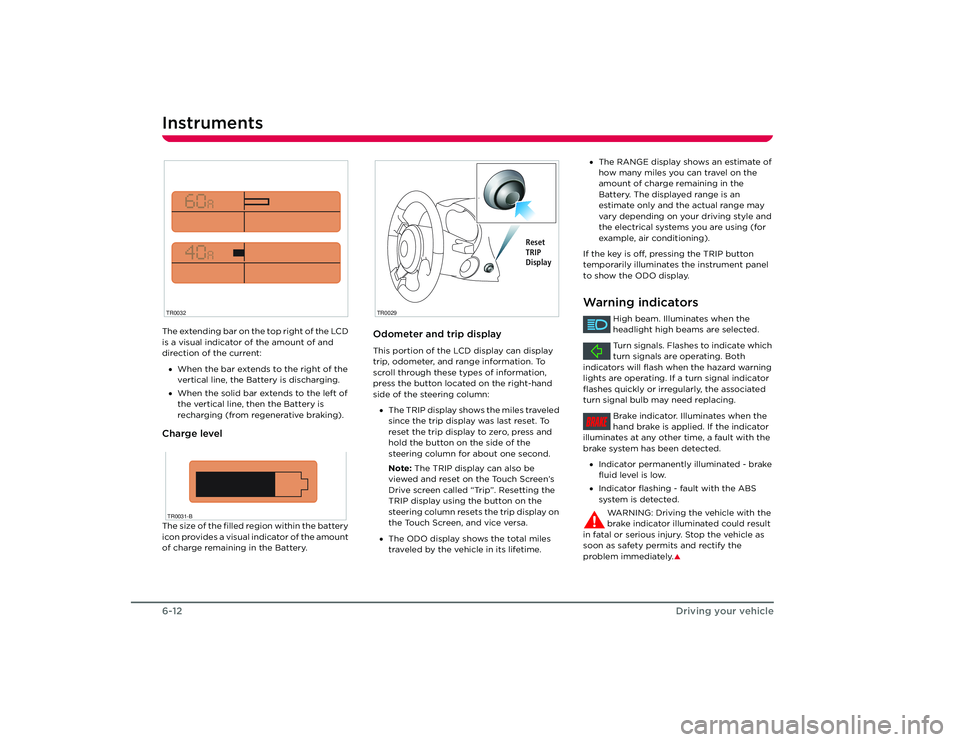
Instruments6-12Driving your vehicleThe extending bar on the top right of the LCD
is a visual indicator of the amount of and
direction of the current:
• When the bar extends to the right of the
vertical line, the Battery is discharging.
• When the solid bar extends to the left of
the vertical line, then the Battery is
recharging (from regenerative braking).Charge levelThe size of the filled region within the battery
icon provides a visual indicator of the amount
of charge remaining in the Battery.
Odometer and trip displayThis portion of the LCD display can display
trip, odometer, and range information. To
scroll through these types of information,
press the button located on the right-hand
side of the steering column:
• The TRIP display shows the miles traveled
since the trip display was last reset. To
reset the trip display to zero, press and
hold the button on the side of the
steering column for about one second.
Note: The TRIP display can also be
viewed and reset on the Touch Screen’s
Drive screen called “Trip”. Resetting the
TRIP display using the button on the
steering column resets the trip display on
the Touch Screen, and vice versa.
• The ODO display shows the total miles
traveled by the vehicle in its lifetime.
TR0032TR0031-B
TR0029
Reset
TRIP
Display
•The RANGE display shows an estimate of
how many miles you can travel on the
amount of charge remaining in the
Battery. The displayed range is an
estimate only and the actual range may
vary depending on your driving style and
the electrical systems you are using (for
example, air conditioning).
If the key is off, pressing the TRIP button
temporarily illuminates the instrument panel
to show the ODO display.Warning indicators
High beam. Illuminates when the
headlight high beams are selected.
Turn signals. Flashes to indicate which
turn signals are operating. Both
indicators will flash when the hazard warning
lights are operating. If a turn signal indicator
flashes quickly or irregularly, the associated
turn signal bulb may need replacing.
Brake indicator. Illuminates when the
hand brake is applied. If the indicator
illuminates at any other time, a fault with the
brake system has been detected.
• Indicator permanently illuminated - brake
fluid level is low.
• Indicator flashing - fault with the ABS
system is detected.
WARNING: Driving the vehicle with the
brake indicator illuminated could result
in fatal or serious injury. Stop the vehicle as
soon as safety permits and rectify the
problem immediately.
S
BRAKE
Roadster OHB.book Page 12 Thursday, October 2, 2008 8:59 AM
Page 71 of 115
Maintenance
9-3
Maintenance and care
TR0043
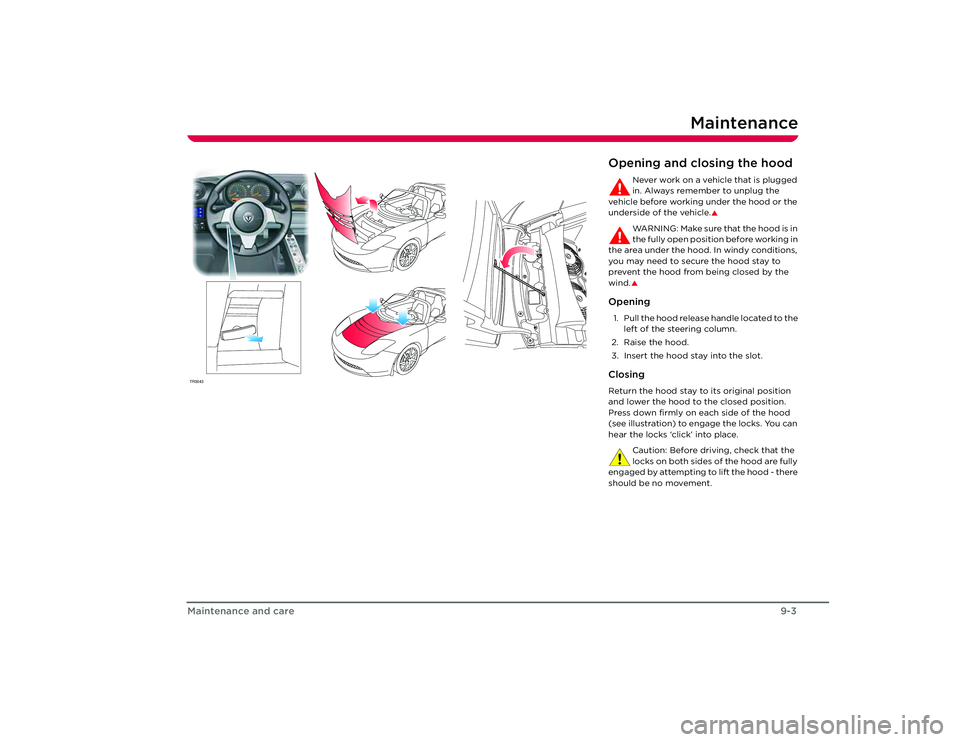
Opening and closing the hood
Never work on a vehicle that is plugged
in. Always remember to unplug the
vehicle before working under the hood or the
underside of the vehicle.
S
WA R N I N G : M a ke s u re t h a t t h e h o o d i s i n
the fully open position before working in
the area under the hood. In windy conditions,
you may need to secure the hood stay to
prevent the hood from being closed by the
wind.S
Opening1. Pull the hood release handle located to the left of the steering column.
2. Raise the hood.
3. Insert the hood stay into the slot.ClosingReturn the hood stay to its original position
and lower the hood to the closed position.
Press down firmly on ea ch side of the hood
(see illustration) to engage the locks. You can
hear the locks ‘click’ into place.
Caution: Before driving, check that the
locks on both sides of the hood are fully
engaged by attempting to lift the hood - there
should be no movement.
Roadster OHB.book Page 3 Th ursday, October 2, 2008 8:59 AM
Page 90 of 115
Vehicle recovery10-14
Roadside emergencies
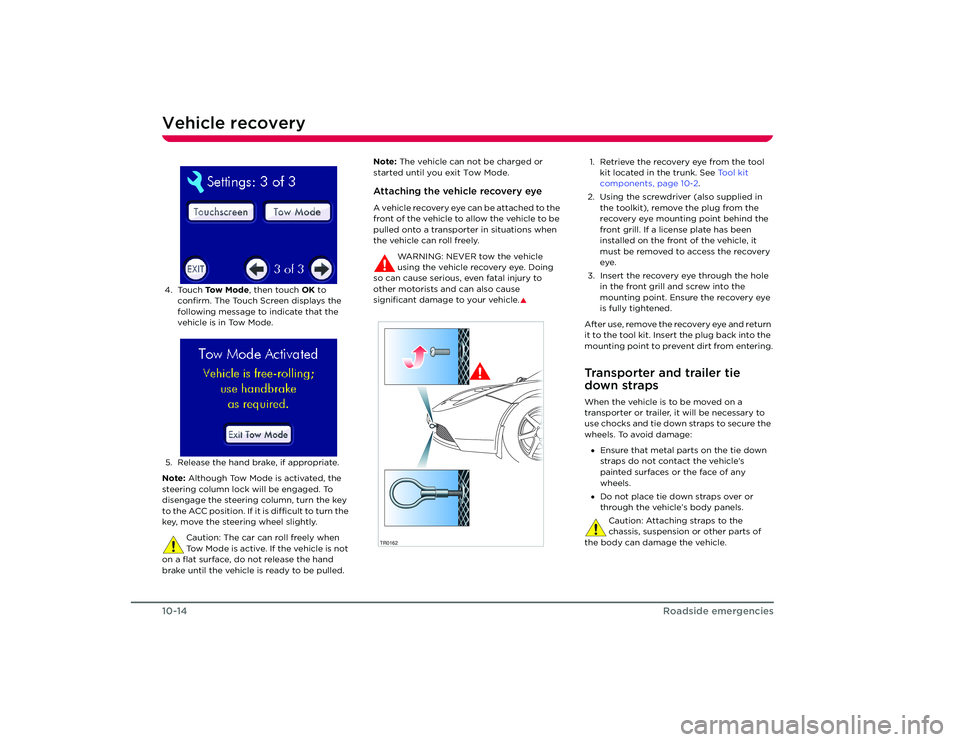
4. Touch To w M o d e , then touch OK to
confirm. The Touch Screen displays the
following message to indicate that the
vehicle is in Tow Mode.
5. Release the hand brake, if appropriate.
Note: Although Tow Mode is activated, the
steering column lock will be engaged. To
disengage the steering column, turn the key
to the ACC position. If it is difficult to turn the
key, move the steering wheel slightly.
Caution: The car can roll freely when
Tow Mode is active. If the vehicle is not
on a flat surface, do not release the hand
brake until the vehicle is ready to be pulled. Note:
The vehicle can not be charged or
started until you exit Tow Mode.
Attaching the vehicle recovery eyeA vehicle recovery eye can be attached to the
front of the vehicle to allow the vehicle to be
pulled onto a transporter in situations when
the vehicle can roll freely.
WARNING: NEVER tow the vehicle
using the vehicle recovery eye. Doing
so can cause serious, even fatal injury to
other motorists and can also cause
significant damage to your vehicle.
S
1. Retrieve the recovery eye from the tool kit located in the trunk. See Tool kit
components, page 10-2.
2. Using the screwdriver (also supplied in the toolkit), remove the plug from the
recovery eye mounting point behind the
front grill. If a license plate has been
installed on the front of the vehicle, it
must be removed to access the recovery
eye.
3. Insert the recovery eye through the hole in the front grill and screw into the
mounting point. Ensure the recovery eye
is fully tightened.
After use, remove the recovery eye and return
it to the tool kit. Insert the plug back into the
mounting point to prevent dirt from entering.Transporter and trailer tie
down strapsWhen the vehicle is to be moved on a
transporter or trailer, it will be necessary to
use chocks and tie down straps to secure the
wheels. To avoid damage: • Ensure that metal parts on the tie down
straps do not contact the vehicle’s
painted surfaces or the face of any
wheels.
• Do not place tie down straps over or
through the vehicle’s body panels.
Caution: Attaching straps to the
chassis, suspension or other parts of
the body can damage the vehicle.
TR0162
Roadster OHB.book Page 14 Thursday, October 2, 2008 8:59 AM
Page 91 of 115
11-1
Technical specifications
Vehicle identificationVehicle Identification Number 11-2
Safety compliance certification label 1 1-3
Wheels and tires Specifications and tire pressures 11-4
Tire markings 11-5
Tire placard/label 11-7
Uniform tire quality grading 11-7
Tire care 11-8
Tire Pressure Monitoring System 11 -11
Dynamic tire pressure monitoring 11-12
Wheels and tires glossary 11-13
Approved fluids and capacities Fluid specifications 11-14
Capacities 11-14
Vehicle dimensions and weights Exterior dimensions 11-15
Vehicle weights 11-16
Subsystem specifications Motor 11-17
Transmission 11-17
Steering 11-17
Front suspension 11-18
Rear suspension 11-18
Brakes 11-18
Electrical 11-19
Battery 11-19
Roadster OHB.book Page 1 Thursday, October 2, 2008 8:59 AM
Page 107 of 115
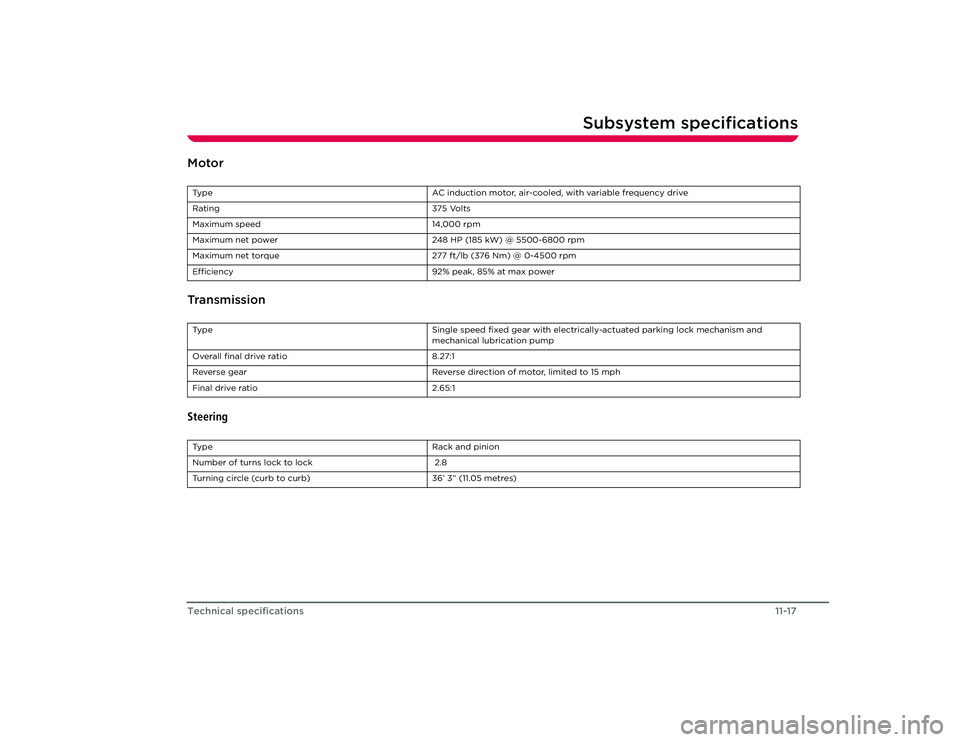
Subsystem specifications
11-17
Technical specifications
Subsystem specificationsMotor
TransmissionSteeringType AC induction motor, air-cooled, with variable frequency drive
Rating 375 Volts
Maximum speed 14,000 rpm
Maximum net power 248 HP (185 kW) @ 5500-6800 rpm
Maximum net torque 277 ft/lb (376 Nm) @ 0-4500 rpm
Efficiency 92% peak, 85% at max powerType Single speed fixed gear with electrically-actuated parking lock mechanism and
mechanical lubrication pump
Overall final drive ratio 8.27:1
Reverse gear Reverse direction of motor, limited to 15 mph
Final drive ratio 2.65:1TypeRack and pinion
Number of turns lock to lock 2.8
Turning circle (curb to curb) 36’ 3” (11.05 metres)
Roadster OHB.book Page 17 Thursday, October 2, 2008 8:59 AM
Page 113 of 115
Index
Steering ........................................................ 11-17
Tires .................................................................11-4
Transmission............................................... 11-17
Wheels ............................................................11-4
Standard charge setting ................................. 5-4
Starter switch ...................................................... 6-2
Starting the vehicle ........................................... 6-3
Steering column lock........................................ 6-2
Steering specifications .................................. 11-17
Stereo system ...................................................... 8-1
Storage charge setting .................................... 5-4
Storing your vehicle .......................................... 5-3
Sun visors .............................................................. 7-7
Supplementary Restraint System (SRS) ... 3-6
TTemperature control ........................................ 7-4
Theft prevention................................................. 4-7
Tie Down Straps .............................................. 10-14
Tire Identification Number (TIN) ................. 11-6
Tire placard/label............................................... 11-7
Tire pressure checking..................................... 11-9
Tire Pressure Monitoring System Malfunction .................................................. 11-11
Operation...................................................... 11-11
Tire repair............................................................ 10-4
Tire sealant replacement .............................. 10-5
Tires......................................................................... 11-5 Care.................................................................. 11-8
Chains............................................................ 11-10
Changing pressure settings................... 11-11
Degradation ................................................ 11-10
Directional ................................................... 11-10
Grading ........................................................... 11-7
Markings ......................................................... 11-5
Pressure monitoring ................................. 11-11
Pressures.............................................. 11-4, 11-8
Quality ............................................................ 11-7 Replacement of ......................................... 11-10
Replacing a tire sensor ............................ 11-11
Specification ................................................ 11-4
Tire sealant .................................................. 10-4
Wear ............................................................... 11-9
Winter ...........................................................11-10
Winter specification.................................. 11-4
Tool kit Components ............................................... 10-2
Location........................................................ 10-2
Towing.................................................................10-13
TPMS ...................................................................... 11-11
Traction control .................................................. 6-6
Traction control indicator light................... 6-12
Transmission ........................................................ 6-3
Transmission specifications ......................... 11-17
Transporting......................................................10-13
Trip display ......................................................... 6-12
Trunk Interior release handle ..............................4-6
Light replacement .................................. 10-10
Opening and closing .................................4-6
Turn signal indicator light ............................. 6-12
Turn signals .......................................................... 6-8
UUniform tire quality grading ..........................11-7
Unlocking your vehicle..................................... 4-2
USB port ................................................................ 7-7VValet mode .......................................................... 4-11
Vehicle Identification Number (VIN) ..........11-2
Vehicle loading....................................................11-7
Vehicle recovery eye .................................... 10-14
Ventilation............................................................. 7-5
VIN (Vehicle Identification Number) ..........11-2 Voltage warning .................................................. 1-2
WWarning indicator
ABS ...................................................................6-6
Airbags ............................................................ 3-7
Anti-theft alarm ...........................................4-7
Brake ................................................................6-5
Cruise control ...............................................6-9
Fault ............................................................... 6-12
Frost ............................................................... 6-12
Headlights ...................................................... 6-7
Seat belt .........................................................3-4
Traction control ...........................................6-6
Turn signals ...................................................6-8
Warning light summary ................................. 6-12
Washer fluid .........................................................9-5
Washing the soft-top ........................................ 9-7
Washing the vehicle .......................................... 9-7
Weekly checks.....................................................9-2
Weights ................................................................ 11-16
Wheel nut tightening ...................................... 10-6
Wheel removal .................................................. 10-6
Wheel replacement .........................................11-10
Wheel specifications ........................................ 11-4
Wheelbase .......................................................... 11-15
Windows ................................................................ 7-2
Windshield defrosting ...................................... 7-5
Windshield washer
Fluid top-up ..................................................9-5
Jets ...................................................................9-6
Operation .......................................................6-8
Windshield wiper Checking blade ............................................9-6
Operation .......................................................6-8
Winter tires .......................................................... 11-4
Wiper.......................................................................6-8
Wiper blade inspection ....................................9-6
Part Number 02-003729-00 Rev AA
Roadster OHB.book Page 4 Th ursday, October 2, 2008 8:59 AM