warning TESLA ROADSTER 2008 User Guide
[x] Cancel search | Manufacturer: TESLA, Model Year: 2008, Model line: ROADSTER, Model: TESLA ROADSTER 2008Pages: 115, PDF Size: 46.35 MB
Page 21 of 115
Airbag system3-8
Seating and safety restraints
Airbag service information
WARNING: The disposal of used airbag
units is subject to stringent regulations,
and should only be handled by Tesla
Motors.S
For your safety, a Tesla Motors technician,
who is familiar with your vehicle, must
perform the following tasks:
• Removal, replacement, repair, or
modification, of any wiring or component
in the vicinity of airbag system
components, including the steering
wheel, steering column, dashboard and
instrument panel.
• Modification to the front or side of your
vehicle, including the bumper and
chassis.
In addition, always seek the assistance of
Te s l a M o t o r s i f : • An airbag inflates
• A pre-tensioner activates
• The front or side of your vehicle is
damaged, even if the airbag has not
inflated
• Any part of an airbag module cover
shows signs of cracking or damageRoadster OHB.book Page 8 Th ursday, October 2, 2008 8:59 AM
Page 23 of 115
Keys4-2
Doors, locks, and security
Doors, Locks, and Security
KeysAbout your keys
Caution: The key fob contains delicate
electronic circuits and must be
protected from impact, water damage
and high temperatures. Avoid contact with
solvents, waxes and abrasive cleaners.
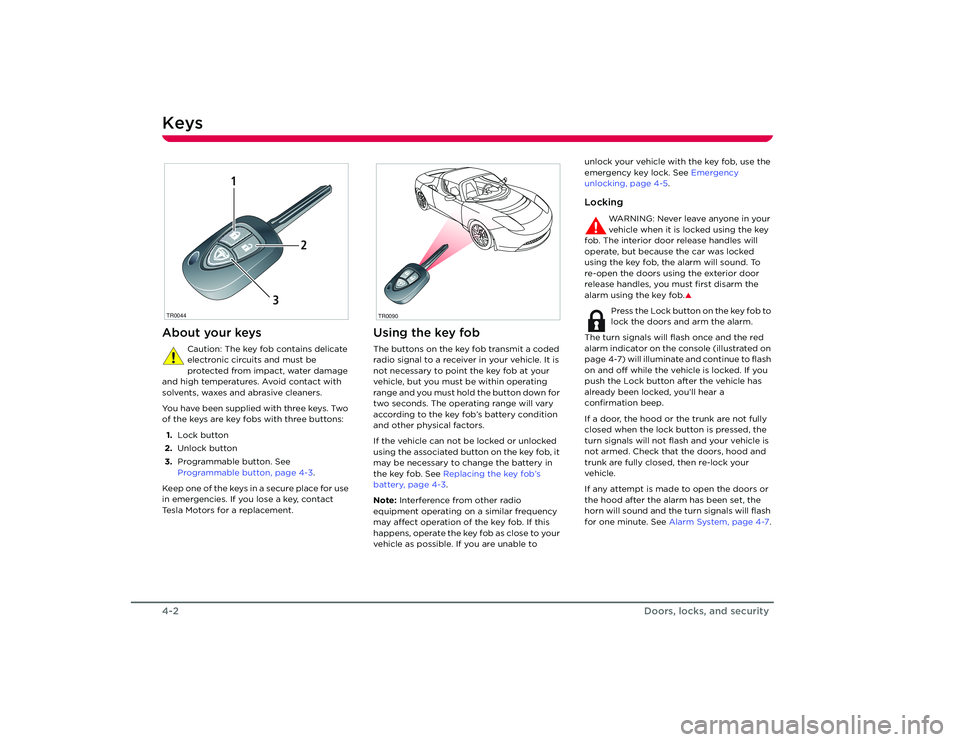
You have been supplied with three keys. Two
of the keys are key fobs with three buttons:
1. Lock button
2. Unlock button
3. Programmable button. See
Programmable button, page 4-3 .
Keep one of the keys in a secure place for use
in emergencies. If you lose a key, contact
Tesla Motors for a replacement.
Using the key fobThe buttons on the key fob transmit a coded
radio signal to a receiver in your vehicle. It is
not necessary to point the key fob at your
vehicle, but you must be within operating
range and you must hold the button down for
two seconds. The operating range will vary
according to the key fob’s battery condition
and other physical factors.
If the vehicle can not be locked or unlocked
using the associated button on the key fob, it
may be necessary to change the battery in
the key fob. See Replacing the key fob’s
battery, page 4-3 .
Note: Interference from other radio
equipment operating on a similar frequency
may affect operation of the key fob. If this
happens, operate the key fob as close to your
vehicle as possible. If you are unable to unlock your vehicle with the key fob, use the
emergency key lock. See
Emergency
unlocking, page 4-5 .
Locking
WARNING: Never leave anyone in your
vehicle when it is locked using the key
fob. The interior door release handles will
operate, but because the car was locked
using the key fob, the alarm will sound. To
re-open the doors using the exterior door
release handles, you must first disarm the
alarm using the key fob.
S
Press the Lock button on the key fob to
lock the doors and arm the alarm.
The turn signals will flash once and the red
alarm indicator on the console (illustrated on
page 4-7) will illuminate and continue to flash
on and off while the vehicle is locked. If you
push the Lock button after the vehicle has
already been locked, you’ll hear a
confirmation beep.
If a door, the hood or the trunk are not fully
closed when the lock button is pressed, the
turn signals will not flash and your vehicle is
not armed. Check that the doors, hood and
trunk are fully closed, then re-lock your
vehicle.
If any attempt is made to open the doors or
the hood after the alarm has been set, the
horn will sound and the turn signals will flash
for one minute. See Alarm System, page 4-7 .
TR0044
1
2
3
TR0090
Roadster OHB.book Page 2 Th ursday, October 2, 2008 8:59 AM
Page 34 of 115
General information about charging5-2
Charging your vehicle
Charging your vehicle
General information about chargingImportant!
Caution: If the Battery’s charge level
falls to 0%, it must be plugged in
immediately. Failure to do so can
permanently damage the Battery and this
damage is not covered by the New Vehicle
Limited Warranty. Also, if you allow the
Battery to fall to a critically low level it may
not be possible to charge the vehicle. If you
are unable to charge the vehicle, contact
Te s l a M o t o r s .
WARNING: The Battery has no parts
that an owner, or a non-Tesla authorized
technician can service. Under no
circumstances should you open or tamper
with the Battery. Always contact Tesla Motors
to arrange for Battery servicing
.S
At the end of its service life, the Battery
will be recycled. Contact Tesla Motors
for recycling arrangements.
The BatteryThe Tesla Roadster’s Battery provides power
to the motor as well as all the other electrical
systems on the vehicle, such as lights,
instruments, audio system, etc.
The Battery is one of the largest and most
advanced battery packs in the world,
consisting of several thousand lithium-ion
battery cells that store enough energy for the
vehicle to travel over 200 miles without
recharging.
Note: Actual range will vary based on driving
style. The vehicle consumes more energy if
you are driving aggressively, driving up hills, or are using more resources such as air
conditioning. Also, over time, the Battery
experiences a gradual loss of capacity,
inherent in all lithium-ion batteries. So, as
your vehicle ages, the ca
pacity of the Battery
declines.
As you drive your vehicle, the level of charge
in the Battery is depleted and you’ll need to
recharge it. The Roadster’s built-in charging
system allows you to easily recharge it by
connecting an electrical power supply to the
vehicle’s charging port.
Designed to be plugged inThe Tesla Roadster is de signed to be plugged
in when not in use. This ensures that the next
time you use the vehicle, it is fully charged
and ready to go. There is no advantage to
waiting until battery level is low before
charging. In fact, by plugging it in every night,
you eliminate the risk of damage that could
be caused by over-discharging the battery.
When plugged in, the vehicle takes care of
itself, preserving battery life by managing the
charge level and keeping the Battery at an
ideal temperature. The vehicle wakes up
every 24 hours and, if needed, automatically
initiates the charging process to keep the
Battery at an optimum charge level.
If you’re not driving your vehicle every day,
see Storing your vehicle, page 5-3 .
Leaving the vehicle unpluggedEven when you’re not driving the vehicle, the
Battery will slowly lose its charge. Therefore,
when you’re not using the vehicle, you should
leave it plugged in. However, situations may
arise in which you must leave the vehicle
unplugged for an extended time (for
example, at an airport when travelling for a
couple of weeks). If this is the case, it is your
responsibility to ensure that the Battery does
not become fully depleted. Charge the
Battery to a maximum level before leaving it,
and keep in mind that when the vehicle is left
unplugged, the Battery’s charge level will
drop to a level of approximately 50% within
the first week, and then decline at a rate of
approximately 5% each subsequent week.
Plan accordingly to ensure that the Battery
never approaches a level of 0%.
Over-discharge can permanently damage the
Battery.
If for some reason, you are unable to keep the
vehicle plugged in when it is not being used,
it is up to you to preserve battery life by
paying attention to the charge level and the
temperature (see bulleted list below). If
leaving your vehicle unplugged for more than
24 hours, follow these do’s and don’ts to
avoid prematurely decreasing the life of your
vehicle’s Battery:
• DO leave the vehicle plugged in whenever
possible.
• DO maintain at least a 15% charge level in
the Battery if leaving it unplugged for
more than 48 hours.
Roadster OHB.book Page 2 Th ursday, October 2, 2008 8:59 AM
Page 39 of 115
6-1
Driving your vehicle
Driving basicsKey positions 6-2
Steering column lock 6-2
Starting the vehicle 6-3
Selecting gears 6-3
Driving tips 6-3
Hand brake 6-5
Braking 6-5
Anti-lock Braking System (ABS) 6-5
Traction control 6-6
Switches and controls Exterior lights 6-7
Turn signals 6-8
Windshield wiper and washer 6-8
Cruise control 6-9
Hazard warning 6-10
Horn 6-10
Instruments LCD panel 6-11
Warning indicators 6-12
Gear position indicators 6-13
Instrument panel lighting 6-14
Roadster OHB.book Page 1 Thursday, October 2, 2008 8:59 AM
Page 40 of 115
Driving basics6-2
Driving your vehicle
Driving your vehicle
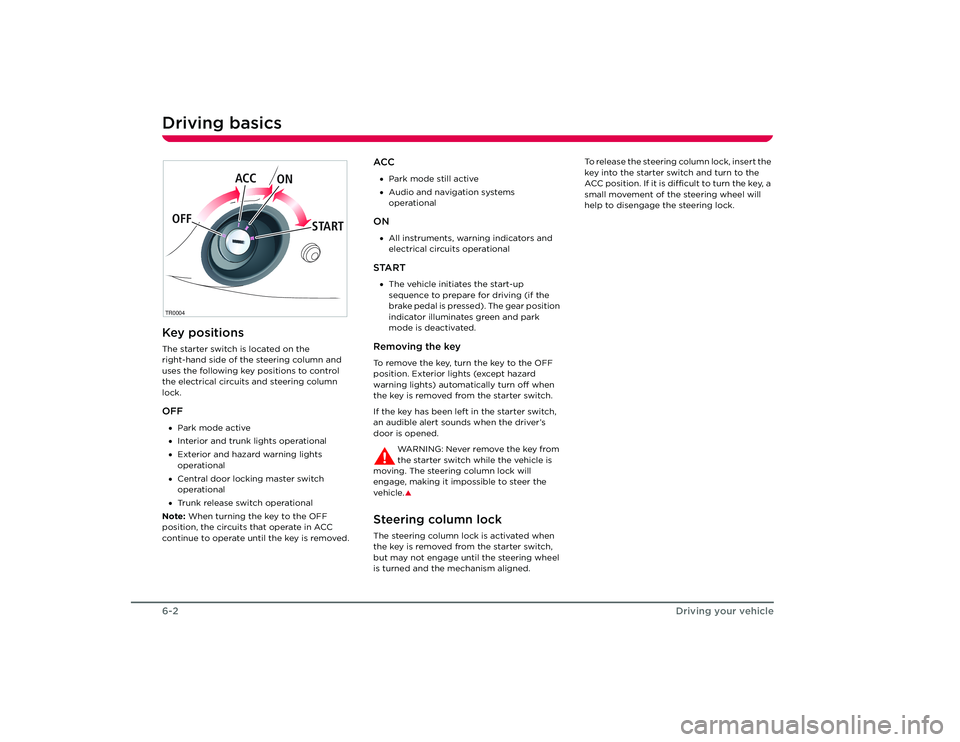
Driving basicsKey positionsThe starter switch is located on the
right-hand side of the steering column and
uses the following key positions to control
the electrical circuits and steering column
lock.OFF•Park mode active
• Interior and trunk lights operational
• Exterior and hazard warning lights
operational
• Central door locking master switch
operational
• Trunk release switch operational
Note: When turning the key to the OFF
position, the circuits that operate in ACC
continue to operate until the key is removed.
ACC• Park mode still active
• Audio and navigation systems
operationalON•All instruments, warning indicators and
electrical circuits operationalSTART•The vehicle initiates the start-up
sequence to prepare for driving (if the
brake pedal is pressed). The gear position
indicator illuminates green and park
mode is deactivated.Removing the keyTo remove the key, turn the key to the OFF
position. Exterior lights (except hazard
warning lights) automatically turn off when
the key is removed from the starter switch.
If the key has been left in the starter switch,
an audible alert sounds when the driver’s
door is opened.
WARNING: Never remove the key from
the starter switch while the vehicle is
moving. The steering column lock will
engage, making it impossible to steer the
vehicle.
S
Steering column lockThe steering column lock is activated when
the key is removed from the starter switch,
but may not engage until the steering wheel
is turned and the mechanism aligned. To release the steering column lock, insert the
key into the starter switch and turn to the
ACC position. If it is difficult to turn the key, a
small movement of the steering wheel will
help to disengage the steering lock.
TR0004OFF
ACC
ON
STARTRoadster OHB.book Page 2 Th ursday, October 2, 2008 8:59 AM
Page 43 of 115
Driving basics
6-5
Driving your vehicle
Hand brake
WARNING: Do not apply the hand
brake when the vehicle is moving. This
could result in a loss of control and may
damage the rear brakes.
S
The hand brake operates on the rear wheels
only, and is totally independent of the foot
operated hydraulic brake system.
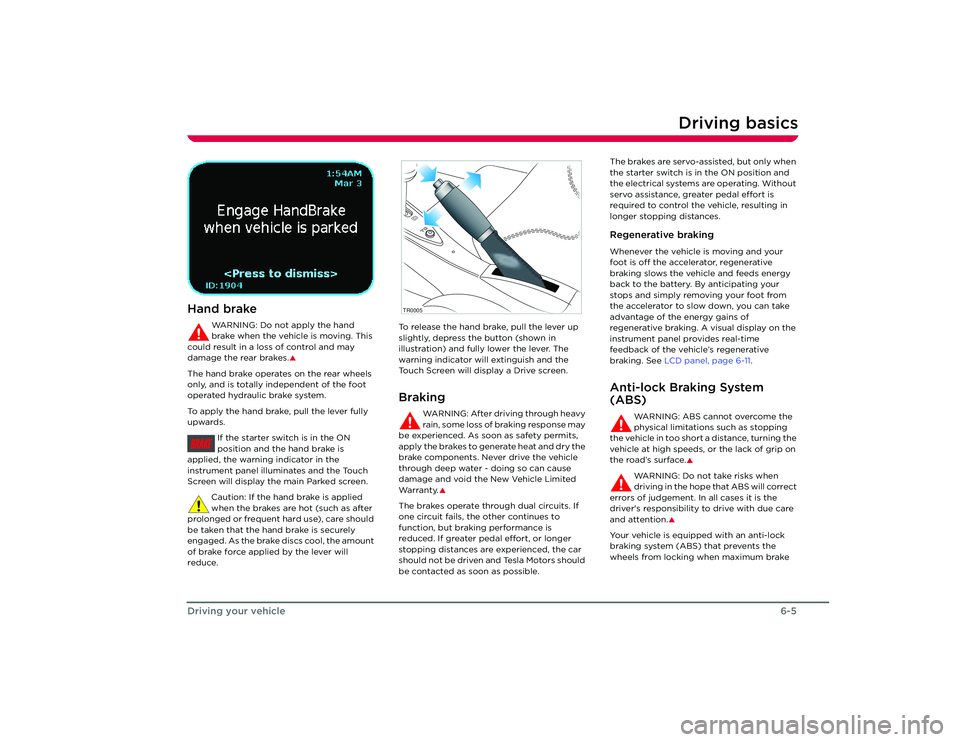
To apply the hand brake, pull the lever fully
upwards.
If the starter switch is in the ON
position and the hand brake is
applied, the warnin g indicator in the
instrument panel illuminates and the Touch
Screen will display the main Parked screen.
Caution: If the hand brake is applied
when the brakes are hot (such as after
prolonged or frequent hard use), care should
be taken that the hand brake is securely
engaged. As the brake discs cool, the amount
of brake force applied by the lever will
reduce. To release the hand brake, pull the lever up
slightly, depress the button (shown in
illustration) and fully lower the lever. The
warning indicator will extinguish and the
Touch Screen will display a Drive screen.
Braking
WARNING: After driving through heavy
rain, some loss of braking response may
be experienced. As soon as safety permits,
apply the brakes to generate heat and dry the
brake components. Never drive the vehicle
through deep water - doing so can cause
damage and void the New Vehicle Limited
Wa r ra n t y.
S
The brakes operate through dual circuits. If
one circuit fails, the other continues to
function, but brakin g performance is
reduced. If greater pedal effort, or longer
stopping distances are experienced, the car
should not be driven and Tesla Motors should
be contacted as soon as possible. The brakes are servo-assisted, but only when
the starter switch is in the ON position and
the electrical systems are operating. Without
servo assistance, greater pedal effort is
required to control the vehicle, resulting in
longer stopping distances.
Regenerative brakingWhenever the vehicle is moving and your
foot is off the accelerator, regenerative
braking slows the vehicle and feeds energy
back to the battery. By anticipating your
stops and simply removing your foot from
the accelerator to slow down, you can take
advantage of the energy gains of
regenerative braking. A visual display on the
instrument panel provides real-time
feedback of the vehicle’s regenerative
braking. See
LCD panel, page 6-11 .Anti-lock Braking System
(ABS)
WARNING: ABS cannot overcome the
physical limitations such as stopping
the vehicle in too short a distance, turning the
vehicle at high speeds, or the lack of grip on
the road’s surface.
S
WARNING: Do not take risks when
driving in the hope that ABS will correct
errors of judgement. In all cases it is the
driver's responsibility to drive with due care
and attention.
S
Your vehicle is equipp ed with an anti-lock
braking system (ABS) that prevents the
wheels from locking when maximum brake
BRAKE
TR0005
Roadster OHB.book Page 5 Th ursday, October 2, 2008 8:59 AM
Page 44 of 115
Driving basics6-6
Driving your vehicle
pressure is applied. This allows you to
maintain steering control during heavy
braking on most road conditions.
During emergency braking conditions, the
ABS constantly monitors the speed of each
wheel and varies the brake pressure
according to the grip available.
The alteration of brake pressure can be felt as
a pulsing sensation through the brake pedal.
This demonstrates that ABS is operating and
is not a cause for concern. Keep firm and
steady pressure on the brake pedal while
experiencing the pulsation.Emergency braking
WARNING: DO NOT pump the foot
brake. ABS does this for you and by
pumping the foot brake yourself, you are
interfering with ABS operation which may
result in an increase in braking distance.
S
In an emergency, fully press the brake pedal
even when the road surface is slippery. ABS
will vary the braking pressure to each wheel
according to the amount of traction available.
This prevents the wheels from locking and
ensures that the vehicle stops as safely as
possible.
Note: ABS operates only when control of the
vehicle is jeopardized. It can not compensate
for driver error.ABS warning indicatorWhen the starter switch is turned to the ON
position, and also at frequent intervals while
driving, the ABS checks that all its
components are operating correctly. If a fault is detected, the warning
indicator in the instrument panel
flashes and the ABS shuts down. Contact
Tesla Motors as soon as possible.
The vehicle’s brakes remain fully operational
and are not affected by an ABS failure.
However, braking distances may increase and
wheels may lock under heavy braking.
Tra c t i o n c o n t ro l
WARNING: Traction control cannot
overcome the physical limitations of the
vehicle turning at too high a speed and
cannot prevent any accident which may
result.S
The traction control system constantly
monitors the difference in speed between the
front and rear wheels. If a loss of traction is
detected, it reduces torque to the rear wheels
to minimize wheel spin. When this happens,
you may notice the traction control warning
indicator on the instrument panel flash
quickly.
Traction control is automatically switched on
each time the starter switch is turned to the
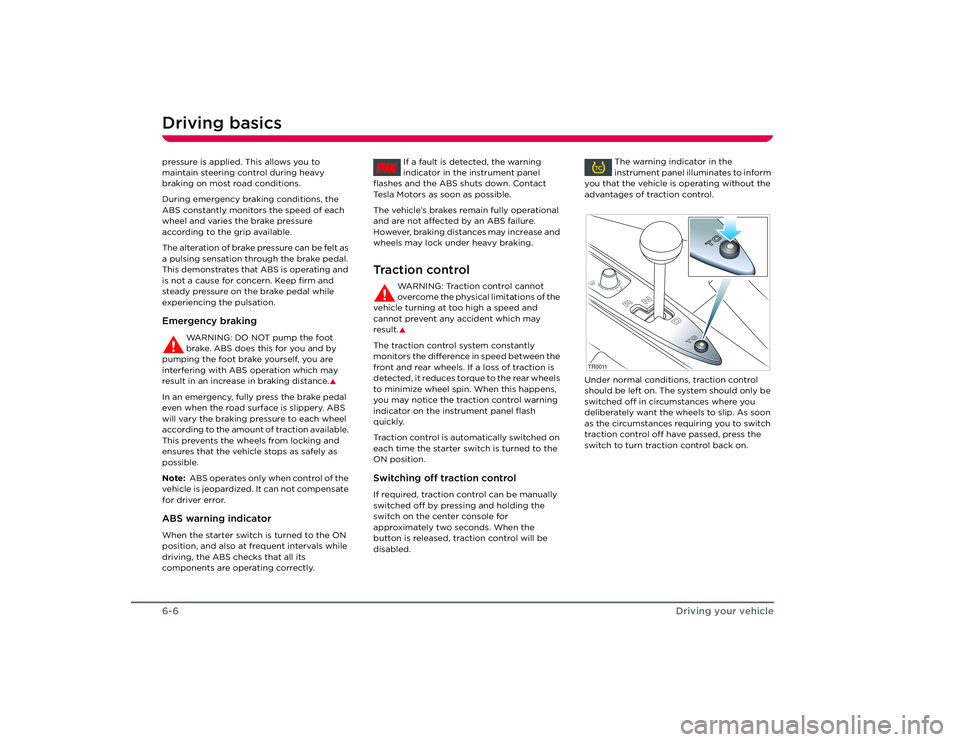
ON position.Switching off traction controlIf required, traction control can be manually
switched off by pressing and holding the
switch on the center console for
approximately two seconds. When the
button is released, traction control will be
disabled. The warning indicator in the
instrument panel illuminates to inform
you that the vehicle is operating without the
advantages of traction control.
Under normal conditions, traction control
should be left on. The system should only be
switched off in circumstances where you
deliberately want the wheels to slip. As soon
as the circumstances requiring you to switch
traction control off have passed, press the
switch to turn traction control back on.BRAKE
TC
TC T CT C
T C
T C
D
R
N
TR0011
Roadster OHB.book Page 6 Th ursday, October 2, 2008 8:59 AM
Page 45 of 115
Switches and controls
6-7
Driving your vehicle
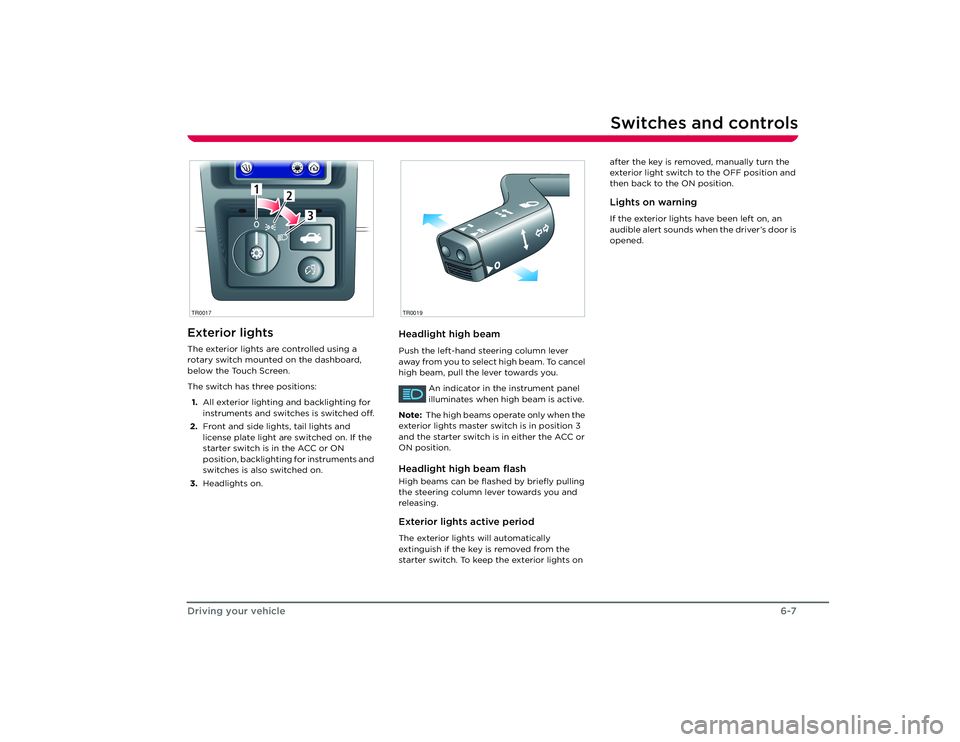
Switches and controlsExterior lightsThe exterior lights are controlled using a
rotary switch mounted on the dashboard,
below the Touch Screen.
The switch has three positions:
1. All exterior lighting and backlighting for
instruments and switches is switched off.
2. Front and side lights, tail lights and
license plate light are switched on. If the
starter switch is in the ACC or ON
position, backlighting for instruments and
switches is also switched on.
3. Headlights on.
Headlight high beamPush the left-hand steering column lever
away from you to select high beam. To cancel
high beam, pull the lever towards you.
An indicator in the instrument panel
illuminates when high beam is active.
Note: The high beams operate only when the
exterior lights master switch is in position 3
and the starter switch is in either the ACC or
ON position.Headlight high beam flashHigh beams can be flas hed by briefly pulling
the steering column lever towards you and
releasing.Exterior lights active periodThe exterior lights will automatically
extinguish if the key is removed from the
starter switch. To keep the exterior lights on after the key is removed, manually turn the
exterior light switch to the OFF position and
then back to the ON position.
Lights on warningIf the exterior lights have been left on, an
audible alert sounds when the driver’s door is
opened.
1
2
3
1
2
3
TR0017
R
O
TR0019
Roadster OHB.book Page 7 Th
ursday, October 2, 2008 8:59 AM
Page 47 of 115
Switches and controls
6-9
Driving your vehicle
Cruise control
WARNING: Only use cruise control
when conditions are favorable, on
straight, dry, open roads with light traffic.
S
The cruise control system allows you to
maintain a selected vehicle speed above
30 mph, without having to use the
accelerator pedal.
When cruise control is active, the
warning indicator in the instrument
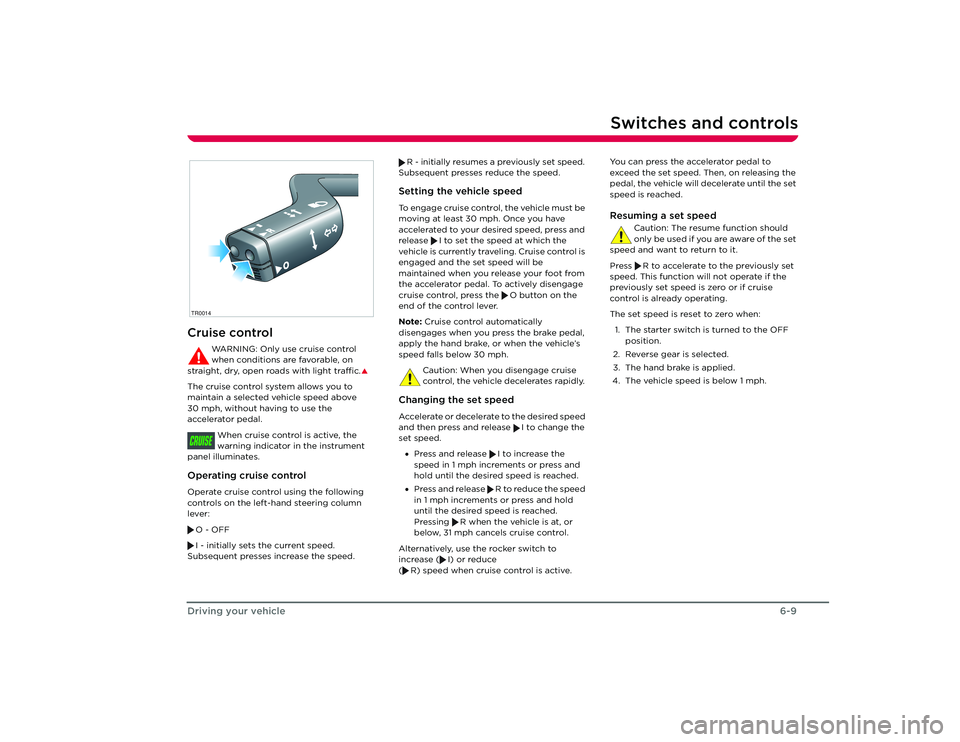
panel illuminates.Operating cruise controlOperate cruise control using the following
controls on the left-hand steering column
lever:
O - OFF
I - initially sets the current speed.
Subsequent presses increase the speed. R - initially resumes a previously set speed.
Subsequent presses reduce the speed.
Setting the vehicle speedTo engage cruise control, the vehicle must be
moving at least 30 mph. Once you have
accelerated to your desired speed, press and
release I to set the speed at which the
vehicle is currently traveling. Cruise control is
engaged and the set speed will be
maintained when you release your foot from
the accelerator pedal. To actively disengage
cruise control, press the O button on the
end of the control lever.
Note: Cruise control automatically
disengages when you press the brake pedal,
apply the hand brake, or when the vehicle’s
speed falls below 30 mph.
Caution: When you disengage cruise
control, the vehicle decelerates rapidly. Changing the set speedAccelerate or decelerate to the desired speed
and then press and release I to change the
set speed. • Press and release I to increase the
speed in 1 mph increments or press and
hold until the desired speed is reached.
• Press and release R to reduce the speed
in 1 mph increments or press and hold
until the desired speed is reached.
Pressing R when the vehicle is at, or
below, 31 mph cancels cruise control.
Alternatively, use the rocker switch to
increase ( I) or reduce
( R) speed when cruise control is active. You can press the accelerator pedal to
exceed the set speed. Then, on releasing the
pedal, the vehicle will decelerate until the set
speed is reached.
Resuming a set speed
Caution: The resume function should
only be used if you are aware of the set
speed and want to return to it.
Press R to accelerate to the previously set
speed. This function will not operate if the
previously set speed is zero or if cruise
control is already operating.
The set speed is reset to zero when:
1. The starter switch is turned to the OFF position.
2. Reverse gear is selected.
3. The hand brake is applied.
4. The vehicle speed is below 1 mph.
R
O
TR0014CRUISE
Roadster OHB.book Page 9 Th ursday, October 2, 2008 8:59 AM
Page 48 of 115
Switches and controls6-10
Driving your vehicle
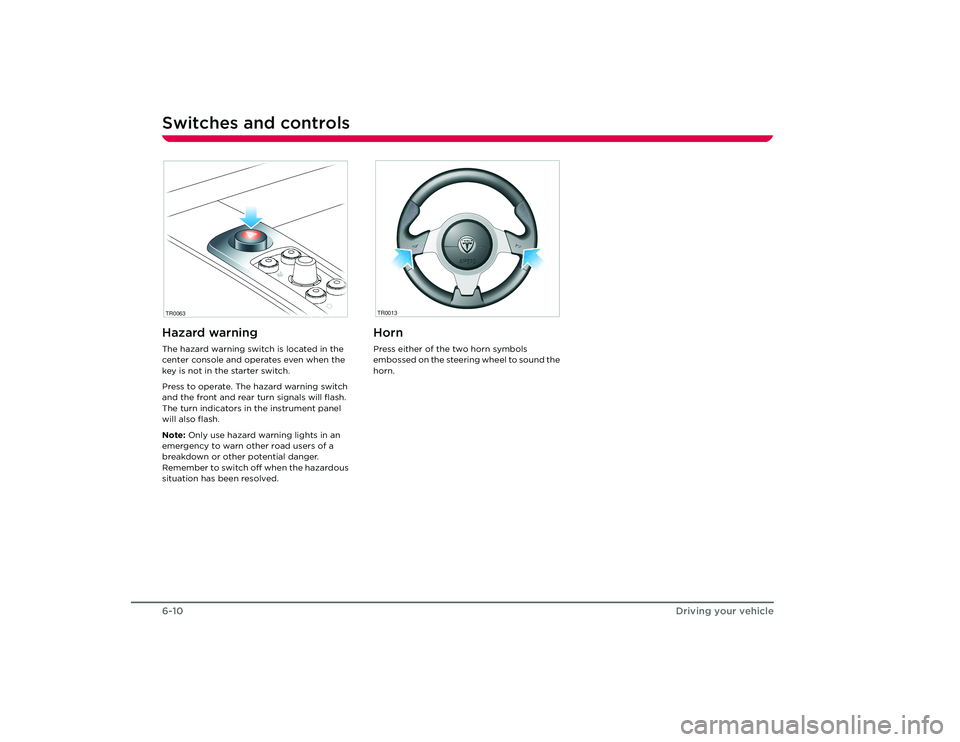
Hazard warningThe hazard warning switch is located in the
center console and operates even when the
key is not in the starter switch.
Press to operate. The hazard warning switch
and the front and rear turn signals will flash.
The turn indicators in the instrument panel
will also flash.
Note: Only use hazard warning lights in an
emergency to warn other road users of a
breakdown or other potential danger.
Remember to switch off when the hazardous
situation has been resolved.
HornPress either of the two horn symbols
embossed on the steering wheel to sound the
horn.
TR0063
TR0013
Roadster OHB.book Page 10 Thursday, October 2, 2008 8:59 AM