warning TESLA ROADSTER 2008 Owner's Manual
[x] Cancel search | Manufacturer: TESLA, Model Year: 2008, Model line: ROADSTER, Model: TESLA ROADSTER 2008Pages: 115, PDF Size: 46.35 MB
Page 50 of 115
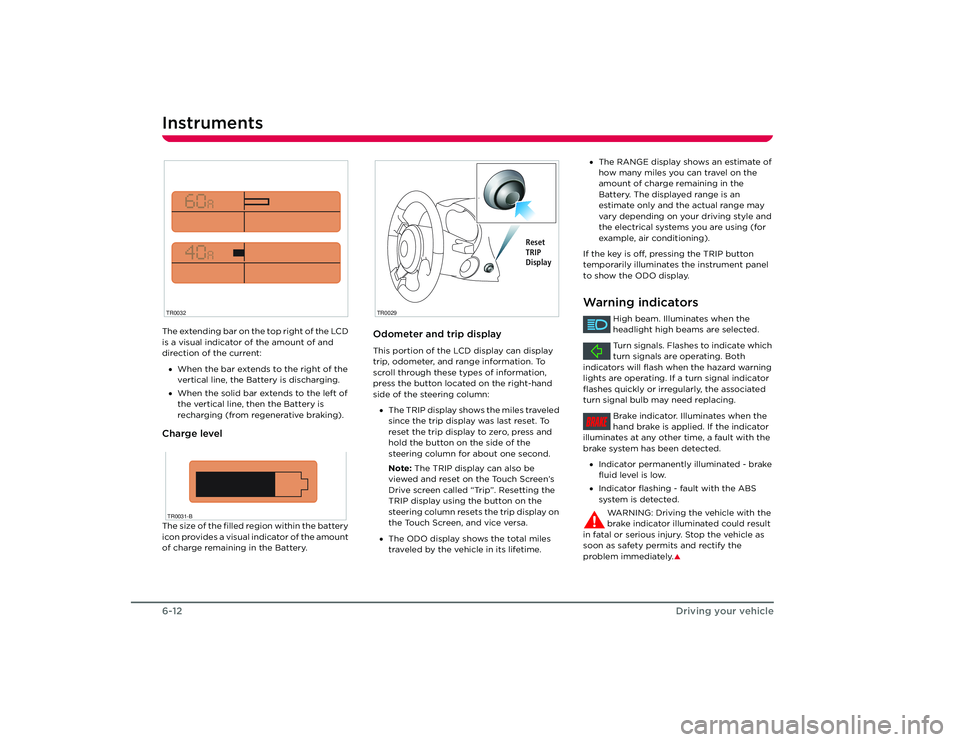
Instruments6-12Driving your vehicleThe extending bar on the top right of the LCD
is a visual indicator of the amount of and
direction of the current:
• When the bar extends to the right of the
vertical line, the Battery is discharging.
• When the solid bar extends to the left of
the vertical line, then the Battery is
recharging (from regenerative braking).Charge levelThe size of the filled region within the battery
icon provides a visual indicator of the amount
of charge remaining in the Battery.
Odometer and trip displayThis portion of the LCD display can display
trip, odometer, and range information. To
scroll through these types of information,
press the button located on the right-hand
side of the steering column:
• The TRIP display shows the miles traveled
since the trip display was last reset. To
reset the trip display to zero, press and
hold the button on the side of the
steering column for about one second.
Note: The TRIP display can also be
viewed and reset on the Touch Screen’s
Drive screen called “Trip”. Resetting the
TRIP display using the button on the
steering column resets the trip display on
the Touch Screen, and vice versa.
• The ODO display shows the total miles
traveled by the vehicle in its lifetime.
TR0032TR0031-B
TR0029
Reset
TRIP
Display
•The RANGE display shows an estimate of
how many miles you can travel on the
amount of charge remaining in the
Battery. The displayed range is an
estimate only and the actual range may
vary depending on your driving style and
the electrical systems you are using (for
example, air conditioning).
If the key is off, pressing the TRIP button
temporarily illuminates the instrument panel
to show the ODO display.Warning indicators
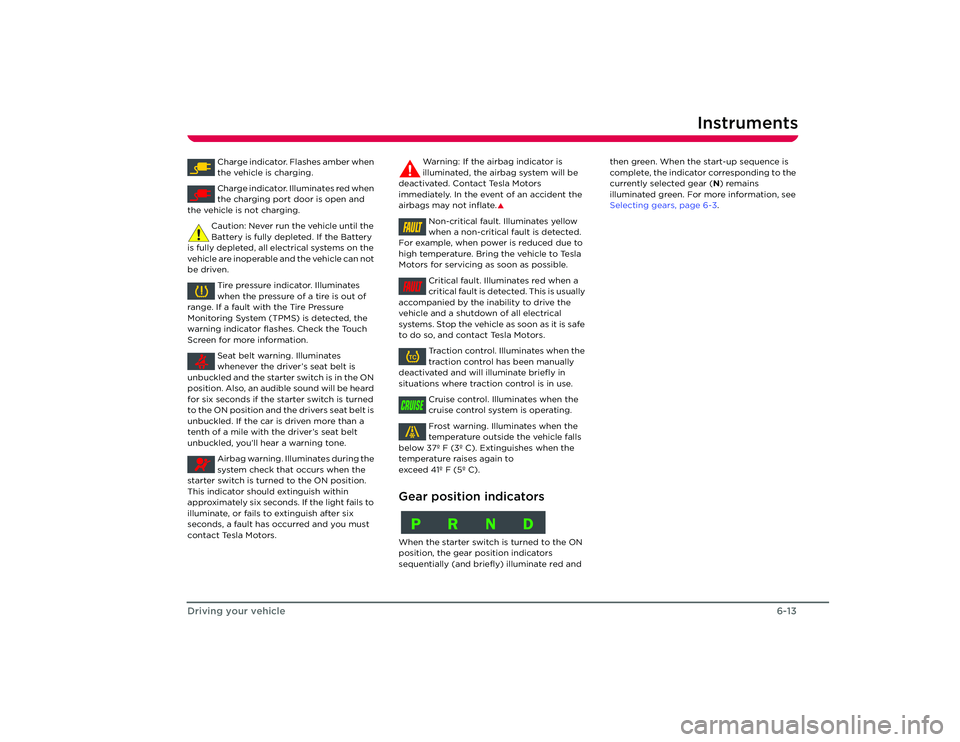
High beam. Illuminates when the
headlight high beams are selected.
Turn signals. Flashes to indicate which
turn signals are operating. Both
indicators will flash when the hazard warning
lights are operating. If a turn signal indicator
flashes quickly or irregularly, the associated
turn signal bulb may need replacing.
Brake indicator. Illuminates when the
hand brake is applied. If the indicator
illuminates at any other time, a fault with the
brake system has been detected.
• Indicator permanently illuminated - brake
fluid level is low.
• Indicator flashing - fault with the ABS
system is detected.
WARNING: Driving the vehicle with the
brake indicator illuminated could result
in fatal or serious injury. Stop the vehicle as
soon as safety permits and rectify the
problem immediately.
S
BRAKE
Roadster OHB.book Page 12 Thursday, October 2, 2008 8:59 AM
Page 51 of 115
Instruments
6-13
Driving your vehicle
Charge indicator. Flashes amber when
the vehicle is charging.
Charge indicator. Illuminates red when
the charging port door is open and
the vehicle is not charging.
Caution: Never run the vehicle until the
Battery is fully depleted. If the Battery
is fully depleted, all electrical systems on the
vehicle are inoperable and the vehicle can not
be driven.
Tire pressure indicator. Illuminates
when the pressure of a tire is out of
range. If a fault with the Tire Pressure
Monitoring System (TPMS) is detected, the
warning indicator flas hes. Check the Touch
Screen for more information.
Seat belt warning. Illuminates
whenever the driver’s seat belt is
unbuckled and the starter switch is in the ON
position. Also, an audible sound will be heard
for six seconds if the starter switch is turned
to the ON position and the drivers seat belt is
unbuckled. If the car is driven more than a
tenth of a mile with the driver’s seat belt
unbuckled, you’ll hear a warning tone.
Airbag warning. Illu minates during the
system check that occurs when the
starter switch is turned to the ON position.
This indicator should extinguish within
approximately six seconds. If the light fails to
illuminate, or fails to extinguish after six
seconds, a fault has occurred and you must
contact Tesla Motors. Warning: If the airbag indicator is
illuminated, the airbag system will be
deactivated. Contact Tesla Motors
immediately. In the event of an accident the
airbags may not inflate.
S
Non-critical fault. Illuminates yellow
when a non-critical fault is detected.
For example, when power is reduced due to
high temperature. Bring the vehicle to Tesla
Motors for servicing as soon as possible.
Critical fault. Illuminates red when a
critical fault is detected. This is usually
accompanied by the inability to drive the
vehicle and a shutdown of all electrical
systems. Stop the vehicle as soon as it is safe
to do so, and contact Tesla Motors.
Traction control. Illuminates when the
traction control has been manually
deactivated and will il luminate briefly in
situations where traction control is in use.
Cruise control. Illuminates when the
cruise control system is operating.
Frost warning. Illuminates when the
temperature outside the vehicle falls
below 37º F (3º C). Extinguishes when the
temperature raises again to
exceed 41º F (5º C).
Gear position indicatorsWhen the starter switch is turned to the ON
position, the gear po sition indicators
sequentially (and briefly) illuminate red and then green. When the start-up sequence is
complete, the indicator corresponding to the
currently selected gear (
N) remains
illuminated green. For more information, see
Selecting gears, page 6-3 .FAULTFAULTTCCRUISEPRND
Roadster OHB.book Page 13 Thursday, October 2, 2008 8:59 AM
Page 54 of 115
Power windows7-2
Comfort and convenience
Comfort and convenience
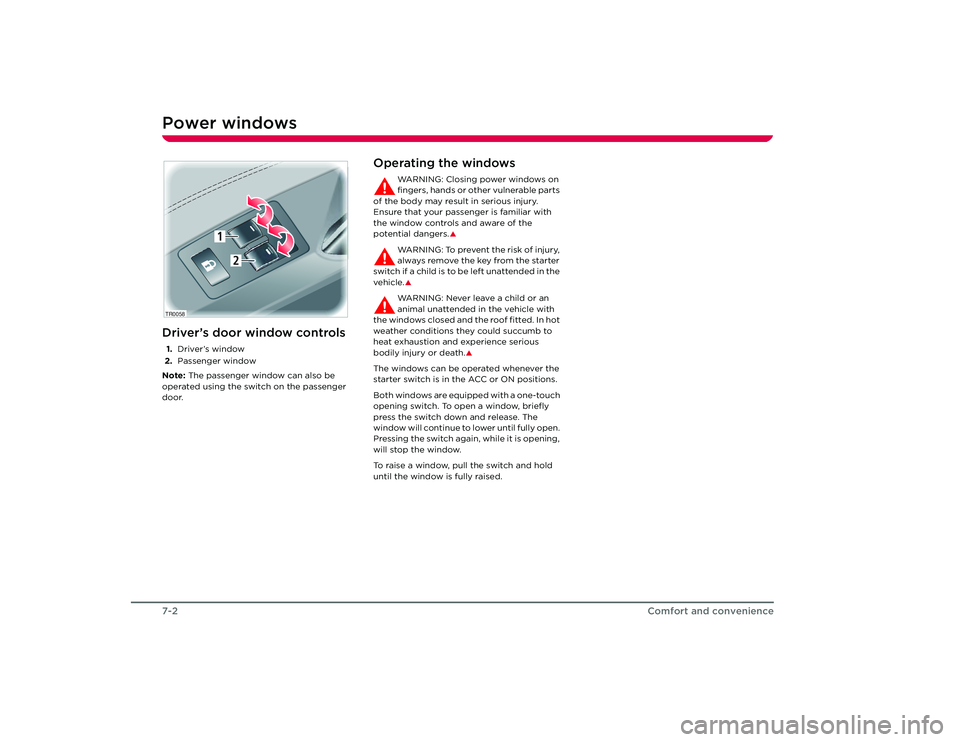
Power windowsDriver’s door window controls1.Driver’s window
2. Passenger window
Note: The passenger window can also be
operated using the switch on the passenger
door.
Operating the windows
WARNING: Closing power windows on
fingers, hands or other vulnerable parts
of the body may result in serious injury.
Ensure that your passenger is familiar with
the window controls and aware of the
potential dangers.
S
WARNING: To prevent the risk of injury,
always remove the key from the starter
switch if a child is to be left unattended in the
vehicle.SWARNING: Never leave a child or an
animal unattended in the vehicle with
the windows closed and the roof fitted. In hot
weather conditions they could succumb to
heat exhaustion and experience serious
bodily injury or death.
S
The windows can be operated whenever the
starter switch is in the ACC or ON positions.
Both windows are equipped with a one-touch
opening switch. To open a window, briefly
press the switch down and release. The
window will continue to lower until fully open.
Pressing the switch again, while it is opening,
will stop the window.
To raise a window, pull the switch and hold
until the window is fully raised.
TR0058
1
2
Roadster OHB.book Page 2 Th ursday, October 2, 2008 8:59 AM
Page 55 of 115
Rear view mirrors
7-3
Comfort and convenience
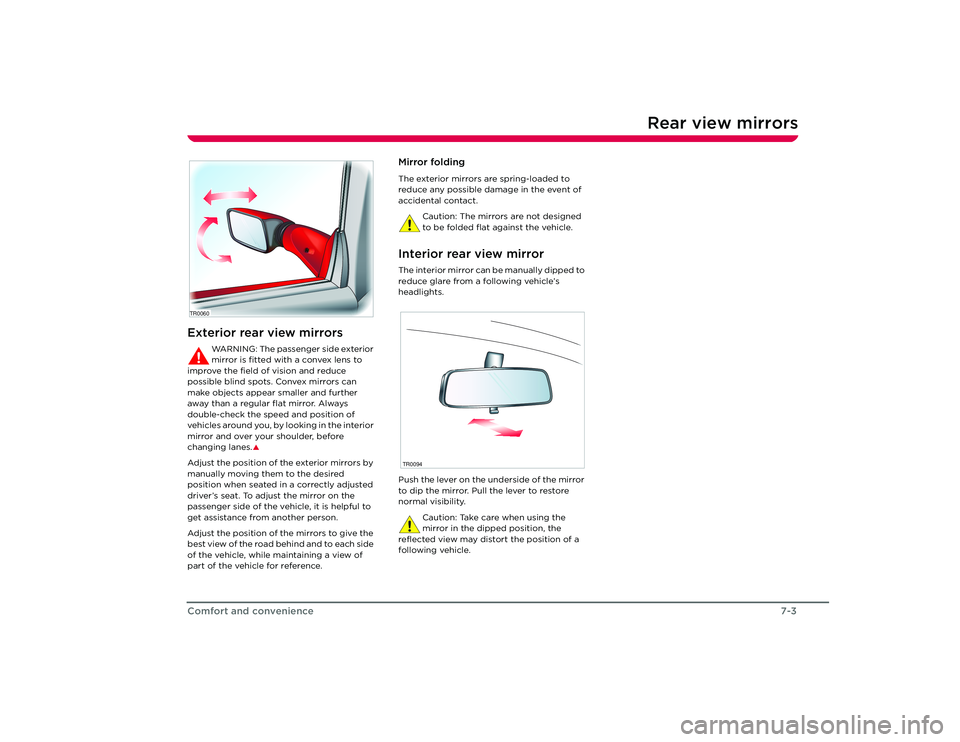
Rear view mirrorsExterior rear view mirrors
WARNING: The passenger side exterior
mirror is fitted with a convex lens to
improve the field of vision and reduce
possible blind spots. Convex mirrors can
make objects appear smaller and further
away than a regular flat mirror. Always
double-check the speed and position of
v e h i c l e s a r o u n d y o u , b y l o o k i n g i n t h e i n t e r i o r
mirror and over your shoulder, before
changing lanes.
S
Adjust the position of the exterior mirrors by
manually moving them to the desired
position when seated in a correctly adjusted
driver’s seat. To adjust the mirror on the
passenger side of the vehicle, it is helpful to
get assistance from another person.
Adjust the position of the mirrors to give the
best view of the road behind and to each side
of the vehicle, while maintaining a view of
part of the vehicle for reference.
Mirror foldingThe exterior mirrors are spring-loaded to
reduce any possible damage in the event of
accidental contact.
Caution: The mirrors are not designed
to be folded flat against the vehicle.Interior rear view mirrorThe interior mirror can be manually dipped to
reduce glare from a following vehicle’s
headlights.
Push the lever on the underside of the mirror
to dip the mirror. Pull the lever to restore
normal visibility.Caution: Take care when using the
mirror in the dipped position, the
reflected view may distort the position of a
following vehicle.
TR0060
TR0094
Roadster OHB.book Page 3 Th ursday, October 2, 2008 8:59 AM
Page 60 of 115
Interior accessories7-8
Comfort and convenience
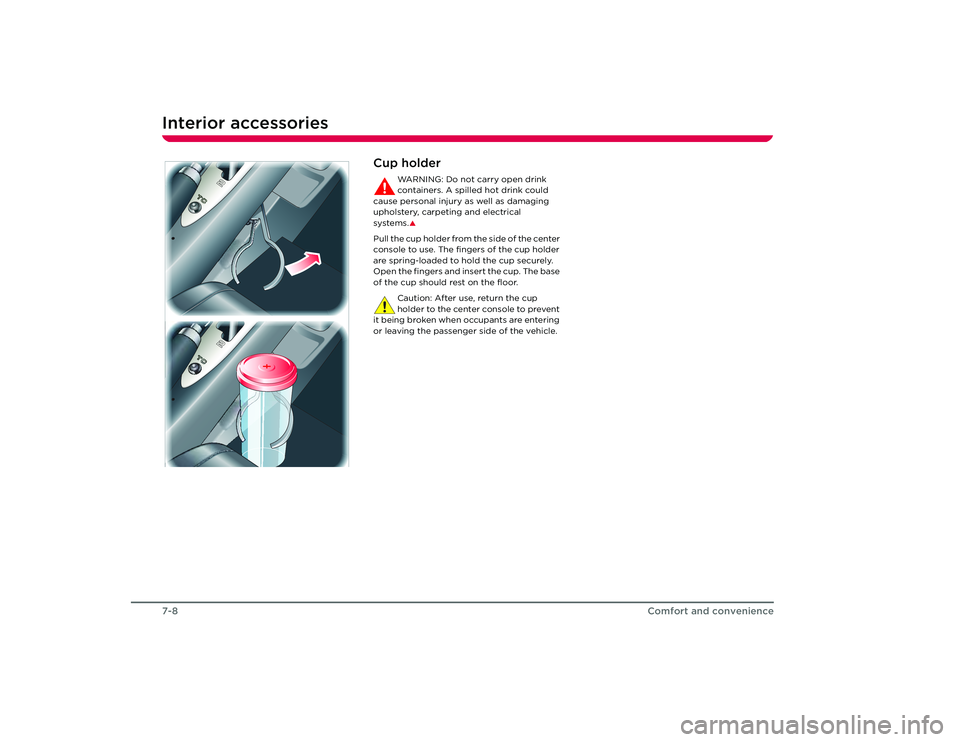
Cup holder
WARNING: Do not carry open drink
containers. A spilled hot drink could
cause personal injury as well as damaging
upholstery, carpeting and electrical
systems.S
Pull the cup holder from the side of the center
console to use. The fingers of the cup holder
are spring-loaded to hold the cup securely.
Open the fingers and insert the cup. The base
of the cup should rest on the floor.
Caution: After use, return the cup
holder to the center console to prevent
it being broken when occupants are entering
or leaving the passenger side of the vehicle.
Roadster OHB.book Page 8 Th ursday, October 2, 2008 8:59 AM
Page 61 of 115
Removable roof
7-9
Comfort and convenience
Removable roofHard-top and soft-topIn the Tesla Roadster, you can enjoy exposure
to the natural environment and drive without
the confinement of a cockpit roof. To provide
weather protection in unfavorable conditions,
you have the choice of installing either the
soft-top or hard-top roof.
The Tesla Roadster is designed to
accommodate changing loads and strains
that constantly occur while driving. It also
accommodates the tolerances needed to
allow repeated removal and installation of the
roof. As a result, wind noise and minor water
leaks can occur and are considered normal.
WARNING: Never attempt to install or
remove the soft-top or hard-top while
the vehicle is moving.
S
Instructions for installing and removing the
soft-top and hard-top are provided on the
following pages.
Roadster OHB.book Page 9 Th ursday, October 2, 2008 8:59 AM
Page 62 of 115
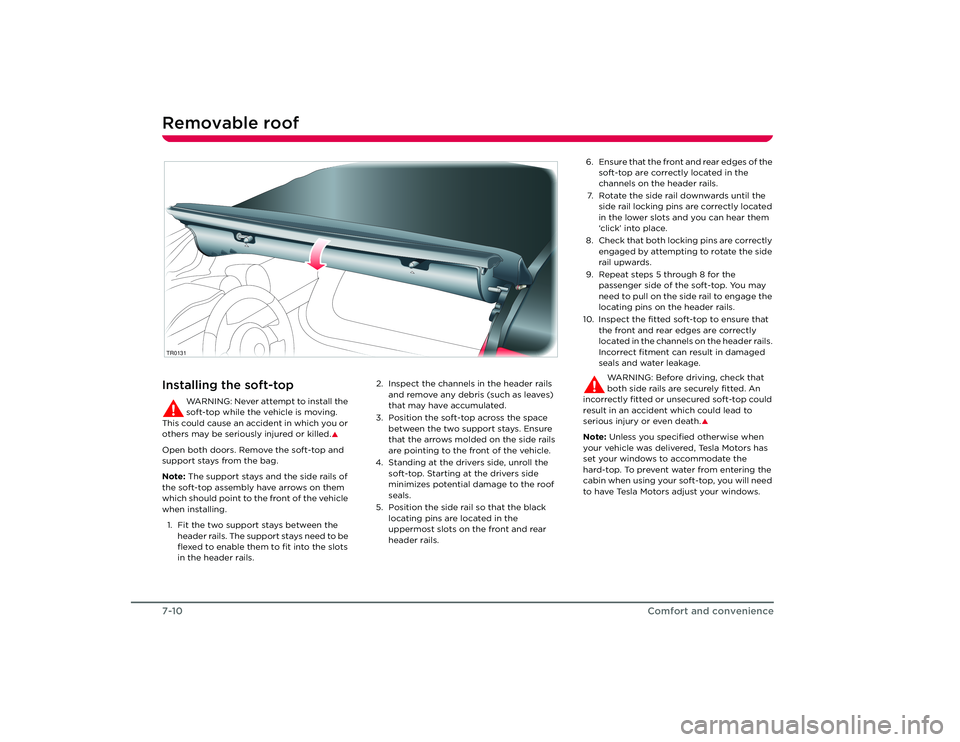
Removable roof7-10Comfort and convenienceInstalling the soft-top
WARNING: Never attempt to install the
soft-top while the vehicle is moving.
This could cause an accident in which you or
others may be seriously injured or killed.
S
Open both doors. Remove the soft-top and
support stays from the bag.
Note: The support stays and the side rails of
the soft-top assembly have arrows on them
which should point to the front of the vehicle
when installing.
1. Fit the two support stays between the header rails. The support stays need to be
flexed to enable them to fit into the slots
in the header rails. 2. Inspect the channels in the header rails
and remove any debris (such as leaves)
that may have accumulated.
3. Position the soft-top across the space between the two support stays. Ensure
that the arrows molded on the side rails
are pointing to the front of the vehicle.
4. Standing at the drivers side, unroll the soft-top. Starting at the drivers side
minimizes potential damage to the roof
seals.
5. Position the side rail so that the black locating pins are located in the
uppermost slots on the front and rear
header rails.TR0131
6. Ensure that the front and rear edges of the soft-top are correctly located in the
channels on the header rails.
7. Rotate the side rail downwards until the side rail locking pins are correctly located
in the lower slots and you can hear them
‘click’ into place.
8. Check that both locking pins are correctly engaged by attempting to rotate the side
rail upwards.
9. Repeat steps 5 through 8 for the passenger side of the soft-top. You may
need to pull on the side rail to engage the
locating pins on the header rails.
10. Inspect the fitted soft-top to ensure that the front and rear edges are correctly
located in the channels on the header rails.
Incorrect fitment can result in damaged
seals and water leakage.
WARNING: Before driving, check that
both side rails are securely fitted. An
incorrectly fitted or unsecured soft-top could
result in an accident which could lead to
serious injury or even death.
S
Note: Unless you specified otherwise when
your vehicle was delivered, Tesla Motors has
set your windows to accommodate the
hard-top. To prevent water from entering the
cabin when using your soft-top, you will need
to have Tesla Motors adjust your windows.
Roadster OHB.book Page 10 Thursday, October 2, 2008 8:59 AM
Page 65 of 115
Removable roof
7-13
Comfort and convenience
TR0130
4
6
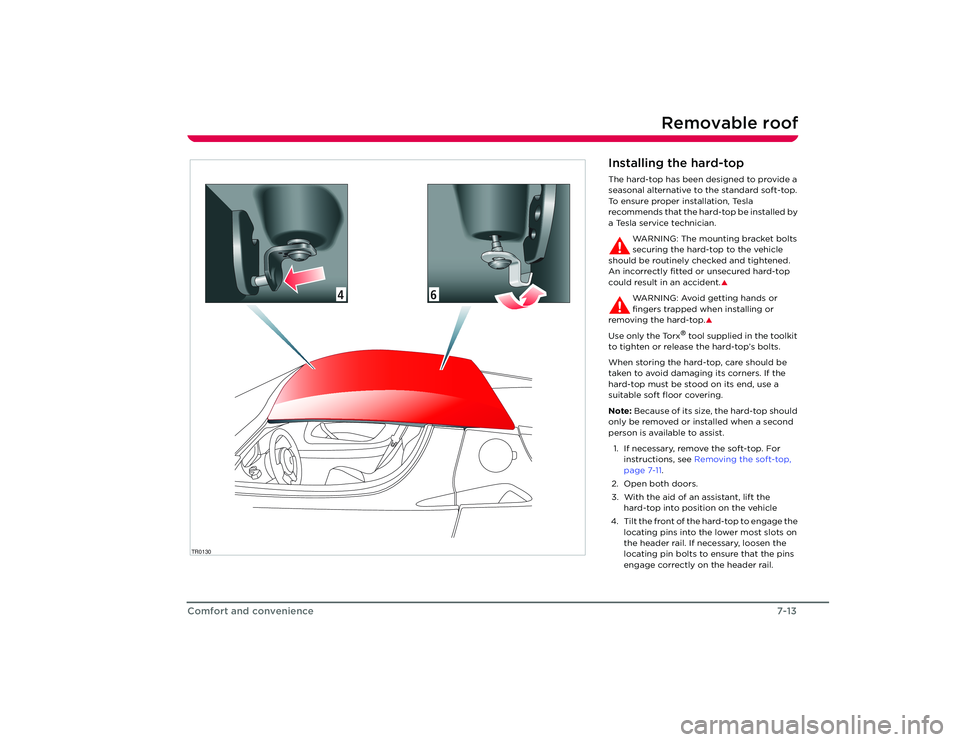
Installing the hard-topThe hard-top has been designed to provide a
seasonal alternative to the standard soft-top.
To ensure proper installation, Tesla
recommends that the hard-top be installed by
a Tesla service technician.
WARNING: The mounting bracket bolts
securing the hard-top to the vehicle
should be routinely ch ecked and tightened.
An incorrectly fitted or unsecured hard-top
could result in an accident.
S
WARNING: Avoid getting hands or
fingers trapped when installing or
removing the hard-top.
S
Use only the Torx
® tool supplied in the toolkit
to tighten or release the hard-top’s bolts.
When storing the hard-top, care should be
taken to avoid damaging its corners. If the
hard-top must be stood on its end, use a
suitable soft floor covering.
Note: Because of its size, the hard-top should
only be removed or installed when a second
person is available to assist.
1. If necessary, remove the soft-top. For instructions, see Removing the soft-top,
page 7-11.
2. Open both doors.
3. With the aid of an assistant, lift the hard-top into positi on on the vehicle
4. Tilt the front of the hard-top to engage the locating pins into the lower most slots on
the header rail. If necessary, loosen the
locating pin bolts to ensure that the pins
engage correctly on the header rail.
Roadster OHB.book Page 13 Thursday, October 2, 2008 8:59 AM
Page 66 of 115
Removable roof7-14
Comfort and convenience
5. Push the hard-top into position on the front header rail and then lower the
hard-top’s rear edge.
6. Engage the hook on the rear mounting brackets with the fixings on the rear
header rail.
7. Use the Torx
® tool supplied in the toolkit
to tighten the bolts just enough to keep
the rear brackets engaged. Do not fully
tighten.
8. Ensure the hard-top is correctly aligned on the vehicle.
9. Holding the rear mounting brackets to prevent them from twisting, tighten the
bolts to secure the hard-top in place. Do
not overtighten.
10. Check and tighten th e bolts securing the
front locating pins to the hard-top.
WARNING: Make sure that the
hard-top is securely fitted by trying
to lift each corner in turn. If any
movement is evident, check and tighten
the hard-top fixings. Driving with a loose
or incorrectly secured hard-top could
result in an accident which could lead to
serious injury and even death.
S
11. Check that both doors shut correctly with the windows in the fully raised position.
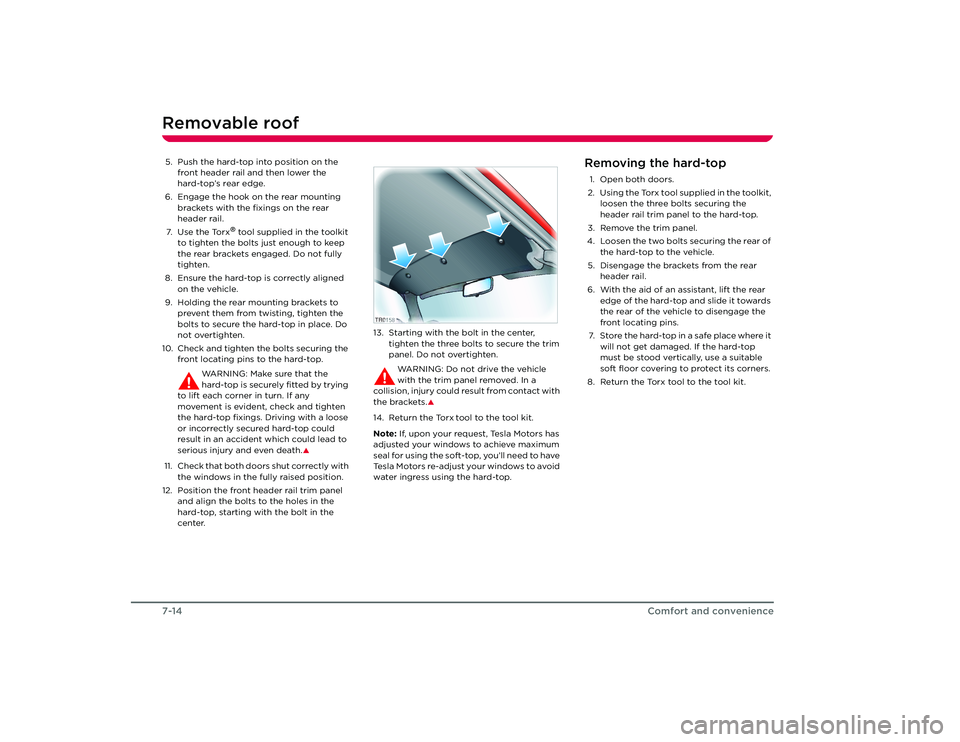
12. Position the front header rail trim panel and align the bolts to the holes in the
hard-top, starting with the bolt in the
center. 13. Starting with the bolt in the center,
tighten the three bolts to secure the trim
panel. Do not overtighten.
WARNING: Do not drive the vehicle
with the trim panel removed. In a
collision, injury could result from contact with
the brackets.
S
14. Return the Torx
tool to the tool kit.
Note: If, upon your request, Tesla Motors has
adjusted your windows to achieve maximum
seal for using the soft-top, you’ll need to have
Tesla Motors re-adjust your windows to avoid
water ingress using the hard-top.
Removing the hard-top1. Open both doors.
2. Using the Torx tool supplied in the toolkit, loosen the three bolts securing the
header rail trim panel to the hard-top.
3. Remove the trim panel.
4. Loosen the two bolts securing the rear of the hard-top to the vehicle.
5. Disengage the brackets from the rear header rail.
6. With the aid of an assistant, lift the rear edge of the hard-top and slide it towards
the rear of the vehicle to disengage the
front locating pins.
7. Store the hard-top in a safe place where it will not get damaged. If the hard-top
must be stood vertically, use a suitable
soft floor covering to protect its corners.
8. Return the Torx tool to the tool kit.
TR0158
Roadster OHB.book Page 14 Thursday, October 2, 2008 8:59 AM
Page 67 of 115
HomeLink®
7-15
Comfort and convenience
HomeLink
®
HomeLink
® Universal
Transceiver
Your vehicle is equipped with a HomeLink
®
Universal Transceiver that you can use to
operate most Radio Frequency (RF) devices
such as garage doors, gates, lights and
security systems. Your transceiver can be
programmed using the Touch Screen to
operate up to three individual devices.
Devices can be operated by touching a
button on the Touch Screen. You can also set
up the third button on the key fob to operate
a device. For details on how to program
HomeLink, refer to the Touch Screen Users
Manual, provided in your owners package.
For security purposes, when you sell your
vehicle, you should erase your HomeLink
settings.
WARNING: Do not use the HomeLink
Universal Transceiver with any garage
door opener that la cks safety stop and
reverse features as required by federal safety
standards. A garage door opener which
cannot detect an object in the path of a
closing garage door and then automatically
stop and reverse, does not meet current
federal safety standards. Using a garage door
opener without these features increases the
risk of injury or death.
S
You’re vehicle should be turned off
while programming the HomeLink
Universal Transceiver.
S
During programming, your garage
door or gate may open or close. Make
sure that people and objects are clear of the
garage door or gate that you are
programming.
S
FCC ComplianceThis device complies with Part 15 of the FCC
Rules. Operation is subject to the following
two conditions:
1. This device may not cause harmful interference, and
2. This device must accept any interference received, including interference that may
cause undesired operation.
Any unauthorized modification to this device
could void the user’s authority to operate the
equipment.
Roadster OHB.book Page 15 Thursday, October 2, 2008 8:59 AM