lock TOYOTA 4RUNNER 1999 Workshop Manual
[x] Cancel search | Manufacturer: TOYOTA, Model Year: 1999, Model line: 4RUNNER, Model: TOYOTA 4RUNNER 1999Pages: 268, PDF Size: 2.63 MB
Page 99 of 268
4RUNNER ()99
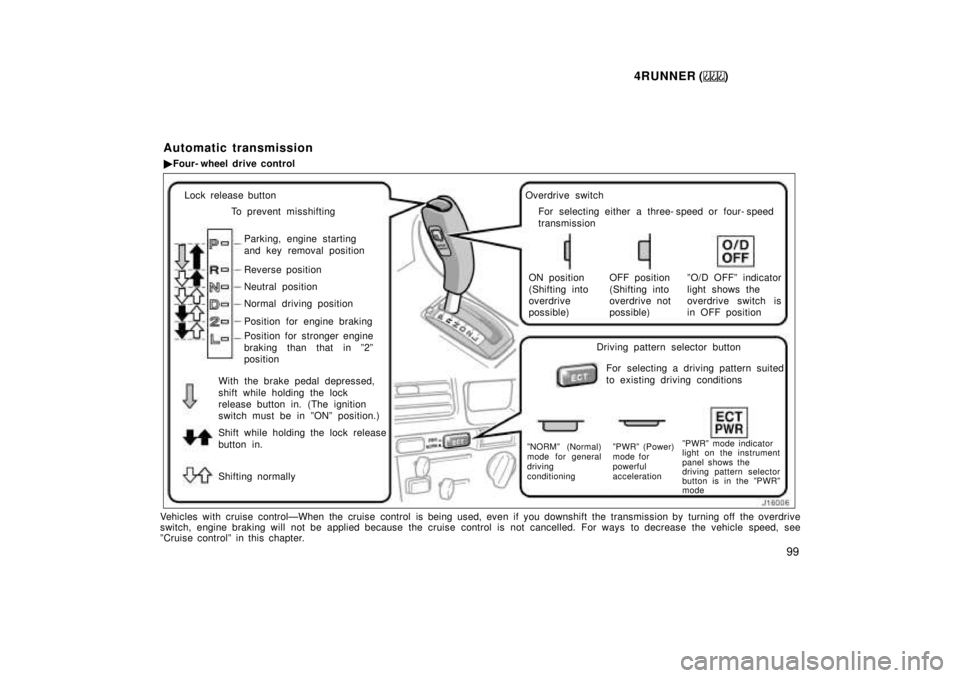
Lock release buttonTo prevent misshifting
Parking, engine starting
and key removal position
Reverse position
Neutral position
Normal driving position
Position for engine braking
Position for stronger engine
braking than that in º2º
position
With the brake pedal depressed,
shift while holding the lock
release button in. (The ignition
switch must be in ºONº position.)
Shift while holding the lock release
button in.
Shifting normally Overdrive switch
For selecting either a three- speed or four- speed
transmission
ON position
(Shifting into
overdrive
possible) OFF position
(Shifting into
overdrive not
possible)ºO/D OFFº indicator
light shows the
overdrive switch is
in OFF position
Driving pattern selector button For selecting a driving pattern suited
to existing driving conditions
ºNORMº (Normal)
mode for general
driving
conditioning ºPWRº (Power)
mode for
powerful
accelerationºPWRº mode indicator
light on the instrument
panel shows the
driving pattern selector
button is in the ºPWRº
mode
Vehicles with cruise controlÐWhen the cruise control is being used, eve
n if you downshift the transmission by turning off the overdrive
switch, engine braking will not be applied because the cruise cont rol is not cancelled. For ways to decrease the vehicle speed, see
ºCruise controlº in this chapter. Automatic transmission
Four- wheel drive control
Page 100 of 268
4RUNNER ()
100
Your automatic transmission has a shift
lock system to minimize the possibility of
incorrect operation. This means you can
only shift out of ºPº position when the
brake pedal is depressed (with the ignition
switch in ºONº position and the lock re-
lease button depressed).
(a) Normal driving
1. Start the engine as instructed in ºHow
to start the engineº in Part 3. The trans-
mission must be in ºPº or ºNº.
When the front drive control lever is in
ºL4º (low- speed position, four- wheel
drive), the driving pattern selector setting
has no effect on gear shift timing. (See
ºFour- wheel drive systemº in this chapter
for information of the front drive control
lever.)
2. With your foot holding down the brake
pedal, shift the selector lever to ºDº.
In ºDº position, the automatic transmission
system will select the most suitable gear
for running conditions such as normal
cruising, hill climbing, hard towing, etc.
Always turn the overdrive switch on for
better fuel economy and quieter driving. If
the engine coolant temperature is low or
when the front drive control lever is in
ºL4º (low- speed position, four- wheel
drive), the transmission will not shift into
the overdrive gear even with the overdrive
switch on. (See ºFour- wheel drive systemº
in this chapter for information of the front
drive control lever.)
CAUTION
Never put your foot on the accelera-
tor pedal while shifting.
3. Release the parking brake and brake
pedal. Depress the accelerator pedal slow-
ly for smooth starting.
(b) Using engine braking
To use engine braking, you can downshift
the transmission as follows:
Turn off the overdrive switch. The ºO/D
OFFº indicator light will come on and
the transmission will downshift to the
third gear.
Shift into the º2º position. The trans-
mission will downshift to the second
gear when the vehicle speed drops
down to or lower than the following
speed, and more powerful engine brak-
ing will be obtained.
Front drive control lever in ºH2º or
ºH4º3RZ- FE engine.....105 km/h (65 mph)
5VZ- FE engine.....114 km/h (70 mph)
Front drive control lever in ºL4º 3RZ- FE engine.....38 km/h (23 mph)
5VZ- FE engine.....41 km/h (25 mph)
Shift into the ºLº position. The trans-
mission will downshift to the first gear
when the vehicle speed drops down to
or lower than the following speed, and
maximum engine braking will be ap-
plied.
Front drive control lever in ºH2º or
ºH4º3RZ- FE engine.....51 km/h (31 mph)
5VZ- FE engine.....55 km/h (34 mph)
Front drive control lever in ºL4º
3RZ- FE engine.....11 km/h (6 mph)
5VZ- FE engine.....12 km/h (7 mph)
Page 103 of 268

4RUNNER ()103
(i) If you cannot shift the selector le-
ver out of ºPº position
If you cannot shift the selector lever from
the ºPº position even though the brake
pedal is depressed, use the shift lock
override lever. For instructions, see ºIf you
cannot shift automatic transmission selec-
tor leverº in Part 4. Manual transmission
The shift pattern is as shown above.
Press the clutch pedal down fully while
shifting, and then release it slowly. Do not
rest your foot on the pedal while driving,
because it will cause clutch trouble. And
do not use the clutch to hold the vehicle
when stopped on an uphill gradeÐuse the
parking brake.Recommended shifting speeds
The transmission is fully synchronized and
upshifting or downshifting is easy.
For the best compromise between fuel
economy and vehicle performance, you
should upshift or downshift at the following
speeds:
3RZ- FE engine
Upshifting gear km/h (mph)
1 to 2 24 (15)
2 to 3 40 (25)/58 (36) *
3 to 4 64 (40)/72 (45) *
4 to 5 72 (45)/85 (53) *
Downshifting gear km/h (mph)
2 to 1 24 (15)
3 to 2 40 (25)
4 to 3 64 (40)
5 to 4 72 (45)
* : Applicable under heavy acceleration
conditions.
5VZ- FE engine
gear km/h (mph)
1 to 2 or 2 to 1 24 (15)
2 to 3 or 3 to 2 40 (25)
3 to 4 or 4 to 3 64 (40)
4 to 5 or 5 to 4 72 (45)
Page 106 of 268
4RUNNER ()
106
Use the front drive control lever and
º4WDº button to select the transfer and
center differential modes.
ºH2º mode (high speed position, two-
wheel drive):
Lever at ºH2´H4º, º4WDº
button left out
Use this for normal driving on dry hard-
surfaced roads. This position gives greater
economy, quietest ride and least wear and
better vehicle control.
ºH4º mode (high speed position, four-
wheel drive, center differential un-
locked): Lever at ºH2´H4º, º4WDº button
pushed in
Use this for normal driving on all types of
roads, from dry hard- surfaced roads to
wet, icy or snow- covered roads. This
position provides greater traction than
two- wheel drive. ºH4Lº mode (high speed position, four-
wheel drive, center differential locked):
Lever at ºH4Lº
Use this for greater traction when you
experience a loss of power, such as
wheel slipping, in the ºH2´H4º (four- wheel
drive) mode.
ºNº mode (neutral position):
Lever at
ºNº
No power is delivered to the wheels. The
vehicle must be stopped.
ºL4Lº mode (low speed position, four-
wheel drive, center differential locked):
Lever at ºL4Lº
Use this for maximum power and traction.
Use ºL4Lº mode for hard pu lling in situa-
tions the vehicle cannot negotiate even in
the ºH4Lº mode.
The indicator shows which transfer and
center differential mode the vehicle is in.
See º(c) Shifting procedureº for further in-
structions.
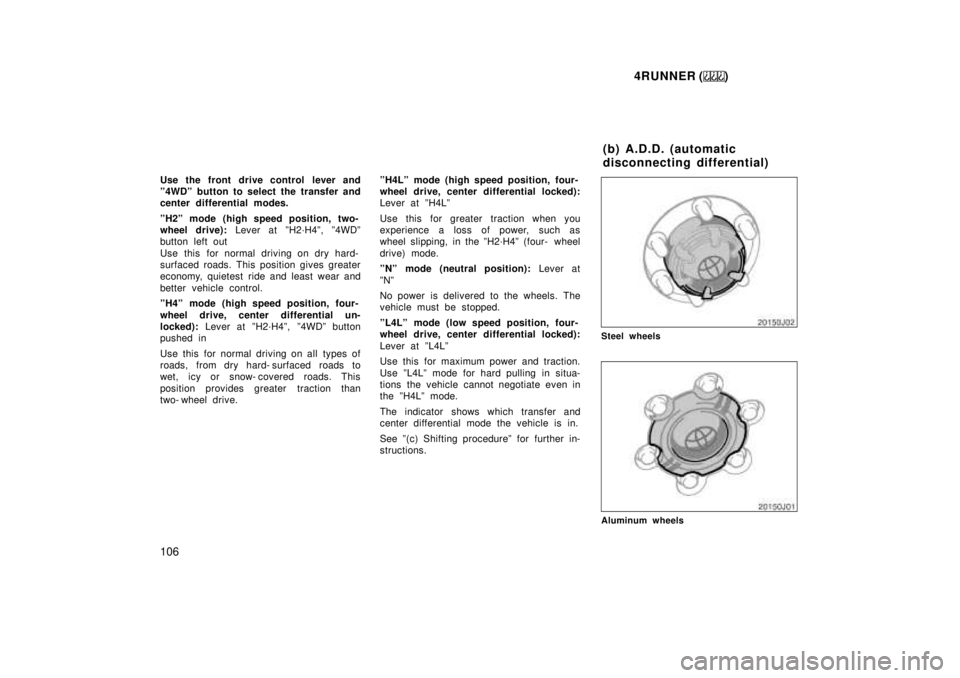
Steel wheels
Aluminum wheels (b) A.D.D. (automatic
disconnecting differential)
Page 109 of 268

4RUNNER ()109
SHIFTING BETWEEN ºH2º MODE AND
ºH4º MODE
To shift from ºH2º mode to ºH4º mode,
reduce your speed to less than 100 km/h
(62 mph) and push in the º4WDº button.
If the indicator light flashes when you
push in the º4WDº button, drive straight
ahead while accelerating or decelerating.
If the indicator light flashes and the buzz-
er sounds when you push in the º4WDº
button, reduce your speed or stop the
vehicle and reset.
CAUTION
Never push the º4WDº button if
wheels are slipping. Stop the slipping
or spinning before shifting.
To shift from ºH4º mode to ºH2º mode,
push the º4WDº button again to turn it off.
This can be done at any vehicle speed.
If the indicator light flashes when you
push in the º4WDº button, drive straight
ahead while accelerating or decelerating,
or drive in reverse.
SHIFTING BETWEEN ºH2´H4º AND
ºH4Lº
To shift from ºH2´H4º to ºH4Lº,
reduce
your speed to less than 100 km/h (62
mph) and move the front drive control
lever.
If the indicator light flashes when you
move the front drive control lever, drive
straight ahead while accelerating or decel-
erating.
If the indicator light flashes and the buzz-
er sounds when you move the front drive
control lever, reduce your speed or stop
the vehicle and reset.
CAUTION
Never move the front drive control
lever if wheels are slipping. Stop the
slipping or spinning before shifting.
NOTICE
Do not drive on a dry paved surface
in ºH4Lº mode. This may damage thelocking mechanism and the drive sys- tem.
To shift from ºH4Lº to ºH2´H4º move
the front drive control lever.
This can be done at any vehicle speed.
If the indicator light flashes when you shift
the transfer into ºH2´H4º, drive straight
ahead while accelerating or decelerating,
or drive in reverse.
SHIFTING BETWEEN ºH4Lº AND ºL4Lº
To shift from ºH4Lº to ºL4Lº, stop the
vehicle and put the transmission in ºNº.
With your foot holding down the brake
pedal, move the front drive control lever.
NOTICE
Do not drive on a dry paved surface
in ºH4Lº or ºL4Lº mode. This maydamage the locking mechanism and
the drive system.
(c) Shifting procedure
(lever/button type)
Page 110 of 268
4RUNNER ()
11 0
To shift from ºL4Lº to ºH4Lº,
stop the
vehicle and put the transmission in ºNº.
With your foot holding down the brake
pedal, move the front drive control lever.
NOTICE
Do not drive on a dry paved surface
in ºH4Lº or ºL4Lº mode. This maydamage the locking mechanism andthe drive system.
Rear differential lock system
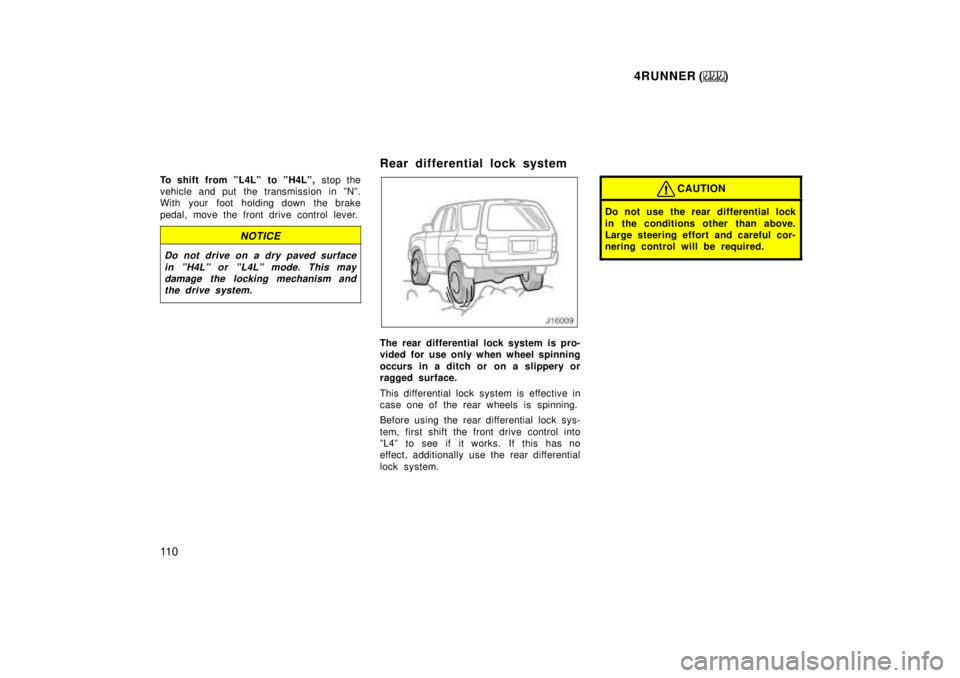
The rear differential lock system is pro-
vided for use only when wheel spinning
occurs in a ditch or on a slippery or
ragged surface.
This differential lock system is effective in
case one of the rear wheels is spinning.
Before using the rear differential lock sys-
tem, first shift the front drive control into
ºL4º to see if it works. If this has no
effect, additionally use the rear differential
lock system.
CAUTION
Do not use the rear differential lock
in the conditions other than above.
Large steering effort and careful cor-
nering control will be required.
Page 111 of 268
4RUNNER ()111
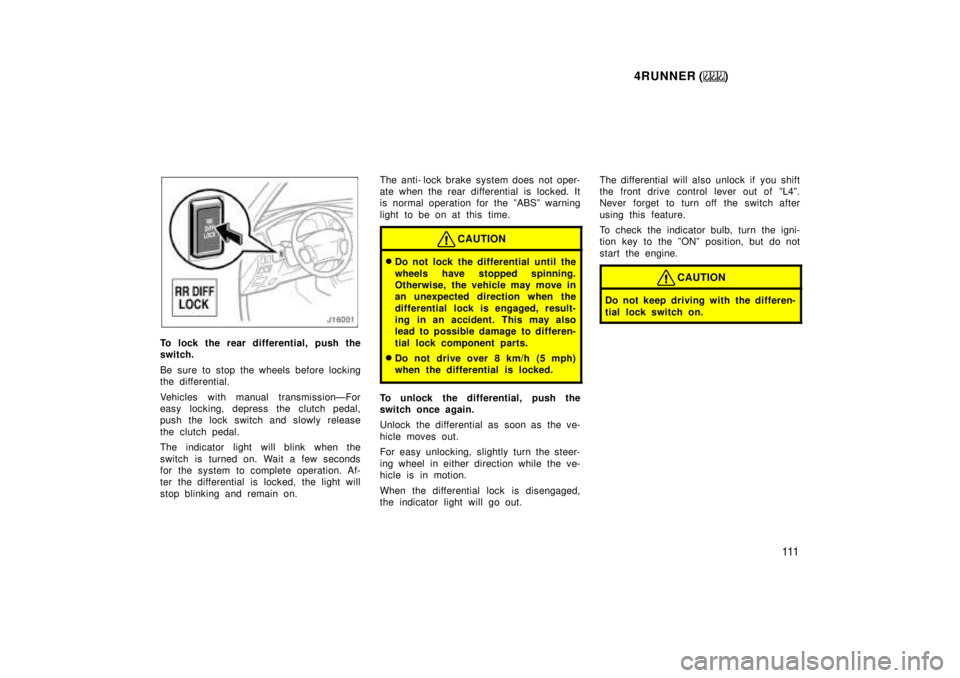
To lock the rear differential, push the
switch.
Be sure to stop the wheels before locking
the differential.
Vehicles with manual transmissionÐFor
easy locking, depress the clutch pedal,
push the lock switch and slowly release
the clutch pedal.
The indicator light will blink when the
switch is turned on. Wait a few seconds
for the system to complete operation. Af-
ter the differential is locked, the light will
stop blinking and remain on. The anti- lock brake system does not oper-
ate when the rear differential is locked. It
is normal operation for the ºABSº warning
light to be on at this time.
CAUTION
Do not lock the differential until the
wheels have stopped spinning.
Otherwise, the vehicle may move in
an unexpected direction when the
differential lock is engaged, result-
ing in an accident. This may also
lead to possible damage to differen-
tial lock component parts.
Do not drive over 8 km/h (5 mph)
when the differential is locked.
To unlock the differential, push the
switch once again.
Unlock the differential as soon as the ve-
hicle moves out.
For easy unlocking, slightly turn the steer-
ing wheel in either direction while the ve-
hicle is in motion.
When the differential lock is disengaged,
the indicator light will go out. The differential will also unlock if you shift
the front drive control lever out of ºL4º.
Never forget to turn off the switch after
using this feature.
To check the indicator bulb, turn the igni-
tion key to the ºONº position, but do not
start the engine.
CAUTION
Do not keep driving with the differen-
tial lock switch on.
Page 119 of 268
4RUNNER ()11 9
YOUR RADIO ANTENNA
To lower a power antenna, turn off the
audio system by pushing ºPWR´VOLº,
ºPWR/VOLº or ºVOL/PWRº, or turn the
ignition key to ºLOCKº.
On some models, the power antenna auto-
matically retracts when the radio mode is
switched off to turn on the cassette tape
player.
NOTICE
To prevent damage to the antenna,
make sure it is retracted before driv-ing your Toyota through an automaticcar wash. On vehicles with detachable
antenna, remove the antenna beforeusing an automatic car wash.
YOUR CASSETTE PLAYER
When you insert a cassette, the exposed
tape should be to the right.
NOTICE
Do not oil any part of the player and
do not insert anything other than cas-sette tapes into the slot, or the tape player may be damaged.
YOUR COMPACT DISC PLAYER
When you insert a disc, gently push it in
with the label side up. (The player will
automatically eject a disc if the label side
is down.) The compact disc player will
play from track 1 through the end of the
disc. Then it will play from track 1 again.
NOTICE
Never try to disassemble or oil any
part of the compact disc player. Donot insert anything except a compact disc into the slot.
8 cm (3 in.) compact disc singles
Your compact disc player does not need
an adaptor to play compact disc singles.
Compact disc singles are about 8 cm (3
in.) in diameter- smaller than standard
discs.
After you eject a compact disc single, do
not insert a standard 12 cm (5 in.) disc
until ºDISCº disappears from the display.
NOTICE
Do not use an adaptor for compact
disc singlesÐit could cause trackingerrors or interfere with the ejection of compact discs.
Page 121 of 268

4RUNNER ()121
1 2 3 4 5 6 (Preset buttons)
These buttons are used to preset and
tune in radio stations.
To preset a station to a button: Tune in
the desired station (see ºTUNEº button).
Push and hold down the button until you
hear a beepÐthis will set the station to
the button. The button number will appear
on the display.
To tune in to a preset station: Push the
button for the station you want. The but-
ton number and station frequency will ap-
pear on the display.
These systems can store one AM and two
FM stations for each button (The display
will show ºAMº, ºFM1º or ºFM2º when you
push ºAMº or ºFMº).
(Eject button)
Push this button to eject a cassette.
After you turn the ignition to ºLOCKº, you
will be able to eject a cassette but you
will not be able to reinsert it.
(Reverse/Fast forward buttons)
Cassette Player
Push the fast forward button to fast for-
ward a cassette tape. ºFFº will appear on
the display. Push the reverse button to
rewind a tape. ºREWº will appear on the
display.
To stop the tape while it is fast forward-
ing, push the fast forward button or
ºTAPEº; to stop the tape while it is re-
winding, push the reverse button or
ºTAPEº.
If a tape side rewinds completely, the cas-
sette player will stop and then play that
same side. If a tape fast forwards com-
pletely, the cassette player will play the
other side of the tape, using the auto- re-
verse feature.
Compact Disc Player
If you want to fast forward or reverse
through a compact disc track, push and
hold in the fast forward or reverse button.
When you release the button, the compact
disc player will resume playing. AM
Push ºAMº to switch the AM band. ºAMº
will appear on the display.
If the audio system is off, you can turn
on the radio by pushing ºAMº. Also, push
ºAMº to switch from cassette or compact
disc operation to radio operation.
AUDIO CONTROL / MODE
Manual tone adjustment functionÐ
This knob is used to adjust the tone
manually.
For low- pitch tone adjustment, push
ºAUDIO CONTROL / MODEº repeatedly
until ºBASº appears on the display. Then
turn the knob to suit your preference.
The display will show the range from
ºBAS -5º to ºBAS 5º.
For high- pitch tone adjustment, push
ºAUDIO CONTROL / MODEº repeatedly
until ºTREº appears on the display. Then
turn the knob to suit your preference.
The display will show the range from
ºTRE -5º to ºTRE 5º.
Page 127 of 268

4RUNNER ()127
1 2 3 4 5 6 (Preset buttons)
These buttons are used to preset and
tune in radio stations.
To preset a station to a button: Tune in
the desired station (see ºTUNEº or ºSEEKº
button). Push and hold down the button
until you hear a beepÐthis will set the
station to the button. The button number
will appear on the display.
To tune in to a preset station: Push the
button for the station you want. The but-
ton number and station frequency will ap-
pear on the display.
These systems can store one AM and two
FM stations for each button (The display
will show ºAMº, ºFM1º or ºFM2º when you
push ºAMº or ºFMº).
(Eject button)
Push this button to eject a cassette.
After you turn the ignition to ºLOCKº, you
will be able to eject a cassette but you
will not be able to reinsert it.
(Reverse/Fast forward buttons)
Cassette Player
Push the fast forward button to fast for-
ward a cassette tape. ºFFº will appear on
the display. Push the reverse button to
rewind a tape. ºREWº will appear on the
display.
To stop the tape while it is fast forward-
ing, push the fast forward button or
ºTAPEº; to stop the tape while it is re-
winding, push the reverse button or
ºTAPEº.
If a tape side rewinds completely, the cas-
sette player will stop and then play that
same side. If a tape fast forwards com-
pletely, the cassette player will play the
other side of the tape, using the auto- re-
verse feature.
Compact Disc Player
If you want to fast forward or reverse
through a compact disc track, push and
hold in the fast forward or reverse button.
When you release the button, the compact
disc player will resume playing. AM
Push ºAMº to switch the AM band. ºAMº
will appear on the display.
If the audio system is off, you can turn
on the radio by pushing ºAMº. Also, push
ºAMº to switch from cassette or compact
disc operation to radio operation.
AUDIO CONTROL / MODE
Manual tone adjustment functionÐ
This knob is used to adjust the tone
manually.
For low- pitch tone adjustment, push
ºAUDIO CONTROL / MODEº repeatedly
until ºBASº appears on the display. Then
turn the knob to suit your preference.
The display will show the range from
ºBAS -5º to ºBAS 5º.
For middle- pitch tone adjustment, push
ºAUDIO CONTROL / MODEº repeatedly
until ºMIdº appears on the display. Then
turn the knob to suit your preference.
The display will show the range from ºMId
- 5º to ºMId 5º.