brake TOYOTA 4RUNNER 2009 N280 / 5.G Owner's Manual
[x] Cancel search | Manufacturer: TOYOTA, Model Year: 2009, Model line: 4RUNNER, Model: TOYOTA 4RUNNER 2009 N280 / 5.GPages: 520, PDF Size: 10.74 MB
Page 183 of 520
183
2-4. Using other
driving systems
2
When driving
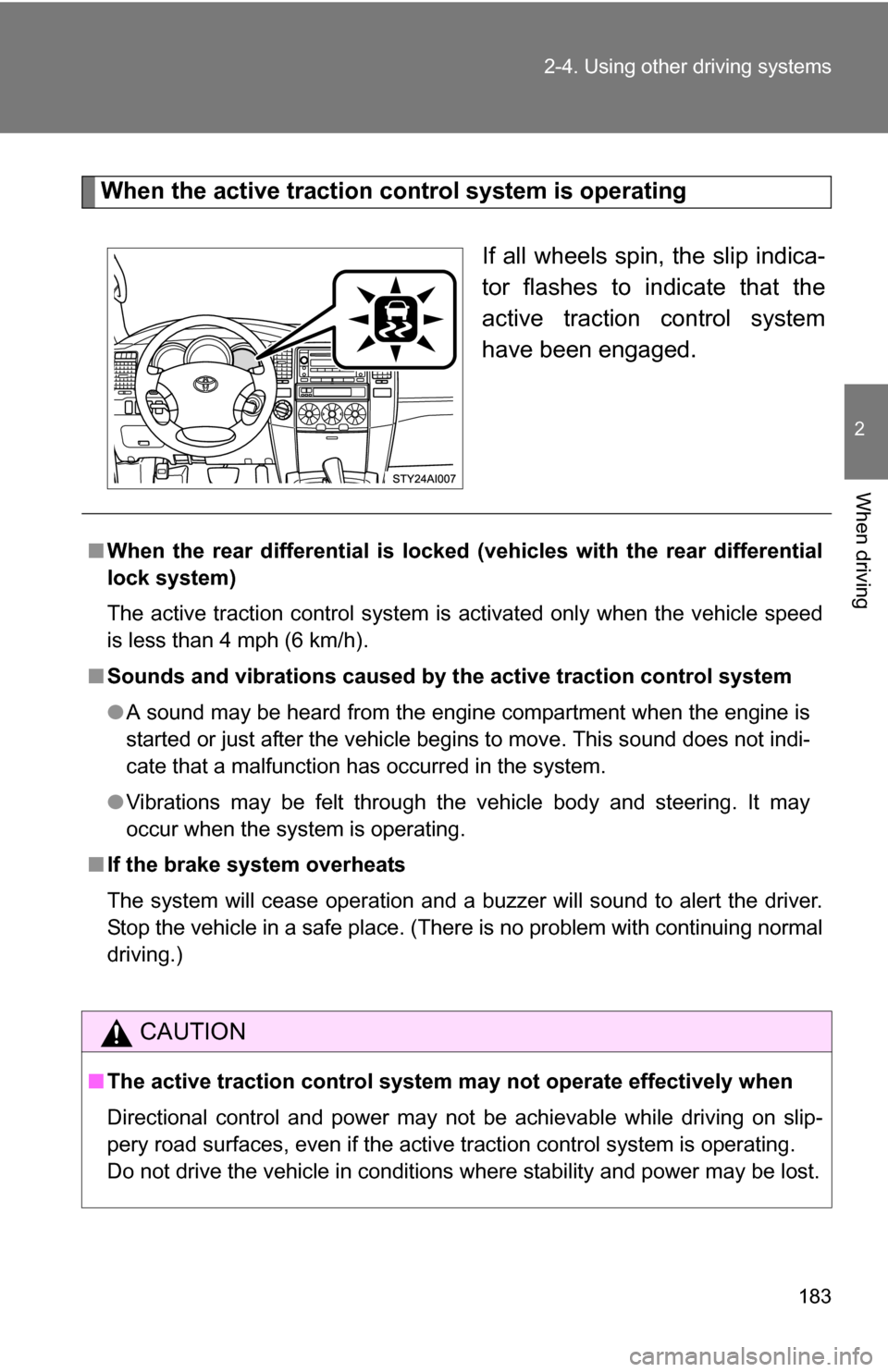
When the active traction control system is operating
If all wheels spin, the slip indica-
tor flashes to indicate that the
active traction control system
have been engaged.
■When the rear differential is locked (vehicles with the rear differential
lock system)
The active traction control system is activated only when the vehicle speed
is less than 4 mph (6 km/h).
■ Sounds and vibrations caused by the active traction control system
●A sound may be heard from the engine compartment when the engine is
started or just after the vehicle begins to move. This sound does not indi-
cate that a malfunction has occurred in the system.
● Vibrations may be felt through the vehicle body and steering. It may
occur when the system is operating.
■ If the brake system overheats
The system will cease operation and a buzzer will sound to alert the driver.
Stop the vehicle in a safe place. (Ther e is no problem with continuing normal
driving.)
CAUTION
■ The active traction control system m ay not operate effectively when
Directional control and power may not be achievable while driving on slip-
pery road surfaces, even if the active traction control system is operating.
Do not drive the vehicle in conditions where stability and power may be lost.
Page 185 of 520
185
2-4. Using other
driving systems
2
When driving
Gently depress the accelerator pedal.
Unlock the rear differential as soon as the vehicle moves out.
To unlock the rear differential, push the switch again.
■Locking the rear differential
●When the rear differential is locked, VSC is automatically turned off.
(The rear differential lock and VSC OFF indicators come on.)
● The following systems do not operate when the rear differential is locked.
It is normal operation for the ABS warning light, VSC OFF indicator and
slip indicator to be on at this time.
•ABS
• Brake assist system
•VSC
•TRAC
■ The rear differential lock is disengaged when
●Turn the four-wheel drive control switch to the H2 or H4 position.
Never forget to turn off the switch after using this feature.
■ After unlocking the rear differential
Check that the indicator goes off.
CAUTION
■To avoid an accident
●Do not use the rear differential lock system except when wheel spinning
occurs in a ditch or on a slippery or ragged surface. Large steering effort
and careful cornering control will be required.
● Do not lock the rear differential until the wheels have stopped spinning.
Otherwise, the vehicle may move in an unexpected direction when the dif-
ferential lock is engaged, resulting in an accident. This may also lead to
possible damage to rear differential lock component parts.
● Do not drive over 5 mph (8 km/h) when the rear differential is locked.
● Do not keep driving with the RR DIFF LOCK switch on.
Page 186 of 520
186
2-4. Using other driving systems
Downhill Assist Control (if equipped)
The downhill assist control system helps to prevent excessive speed
on steep downhill descents.
■System operation
The system will operate when the vehicle is traveling under 15
mph (25 km/h) and the four-wheel drive control switch is in the
L4 position.
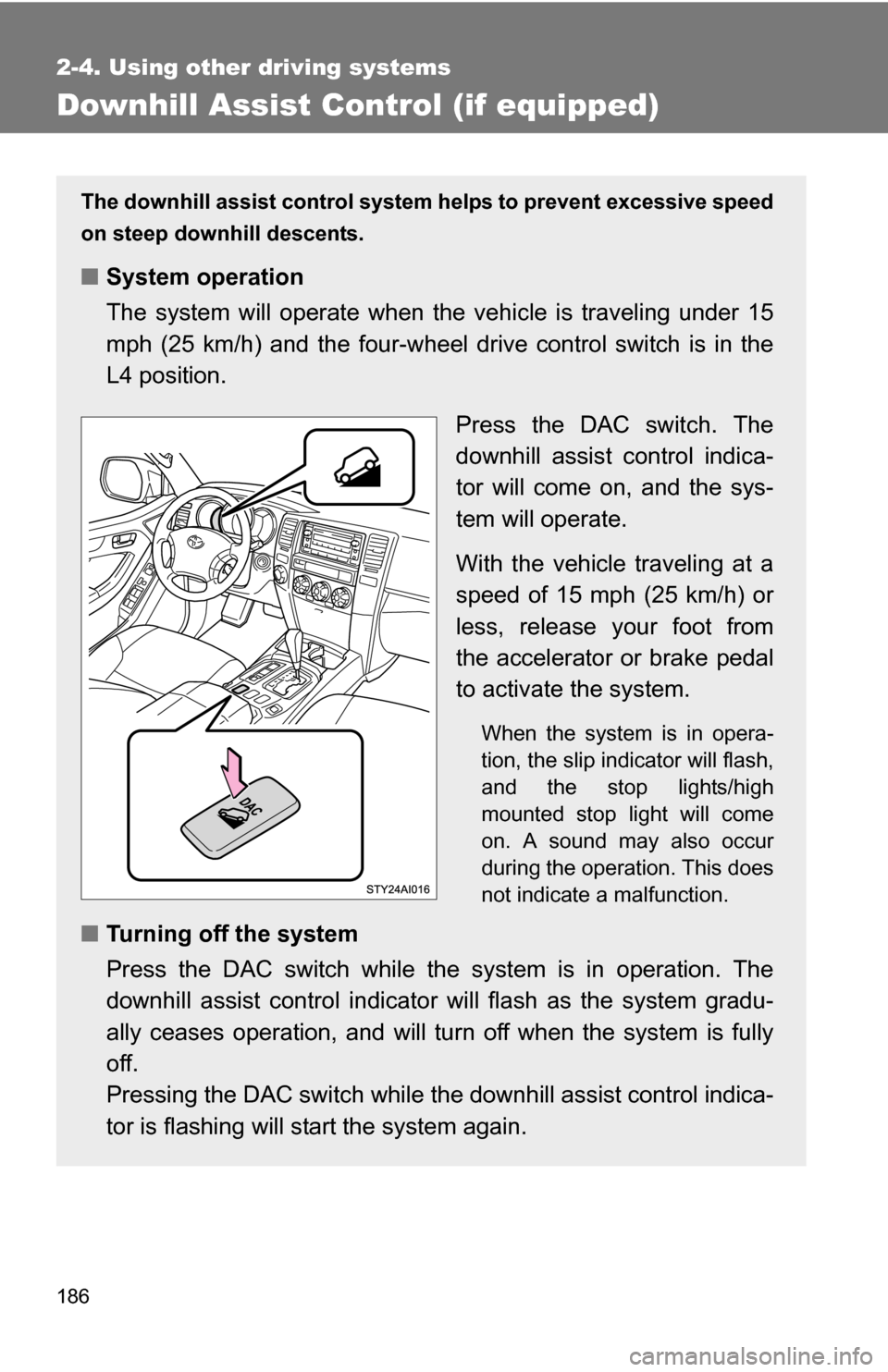
Press the DAC switch. The
downhill assist control indica-
tor will come on, and the sys-
tem will operate.
With the vehicle traveling at a
speed of 15 mph (25 km/h) or
less, release your foot from
the accelerator or brake pedal
to activate the system.
When the system is in opera-
tion, the slip indicator will flash,
and the stop lights/high
mounted stop light will come
on. A sound may also occur
during the operation. This does
not indicate a malfunction.
■Turning off the system
Press the DAC switch while the system is in operation. The
downhill assist control indicator will flash as the system gradu-
ally ceases operation, and will tu rn off when the system is fully
off.
Pressing the DAC switch while t he downhill assist control indica-
tor is flashing will st art the system again.
Page 187 of 520
187
2-4. Using other
driving systems
2
When driving
■Operating tips
The system will operate when the shift lever is in a position other than P.
However, to make effective use of the system it is recommended that the
shift lever be shifted to 2 or L.
■ The system will not operate when
The four-wheel drive control switch is in the H2 or H4 position.
■ The downhill assist control indicator flashes when
●The shift lever is in N.
● The four-wheel drive control switch is in the H2 or H4 position.
■ If the brake system overheats
The system will cease operation and a buzzer will sound to alert the driver.
Stop the vehicle in a safe place. (Ther e is no problem with continuing normal
driving.)
■ System malfunction
●The downhill assist control indicator does not come on when the engine
switch is turned to the ON position.
● The downhill assist control indicator does not come on when the DAC
switch is pressed.
In the above cases have your vehicle checked by your Toyota dealer.
CAUTION
■Do not rely excessively on the downhill assist control system
It may not be able to maintain a low speed over road surfaces on which slid-
ing can easily occur, such as extremely steep slopes or icy or muddy roads.
Page 188 of 520
188
2-4. Using other driving systems
Driving assist systems
To help enhance driving safety and performance, the following sys-
tems operate automatically in res ponse to various driving situations.
Be aware, however, that these systems are supplementary and
should not be relied upon too h eavily when operating the vehicle.
■ABS (Anti-lock Brake System)
Helps to prevent wheel lock when the brakes are applied suddenly, or if
the brakes are applied while driving on a slippery road surface.
■Brake Assist
Generates an increased level of braking force after the brake pedal is
depressed, when the system detects a panic stop situation.
■VSC (Vehicle Stability Control)
Helps the driver to control skidding when swerving suddenly or turning
on slippery road surfaces.
■TRAC (Traction Control)
Maintains drive power and prevents the rear wheels (2WD models and
H2 mode on Multi-mode 4WD models) or all wheels (4WD models
except on L4 mode) from spinning when starting the vehicle or acceler-
ating on slippery roads.
■A-TRAC (Active Traction Contro l) for L4 mode on 4WD mod-
els (vehicles with the A-TRAC switch except when the cen-
ter differential lock is locked)
Maintains drive power and prevents the all wheels from spinning when
starting the vehicle or accelerating on slippery roads.
■ Hill-start assist control (if equipped)
Helps prevent the vehicle from rolling backwards when starting on an
incline or slippery slope. It operates for approximately 5 seconds at
maximum.
Page 196 of 520
196 2-4. Using other driving systems
■Sounds and vibrations caused by the ABS, TRAC, A-TRAC, VSC and
brake assist system
● A sound may be heard from the engine compartment when the engine is
started or just after the vehicle begins to move. This sound does not indi-
cate that a malfunction has occurred in any of these systems.
● Any of the following conditions may occur when the above systems are
operating. None of these indicates that a malfunction has occurred.
• Vibrations may be felt through the vehicle body and steering.
• A motor sound may be heard after the vehicle comes to a stop.
• The brake pedal may pulsate slightly after the ABS is activated.
• The brake pedal may move down slightly after the ABS is activated.
■ If the brake system overheats
TRAC will cease operation and a buzzer will sound to alert the driver. Stop
the vehicle in a safe place. (There is no problem with continuing normal driv-
ing.)
Page 201 of 520
201
2-5. Driving information
2
When driving
CAUTION
■
Off-road driving precautions
Always observe the following precautions to minimize the risk of serious per-
sonal injury or damage to your vehicle:
●Drive carefully when off the road. Do not take unnecessary risks by driving
in dangerous places.
● Do not grip the steering wheel spokes when driving off-road. A bad bump
could jerk the wheel and injure your hands. Keep both hands and espe-
cially your thumbs on the outside of the rim.
● Always check your brakes for effectiveness immediately after driving in
sand, mud, water or snow.
● After driving through tall grass, mud, rock, sand, rivers, etc., check that
there is no grass, bush, paper, rags, stone, sand, etc. adhering or trapped
on the underbody. Clear off any such matter from the underbody. If the
vehicle is used with these materials trapped or adhering to the underbody,
a breakdown or fire could occur.
● In a rollover crash, an unbelted person is significantly more likely to die
than a person wearing a seat belt. Therefore, the driver and all passengers
should fasten their seat belts whenever the vehicle is moving.
● When driving off-road or in rugged terrain, do not drive at excessive
speeds, jump, make sharp turns, strike objects, etc. This may cause loss
of control or vehicle rollover causing death or serious injury. You are also
risking expensive damage to your vehicle’s suspension and chassis.
Page 202 of 520
202 2-5. Driving information
NOTICE
■To prevent the water damage
●Take all necessary safety measures to ensure that water damage to the
engine or other components does not occur.
● Water entering the engine air intake will cause severe engine damage.
● Water entering the automatic transmission will cause deterioration in shift
quality, locking up of your transmission accompanied by vibration, and ulti-
mately damage.
● Water can wash the grease from wheel bearings, causing rusting and pre-
mature failure, and may also enter the differentials, transmission and
transfer case, reducing the gear oil’s lubricating qualities.
■ When you drive through water
If driving through water, such as when crossing shallow streams, first check
the depth of the water and the bottom of the river bed for firmness. Drive
slowly and avoid deep water.
■ Inspection after off-road driving
●Sand and mud that has accumulate d in brake drums and around brake
discs may affect braking efficiency and may damage brake system compo-
nents.
● Always perform a maintenance inspection after each day of off-road driv-
ing that has taken you through rough terrain, sand, mud, or water. For
scheduled maintenance information, refer to the “Scheduled Maintenance
Guide” or “Owner’s Manual Supplement”.
Page 213 of 520
213
2-5. Driving information
2
When driving
Winter driving tips
Carry out the necessary preparations and inspections before driving
the vehicle in winter. Always drive the vehicle in a manner appropri-
ate to the prevailing weather conditions.
■ Pre-winter preparations
●Use fluids that are appropriate to the prevailing outside tem-
peratures.
• Engine oil
• Engine coolant
• Washer fluid
● Have a service technician inspect the level and specific grav-
ity of battery electrolyte.
● Have the vehicle fitted with four snow tires or purchase a set
of tire chains for the rear tires.
Ensure that all tires are the same size and brand, and that chains
match the size of the tires.
■Before driving the vehicle
Perform the following according to the driving conditions.
●Do not try to forcibly open a window, scrape an outside rear
view mirror surface or move a wiper or outside rear view mir-
ror that is frozen. Pour warm water over the frozen area to
melt the ice. Wipe away the water immediately to prevent it
from freezing.
● To ensure proper operation of th e climate control system fan,
remove any snow that has accumulated on the air inlet vents
in front of the windshield.
● Remove any ice that has accumu lated on the vehicle chassis.
● Periodically check for and remove any excess ice or snow
that may have accumulated in the wheel well or on the
brakes.
Page 214 of 520
214 2-5. Driving information
Regulations on the use of snow chains● Regulations regarding the use of tire chains vary according to loca-
tion and type of road. Always check local regu lations before install-
ing chains.
● Install the chains on the rear tires.
● Retighten the chains after drivi ng 1/4 - 1/2 mile (0.5 - 1.0 km).
■Snow chain installation
Observe the following precautions when installing and removing chains.
●Install and remove tire chains in a safe location.
● Install tire chains on the rear tires only. Do not install tire chains on the
front tires.
● Install tire chains following the instructions provided in the accompanying
instructions.
■ When driving the vehicle
Accelerate the vehicle slowly and drive at a reduced speed suit-
able to road conditions.
■ When parking the vehicle
Park the vehicle and move the shift lever to P without setting the
parking brake. The parking brak e may freeze up, preventing it
from being released.