cruise control TOYOTA 4RUNNER 2009 N280 / 5.G Owners Manual
[x] Cancel search | Manufacturer: TOYOTA, Model Year: 2009, Model line: 4RUNNER, Model: TOYOTA 4RUNNER 2009 N280 / 5.GPages: 520, PDF Size: 10.74 MB
Page 3 of 520
1
2
3
4
5
6
7
3
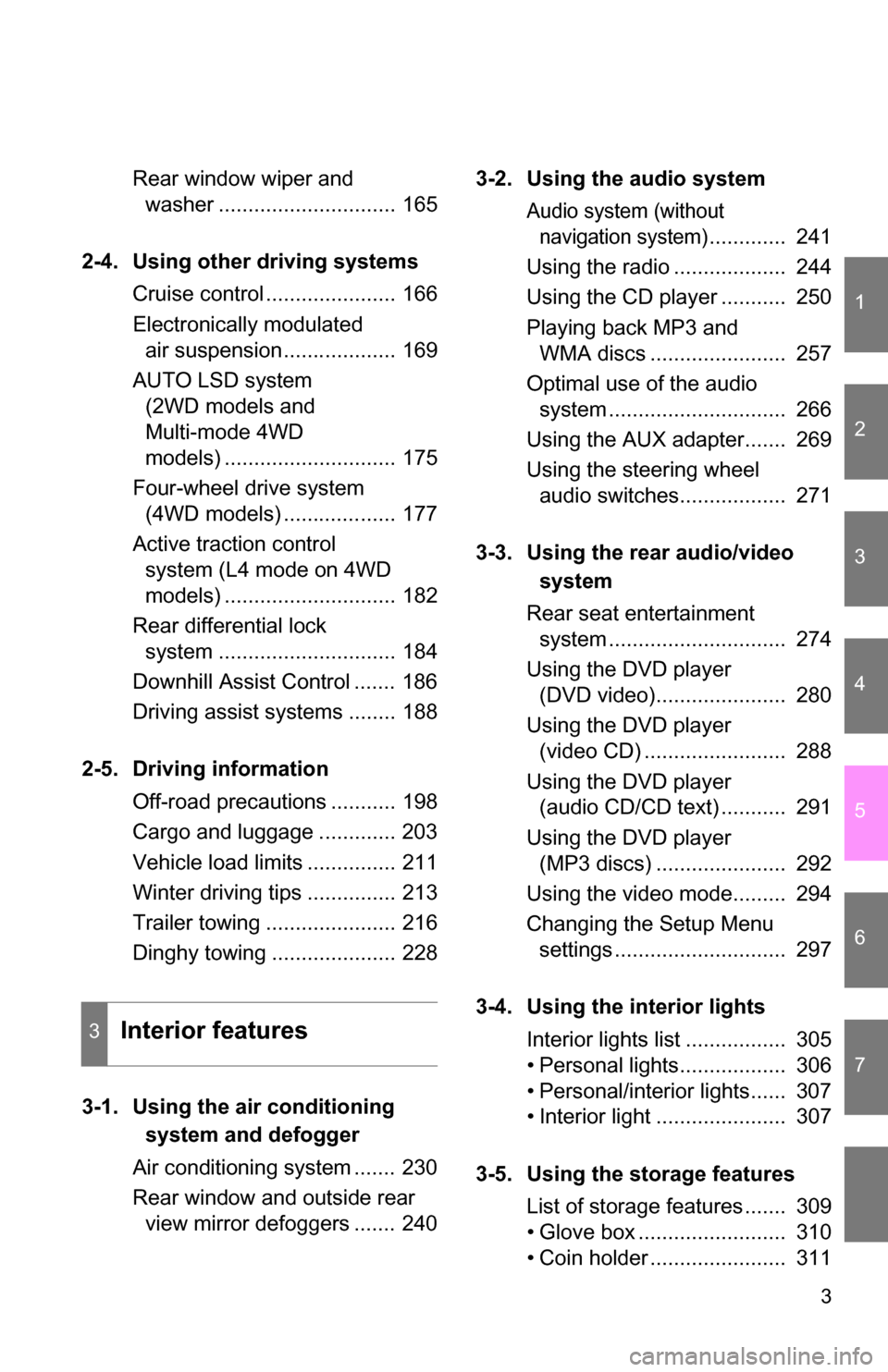
Rear window wiper and washer .............................. 165
2-4. Using other driving systems Cruise control ...................... 166
Electronically modulated air suspension................... 169
AUTO LSD system (2WD models and
Multi-mode 4WD
models) ............................. 175
Four-wheel drive system (4WD models) ................... 177
Active traction control system (L4 mode on 4WD
models) ............................. 182
Rear differential lock system .............................. 184
Downhill Assist Control ....... 186
Driving assist systems ........ 188
2-5. Driving information Off-road precautions ........... 198
Cargo and luggage ............. 203
Vehicle load limits ............... 211
Winter driving tips ............... 213
Trailer towing ...................... 216
Dinghy towing ..................... 228
3-1. Using the air conditioning
system a nd defogger
Air conditioning system ....... 230
Rear window and outside rear view mirror defoggers ....... 240 3-2. Using the audio system
Audio system (without
navigation system)
............. 241
Using the radio ................... 244
Using the CD player ........... 250
Playing back MP3 and WMA discs ....................... 257
Optimal use of the audio system .............................. 266
Using the AUX adapter....... 269
Using the steering wheel audio switches.................. 271
3-3. Using the rear audio/video
system
Rear seat entertainment system .............................. 274
Using the DVD player (DVD video)...................... 280
Using the DVD player (video CD) ........................ 288
Using the DVD player (audio CD/CD text) ........... 291
Using the DVD player (MP3 discs) ...................... 292
Using the video mode......... 294
Changing the Setup Menu settings ............................. 297
3-4. Using the interior lights Interior lights list ................. 305
• Personal lights.................. 306
• Personal/interior lights...... 307
• Interior light ...................... 307
3-5. Using the storage features List of storage features ....... 309
• Glove box ......................... 310
• Coin holder ....................... 311
3Interior features
Page 17 of 520
17
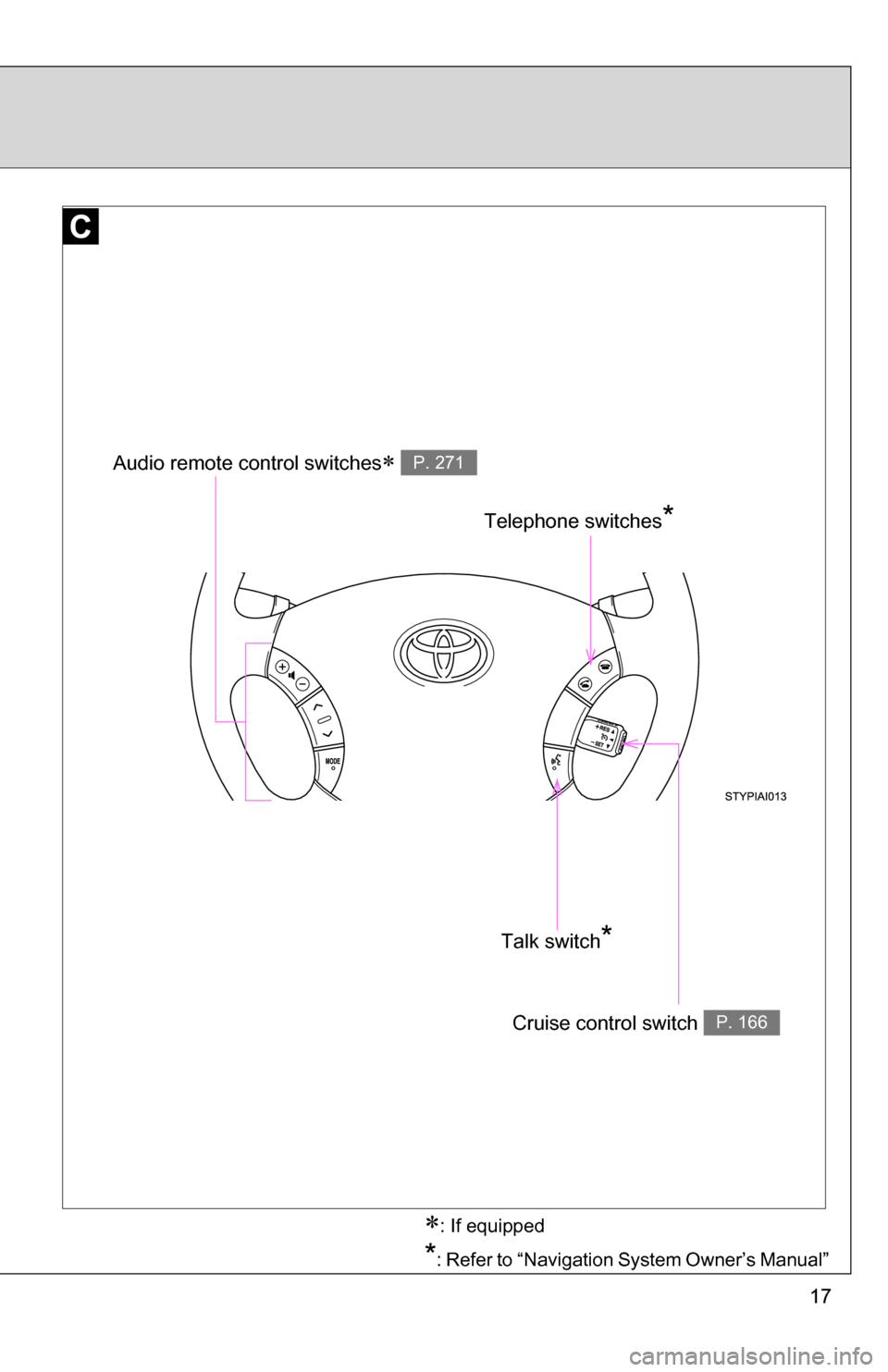
Telephone switches*
Audio remote control switches P. 271
Talk switch*
Cruise control switch P. 166
: If equipped
*: Refer to “Navigation System Owner’s Manual”
Page 22 of 520
22
For your information
Main Owners Manual
Please note that this manual applies to all models explains and all equip-
ment, including options. Therefore, you may find some explanations for
equipment not installed on your vehicle.
All specifications provided in this manual are current at the time of printing.
However, because of the Toyota policy of continual product improvement, we
reserve the right to make changes at any time without notice.
Depending on specifications, the vehicle shown in the illustrations may differ
from your vehicle in terms of equipment.
Accessories, spare parts and modification of your Toyota
A wide variety of non-genuine spare parts and accessories for Toyota
vehicles are currently available in the market. You should know that Toyota
does not warrant these products and is not responsible for their
performance, repair, or replacement, or for any damage they may cause to,
or adverse effect they may have on, your Toyota vehicle.
This vehicle should not be modified with non-genuine Toyota products.
Modification with non-genuine Toyota products could affect its performance,
safety or durability, and may even violate governmental regulations. In
addition, damage or performance problems resulting from the modification
may not be covered under warranty.
Installation of a mobile two-way radio system
As the installation of a mobile two-way radio system in your vehicle could
affect electronic systems such as the multiport fuel injection system/sequen-
tial multiport fuel injection system, cruise control system, anti-lock brake sys-
tem, SRS airbag system and seat belt pretensioner system, be sure to check
with your Toyota dealer for precautionary measures or special instructions
regarding installation.
Page 131 of 520
When driving2
131
2-1. Driving proceduresDriving the vehicle............ 132
Engine (ignition) switch .... 140
Automatic
Transmission.... 143
Turn signal lever .............. 145
Parking brake ................... 146
Horn ................................. 147
2-2. Instrument cluster Gauges and meters ......... 148
Indicators and warning lights .............................. 151
Accessory meter .............. 155
2-3. Operating the lights and wipers
Headlight switch ............... 158
Fog light switch ................ 162
Windshield wipers and washer ........................... 163
Rear window wiper and washer ........................... 165 2-4. Using other driving systems
Cruise control ................... 166
Electronically modulated air suspension ................ 169
AUTO LSD system (2WD models and
Multi-mode 4WD
models) .......................... 175
Four-wheel drive system (4WD models) ................ 177
Active traction control system (L4 mode on
4WD models) ................. 182
Rear differential lock system ........................... 184
Downhill Assist Control .... 186
Driving assist systems ..... 188
2-5. Driving information Off-road precautions ........ 198
Cargo and luggage .......... 203
Vehicle load limits ............ 211
Winter driving tips ............ 213
Trailer towing ................... 216
Dinghy towing .................. 228
Page 144 of 520
144 2-1. Driving procedures
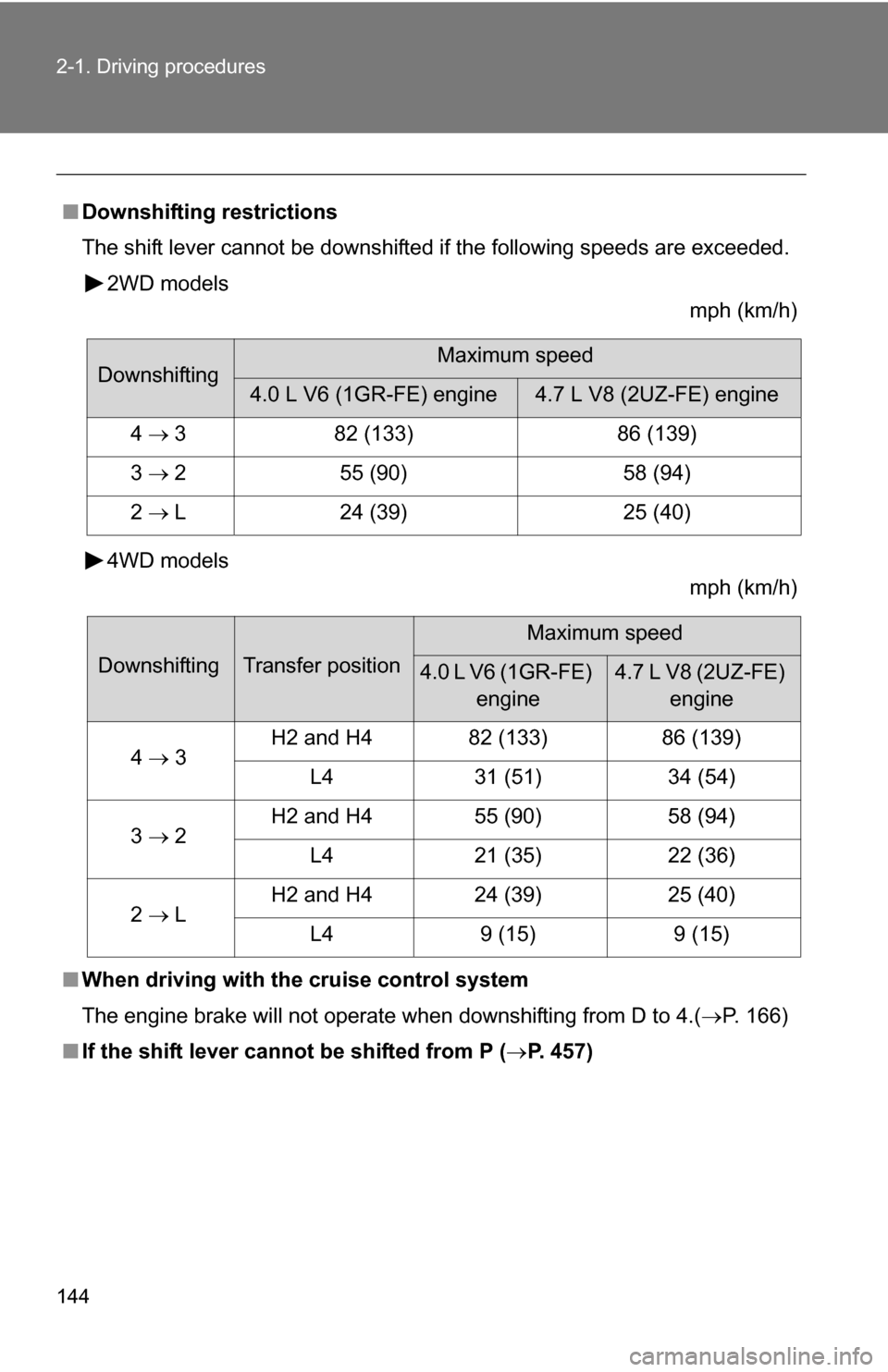
■Downshifting restrictions
The shift lever cannot be downshifted if the following speeds are exceeded.
2WD models mph (km/h)
4WD models mph (km/h)
■ When driving with the cruise control system
The engine brake will not operate when downshifting from D to 4.( P. 166)
■ If the shift lever cannot be shifted from P (P. 457)
DownshiftingMaximum speed
4.0 L V6 (1GR-FE) engine4.7 L V8 (2UZ-FE) engine
4 3 82 (133) 86 (139)
3 2 55 (90) 58 (94)
2 L 24 (39) 25 (40)
DownshiftingTransfer position
Maximum speed
4.0 L V6 (1GR-FE)
engine4.7 L V8 (2UZ-FE) engine
4 3 H2 and H4 82 (133) 86 (139)
L4 31 (51) 34 (54)
3 2 H2 and H4 55 (90) 58 (94)
L4 21 (35) 22 (36)
2 L H2 and H4 24 (39) 25 (40)
L4 9 (15) 9 (15)
Page 153 of 520
153
2-2. Instrument cluster
2
When driving
■
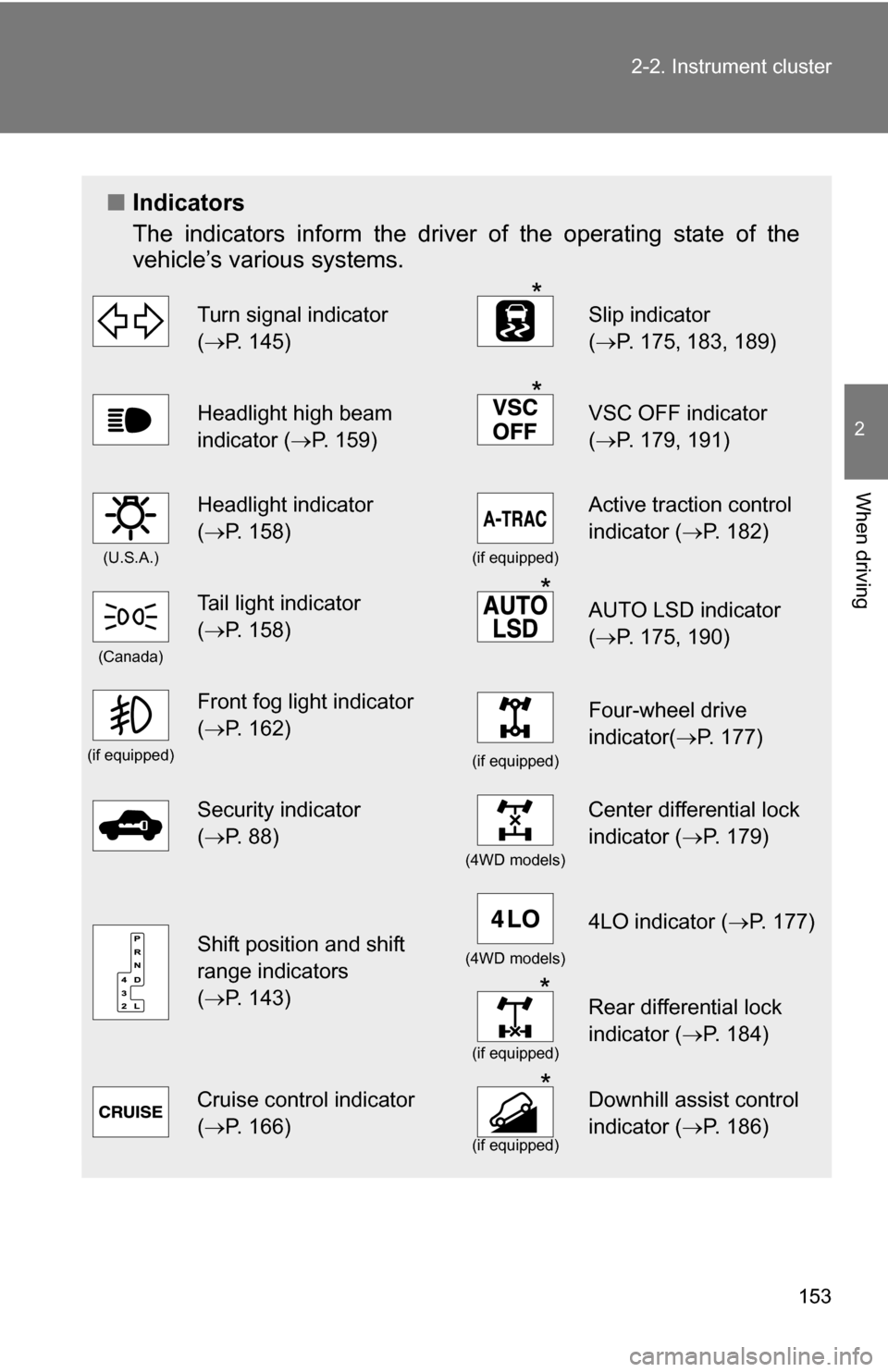
Indicators
The indicators inform the driver of the operating state of the
vehicle’s various systems.
Turn signal indicator
(P. 145)*Slip indicator
( P. 175, 183, 189)
Headlight high beam
indicator ( P. 159)*VSC OFF indicator
(P. 179, 191)
(U.S.A.)
Headlight indicator
(P. 158)
(if equipped)
Active traction control
indicator ( P. 182)
(Canada)
Tail light indicator
(P. 158) *AUTO LSD indicator
( P. 175, 190)
(if equipped)
Front fog light indicator
(P. 162)
(if equipped)
Four-wheel drive
indicator( P. 177)
Security indicator
(P. 88)
(4WD models)
Center differential lock
indicator ( P. 179)
Shift position and shift
range indicators
(P. 143)(4WD models)
4LO indicator ( P. 177)
*
(if equipped)
Rear differential lock
indicator (P. 184)
Cruise control indicator
(P. 166) *
(if equipped)
Downhill assist control
indicator ( P. 186)
Page 166 of 520
166
2-4. Using other driving systems
Cruise control
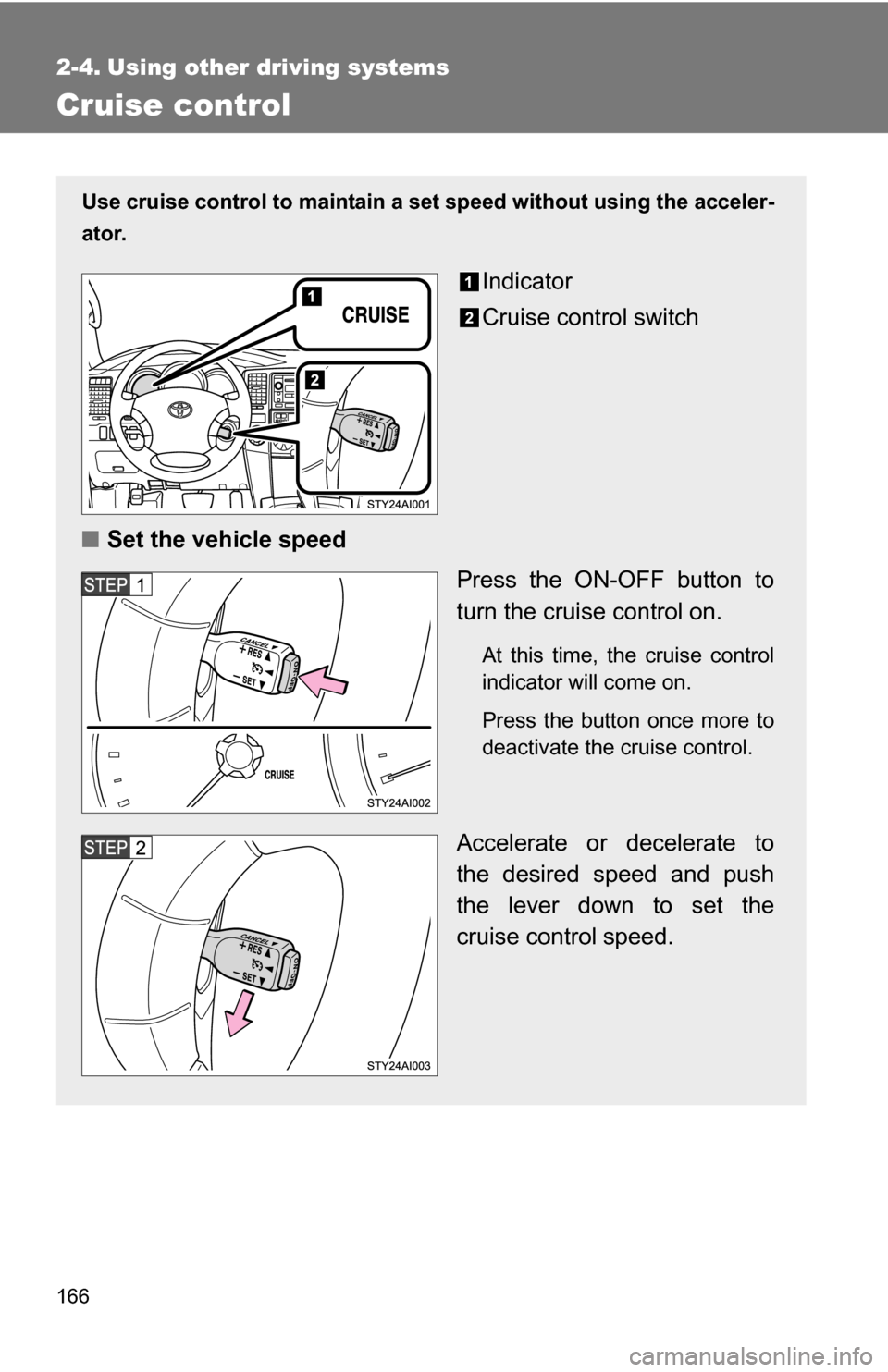
Use cruise control to maintain a set speed without using the acceler-
ator.
Indicator
Cruise control switch
■ Set the vehicle speed
Press the ON-OFF button to
turn the cruise control on.
At this time, the cruise control
indicator will come on.
Press the button once more to
deactivate the cruise control.
Accelerate or decelerate to
the desired speed and push
the lever down to set the
cruise control speed.
Page 167 of 520
167
2-4. Using other
driving systems
2
When driving
■Cruise control can be set when
●The shift lever is in D or 4.
● Vehicle speed is more than approximately 25 mph (40 km/h).
■ Accelerating
The vehicle can be accelerated normally.
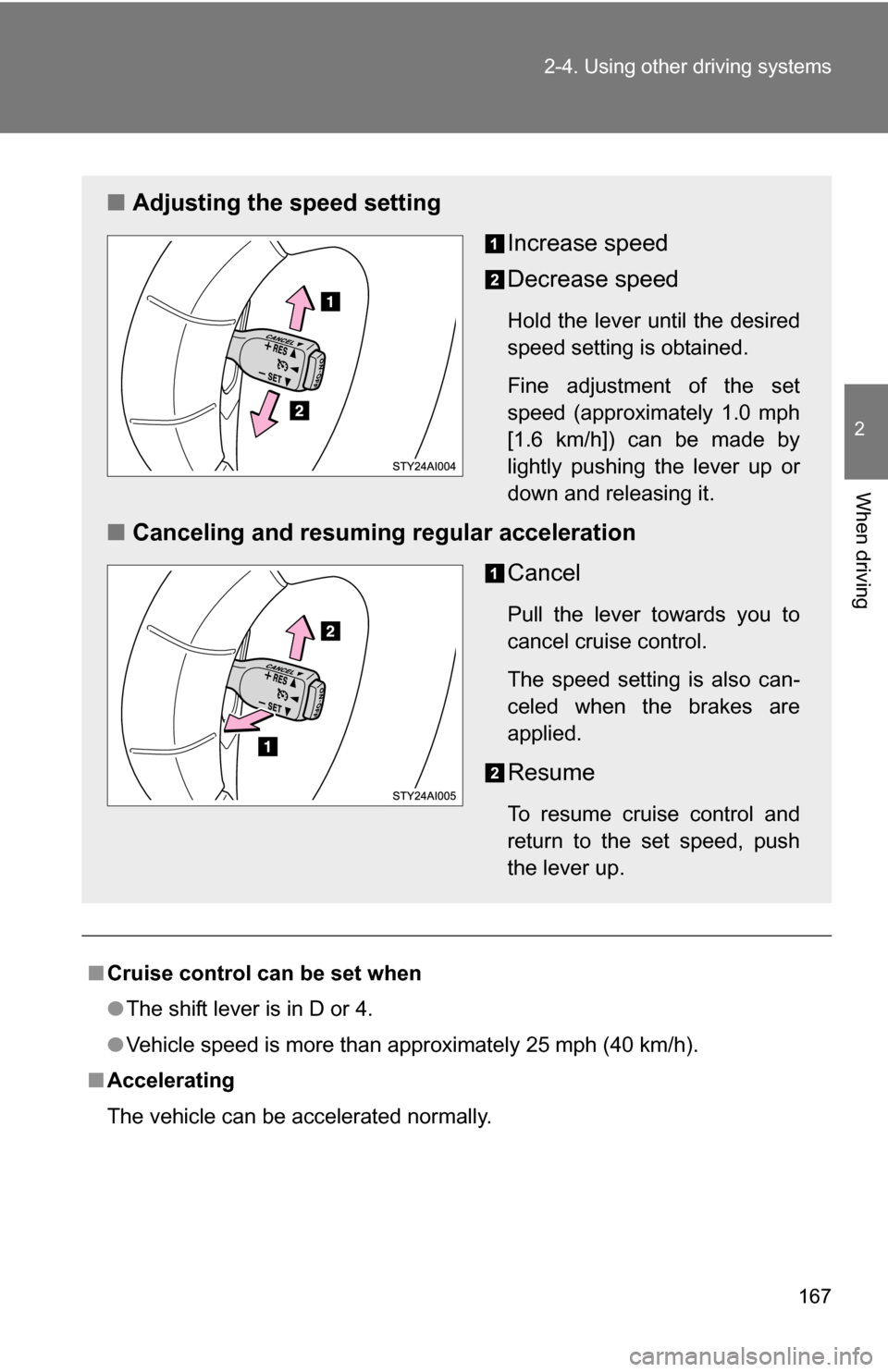
■ Adjusting the speed setting
Increase speed
Decrease speed
Hold the lever until the desired
speed setting is obtained.
Fine adjustment of the set
speed (approximately 1.0 mph
[1.6 km/h]) can be made by
lightly pushing the lever up or
down and releasing it.
■Canceling and resuming regular acceleration
Cancel
Pull the lever towards you to
cancel cruise control.
The speed setting is also can-
celed when the brakes are
applied.
Resume
To resume cruise control and
return to the set speed, push
the lever up.
Page 168 of 520
168 2-4. Using other driving systems
■Automatic cruise control cancellation
The set speed is automatically canceled in any of the following situations.
●Actual vehicle speed falls more than 10 mph (16 km/h) below the preset
vehicle speed.
At this time, the memorized set speed is not retained.
● Actual vehicle speed is below 25 mph (40 km/h).
● VSC is activated.
■ If the cruise control indicator flashes
Press the ON-OFF button to turn the cruise control off, and then reactivate
the system.
If the cruise control speed cannot be set or if the cruise control cancels
immediately after being activated, there may be a malfunction in the cruise
control system. Have the vehicle inspected by your Toyota dealer.
CAUTION
■To avoid operating the cruise control by mistake
Keep the ON-OFF button off when not in use.
■ Situations unsuitable for cruise control
Do not use cruise control in any of the following situations.
Doing so may result in control of the vehicle being lost and could cause an
accident resulting in death or serious injury.
●In heavy traffic
● On roads with sharp bends
● On winding roads
● On slippery roads, such as those covered with rain, ice or snow
● On steep hills
● When towing a trailer
Page 225 of 520
225
2-5. Driving information
2
When driving
■
When connecting and disconnecting a trailer
Set the electronically modulated air suspension system to LO mode and
push the HEIGHT CONTROL OFF switch to turn off the rear height control
air suspension. (if equipped)
■ Break-in schedule
If your vehicle is new or equipped with any new power train components
(such as an engine, transmission, differential and wheel bearing), Toyota
recommends that you do not tow a trailer until it has been driven for over 500
miles (800 km).
However, avoid full throttle acceleration.
■ Maintenance
●If you tow a trailer, your vehicle will require more frequent maintenance
due to the additional load. (See “Scheduled Maintenance Guide” or
“Owner’s Manual Supplement”.)
● Retighten the fixing bolts of the towing ball and bracket after approxi-
mately 600 miles (1000 km).
CAUTION
■Trailer towing precautions
●Follow all the instructions described in this section. Failure to do so could
cause an accident resulting in death or serious injury.
● Exceeding the towing capacity, GVWR, GCWR or GAWR can cause an
accident resulting in death or serious injuries.
■ To avoid accident or injury
●Do not exceed the trailer hitch assembly weight, gross vehicle weight,
gross axle weight and trailer tongue load capacities.
● Do not exceed 45 mph (72 km/h) or the posted towing speed limit, which-
ever is lower. As instability (swaying) of the towing vehicle-trailer combina-
tion increases as speed increases, exceeding 45 mph (72 km/h) may
cause loss of control.
● Do not use cruise control when you are towing.
● Slow down and downshift before descending steep or long downhill
grades. Do not make sudden downshifts.