USB TOYOTA 4RUNNER 2011 N280 / 5.G User Guide
[x] Cancel search | Manufacturer: TOYOTA, Model Year: 2011, Model line: 4RUNNER, Model: TOYOTA 4RUNNER 2011 N280 / 5.GPages: 680, PDF Size: 12.58 MB
Page 354 of 680

354 3-2. Using the audio system
4RUNNER_U
●Extensions
If the file extensions .mp3 and .wma are used for files other than MP3 and
WMA files, they will be mistakenly recognized and played as MP3 and
WMA files. This may result in large amounts of interference and damage
to the speakers.
● Playback
• To play MP3 file with steady sound quality, we recommend a fixed bit
rate of at least 128 kbps and a sampling frequency of 44.1 kHz.
• There is a wide variety of freeware and other encoding software for MP3 and WMA files on the market, and depending on the status of the
encoding and the file format, poor sound quality or noise at the start of
playback may result. In some cases, playback may not be possible at
all.
• Microsoft, Windows, and Windows Media are the registered trade- marks of Microsoft Corporation in the U.S.A. and other countries.
CAUTION
■Caution while driving
Do not use a USB memory, or connect a USB memory.
NOTICE
■To prevent damage to a USB memory
● Do not leave a USB memory in the vehicle. The temperature inside may
become high, resulting in damage to the player.
● Do not push down on or apply unnecessary pressure to the USB memory
while it is connected as this may damage the USB memory or its terminal.
● Do not insert foreign objects into the port as this may damage the USB
memory or its terminal.
Page 361 of 680
361
3-2. Using the audio system
3
Interior features
4RUNNER_U
Using the steering wheel audio switches
: If equipped
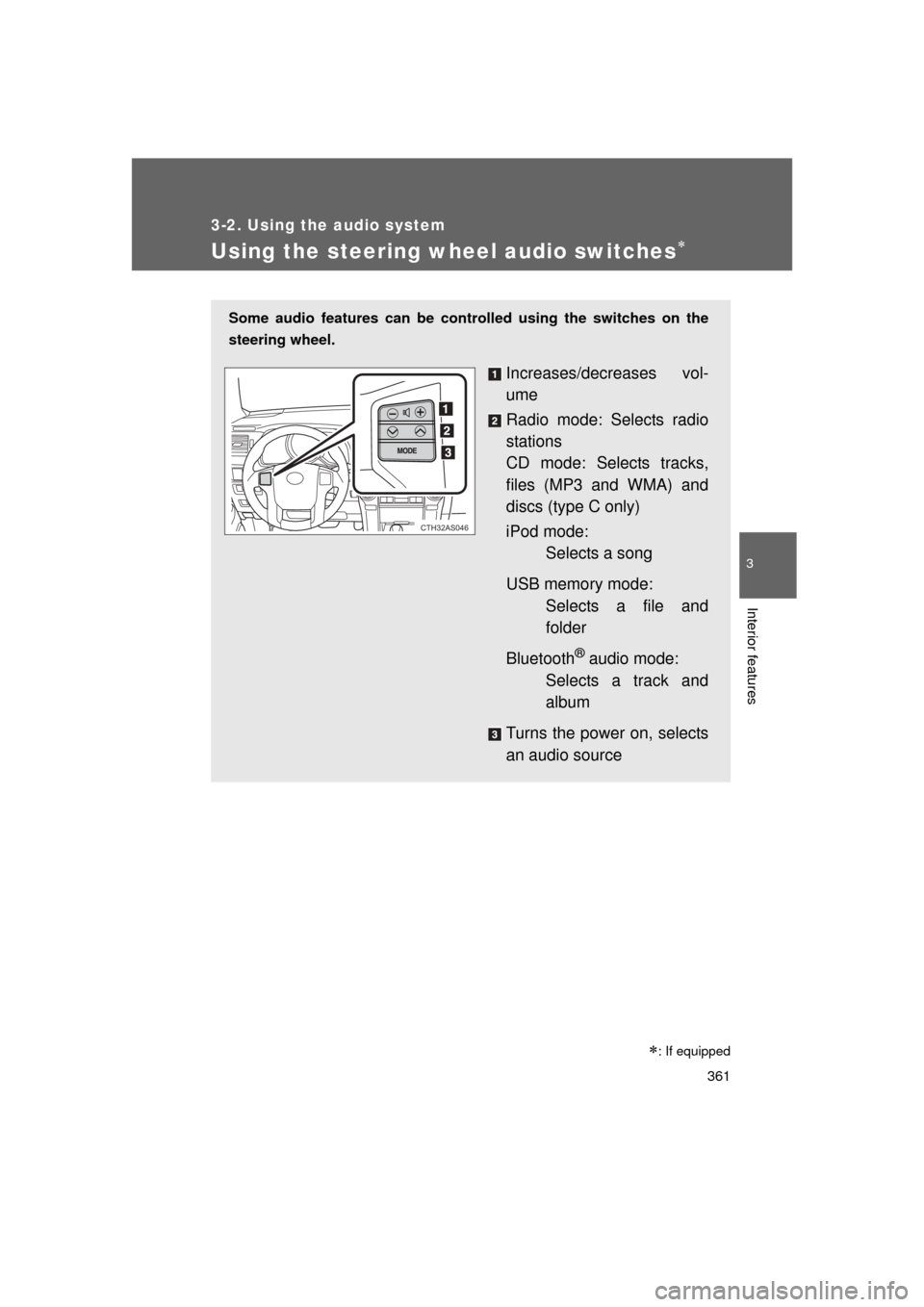
Some audio features can be controlled using the switches on the
steering wheel.
Increases/decreases vol-
ume
Radio mode: Selects radio
stations
CD mode: Selects tracks,
files (MP3 and WMA) and
discs (type C only)
iPod mode: Selects a song
USB memory mode: Selects a file and
folder
Bluetooth
® audio mode:
Selects a track and
album
Turns the power on, selects
an audio source
CTH32AS046
Page 362 of 680
362 3-2. Using the audio system
4RUNNER_U
Turning the power onPress when the audio system is turned off.
The audio system can be turned off by holding the switch down until you
hear a beep.
Changing the audio sourcePress when the audio system is turned on. The audio source
changes as follows each time the switch is pressed.
If no discs are inserted in the player, that mode will be skipped.
FM SAT CD (type B only) CD changer (type C only) Bluetooth®
Audio AUX USB/iPodAM
Adjusting the volume
Press “+” on to increase the vo lume and “-” to decrease the
volume.
Press and hold the switch to continue increasing or decreasing the vol-
ume.
Selecting a radio station
Press to select radio mode.
Press “” or “ ” on to select a radio station.
To scan for receivable stations, press and hold “ ” or “ ” on
until you hear a beep.
STEP 1
STEP 2
Page 363 of 680
363
3-2. Using the audio system
3
Interior features
4RUNNER_U
Selecting a track/file or song
Press to select CD, iPod, USB memory or Bluetooth
®
audio mode.
Press “” or “ ” on to select the desired track/file or
song.
Selecting a folder or album
Press to select the CD, USB memory or Bluetooth
®
audio mode.
Press and hold “ ” or “ ” on until you hear a beep.
Selecting a disc in the CD player (type C only)
Press to select CD mode.
Press and hold “ ” or “ ” on until you hear a beep.
CAUTION
■ To reduce the risk of an accident
Exercise care when operating the audio switches on the steering wheel.
STEP 1
STEP 2
STEP 1
STEP 2
STEP 1
STEP 2
Page 666 of 680

666
4RUNNER_U
Alphabetical index
Alphabetical index
A/C .....................................296, 302
ABS ...........................................253
Accessory meter ......................194
Active head restraints ............... 62
Active traction control ............. 230
Air conditioning filter............... 526
Air conditioning systemAir conditioning filter ..............526
Automatic air conditioning
system ................................302
Manual air conditioning system ................................296
Airbags Airbag operating conditions...118
Airbag precautions for your child .................................... 122
Airbag warning light............... 566
Curtain shield airbag operating conditions............118
Curtain shield airbag precautions .........................122
Front passenger occupant classification system ...........130
General airbag precautions ...122
Locations of airbags ..............115
Modification and disposal of airbags ............................ 127
Proper driving posture ...113, 122
Roll sensing of curtain shield airbags off switch ................128
Side airbag operating conditions............................ 118
Side airbag precautions ........ 122
SRS airbags .......................... 115 Alarm......................................... 109
Antenna .................................... 321
Anti-lock brake system ........... 253
Armrest ..................................... 448
Audio input ............................... 360
Audio remote controls ............ 361
Audio system
Antenna................................. 321
Audio input ............................ 360
AUX port ............................... 360
CD player/changer ................ 324
iPod ....................................... 341
MP3/WMA disc ..................... 333
Optimal use ........................... 355
Portable music player ........... 360
Radio..................................... 317
Steering wheel audio switch.................................. 361
Type ...................................... 313
USB memory......................... 348
AUTO LSD system ................... 232
Automatic air conditioning
system .................................... 302
Automatic light control
system .................................... 198
Automatic transmission Automatic transmission ......... 173
If the shift lever cannot be
shifted from P ..................... 593
S mode.................................. 176
AUX port ................................... 360
Auxiliary box ............................ 422A