ESP TOYOTA 4RUNNER 2011 N280 / 5.G Owner's Manual
[x] Cancel search | Manufacturer: TOYOTA, Model Year: 2011, Model line: 4RUNNER, Model: TOYOTA 4RUNNER 2011 N280 / 5.GPages: 680, PDF Size: 12.58 MB
Page 265 of 680
265
2-5. Driving information
2
When driving
4RUNNER_U
CAUTION
■
Off-road driving precautions
Always observe the following precautions to minimize the risk of death, seri-
ous injury or damage to your vehicle:
● Drive carefully when off the road. Do not take unnecessary risks by driving
in dangerous places.
● Do not grip the steering wheel spokes when driving off-road. A bad bump
could jerk the wheel and injure your hands. Keep both hands and espe-
cially your thumbs on the outside of the rim.
● Always check your brakes for effectiveness immediately after driving in
sand, mud, water or snow.
● After driving through tall grass, mud, rock, sand, rivers, etc., check that
there is no grass, bush, paper, rags, stone, sand, etc. adhering or trapped
on the underbody. Clear off any such matter from the underbody. If the
vehicle is used with these materials trapped or adhering to the underbody,
a breakdown or fire could occur.
● In a rollover crash, an unbelted person is significantly more likely to die
than a person wearing a seat belt. Therefore, the driver and all passengers
should fasten their seat belts whenever the vehicle is moving.
● When driving off-road or in rugged terrain, do not drive at excessive
speeds, jump, make sharp turns, strike objects, etc. This may cause loss
of control or vehicle rollover causing death or serious injury. You are also
risking expensive damage to your vehicle’s suspension and chassis.
Page 286 of 680

286 2-5. Driving information
4RUNNER_U
Trailer towing tipsYour vehicle will handle differently w hen towing a trailer. In order to
avoid accident, death or serious in jury, keep the following in mind
when towing.
● Before starting out, check the trailer lights and the vehicle-trailer
connections. Recheck after driving a short distance.
● Practice turning, stopping and reve rsing with the trailer attached in
an area away from traffic until you become accustomed to the feel
of the vehicle.
● Reversing with a trailer attached is difficult and requires practice.
Grip the bottom of the steering wheel and move your hand to the
left to move the trailer to the left. Move your hand to the right to
move the trailer to right. (This is generally opposite to reversing
without a trailer attached.) Avoid sharp or prolonged turning. Have
someone guide you when reversing to reduce the risk of an acci-
dent.
● As stopping distance is increased when towing a trailer, vehicle-to
vehicle distance should be increased. For each 10 mph (16 km/h)
of speed, allow at least o ne vehicle and trailer length.
● Avoid sudden braking as you may skid, resulting in jackknifing and
loss of control. This is especiall y true on wet or slippery surfaces.
● Avoid jerky starts or sudden acceleration.
● Avoid jerky steering and sharp turns, and slow down before mak-
ing turns.
Page 314 of 680
314 3-2. Using the audio system
4RUNNER_U
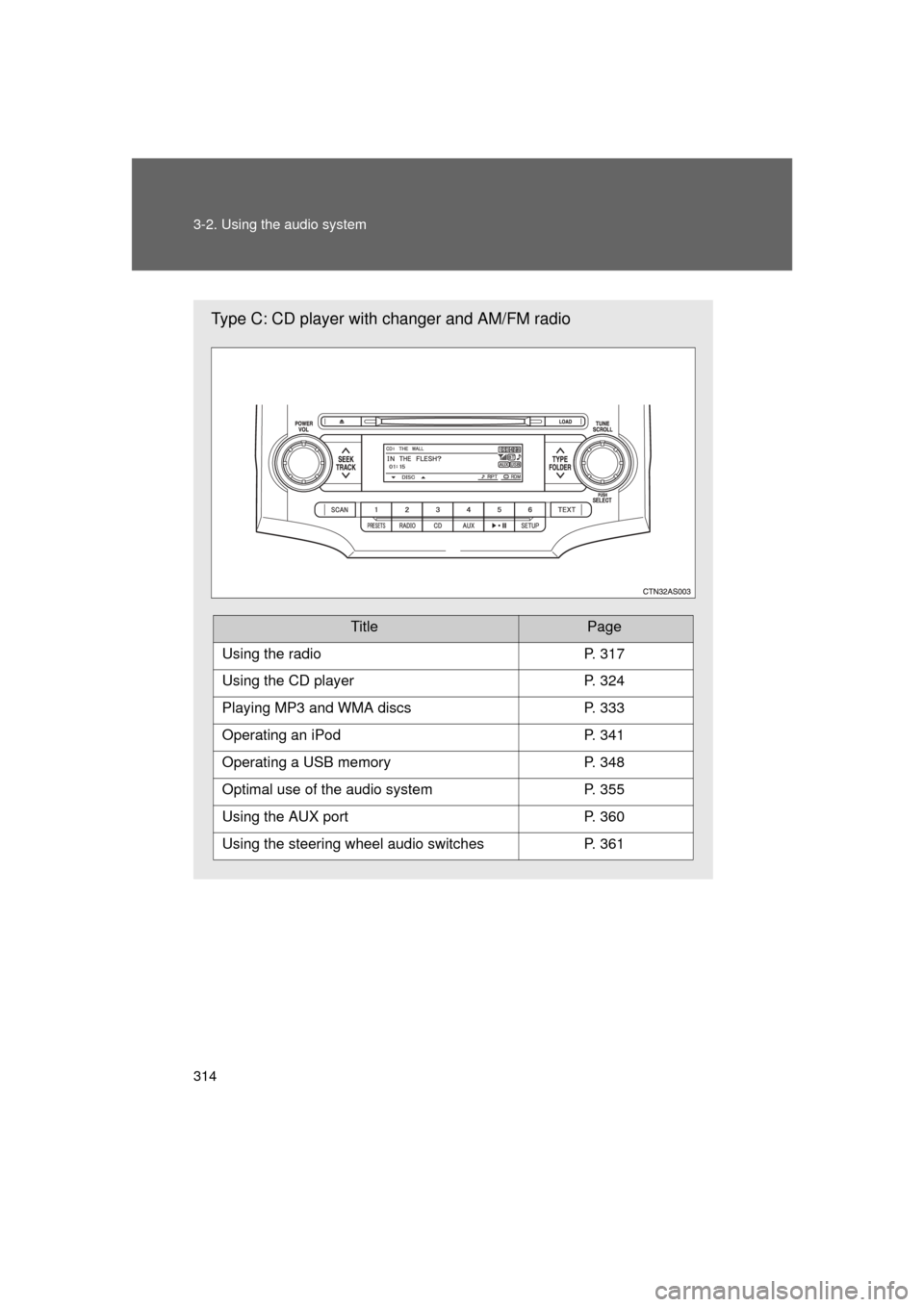
Type C: CD player with changer and AM/FM radio
TitlePage
Using the radioP. 317
Using the CD playerP. 324
Playing MP3 and WMA discsP. 333
Operating an iPodP. 341
Operating a USB memoryP. 348
Optimal use of the audio systemP. 355
Using the AUX portP. 360
Using the steering wheel audio switchesP. 361
Page 315 of 680
315
3-2. Using the audio system
3
Interior features
4RUNNER_U
Language settings (type B and C)
The language used for all voice guidance, voice recognition and mes-
sages may be changed. Press .
Press (MORE).
Press (LANG).
Press or as corresponds to the desired lan-
guage.
For vehicles sold in the U.S.A.“ENG” (English) or “ESP” (Spanish)
For vehicles sold in Canada “ENG” (English) or “FRAN” (French)
■Using cellular phones
Interference may be heard through the audio system's speakers if a cellular
phone is being used inside or close to the vehicle while the audio syste\
m is
operating.
■ Certification for the audio system
This device complies with part 15 of the FCC Rules and RSS-Gen of the IC
Rules. Operation is subject to the following two conditions: (1) This device
may not cause harmful interference, and (2) this device must accept an\
y
interference received, including interference that may cause undesired oper-
ation.
STEP 1
STEP 2
STEP 3
STEP 4
Page 316 of 680

316 3-2. Using the audio system
4RUNNER_U
CAUTION
■For vehicles sold in the U.S.A. and Canada
● Part 15 of the FCC Rules and RSS-Gen of the IC Rules
FCC Warning:
Changes or modifications not expressly approved by the party responsible
for compliance could void the user's authority to operate the equipment.\
● Laser products
• Do not take this unit apart or attempt to make any changes yourself.
This is an intricate unit that uses a laser pickup to retrieve information
from the surface of compact discs. The laser is carefully shielded so
that its rays remain inside the cabinet. Therefore, never try to disas-
semble the player or alter any of its parts since you may be exposed to
laser rays and dangerous voltages.
• This product utilizes a laser. Use of controls or adjustments or performance of procedures other
than those specified herein may result in hazardous radiation expo-
sure.
• The use of optical instruments with this product will increase eye haz- ard.
NOTICE
■To prevent battery discharge
Do not leave the audio system on longer than necessary with the engine o\
ff.
■ To avoid damaging the audio system
Take care not to spill drinks or other fluids over the audio system.
Page 321 of 680
321
3-2. Using the audio system
3
Interior features
4RUNNER_U
■
When the battery is disconnected
All preset stations are erased. (type A only)
■ Reception sensitivity
● Type B and C Cargo loaded on the roof luggage carrier, especially
metal objects, may adversely affect the reception of XM
® Satellite Radio.
● Maintaining perfect radio reception at all times is difficult due to the con-
tinually changing position of the antenna, differences in signal strength
and surrounding objects, such as trains, transmitters, etc.
● The radio antenna is mounted on the right-side front fender. The antenna
can be removed from the base by turning it.
■ XM
® Satellite Radio
An XM
® Satellite Radio is a tuner designed exclusively to receive broadcasts
provided under a separate subscription. Availability is limited to the 48 con-
tiguous states and 10 Canadian provinces.
● XM
® subscriptions
For detailed information about XM® Satellite Radio or to subscribe:
U.S.A.
Visit on the web at www.xmradio.com
or call 1-800-967-2346.
Canada
Visit on the web at www.xmradio.ca
or call 1-877-438-9677.
● Radio ID
You will need the radio ID when activating XM
® service or reporting a
problem. Select “CH000” using
or , and the receiver's 8-
character ID number will appear.
● Satellite tuner
The tuner supports only Audio Services (Music and Talk) and the accom-
panying Text Information of XM
® Satellite Radio.
Page 343 of 680
343
3-2. Using the audio system
3
Interior features
4RUNNER_U
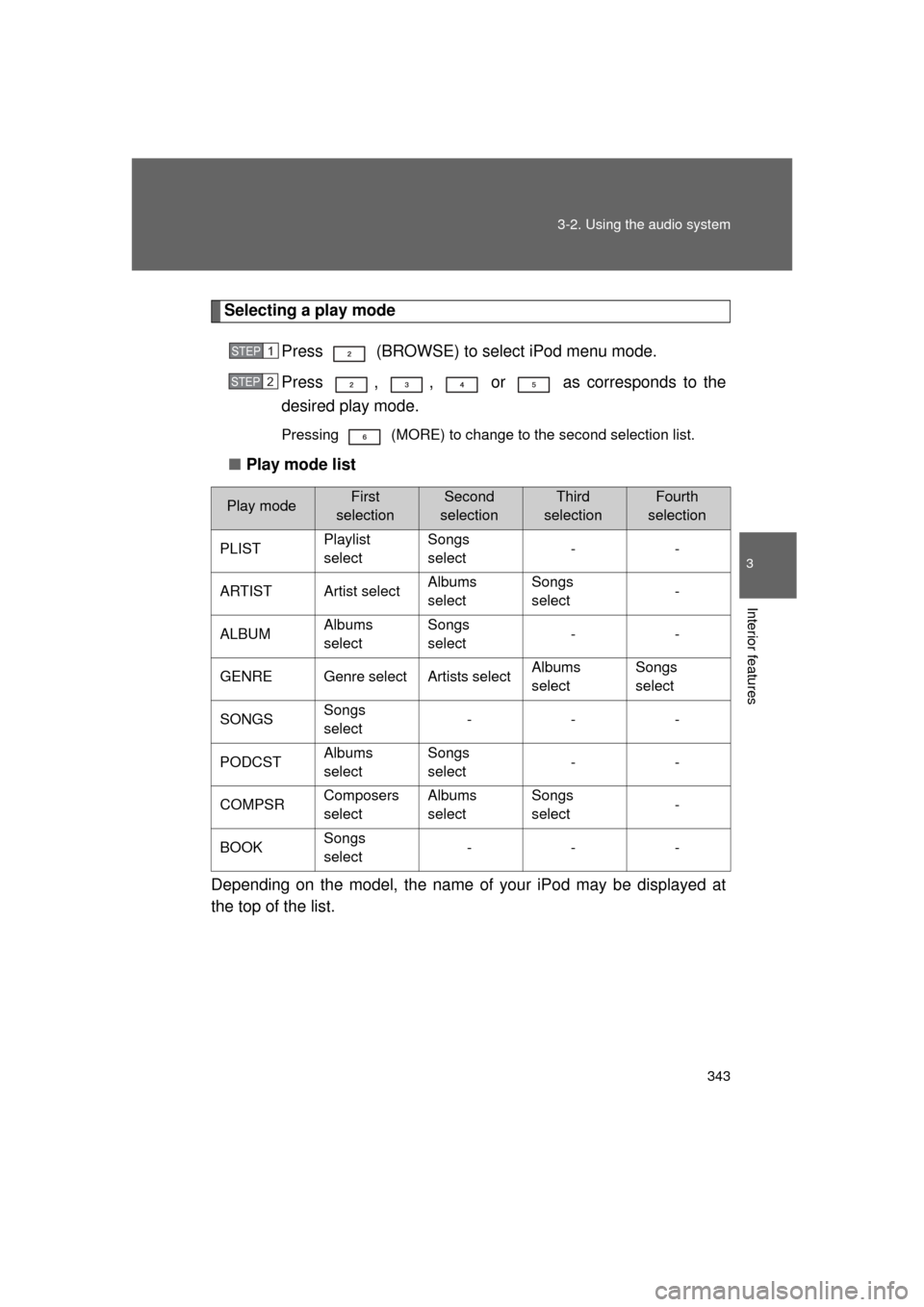
Selecting a play mode
Press (BROWSE) to select iPod menu mode.
Press , , or as corresponds to the
desired play mode.
Pressing (MORE) to change to the second selection list.
■Play mode list
Depending on the model, the name of your iPod may be displayed at
the top of the list.
Play modeFirst
selectionSecond
selectionThird
selectionFourth
selection
PLIST Playlist
selectSongs
select
--
ARTIST Artist select Albums
selectSongs
select
-
ALBUM Albums
selectSongs
select
--
GENRE Genre select Artists select Albums
selectSongs
select
SONGS Songs
select ---
PODCST Albums
selectSongs
select
--
COMPSR Composers
selectAlbums
selectSongs
select
-
BOOK Songs
select ---
STEP 1
STEP 2
Page 346 of 680

346 3-2. Using the audio system
4RUNNER_U
Switching the displayPress .
Each time is pressed, the display changes in the following
order:
Track title Track title/Artist name Track title/Album name Track
title/Elapsed time
■ About iPod
● Apple is not responsible for the operation of this device or its compliance
with safety and regulatory standards.
● iPod is a trademark of Apple Inc., registered in the U.S. and other coun-
tries.
■ iPod functions
● When an iPod is connected and the audio source is changed to iPod
mode, the iPod will resume play from the same point in which it was last
used.
● Depending on the iPod that is connected to the system, certain functions
may not be available. Disconnecting the device and reconnecting it once
again may resolve some malfunctions.
■ iPod problems
To resolve most problems encountered when using your iPod, disconnect
your iPod from the vehicle iPod connection and reset it.
For instructions on how to reset your iPod, refer to your iPod Owner's Man-
ual.
■ Error messages
“iPod ERROR”: This indicates a problem in the iPod, inside the
USB box or the connection between them.
“NO SONGS”: This indicates that there is no music data in the iPod.
“UPDATE YOUR iPod”: This indicates that the version of the iPod is not compatible.
Page 352 of 680

352 3-2. Using the audio system
4RUNNER_U
■USB memory
● Compatible device
USB memories that can be used for MP3 and WMA playback.
Depending on the type of USB device, playback may not be possible.
● Compatible device formats
The following device formats can be used:
• USB communication formats: USB2.0 FS (12 mbps)
• File formats: FAT16/32 (Windows)
• Correspondence class: Mass storage class
MP3 and WMA files written in any format other than those listed above
may not play correctly, and their file names and folder names may not
be displayed correctly.
Items related to standards and limitations are as follows:
• Maximum directory hierarchy: 8 levels
• Maximum number of folder in device: 999 (including the root)
• Maximum number of files in device: 65025
• Maximum number of files per folder: 255
● MP3 and WMA files
MP3 (MPEG Audio LAYER 3) is a standard audio compression format.
Files can be compressed to approximately 1/10 of their original size using
MP3 compression.
WMA (Windows Media
® Audio) is a Microsoft audio compression format.
This format compresses audio data to a size smaller than that of the MP3
format.
There is a limit to the MP3 and WMA file standards that can be used and to
the media/formats on which the files are recorded.
Page 356 of 680
356 3-2. Using the audio system
4RUNNER_U
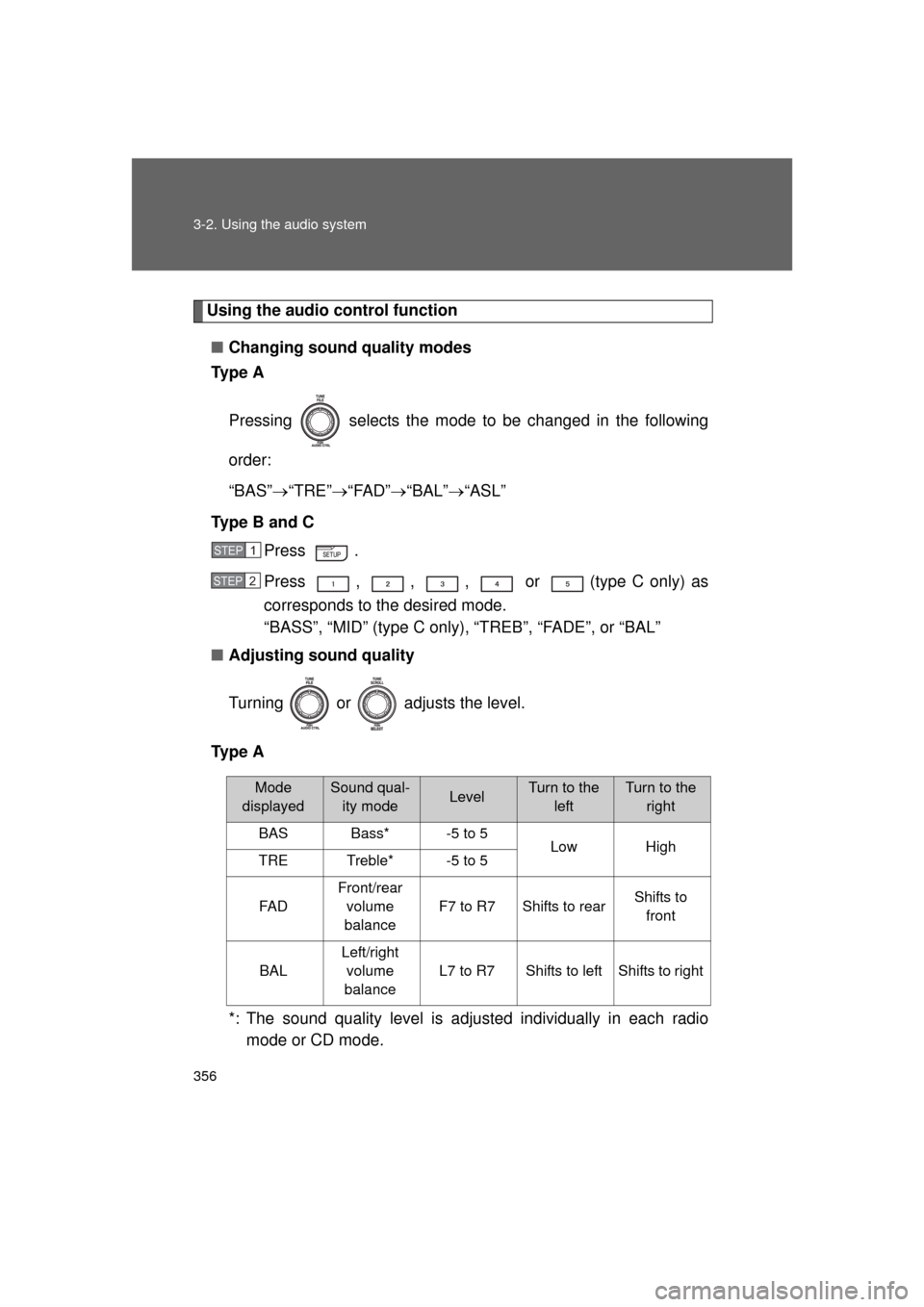
Using the audio control function■ Changing sound quality modes
Ty p e A
Pressing selects the mode to be changed in the following
order:
“BAS” “TRE” “FAD” “BAL” “ASL”
Type B and C Press .
Press , , , or (type C only) as
corresponds to the desired mode.
“BASS”, “MID” (type C only), “TREB”, “FADE”, or “BAL”
■ Adjusting sound quality
Turning or adjusts the level.
Ty p e A
*: The sound quality level is adjusted individually in each radiomode or CD mode.
STEP 1
STEP 2
Mode
displayedSound qual- ity modeLevelTurn to the leftTurn to the right
BASBass*-5 to 5LowHighTRETreble*-5 to 5
FA D
Front/rear volume
balance
F7 to R7Shifts to rearShifts to front
BAL
Left/right volume
balance
L7 to R7Shifts to leftShifts to right