light TOYOTA 4RUNNER 2011 N280 / 5.G Manual PDF
[x] Cancel search | Manufacturer: TOYOTA, Model Year: 2011, Model line: 4RUNNER, Model: TOYOTA 4RUNNER 2011 N280 / 5.GPages: 680, PDF Size: 12.58 MB
Page 208 of 680

208 2-3. Operating the lights and wipers
4RUNNER_U
■When the rear window wiper and washer switch is turned off
The rear wiper will stop operation, and return to the retracted position after
approximately 3 seconds.
However, if the engine switch is turned to the “ACC” or “LOCK” position
(vehicles without a smart key system) or the “ENGINE START STOP” switch
is turned to ACCESSORY mode or tur ned off (vehicles with a smart key sys-
tem) while the rear wiper is operating, the rear wiper will stop at that position
and will not return to the retracted position.
■ If no washer fluid sprays
Check that the washer nozzle is not blocked if there is washer fluid in the
washer fluid reservoir.
■ Customization that can be co nfigured at Toyota dealer
Settings (e.g. drip prevention function) can be changed.
(Customizable features P. 640)
NOTICE
■When the rear window is dry
Do not use the wiper, as it may damage the rear window.
■ When the washer fluid tank is empty
Do not operate the switch continually as the washer fluid pump may over-
heat.
■ When a nozzle becomes blocked
Do not try to clear it with a pin or other object. The nozzle will be damaged.
Page 210 of 680
210 2-4. Using other driving systems
4RUNNER_U
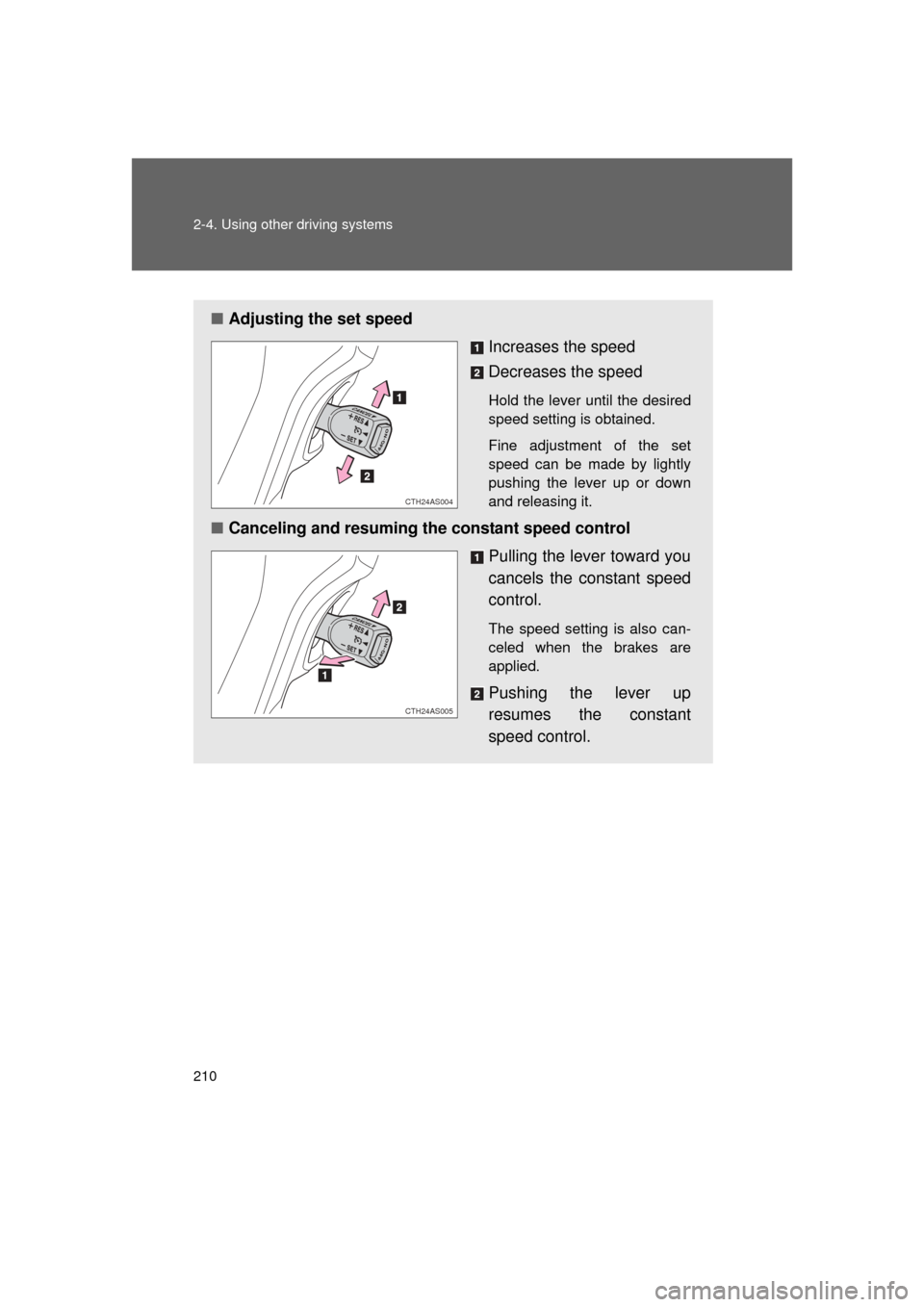
■Adjusting the set speed
Increases the speed
Decreases the speed
Hold the lever until the desired
speed setting is obtained.
Fine adjustment of the set
speed can be made by lightly
pushing the lever up or down
and releasing it.
■Canceling and resuming the constant speed control
Pulling the lever toward you
cancels the constant speed
control.
The speed setting is also can-
celed when the brakes are
applied.
Pushing the lever up
resumes the constant
speed control.
CTH24AS004
CTH24AS005
Page 211 of 680
211
2-4. Using other
driving systems
2
When driving
4RUNNER_U
■Cruise control can be set when
● The shift lever is in D or “3” (standard type), or in D, or “4” or “5” range of
S has been selected (multi-mode type).
● Vehicle speed is above 25 mph (40 km/h).
■ Accelerating
The vehicle can be accelerated normally. After acceleration, the set speed
resumes.
■ Automatic cruise control cancelation
Cruise control will stop maintaining the vehicle speed in any of the following
situations:
● Actual vehicle speed falls more than 10 mph (16 km/h) below the preset
vehicle speed.
At this time, the memorized set speed is not retained.
● Actual vehicle speed is below 25 mph (40 km/h).
● VSC is activated.
■ If the cruise control indicator light flashes
Press the “ON-OFF” button once to deactivate the system, and then press
the button again to reactivate the system.
If the cruise control speed cannot be set or if the cruise control cancels
immediately after being activated, there may be a malfunction in the cruise
control system. Have the vehicle inspected by your Toyota dealer.
Page 213 of 680
213
2-4. Using other driving systems
2
When driving
4RUNNER_U
Intuitive parking assist
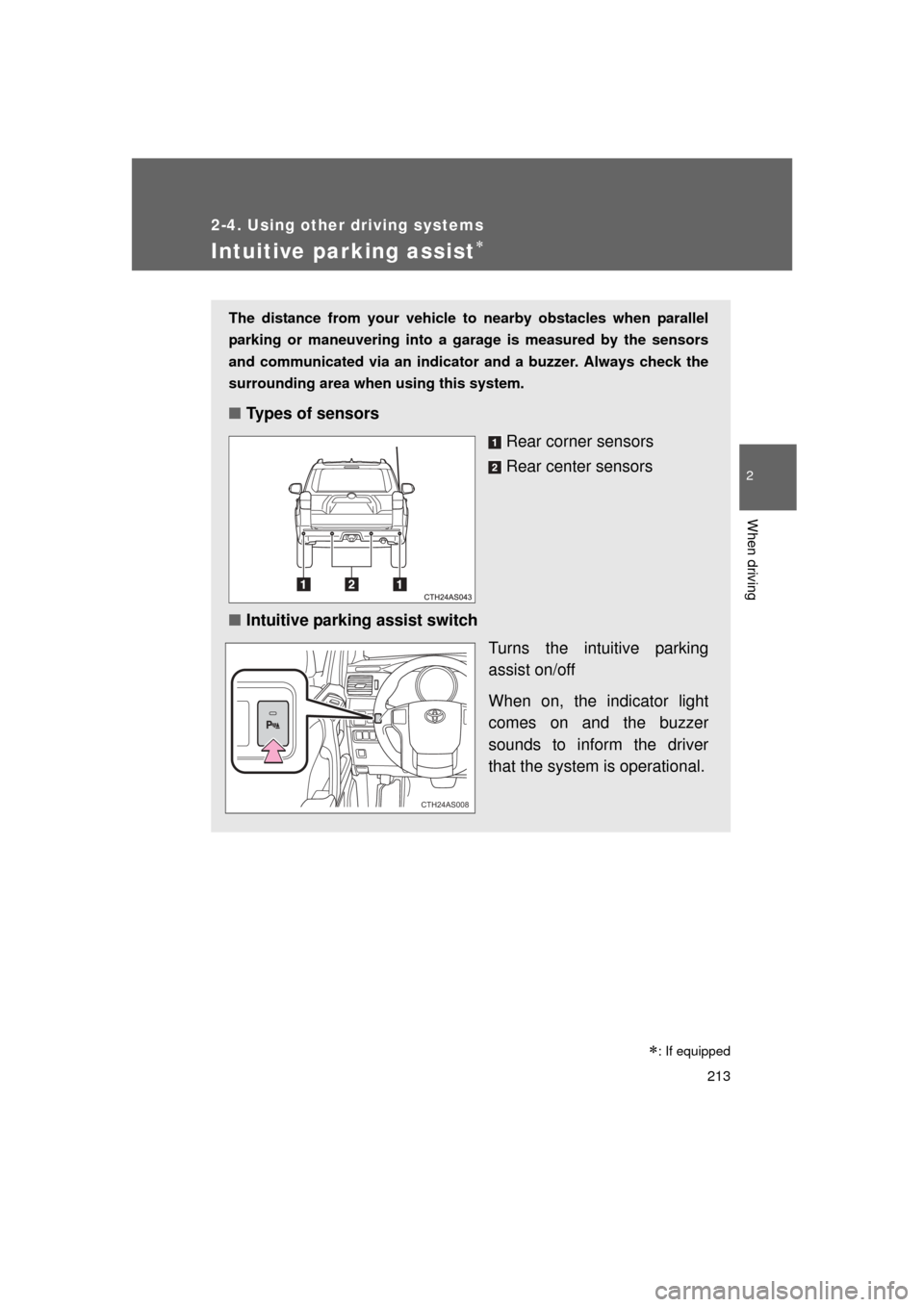
The distance from your vehicle to nearby obstacles when parallel
parking or maneuvering into a garage is measured by the sensors
and communicated via an indicator and a buzzer. Always check the
surrounding area when using this system.
■Types of sensors
Rear corner sensors
Rear center sensors
■ Intuitive parking assist switch
Turns the intuitive parking
assist on/off
When on, the indicator light
comes on and the buzzer
sounds to inform the driver
that the system is operational.
CTH24AS008
: If equipped
Page 216 of 680

216 2-4. Using other driving systems
4RUNNER_U
■Sensor detection information
● Certain vehicle conditions and the surrounding environment may affect
the ability of a sensor to correctly detect an obstacle. Particular instances
where this may occur are listed below.
• There is dirt, snow or ice on a sensor.
• A sensor is frozen.
• A sensor is covered in any way.
• The vehicle is leaning considerably to one side.
• On an extremely bumpy road, on an incline, on gravel, or on grass
• The vicinity of the vehicle is noisy due to vehicle horns, motorcycle
engines, air brakes of large vehicles, or other loud noises producing
ultrasonic waves.
• There is another vehicle equipped with parking assist sensors in the vicinity.
• A sensor is coated with a sheet of spray or heavy rain.
• A bumper or sensor receives a strong impact.
• The vehicle is approaching a tall or right-angled curb.
• In harsh sunlight or intense cold weather
• A non-genuine Toyota suspension (lowered suspension etc.) is installed.
In addition to the examples above, there are instances in which, because of
their shape, signs and other objects may be judged by a sensor to be closer
than they are.
● The shape of the obstacle may prevent a sensor from detecting it. Pay
particular attention to the following obstacles:
• Wires, fences, ropes, etc.
• Cotton, snow and other materials that absorb sound waves
• Sharply-angled objects
• Low obstacles
• Tall obstacles with upper sections projecting outwards in the direction
of your vehicle
Page 221 of 680
221
2-4. Using other
driving systems
2
When driving
4RUNNER_U
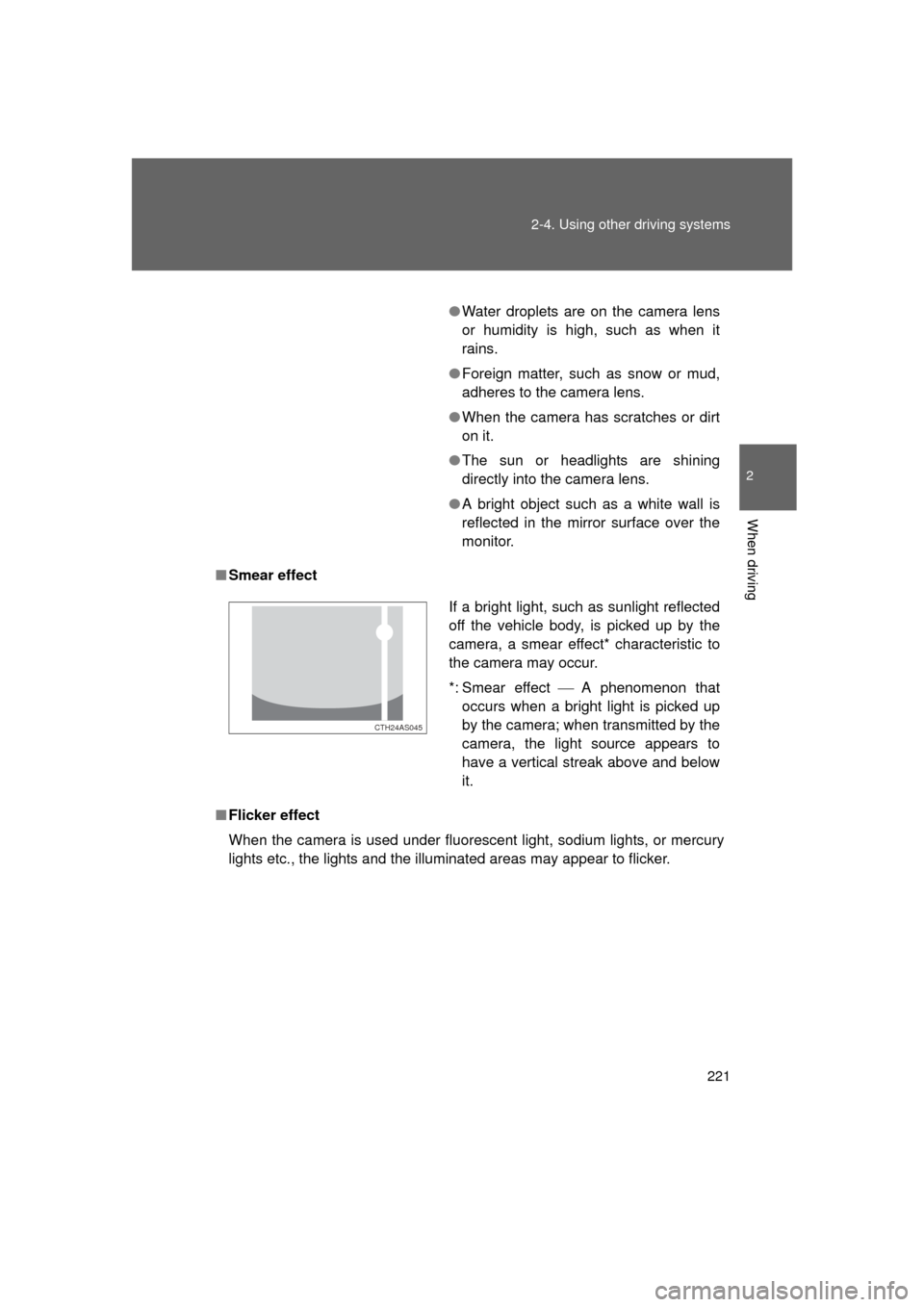
■Smear effect
■ Flicker effect
When the camera is used under fluorescent light, sodium lights, or mercury
lights etc., the lights and the illuminated areas may appear to flicker.
●Water droplets are on the camera lens
or humidity is high, such as when it
rains.
● Foreign matter, such as snow or mud,
adheres to the camera lens.
● When the camera has scratches or dirt
on it.
● The sun or headlights are shining
directly into the camera lens.
● A bright object such as a white wall is
reflected in the mirror surface over the
monitor.
If a bright light, such as sunlight reflected
off the vehicle body, is picked up by the
camera, a smear effect* characteristic to
the camera may occur.
*: Smear effect A phenomenon that
occurs when a bright light is picked up
by the camera; when transmitted by the
camera, the light source appears to
have a vertical streak above and below
it.
CTH24AS045
Page 222 of 680
222 2-4. Using other driving systems
4RUNNER_U
CAUTION
■When using the rear view monitor system
Observe the following precautions to avoid an accident that could result in
death or serious injuries:
● Never depend solely on the monitor system when reversing.
● Always check visually and with the mirrors to confirm your intended path is
clear.
● Use your own eyes to confirm the vehicle’s surroundings, as the displayed
image may become faint or dark, and moving images will be distorted, or
not entirely visible when the outside temperature is low. When backing up,
be sure to check behind and all around the vehicle visually and with the
mirrors before proceeding.
● Depicted distances between objects and flat surfaces differ from actual
distances.
● Do not use the system if the back door is open.
■ Conditions which may affect the rear view monitor system
● If the back of the vehicle has been hit, the camera’s position and mounting
angle may have changed. Have the vehicle inspected by your Toyota
dealer.
● Rapid temperature changes, such as when hot water is poured on the
vehicle in cold weather, may cause the system to function abnormally.
● If the camera lens is dirty, it cannot transmit a clear image. Rinse with
water and wipe with a soft cloth. If the camera lens is extremely dirty, wash
with a mild cleanser and rinse.
● The displayed image may be darker and moving images may be slightly
distorted when the system is cold.
NOTICE
●Do not allow organic solvent, car wax, window cleaner or glass coat to
adhere to the camera. If this happens, wipe it off as soon as possible.
● When replacing tires, please consult your Toyota dealer. If you replace the
tires, the area displayed on the screen may change.
Page 236 of 680
236 2-4. Using other driving systems
4RUNNER_U
Using the rear differential lock systemBefore using the rear differential lock system:
Stop the vehicle, shift the shift lever to N and shift the front-
wheel drive control lever into L4 to see if this is sufficient. If
this has no effect, additionally use the rear differential lock
system.
Be sure the wheels have stopped spinning.
Press the rear differential lock switch.
Gently depress the accelerator pedal.
After the rear differential is locked, the indicator will come on.
Unlock the rear differential as soon as the vehicle moves.
To unlock the rear differential, press the switch again.
■ Locking the rear differential
The following systems do not operate when the rear differential is locked. It
is normal operation for the ABS warning light and VSC off indicator to be on
at this time.
•ABS
• Multi Terrain ABS
• Brake assist system
•VSC
• Hill-start assist control
■ The rear differential lock is disengaged when
The front-wheel drive control lever is shifted to H2 or H4.
Never forget to turn off the switch after using this feature.
■ After unlocking the rear differential
Check that the indicator goes off.
STEP 1
STEP 2
STEP 3
STEP 4
Page 239 of 680
239
2-4. Using other
driving systems
2
When driving
4RUNNER_U
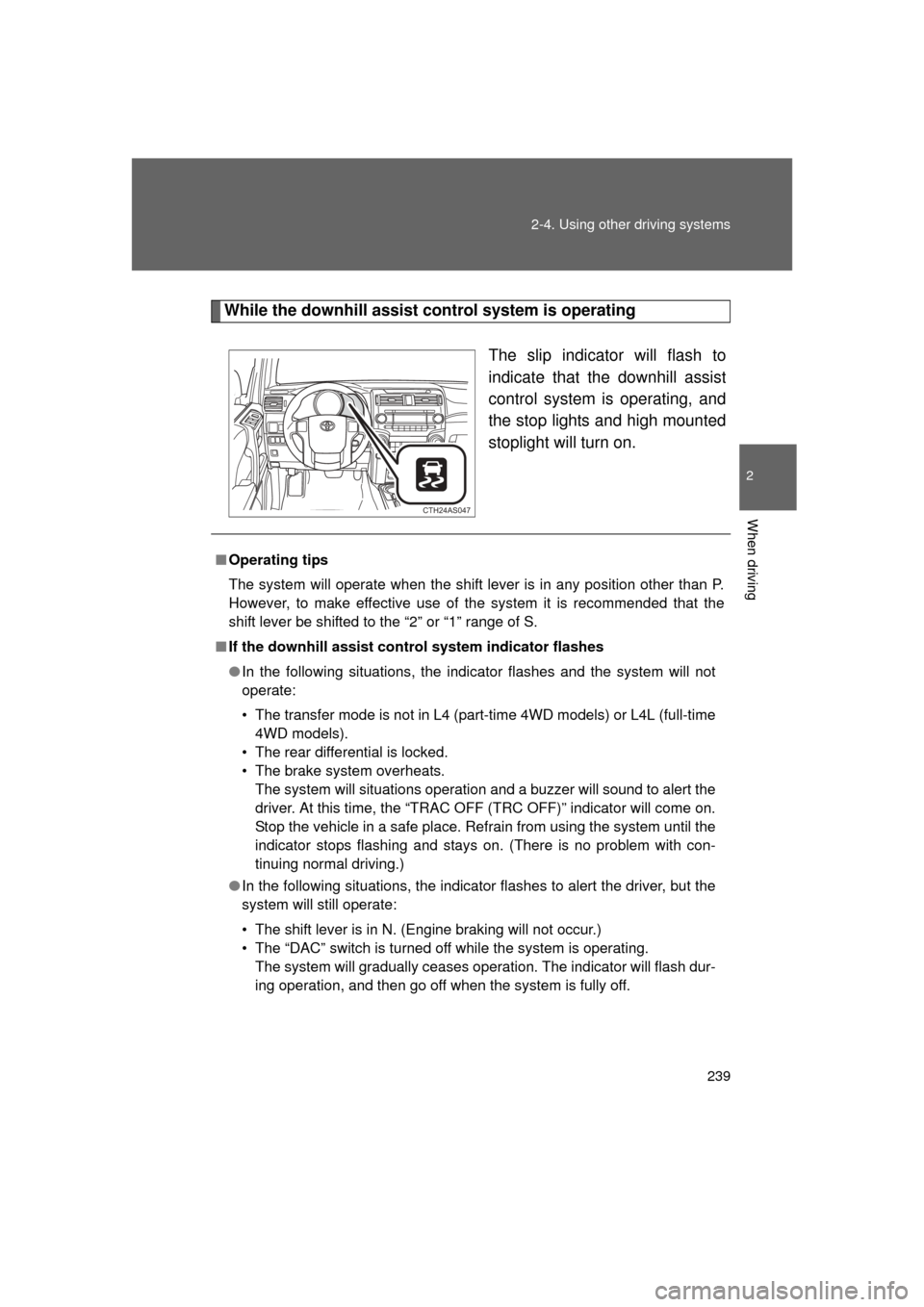
While the downhill assist control system is operating
The slip indicator will flash to
indicate that the downhill assist
control system is operating, and
the stop lights and high mounted
stoplight will turn on.
CTH24AS047
■Operating tips
The system will operate when the shift lever is in any position other than P.
However, to make effective use of the system it is recommended that the
shift lever be shifted to the “2” or “1” range of S.
■ If the downhill assist control system indicator flashes
● In the following situations, the indicator flashes and the system will not
operate:
• The transfer mode is not in L4 (part-time 4WD models) or L4L (full-time
4WD models).
• The rear differential is locked.
• The brake system overheats. The system will situations operation and a buzzer will sound to alert the
driver. At this time, the “TRAC OFF (TRC OFF)” indicator will come on.
Stop the vehicle in a safe place. Refrain from using the system until the
indicator stops flashing and stays on. (There is no problem with con-
tinuing normal driving.)
● In the following situations, the indicato r flashes to alert the driver, but the
system will still operate:
• The shift lever is in N. (Engine braking will not occur.)
• The “DAC” switch is turned off while the system is operating. The system will gradually ceases operation. The indicator will flash dur-
ing operation, and then go off when the system is fully off.
Page 243 of 680
243
2-4. Using other
driving systems
2
When driving
4RUNNER_U
■Crawl Control is temp orarily canceled when
Vehicle speed exceeds 15 mph (25 km/h). The Crawl Control indicator
flashes until the vehicle speed is reduced.
■ Automatic system cancelation
In the following situations, the system will cease operation and a buzzer will
sound to alert the driver. The Crawl Control indicator will flash until the sys-
tem is turned off completely.
● When the shift lever is shifted to P or N
● When the front-wheel drive control lever is shifted to H4
● When the driver’s door is opened
● When the system is malfunctioning
● When the brake system overheats
Stop the vehicle in a safe place. (There is no problem with continuing
normal driving.)
● When the automatic transmission system overheats
Stop the vehicle in a safe place until the automatic transmission fluid tem-
perature warning light goes off.
■ Sounds and vibrations caused by the Crawl Control system
● A sound may be heard from the engine compartment when the engine is
started or just after the vehicle begins to move. This sound does not indi-
cate that a malfunction has occurred in Crawl Control system.
● Either of the following conditions may occur when the Crawl Control sys-
tem is operating. None of these indicates that a malfunction has
occurred.
• Vibrations may be felt through the vehicle body and steering.
• A motor sound may be heard after the vehicle comes to a stop.