ECO mode TOYOTA 4RUNNER 2012 N280 / 5.G User Guide
[x] Cancel search | Manufacturer: TOYOTA, Model Year: 2012, Model line: 4RUNNER, Model: TOYOTA 4RUNNER 2012 N280 / 5.GPages: 700, PDF Size: 10.76 MB
Page 178 of 700

178 2-1. Driving procedures
4RUNNER_U
NOTICE
■To prevent battery discharge
● Do not leave the “ENGINE START STOP” switch in ACCESSORY or IGNI-
TION ON mode for long periods of time without the engine running.
● If the indicator on the “ENGINE START STOP” switch is illuminated, the
“ENGINE START STOP” switch is not off. When exiting the vehicle,
always check that the “ENGINE START STOP” switch is off.
● Do not stop the engine when the shift lever is in a position other than P. If
the engine is stopped in another shift lever position, the “ENGINE START
STOP” switch will not be turned off but instead be turned to ACCESSORY
mode. If the vehicle is left in ACCESSORY mode, battery discharge may
occur.
■ When starting the engine
● Do not race a cold engine.
● If the engine becomes difficult to start or stalls frequently, have the engine
checked immediately.
■ Symptoms indicating a malfunction with the “ENGINE START STOP”
switch
If the “ENGINE START STOP” seems to be operating somewhat differently
than usual, such as the switch sticking slightly, there may be a malfunction.
Contact your Toyota dealer immediately.
Page 192 of 700

192 2-2. Instrument cluster
4RUNNER_U
■The meters and display illuminate when (Optitron type meter)
Vehicles without a smart key system:
The engine switch is in the “ON” position.
Vehicles with a smart key system:
The “ENGINE START STOP” switch is in IGNITION ON mode.
■ Eco Driving Indicator Light will not operate in the following conditions
● The shift lever is anything other than D.
● The vehicle speed is approximately 80 mph (130 km/h) or higher.
■ When the average fuel consumption is reset
The average fuel consumption displayed on the accessory meter and “Past
Record” screen of the Display Audio system (if equipped) or the navigation
system (if equipped) will be reset at the same time.
■ The brightness of the instrument panel lights (Optitron type meter)
When the headlight switch is turned to on, the brightness will be reduced
slightly unless the control dial is turned fully upward.
NOTICE
■ To prevent damage to the engine and its components
● Do not let the indicator needle of the tachometer enter the red zone, which
indicates the maximum engine speed.
● The engine may be overheating if the engine coolant temperature gauge is
in the red zone (H). In this case, immediately stop the vehicle in a safe
place, and check the engine after it has cooled completely. ( P. 627)
■ While driving (Optitron type meter)
When the voltmeter indicates more than 19 V or less than 9 V, the battery
may be malfunctioning. Have your vehicle checked at your Toyota dealer.
Page 196 of 700
196 2-2. Instrument cluster
4RUNNER_U
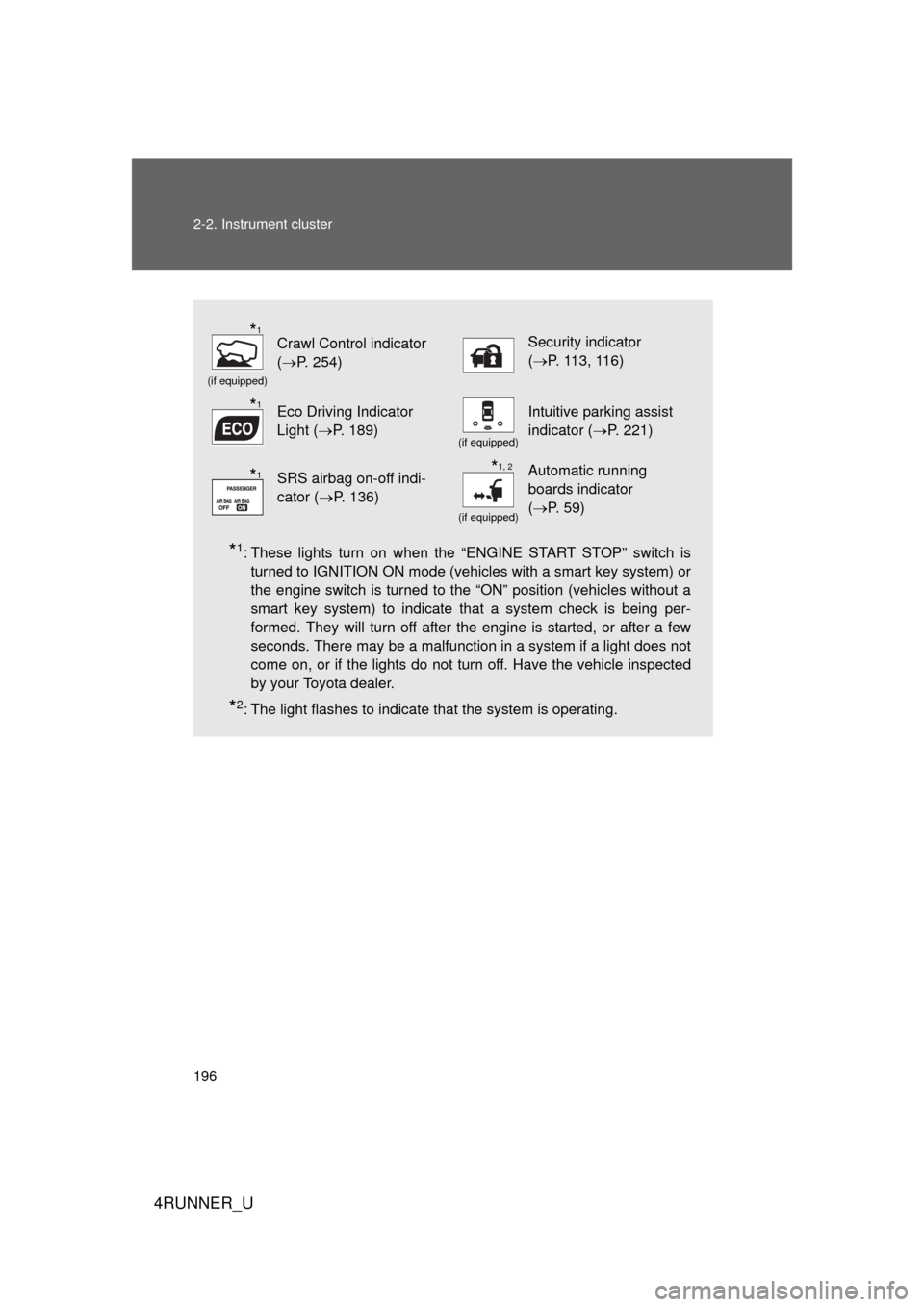
*1: These lights turn on when the “ENGINE START STOP” switch isturned to IGNITION ON mode (vehicles with a smart key system) or
the engine switch is turned to the “ON” position (vehicles without a
smart key system) to indicate that a system check is being per-
formed. They will turn off after the engine is started, or after a few
seconds. There may be a malfunction in a system if a light does not
come on, or if the lights do not turn off. Have the vehicle inspected
by your Toyota dealer.
*2: The light flashes to indicate that the system is operating.
(if equipped)
Crawl Control indicator
(P. 254) Security indicator
(P. 11 3 , 11 6 )
Eco Driving Indicator
Light ( P. 189)
(if equipped)
Intuitive parking assist
indicator ( P. 221)
SRS airbag on-off indi-
cator (P. 136)
(if equipped)
Automatic running
boards indicator
(P. 59)
*1
*1
*1*1, 2
Page 197 of 700
197
2-2. Instrument cluster
2
When driving
4RUNNER_U
■
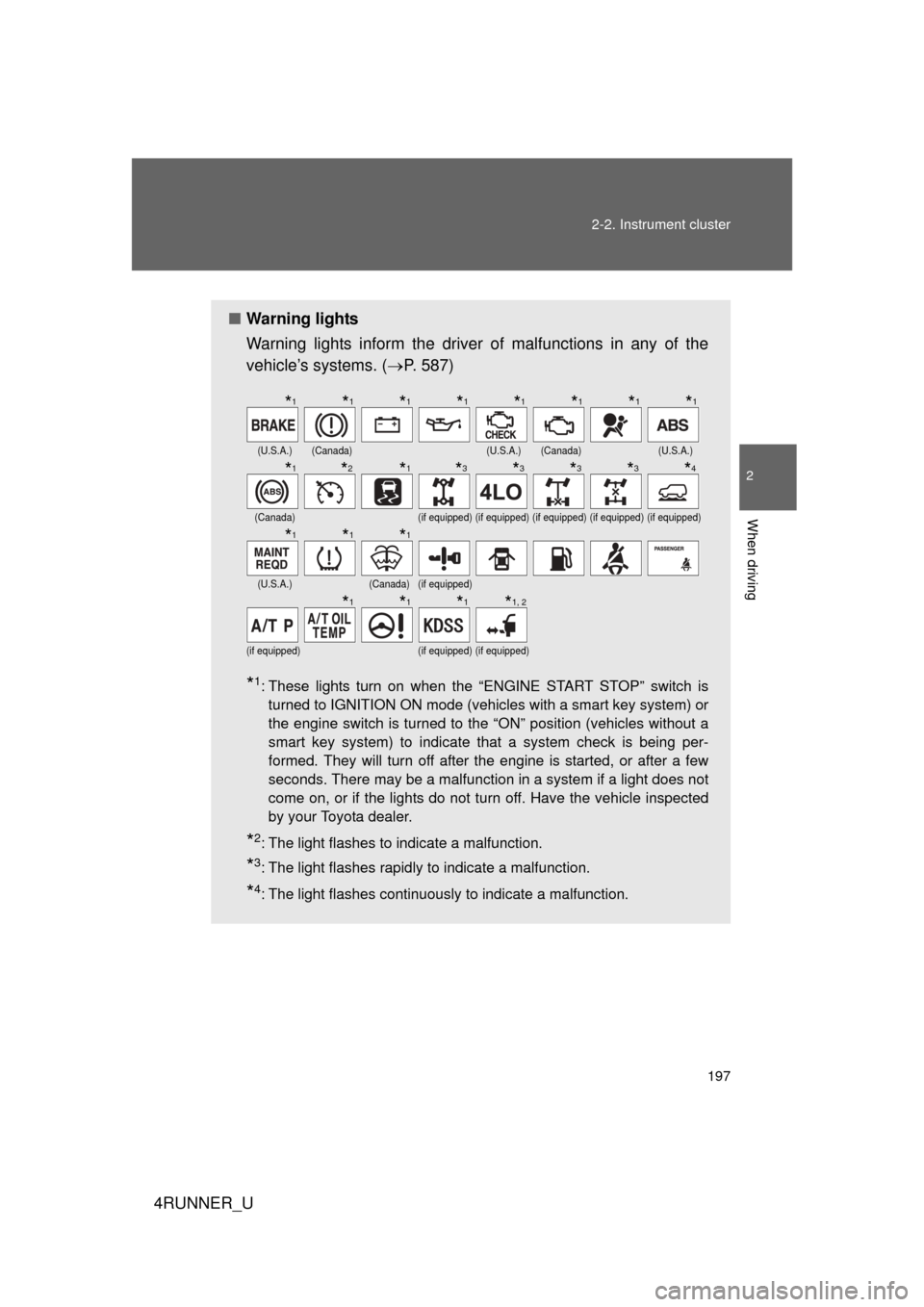
Warning lights
Warning lights inform the driver of malfunctions in any of the
vehicle’s systems. ( P. 587)
*1: These lights turn on when the “ENGINE START STOP” switch is
turned to IGNITION ON mode (vehicles with a smart key system) or
the engine switch is turned to the “ON” position (vehicles without a
smart key system) to indicate that a system check is being per-
formed. They will turn off after the engine is started, or after a few
seconds. There may be a malfunction in a system if a light does not
come on, or if the lights do not turn off. Have the vehicle inspected
by your Toyota dealer.
*2: The light flashes to indicate a malfunction.
*3: The light flashes rapidly to indicate a malfunction.
*4: The light flashes continuously to indicate a malfunction.
(U.S.A.)(Canada)(U.S.A.)(Canada)(U.S.A.)
(Canada)(if equipped)(if equipped)(if equipped)(if equipped)(if equipped)
(U.S.A.)(Canada)(if equipped)
(if equipped)(if equipped)(if equipped)
*1*1*1*1*1*1*1*1
*1*2*1*3*3*3*3*4
*1*1*1
*1*1*1*1, 2
Page 202 of 700

202 2-2. Instrument cluster
4RUNNER_U
■When the average fuel consumption is reset
The average fuel consumption displayed on the instrument cluster and “Past
Record” screen of the Display Audio system (if equipped) or the navigation
system (if equipped) will be reset at the same time.
■ Adjusting the brightness of the accessory meter
● If left idle for approximately 6 seconds or more while adjusting, the dis-
play will revert to the trip information display.
● When the parking lights are on, the brightness of the accessory meter
can be adjusted only with the instrument panel light control.
● If the “MODE/ ” button is pressed and held when the accessory meter
light control is displayed, the display will switch to compass calibration.
(P. 474)
■ Liquid crystal display
Small spots or light spots may appear on the display. This phenomenon is
characteristic of liquid crystal displays, and there is no problem with continu-
ing to use the display.
NOTICE
■The accessory meter at low temperatures
Allow the interior of the vehicle to warm up before using the liquid crystal dis-
play. At extremely low temperatures, the display monitor may respond
slowly, and display changes may be delayed.
Page 208 of 700
208 2-3. Operating the lights and wipers
4RUNNER_U
■Automatic light off system
Vehicles without a smart key system
● When the headlights come on: The headlights and tail lights turn off 30
seconds after a door is opened and closed if the engine switch is turned
to the “ACC” or “LOCK” position. (The lights turn off immediately if
on the key is pressed after all the doors are locked.)
● When only the tail lights come on: The tail lights turn off automatically if
the engine switch is turned to the “ACC” or “LOCK” position and the
driver’s door is opened.
To turn the lights on again, turn the engine switch to the “ON” position, or
turn the lights off and then back to or .
Vehicles with a smart key system
● When the headlights come on: The headlights and tail lights turn off 30
seconds after a door is opened and closed if the “ENGINE START
STOP” switch is turned to ACCESSORY mode or turned off. (The lights
turn off immediately if on the key is pressed after all the doors are
locked.)
● When only the tail lights come on: The tail lights turn off automatically if
the “ENGINE START STOP” switch is turned off and the driver’s door is
opened.
To turn the lights on again, turn the “ENGINE START STOP” switch to IGNI-
TION ON mode, or turn the light switch off and then back to or
.
■ Customization that can be co nfigured at Toyota dealer
Settings (e.g. light sensor sensitivity) can be changed.
(Customizable features P. 660)
NOTICE
■To prevent battery discharge
Do not leave the lights on longer than necessary when the engine is not run-
ning.
Page 213 of 700
213
2-3. Operating the lights and wipers
2
When driving
4RUNNER_U
■
The windshield wipers and washer can be operated when
Vehicles without a smart key system: The engine switch is in the “ON” posi-
tion.
Vehicles with a smart key system: The “ENGINE START STOP” switch is in
IGNITION ON mode.
■ If no windshield washer fluid sprays
Check that the washer nozzles are not blocked if there is washer fluid in the
windshield washer fluid reservoir.
NOTICE
■When the windshield is dry
Do not use the wipers, as they may damage the windshield.
■ When the washer fluid tank is empty
Do not operate the switch continually as the washer fluid pump may over-
heat.
■ When a nozzle becomes blocked
Do not try to clear it with a pin or other object. The nozzle will be damaged.
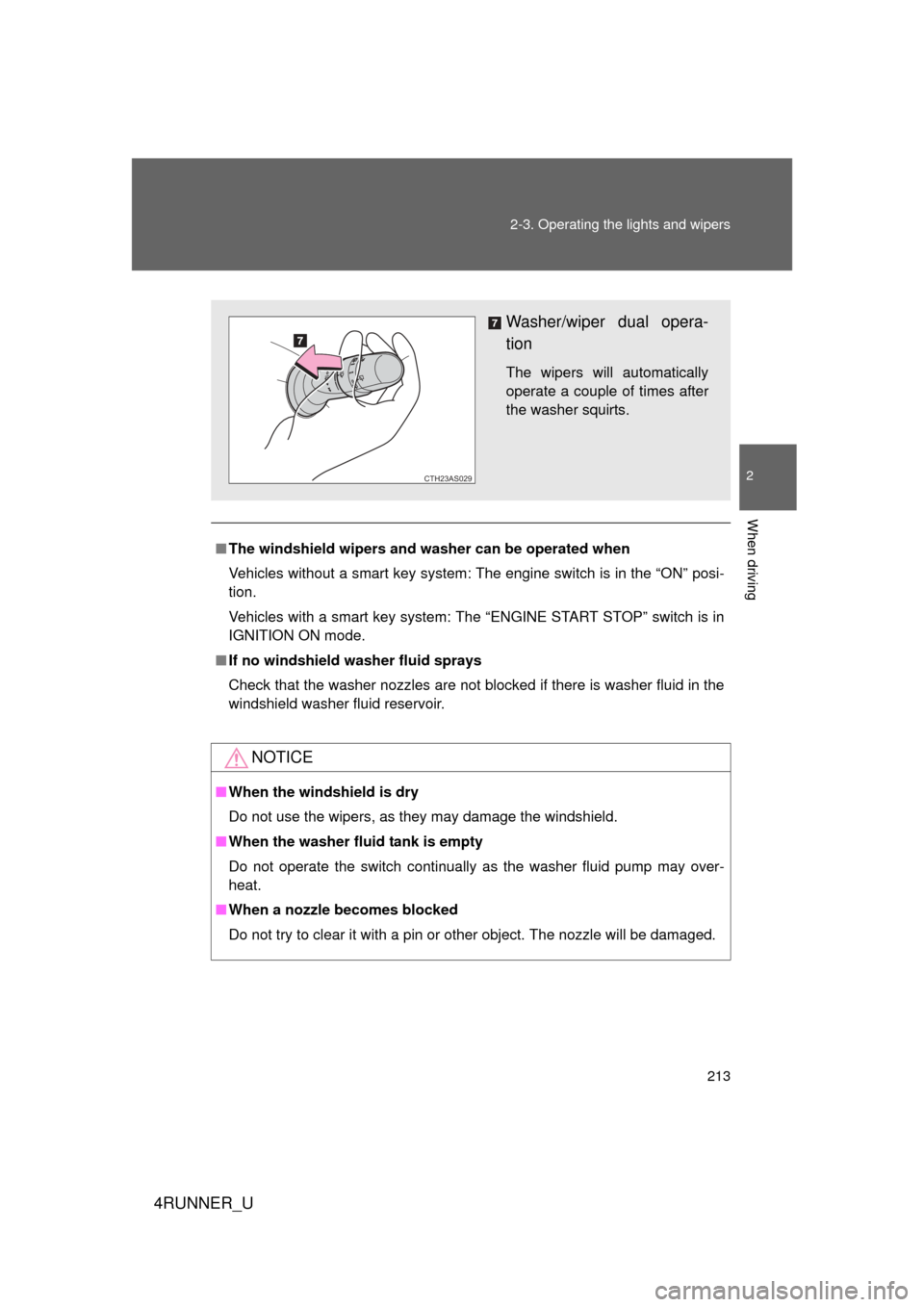
Washer/wiper dual opera-
tion
The wipers will automatically
operate a couple of times after
the washer squirts.
CTH23AS029
Page 216 of 700

216 2-3. Operating the lights and wipers
4RUNNER_U
■When the rear window wiper and washer switch is turned off
The rear wiper will stop operation, and return to the retracted position after
approximately 3 seconds.
However, if the engine switch is turned to the “ACC” or “LOCK” position
(vehicles without a smart key system) or the “ENGINE START STOP” switch
is turned to ACCESSORY mode or tur ned off (vehicles with a smart key sys-
tem) while the rear wiper is operating, the rear wiper will stop at that position
and will not return to the retracted position.
■ If no washer fluid sprays
Check that the washer nozzle is not blocked if there is washer fluid in the
washer fluid reservoir.
■ Customization that can be co nfigured at Toyota dealer
Settings (e.g. drip prevention function) can be changed.
(Customizable features P. 660)
NOTICE
■When the rear window is dry
Do not use the wiper, as it may damage the rear window.
■ When the washer fluid tank is empty
Do not operate the switch continually as the washer fluid pump may over-
heat.
■ When a nozzle becomes blocked
Do not try to clear it with a pin or other object. The nozzle will be damaged.
Page 228 of 700
228 2-4. Using other driving systems
4RUNNER_U
■The rear view monitor system can be operated when
Vehicles without a smart key system
The shift lever is in R, the engine switch is in the “ON” position.
Vehicles with a smart key system
The shift lever is in R, the “ENGINE START STOP” switch is in IGNITION
ON mode.
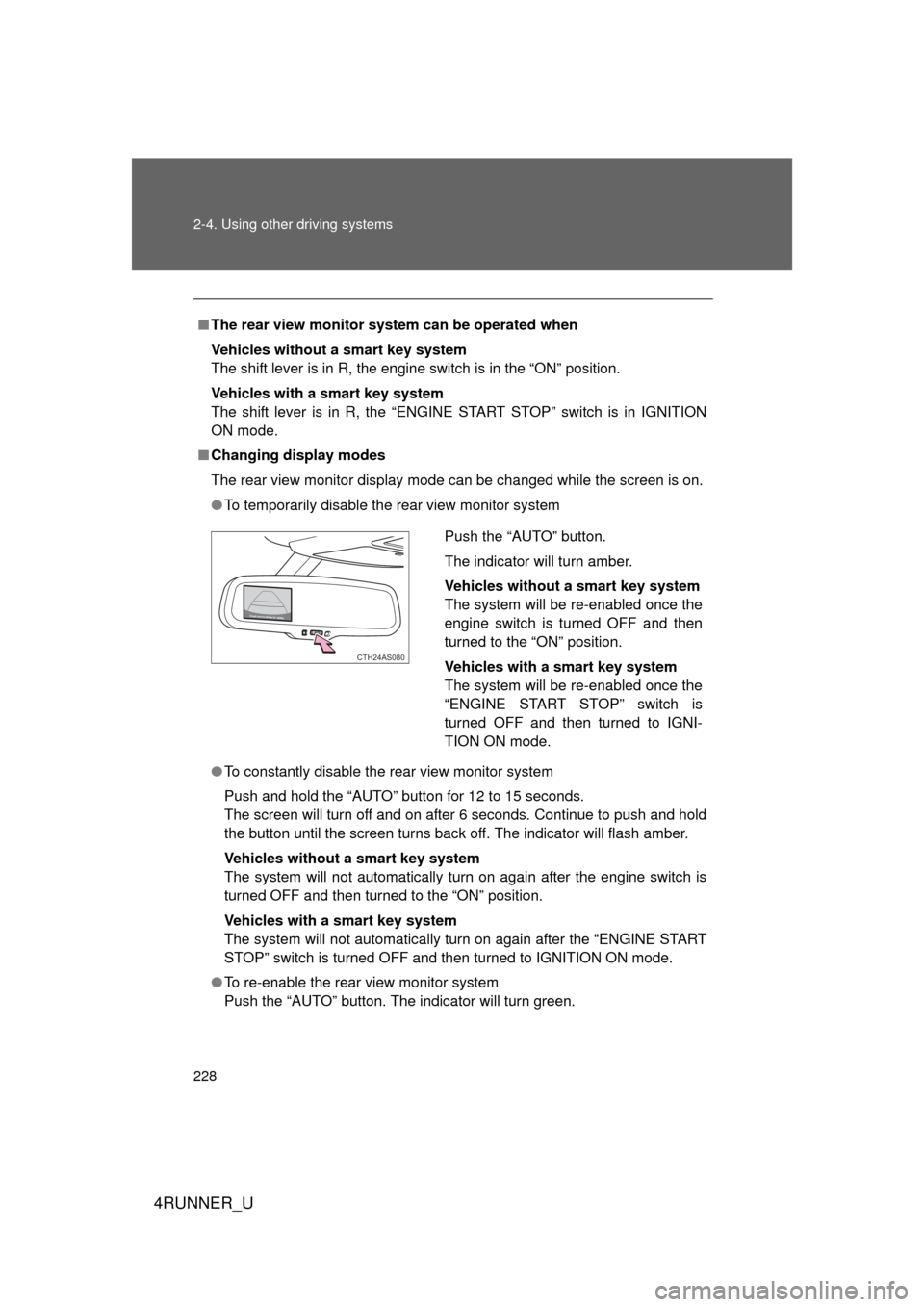
■ Changing display modes
The rear view monitor display mode can be changed while the screen is on.
● To temporarily disable the rear view monitor system
● To constantly disable the rear view monitor system
Push and hold the “AUTO” button for 12 to 15 seconds.
The screen will turn off and on after 6 seconds. Continue to push and hold
the button until the screen turns back off. The indicator will flash amber.
Vehicles without a smart key system
The system will not automatically turn on again after the engine switch is
turned OFF and then turned to the “ON” position.
Vehicles with a smart key system
The system will not automatically turn on again after the “ENGINE START
STOP” switch is turned OFF and then turned to IGNITION ON mode.
● To re-enable the rear view monitor system
Push the “AUTO” button. The indicator will turn green.
Push the “AUTO” button.
The indicator will turn amber.
Vehicles without a smart key system
The system will be re-enabled once the
engine switch is turned OFF and then
turned to the “ON” position.
Vehicles with a smart key system
The system will be re-enabled once the
“ENGINE START STOP” switch is
turned OFF and then turned to IGNI-
TION ON mode.
CTH24AS080
Page 234 of 700

234 2-4. Using other driving systems
4RUNNER_U
CAUTION
■When using the rear view monitor system
Observe the following precautions to avoid an accident that could result in
death or serious injuries:
● Never depend solely on the monitor system when reversing.
● Always check visually and with the mirrors to confirm your intended path is
clear.
● Use your own eyes to confirm the vehicle’s surroundings, as the displayed
image may become faint or dark, and moving images will be distorted, or
not entirely visible when the outside temperature is low. When backing up,
be sure to check behind and all around the vehicle visually and with the
mirrors before proceeding.
● Always check the vehicle surroundi ng area, because the guide lines are
ancillary lines.
● The guide lines are ancillary lines and do not change even if the steeri\
ng
wheel is turned.
● Depicted distances between objects and flat surfaces differ from actual
distances.
● Do not use the system if the back door is open.
■ Conditions which may affect the rear view monitor system
● If the back of the vehicle has been hit, the camera’s position and mounting
angle may have changed. Have the vehicle inspected by your Toyota
dealer.
● Rapid temperature changes, such as when hot water is poured on the
vehicle in cold weather, may cause the system to function abnormally.
● If the camera lens is dirty, it cannot transmit a clear image. Rinse with
water and wipe with a soft cloth. If the camera lens is extremely dirty, wash
with a mild cleanser and rinse.
● The displayed image may be darker and moving images may be slightly
distorted when the system is cold.
■ Caution while driving in reverse
Do not change modes while the vehicle is moving.