ECO mode TOYOTA 4RUNNER 2012 N280 / 5.G Owner's Manual
[x] Cancel search | Manufacturer: TOYOTA, Model Year: 2012, Model line: 4RUNNER, Model: TOYOTA 4RUNNER 2012 N280 / 5.GPages: 700, PDF Size: 10.76 MB
Page 236 of 700
236
2-4. Using other driving systems
4RUNNER_U
Four-wheel drive system (par t-time 4WD models)
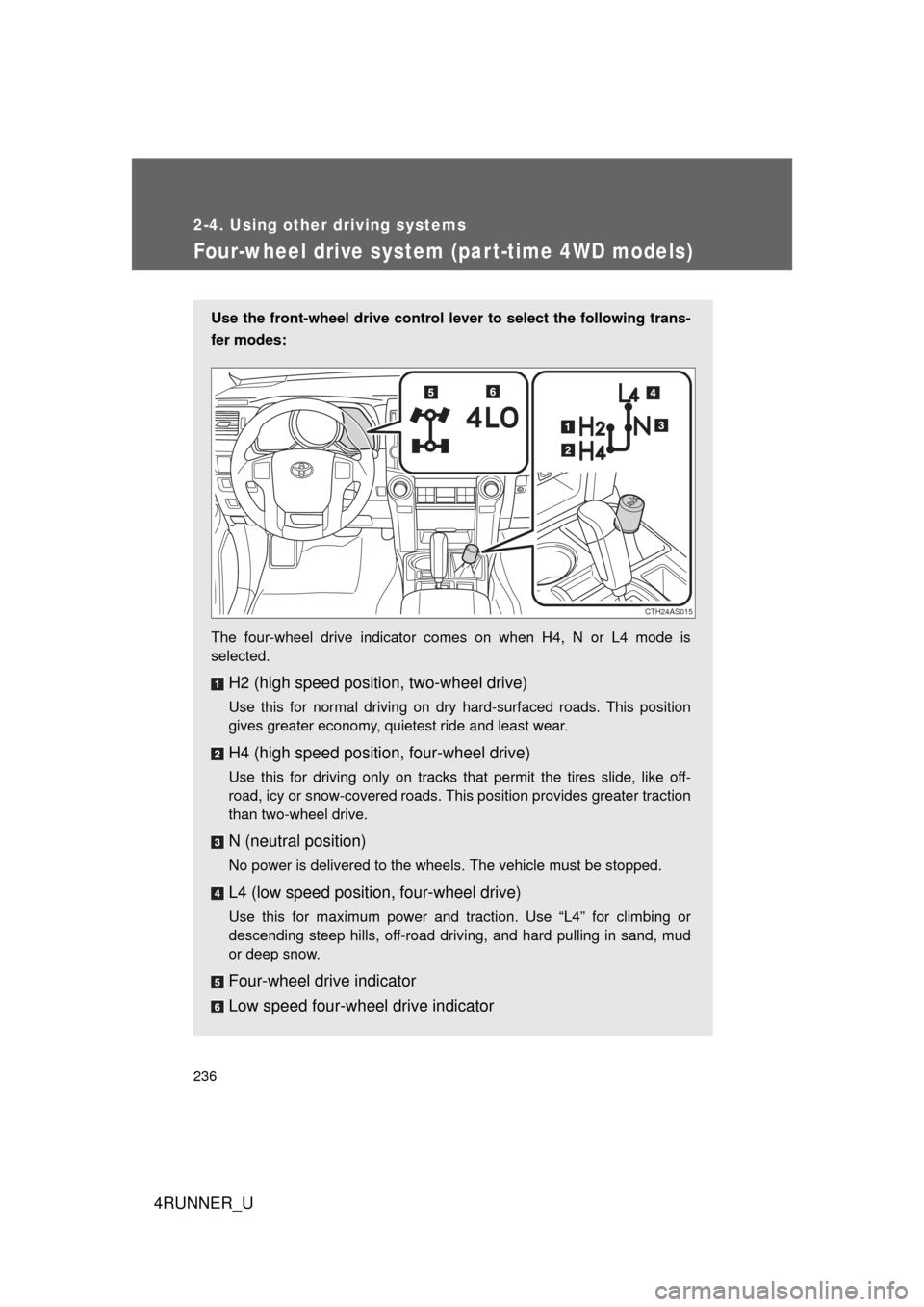
Use the front-wheel drive control lever to select the following trans-
fer modes:
The four-wheel drive indicator comes on when H4, N or L4 mode is
selected.
H2 (high speed position, two-wheel drive)
Use this for normal driving on dry hard-surfaced roads. This position
gives greater economy, quietest ride and least wear.
H4 (high speed position, four-wheel drive)
Use this for driving only on tracks that permit the tires slide, like off-
road, icy or snow-covered roads. This position provides greater traction
than two-wheel drive.
N (neutral position)
No power is delivered to the wheels. The vehicle must be stopped.
L4 (low speed position, four-wheel drive)
Use this for maximum power and traction. Use “L4” for climbing or
descending steep hills, off-road driving, and hard pulling in sand, mud
or deep snow.
Four-wheel drive indicator
Low speed four-wheel drive indicator
CTH24AS015
Page 239 of 700
239
2-4. Using other driving systems
2
When driving
4RUNNER_U
Four-wheel drive system (full-time 4WD models)
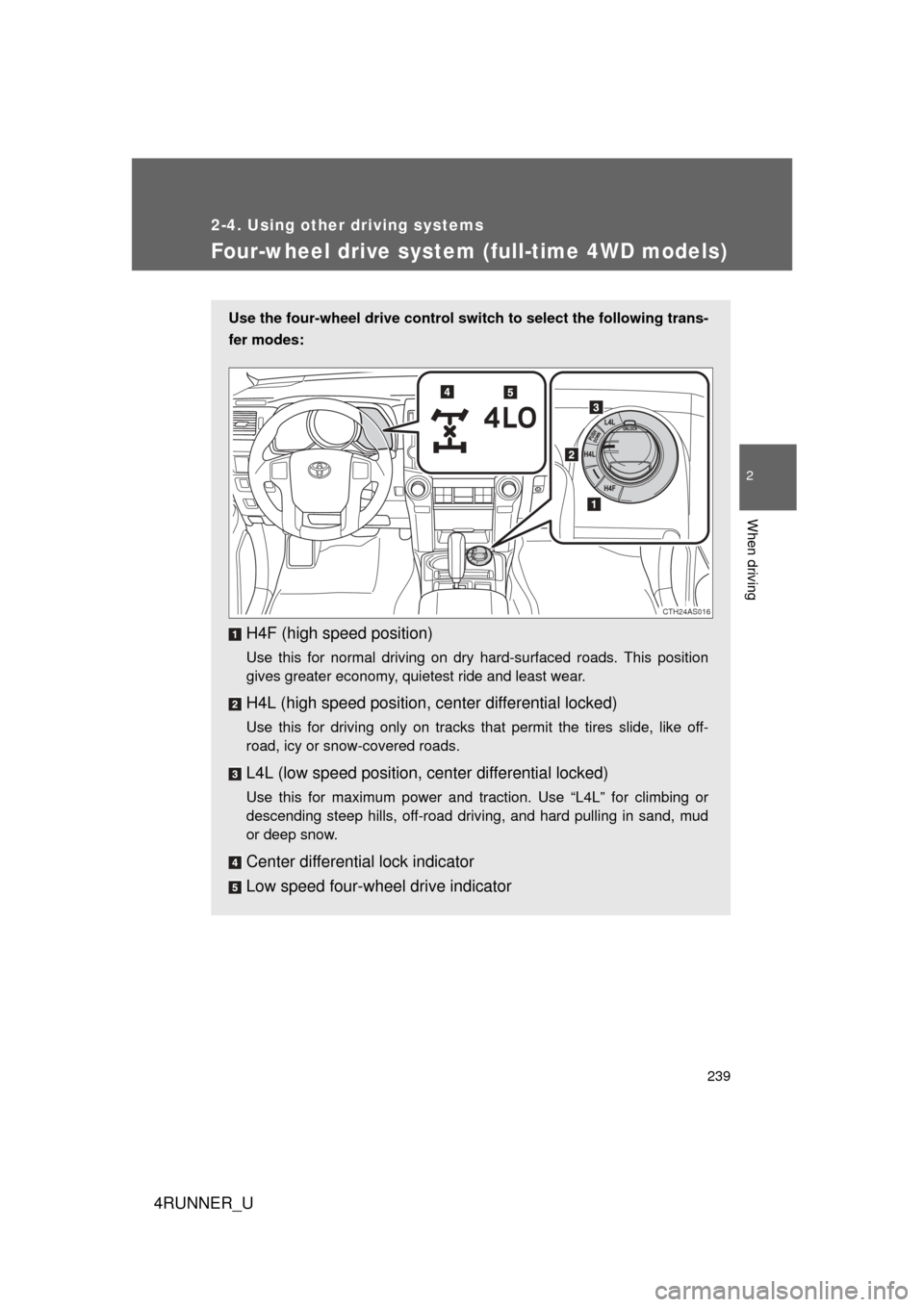
Use the four-wheel drive control switch to select the following trans-
fer modes:
H4F (high speed position)
Use this for normal driving on dry hard-surfaced roads. This position
gives greater economy, quietest ride and least wear.
H4L (high speed position, c enter differential locked)
Use this for driving only on tracks that permit the tires slide, like off-
road, icy or snow-covered roads.
L4L (low speed position, center differential locked)
Use this for maximum power and traction. Use “L4L” for climbing or
descending steep hills, off-road driving, and hard pulling in sand, mud
or deep snow.
Center differential lock indicator
Low speed four-wheel drive indicator
CTH24AS016
Page 252 of 700
252 2-4. Using other driving systems
4RUNNER_U
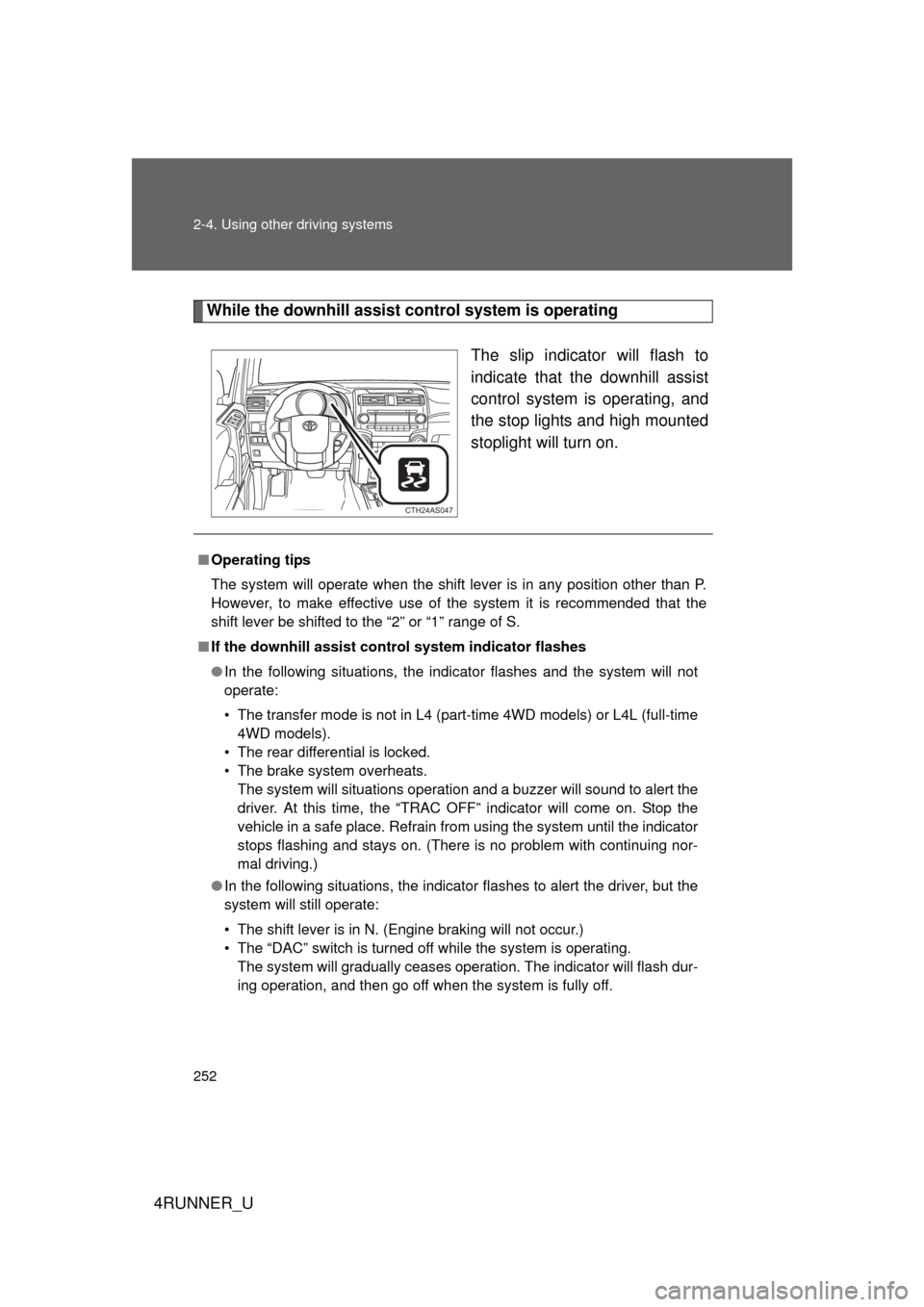
While the downhill assist control system is operating
The slip indicator will flash to
indicate that the downhill assist
control system is operating, and
the stop lights and high mounted
stoplight will turn on.
CTH24AS047
■Operating tips
The system will operate when the shift lever is in any position other than P.
However, to make effective use of the system it is recommended that the
shift lever be shifted to the “2” or “1” range of S.
■ If the downhill assist control system indicator flashes
● In the following situations, the indicator flashes and the system will not
operate:
• The transfer mode is not in L4 (part-time 4WD models) or L4L (full-time
4WD models).
• The rear differential is locked.
• The brake system overheats. The system will situations operation and a buzzer will sound to alert the
driver. At this time, the “TRAC OFF” indicator will come on. Stop the
vehicle in a safe place. Refrain from using the system until the indicator
stops flashing and stays on. (There is no problem with continuing nor-
mal driving.)
● In the following situations, the indicator flashes to alert the driver, but the
system will still operate:
• The shift lever is in N. (Engine braking will not occur.)
• The “DAC” switch is turned off while the system is operating.
The system will gradually ceases operation. The indicator will flash dur-
ing operation, and then go off when the system is fully off.
Page 255 of 700
255
2-4. Using other
driving systems
2
When driving
4RUNNER_U
■Crawl Control can be operated when
● The engine is running.
● The shift lever is in any position other than P or N.
● The front-wheel drive control lever is in L4.
● The driver’s door is closed.
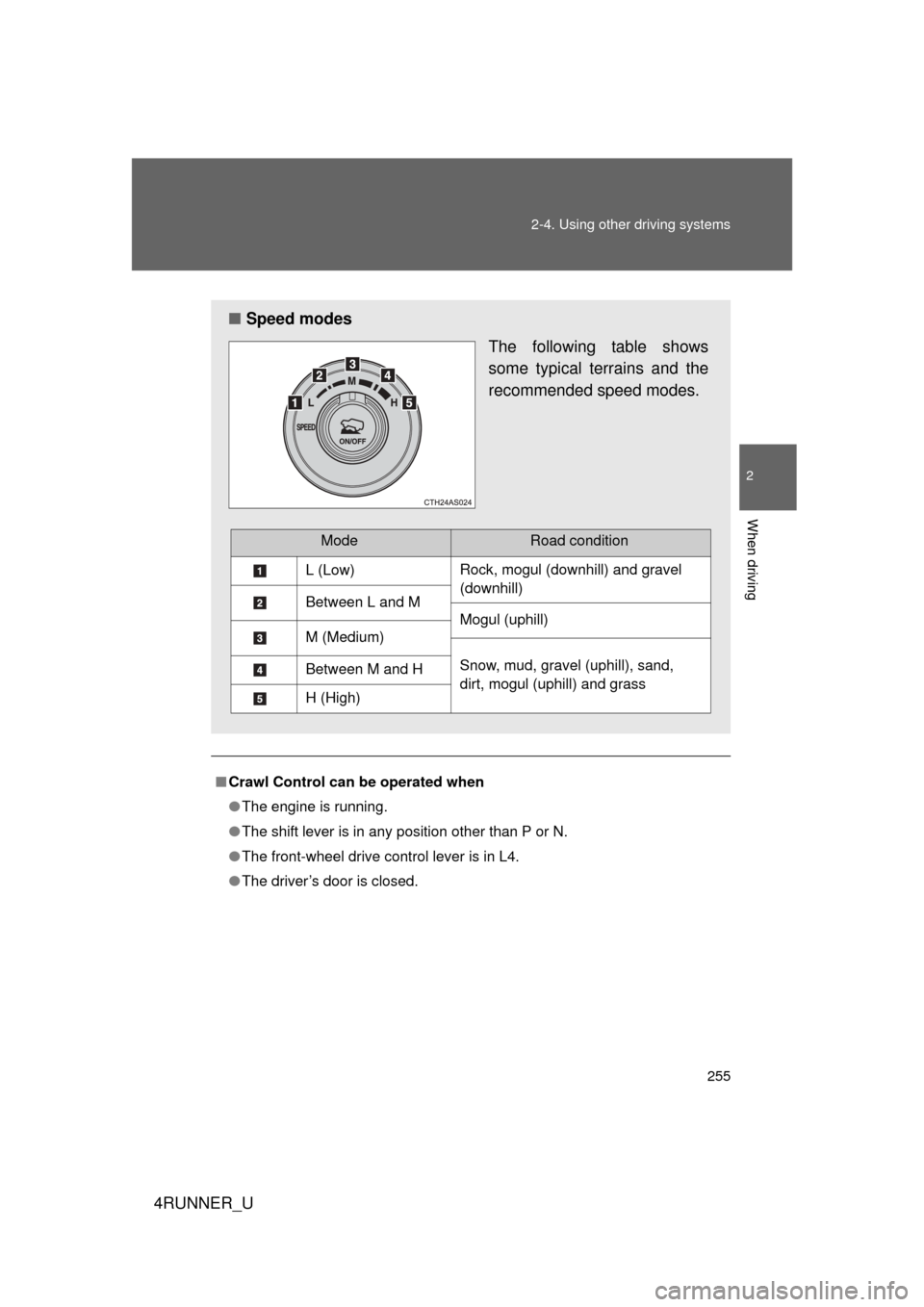
■ Speed modes
The following table shows
some typical terrains and the
recommended speed modes.
ModeRoad condition
L (Low)Rock, mogul (downhill) and gravel
(downhill)
Between L and M
Mogul (uphill)
M (Medium)
Snow, mud, gravel (uphill), sand,
dirt, mogul (uphill) and grassBetween M and H
H (High)
Page 257 of 700

257
2-4. Using other
driving systems
2
When driving
4RUNNER_U
CAUTION
■When using Crawl Control
● Do not overly rely on Crawl Control. This function does not extend the
vehicle’s performance limitations. Always check the terrain thoroughly and
drive safely.
● The recommended speed modes for the listed terrains ( P. 255) are only
a reference. The selected mode may not be suitable to actual off-road con-
ditions due to factors such as the type or unevenness of the terrain or the
degree of incline. Check the actual terrain thoroughly and drive safely.
● After activating Crawl Control, make sure that the Crawl Control indicator
comes on. If the indicator flashes, the vehicle is not under system control.
■ Conditions under which the syst em may not operate correctly
When driving on the following surfaces, the system may not be able to main-
tain a fixed low speed, which may result in an accident:
● Extremely steep inclines
● Extremely uneven surfaces
● Snow-covered roads, or other slippery surfaces
Page 260 of 700
260 2-4. Using other driving systems
4RUNNER_U
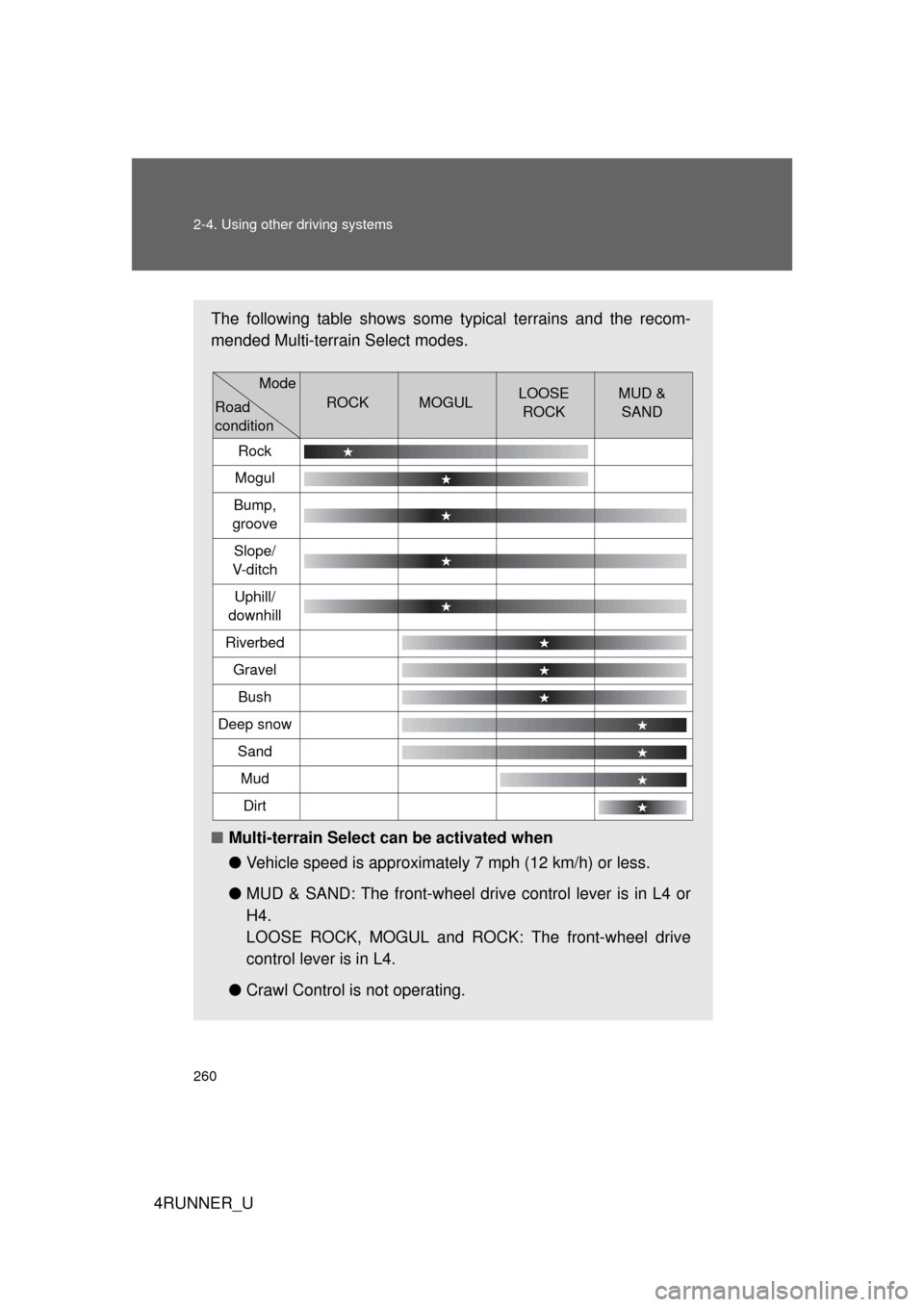
The following table shows some typical terrains and the recom-
mended Multi-terrain Select modes.
■Multi-terrain Select can be activated when
●Vehicle speed is approximately 7 mph (12 km/h) or less.
● MUD & SAND: The front-wheel driv e control lever is in L4 or
H4.
LOOSE ROCK, MOGUL and ROCK: The front-wheel drive
control lever is in L4.
● Crawl Control is not operating.
ROCKMOGULLOOSE
ROCKMUD & SAND
Rock
Mogul
Bump,
groove
Slope/
V-d i t c h
Uphill/
downhill
Riverbed
Gravel
Bush
Deep snow
Sand
Mud
Dirt
Mode
Road
condition
Page 265 of 700
265
2-4. Using other
driving systems
2
When driving
4RUNNER_U
CAUTION
■Before driving
To avoid an accident, observe the precautions relating to off-road driving.
(P. 275)
■ When using Multi-terrain Select
● Do not use the Multi-terrain Select system for normal (on-road) driving.
The Multi-terrain Select system is designed for off-road use only.
● Do not overly rely on Multi-terrain Select. This function does not extend
the vehicle’s performance limitations. Always check the terrain thoroughly
and drive safely.
● The recommended modes for the listed terrains ( P. 259) are only a refer-
ence. The selected mode may not be suitable to actual off-road conditions
due to factors such as the type or unevenness of the terrain or the degree
of incline. Check the actual terrain thoroughly and drive safely.
● After selecting a mode, make sure that the Multi-terrain Select indicator
and the selected mode indicator come on. If any related indicator flashes,
the vehicle is not under Multi-terrain Select control.
Page 319 of 700

319
3-1. Using the air conditioning system
and defogger
3
Interior features
4RUNNER_U
■Air conditioning odors
● During use, various odors from inside and outside the vehicle may enter
into and accumulate in the air conditioning system. This may then cause
odor to be emitted from the vents.
● To reduce potential odors from occurring:
It is recommended that the air conditioning system be set to outside air
mode prior to turning the vehicle off.
CAUTION
■To prevent the windshield from fogging up
Do not use during cool air operation in extremely humid weather. The
difference between the temperature of the outside air and that of the wind-
shield can cause the outer surface of the windshield to fog up, blocking your
vision.
NOTICE
■To prevent battery discharge
Do not leave the air conditioning system on longer than necessary when the
engine is stopped.
Page 326 of 700

326 3-1. Using the air conditioning system and defogger
4RUNNER_U
■Using automatic mode
Fan speed is adjusted automatically according to the temperature setting
and ambient conditions. As a result, the following may occur:
● The system may switch automatically to recirculated air mode when the
coolest temperature setting is selected when the ambient temperature is
high.
● Immediately after the switch is pressed, the fan may stop for a while until
warm or cool air is ready to flow.
● Cool air may flow to the area around the upper body when the heater is
on.
■ Switching between outside air and recirculated air modes
Recirculated air mode or outside air mode may be automatically switched to
in accordance with the temperature setting, the outside temperature, etc.
■ Using the system in recirculated air mode
The windows will fog up more easily if recirculated air mode is used.
■ Window defogger feature
Recirculated air mode may automatically switch to outside air mode in situa-
tions where the windows need to be defogged.
■ When
is selected for the air outlets used
For your driving comfort, air flowing to the feet may be warmer than air flow-
ing to the upper body depending on the temperature setting.
■ When driving on dusty roads
Close all windows. If dust thrown up by the vehicle is still drawn into the vehi-
cle after closing the windows, it is recommended that the air intake mode be
set to outside air mode and the fan speed to any setting except off.
Page 327 of 700
327
3-1. Using the air conditioning system
and defogger
3
Interior features
4RUNNER_U
■When outside air temperature is below 32°F (0°C)
The cooling and dehumidification function may not operate even when
is pressed.
■ When the indicator light on flashes
Press
to turn off the cooling and dehumidification function and turn it
on again. There may be a problem in the air conditioning system if the indi-
cator light continues to flash. Turn the air conditioning system off and have it
inspected by your Toyota dealer.
■ Air conditioning odors
● During use, various odors from inside and outside the vehicle may enter
into and accumulate in the air conditioning system. This may then cause
odor to be emitted from the vents.
● To reduce potential odors from occurring:
• It is recommended that the air conditioning system be set to outside air
mode prior to turning the vehicle off.
• The start timing of the blower may be delayed for a short period of time immediately after the air conditioning system is started in automatic
mode.
CAUTION
■To prevent the windshield from fogging up
Do not use during cool air operation in extremely humid weather. The
difference between the temperature of the outside air and that of the wind-
shield can cause the outer surface of the windshield to fog up, blocking your
vision.
NOTICE
■To prevent battery discharge
Do not leave the air conditioning system on longer than necessary when the
engine is stopped.