remote start TOYOTA 4RUNNER 2013 N280 / 5.G Owners Manual
[x] Cancel search | Manufacturer: TOYOTA, Model Year: 2013, Model line: 4RUNNER, Model: TOYOTA 4RUNNER 2013 N280 / 5.GPages: 704, PDF Size: 11.56 MB
Page 5 of 704
1
2
3
4
5
6
7
4RUNNER_U
5
4-1. Maintenance and careCleaning and protecting the vehicle exterior............ 508
Cleaning and protecting the vehicle interior............. 511
4-2. Maintenance Maintenance requirements ..................... 514
General maintenance.......... 517
Emission inspection and maintenance (I/M)
programs........................... 521
4-3. Do-it-yourself maintenance Do-it-yourself service precautions ....................... 522
Hood ................................... 525
Engine compartment ........... 526
Tires .................................... 542
Tire inflation pressure ......... 548
Wheels ................................ 552
Air conditioning filter............ 555
Wireless remote control/ electronic key battery ........ 557
Checking and replacing fuses ................................. 560
Light bulbs........................... 570 5-1. Essential information
Emergency flashers............ 582
If your vehicle needs to be towed........................... 583
If you think something is wrong ............................... 589
Fuel pump shut off system .............................. 590
5-2. Steps to take in an emergency
If a warning light turns on or a warning buzzer
sounds.............................. 591
If you have a flat tire ........... 607
If the engine will not start.... 620
If the shift lever cannot be shifted from P ................... 622
If you lose your keys........... 623
If you cannot operate back door opener ...................... 624
If the electronic key does not operate properly ......... 625
If the vehicle battery is discharged........................ 627
If your vehicle overheats .... 631
If the vehicle becomes stuck ................................. 634
If your vehicle has to be stopped in an
emergency ....................... 635
4Maintenance and care5When trouble arises
Page 42 of 704
42 1-2. Opening, closing and locking the doors
4RUNNER_U
■Security feature
If a door is not opened within approximately 60 seconds after the vehicle is
unlocked, the security feature automatically locks the vehicle again.
■ Battery-saving function
In the following circumstances, the entry function is disabled in order to pre-
vent the vehicle battery from discharging and the electronic key battery from
depleting.
● When the entry function has not been used for 5 days or more
● When the electronic key has been left within approximately 6 ft. (2 m) of
the vehicle for 10 minutes or more
● If the entry function has not been used for 14 days or more, the vehicle
cannot be unlocked by a door other than the driver's door. To unlock the
vehicle, grip the driver's door handle or use the wireless remote control
or the mechanical key.
The system will resume operation when
● The vehicle is locked using the door handle lock switch when carrying the
electronic key on your person.
● The vehicle is locked/unlocked using the wireless remote control.
(P. 4 9 )
● The vehicle is locked/unlocked using the mechanical key. ( P. 625)
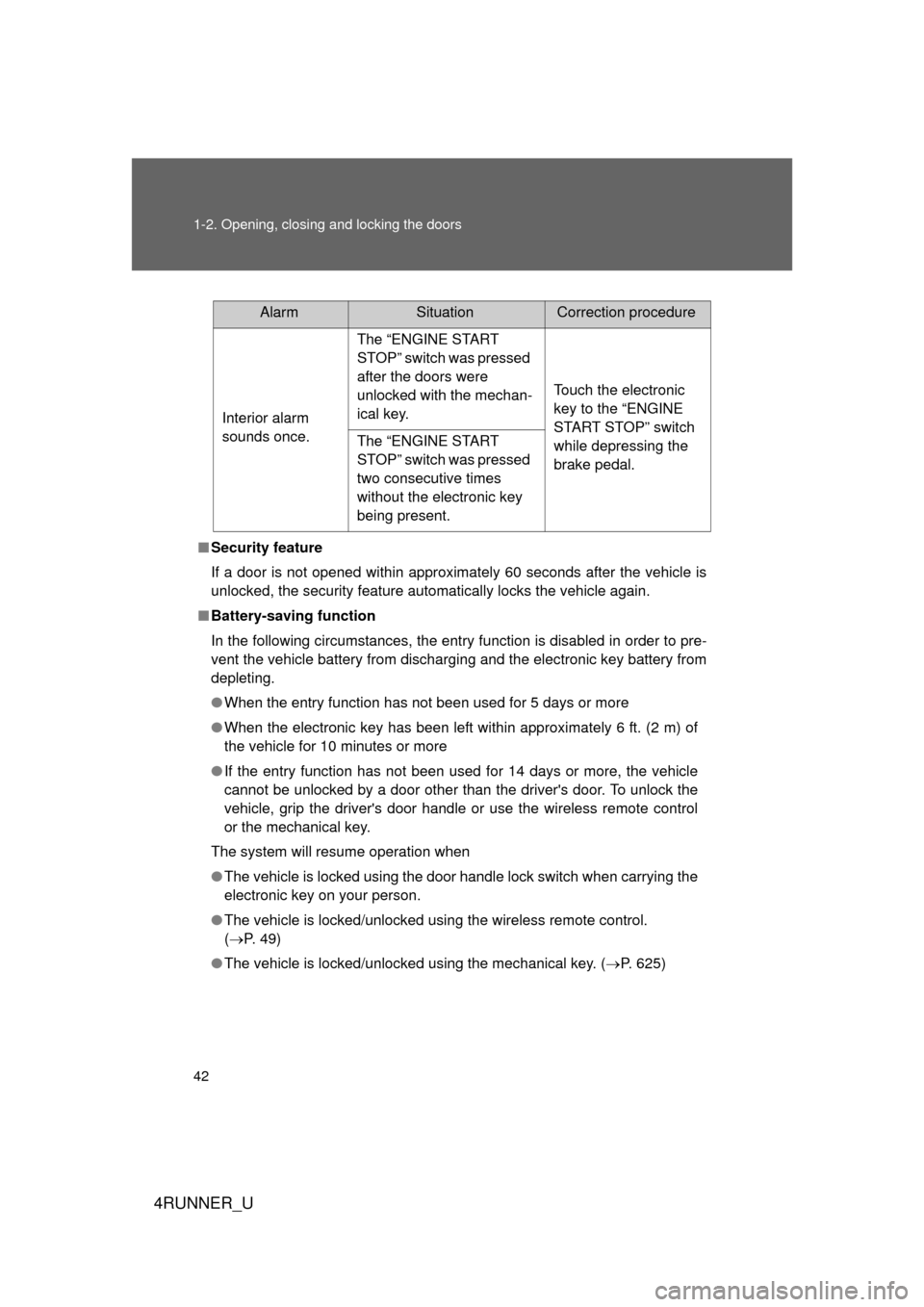
AlarmSituationCorrection procedure
Interior alarm
sounds once. The “ENGINE START
STOP” switch was pressed
after the doors were
unlocked with the mechan-
ical key.
Touch the electronic
key to the “ENGINE
START STOP” switch
while depressing the
brake pedal.
The “ENGINE START
STOP” switch was pressed
two consecutive times
without the electronic key
being present.
Page 46 of 704
46 1-2. Opening, closing and locking the doors
4RUNNER_U
■Electronic key battery depletion
● The standard battery life is 1 to 2 years.
● As the electronic key always receives radio waves, the battery will
become depleted even if the electronic key is not used. The following
symptoms indicate that the electronic key battery may be depleted.
Replace the battery when necessary. ( P. 557)
• The smart key system or the wireless remote control does not operate.
• The detection area becomes smaller.
• The LED indicator on the key surface does not turn on.
● To avoid serious deterioration, do not leave the electronic key within 3 ft.
(1 m) of the following electrical appliances that produce a magnetic field:
•TVs
• Personal computers
• Cellular phones, cordless phones and battery chargers
• Recharging cellular phones or cordless phones
• Glass top ranges
• Table lamps
■ Precautions when disc onnecting the battery
● In some cases, it may not be possible to unlock the doors using the smart
key system immediately after the battery has been disconnected. Use
the wireless remote control or the mechanical key to lock or unlock the
doors.
● The engine may not start on the first attempt after reconnecting the bat-
tery but will start normally after the second attempt. This is not a malfunc-
tion.
● The “ENGINE START STOP” switch mode is memorized by the vehicle.
When the battery is reconnected, the system will return to the mode it
was in before the battery was disconnected. Before disconnecting the
battery, turn the “ENGINE START STOP” switch off.
If you are unsure what mode the “ENGINE START STOP” switch was in
when the battery was disconnected, be especially careful when reconnect-
ing the battery.
Page 116 of 704
116
1-6. Theft deterrent system
4RUNNER_U
Alarm
: If equipped
The system sounds the alarm and flashes the lights when forced
entry is detected.
■ Triggering of the alarm
The alarm is triggered in the fo llowing situations when the alarm
is set:
● A locked door is unlocked or opened in any way other than
using the entry function, wireless remote control or mechani-
cal key. (The doors will lock again automatically.)
● The hood is opened.
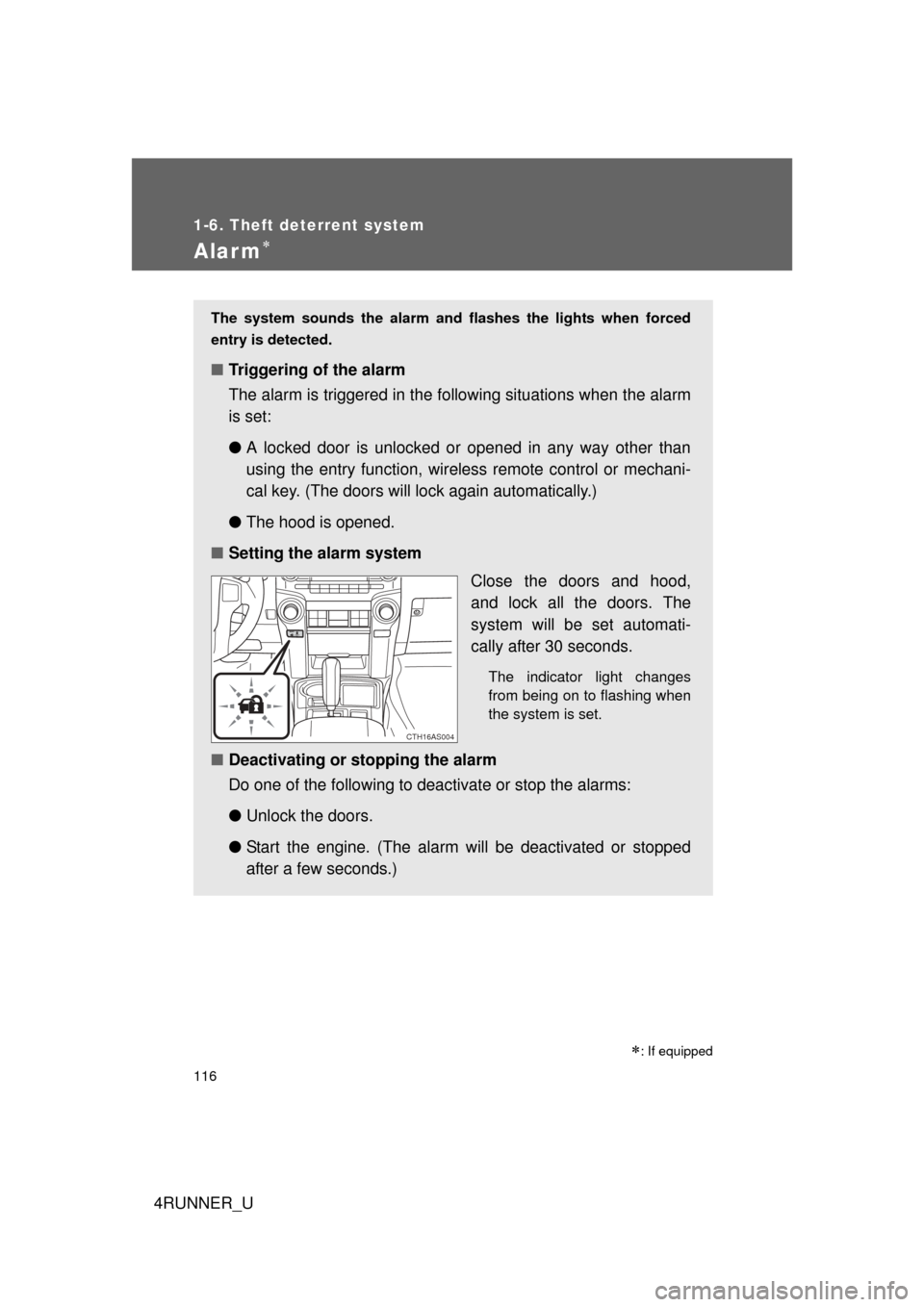
■ Setting the alarm system
Close the doors and hood,
and lock all the doors. The
system will be set automati-
cally after 30 seconds.
The indicator light changes
from being on to flashing when
the system is set.
■Deactivating or stopping the alarm
Do one of the following to deactivate or stop the alarms:
●Unlock the doors.
● Start the engine. (The alarm will be deactivated or stopped
after a few seconds.)
CTH16AS004
Page 496 of 704
496 3-7. Other interior features
4RUNNER_U■
Programming an entry gate (for U.S. owners)/Programming a
device in the Canadian market
Place the remote control transmitter 1 to 3 in. (25 to 75 mm)
away from the HomeLink
buttons.
Keep the HomeLink indicator light in view while programming.
Press and hold the selected HomeLink button.
Repeatedly press and release (cycle) the remote control
transmitter for 2 seconds each until step 4 is completed.
When the HomeLink
indicator light starts to flash rapidly,
release the buttons.
Test the HomeLink
operation by pressing the newly pro-
grammed button. Check to see if the gate/device operates
correctly.
Repeat the steps above to program another device for any of
the remaining HomeLink
buttons.
■ Programming other devices
To program other devices such as home security systems, home
door locks and lighting, contact your Toyota dealer for assistance.
■ Reprogramming a button
The individual HomeLink
buttons cannot be erased but can be
reprogrammed. To reprogram a button, follow the “Reprogramming
a HomeLink
button” instructions.
STEP 1
STEP 2
STEP 3
STEP 4
STEP 5
STEP 6
Page 497 of 704
497
3-7. Other interior features
3
Interior features
4RUNNER_U
Operating HomeLink
Press the appropriate HomeLink button. The HomeLink indicator
light should come on.
The HomeLink compatible transceiver in your vehicle continues to send
a signal for up to 20 seconds as long as the button is pressed.
Reprogramming a HomeLink button
Press and hold the desired HomeLink
button. After 20 seconds, the
HomeLink indicator light will start flas hing slowly. Keep pressing the
HomeLink button and press and hold the transmitter button until the
HomeLink indicator light changes from a slow to a rapid flash.
Release the buttons.
Erasing the entire HomeLink memory (all three programs)
Press and hold the 2 outside but-
tons for 10 seconds until the indi-
cator light flashes.
If you sell your vehicle, be sure to
erase the programs stored in the
HomeLink
memory.
■Before programming
● Install a new battery in the remote control transmitter.
● The battery side of the remote control transmitter must be pointed away
from the HomeLink
button.
■ When programming
Depending on radio wave conditions, the direction the remote control trans-
mitter is pointed and the remaining charge of the transmitter's batteries,
there are cases when programming may be difficult.
Page 538 of 704
538 4-3. Do-it-yourself maintenance
4RUNNER_U
■After recharging/reconnecting the battery (vehicles with smart key sys-
tem)
● Unlocking the doors using the smart key system may not be possible
immediately after reconnecting the battery. If this happens, use the wire-
less remote control or the mechanical key to lock/unlock the doors.
● Start the engine with the “ENGINE START STOP” switch in ACCES-
SORY mode. The engine may not start with the “ENGINE START STOP”
switch turned OFF. However, the engine will operate normally from the
second attempt.
● The “ENGINE START STOP” switch mode is recorded by the vehicle. If
the battery is reconnected, the vehicle will return the “ENGINE START
STOP” switch mode to the status it was in before the battery was discon-
nected. Make sure to turn off the engine before disconnect the battery.
Take extra care when connecting the battery if the “ENGINE START
STOP” switch mode prior to discharge is unknown.
If the system will not start even after multiple attempts, contact your Toyota
dealer.
CAUTION
■ Chemicals in the battery
Batteries contain poisonous and corrosive sulfuric acid and may produce
hydrogen gas which is flammable and explosive. To reduce the risk of death
or serious injury, take the following precautions while working on or near the
battery:
● Do not cause sparks by touching the battery terminals with tools.
● Do not smoke or light a match near the battery.
● Avoid contact with eyes, skin and clothes.
● Never inhale or swallow electrolyte.
● Wear protective safety glasses when working near the battery.
● Keep children away from the battery.
Page 625 of 704
5
When trouble arises
625
5-2. Steps to take in an emergency
4RUNNER_U
If the electronic key does not operate properly (vehicles with a smar t key system)
Locking and unlocking the doorsUse the mechanical key (P.
33) in order to perform the fol-
lowing operations:
Locks all doors
Unlocks all doors
Turning the key rearward
unlocks the driver’s door.
Turning the key once again
unlocks the other doors.
If communication between the electronic key and vehicle is inter-
rupted ( P. 43) or the electronic key cannot be used because the
battery is depleted, the smart key system and wireless remote con-
trol cannot be used. In such cases, the doors can be opened and the
engine can be started by following the procedure below.
CTH52AS001
Page 629 of 704
5
When trouble arises
629
5-2. Steps to take in an emergency
4RUNNER_U
■
Starting the engine when the battery is discharged
The engine cannot be started by push-starting.
■ To prevent battery discharge
● Turn off the headlights and the audio system while the engine is off.
● Turn off any unnecessary electrical components when the vehicle is run-
ning at a low speed for an extended period, such as in heavy traffic.
■ When the battery is removed or discharged
Make sure that the key is not inside the vehicle when recharging or replacing
the battery. The key may be locked in the vehicle if the alarm is activated.
(P. 117)
■ Charging the battery
The electricity stored in the battery will discharge gradually even when the
vehicle is not in use, due to natural discharge and the draining effects of cer-
tain electrical appliances. If the vehicle is left for a long time, the battery may
discharge, and the engine may be unable to start. (The battery recharges
automatically during driving.)
■ Precautions when the battery is di scharged (vehicles with a smart key
system)
● In some cases, it may not be possible to unlock the doors using the smart
key system when the battery is discharged. Use the wireless remote con-
trol or the mechanical key to lock or unlock the doors.
● The engine may not start on the first attempt after the battery has
recharged but will start normally after the second attempt. This is not a
malfunction.
● The “ENGINE START STOP” switch mode is memorized by the vehicle.
When the battery is reconnected, the system will return to the mode it
was in before the battery was discharged. Before disconnecting the bat-
tery, turn the “ENGINE START STOP” switch off.
If you are unsure what mode the “ENGINE START STOP” switch was in
before the battery discharged, be especially careful when reconnecting
the battery.
Page 694 of 704
694 Alphabetical index
4RUNNER_U
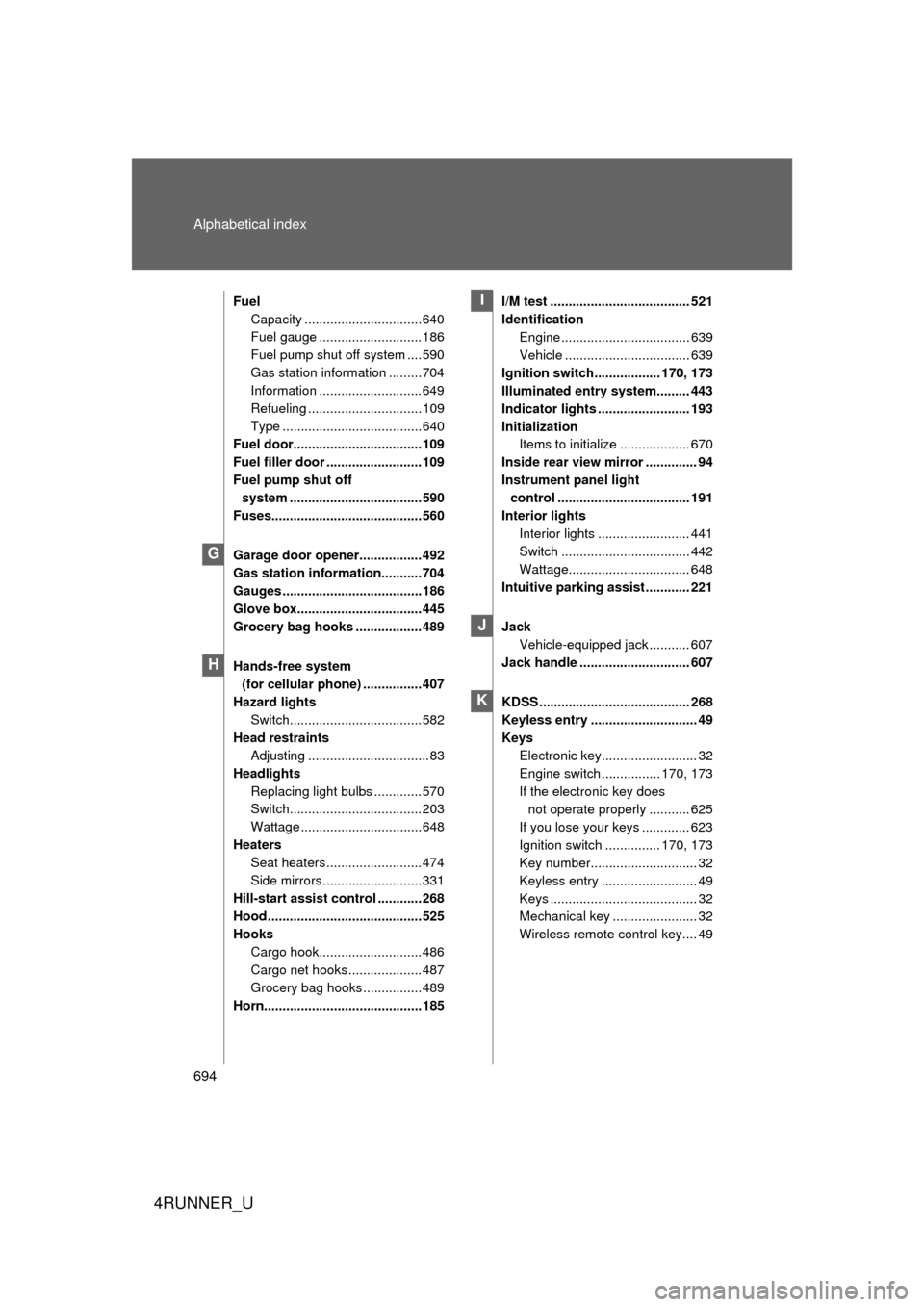
FuelCapacity ................................640
Fuel gauge ............................ 186
Fuel pump shut off system ....590
Gas station information .........704
Information ............................ 649
Refueling ............................... 109
Type ......................................640
Fuel door...................................109
Fuel filler door .......................... 109
Fuel pump shut off system .................................... 590
Fuses......................................... 560
Garage door opener.................492
Gas station information...........704
Gauges ......................................186
Glove box.................................. 445
Grocery bag hooks .................. 489
Hands-free system (for cellular phone) ................407
Hazard lights
Switch.................................... 582
Head restraints Adjusting ................................. 83
Headlights Replacing light bulbs ............. 570
Switch.................................... 203
Wattage .................................648
Heaters Seat heaters .......................... 474
Side mirrors ...........................331
Hill-start assist control ............268
Hood .......................................... 525
Hooks Cargo hook............................ 486
Cargo net hooks .................... 487
Grocery bag hooks ................489
Horn...........................................185 I/M test ...................................... 521
Identification
Engine ................................... 639
Vehicle .................................. 639
Ignition switch.................. 170, 173
Illuminated entry system......... 443
Indicator lights ......................... 193
Initialization Items to initialize ................... 670
Inside rear view mirror .............. 94
Instrument panel light control .................................... 191
Interior lights Interior lights ......................... 441
Switch ................................... 442
Wattage................................. 648
Intuitive parking assist ............ 221
Jack Vehicle-equipped jack ........... 607
Jack handle .............................. 607
KDSS ......................................... 268
Keyless entry ............................. 49
Keys Electronic key.......................... 32
Engine switch ................ 170, 173
If the electronic key does not operate properly ........... 625
If you lose your keys ............. 623
Ignition switch ............... 170, 173
Key number............................. 32
Keyless entry .......................... 49
Keys ........................................ 32
Mechanical key ....................... 32
Wireless remote control key.... 49
G
H
I
J
K