display TOYOTA 4RUNNER 2014 N280 / 5.G User Guide
[x] Cancel search | Manufacturer: TOYOTA, Model Year: 2014, Model line: 4RUNNER, Model: TOYOTA 4RUNNER 2014 N280 / 5.GPages: 530, PDF Size: 9.97 MB
Page 85 of 530
852. Instrument cluster
2
Instrument cluster
4RUNNER (U)_(OM35A83U)■
Front tire angle
Displays the direction of the front tires
The tire direction is displayed in 3 stages for both left and right, in accor-
dance with the angle of the tire.
■
Customization
Language, units and Eco Driving Indicator Light settings can be
changed. ( P. 8 6 )
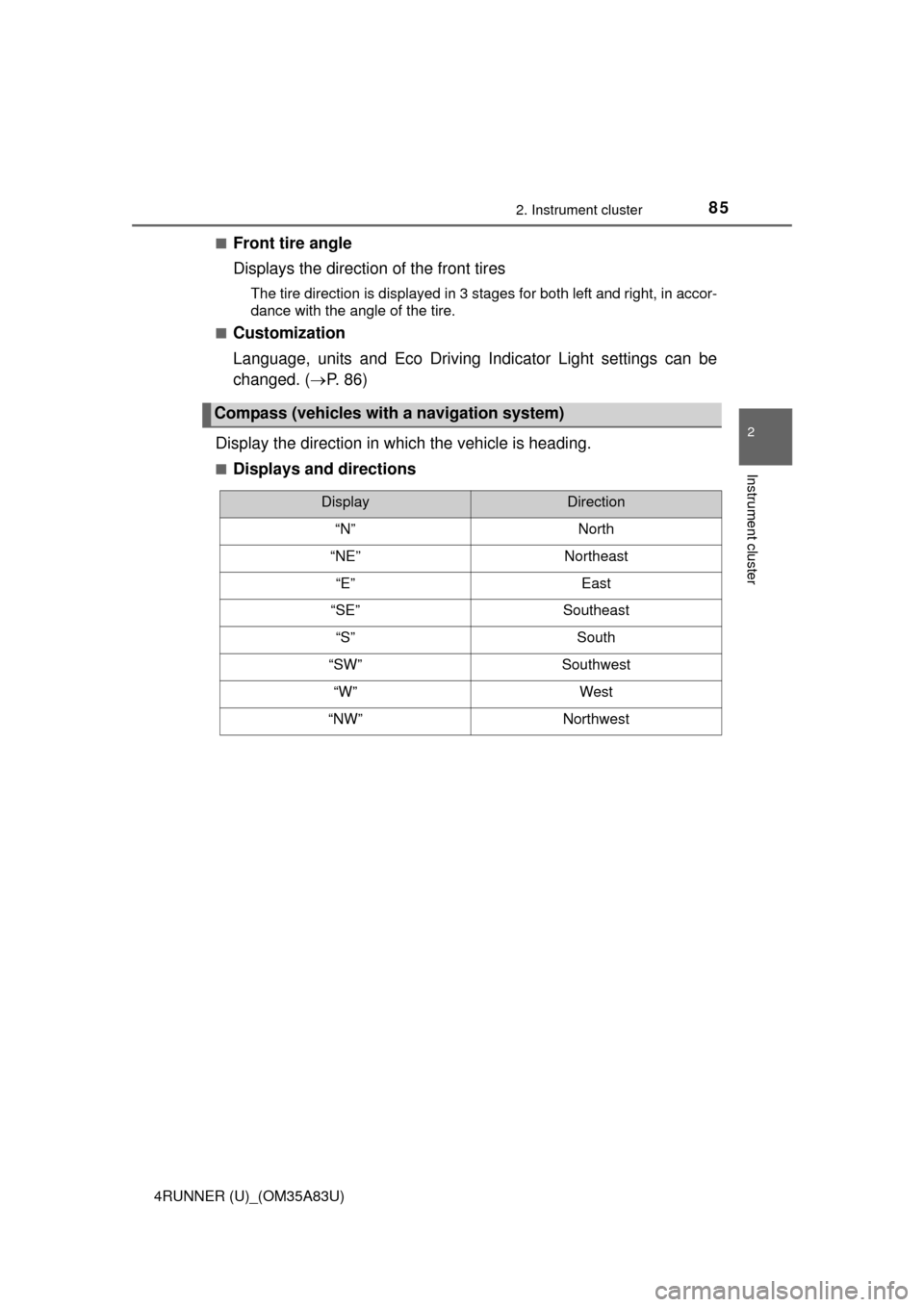
Display the direction in which the vehicle is heading.
■Displays and directions
Compass (vehicles with a navigation system)
DisplayDirection
“N”North
“NE”Northeast
“E”East
“SE”Southeast
“S”South
“SW”Southwest
“W”West
“NW”Northwest
Page 86 of 530
862. Instrument cluster
4RUNNER (U)_(OM35A83U)
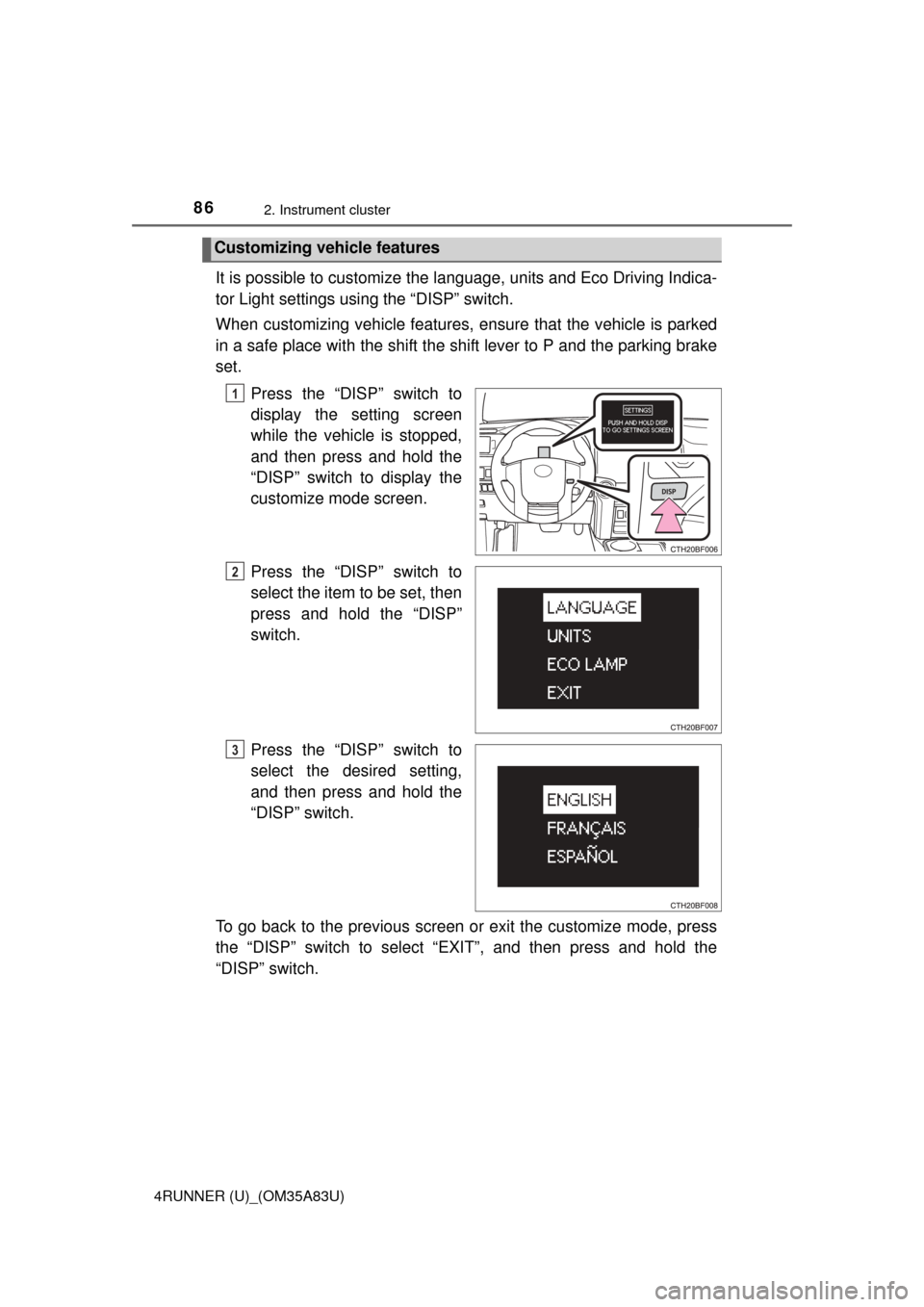
It is possible to customize the language, units and Eco Driving Indica-
tor Light settings using the “DISP” switch.
When customizing vehicle features, en sure that the vehicle is parked
in a safe place with the shift the shift lever to P and the parking brake
set.
Press the “DISP” switch to
display the setting screen
while the vehicle is stopped,
and then press and hold the
“DISP” switch to display the
customize mode screen.
Press the “DISP” switch to
select the item to be set, then
press and hold the “DISP”
switch.
Press the “DISP” switch to
select the desired setting,
and then press and hold the
“DISP” switch.
To go back to the previous screen or exit the customize mode, press
the “DISP” switch to select “EXIT”, and then press and hold the
“DISP” switch.
Customizing vehicle features
1
2
3
Page 87 of 530
872. Instrument cluster
2
Instrument cluster
4RUNNER (U)_(OM35A83U)
●Items that can be changed
*: The default setting varies according to countries.
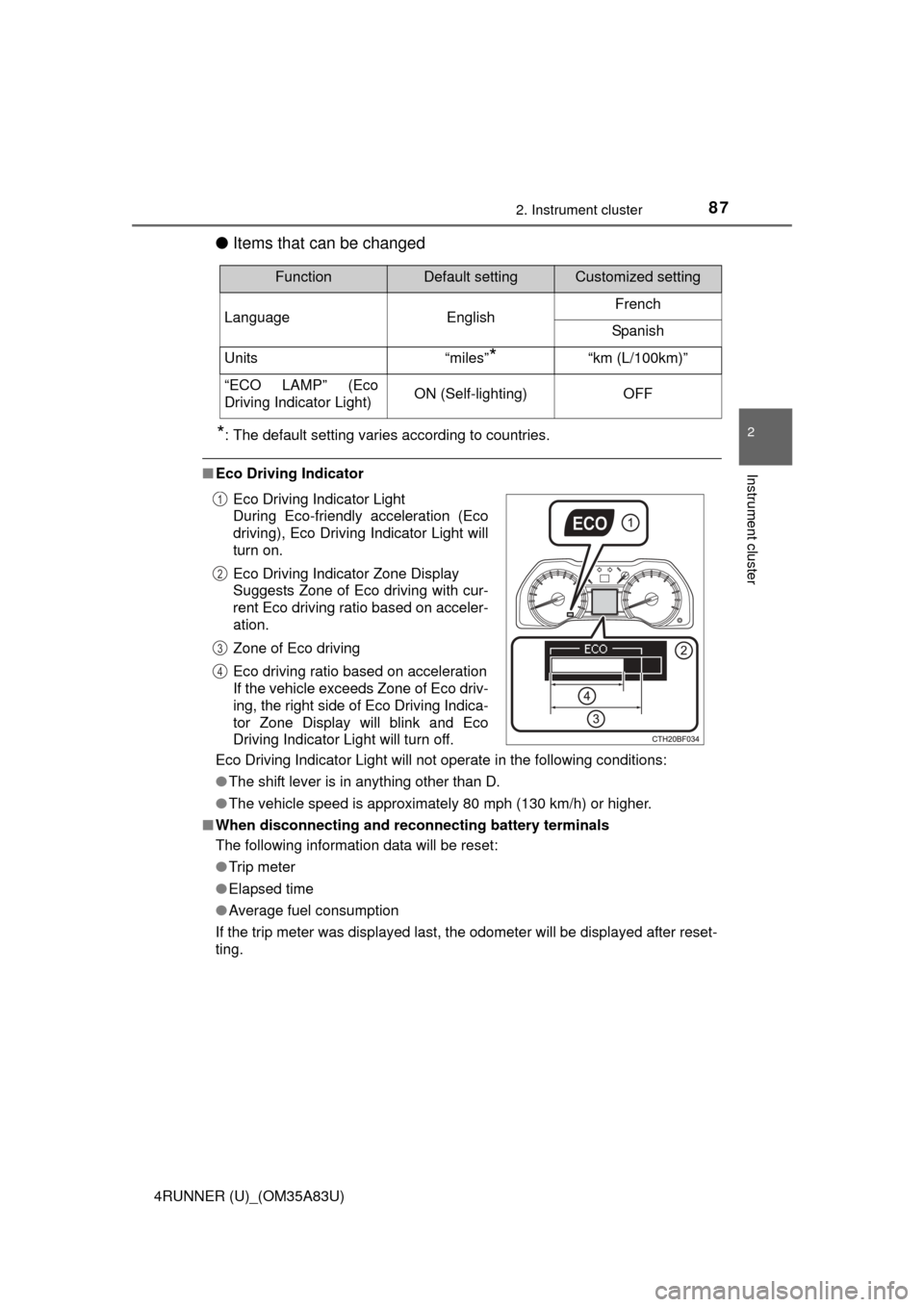
■Eco Driving Indicator
Eco Driving Indicator Light will not operate in the following conditions:
●The shift lever is in anything other than D.
● The vehicle speed is approximately 80 mph (130 km/h) or higher.
■ When disconnecting and reco nnecting battery terminals
The following information data will be reset:
● Trip meter
● Elapsed time
● Average fuel consumption
If the trip meter was displayed last, the odometer will be displayed after reset-
ting.
FunctionDefault settingCustomized setting
Language EnglishFrench
Spanish
Units “miles”
*“km (L/100km)”
“ECO LAMP” (Eco
Driving Indicator Light)ON (Self-lighting)OFF
Eco Driving Indicator Light
During Eco-friendly acceleration (Eco
driving), Eco Driving Indicator Light will
turn on.
Eco Driving Indicator Zone Display
Suggests Zone of Eco driving with cur-
rent Eco driving ratio based on acceler-
ation.
Zone of Eco driving
Eco driving ratio based on acceleration
If the vehicle exceeds Zone of Eco driv-
ing, the right side of Eco Driving Indica-
tor Zone Display will blink and Eco
Driving Indicator Light will turn off.1
2
3
4
Page 88 of 530

882. Instrument cluster
4RUNNER (U)_(OM35A83U)■
Liquid crystal display
Small spots or light spots may appear on the display. This phenomenon is
characteristic of liquid crystal displays, and there is no problem continuing to
use the display.
■ Setting display automatic suspension
In the following situations, the setting display will be suspended.
●When a message appears.
● When the vehicle begins to move.
CAUTION
■The display at low temperatures
Allow the interior of the vehicle to warm up before using the display. At
extremely low temperatures, the display monitor may respond slowly, and
display changes may be delayed.
■ Cautions during setting up the display
As the engine needs to be running during setting up the display, ensure that
the vehicle is parked in a place with adequate ventilation. In a closed area
such as a garage, exhaust gases including harmful carbon monoxide (CO)
may collect and enter the vehicle. This may lead to death or a serious
health hazard.
Page 89 of 530
892. Instrument cluster
2
Instrument cluster
4RUNNER (U)_(OM35A83U)
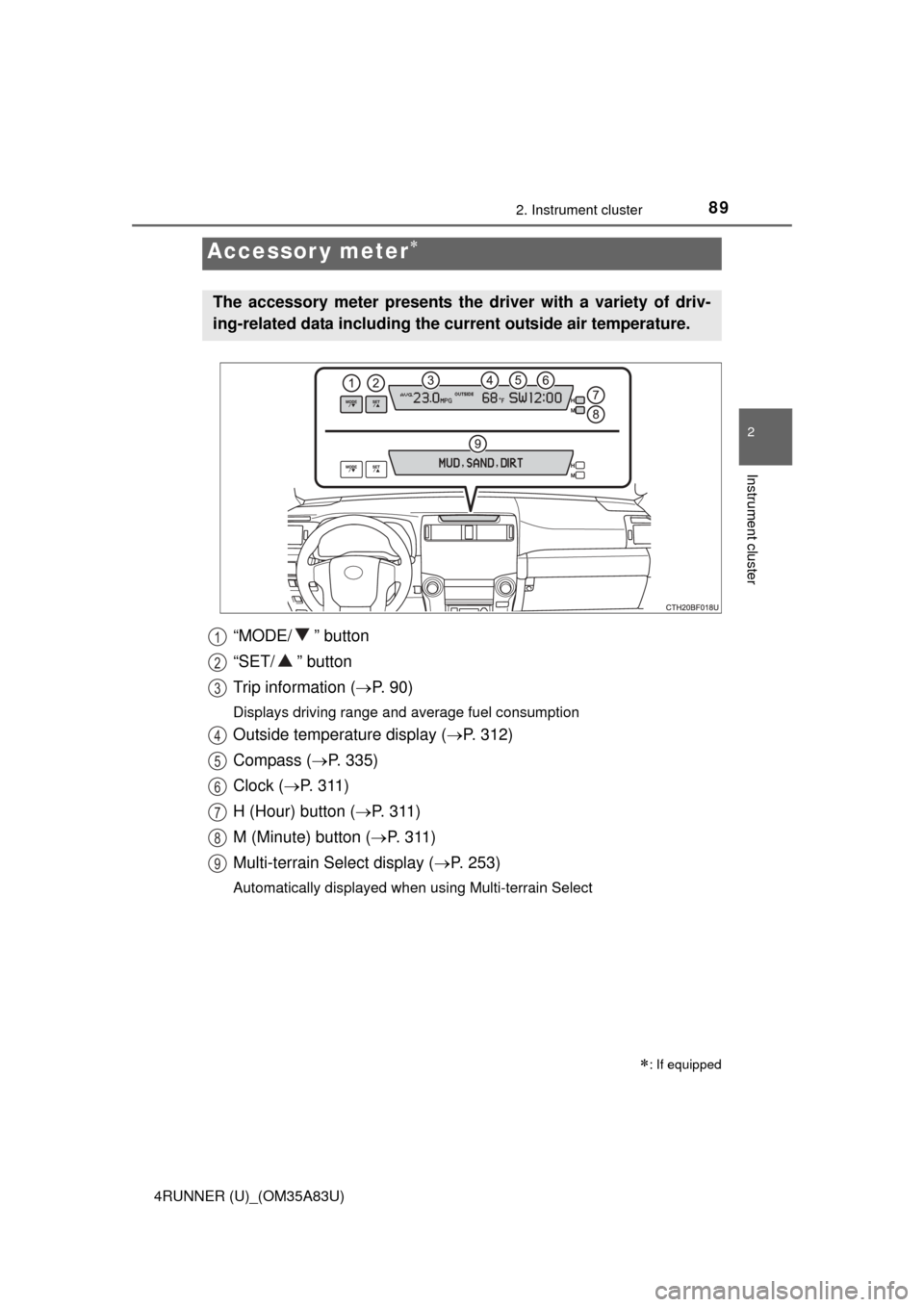
“MODE/ ” button
“SET/ ” button
Trip information (P. 9 0 )
Displays driving range and average fuel consumption
Outside temperature display ( P. 312)
Compass ( P. 335)
Clock ( P. 3 1 1 )
H (Hour) button ( P. 311)
M (Minute) button ( P. 3 1 1 )
Multi-terrain Select display ( P. 253)
Automatically displayed when using Multi-terrain Select
Accessor y meter
: If equipped
The accessory meter presents the driver with a variety of driv-
ing-related data including the cu rrent outside air temperature.
1
2
3
4
5
6
7
8
9
Page 90 of 530
902. Instrument cluster
4RUNNER (U)_(OM35A83U)
Items displayed can be switched by pressing the “MODE/ ” button.
■Cruising range
Displays the estimated maximum dist ance that can be driven with the
quantity of fuel remaining
• This distance is computed based on your average fuel consumption. As a result, the actual distance that can be driven may differ from that displayed.
• When only a small amount of fuel is added to the tank, the display may not be updated.
■
Average fuel consumption
Displays the average fuel consumpt ion since the function was reset
• Pressing and holding the “SET/ ” button will reset the average fuel con-
sumption.
• Use the displayed average fuel consumption as a reference.
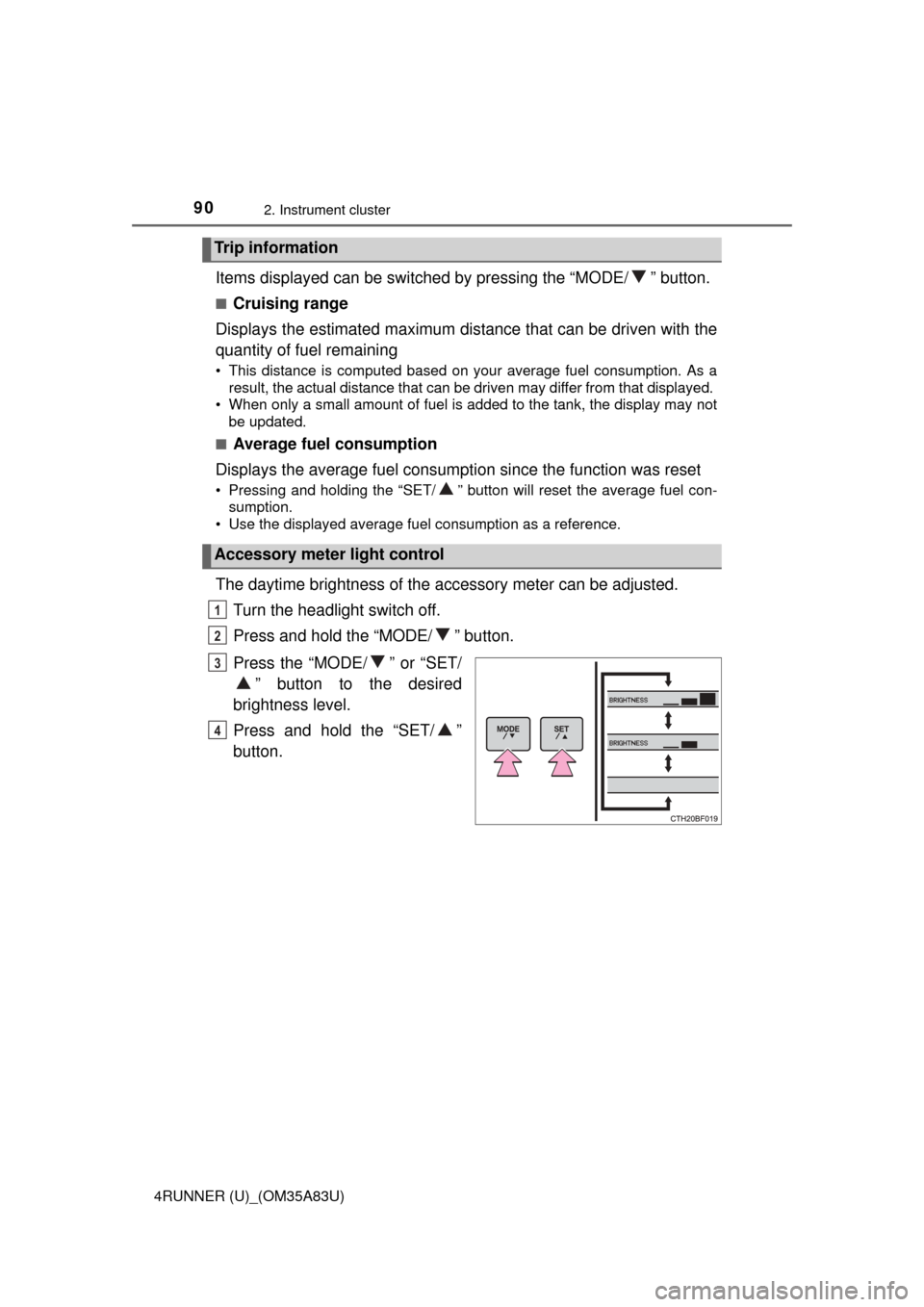
The daytime brightness of the accessory meter can be adjusted.
Turn the headlight switch off.
Press and hold the “MODE/ ” button.
Press the “MODE/ ” or “SET/ ” button to the desired
brightness level.
Press and hold the “SET/ ”
button.
Trip information
Accessory meter light control
1
2
3
4
Page 91 of 530
912. Instrument cluster
2
Instrument cluster
4RUNNER (U)_(OM35A83U)
■Adjusting the brightness of the accessory meter
●If left idle for approximately 6 seconds or more while adjusting, the display
will revert to the trip information display.
● When the parking lights are on, the brightness of the accessory meter can
be adjusted only with the instrument panel light control.
● If the “MODE/ ” button is pressed and held when the accessory meter
light control is displayed, the display will switch to compass calibration.
(P. 335)
■ Liquid crystal display
Small spots or light spots may appear on the display. This phenomenon is
characteristic of liquid crystal displays, and there is no problem with continu-
ing to use the display.
NOTICE
■The accessory meter at low temperatures
Allow the interior of the vehicle to warm up before using the liquid crystal
display. At extremely low temperatures, the display monitor may respond
slowly, and display changes may be delayed.
Page 109 of 530
1093-2. Opening, closing and locking the doors
3
Operation of each component
4RUNNER (U)_(OM35A83U)
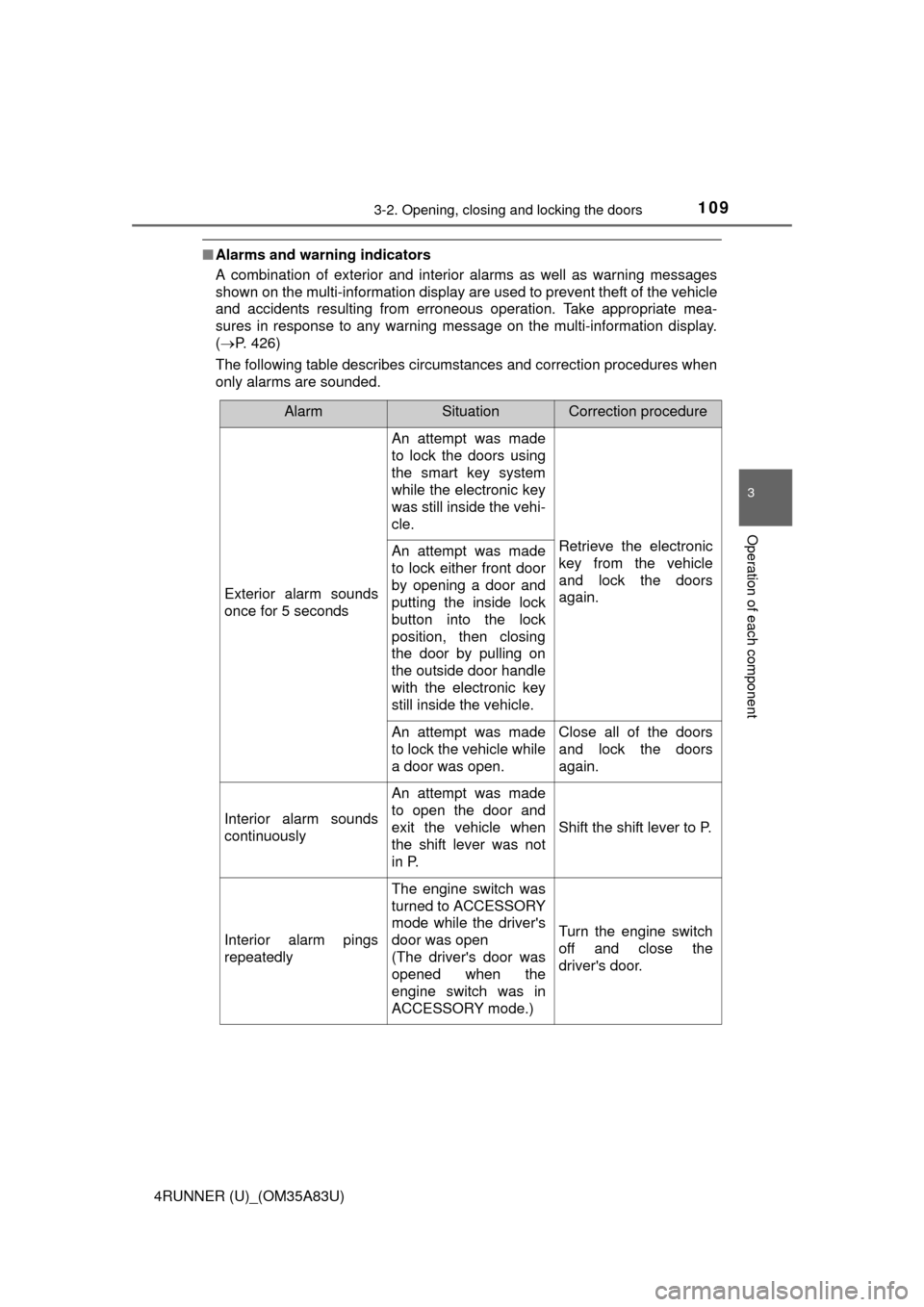
■Alarms and warning indicators
A combination of exterior and interior alarms as well as warning messages
shown on the multi-information display are used to prevent theft of the vehicle
and accidents resulting from erroneous operation. Take appropriate mea-
sures in response to any warning message on the multi-information display.
(P. 426)
The following table describes circumstances and correction procedures when
only alarms are sounded.
AlarmSituationCorrection procedure
Exterior alarm sounds
once for 5 seconds
An attempt was made
to lock the doors using
the smart key system
while the electronic key
was still inside the vehi-
cle.
Retrieve the electronic
key from the vehicle
and lock the doors
again.An attempt was made
to lock either front door
by opening a door and
putting the inside lock
button into the lock
position, then closing
the door by pulling on
the outside door handle
with the electronic key
still inside the vehicle.
An attempt was made
to lock the vehicle while
a door was open.Close all of the doors
and lock the doors
again.
Interior alarm sounds
continuously
An attempt was made
to open the door and
exit the vehicle when
the shift lever was not
in P.
Shift the shift lever to P.
Interior alarm pings
repeatedly
The engine switch was
turned to ACCESSORY
mode while the driver's
door was open
(The driver's door was
opened when the
engine switch was in
ACCESSORY mode.)
Turn the engine switch
off and close the
driver's door.
Page 228 of 530
2264-5. Using the driving support systems
4RUNNER (U)_(OM35A83U)■
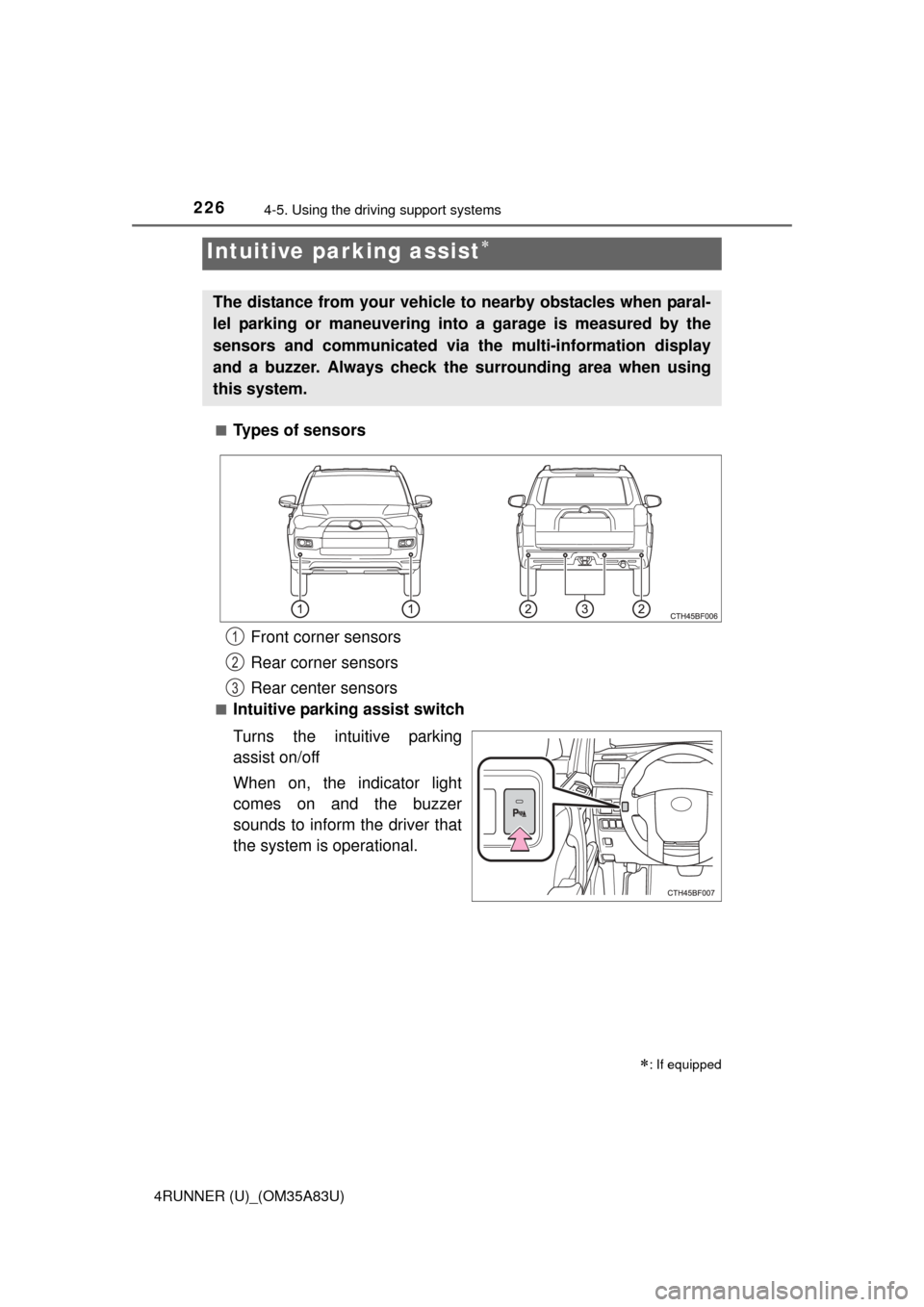
Types of sensors
■Intuitive parking assist switch
Turns the intuitive parking
assist on/off
When on, the indicator light
comes on and the buzzer
sounds to inform the driver that
the system is operational.
Intuitive parking assist
: If equipped
The distance from your vehicle
to nearby obstacles when paral-
lel parking or maneuvering into a garage is measured by the
sensors and communicated via the multi-information display
and a buzzer. Always check the surrounding area when using
this system.
Front corner sensors
Rear corner sensors
Rear center sensors1
2
3
Page 229 of 530
2274-5. Using the driving support systems
4
Driving
4RUNNER (U)_(OM35A83U)
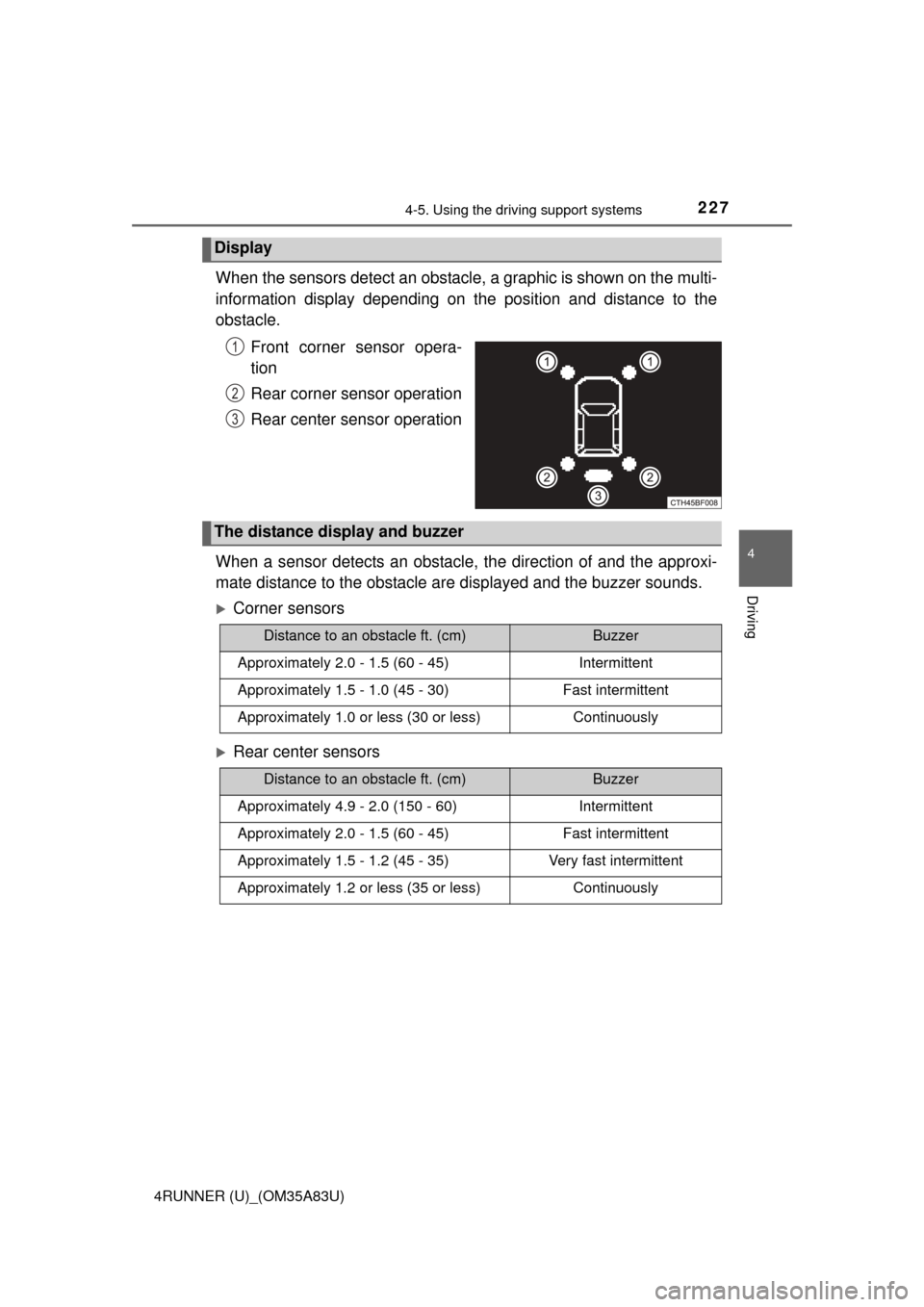
When the sensors detect an obstacle, a graphic is shown on the multi-
information display depending on the position and distance to the
obstacle.
Front corner sensor opera-
tion
Rear corner sensor operation
Rear center sensor operation
When a sensor detects an obstacle, the direction of and the approxi-
mate distance to the obstacle ar e displayed and the buzzer sounds.
Corner sensors
Rear center sensors
Display
1
2
3
The distance display and buzzer
Distance to an obstacle ft. (cm)Buzzer
Approximately 2.0 - 1.5 (60 - 45)Intermittent
Approximately 1.5 - 1.0 (45 - 30)Fast intermittent
Approximately 1.0 or less (30 or less)Continuously
Distance to an obstacle ft. (cm)Buzzer
Approximately 4.9 - 2.0 (150 - 60)Intermittent
Approximately 2.0 - 1.5 (60 - 45)Fast intermittent
Approximately 1.5 - 1.2 (45 - 35)Very fast intermittent
Approximately 1.2 or less (35 or less)Continuously