display TOYOTA 4RUNNER 2014 N280 / 5.G Owner's Manual
[x] Cancel search | Manufacturer: TOYOTA, Model Year: 2014, Model line: 4RUNNER, Model: TOYOTA 4RUNNER 2014 N280 / 5.GPages: 530, PDF Size: 9.97 MB
Page 231 of 530

2294-5. Using the driving support systems
4
Driving
4RUNNER (U)_(OM35A83U)■
Sensor detection information
●The sensor’s detection areas are limited to the areas around the vehicle’s
front corner and rear bumpers.
● Certain vehicle conditions and the surrounding environment may affect the
ability of the sensor to correctly detect obstacles. Particular instances where
this may occur are listed below.
• There is dirt, snow or ice on the sensor. (Wiping the sensors will resolve
this problem.)
• The sensor is frozen. (Thawing the area will resolve this problem.)
In especially cold weather, if a sensor is frozen the screen may show an
abnormal display, or obstacles may not be detected.
• The sensor is covered in any way.
• The vehicle is leaning considerably to one side.
• On an extremely bumpy road, on an incline, on gravel, or on grass.
• The vicinity of the vehicle is noisy due to vehicle horns, motorcycleengines, air brakes of large vehicles, or other loud noises producing ultra-
sonic waves.
• There is another vehicle equipped with parking assist sensors in the
vicinity.
• The sensor is coated with a sheet of spray or heavy rain.
• The vehicle is equipped with a fender pole or wireless antenna.
• Towing eyelet is installed.
• The bumper or sensor receives a strong impact.
• The vehicle is approaching a tall or curved curb.
• In harsh sunlight or intense cold weather.
• The area directly under the bumpers is not detected.
• If obstacles draw too close to the sensor.
• A non-genuine Toyota suspension (lowered suspension etc.) is installed.
• People may not be detected if they are wearing certain types of clothing.
In addition to the examples above, there are instances in which, because of
their shape, signs and other objects may be judged by the sensor to be closer
than they are.
● The shape of the obstacle may prevent the sensor from detecting it. Pay
particular attention to the following obstacles:
• Wires, fences, ropes, etc.
• Cotton, snow and other materials that absorb sound waves
• Sharply-angled objects
• Low obstacles
• Tall obstacles with upper sections projecting outwards in the direction of
your vehicle
Page 232 of 530

2304-5. Using the driving support systems
4RUNNER (U)_(OM35A83U)●
The following situations may occur during use.
• Depending on the shape of the obstacle and other factors, the detection
distance may shorten, or detection may be impossible.
• Obstacles may not be detected if they are too close to the sensor.
• There will be a short delay between obstacle detection and display. Even at slow speeds, there is a possibility that the obstacle will come within the
sensor’s detection areas before the display is shown and the warning
beep sounds.
• Thin posts or objects lower than the sensor may not be detected for colli- sion when approached, even if they have been detected once.
• It might be difficult to hear beeps due to the volume of audio system or air flow noise of air conditioning system.
■ If a message is displayed on the multi-information display
P. 426
■ Customization that can be co nfigured at Toyota dealer
Settings (e.g. buzzer volume) can be changed.
(Customizable features P. 485)
■ Certification
For vehicles sold in the U.S.A.
This device complies with Part 15 of the FCC Rules. Operation is subject to
the following two conditions; (1) This device may not cause harmful interfer-
ence, and (2) This device must accept any interference received, including
interference that may cause undesired operation.
For vehicles sold in Canada
This ISM device complies with Canadian ICES-001.
Cet appareil ISM est conforme a la norme NMB-001 du Canada.
Page 233 of 530
2314-5. Using the driving support systems
4
Driving
4RUNNER (U)_(OM35A83U)
CAUTION
■When using the intuitive parking assist
Observe the following precautions.
Failing to do so may result in the vehicle being unable to be driven safely
and possibly cause an accident.
● Do not use the sensor at speeds in excess of 6 mph (10 km/h).
● The sensors’ detection areas and reaction times are limited. When moving
forward or reversing, check the areas surrounding the vehicle (especially
the sides of the vehicle) for safety, and drive slowly, using the brake to
control the vehicle’s speed.
● Do not install accessories within the sensors’ detection areas.
NOTICE
■When using intuitive parking assist-sensor
In the following situations, the system may not function correctly due t\
o a
sensor malfunction etc. Have the vehicle checked by your Toyota dealer.
● The intuitive parking assist operation display flashes, and a beep sounds
when no obstacles are detected.
● If the area around a sensor collides with something, or is subjected to
strong impact.
● If the bumper collides with something.
● If the display shows continuously without a beep.
● If a display error occurs, first check the sensor.
If the error occurs even if there is no ice, snow or mud on the sensor, it is
likely that the sensor is malfunctioning.
■ Notes when washing the vehicle
Do not apply intensive bursts of water or steam to the sensor area.
Doing so may result in the sensor malfunctioning.
Page 255 of 530
2534-5. Using the driving support systems
4
Driving
4RUNNER (U)_(OM35A83U)
Multi-terrain Select
: If equipped
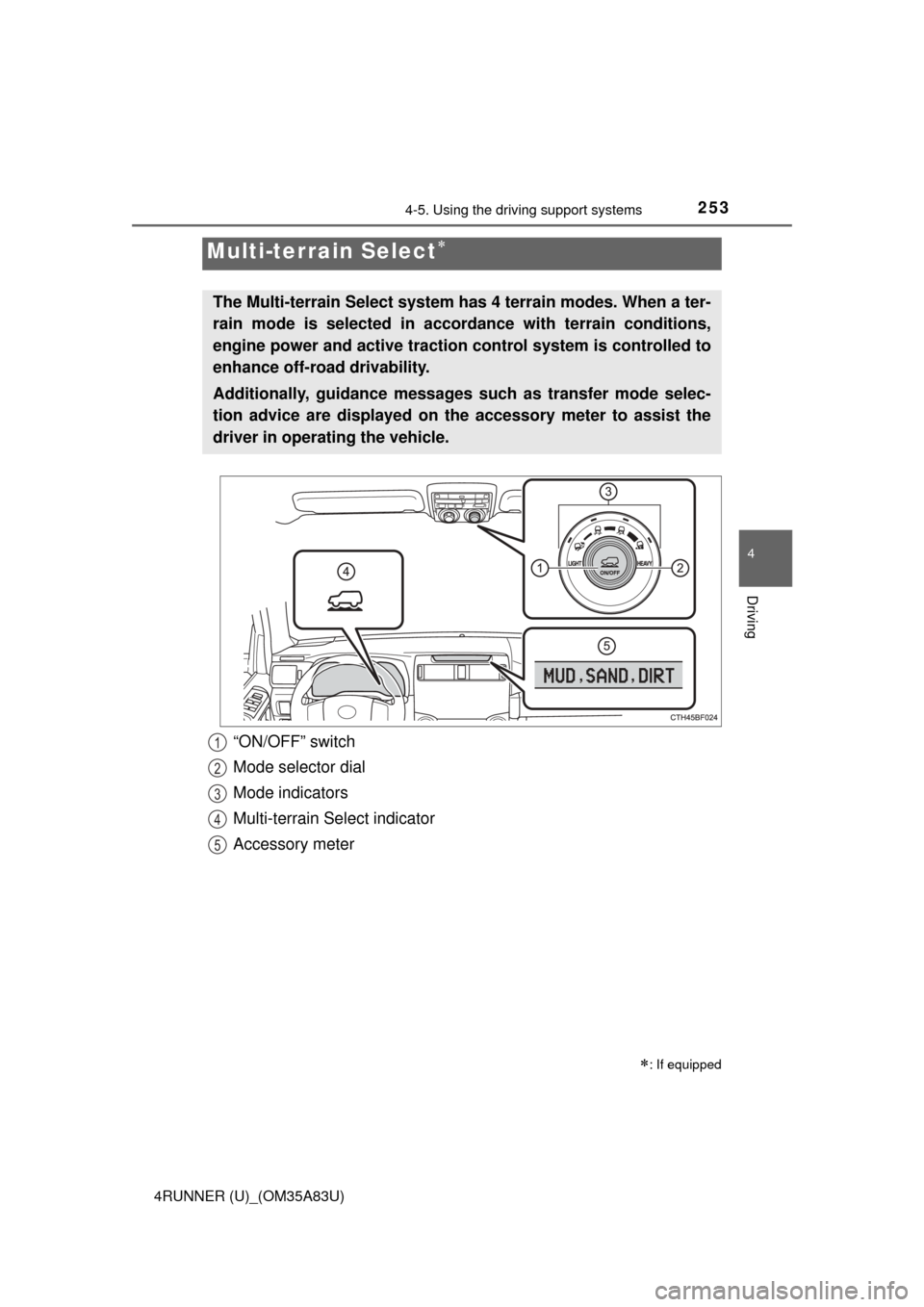
The Multi-terrain Select system has 4 terrain modes. When a ter-
rain mode is selected in accordance with terrain conditions,
engine power and active traction control system is controlled to
enhance off-road drivability.
Additionally, guidance messages such as transfer mode selec-
tion advice are displayed on the accessory meter to assist the
driver in operating the vehicle.
“ON/OFF” switch
Mode selector dial
Mode indicators
Multi-terrain Select indicator
Accessory meter1
2
3
4
5
Page 258 of 530
2564-5. Using the driving support systems
4RUNNER (U)_(OM35A83U)
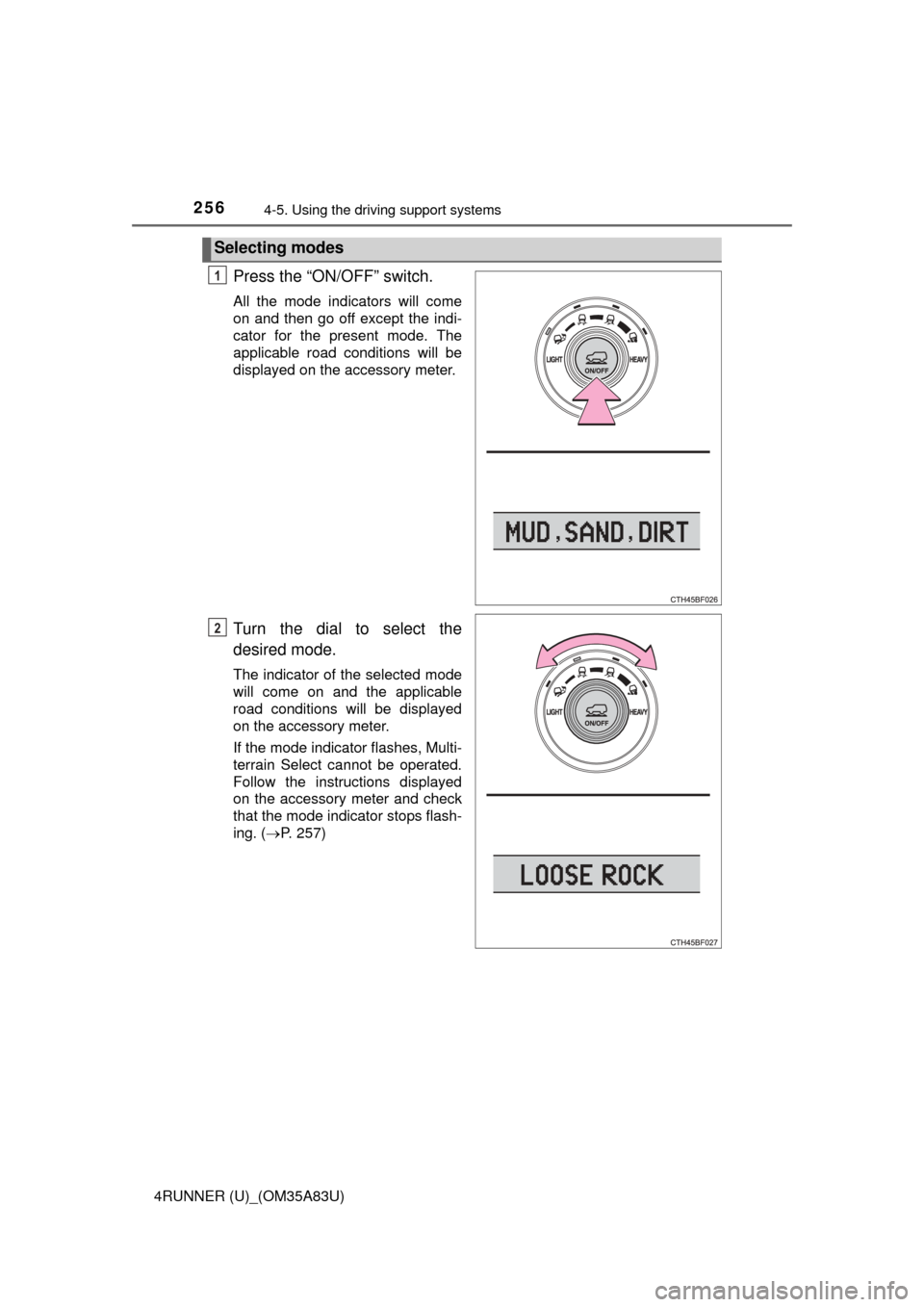
Press the “ON/OFF” switch.
All the mode indicators will come
on and then go off except the indi-
cator for the present mode. The
applicable road conditions will be
displayed on the accessory meter.
Turn the dial to select the
desired mode.
The indicator of the selected mode
will come on and the applicable
road conditions will be displayed
on the accessory meter.
If the mode indicator flashes, Multi-
terrain Select cannot be operated.
Follow the instructions displayed
on the accessory meter and check
that the mode indicator stops flash-
ing. (P. 257)
Selecting modes
1
2
Page 259 of 530
2574-5. Using the driving support systems
4
Driving
4RUNNER (U)_(OM35A83U)
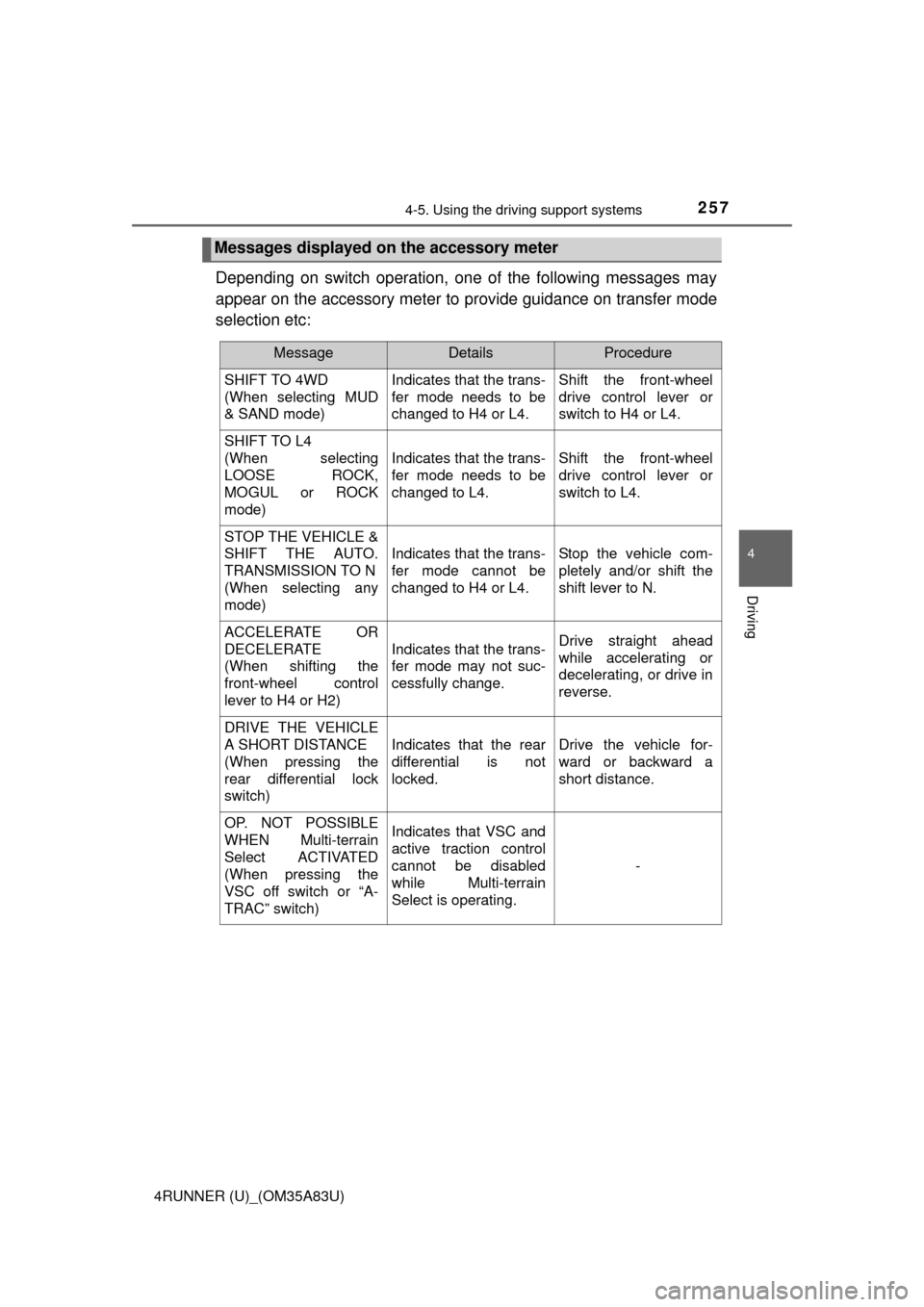
Depending on switch operation, one of the following messages may
appear on the accessory meter to provide guidance on transfer mode
selection etc:
Messages displayed on the accessory meter
MessageDetailsProcedure
SHIFT TO 4WD
(When selecting MUD
& SAND mode) Indicates that the trans-
fer mode needs to be
changed to H4 or L4.Shift the front-wheel
drive control lever or
switch to H4 or L4.
SHIFT TO L4
(When selecting
LOOSE ROCK,
MOGUL or ROCK
mode)
Indicates that the trans-
fer mode needs to be
changed to L4.Shift the front-wheel
drive control lever or
switch to L4.
STOP THE VEHICLE &
SHIFT THE AUTO.
TRANSMISSION TO N
(When selecting any
mode)
Indicates that the trans-
fer mode cannot be
changed to H4 or L4.Stop the vehicle com-
pletely and/or shift the
shift lever to N.
ACCELERATE OR
DECELERATE
(When shifting the
front-wheel control
lever to H4 or H2)
Indicates that the trans-
fer mode may not suc-
cessfully change.Drive straight ahead
while accelerating or
decelerating, or drive in
reverse.
DRIVE THE VEHICLE
A SHORT DISTANCE
(When pressing the
rear differential lock
switch)
Indicates that the rear
differential is not
locked.Drive the vehicle for-
ward or backward a
short distance.
OP. NOT POSSIBLE
WHEN Multi-terrain
Select ACTIVATED
(When pressing the
VSC off switch or “A-
TRAC” switch)Indicates that VSC and
active traction control
cannot be disabled
while Multi-terrain
Select is operating.
-
Page 281 of 530

279
Interior features5
4RUNNER (U)_(OM35A83U)5-1. Using the air conditioning
system and defogger
Manual air conditioning system............................. 280
Automatic air conditioning system............................. 286
Seat heaters/ seat ventilators ................ 293
5-2. Using the interior lights Interior lights list ................ 295
• Interior lights ................. 296
• Personal lights .............. 296 5-3. Using the storage
features
List of storage features ..... 298
• Glove box...................... 299
• Console box .................. 299
• Cup holders .................. 300
• Auxiliary box ................. 302
• Coin holder/tissue pocket/pen holder ......... 303
• Bottle holders ................ 304
Luggage compartment features ........................... 305
5-4. Other interior features Other interior features ....... 310
• Sun visors ..................... 310
• Vanity mirrors................ 310
• Clock ............................. 311
• Outside temperature display........................... 312
• Power outlets (120 V AC) .................... 314
• Power outlets ................ 319
• Armrest ......................... 321
• Assist grips ................... 322
Garage door opener.......... 323
Safety Connect ................. 330
Compass ........................... 335
Page 313 of 530
3115-4. Other interior features
5
Interior features
4RUNNER (U)_(OM35A83U)
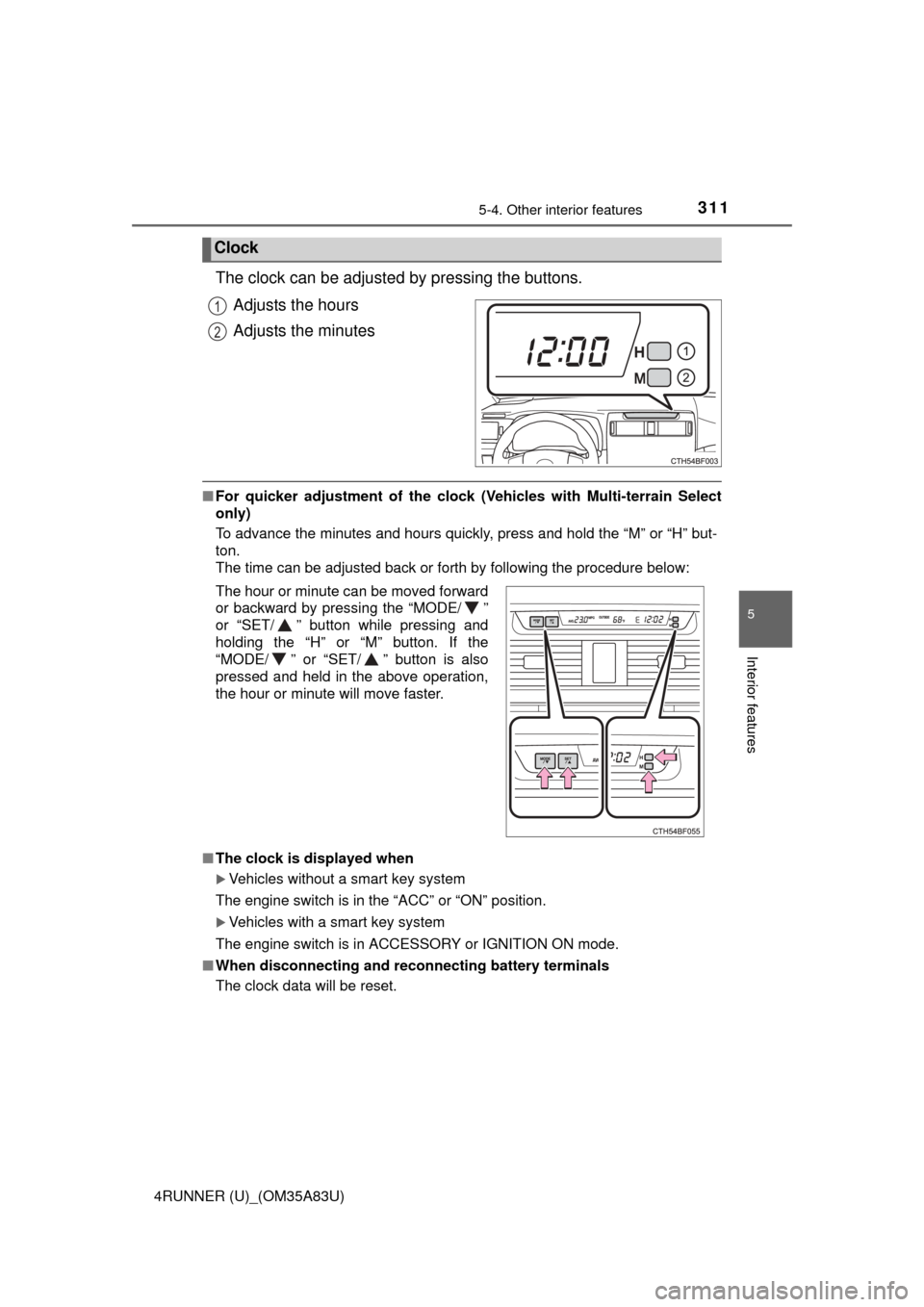
The clock can be adjusted by pressing the buttons.Adjusts the hours
Adjusts the minutes
■For quicker adjustment of the clo ck (Vehicles with Multi-terrain Select
only)
To advance the minutes and hours quickly, press and hold the “M” or “H” but-
ton.
The time can be adjusted back or forth by following the procedure below:
■ The clock is displayed when
Vehicles without a smart key system
The engine switch is in the “ACC” or “ON” position.
Vehicles with a smart key system
The engine switch is in ACCESSORY or IGNITION ON mode.
■ When disconnecting and reco nnecting battery terminals
The clock data will be reset.
Clock
1
2
The hour or minute can be moved forward
or backward by pressing the “MODE/ ”
or “SET/ ” button while pressing and
holding the “H” or “M” button. If the
“MODE/ ” or “SET/ ” button is also
pressed and held in the above operation,
the hour or minute will move faster.
Page 314 of 530
3125-4. Other interior features
4RUNNER (U)_(OM35A83U)
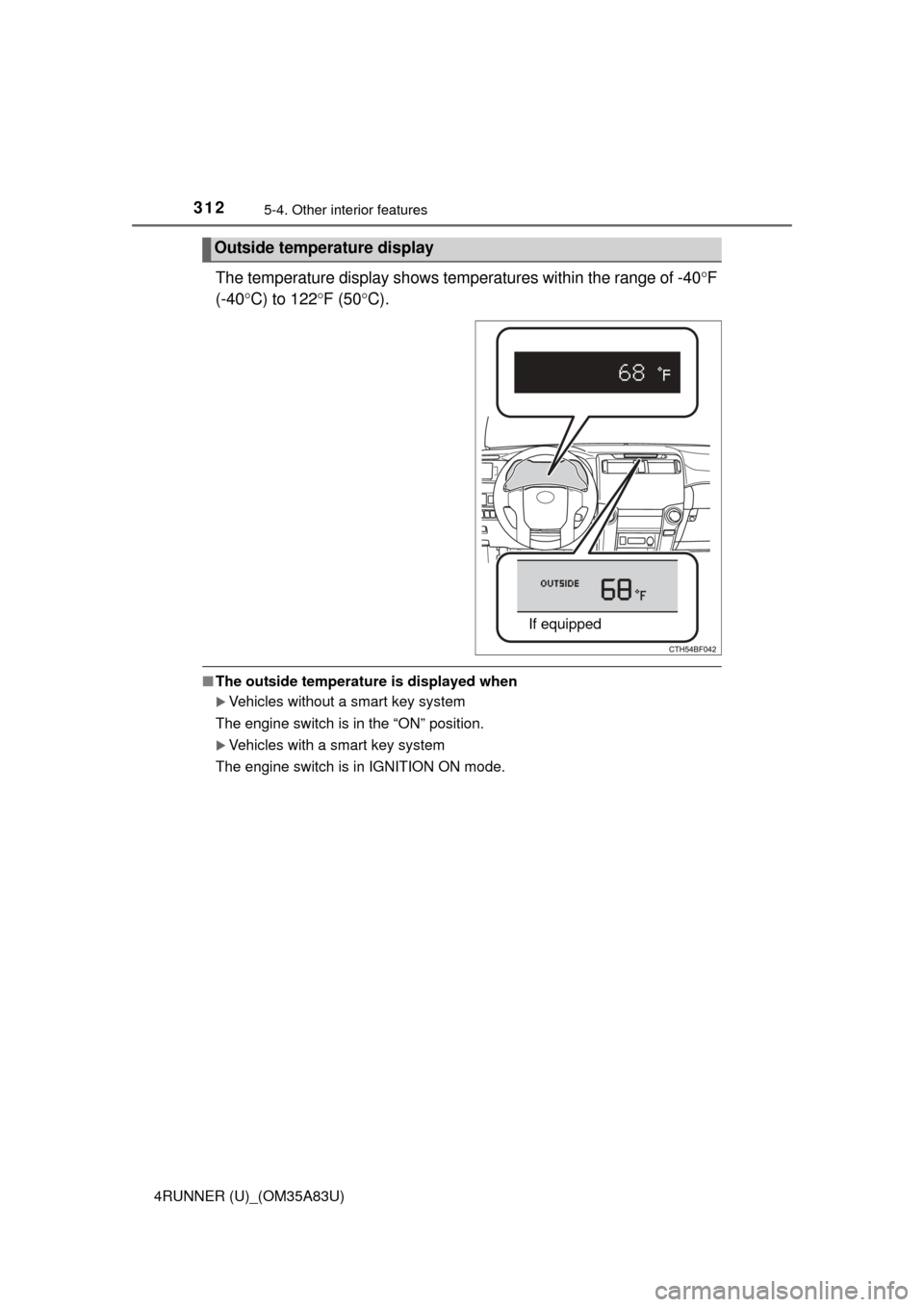
The temperature display shows temperatures within the range of -40F
(-40 C) to 122 F (50 C).
■The outside temperature is displayed when
Vehicles without a smart key system
The engine switch is in the “ON” position.
Vehicles with a smart key system
The engine switch is in IGNITION ON mode.
Outside temperature display
If equipped
Page 315 of 530
3135-4. Other interior features
5
Interior features
4RUNNER (U)_(OM35A83U)■
Ice indicator
■ Display
In the following situations, the correct outside temperature may not be dis-
played, or the display may take longer than normal to change.
●When the vehicle is stopped, or moving at low speeds (less than 14 mph [24
km/h]).
● When the outside temperature has changed suddenly (at the entrance/exit
of a garage, tunnel, etc.)
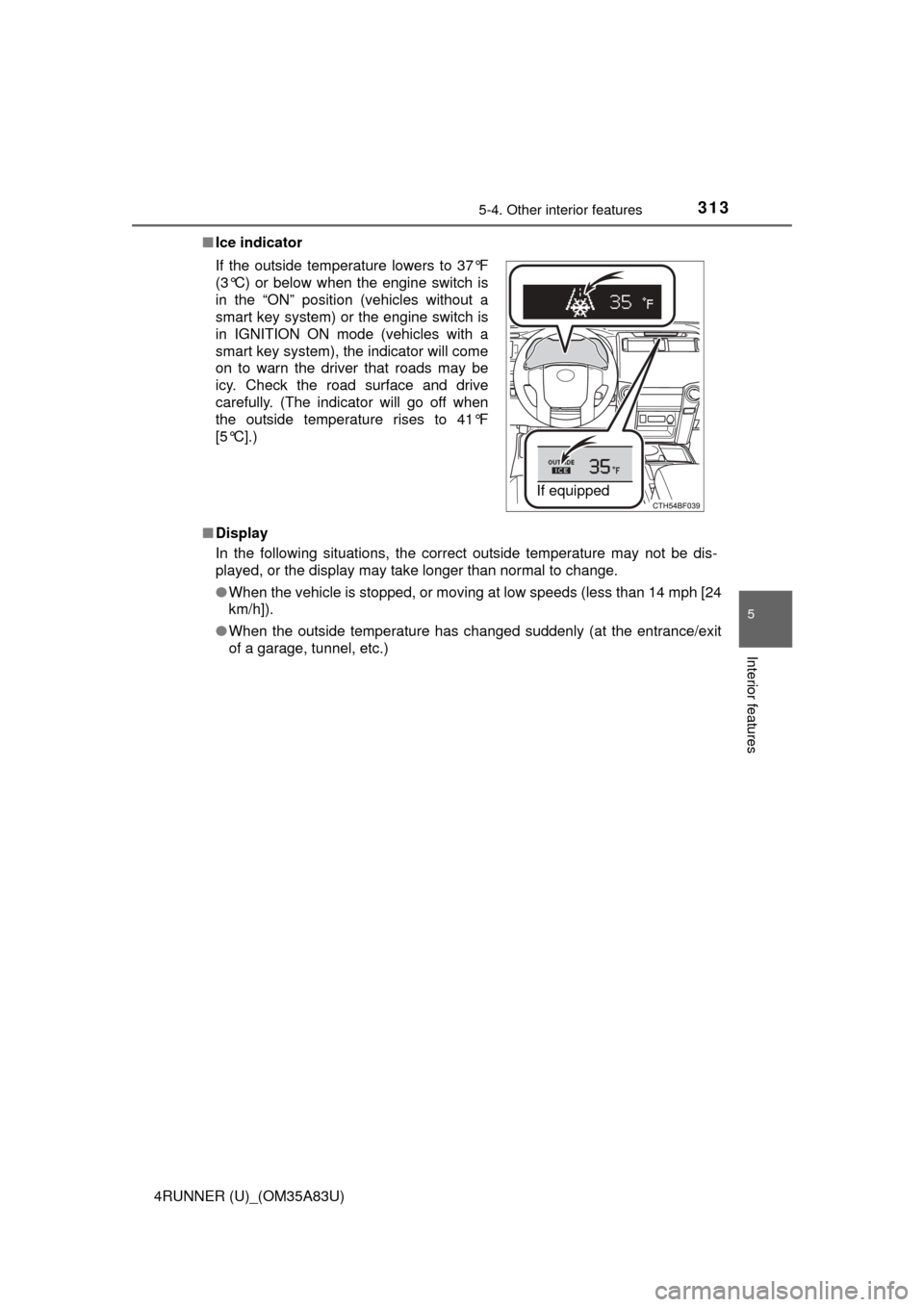
If the outside temperature lowers to 37°F
(3°C) or below when the engine switch is
in the “ON” position (vehicles without a
smart key system) or the engine switch is
in IGNITION ON mode (vehicles with a
smart key system), the indicator will come
on to warn the driver that roads may be
icy. Check the road surface and drive
carefully. (The indicator will go off when
the outside temperature rises to 41°F
[5°C].)
If equipped