rel TOYOTA 4RUNNER 2014 N280 / 5.G User Guide
[x] Cancel search | Manufacturer: TOYOTA, Model Year: 2014, Model line: 4RUNNER, Model: TOYOTA 4RUNNER 2014 N280 / 5.GPages: 530, PDF Size: 9.97 MB
Page 56 of 530
561-1. For safe use
4RUNNER (U)_(OM35A83U)
CAUTION
■When children are in the vehicle
Do not allow children to play with the seat belt. If the seat belt becomes
twisted around a child’s neck, it may lead to choking or other serious injuries
that could result in death.
If this occurs and the buckle cannot be unfastened, scissors should be used
to cut the belt.
■ When the child restraint system is not in use
● Keep the child restraint system properly secured on the seat even if it is
not in use. Do not store the child restraint system unsecured in the pas-
senger compartment.
● If it is necessary to detach the child restraint system, remove it from the
vehicle or store it securely in the luggage compartment. This will prevent it
from injuring passengers in the event of a sudden stop, sudden swerve or
accident.
Page 63 of 530
631-1. For safe use
1
For safety and security
4RUNNER (U)_(OM35A83U)
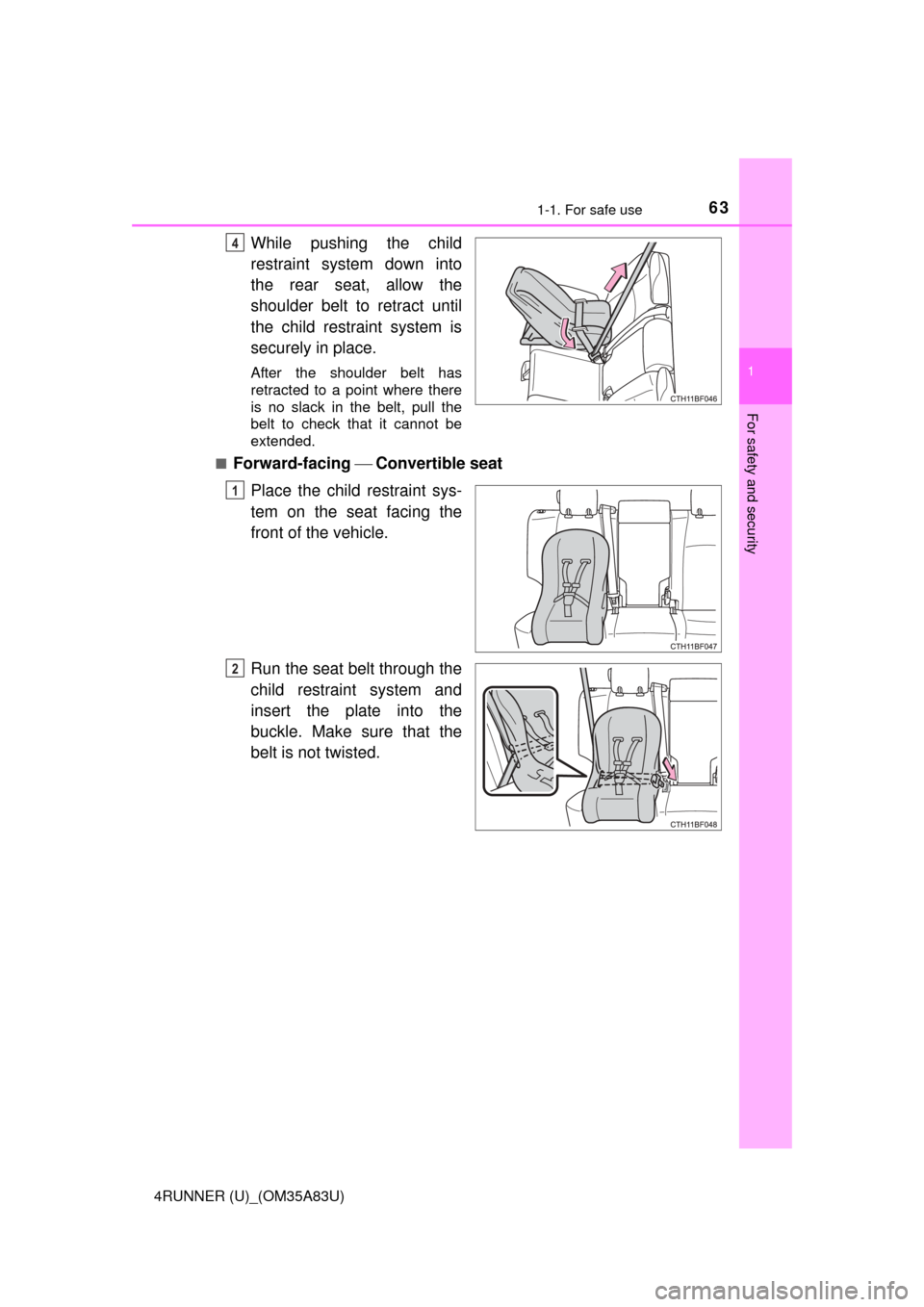
While pushing the child
restraint system down into
the rear seat, allow the
shoulder belt to retract until
the child restraint system is
securely in place.
After the shoulder belt has
retracted to a point where there
is no slack in the belt, pull the
belt to check that it cannot be
extended.
■
Forward-facing Convertible seat
Place the child restraint sys-
tem on the seat facing the
front of the vehicle.
Run the seat belt through the
child restraint system and
insert the plate into the
buckle. Make sure that the
belt is not twisted.
4
1
2
Page 64 of 530
641-1. For safe use
4RUNNER (U)_(OM35A83U)
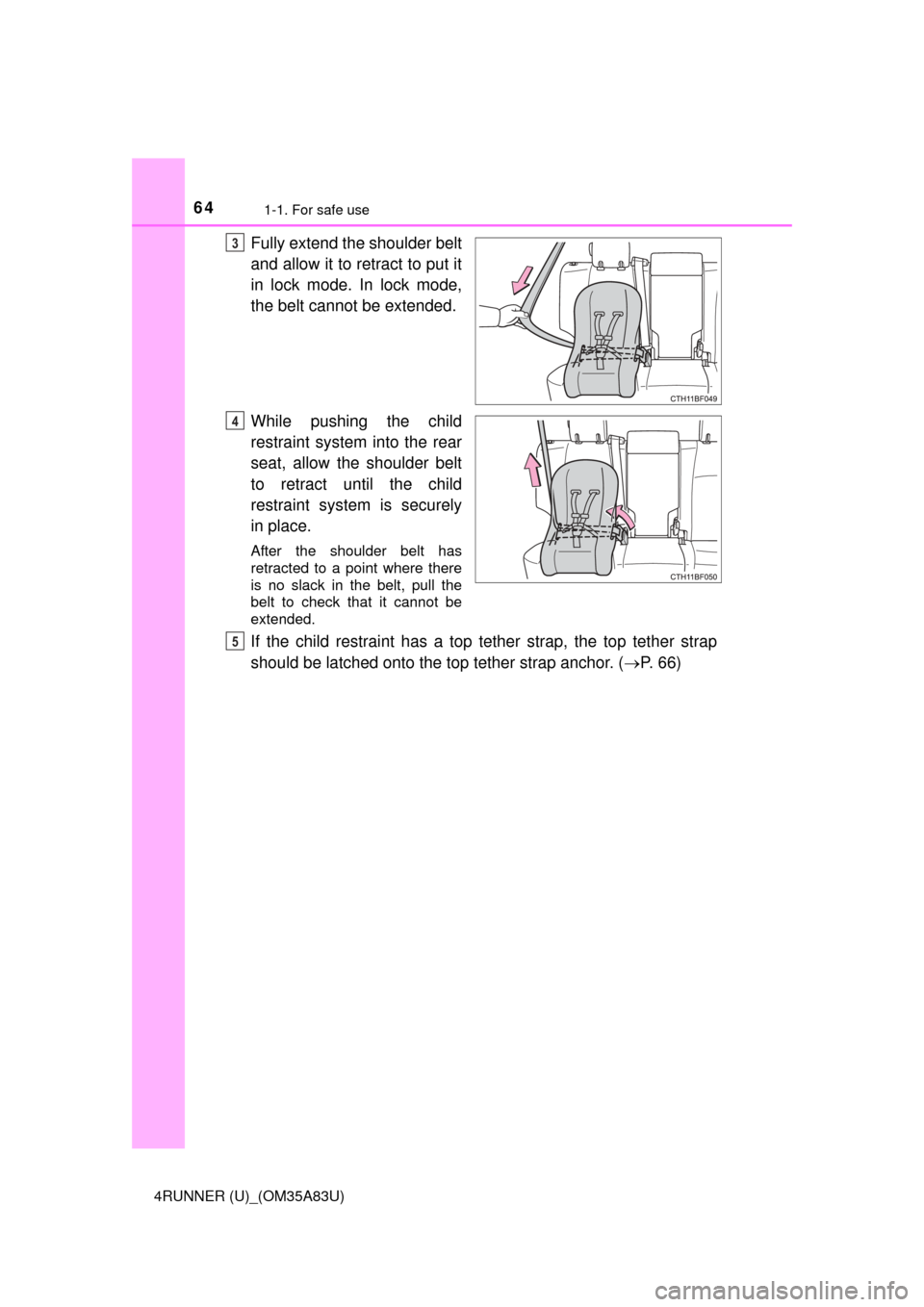
Fully extend the shoulder belt
and allow it to retract to put it
in lock mode. In lock mode,
the belt cannot be extended.
While pushing the child
restraint system into the rear
seat, allow the shoulder belt
to retract until the child
restraint system is securely
in place.
After the shoulder belt has
retracted to a point where there
is no slack in the belt, pull the
belt to check that it cannot be
extended.
If the child restraint has a top tether strap, the top tether strap
should be latched onto the top tether strap anchor. (P. 66)
3
4
5
Page 65 of 530
651-1. For safe use
1
For safety and security
4RUNNER (U)_(OM35A83U)■
Booster seat
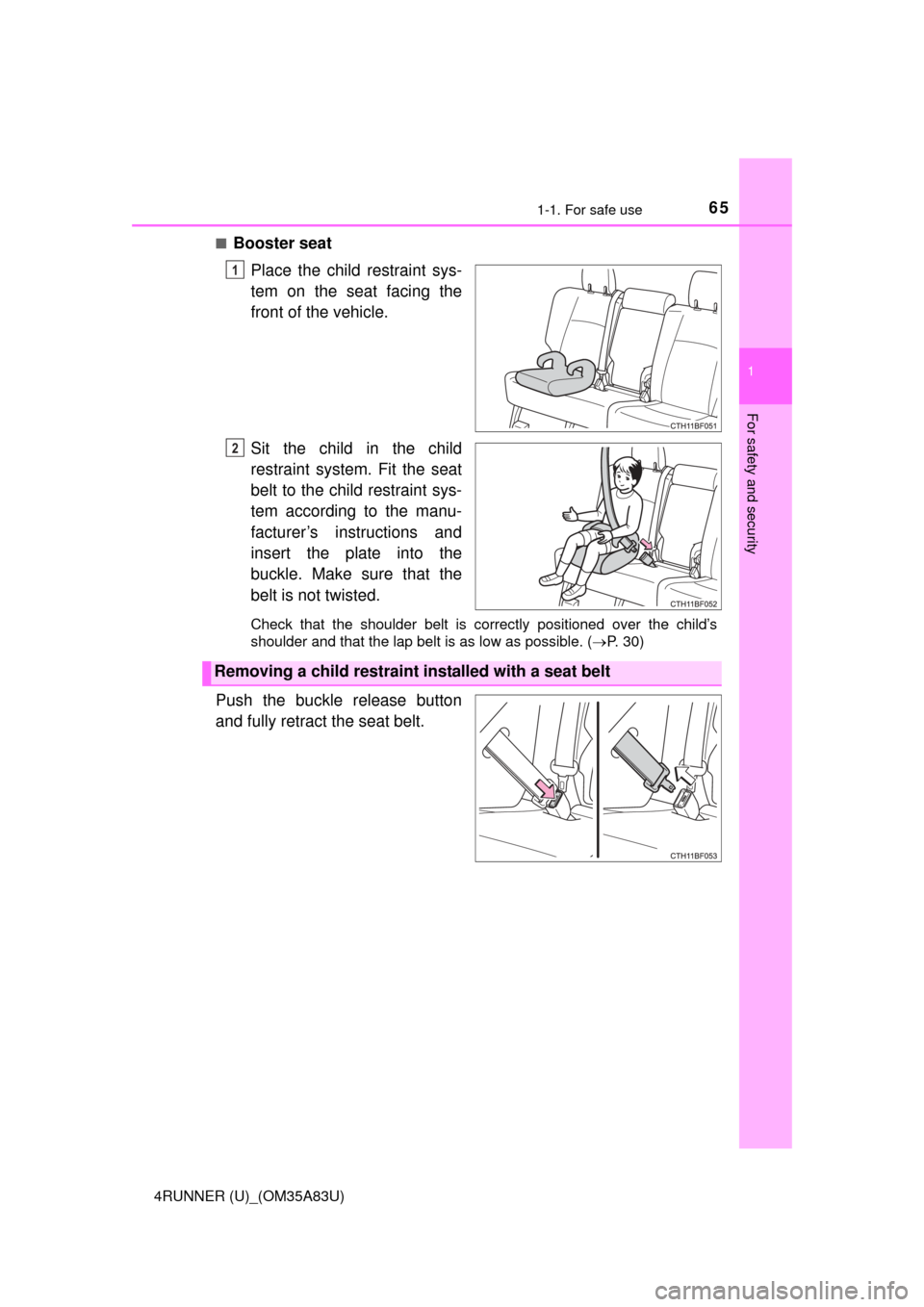
Place the child restraint sys-
tem on the seat facing the
front of the vehicle.
Sit the child in the child
restraint system. Fit the seat
belt to the child restraint sys-
tem according to the manu-
facturer’s instructions and
insert the plate into the
buckle. Make sure that the
belt is not twisted.
Check that the shoulder belt is correctly positioned over the child’s
shoulder and that the lap belt is as low as possible. ( P. 30)
Push the buckle release button
and fully retract the seat belt.
1
2
Removing a child restraint installed with a seat belt
Page 66 of 530
661-1. For safe use
4RUNNER (U)_(OM35A83U)
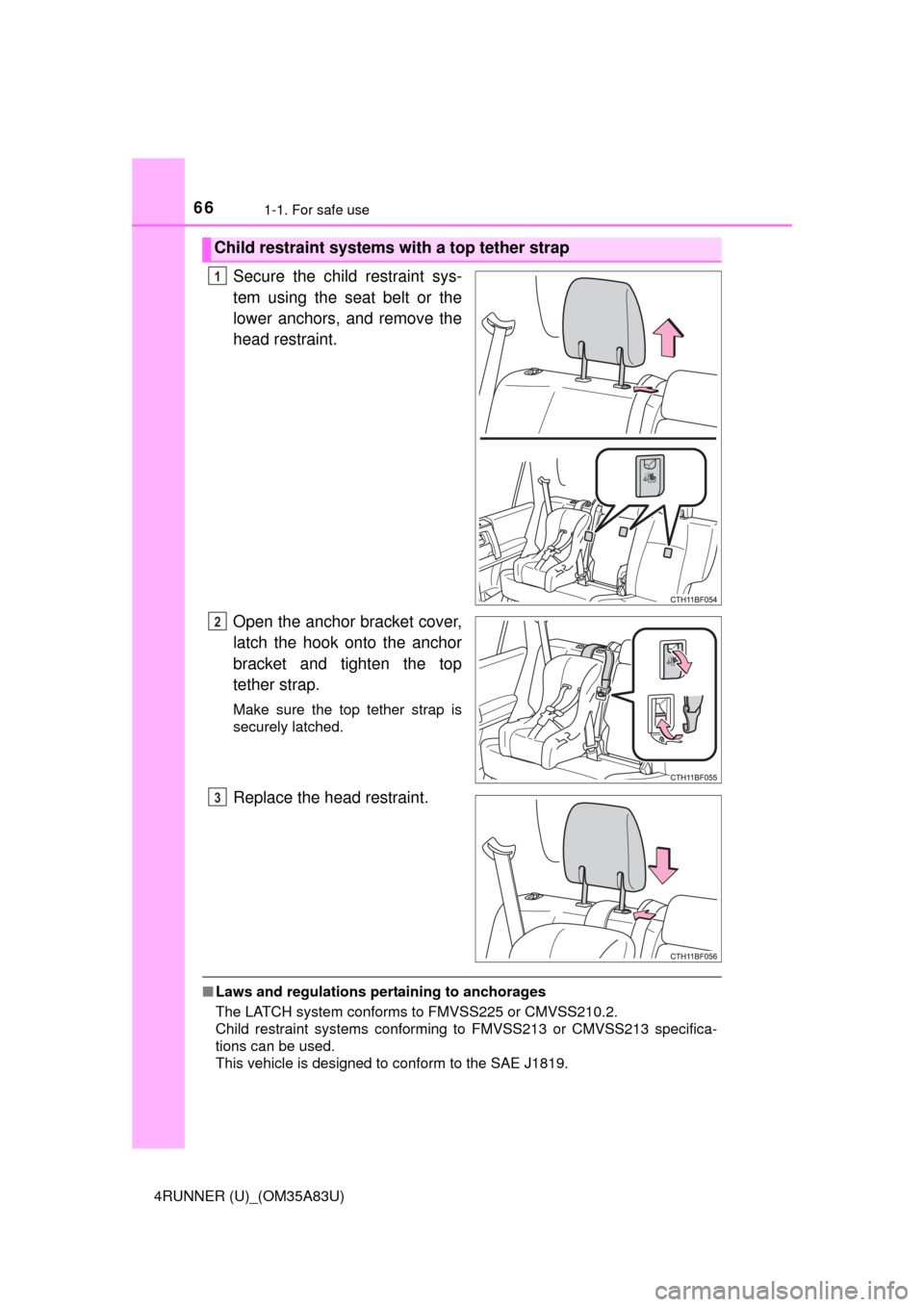
Secure the child restraint sys-
tem using the seat belt or the
lower anchors, and remove the
head restraint.
Open the anchor bracket cover,
latch the hook onto the anchor
bracket and tighten the top
tether strap.
Make sure the top tether strap is
securely latched.
Replace the head restraint.
■Laws and regulations pertaining to anchorages
The LATCH system conforms to FMVSS225 or CMVSS210.2.
Child restraint systems conforming to FMVSS213 or CMVSS213 specifica-
tions can be used.
This vehicle is designed to conform to the SAE J1819.
Child restraint systems with a top tether strap
1
2
3
Page 67 of 530
671-1. For safe use
1
For safety and security
4RUNNER (U)_(OM35A83U)
CAUTION
■When installing a booster seat
To prevent the belt from going into ALR lock mode, do not fully extend the
shoulder belt. ALR mode causes the belt to tighten only. This could cause
injury or discomfort to the child. ( P. 31)
■ When installing a child restraint system
Follow the directions given in the child restraint system installation manual
and fix the child restraint system securely in place.
If the child restraint system is not correctly fixed in place, the child or other
passengers may be seriously injured or even killed in the event of a sudden
braking or an accident.
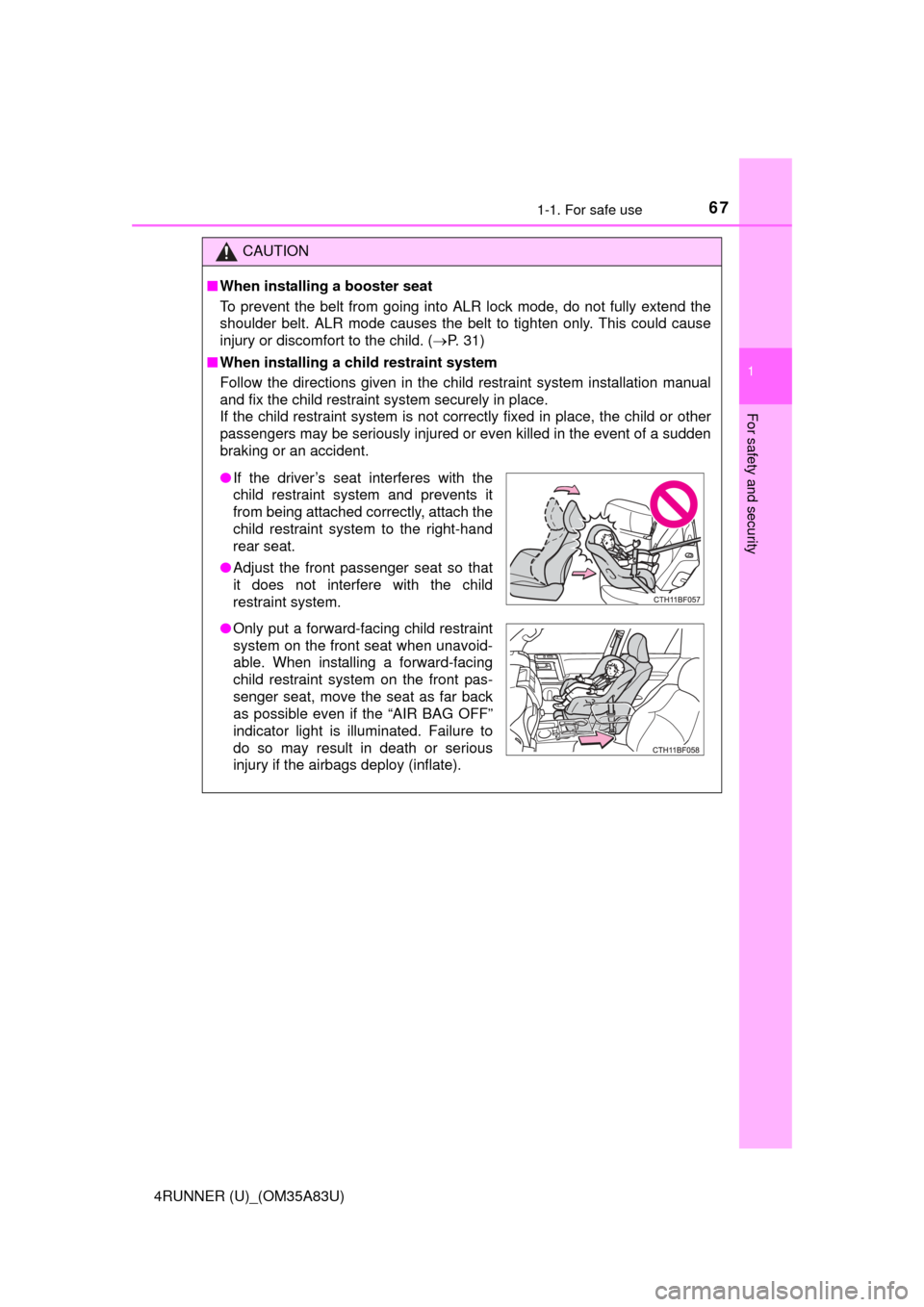
● If the driver’s seat interferes with the
child restraint system and prevents it
from being attached correctly, attach the
child restraint system to the right-hand
rear seat.
● Adjust the front passenger seat so that
it does not interfere with the child
restraint system.
● Only put a forward-facing child restraint
system on the front seat when unavoid-
able. When installing a forward-facing
child restraint system on the front pas-
senger seat, move the seat as far back
as possible even if the “AIR BAG OFF”
indicator light is illuminated. Failure to
do so may result in death or serious
injury if the airbags deploy (inflate).
Page 68 of 530
681-1. For safe use
4RUNNER (U)_(OM35A83U)
CAUTION
■When installing a child restraint system
● Vehicles with third row seats: When using the LATCH anchors for a child
restraint system, move the seat as far back as possible, with the seatback
close to the child restraint system.
● When a booster seat is installed, always ensure that the shoulder belt is
positioned across the center of the child’s shoulder. The belt should be
kept away from the child’s neck, but not so that it could fall off the child’s
shoulder. Failing to do so may result in death or serious injury in the event
of an accident or a sudden braking.
● Ensure that the belt and plate are securely locked and the seat belt is not
twisted.
● Shake the child restraint system left and right, and forward and backward
to ensure that it has been securely installed.
● After securing a child restraint system, never adjust the seat.
● Follow all installation instructions provided by the child restraint system
manufacturer.
■ Do not use a seat belt extender
If a seat belt extender is used when installing a child restraint system, the
seat belt will not securely hold the child restraint system, which could cause
death or serious injury to the child or other passengers in the event of a sud-
den braking, sudden swerving or an accident.
■ To correctly attach a child restraint system to the anchors
● When using the LATCH anchors, be sure that there are no foreign objects
around the anchors and that the seat belt is not caught behind the child
restraint system. Make sure the child restraint system is securely attached,
or it may cause death or serious injury to the child or other passengers in
the event of a sudden braking or an accident.
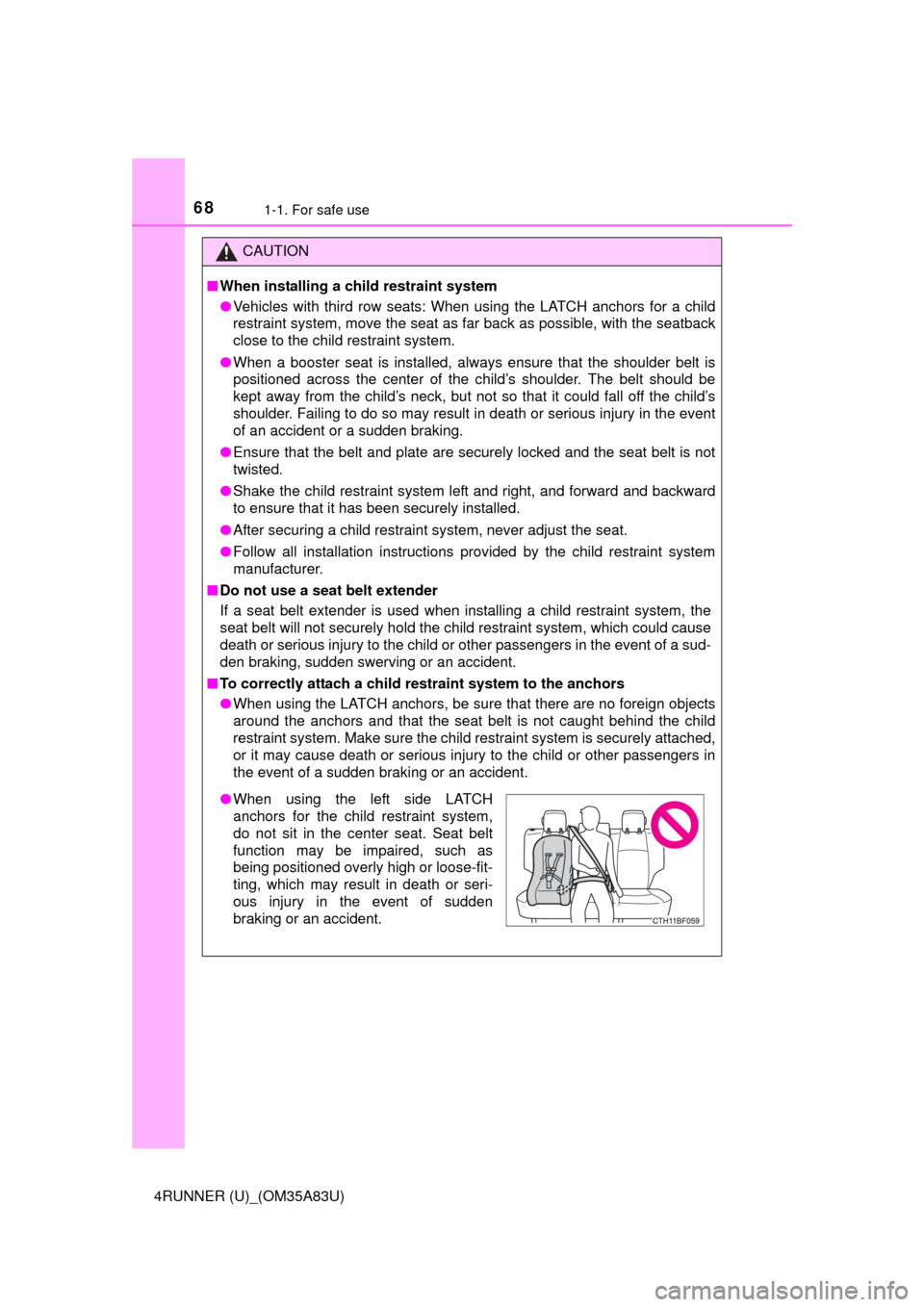
●When using the left side LATCH
anchors for the child restraint system,
do not sit in the center seat. Seat belt
function may be impaired, such as
being positioned overly high or loose-fit-
ting, which may result in death or seri-
ous injury in the event of sudden
braking or an accident.
Page 72 of 530
721-2. Theft deterrent system
4RUNNER (U)_(OM35A83U)
The alarm uses light and sound to give an alert when an intrusion is
detected.
The alarm is triggered in the following situations when the alarm is
set:
●A locked door is unlocked or opened in any way other than using
the entry function, wireless remote control or mechanical key. (The
doors will lock again automatically.)
● The hood is opened.
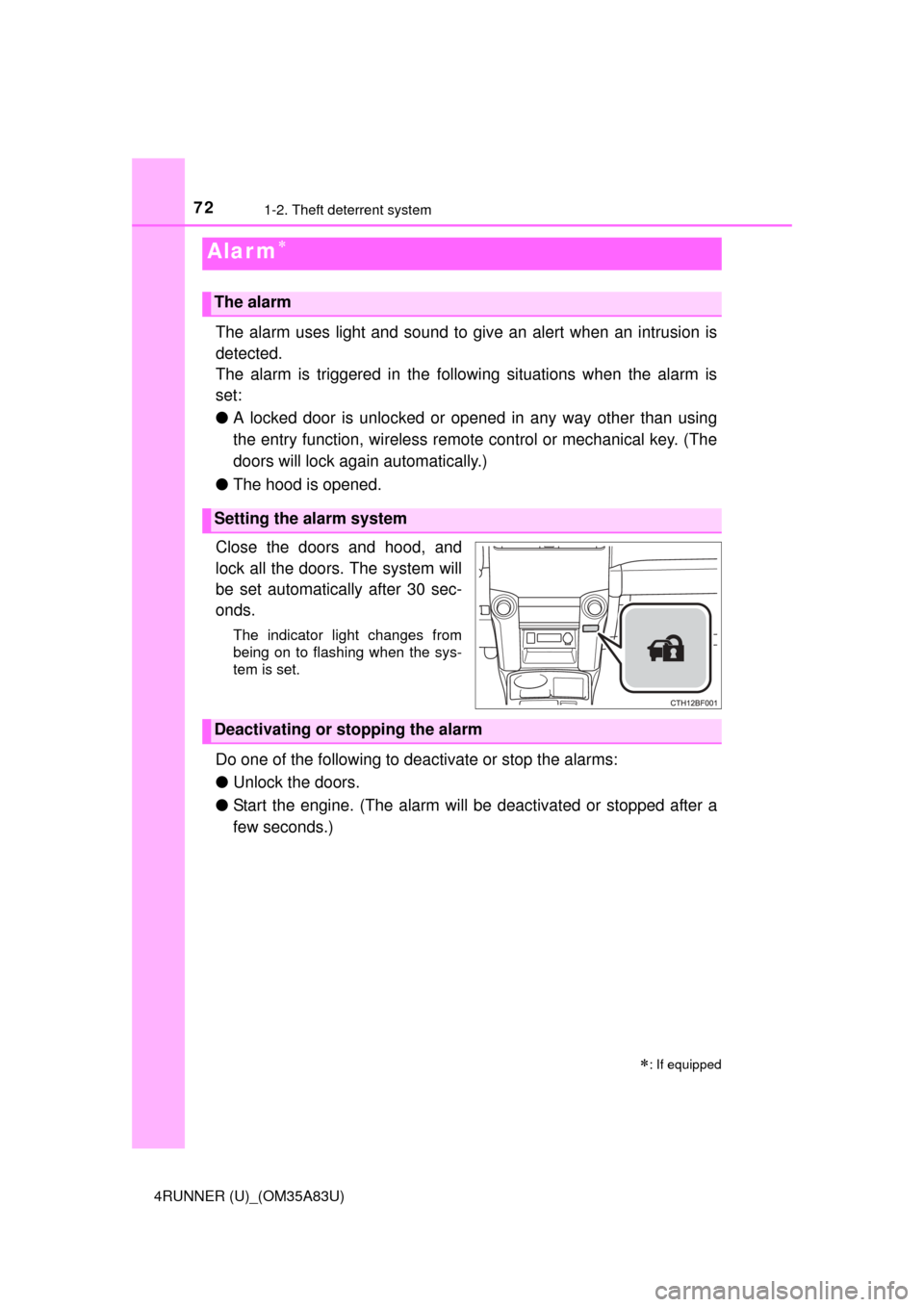
Close the doors and hood, and
lock all the doors. The system will
be set automatically after 30 sec-
onds.
The indicator light changes from
being on to flashing when the sys-
tem is set.
Do one of the following to d eactivate or stop the alarms:
● Unlock the doors.
● Start the engine. (The alarm will be deactivated or stopped after a
few seconds.)
Alar m
: If equipped
The alarm
Setting the alarm system
Deactivating or stopping the alarm
Page 83 of 530
832. Instrument cluster
2
Instrument cluster
4RUNNER (U)_(OM35A83U)
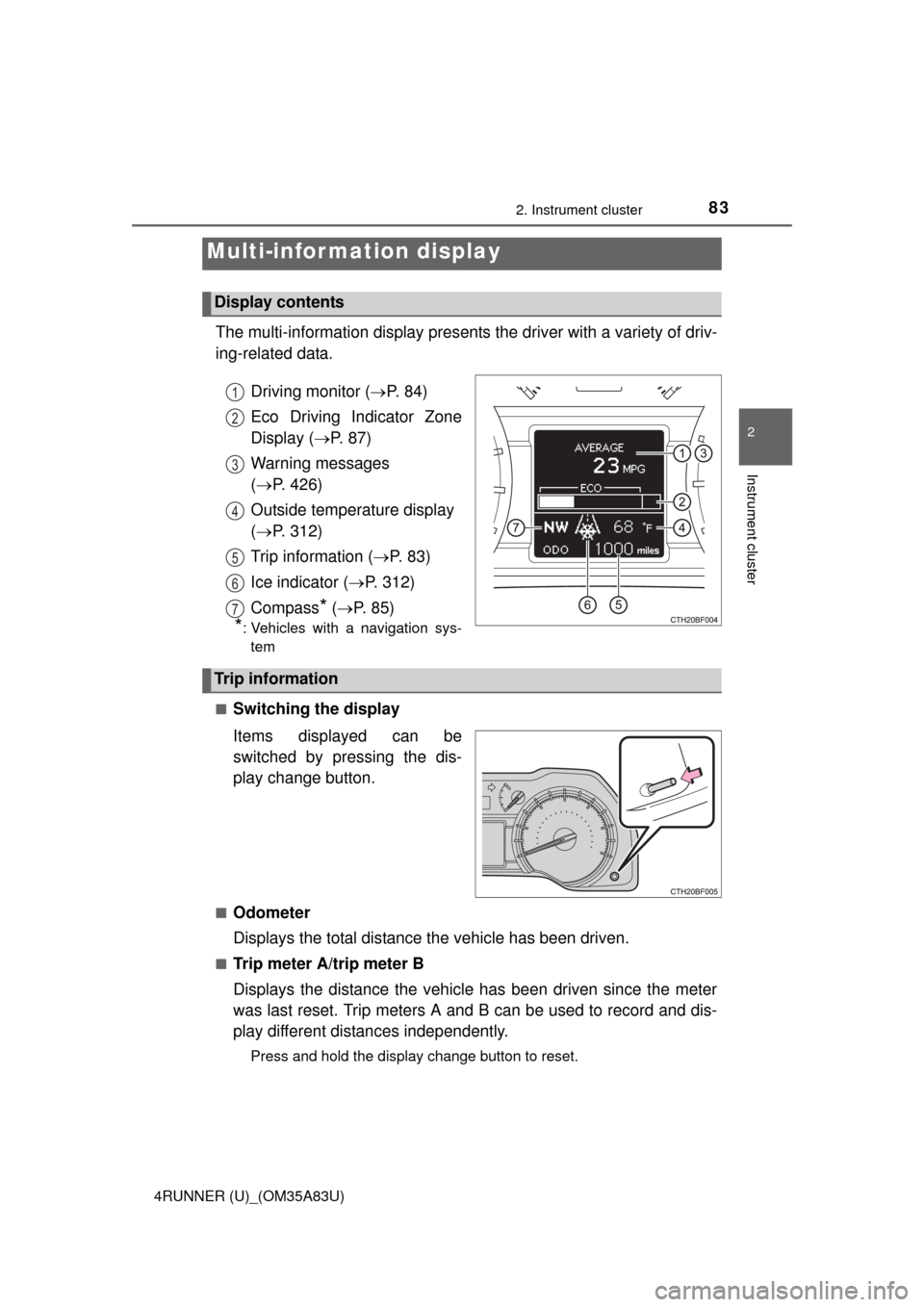
The multi-information display presents the driver with a variety of driv-
ing-related data.
Driving monitor ( P. 84)
Eco Driving Indicator Zone
Display ( P. 87)
Warning messages
( P. 426)
Outside temperature display
( P. 312)
Trip information ( P. 8 3 )
Ice indicator ( P. 312)
Compass
* ( P. 85)
*: Vehicles with a navigation sys-
tem
■
Switching the display
Items displayed can be
switched by pressing the dis-
play change button.
■Odometer
Displays the total distance the vehicle has been driven.
■Trip meter A/trip meter B
Displays the distance the vehicle has been driven since the meter
was last reset. Trip meters A and B can be used to record and dis-
play different distances independently.
Press and hold the display change button to reset.
Multi-infor mation display
Display contents
1
2
3
4
5
6
7
Trip information
Page 89 of 530
892. Instrument cluster
2
Instrument cluster
4RUNNER (U)_(OM35A83U)
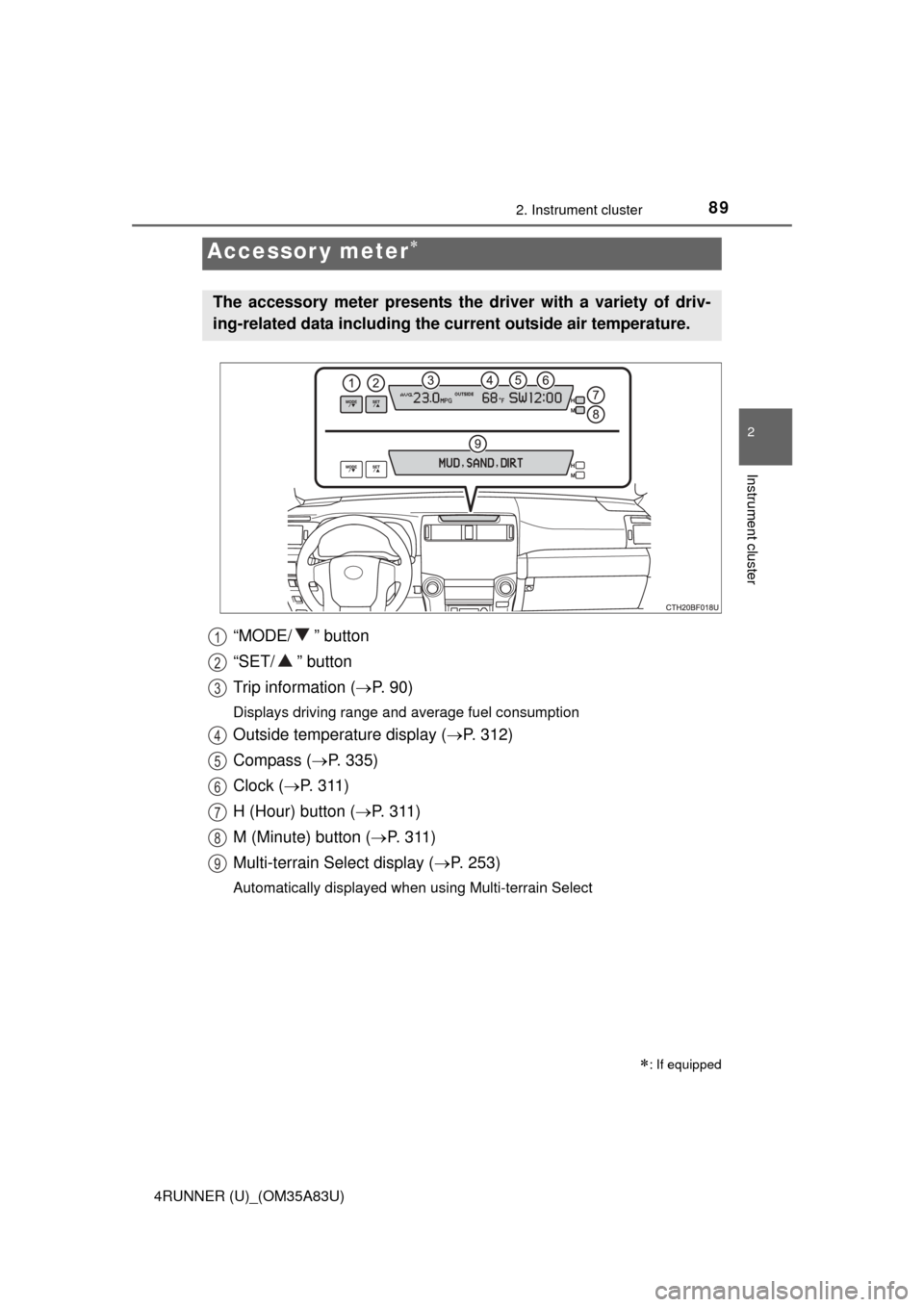
“MODE/ ” button
“SET/ ” button
Trip information (P. 9 0 )
Displays driving range and average fuel consumption
Outside temperature display ( P. 312)
Compass ( P. 335)
Clock ( P. 3 1 1 )
H (Hour) button ( P. 311)
M (Minute) button ( P. 3 1 1 )
Multi-terrain Select display ( P. 253)
Automatically displayed when using Multi-terrain Select
Accessor y meter
: If equipped
The accessory meter presents the driver with a variety of driv-
ing-related data including the cu rrent outside air temperature.
1
2
3
4
5
6
7
8
9