rel TOYOTA 4RUNNER 2014 N280 / 5.G Owner's Manual
[x] Cancel search | Manufacturer: TOYOTA, Model Year: 2014, Model line: 4RUNNER, Model: TOYOTA 4RUNNER 2014 N280 / 5.GPages: 530, PDF Size: 9.97 MB
Page 94 of 530
94
4RUNNER (U)_(OM35A83U)
3-1. Key information
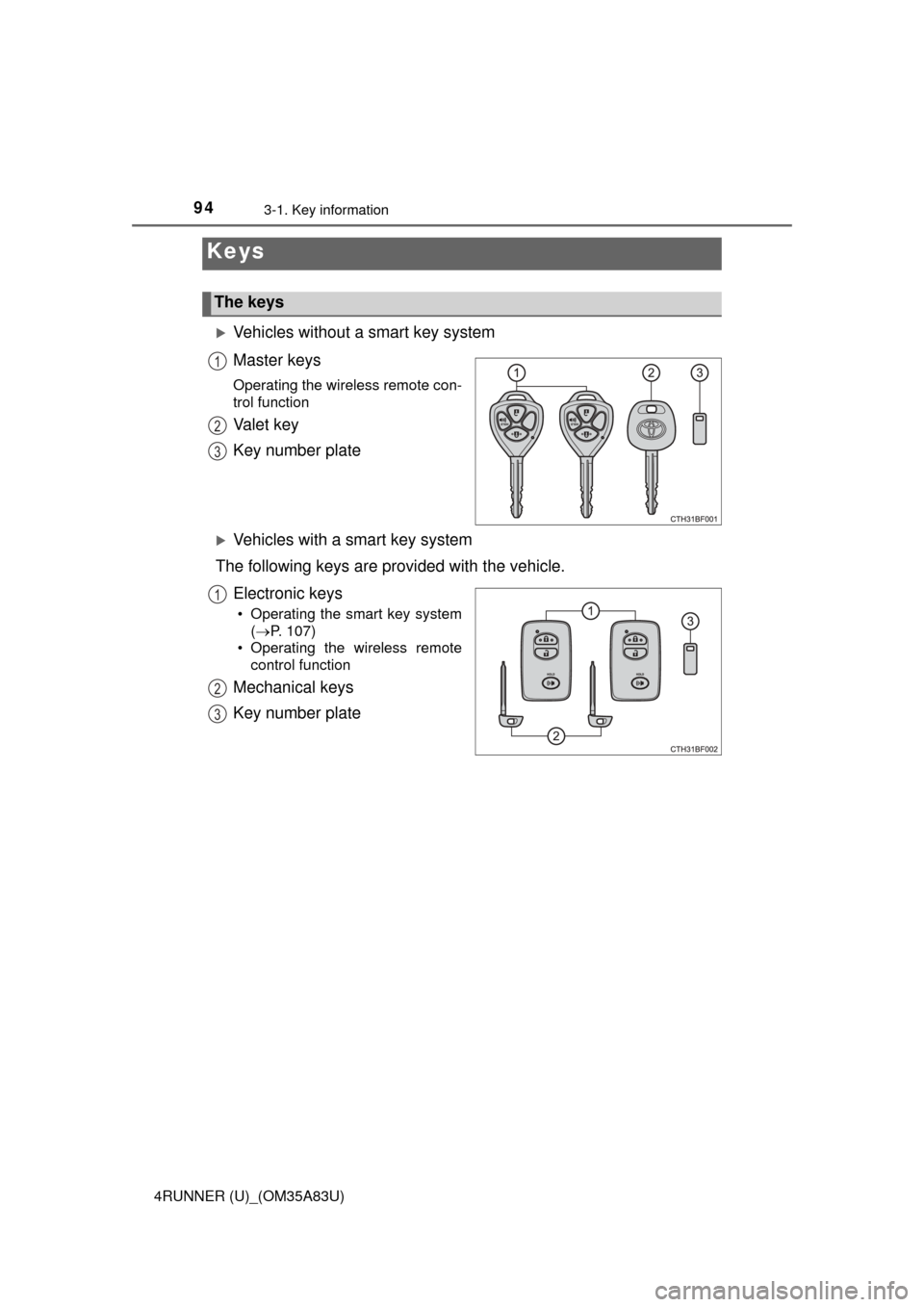
Vehicles without a smart key system
Master keys
Operating the wireless remote con-
trol function
Va l e t k e y
Key number plate
Vehicles with a smart key system
The following keys are provided with the vehicle.
Electronic keys
• Operating the smart key system(P. 107)
• Operating the wireless remote control function
Mechanical keys
Key number plate
Keys
The keys
1
2
3
1
2
3
Page 95 of 530
953-1. Key information
3
Operation of each component
4RUNNER (U)_(OM35A83U)
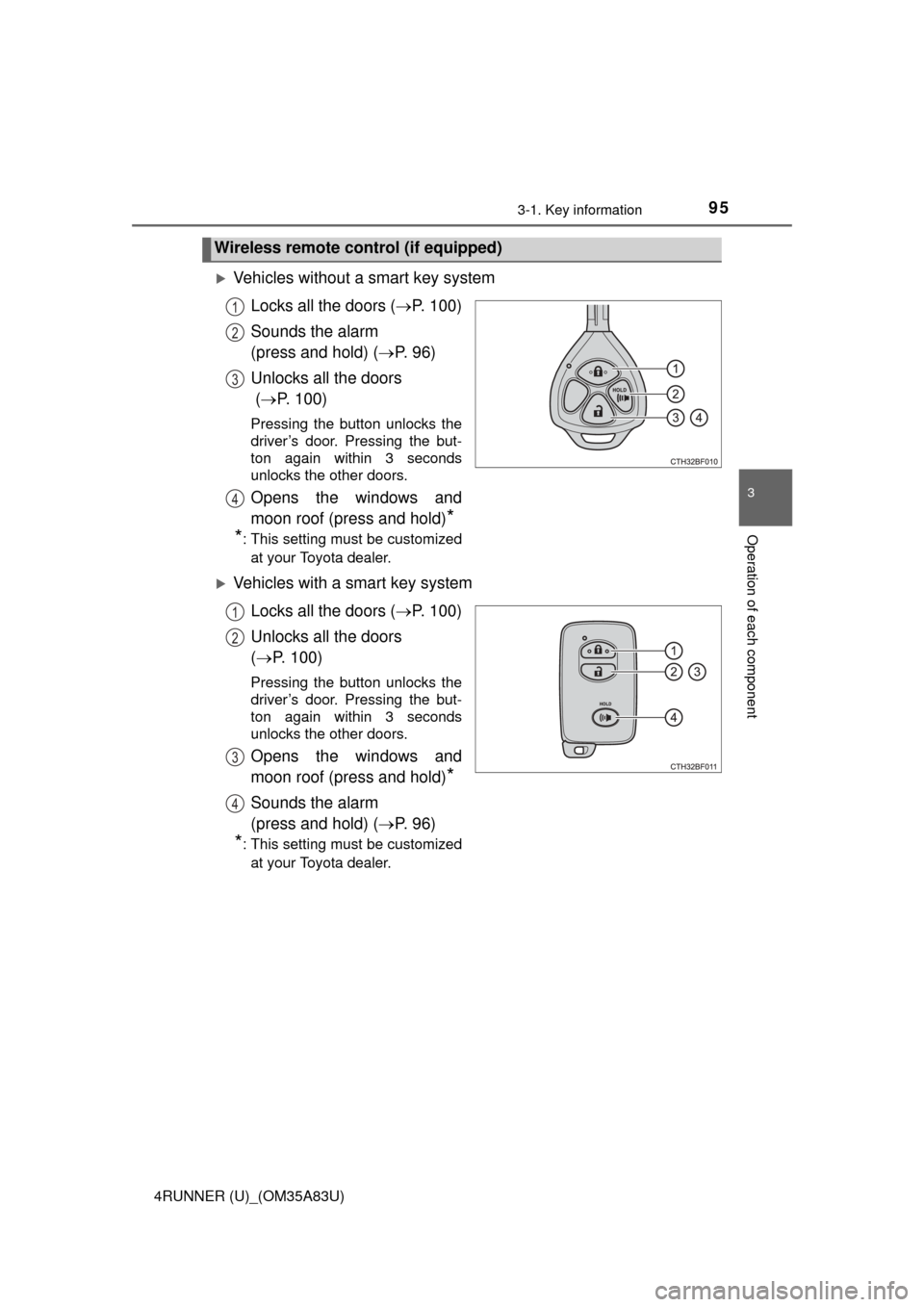
Vehicles without a smart key systemLocks all the doors ( P. 100)
Sounds the alarm
(press and hold) ( P. 9 6 )
Unlocks all the doors
( P. 100)
Pressing the button unlocks the
driver’s door. Pressing the but-
ton again within 3 seconds
unlocks the other doors.
Opens the windows and
moon roof (press and hold)
*
*
: This setting must be customized
at your Toyota dealer.
Vehicles with a smart key system
Locks all the doors ( P. 100)
Unlocks all the doors
( P. 100)
Pressing the button unlocks the
driver’s door. Pressing the but-
ton again within 3 seconds
unlocks the other doors.
Opens the windows and
moon roof (press and hold)
*
Sounds the alarm
(press and hold) ( P. 9 6 )
*: This setting must be customized
at your Toyota dealer.
Wireless remote control (if equipped)
1
2
3
4
1
2
3
4
Page 96 of 530
963-1. Key information
4RUNNER (U)_(OM35A83U)
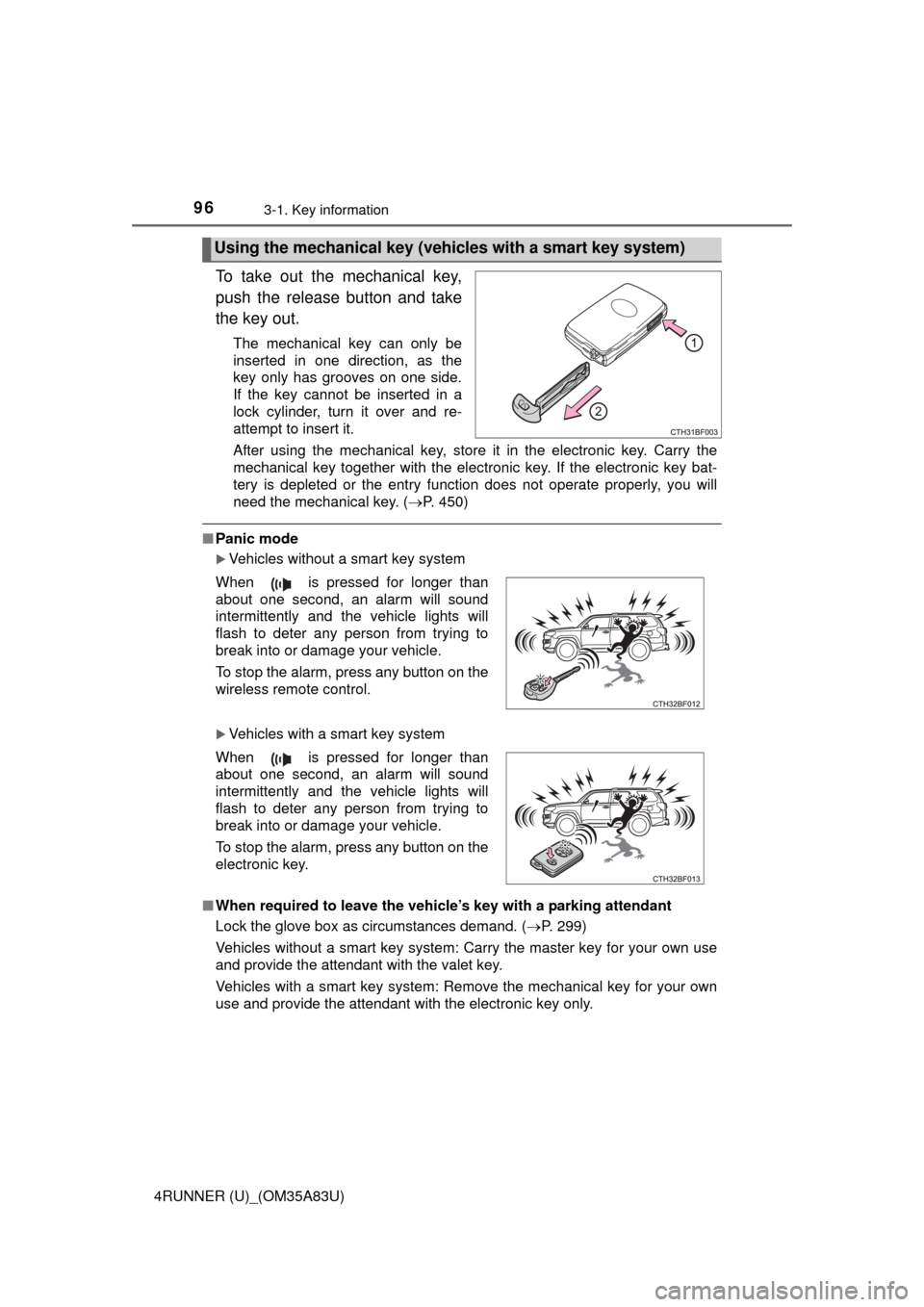
To take out the mechanical key,
push the release button and take
the key out.
The mechanical key can only be
inserted in one direction, as the
key only has grooves on one side.
If the key cannot be inserted in a
lock cylinder, turn it over and re-
attempt to insert it.
After using the mechanical key, store it in the electronic key. Carry the
mechanical key together with the electronic key. If the electronic key bat-
tery is depleted or the entry function does not operate properly, you will
need the mechanical key. (P. 450)
■Panic mode
Vehicles without a smart key system
Vehicles with a smart key system
■ When required to leave the vehicle’s key with a parking attendant
Lock the glove box as circumstances demand. ( P. 299)
Vehicles without a smart key system: Carry the master key for your own use
and provide the attendant with the valet key.
Vehicles with a smart key system: Remove the mechanical key for your own
use and provide the attendant with the electronic key only.
Using the mechanical key (vehic les with a smart key system)
When is pressed for longer than
about one second, an alarm will sound
intermittently and the vehicle lights will
flash to deter any person from trying to
break into or damage your vehicle.
To stop the alarm, press any button on the
wireless remote control.
When is pressed for longer than
about one second, an alarm will sound
intermittently and the vehicle lights will
flash to deter any person from trying to
break into or damage your vehicle.
To stop the alarm, press any button on the
electronic key.
Page 97 of 530
973-1. Key information
3
Operation of each component
4RUNNER (U)_(OM35A83U)■
If you lose your keys
New genuine keys can be made by your Toyota dealer using the other key
(vehicles without a smart key system) or mechanical key (vehicles with a
smart key system) and the key number stamped on your key number plate.
Keep the plate in a safe place such as your wallet, not in the vehicle.
■ When riding in an aircraft
When bringing a key with wireless remote control function onto an aircraft,
make sure you do not press any buttons on the key while inside the aircraft
cabin. If you are carrying the key in your bag etc., ensure that the buttons are
not likely to be pressed accidentally. Pressing a button may cause the key to
emit radio waves that could interfere with the operation of the aircraft.
■ Conditions affecting operation
Vehicles without a smart key system
The wireless remote control function may not operate normally in the follow-
ing situations:
● Near a TV tower, radio station, electric power plant, airport or other facility
that generates strong radio waves
● When carrying a portable radio, cellular phone or other wireless communi-
cation devices
● When multiple wireless keys are in the vicinity
● When the wireless key is in contact with, or is covered by, a metallic object
● When a wireless key (that emits radio waves) is being used nearby
● When the wireless key has been left near an electrical appliance such as a
personal computer
Vehicles with a smart key system
P. 1 1 0
■ Key battery depletion
Vehicles with a smart key system
● The standard battery life is 1 to 2 years.
● If the battery becomes low, an alarm will sound in the cabin when the engine
stops. ( P. 431)
● As the electronic key always receives radio waves, the battery will become
depleted even if the electronic key is not used. The following symptoms indi-
cate that the electronic key battery may be depleted. Replace the battery
when necessary. ( P. 385)
• The smart key system or the wireless remote control does not operate.
• The detection area becomes smaller.
• The LED indicator on the key surface does not turn on.
Page 98 of 530

983-1. Key information
4RUNNER (U)_(OM35A83U)●
To avoid serious deterioration, do not leave the electronic key within 3 ft. (1
m) of the following electrical appl iances that produce a magnetic field:
•TVs
• Personal computers
• Cellular phones, cordless phones and battery chargers
• Recharging cellular phones or cordless phones
• Table lamps
• Induction cookers
Vehicles without a smart key system
If the wireless remote control function does not operate, the battery may be
depleted. Replace the battery when necessary. ( P. 385)
■ Precautions when disconnecting the battery (vehicles with a smart key
system)
● In some cases, it may not be possible to unlock the doors using the smart
key system immediately after the battery has been disconnected. Use the
wireless remote control or the mechanical key to lock or unlock the doors.
● The engine may not start on the first attempt after reconnecting the battery
but will start normally after the second attempt. This is not a malfunction.
● The engine switch mode is memorized by the vehicle. When the battery is
reconnected, the system will return to the mode it was in before the battery
was disconnected. Before disconnecting the battery, turn the engine switch
off.
If you are unsure what mode the engine switch was in when the battery was
disconnected, be especially careful when reconnecting the battery.
■ Replacing the battery
P. 385
■ Confirmation of the registered key number
The number of keys already registered to the vehicle can be confirmed. Ask
your Toyota dealer for details.
■ If a wrong key is used (vehicles with a smart key system)
The key cylinder rotates freely to isolate inside mechanism.
■ Certification for wireless remote control
For vehicles sold in the U.S.A.
FCC ID: HYQ14ACX
FCC ID: HYQ13CZD
FCC ID: HYQ14ADF
FCC ID: HYQ13CZE
FCC ID: HYQ12BBY
FCC ID: HYQ13BDC
Page 99 of 530
993-1. Key information
3
Operation of each component
4RUNNER (U)_(OM35A83U)NOTE:
This device complies with part 15 of the FCC Rules. Operation is subject to
the following two conditions: (1) This device may not cause harmful interfer-
ence, and (2) this device must accept any interference received, including
interference that may cause undesired operation.
FCC WARNING:
Changes or modifications not expressly approved by the party responsible for
compliance could void the user’s authority to operate the equipment.
For vehicles sold in Canada
NOTE:
This device complies with Industry Canada licence-exempt RSS standard(s).
Operation is subject to the following two conditions: (1) this device may not
cause interference, and (2) this device must accept any interference, includ-
ing interference that may cause undesired operation of the device.
NOTICE
■ To prevent key damage
● Do not drop the keys, subject them to strong shocks or bend them.
● Do not expose the keys to high temperatures for long periods of time.
● Do not get the keys wet or wash them in an ultrasonic washer etc.
● Do not attach metallic or magnetic materials to the keys or place the keys
close to such materials.
● Do not disassemble the keys.
● Do not attach a sticker or anything else to the surface of the electronic key
and key (with a wireless remote control function).
● Vehicles with a smart key system: Do not place the keys near objects that
produce magnetic fields, such as TVs, audio systems and induction cook-
ers, or medical electrical equipment, such as low-frequency therapy equip-
ment.
■ Carrying the electronic key on your person (vehicles with a smart key
system)
Carry the electronic key 3.9 in. (10 cm) or more away from electric appli-
ances that are turned on. Radio waves emitted from electric appliances
within 3.9 in. (10 cm) of the electronic key may interfere with the key, caus-
ing the key to not function properly.
■ In case of a smart key system malfunction or other key-related prob-
lems (vehicles with a smart key system)
Take your vehicle with all the electronic keys provided with your vehicle to
your Toyota dealer.
■ When an electronic key is lost (vehicles with a smart key system)
If the electronic key remains lost, the risk of vehicle theft increases signifi-
cantly. Visit your Toyota dealer imm ediately with all remaining electronic
keys that was provided with your vehicle.
Page 100 of 530
1003-1. Key information
4RUNNER (U)_(OM35A83U)
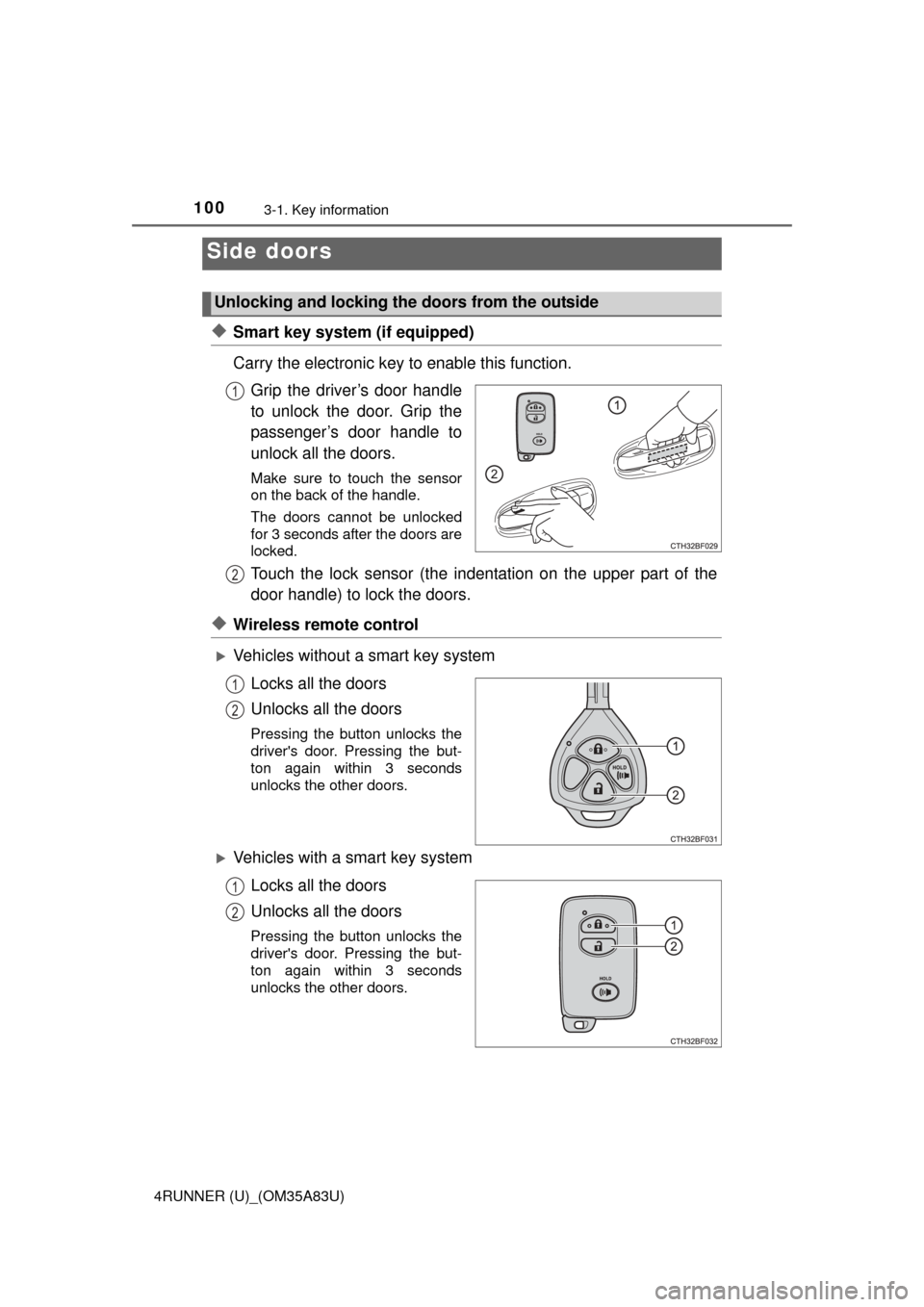
◆Smart key system (if equipped)
Carry the electronic key to enable this function.Grip the driver’s door handle
to unlock the door. Grip the
passenger’s door handle to
unlock all the doors.
Make sure to touch the sensor
on the back of the handle.
The doors cannot be unlocked
for 3 seconds after the doors are
locked.
Touch the lock sensor (the indentation on the upper part of the
door handle) to lock the doors.
◆Wireless remote control
Vehicles without a smart key system
Locks all the doors
Unlocks all the doors
Pressing the button unlocks the
driver's door. Pressing the but-
ton again within 3 seconds
unlocks the other doors.
Vehicles with a smart key systemLocks all the doors
Unlocks all the doors
Pressing the button unlocks the
driver's door. Pressing the but-
ton again within 3 seconds
unlocks the other doors.
Side doors
Unlocking and locking the doors from the outside
1
2
1
2
1
2
Page 102 of 530
1023-1. Key information
4RUNNER (U)_(OM35A83U)■
Door lock buzzer
If an attempt to lock the doors is made when a door is not fully closed, a
buzzer sounds continuously. Fully close the door to stop the buzzer, and lock
the vehicle once more.
■ Alarm
Locking the doors will set the alarm system. ( P. 72)
■ If the smart key system or the wireless remote control does not operate
properly
Use the mechanical key to lock and unlock the doors. ( P. 450)
Replace the battery with a new one if it is depleted. ( P. 385)
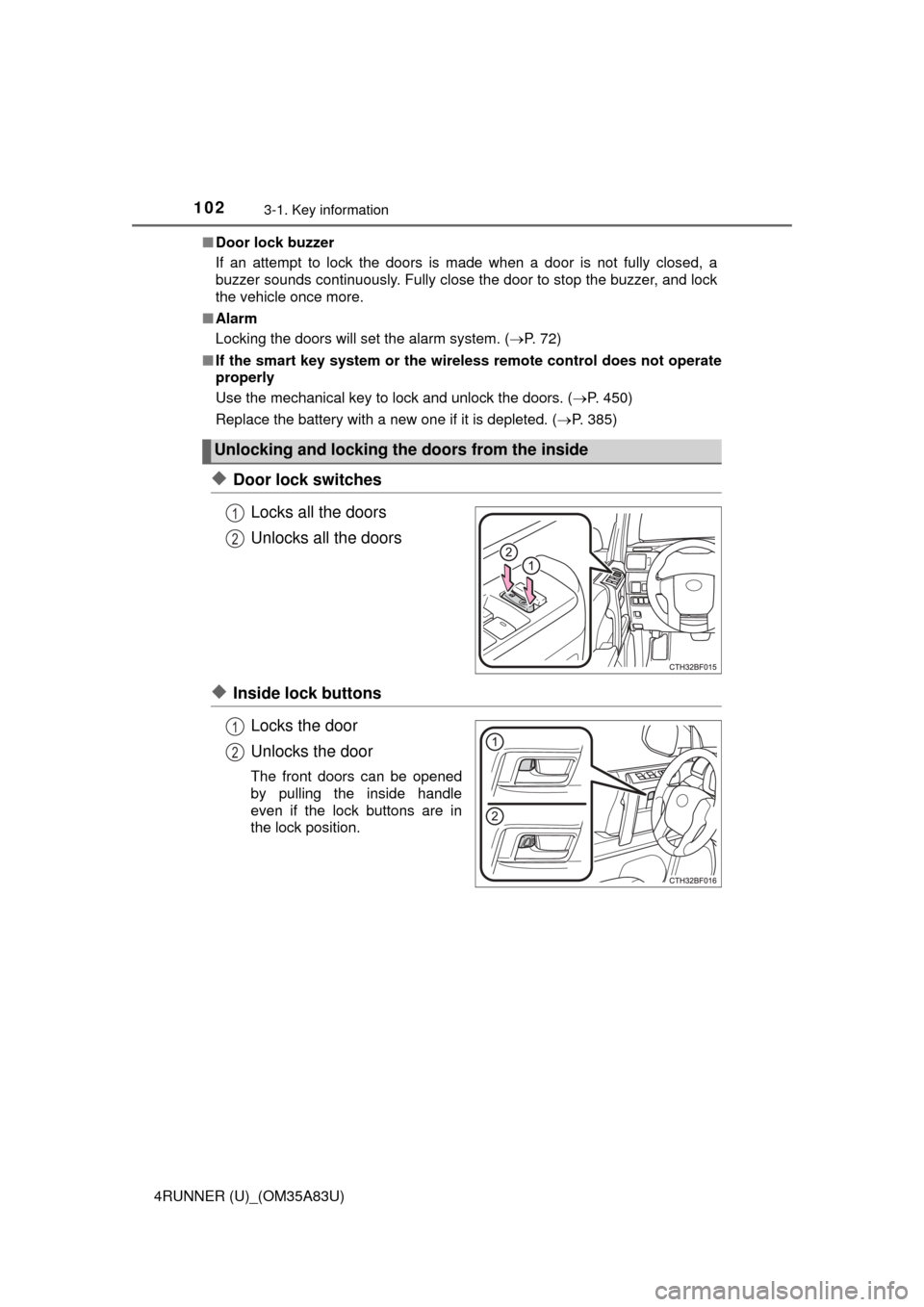
◆Door lock switches
Locks all the doors
Unlocks all the doors
◆Inside lock buttonsLocks the door
Unlocks the door
The front doors can be opened
by pulling the inside handle
even if the lock buttons are in
the lock position.
Unlocking and locking the doors from the inside
1
2
1
2
Page 105 of 530
1053-1. Key information
3
Operation of each component
4RUNNER (U)_(OM35A83U)
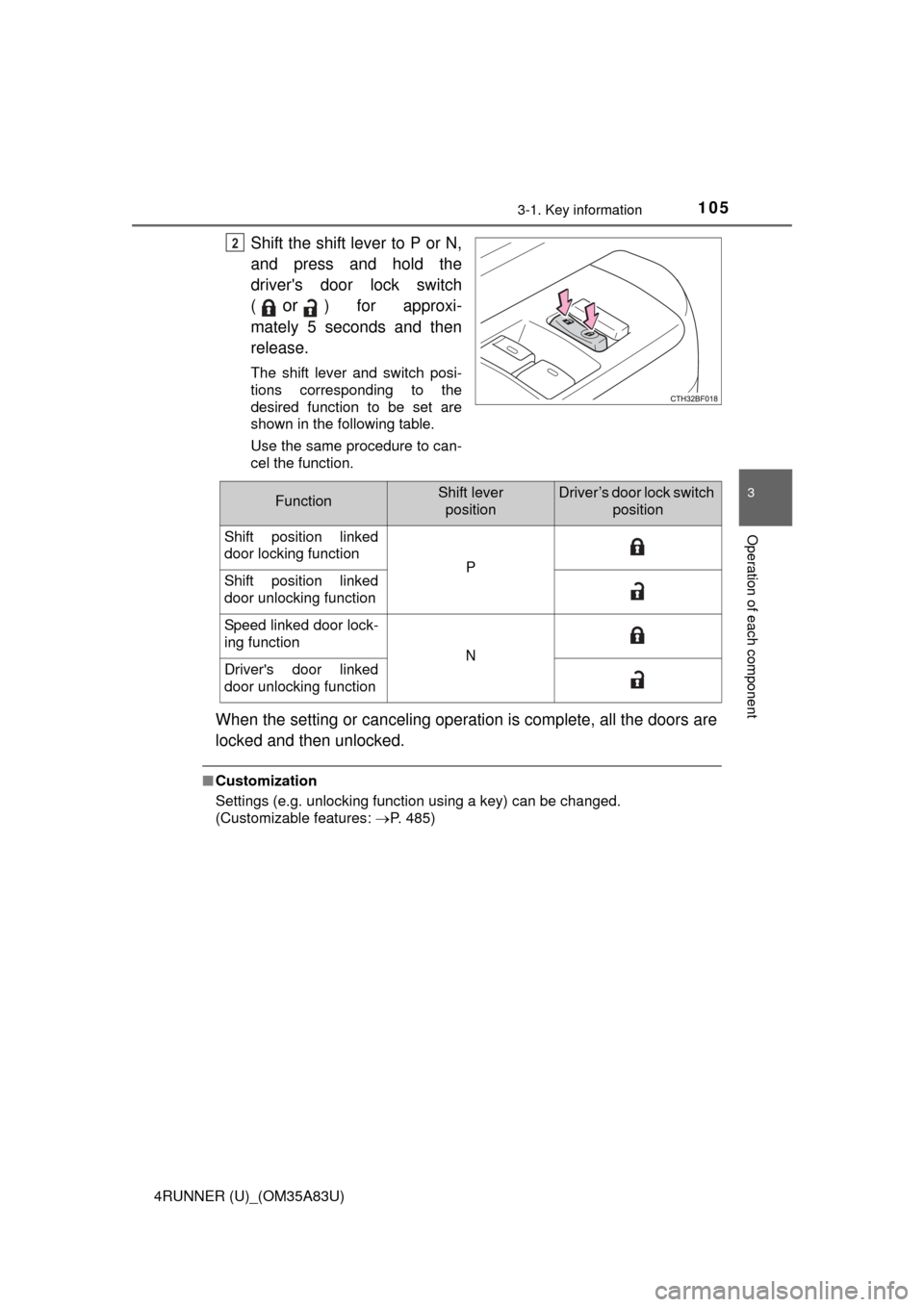
Shift the shift lever to P or N,
and press and hold the
driver's door lock switch
(
or) for approxi-
mately 5 seconds and then
release.
The shift lever and switch posi-
tions corresponding to the
desired function to be set are
shown in the following table.
Use the same procedure to can-
cel the function.
When the setting or canceling operation is complete, all the doors are
locked and then unlocked.
■ Customization
Settings (e.g. unlocking function using a key) can be changed.
(Customizable features: P. 485)
2
FunctionShift lever
positionDriver’s door lock switch position
Shift position linked
door locking function
PShift position linked
door unlocking function
Speed linked door lock-
ing function
NDriver's door linked
door unlocking function
Page 110 of 530
1103-2. Opening, closing and locking the doors
4RUNNER (U)_(OM35A83U)■
Battery-saving function
The battery-saving function will be activated in order to prevent the electronic
key battery and the vehicle battery from being discharged while the vehicle is
not in operation for a long time.
●In the following situations, the smart key system may take some time to
unlock the doors.
• The electronic key has been left in an area of approximately 6 ft. (2 m) of
the outside of the vehicle for 10 minutes or longer.
• The smart key system has not been used for 5 days or longer.
● If the smart key system has not been used for 14 days or longer, the doors
cannot be unlocked at any doors except the driver’s door. In this case, take
hold of the driver’s door handle, or use the wireless remote control or the
mechanical key, to unlock the doors.
The system will resume operation when
● The vehicle is locked using the door handle lock switch when carrying the
electronic key on your person.
● The vehicle is locked/unlocked using the wireless remote control.
(P. 100)
● The vehicle is locked/unlocked using the mechanical key. ( P. 450)
■ Conditions affecting operation
The smart key system uses weak radio waves. In the following situations, the
communication between the electronic key and the vehicle may be affected,
preventing the smart key system, wireless remote control and engine immobi-
lizer system from operating properly. (Ways of coping: P. 450)
● When the electronic key battery is depleted
● Near a TV tower, electric power plant, gas station, radio station, large dis-
play, airport or other facility that generates strong radio waves or electrical
noise
● When carrying a portable radio, cellular phone, cordless phone or other
wireless communication device
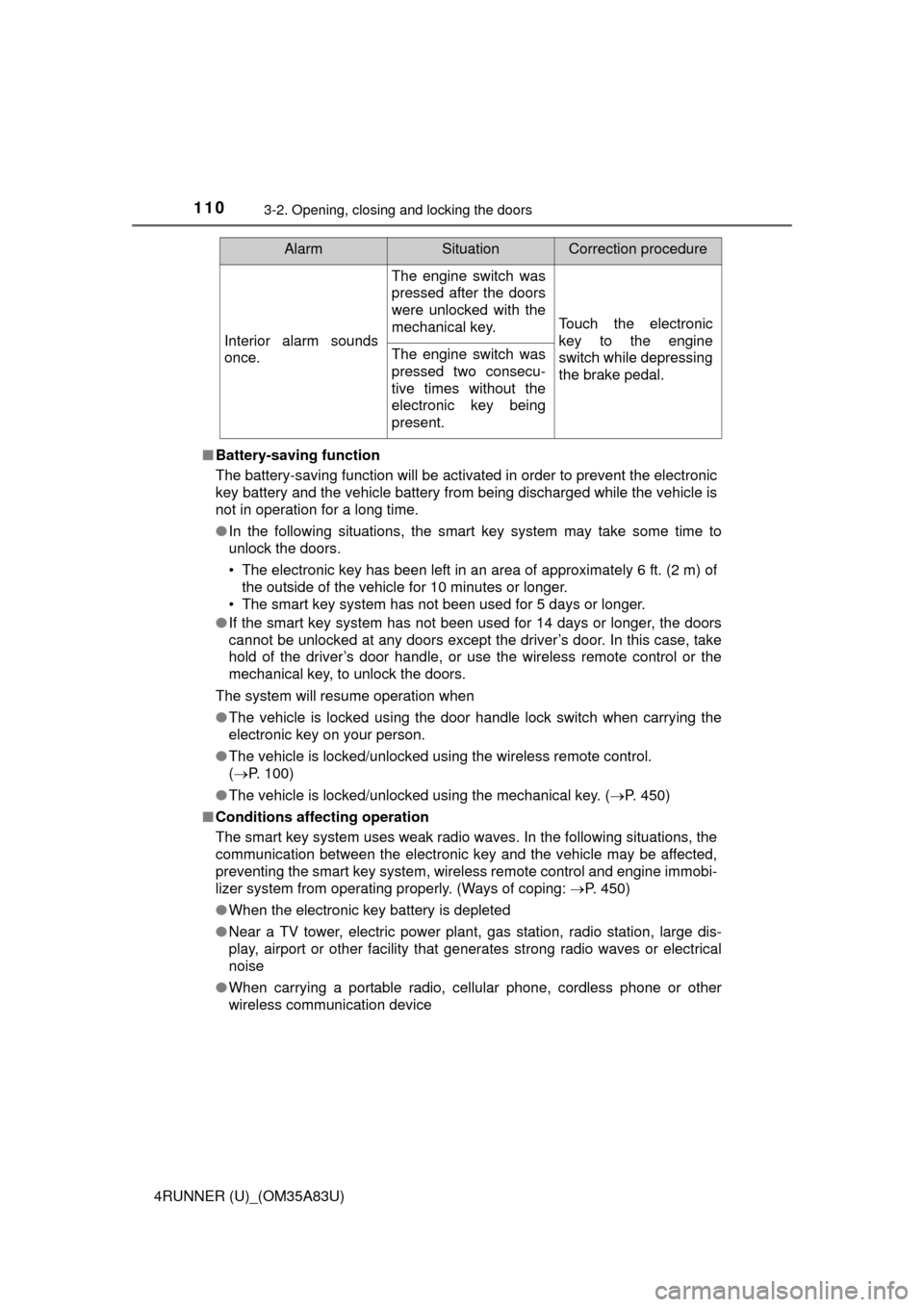
Interior alarm sounds
once.
The engine switch was
pressed after the doors
were unlocked with the
mechanical key.
Touch the electronic
key to the engine
switch while depressing
the brake pedal.
The engine switch was
pressed two consecu-
tive times without the
electronic key being
present.
AlarmSituationCorrection procedure