remote control TOYOTA 4RUNNER 2016 N280 / 5.G Owner's Manual
[x] Cancel search | Manufacturer: TOYOTA, Model Year: 2016, Model line: 4RUNNER, Model: TOYOTA 4RUNNER 2016 N280 / 5.GPages: 528, PDF Size: 12.12 MB
Page 326 of 528

3265-4. Other interior features
4RUNNER (U)_(OM35B23U)
CAUTION
■When programming a garage door or other remote control device
The garage door may operate, so ensure people and objects are out of dan-
ger to prevent potential harm.
■Conforming to federal safety standards
Do not use the HomeLink
Compatible Transceiver with any garage door
opener or device that lacks safety stop and reverse features as required by
federal safety standards.
This includes any garage door that cannot detect an obstruction object. A
door or device without these features increases the risk of death or serious
injury.
■When operating or programming HomeLink
®
Never allow a child to operate or play with the HomeLink® buttons.
Page 333 of 528

333
Maintenance and care6
4RUNNER (U)_(OM35B23U)6-1. Maintenance and care
Cleaning and protecting
the vehicle exterior .......... 334
Cleaning and protecting
the vehicle interior ........... 337
6-2. Maintenance
Maintenance
requirements ................... 340
General maintenance........ 342
Emission inspection and
maintenance (I/M)
programs......................... 345
6-3. Do-it-yourself
maintenance
Do-it-yourself service
precautions ..................... 346
Hood ................................. 349
Engine compartment ......... 350
Tires .................................. 365
Tire inflation pressure ....... 371
Wheels .............................. 374
Air conditioning filter.......... 377
Wireless remote
control/electronic
key battery ...................... 379
Checking and replacing
fuses ............................... 382
Light bulbs......................... 385
Page 361 of 528
3616-3. Do-it-yourself maintenance
6
Maintenance and care
4RUNNER (U)_(OM35B23U)■After recharging/reconnecting the battery (vehicles with a smart key sys-
tem)
The engine may not start. Follow the procedure below to initialize the system.
Shift the shift lever to P.
Open and close any of the doors.
Restart the engine.
●Unlocking the doors using the smart key system may not be possible imme-
diately after reconnecting the battery. If this happens, use the wireless
remote control or the mechanical key to lock/unlock the doors.
●Start the engine with the engine switch in ACCESSORY mode. The engine
may not start when the engine switch turned from off. However, the engine
will operate normally from the second attempt.
●The engine switch mode is recorded by the vehicle. If the battery is recon-
nected, the vehicle will return the engine switch mode to the status it was in
before the battery was disconnected. Make sure to turn off the engine
before disconnect the battery. Take extra care when connecting the battery
if the engine switch mode prior to discharge is unknown.
If the system will not start even after multiple attempts, contact your Toyota
dealer.
CAUTION
■Chemicals in the battery
Batteries contain poisonous and corrosive sulfuric acid and may produce
hydrogen gas which is flammable and explosive. To reduce the risk of death
or serious injury, take the following precautions while working on or near the
battery:
●Do not cause sparks by touching the battery terminals with tools.
●Do not smoke or light a match near the battery.
●Avoid contact with eyes, skin and clothes.
●Never inhale or swallow electrolyte.
●Wear protective safety glasses when working near the battery.
●Keep children away from the battery.
1
2
3
Page 379 of 528
3796-3. Do-it-yourself maintenance
6
Maintenance and care
4RUNNER (U)_(OM35B23U)
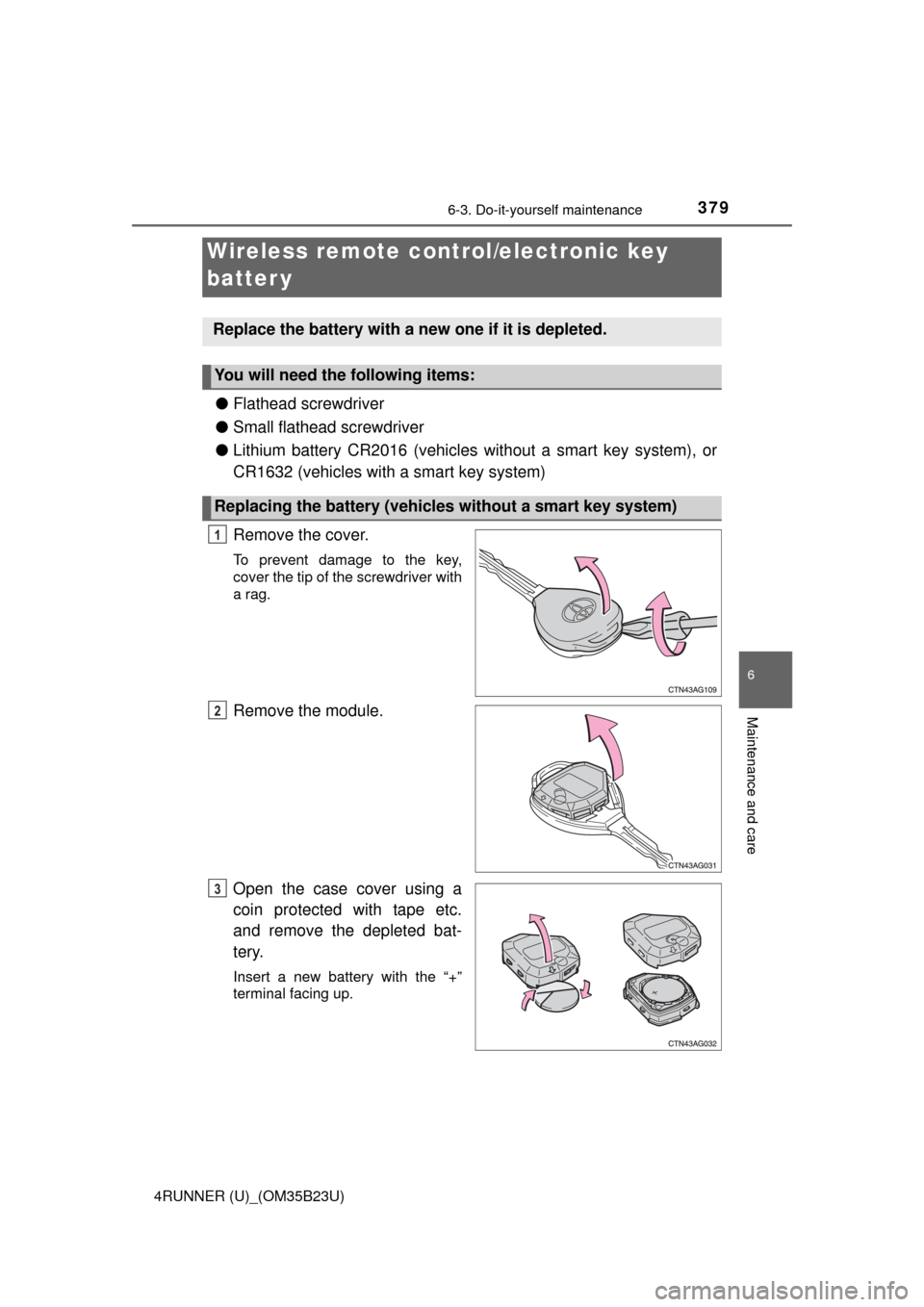
●Flathead screwdriver
●Small flathead screwdriver
●Lithium battery CR2016 (vehicles without a smart key system), or
CR1632 (vehicles with a smart key system)
Remove the cover.
To prevent damage to the key,
cover the tip of the screwdriver with
a rag.
Remove the module.
Open the case cover using a
coin protected with tape etc.
and remove the depleted bat-
tery.
Insert a new battery with the “+”
terminal facing up.
Wireless remote control/electronic key
batter y
Replace the battery with a new one if it is depleted.
You will need the following items:
Replacing the battery (vehicles without a smart key system)
1
2
3
Page 381 of 528
3816-3. Do-it-yourself maintenance
6
Maintenance and care
4RUNNER (U)_(OM35B23U)
■Use a CR2016 (vehicles without a smart key system) or CR1632 (vehicles
with a smart key system) lithium battery
●Batteries can be purchased at your Toyota dealer, local electrical appliance
shops or camera stores.
●Replace only with the same or equivalent type recommended by the manu-
facturer.
●Dispose of used batteries according to local laws.
■If the electronic key battery is depleted
The following symptoms may occur:
●The smart key system and wireless remote control will not function properly.
●The operational range will be reduced.
CAUTION
■Removed battery and other parts
These parts are small and if swallowed by a child, they can cause choking.
Keep away from children. Failure to do so could result in death or serious
injury.
NOTICE
■For normal operation after replacing the battery
Observe the following precautions to prevent accidents:
●Always work with dry hands.
Moisture may cause the battery to rust.
●Do not touch or move any other component inside the remote control.
●Do not bend either of the battery terminals.
Page 446 of 528
4467-2. Steps to take in an emergency
4RUNNER (U)_(OM35B23U)
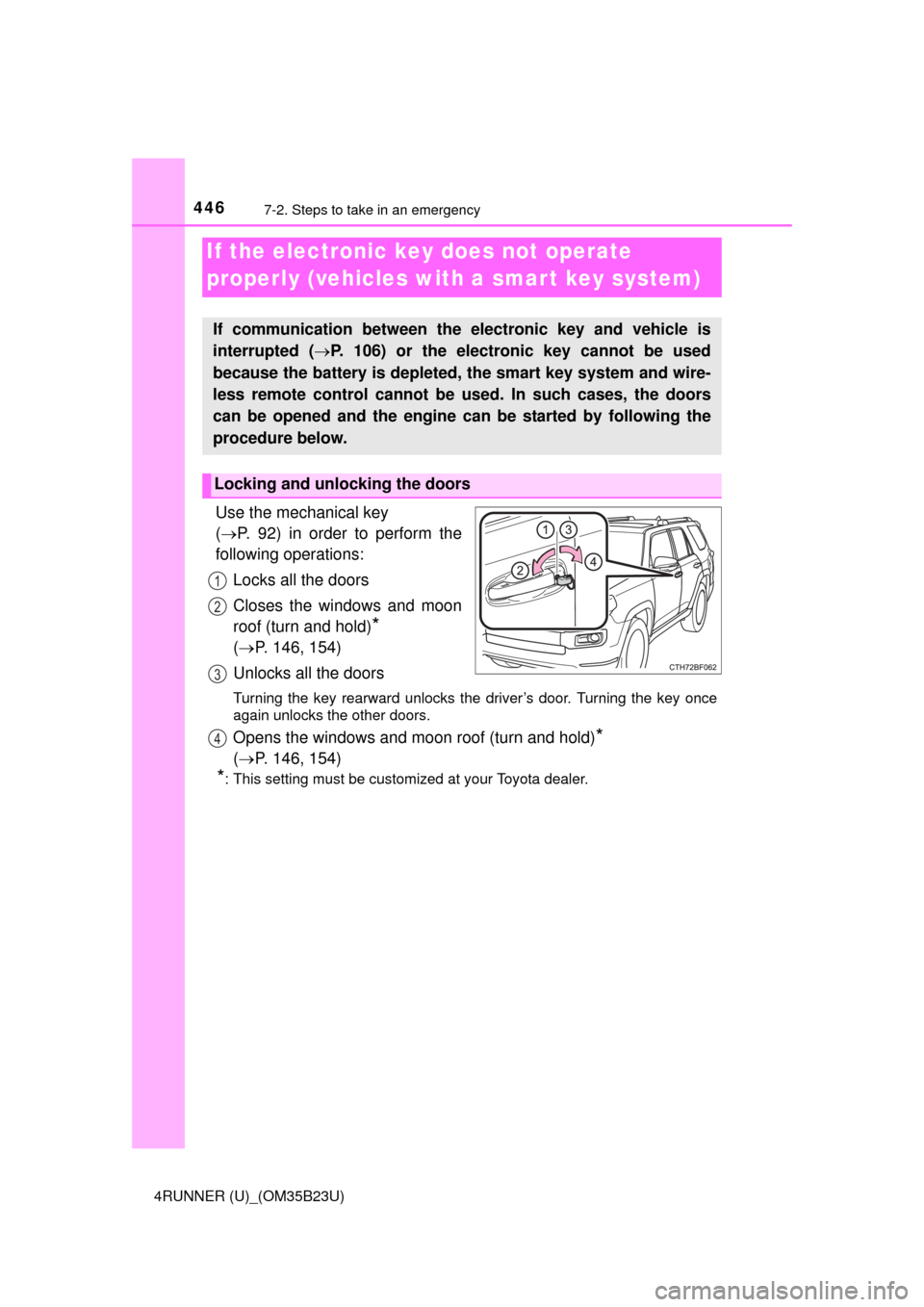
Use the mechanical key
(P. 92) in order to perform the
following operations:
Locks all the doors
Closes the windows and moon
roof (turn and hold)
*
(P. 146, 154)
Unlocks all the doors
Turning the key rearward unlocks the driver’s door. Turning the key once
again unlocks the other doors.
Opens the windows and moon roof (turn and hold)*
(P. 146, 154)
*: This setting must be customized at your Toyota dealer.
If the electronic key does not operate
properly (vehicles with a smar t key system)
If communication between the electronic key and vehicle is
interrupted (P. 106) or the electronic key cannot be used
because the battery is depleted, the smart key system and wire-
less remote control cannot be used. In such cases, the doors
can be opened and the engine can be started by following the
procedure below.
Locking and unlocking the doors
1
2
3
4
Page 450 of 528

4507-2. Steps to take in an emergency
4RUNNER (U)_(OM35B23U)
■Starting the engine when the battery is discharged
The engine cannot be started by push-starting.
■To prevent battery discharge
●Turn off the headlights and the audio system while the engine is off.
●Turn off any unnecessary electrical components when the vehicle is running
at a low speed for an extended period, such as in heavy traffic.
■Charging the battery
The electricity stored in the battery will discharge gradually even when the
vehicle is not in use, due to natural discharge and the draining effects of cer-
tain electrical appliances. If the vehicle is left for a long time, the battery may
discharge, and the engine may be unable to start. (The battery recharges
automatically during driving.)
■When recharging or replacing the battery
●Vehicles with a smart key system: In some cases, it may not be possible to
unlock the doors using the smart key system when the battery is dis-
charged. Use the wireless remote control or the mechanical key to lock or
unlock the doors.
●The engine may not start on the first attempt after the battery has recharged
but will start normally after the second attempt. This is not a malfunction.
●Vehicles with a smart key system: The engine switch mode is memorized by
the vehicle. When the battery is reconnected, the system will return to the
mode it was in before the battery was discharged. Before disconnecting the
battery, turn the engine switch off.
If you are unsure what mode the engine switch was in before the battery dis-
charged, be especially careful when reconnecting the battery.
●Make sure that the key is not inside the vehicle when recharging or replac-
ing the battery. The key may be locked in the vehicle if the alarm is acti-
vated. (P. 73)
Page 485 of 528
485
8
Vehicle specifications
4RUNNER (U)_(OM35B23U)
8-2. Customization
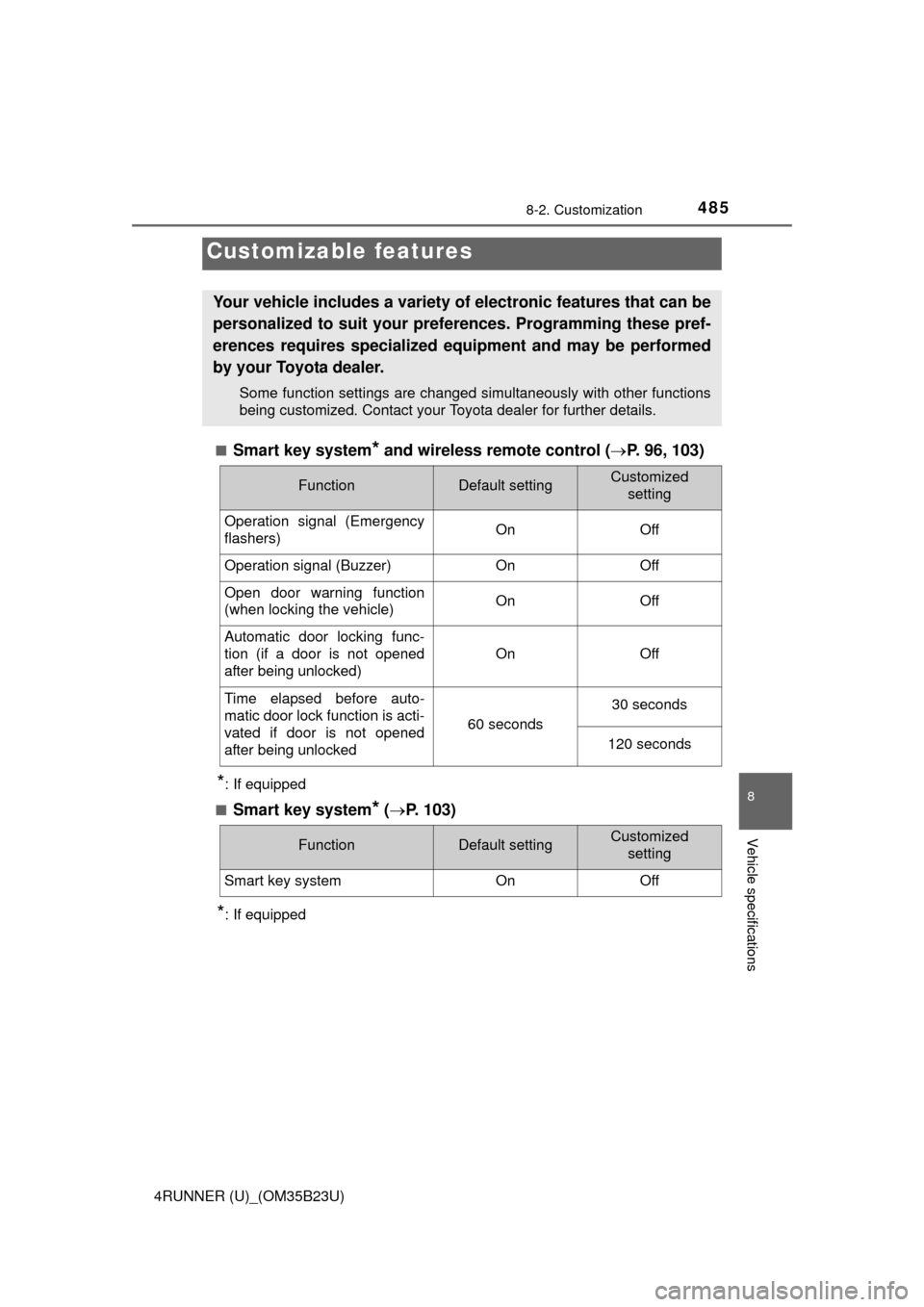
■Smart key system* and wireless remote control (P. 96, 103)
*: If equipped
■
Smart key system* (P. 103)
*: If equipped
Customizable features
Your vehicle includes a variety of electronic features that can be
personalized to suit your preferences. Programming these pref-
erences requires specialized equipment and may be performed
by your Toyota dealer.
Some function settings are changed simultaneously with other functions
being customized. Contact your Toyota dealer for further details.
FunctionDefault settingCustomized
setting
Operation signal (Emergency
flashers)On Off
Operation signal (Buzzer)OnOff
Open door warning function
(when locking the vehicle)OnOff
Automatic door locking func-
tion (if a door is not opened
after being unlocked)
OnOff
Time elapsed before auto-
matic door lock function is acti-
vated if door is not opened
after being unlocked
60 seconds
30 seconds
120 seconds
FunctionDefault settingCustomized
setting
Smart key systemOnOff
Page 486 of 528
4868-2. Customization
4RUNNER (U)_(OM35B23U)■
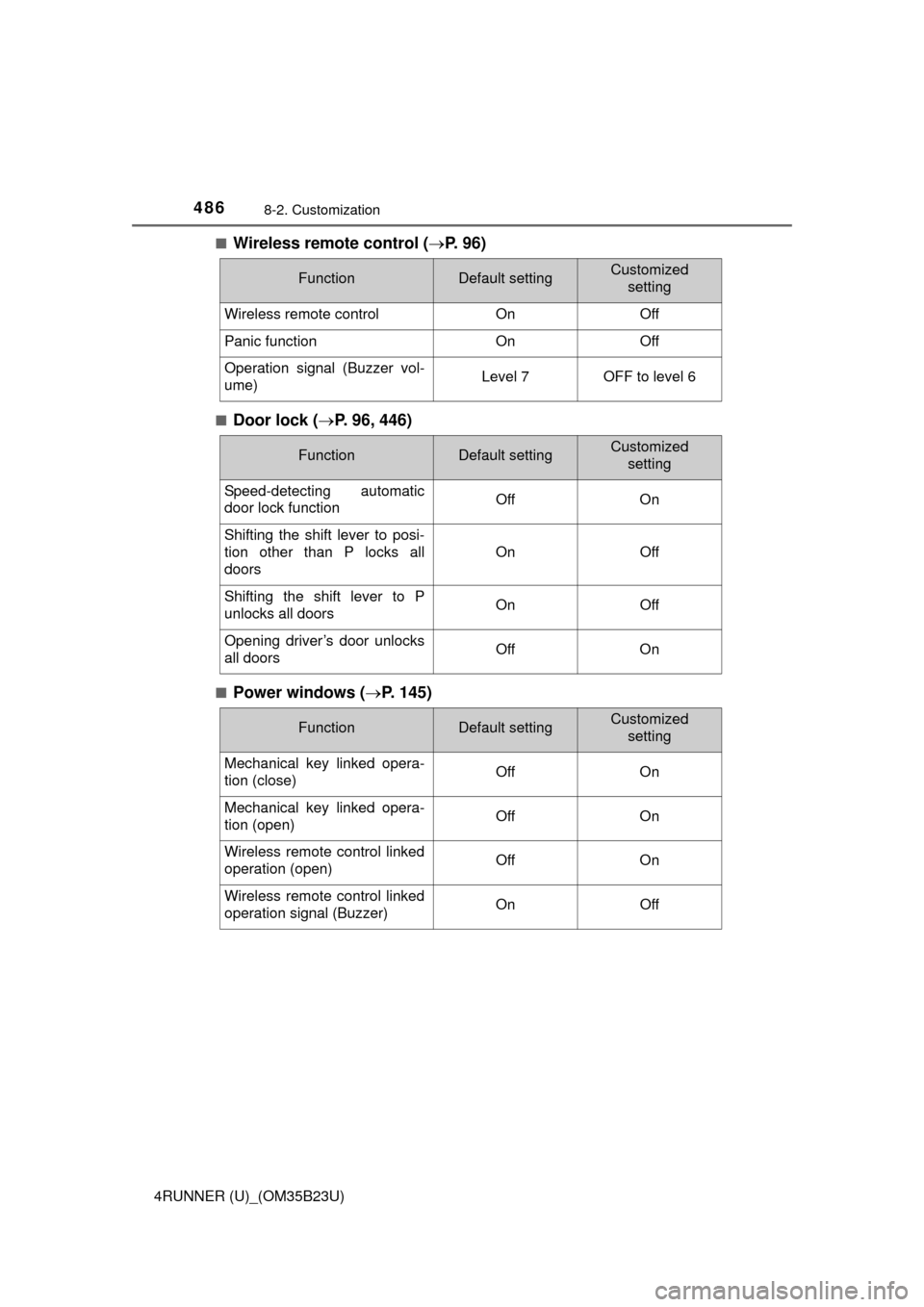
Wireless remote control (P. 9 6 )
■Door lock (P. 96, 446)
■Power windows (P. 145)
FunctionDefault settingCustomized
setting
Wireless remote controlOnOff
Panic functionOnOff
Operation signal (Buzzer vol-
ume)Level 7OFF to level 6
FunctionDefault settingCustomized
setting
Speed-detecting automatic
door lock functionOffOn
Shifting the shift lever to posi-
tion other than P locks all
doors
OnOff
Shifting the shift lever to P
unlocks all doorsOnOff
Opening driver’s door unlocks
all doorsOffOn
FunctionDefault settingCustomized
setting
Mechanical key linked opera-
tion (close)OffOn
Mechanical key linked opera-
tion (open)OffOn
Wireless remote control linked
operation (open)OffOn
Wireless remote control linked
operation signal (Buzzer)OnOff
Page 489 of 528
4898-2. Customization
8
Vehicle specifications
4RUNNER (U)_(OM35B23U)■
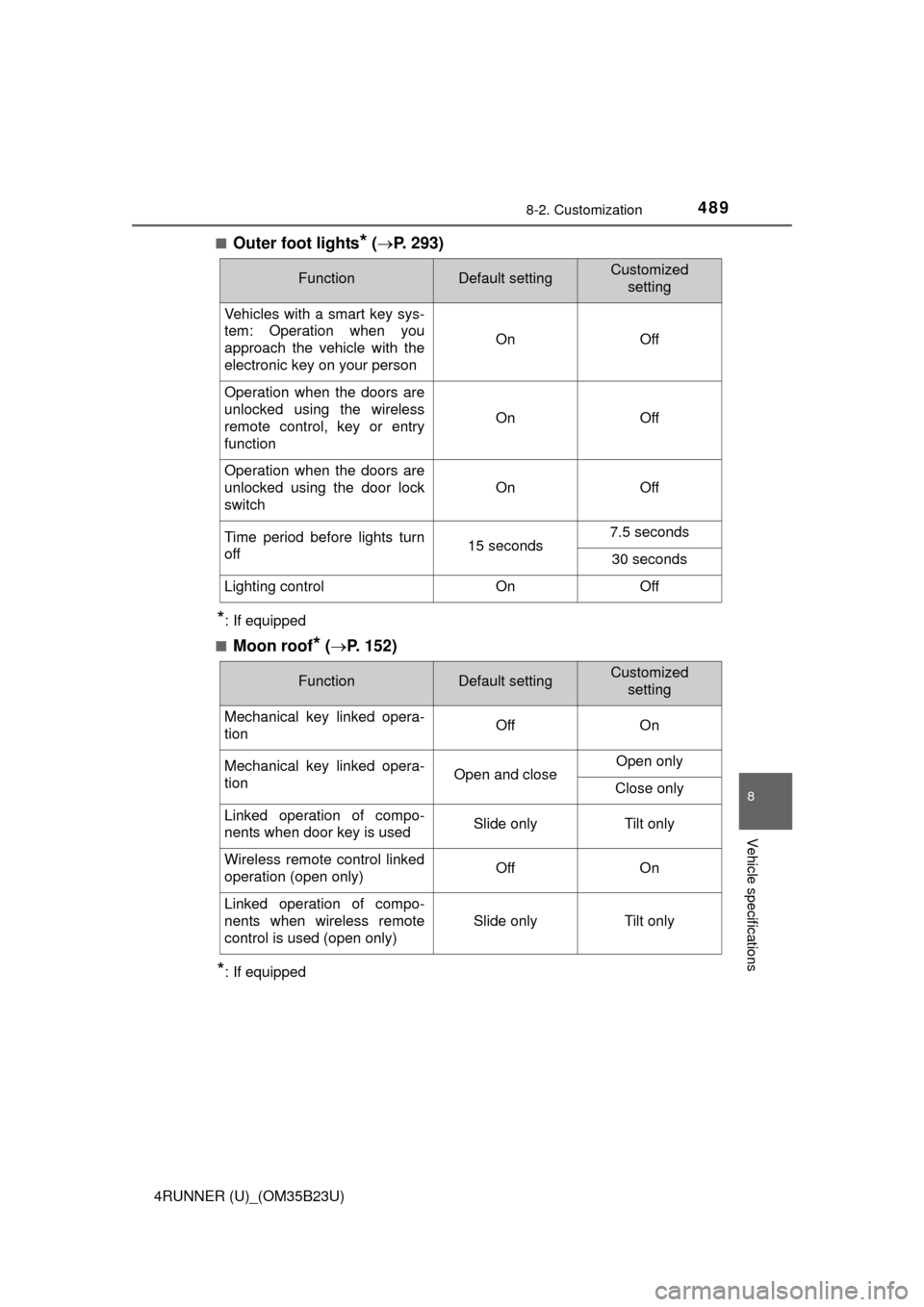
Outer foot lights* (P. 293)
*: If equipped
■
Moon roof* (P. 152)
*: If equipped
FunctionDefault settingCustomized
setting
Vehicles with a smart key sys-
tem: Operation when you
approach the vehicle with the
electronic key on your person
OnOff
Operation when the doors are
unlocked using the wireless
remote control, key or entry
function
OnOff
Operation when the doors are
unlocked using the door lock
switch
OnOff
Time period before lights turn
off15 seconds7.5 seconds
30 seconds
Lighting controlOnOff
FunctionDefault settingCustomized
setting
Mechanical key linked opera-
tionOffOn
Mechanical key linked opera-
tionOpen and closeOpen only
Close only
Linked operation of compo-
nents when door key is usedSlide onlyTilt only
Wireless remote control linked
operation (open only)OffOn
Linked operation of compo-
nents when wireless remote
control is used (open only)
Slide onlyTilt only