remote control TOYOTA 4RUNNER 2016 N280 / 5.G User Guide
[x] Cancel search | Manufacturer: TOYOTA, Model Year: 2016, Model line: 4RUNNER, Model: TOYOTA 4RUNNER 2016 N280 / 5.GPages: 528, PDF Size: 12.12 MB
Page 96 of 528
963-1. Key information
4RUNNER (U)_(OM35B23U)
◆Smart key system (if equipped)
Carry the electronic key to enable this function.
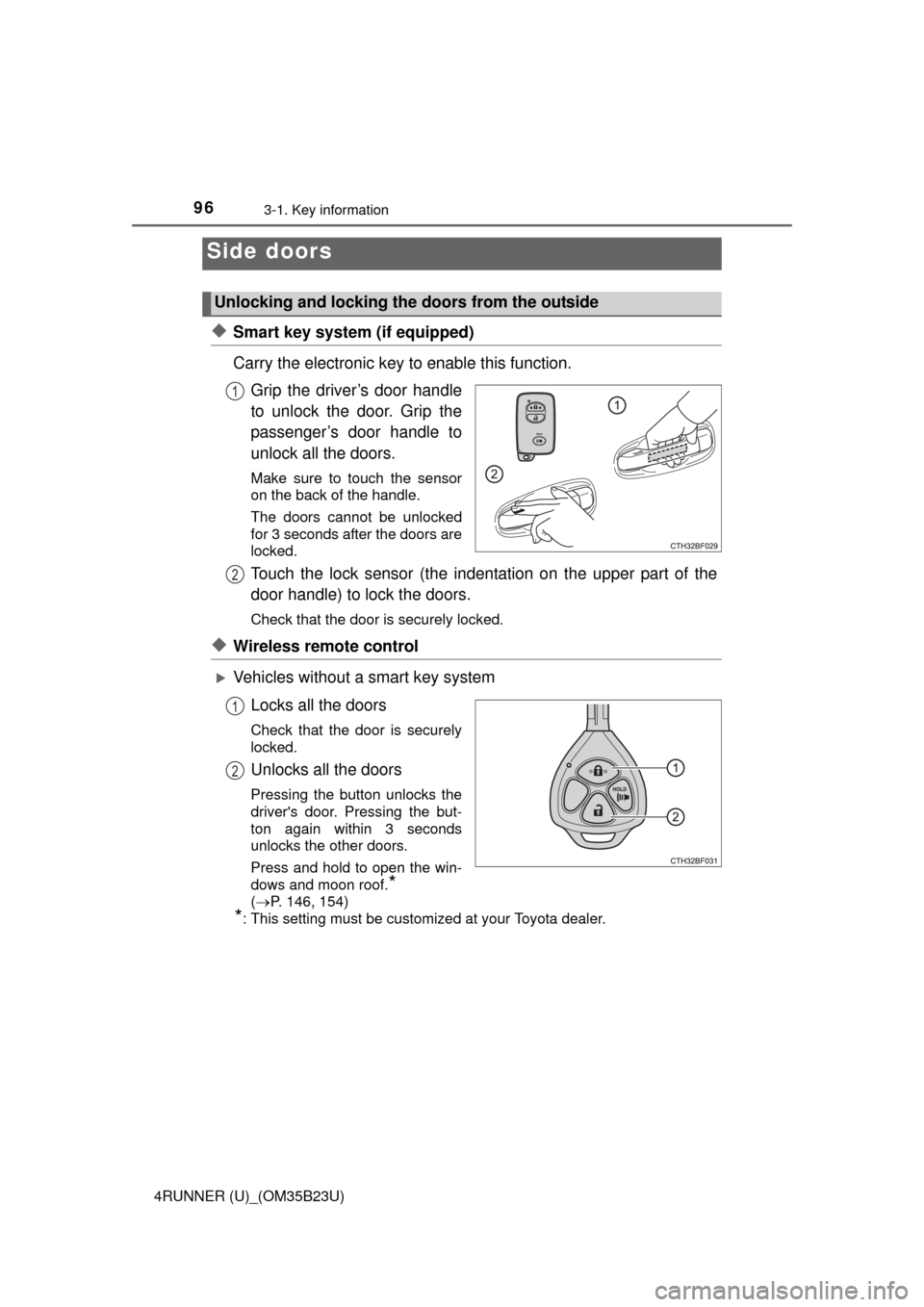
Grip the driver’s door handle
to unlock the door. Grip the
passenger’s door handle to
unlock all the doors.
Make sure to touch the sensor
on the back of the handle.
The doors cannot be unlocked
for 3 seconds after the doors are
locked.
Touch the lock sensor (the indentation on the upper part of the
door handle) to lock the doors.
Check that the door is securely locked.
◆Wireless remote control
Vehicles without a smart key system
Locks all the doors
Check that the door is securely
locked.
Unlocks all the doors
Pressing the button unlocks the
driver's door. Pressing the but-
ton again within 3 seconds
unlocks the other doors.
Press and hold to open the win-
dows and moon roof.
*
(P. 146, 154)
*: This setting must be customized at your Toyota dealer.
Side doors
Unlocking and locking the doors from the outside
1
2
1
2
Page 98 of 528
983-1. Key information
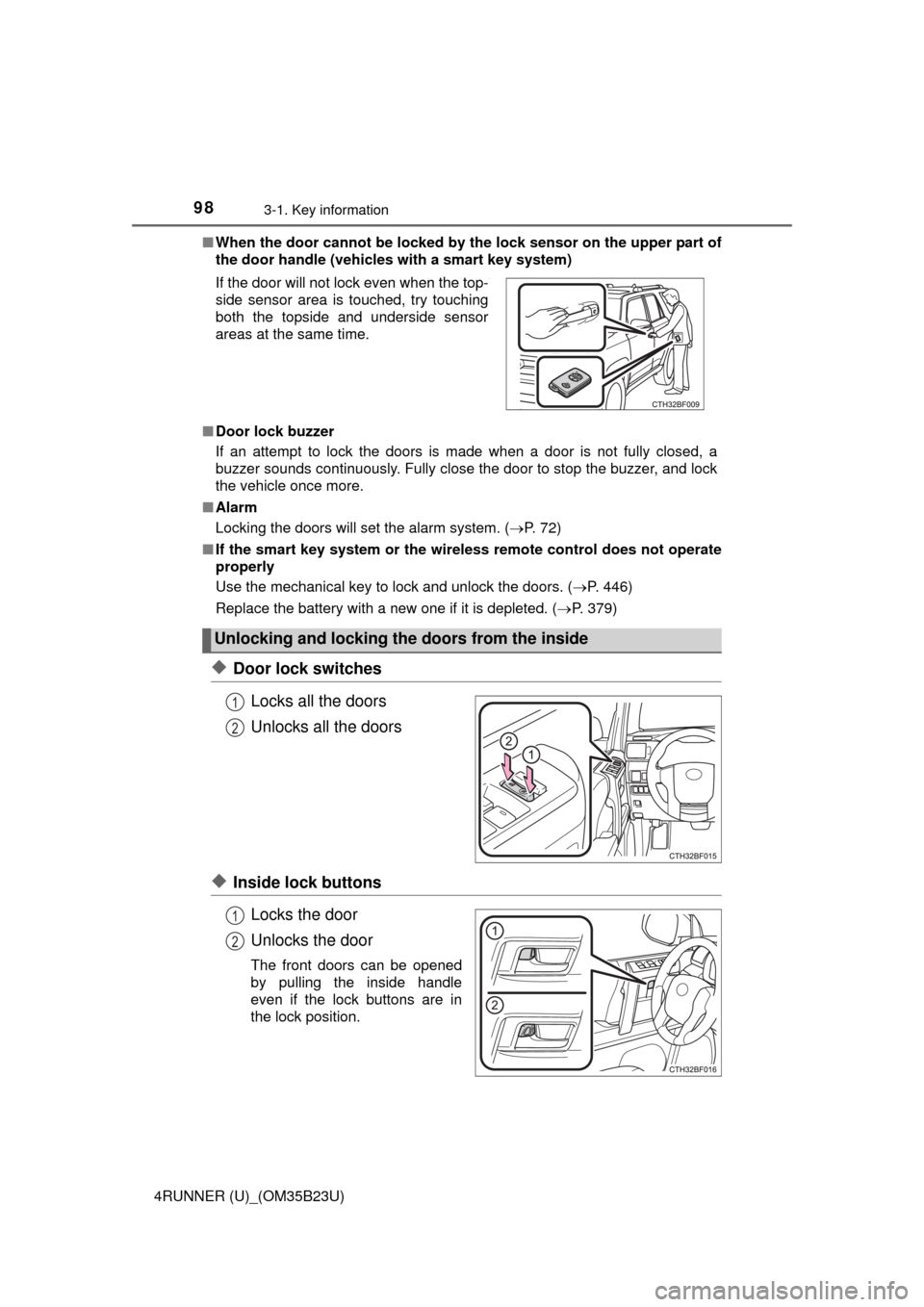
4RUNNER (U)_(OM35B23U)■When the door cannot be locked by the lock sensor on the upper part of
the door handle (vehicles with a smart key system)
■Door lock buzzer
If an attempt to lock the doors is made when a door is not fully closed, a
buzzer sounds continuously. Fully close the door to stop the buzzer, and lock
the vehicle once more.
■Alarm
Locking the doors will set the alarm system. (P. 72)
■If the smart key system or the wireless remote control does not operate
properly
Use the mechanical key to lock and unlock the doors. (P. 446)
Replace the battery with a new one if it is depleted. (P. 379)
◆Door lock switches
Locks all the doors
Unlocks all the doors
◆Inside lock buttons
Locks the door
Unlocks the door
The front doors can be opened
by pulling the inside handle
even if the lock buttons are in
the lock position. If the door will not lock even when the top-
side sensor area is touched, try touching
both the topside and underside sensor
areas at the same time.
Unlocking and locking the doors from the inside
1
2
1
2
Page 106 of 528
1063-2. Opening, closing and locking the doors
4RUNNER (U)_(OM35B23U)■Battery-saving function
The battery-saving function will be activated in order to prevent the electronic
key battery and the vehicle battery from being discharged while the vehicle is
not in operation for a long time.
●In the following situations, the smart key system may take some time to
unlock the doors.
• The electronic key has been left in an area of approximately 6 ft. (2 m) of
the outside of the vehicle for 10 minutes or longer.
• The smart key system has not been used for 5 days or longer.
●If the smart key system has not been used for 14 days or longer, the doors
cannot be unlocked at any doors except the driver’s door. In this case, take
hold of the driver’s door handle, or use the wireless remote control or the
mechanical key, to unlock the doors.
The system will resume operation when
●The vehicle is locked using the door handle lock switch when carrying the
electronic key on your person.
●The vehicle is locked/unlocked using the wireless remote control.
(P. 96)
●The vehicle is locked/unlocked using the mechanical key. (P. 446)
■Conditions affecting operation
The smart key system uses weak radio waves. In the following situations, the
communication between the electronic key and the vehicle may be affected,
preventing the smart key system, wireless remote control and engine immobi-
lizer system from operating properly. (Ways of coping: P. 446)
●When the electronic key battery is depleted
●Near a TV tower, electric power plant, gas station, radio station, large dis-
play, airport or other facility that generates strong radio waves or electrical
noise
●When carrying a portable radio, cellular phone, cordless phone or other
wireless communication device
Interior alarm sounds
once.
The engine switch was
pressed after the doors
were unlocked with the
mechanical key.
Touch the electronic
key to the engine
switch while depressing
the brake pedal.
The engine switch was
pressed two consecu-
tive times without the
electronic key being
present.
AlarmSituationCorrection procedure
Page 107 of 528
1073-2. Opening, closing and locking the doors
3
Operation of each component
4RUNNER (U)_(OM35B23U)●When the electronic key is in contact with, or is covered by the following
metallic objects
• Cards to which aluminum foil is attached
• Cigarette boxes that have aluminum foil inside
• Metallic wallets or bags
• Coins
• Hand warmers made of metal
• Media such as CDs and DVDs
●When multiple electronic keys are in the vicinity
●When other wireless keys (that emit radio waves) are being used nearby
●When carrying the electronic key together with the following devices that
emit radio waves
• Another vehicle’s electronic key or a wireless key that emits radio waves
• Personal computers or personal digital assistants (PDAs)
• Digital audio players
• Portable game systems
●If window tint with a metallic content or metallic objects are attached to the
back window
■Note for the entry function
●Even when the electronic key is within the effective range (detection areas),
the system may not operate properly in the following cases:
• The electronic key is too close to the window or outside door handle, near
the ground, or in a high place when the doors are locked or unlocked.
• The electronic key is on the instrument panel or floor, in the glove box, or
in the auxiliary box of the instrument panel.
●Do not leave the electronic key on top of the instrument panel or near the
door pockets when exiting the vehicle. Depending on the radio wave recep-
tion conditions, it may be detected by the antenna outside the cabin and the
door will become lockable from the outside, possibly trapping the electronic
key inside the vehicle.
●As long as the electronic key is within the effective range, the doors may be
locked or unlocked by anyone. However, only the doors detecting the elec-
tronic key can be used to unlock the vehicle.
●The doors may lock or unlock if the electronic key is within the effective
range and a large amount of water splashes on the door handle, such as in
the rain or in a car wash. The doors will automatically be locked after
approximately 60 seconds if a door is not opened and closed.
●If the wireless remote control is used to lock the doors when the electronic
key is near the vehicle, there is a possibility that the door may not be
unlocked by the entry function. (Use the wireless remote control to unlock
the doors.)
Page 114 of 528
1143-2. Opening, closing and locking the doors
4RUNNER (U)_(OM35B23U)
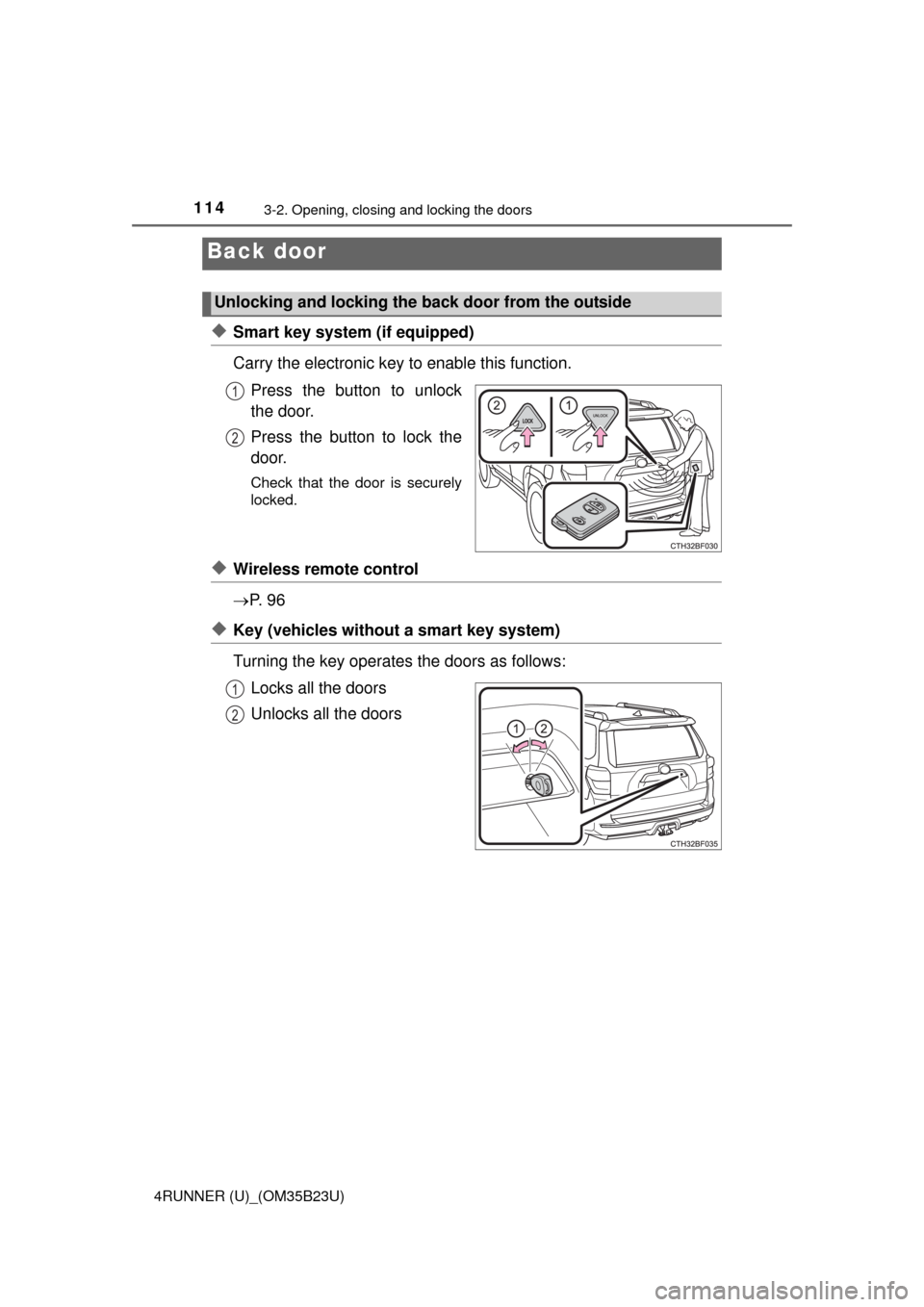
◆Smart key system (if equipped)
Carry the electronic key to enable this function.
Press the button to unlock
the door.
Press the button to lock the
door.
Check that the door is securely
locked.
◆Wireless remote control
P. 9 6
◆Key (vehicles without a smart key system)
Turning the key operates the doors as follows:
Locks all the doors
Unlocks all the doors
Back door
Unlocking and locking the back door from the outside
1
2
1
2
Page 134 of 528
1343-3. Adjusting the seats
4RUNNER (U)_(OM35B23U)
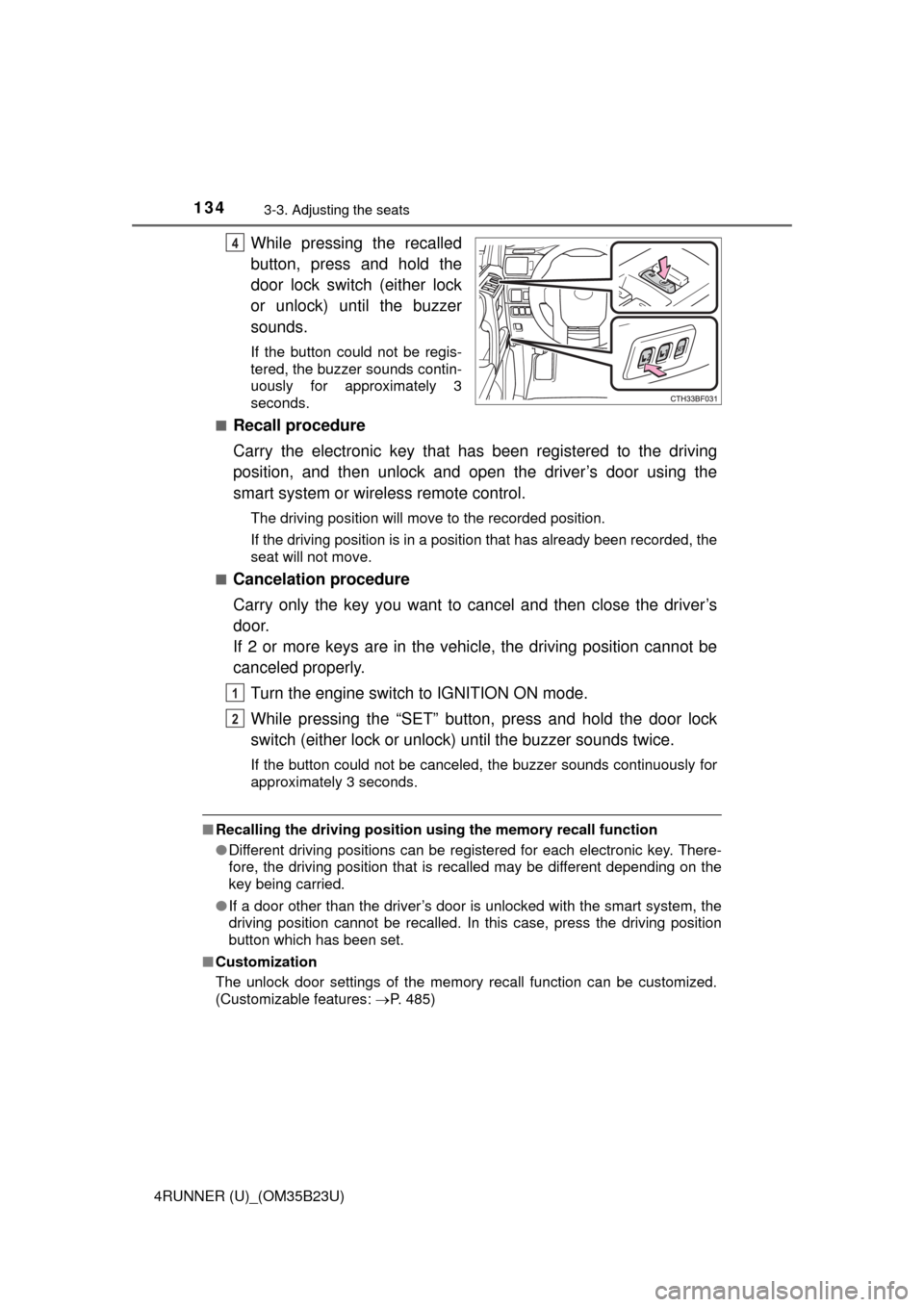
While pressing the recalled
button, press and hold the
door lock switch (either lock
or unlock) until the buzzer
sounds.
If the button could not be regis-
tered, the buzzer sounds contin-
uously for approximately 3
seconds.
■
Recall procedure
Carry the electronic key that has been registered to the driving
position, and then unlock and open the driver’s door using the
smart system or wireless remote control.
The driving position will move to the recorded position.
If the driving position is in a position that has already been recorded, the
seat will not move.
■
Cancelation procedure
Carry only the key you want to cancel and then close the driver’s
door.
If 2 or more keys are in the vehicle, the driving position cannot be
canceled properly.
Turn the engine switch to IGNITION ON mode.
While pressing the “SET” button, press and hold the door lock
switch (either lock or unlock) until the buzzer sounds twice.
If the button could not be canceled, the buzzer sounds continuously for
approximately 3 seconds.
■Recalling the driving position using the memory recall function
●Different driving positions can be registered for each electronic key. There-
fore, the driving position that is recalled may be different depending on the
key being carried.
●If a door other than the driver’s door is unlocked with the smart system, the
driving position cannot be recalled. In this case, press the driving position
button which has been set.
■Customization
The unlock door settings of the memory recall function can be customized.
(Customizable features: P. 485)
4
1
2
Page 146 of 528

1463-5. Opening, closing the windows and moon roof
4RUNNER (U)_(OM35B23U)■Up jam protection function
If an object becomes caught between the window and the window frame, win-
dow travel is stopped and the window is opened slightly.
■Down jam protection function
When the window is opening, if a foreign object malfunction within the door
causes it to be clamped, the operation stops.
■When the power window does not close normally
If the jam protection function is operating abnormally and a window cannot be
closed, perform the following operations using the power window switch on
the relevant door.
●Vehicles without a smart key system: After stopping the vehicle, the window
can be closed by holding the power window switch in the one-touch closing
position while the engine switch is turned to the “ON” position.
●Vehicles with a smart key system: After stopping the vehicle, the window
can be closed by holding the power window switch in the one-touch closing
position while the engine switch is turned to IGNITION ON mode.
●If the window still cannot be closed even by carrying out the operation as
explained above, initialize the function by performing the following proce-
dure.
Hold the power window switch in the one-touch closing position. Continue
holding the switch for a further 4 seconds after the window has closed.
Hold the power window switch in the one-touch opening position. Con-
tinue holding the switch for a further 1 second after the window has
opened completely.
Hold the power window switch in the one-touch closing position once
again. Continue holding the switch for a further 1 second after the window
has closed.
If you release the switch while the window is moving, start again from the
beginning.
If the window continues to close but then re-open slightly even after perform-
ing the above procedure correctly, have the vehicle inspected by your Toyota
dealer.
■Door lock linked window operation
●The power windows can be opened and closed using the key or mechanical
key.
* (P. 97, 446)
●The power windows can be opened using the wireless remote control.
*
(P. 96)
*: These settings must be customized at your Toyota dealer.
■Customization
Settings (e.g. key linked operation) can be changed.
(Customizable features P. 485)
1
2
3
Page 151 of 528
1513-5. Opening, closing the windows and moon roof
3
Operation of each component
4RUNNER (U)_(OM35B23U)
CAUTION
Observe the following precautions.
Failure to do so may result in death or serious injury.
■Caution while driving
Keep the back door and back window closed while driving. If the back door
or the back window is left open, the back door may hit nearby objects while
driving or luggage may be unexpectedly thrown out, causing an accident.
In addition, exhaust gases may enter the vehicle, causing death or a seri-
ous health hazard. Make sure to close the back door and back window
before driving.
■Closing the power back window
●The driver is responsible for power back window opening and closing
operations.
In order to prevent accidental operation, especially by a child, do not let a
child operate the power back window. It is possible for children and other
passengers to have body parts caught in the power back window.
●Check to make sure that all passengers do not have any part of their body
in a position where it could be caught when a window is being operated.
●When using the wireless remote control or key and operating the power
back window, operate the power back window after checking to make sure
that there is no possibility of any passenger having any of their body parts
caught in the power back window. Also, do not let a child operate power
back window by the wireless remote control or key. It is possible for chil-
dren and other passengers to get caught in the power back window.
●When exiting the vehicle, turn the engine switch off, carry the key and exit
the vehicle along with the child. There may be accidental operation, due to
mischief, etc., that may possibly lead to an accident.
■Jam protection function
●Never use any part of your body to intentionally activate the jam protection
function.
●The jam protection function may not work if something gets caught just
before the window fully closes.
Page 154 of 528
1543-5. Opening, closing the windows and moon roof
4RUNNER (U)_(OM35B23U)■When the moon roof does not close normally
Perform the following procedure:
●If the moon roof closes but then re-opens slightly
Stop the vehicle.
Press and hold the “SLIDE (open/close)” switch in the close position.
*1
The moon roof will close, reopen and pause for approximately 10 sec-
onds.
*2 Then it will close again, tilt up and pause for approximately 1 sec-
ond. Finally, it will tilt down, open and close.
Check to make sure that the moon roof is completely closed and then
release the switch.
●If the moon roof tilts down but then tilts back up
Stop the vehicle.
Press and hold the “UP” switch
*1 until the moon roof moves into the tilt
up position and stops.
Release the “UP” switch once and then press and hold the “UP” switch
again.
*1
The moon roof will pause for approximately 10 seconds in the tilt up posi-
tion.
*2 Then it will adjust slightly and pause for approximately 1 second.
Finally, it will tilt down, open and close.
Check to make sure that the moon roof is completely closed and then
release the switch.
*1: If the switch is released at the incorrect time, the procedure will have to
be performed again from the beginning.
*2: If the switch is released after the above mentioned 10 second pause,
automatic operation will be disabled. In that case, press and hold the
“UP” or “DOWN” switch, and the moon roof will tilt up and pause for
approximately 1 second. Then it will tilt down, open and close. Check to
make sure that the moon roof is completely closed and then release the
switch.
If the moon roof does not fully close even after performing the above proce-
dure correctly, have the vehicle inspected by your Toyota dealer.
■Moon roof open reminder function
An alarm will sound when the driver’s door is opened with the moon roof not
fully closed and the engine switch off.
■Door lock linked moon roof operation
●The moon roof can be opened and closed using the key or mechanical key.
*
(P. 97, 446)
●The moon roof can be opened using the wireless remote control.
*
(P. 96)
*: These settings must be customized at your Toyota dealer.
1
2
3
1
2
3
4
Page 321 of 528
3215-4. Other interior features
5
Interior features
4RUNNER (U)_(OM35B23U)■
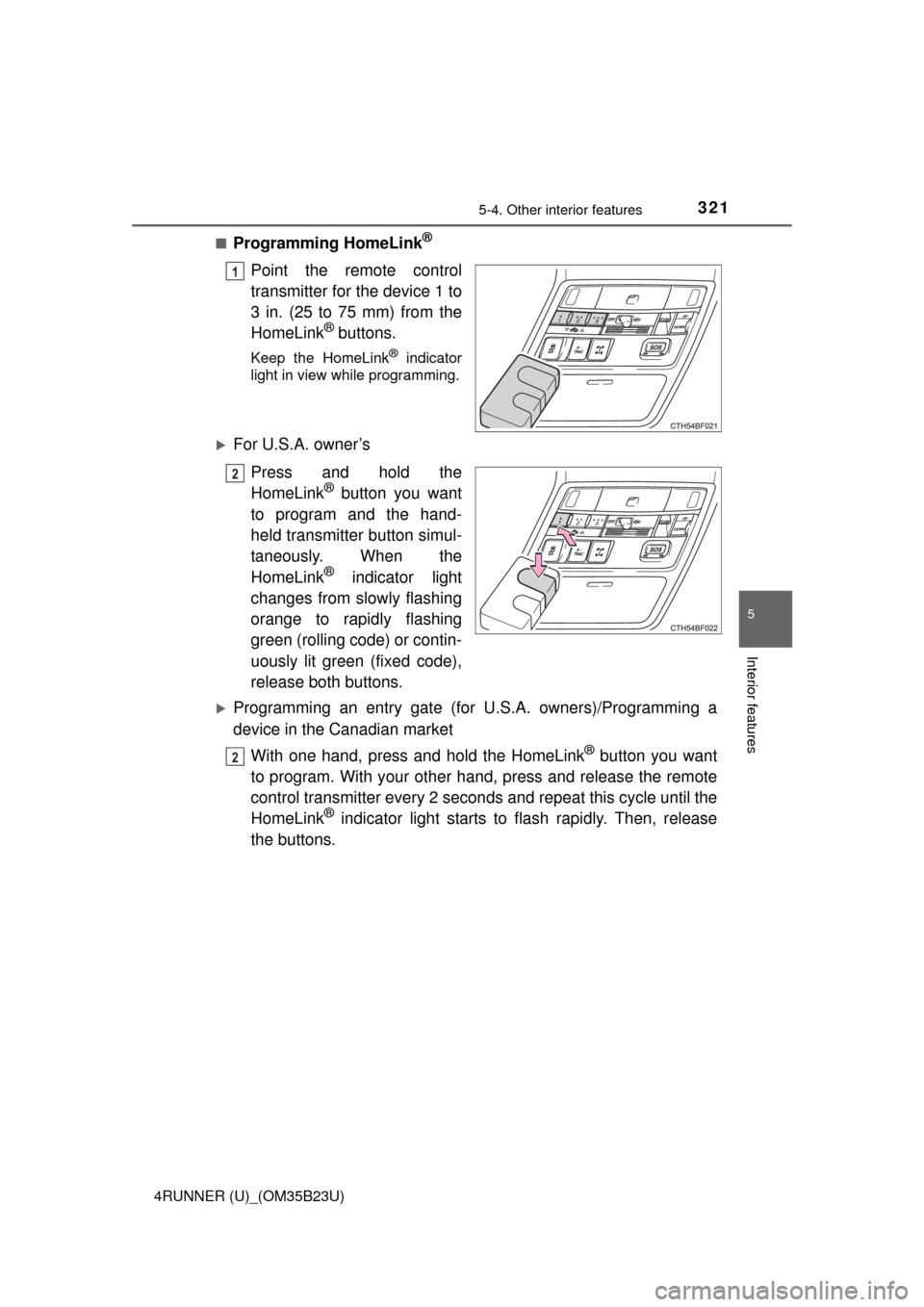
Programming HomeLink®
Point the remote control
transmitter for the device 1 to
3 in. (25 to 75 mm) from the
HomeLink
® buttons.
Keep the HomeLink® indicator
light in view while programming.
For U.S.A. owner’s
Press and hold the
HomeLink
® button you want
to program and the hand-
held transmitter button simul-
taneously. When the
HomeLink
® indicator light
changes from slowly flashing
orange to rapidly flashing
green (rolling code) or contin-
uously lit green (fixed code),
release both buttons.
Programming an entry gate (for U.S.A. owners)/Programming a
device in the Canadian market
With one hand, press and hold the HomeLink
® button you want
to program. With your other hand, press and release the remote
control transmitter every 2 seconds and repeat this cycle until the
HomeLink
® indicator light starts to flash rapidly. Then, release
the buttons.
1
2
2