air condition TOYOTA 4RUNNER 2016 N280 / 5.G Owners Manual
[x] Cancel search | Manufacturer: TOYOTA, Model Year: 2016, Model line: 4RUNNER, Model: TOYOTA 4RUNNER 2016 N280 / 5.GPages: 528, PDF Size: 12.12 MB
Page 4 of 528

TABLE OF CONTENTS4
4RUNNER (U)_(OM35B23U)5-1. Using the air
conditioning system
and defogger
Manual air conditioning
system............................. 278
Automatic air conditioning
system............................. 284
Seat heaters/seat
ventilators........................ 291
5-2. Using the interior lights
Interior lights list ................ 293
• Interior lights ................. 294
• Personal lights .............. 294
5-3. Using the storage features
List of storage features...... 296
• Glove box...................... 297
• Console box .................. 297
• Cup holders .................. 298
• Auxiliary box ................. 300
• Coin holder/tissue
pocket/pen holder ......... 301
• Bottle holders ................ 302
Luggage compartment
features ........................... 3035-4. Other interior features
Other interior features........ 308
• Sun visors ..................... 308
• Vanity mirrors ................ 308
• Clock ............................. 309
• Outside temperature
display ........................... 310
• Power outlets
(120 V AC) .................... 311
• Power outlets ................ 316
• Armrest.......................... 318
• Assist grips .................... 319
Garage door opener .......... 320
Safety Connect .................. 327
5Interior features
Page 5 of 528

5
1
8 7
6
5
4
3
2
9
4RUNNER (U)_(OM35B23U)6-1. Maintenance and care
Cleaning and protecting
the vehicle exterior .......... 334
Cleaning and protecting
the vehicle interior ........... 337
6-2. Maintenance
Maintenance
requirements ................... 340
General maintenance ........ 342
Emission inspection
and maintenance (I/M)
programs ......................... 345
6-3. Do-it-yourself
maintenance
Do-it-yourself service
precautions ..................... 346
Hood.................................. 349
Engine compartment ......... 350
Tires .................................. 365
Tire inflation pressure........ 371
Wheels .............................. 374
Air conditioning filter .......... 377
Wireless remote
control/electronic
key battery ...................... 379
Checking and replacing
fuses ............................... 382
Light bulbs ......................... 3857-1. Essential information
Emergency flashers ........... 402
If your vehicle has to
be stopped in an
emergency....................... 403
7-2. Steps to take in an
emergency
If your vehicle needs to
be towed .......................... 405
If you think something
is wrong ........................... 411
Fuel pump shut off
system ............................. 412
If a warning light turns
on or a warning buzzer
sounds ............................. 413
If a warning message or
indicator is displayed ....... 422
If you have a flat tire .......... 429
If the engine will not
start ................................. 442
If the shift lever cannot
be shifted from P ............. 444
If you cannot operate
back door opener ............ 445
If the electronic key does
not operate properly ........ 446
If the vehicle battery is
discharged ....................... 448
If your vehicle overheats.... 452
If the vehicle becomes
stuck ................................ 455
6Maintenance and care7When trouble arises
Page 17 of 528

17Pictorial index
4RUNNER (U)_(OM35B23U)Multi-information display . . . . . . . . . . . . . . . . . . . . . . . . . . . . P. 83
Display . . . . . . . . . . . . . . . . . . . . . . . . . . . . . . . . . . . . . . . . . . . . P. 83
When the warning messages are displayed . . . . . . . . . . . . . . P. 422
Parking brake . . . . . . . . . . . . . . . . . . . . . . . . . . . . . . . . . . . . . P. 203
Applying/releasing . . . . . . . . . . . . . . . . . . . . . . . . . . . . . . . . . . P. 203
Precautions against winter season . . . . . . . . . . . . . . . . . . . . . P. 269
Warning buzzer/message . . . . . . . . . . . . . . . . . . . . . . . . . . . . P. 422
Turn signal lever . . . . . . . . . . . . . . . . . . . . . . . . . . . . . . . . . . P. 202
Headlight switch . . . . . . . . . . . . . . . . . . . . . . . . . . . . . . . . . . . . P. 204
Headlights/parking lights/tail lights/daytime running lights . . . . P. 204
Fog lights . . . . . . . . . . . . . . . . . . . . . . . . . . . . . . . . . . . . . . . . . P. 210
Windshield wiper and washer switch . . . . . . . . . . . . . . . . . P. 212
Usage . . . . . . . . . . . . . . . . . . . . . . . . . . . . . . . . . . . . . . . . . . . P. 212
Adding washer fluid . . . . . . . . . . . . . . . . . . . . . . . . . . . . . . . . . P. 363
Emergency flasher switch . . . . . . . . . . . . . . . . . . . . . . . . . . P. 402
Hood lock release lever. . . . . . . . . . . . . . . . . . . . . . . . . . . . . P. 349
Tilt and telescopic steering lock release lever . . . . . . . . . . P. 139
Air conditioning system . . . . . . . . . . . . . . . . . . . . . . . . P. 278, 284
Usage . . . . . . . . . . . . . . . . . . . . . . . . . . . . . . . . . . . . . . . P. 278, 284
Rear window defogger . . . . . . . . . . . . . . . . . . . . . . . . . . . P. 280, 286
Audio/Navigation system
*
Clock . . . . . . . . . . . . . . . . . . . . . . . . . . . . . . . . . . . . . . . . . . . . P. 309
*: Refer to “NAVIGATION AND MULTIMEDIA SYSTEM OWNER’S MANUAL”.
4
5
6
7
8
9
10
11
12
13
Page 42 of 528
421-1. For safe use
4RUNNER (U)_(OM35B23U)■SRS airbag deployment conditions (SRS front airbags)
●The SRS front airbags will deploy in the event of an impact that exceeds the
set threshold level (the level of force corresponding to an approximately 12 -
18 mph [20 - 30 km/h] frontal collision with a fixed wall that does not move or
deform).
However, this threshold velocity will be considerably higher in the following
situations:
• If the vehicle strikes an object, such as a parked vehicle or sign pole,
which can move or deform on impact
• If the vehicle is involved in an underride collision, such as a collision in
which the front of the vehicle “underrides”, or goes under, the bed of a
truck
●Depending on the type of collision, it is possible that only the seat belt pre-
tensioners will activate.
●The SRS front airbags for the front passenger will not activate if there is no
passenger sitting in the front passenger seat. However, the SRS front air-
bags for the front passenger may deploy if luggage is put in the seat, even if
the seat is unoccupied.
■SRS airbag deployment conditions (SRS side and curtain shield airbags)
●The SRS side and curtain shield airbags will deploy in the event of an
impact that exceeds the set threshold level (the level of force corresponding
to the impact force produced by an approximately 3300 lb. [1500 kg] vehicle
colliding with the vehicle cabin from a direction perpendicular to the vehicle
orientation at an approximate speed of 12 - 18 mph [20 - 30 km/h]).
●The SRS curtain shield airbags will deploy in the event of vehicle rollover.
●The SRS side and curtain shield airbags deploy in the event of a frontal col-
lision.
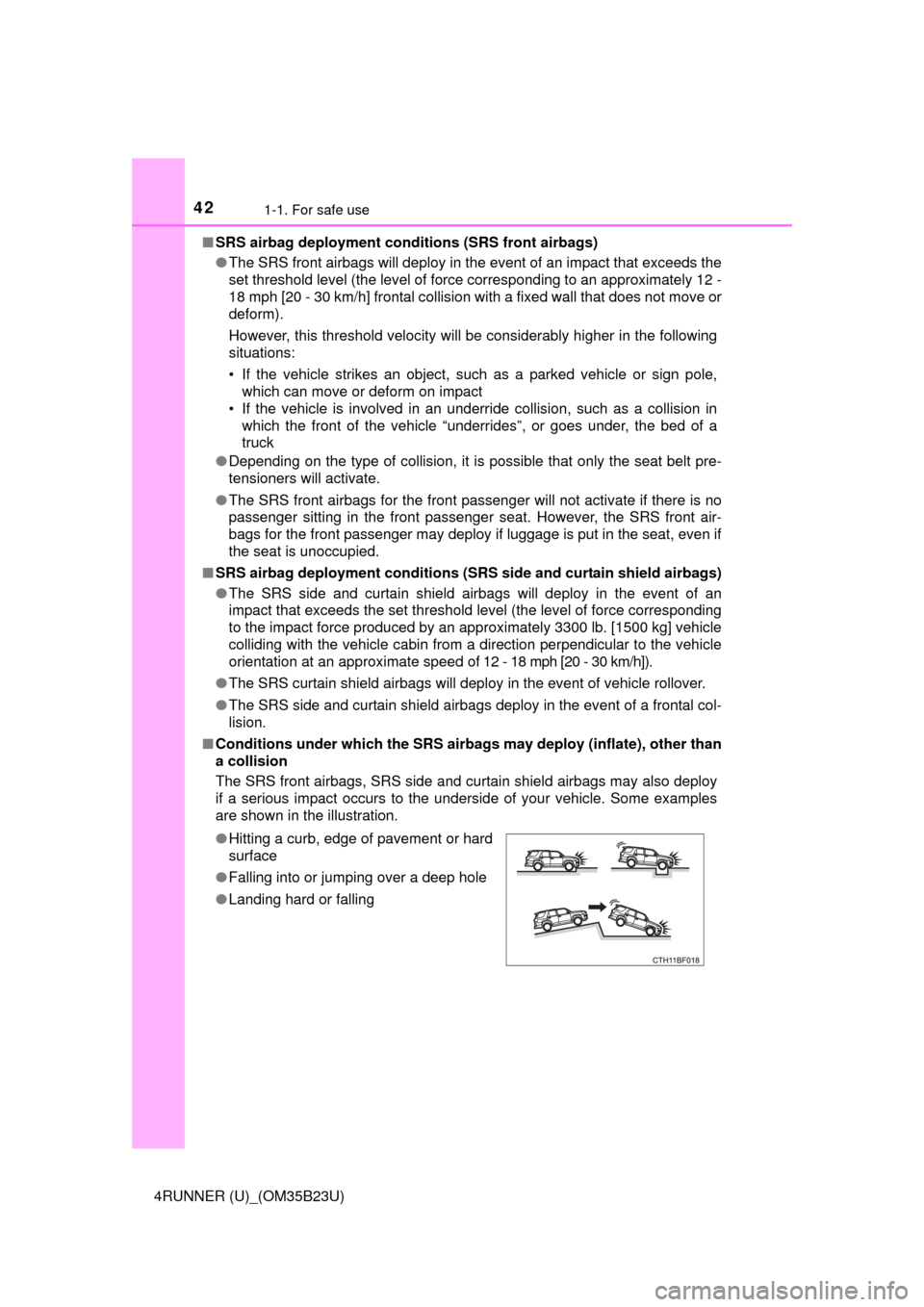
■Conditions under which the SRS airbags may deploy (inflate), other than
a collision
The SRS front airbags, SRS side and curtain shield airbags may also deploy
if a serious impact occurs to the underside of your vehicle. Some examples
are shown in the illustration.
●Hitting a curb, edge of pavement or hard
surface
●Falling into or jumping over a deep hole
●Landing hard or falling
Page 46 of 528
461-1. For safe use
4RUNNER (U)_(OM35B23U)
Front passenger occupant classification
system
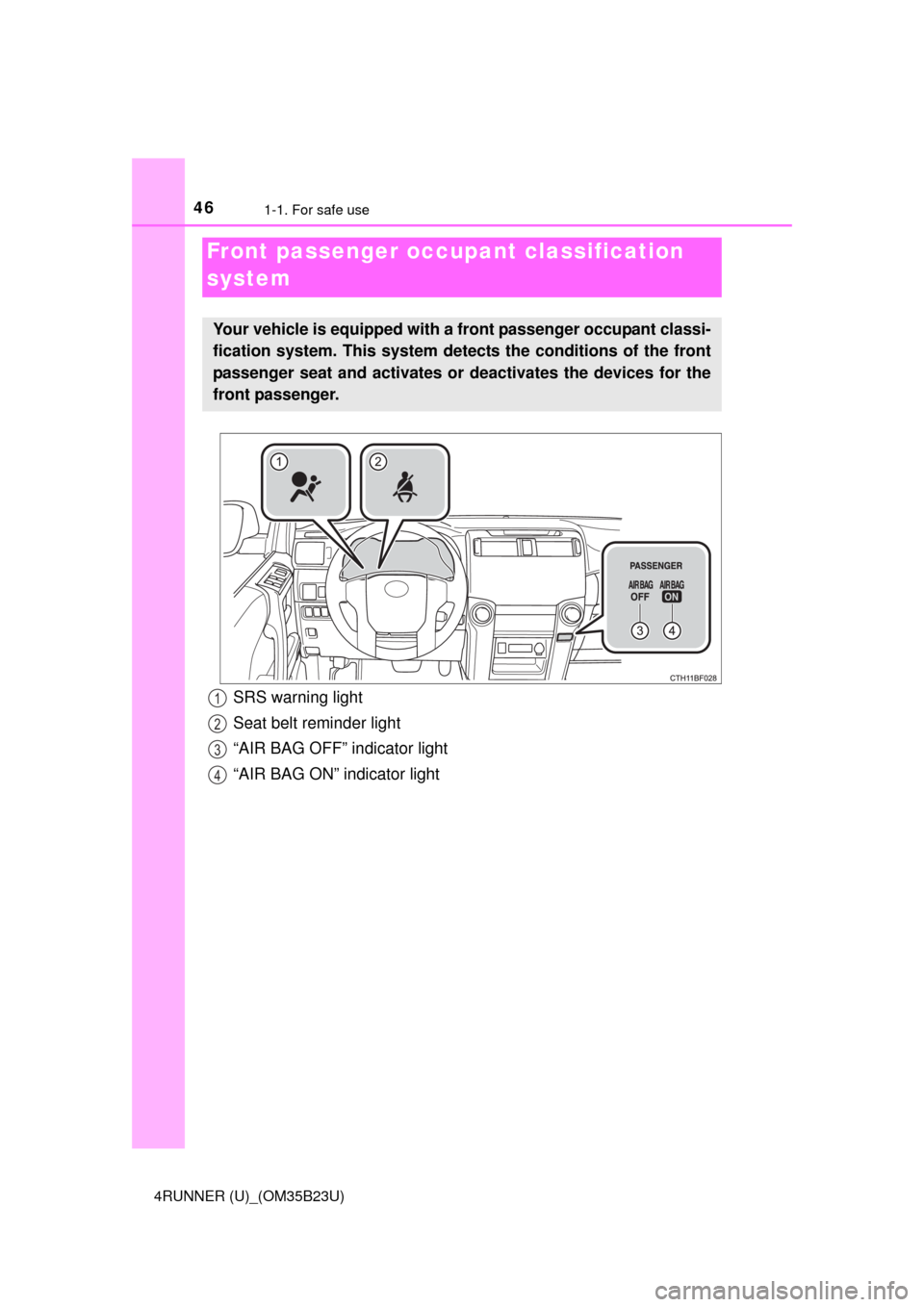
Your vehicle is equipped with a front passenger occupant classi-
fication system. This system detects the conditions of the front
passenger seat and activates or deactivates the devices for the
front passenger.
SRS warning light
Seat belt reminder light
“AIR BAG OFF” indicator light
“AIR BAG ON” indicator light1
2
3
4
Page 47 of 528
471-1. For safe use
1
For safety and security
4RUNNER (U)_(OM35B23U)■
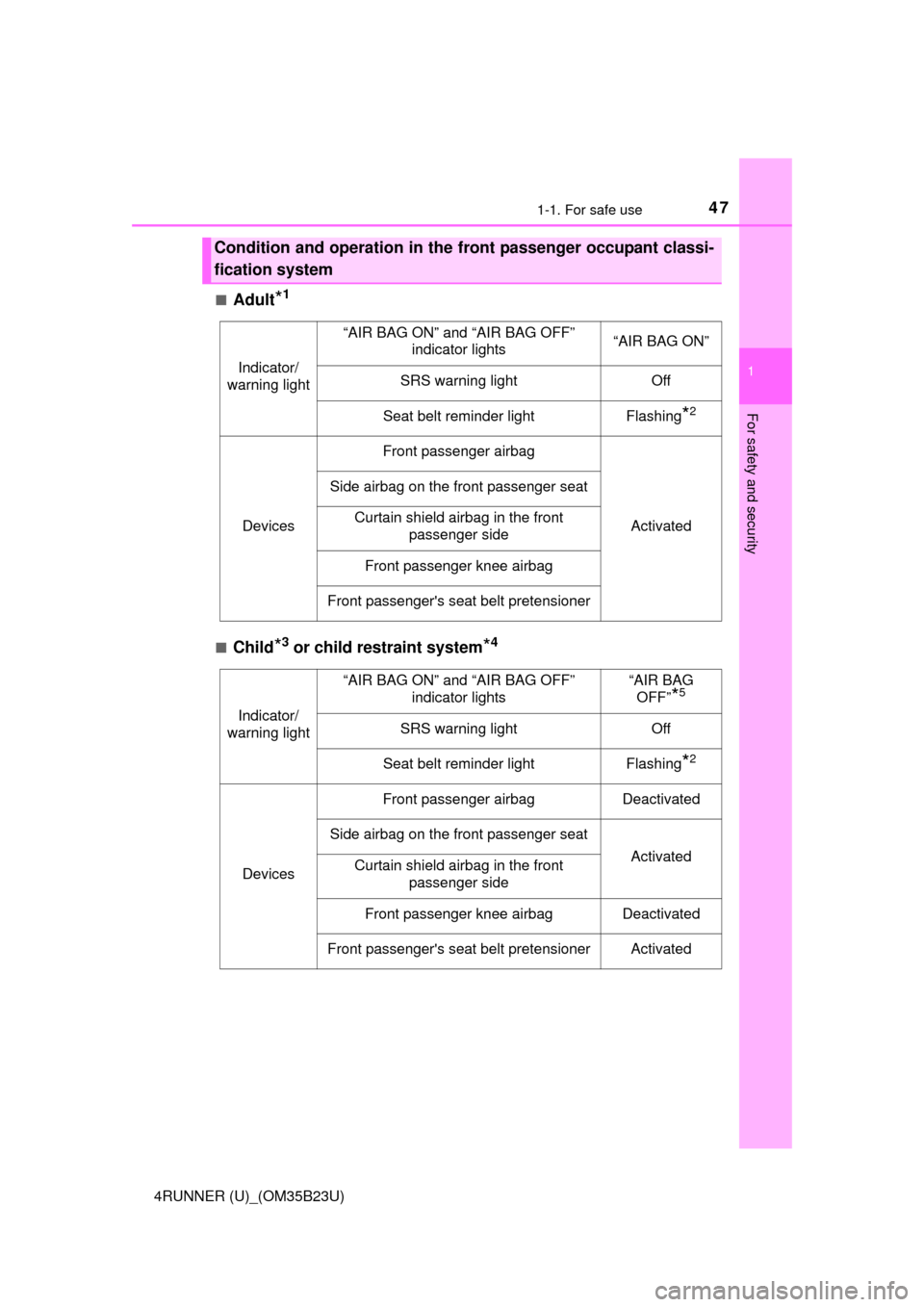
Adult*1
■Child*3 or child restraint system*4
Condition and operation in the front passenger occupant classi-
fication system
Indicator/
warning light
“AIR BAG ON” and “AIR BAG OFF”
indicator lights“AIR BAG ON”
SRS warning lightOff
Seat belt reminder lightFlashing*2
Devices
Front passenger airbag
Activated
Side airbag on the front passenger seat
Curtain shield airbag in the front
passenger side
Front passenger knee airbag
Front passenger's seat belt pretensioner
Indicator/
warning light
“AIR BAG ON” and “AIR BAG OFF”
indicator lights“AIR BAG
OFF”
*5
SRS warning lightOff
Seat belt reminder lightFlashing*2
Devices
Front passenger airbagDeactivated
Side airbag on the front passenger seat
ActivatedCurtain shield airbag in the front
passenger side
Front passenger knee airbagDeactivated
Front passenger's seat belt pretensionerActivated
Page 93 of 528

933-1. Key information
3
Operation of each component
4RUNNER (U)_(OM35B23U)■If you lose your keys
New genuine keys can be made by your Toyota dealer using the other key
(vehicles without a smart key system) or mechanical key (vehicles with a
smart key system) and the key number stamped on your key number plate.
Keep the plate in a safe place such as your wallet, not in the vehicle.
■When riding in an aircraft
When bringing a key with wireless remote control function onto an aircraft,
make sure you do not press any buttons on the key while inside the aircraft
cabin. If you are carrying the key in your bag etc., ensure that the buttons are
not likely to be pressed accidentally. Pressing a button may cause the key to
emit radio waves that could interfere with the operation of the aircraft.
■Conditions affecting operation
Vehicles without a smart key system
The wireless remote control function may not operate normally in the follow-
ing situations:
●Near a TV tower, radio station, electric power plant, airport or other facility
that generates strong radio waves
●When carrying a portable radio, cellular phone or other wireless communi-
cation devices
●When multiple wireless keys are in the vicinity
●When the wireless key is in contact with, or is covered by, a metallic object
●When a wireless key (that emits radio waves) is being used nearby
●When the wireless key has been left near an electrical appliance such as a
personal computer
Vehicles with a smart key system
P. 106
■Key battery depletion
Vehicles with a smart key system
●The standard battery life is 1 to 2 years.
●If the battery becomes low, an alarm will sound in the cabin when the engine
stops. (P. 427)
●As the electronic key always receives radio waves, the battery will become
depleted even if the electronic key is not used. The following symptoms indi-
cate that the electronic key battery may be depleted. Replace the battery
when necessary. (P. 379)
• The smart key system or the wireless remote control does not operate.
• The detection area becomes smaller.
• The LED indicator on the key surface does not turn on.
Page 106 of 528
1063-2. Opening, closing and locking the doors
4RUNNER (U)_(OM35B23U)■Battery-saving function
The battery-saving function will be activated in order to prevent the electronic
key battery and the vehicle battery from being discharged while the vehicle is
not in operation for a long time.
●In the following situations, the smart key system may take some time to
unlock the doors.
• The electronic key has been left in an area of approximately 6 ft. (2 m) of
the outside of the vehicle for 10 minutes or longer.
• The smart key system has not been used for 5 days or longer.
●If the smart key system has not been used for 14 days or longer, the doors
cannot be unlocked at any doors except the driver’s door. In this case, take
hold of the driver’s door handle, or use the wireless remote control or the
mechanical key, to unlock the doors.
The system will resume operation when
●The vehicle is locked using the door handle lock switch when carrying the
electronic key on your person.
●The vehicle is locked/unlocked using the wireless remote control.
(P. 96)
●The vehicle is locked/unlocked using the mechanical key. (P. 446)
■Conditions affecting operation
The smart key system uses weak radio waves. In the following situations, the
communication between the electronic key and the vehicle may be affected,
preventing the smart key system, wireless remote control and engine immobi-
lizer system from operating properly. (Ways of coping: P. 446)
●When the electronic key battery is depleted
●Near a TV tower, electric power plant, gas station, radio station, large dis-
play, airport or other facility that generates strong radio waves or electrical
noise
●When carrying a portable radio, cellular phone, cordless phone or other
wireless communication device
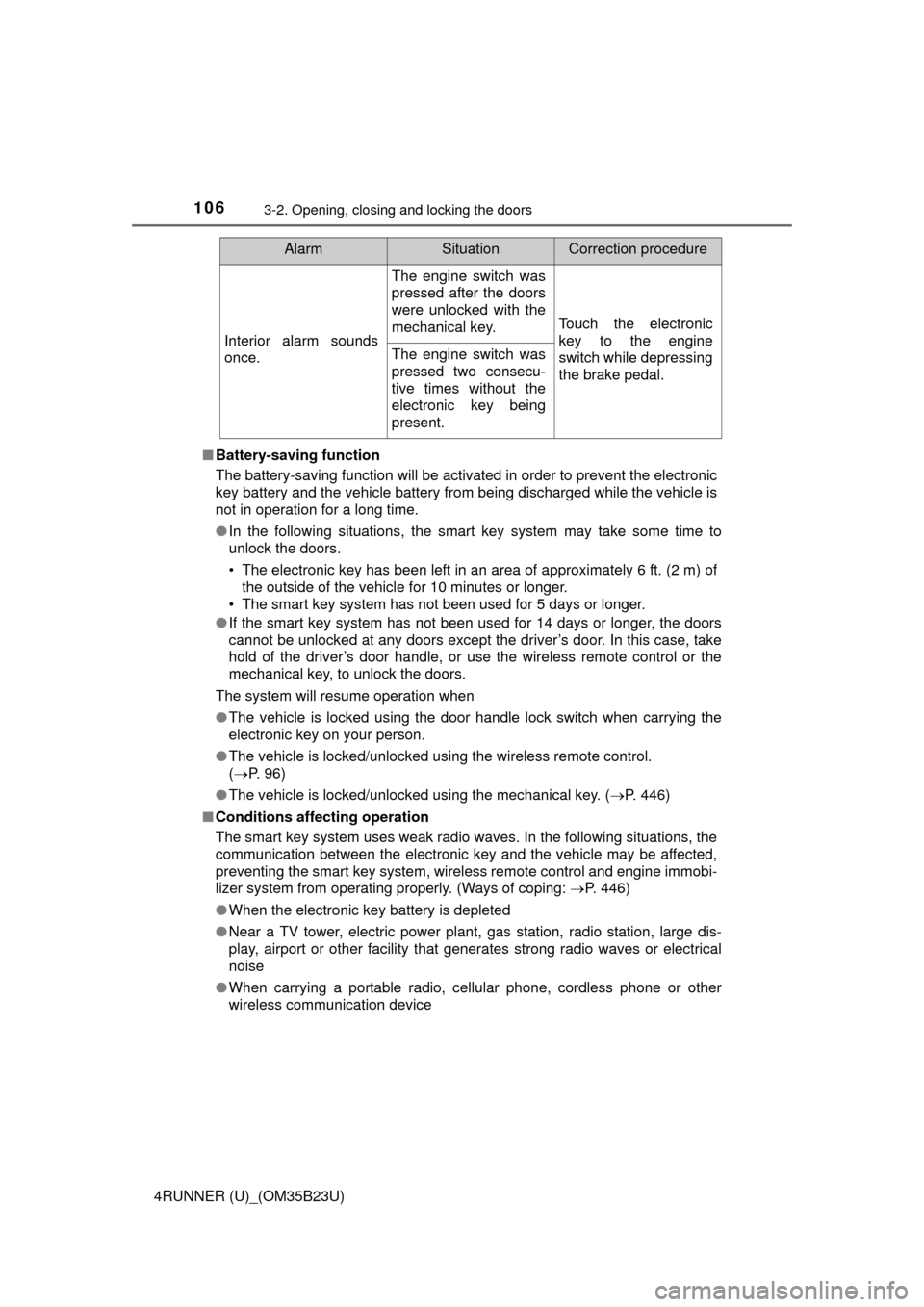
Interior alarm sounds
once.
The engine switch was
pressed after the doors
were unlocked with the
mechanical key.
Touch the electronic
key to the engine
switch while depressing
the brake pedal.
The engine switch was
pressed two consecu-
tive times without the
electronic key being
present.
AlarmSituationCorrection procedure
Page 184 of 528

1844-1. Before driving
4RUNNER (U)_(OM35B23U)
●Avoid jerky starts or sudden acceleration.
●Avoid jerky steering and sharp turns, and slow down before making
turn.
●Note that when making a turn, the trailer wheels will be closer than
the vehicle wheels to the inside of the turn. Compensate by making
a wider than normal turning radius.
●Slow down before making a turn, in cross winds, on wet or slippery
surfaces, etc.
Increasing vehicle speed can destabilize the trailer.
●Take care when passing other vehicles. Passing requires consider-
able distance. After passing a vehicle, do not forget the length of
your trailer, and be sure you have plenty of room before changing
lanes.
●To maintain engine braking efficiency and charging system perfor-
mance when using engine braking, do not put the transmission in
D.
●Instability happens more frequently when descending steep or long
downhill grades. Before descending, slow down and downshift. Do
not make sudden downshifts while descending steep or long down-
hill grades.
●Avoid holding the brake pedal down too long or applying the brakes
too frequently. This could cause the brakes to overheat and result in
reduced braking efficiency.
●Due to the added load of the trailer, your vehicle’s engine may over-
heat on hot days (at temperatures over 85°F [30°C]) when driving
up a long or steep grade. If the engine coolant temperature gauge
indicates overheating, immediately turn off the air conditioning (if in
use), pull your vehicle off the road and stop in a safe spot.
(P. 452)
Page 228 of 528

2284-5. Using the driving support systems
4RUNNER (U)_(OM35B23U)■Sensor detection information
●The sensor’s detection areas are limited to the areas around the vehicle’s
front corner and rear bumpers.
●Certain vehicle conditions and the surrounding environment may affect the
ability of the sensor to correctly detect obstacles. Particular instances where
this may occur are listed below.
• There is dirt, snow or ice on the sensor. (Wiping the sensors will resolve
this problem.)
• The sensor is frozen. (Thawing the area will resolve this problem.)
In especially cold weather, if a sensor is frozen the screen may show an
abnormal display, or obstacles may not be detected.
• The sensor is covered in any way.
• The vehicle is leaning considerably to one side.
• On an extremely bumpy road, on an incline, on gravel, or on grass.
• The vicinity of the vehicle is noisy due to vehicle horns, motorcycle
engines, air brakes of large vehicles, or other loud noises producing ultra-
sonic waves.
• There is another vehicle equipped with parking assist sensors in the
vicinity.
• The sensor is coated with a sheet of spray or heavy rain.
• The vehicle is equipped with a fender pole or wireless antenna.
• Towing eyelet is installed.
• The bumper or sensor receives a strong impact.
• The vehicle is approaching a tall or curved curb.
• In harsh sunlight or intense cold weather.
• The area directly under the bumpers is not detected.
• If obstacles draw too close to the sensor.
• A non-genuine Toyota suspension (lowered suspension etc.) is installed.
• People may not be detected if they are wearing certain types of clothing.
In addition to the examples above, there are instances in which, because of
their shape, signs and other objects may be judged by the sensor to be closer
than they are.
●The shape of the obstacle may prevent the sensor from detecting it. Pay
particular attention to the following obstacles:
• Wires, fences, ropes, etc.
• Cotton, snow and other materials that absorb sound waves
• Sharply-angled objects
• Low obstacles
• Tall obstacles with upper sections projecting outwards in the direction of
your vehicle