interior lights TOYOTA 4RUNNER 2016 N280 / 5.G Owners Manual
[x] Cancel search | Manufacturer: TOYOTA, Model Year: 2016, Model line: 4RUNNER, Model: TOYOTA 4RUNNER 2016 N280 / 5.GPages: 528, PDF Size: 12.12 MB
Page 1 of 528

4RUNNER (U)_(OM35B23U)
Pictorial indexSearch by illustration
1For safety
and securityMake sure to read through them
2Instrument
clusterHow to read the gauges and meters, the variety of
warning lights and indicators, etc.
3
Operation of
each
componentOpening and closing the doors and windows,
adjustment before driving, etc.
4DrivingOperations and advice which are necessary for
driving
5Interior featuresUsage of the interior features, etc.
6Maintenance
and careCaring for your vehicle and maintenance
procedures
7When trouble
arisesWhat to do in case of malfunction or emergency
8Vehicle
specificationsVehicle specifications, customizable features, etc.
9For ownersReporting safety defects for U.S. owners, and seat
belt and SRS airbag instructions for Canadian
owners
IndexSearch by symptom
Search alphabetically
Page 4 of 528

TABLE OF CONTENTS4
4RUNNER (U)_(OM35B23U)5-1. Using the air
conditioning system
and defogger
Manual air conditioning
system............................. 278
Automatic air conditioning
system............................. 284
Seat heaters/seat
ventilators........................ 291
5-2. Using the interior lights
Interior lights list ................ 293
• Interior lights ................. 294
• Personal lights .............. 294
5-3. Using the storage features
List of storage features...... 296
• Glove box...................... 297
• Console box .................. 297
• Cup holders .................. 298
• Auxiliary box ................. 300
• Coin holder/tissue
pocket/pen holder ......... 301
• Bottle holders ................ 302
Luggage compartment
features ........................... 3035-4. Other interior features
Other interior features........ 308
• Sun visors ..................... 308
• Vanity mirrors ................ 308
• Clock ............................. 309
• Outside temperature
display ........................... 310
• Power outlets
(120 V AC) .................... 311
• Power outlets ................ 316
• Armrest.......................... 318
• Assist grips .................... 319
Garage door opener .......... 320
Safety Connect .................. 327
5Interior features
Page 22 of 528
22Pictorial index
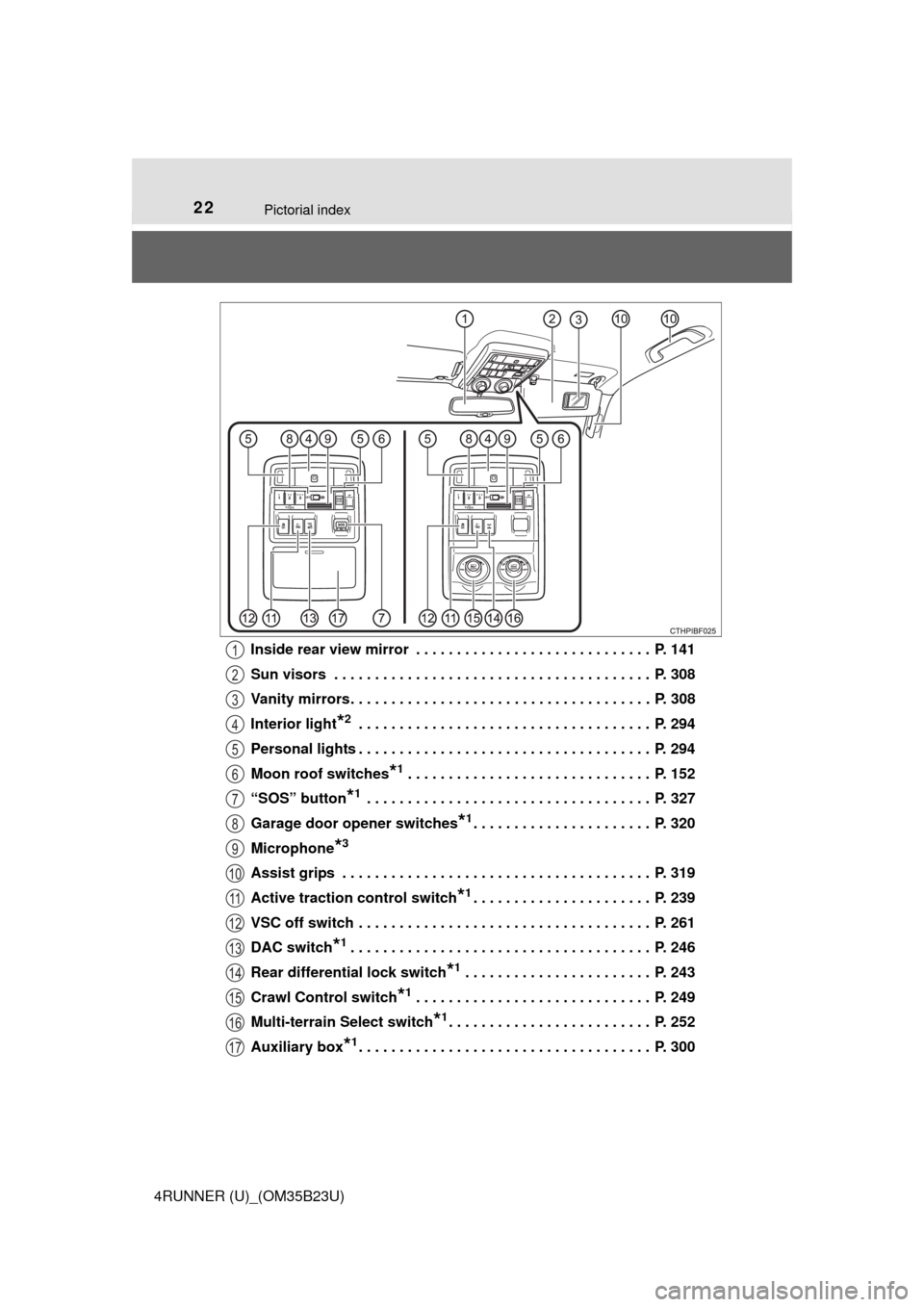
4RUNNER (U)_(OM35B23U)Inside rear view mirror . . . . . . . . . . . . . . . . . . . . . . . . . . . . . P. 141
Sun visors . . . . . . . . . . . . . . . . . . . . . . . . . . . . . . . . . . . . . . . P. 308
Vanity mirrors . . . . . . . . . . . . . . . . . . . . . . . . . . . . . . . . . . . . . P. 308
Interior light
*2 . . . . . . . . . . . . . . . . . . . . . . . . . . . . . . . . . . . . P. 294
Personal lights . . . . . . . . . . . . . . . . . . . . . . . . . . . . . . . . . . . . P. 294
Moon roof switches
*1 . . . . . . . . . . . . . . . . . . . . . . . . . . . . . . P. 152
“SOS” button
*1 . . . . . . . . . . . . . . . . . . . . . . . . . . . . . . . . . . . P. 327
Garage door opener switches
*1. . . . . . . . . . . . . . . . . . . . . . P. 320
Microphone
*3
Assist grips . . . . . . . . . . . . . . . . . . . . . . . . . . . . . . . . . . . . . . P. 319
Active traction control switch
*1. . . . . . . . . . . . . . . . . . . . . . P. 239
VSC off switch . . . . . . . . . . . . . . . . . . . . . . . . . . . . . . . . . . . . P. 261
DAC switch
*1. . . . . . . . . . . . . . . . . . . . . . . . . . . . . . . . . . . . . P. 246
Rear differential lock switch
*1 . . . . . . . . . . . . . . . . . . . . . . . P. 243
Crawl Control switch
*1 . . . . . . . . . . . . . . . . . . . . . . . . . . . . . P. 249
Multi-terrain Select switch
*1. . . . . . . . . . . . . . . . . . . . . . . . . P. 252
Auxiliary box
*1. . . . . . . . . . . . . . . . . . . . . . . . . . . . . . . . . . . . P. 300
1
2
3
4
5
6
7
8
9
10
11
12
13
14
15
16
17
Page 277 of 528

277
Interior features5
4RUNNER (U)_(OM35B23U)5-1. Using the air
conditioning system
and defogger
Manual air conditioning
system............................. 278
Automatic air conditioning
system............................. 284
Seat heaters/seat
ventilators........................ 291
5-2. Using the interior lights
Interior lights list ................ 293
• Interior lights ................. 294
• Personal lights .............. 294
5-3. Using the storage
features
List of storage features ..... 296
• Glove box...................... 297
• Console box .................. 297
• Cup holders .................. 298
• Auxiliary box ................. 300
• Coin holder/tissue
pocket/pen holder ......... 301
• Bottle holders ................ 302
Luggage compartment
features ........................... 3035-4. Other interior features
Other interior features ....... 308
• Sun visors ..................... 308
• Vanity mirrors................ 308
• Clock ............................. 309
• Outside temperature
display........................... 310
• Power outlets
(120 V AC) .................... 311
• Power outlets ................ 316
• Armrest ......................... 318
• Assist grips ................... 319
Garage door opener.......... 320
Safety Connect ................. 327
Page 293 of 528
293
5
Interior features
4RUNNER (U)_(OM35B23U)
5-2. Using the interior lights
Interior lights list
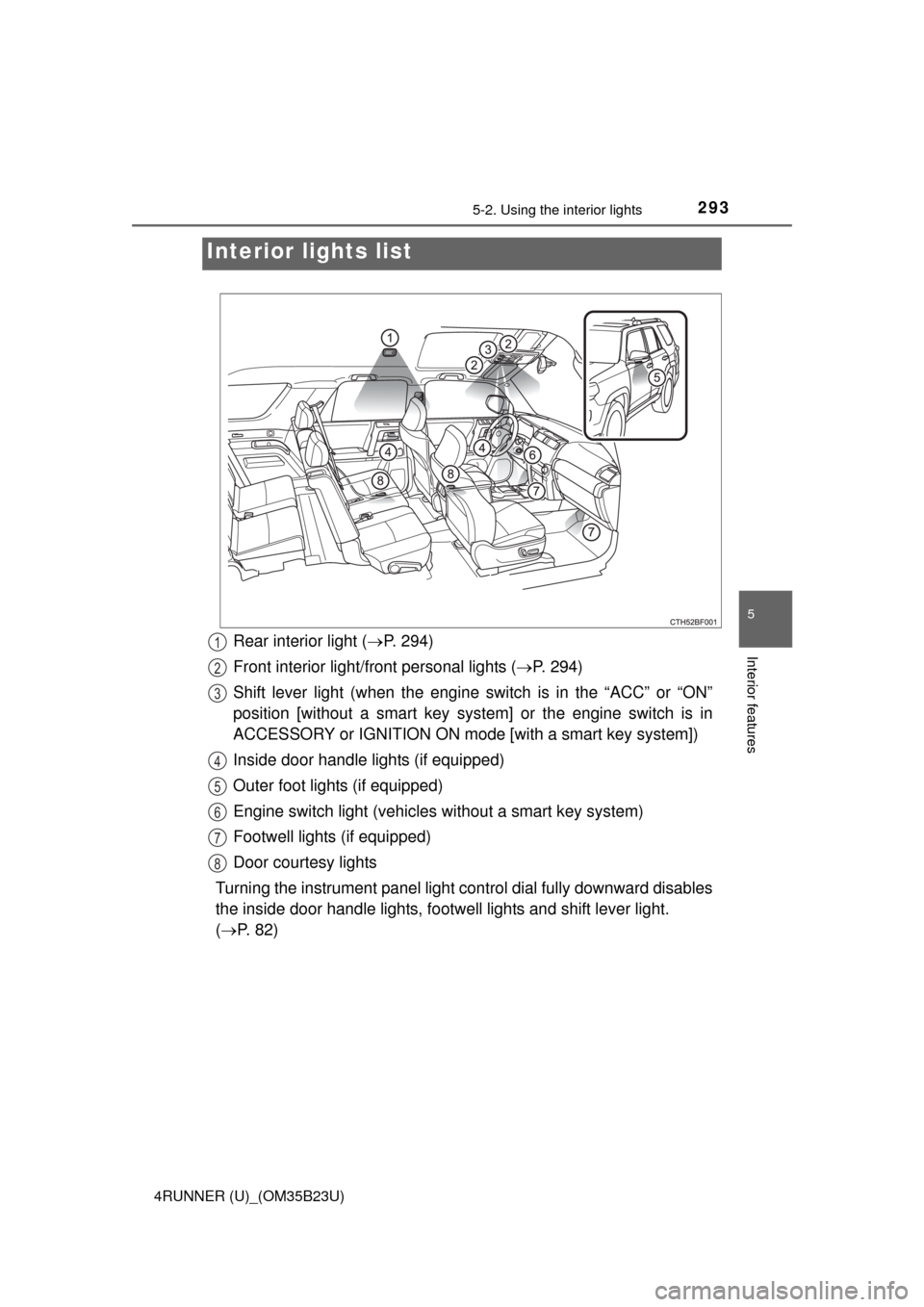
Rear interior light (P. 294)
Front interior light/front personal lights (P. 294)
Shift lever light (when the engine switch is in the “ACC” or “ON”
position [without a smart key system] or the engine switch is in
ACCESSORY or IGNITION ON mode [with a smart key system])
Inside door handle lights (if equipped)
Outer foot lights (if equipped)
Engine switch light (vehicles without a smart key system)
Footwell lights (if equipped)
Door courtesy lights
Turning the instrument panel light control dial fully downward disables
the inside door handle lights, footwell lights and shift lever light.
(P. 82)1
2
3
4
5
6
7
8
Page 294 of 528
2945-2. Using the interior lights
4RUNNER (U)_(OM35B23U)■
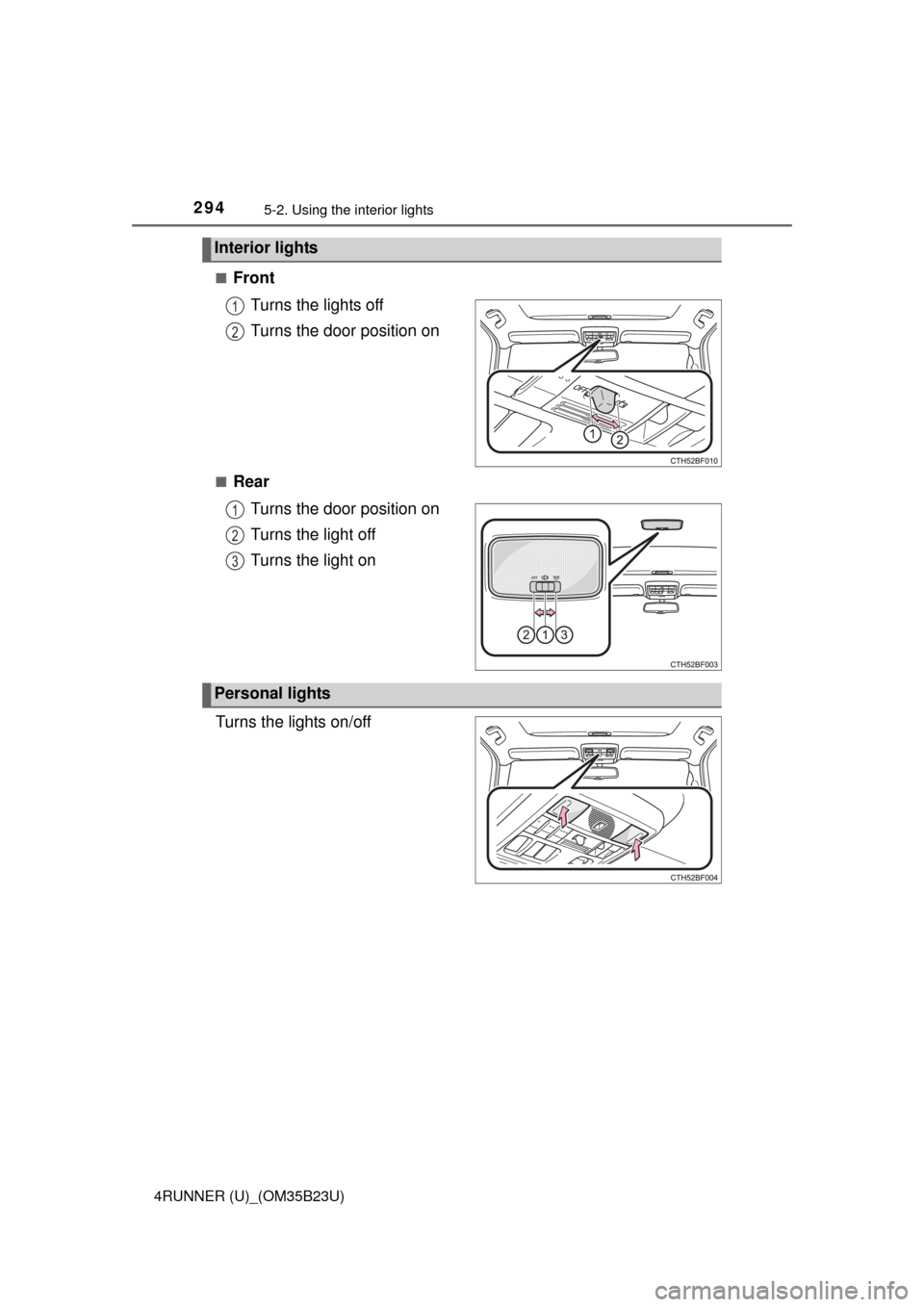
Front
Turns the lights off
Turns the door position on
■Rear
Turns the door position on
Turns the light off
Turns the light on
Turns the lights on/off
Interior lights
1
2
1
2
3
Personal lights
Page 295 of 528
2955-2. Using the interior lights
5
Interior features
4RUNNER (U)_(OM35B23U)
■Illuminated entry system
Vehicles without a smart key system
The lights automatically turn on/off according to the engine switch position,
whether the doors are locked/unlocked, and whether the doors are open/
closed.
Vehicles with a smart key system
The lights automatically turn on/off according to engine switch mode, the
presence of the electronic key, whether the doors are locked/unlocked, and
whether the doors are opened/closed.
■To prevent battery discharge
If the following lights remain on, the lights will go off automatically after 20
minutes:
●Engine switch light
●Front interior light
●Rear interior light
●Personal lights
●Footwell lights
●Inside door handle lights
●Door courtesy lights
■Customization
Setting (e.g. the time elapsed before lights turn off) can be changed.
(Customizable features: P. 485)
NOTICE
■To prevent battery discharge
Do not leave the lights on longer than necessary when the engine is not
running.
Page 308 of 528
308
4RUNNER (U)_(OM35B23U)
5-4. Other interior features
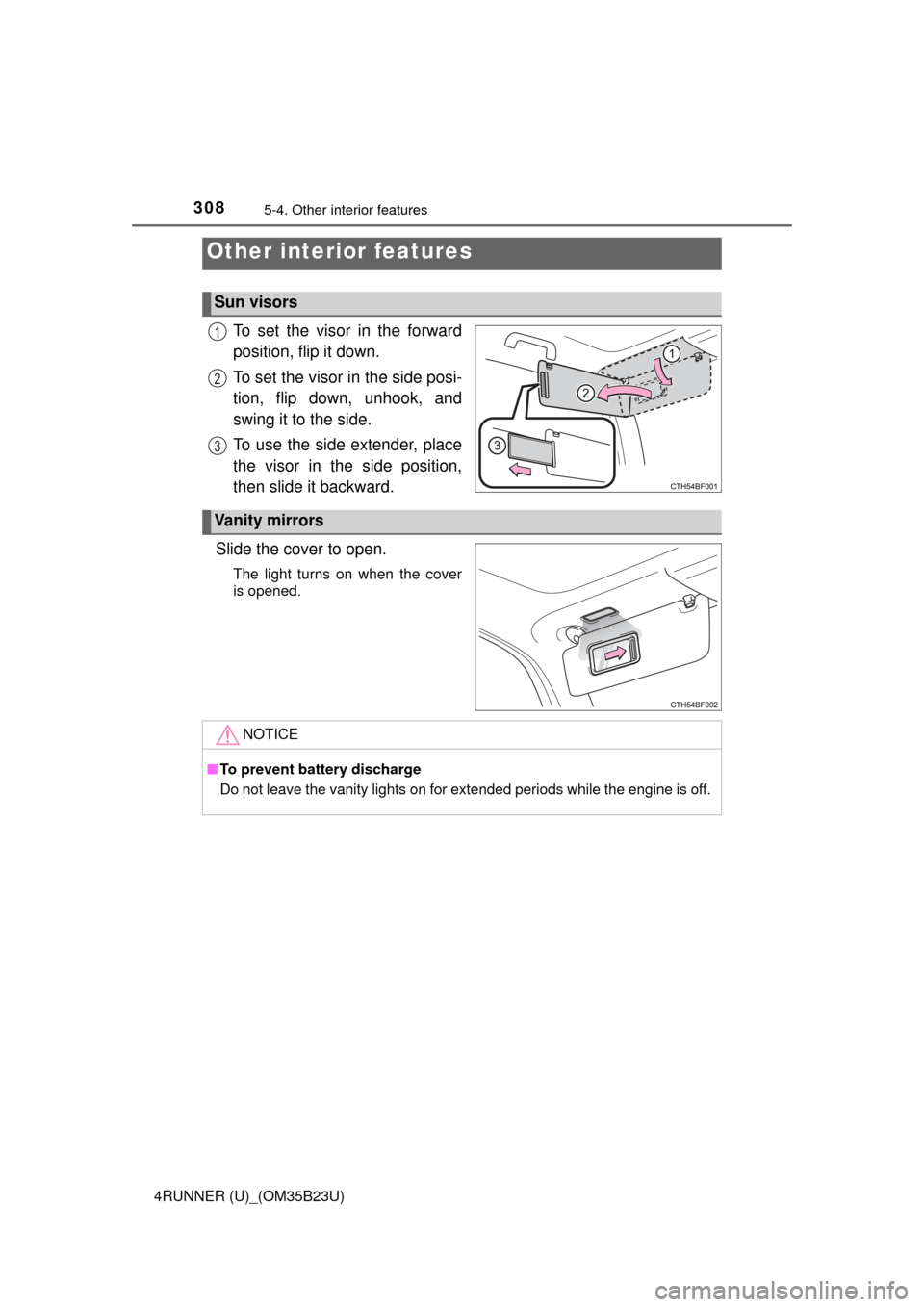
To set the visor in the forward
position, flip it down.
To set the visor in the side posi-
tion, flip down, unhook, and
swing it to the side.
To use the side extender, place
the visor in the side position,
then slide it backward.
Slide the cover to open.
The light turns on when the cover
is opened.
Other interior features
Sun visors
1
2
3
Vanity mirrors
NOTICE
■To prevent battery discharge
Do not leave the vanity lights on for extended periods while the engine is off.
Page 312 of 528
3125-4. Other interior features
4RUNNER (U)_(OM35B23U)
■The power outlet can be used when
The engine is running.
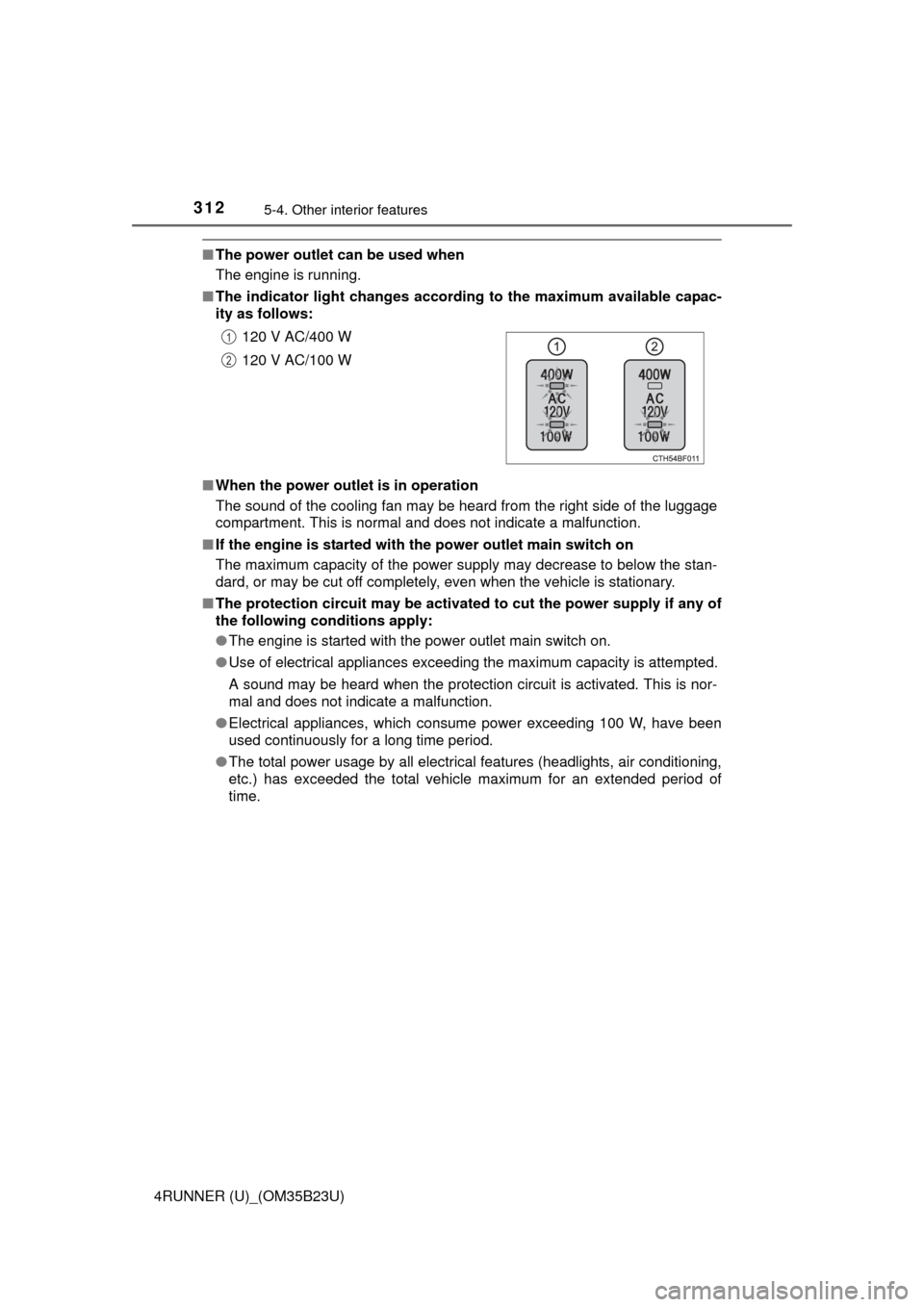
■The indicator light changes according to the maximum available capac-
ity as follows:
■When the power outlet is in operation
The sound of the cooling fan may be heard from the right side of the luggage
compartment. This is normal and does not indicate a malfunction.
■If the engine is started with the power outlet main switch on
The maximum capacity of the power supply may decrease to below the stan-
dard, or may be cut off completely, even when the vehicle is stationary.
■The protection circuit may be activated to cut the power supply if any of
the following conditions apply:
●The engine is started with the power outlet main switch on.
●Use of electrical appliances exceeding the maximum capacity is attempted.
A sound may be heard when the protection circuit is activated. This is nor-
mal and does not indicate a malfunction.
●Electrical appliances, which consume power exceeding 100 W, have been
used continuously for a long time period.
●The total power usage by all electrical features (headlights, air conditioning,
etc.) has exceeded the total vehicle maximum for an extended period of
time.120 V AC/400 W
120 V AC/100 W
1
2
Page 315 of 528
3155-4. Other interior features
5
Interior features
4RUNNER (U)_(OM35B23U)
NOTICE
■To avoid damaging the power outlet and the plug
●Close the power outlet lid when not in use.
●Do not allow foreign objects or liquids to enter the power outlet, as this
may cause a short circuit.
●Do not use plug adaptors to connect too many plugs to the power outlet.
●After removing a plug, gently close the power outlet lid.
■To prevent the fuse from being blown
Do not use a 120 V AC appliance that requires more than the maximum
capacity of the power outlet. If a 120 V AC appliance that consumes more
than the maximum capacity is used, the protection circuit will cut the power
supply.
■Appliances that may not operate properly (120 V AC)
The following 120 V AC appliances may not operate even if their power con-
sumption is under maximum capacity.
●Appliances with high initial peak wattage
●Measuring devices that process precise data.
●Other appliances that require an extremely stable power supply
■To prevent battery discharge
Turn off all the vehicle's electronic equipment and accessories, such as the
headlights and air conditioning, when electrical appliances that consume in
excess of 100 W are used continuously for long periods of time.
■To prevent any damage caused by heat
●Do not use any electrical appliances that give off intense heat, such as
toasters, in any locations including the internal or external trim, seats and
deck.
●Do not use any electrical appliances that are easily affected by vibration or
heat inside the vehicle. Vibration while driving, or the heat of the sun while
parking, may result in damage to those electrical appliances.