charging TOYOTA 4RUNNER 2017 N280 / 5.G Owners Manual
[x] Cancel search | Manufacturer: TOYOTA, Model Year: 2017, Model line: 4RUNNER, Model: TOYOTA 4RUNNER 2017 N280 / 5.GPages: 528, PDF Size: 10.03 MB
Page 73 of 528
731-2. Theft deterrent system
1
For safety and security
4RUNNER (U)_(OM35B37U)
■System maintenance
The vehicle has a maintenance-free type alarm system.
■ Items to check before locking the vehicle
To prevent unexpected triggering of the alarm and vehicle theft, make sure of
the following:
●Nobody is in the vehicle.
● The windows and moon roof are closed before the alarm is set.
● No valuables or other personal items are left in the vehicle.
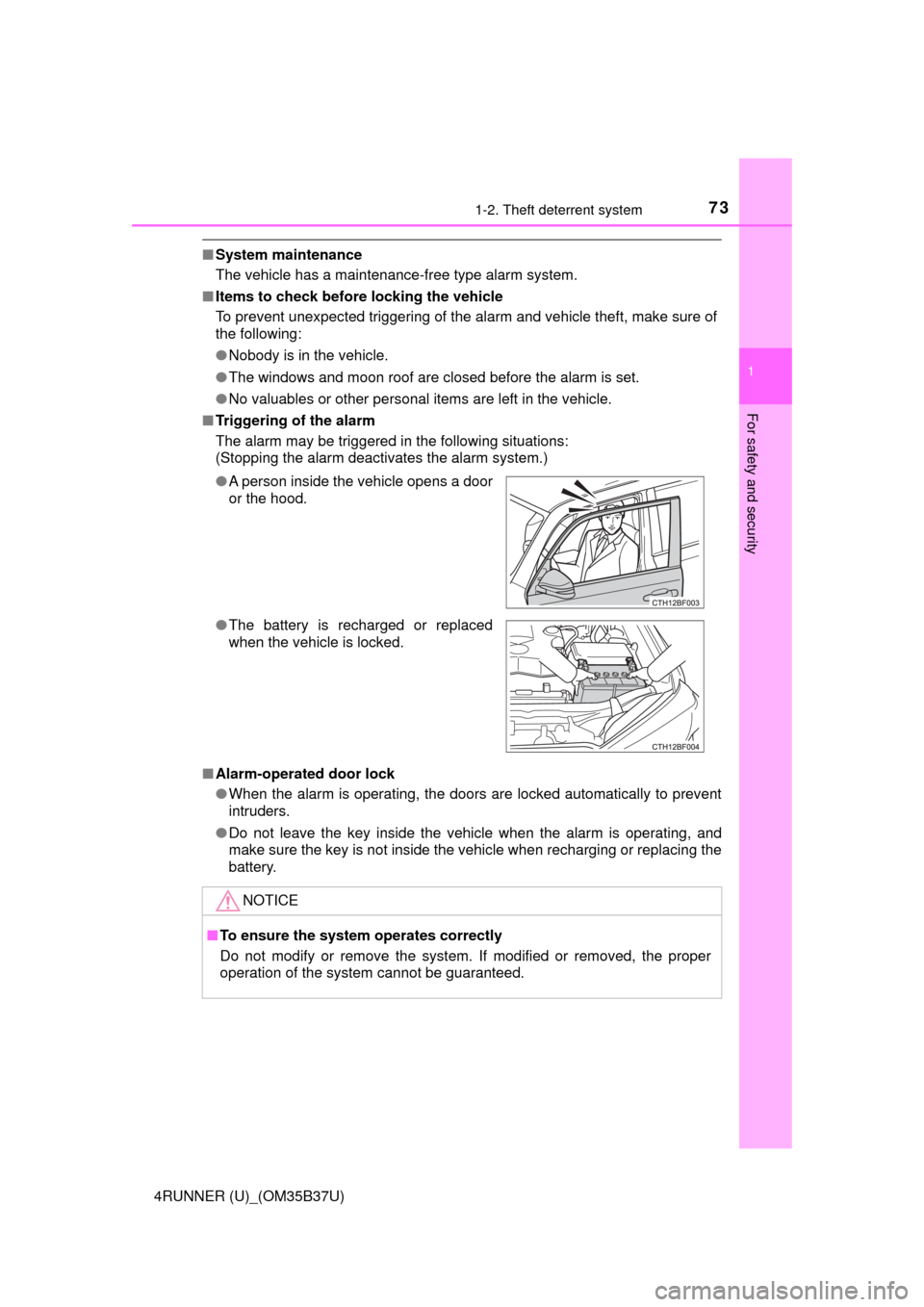
■ Triggering of the alarm
The alarm may be triggered in the following situations:
(Stopping the alarm deactivates the alarm system.)
■ Alarm-operated door lock
●When the alarm is operating, the doors are locked automatically to prevent
intruders.
● Do not leave the key inside the vehicle when the alarm is operating, and
make sure the key is not inside the vehicle when recharging or replacing the
battery.
●
A person inside the vehicle opens a door
or the hood.
● The battery is recharged or replaced
when the vehicle is locked.
NOTICE
■To ensure the system operates correctly
Do not modify or remove the system. If modified or removed, the proper
operation of the system cannot be guaranteed.
Page 77 of 528
772. Instrument cluster
2
Instrument cluster
4RUNNER (U)_(OM35B37U)
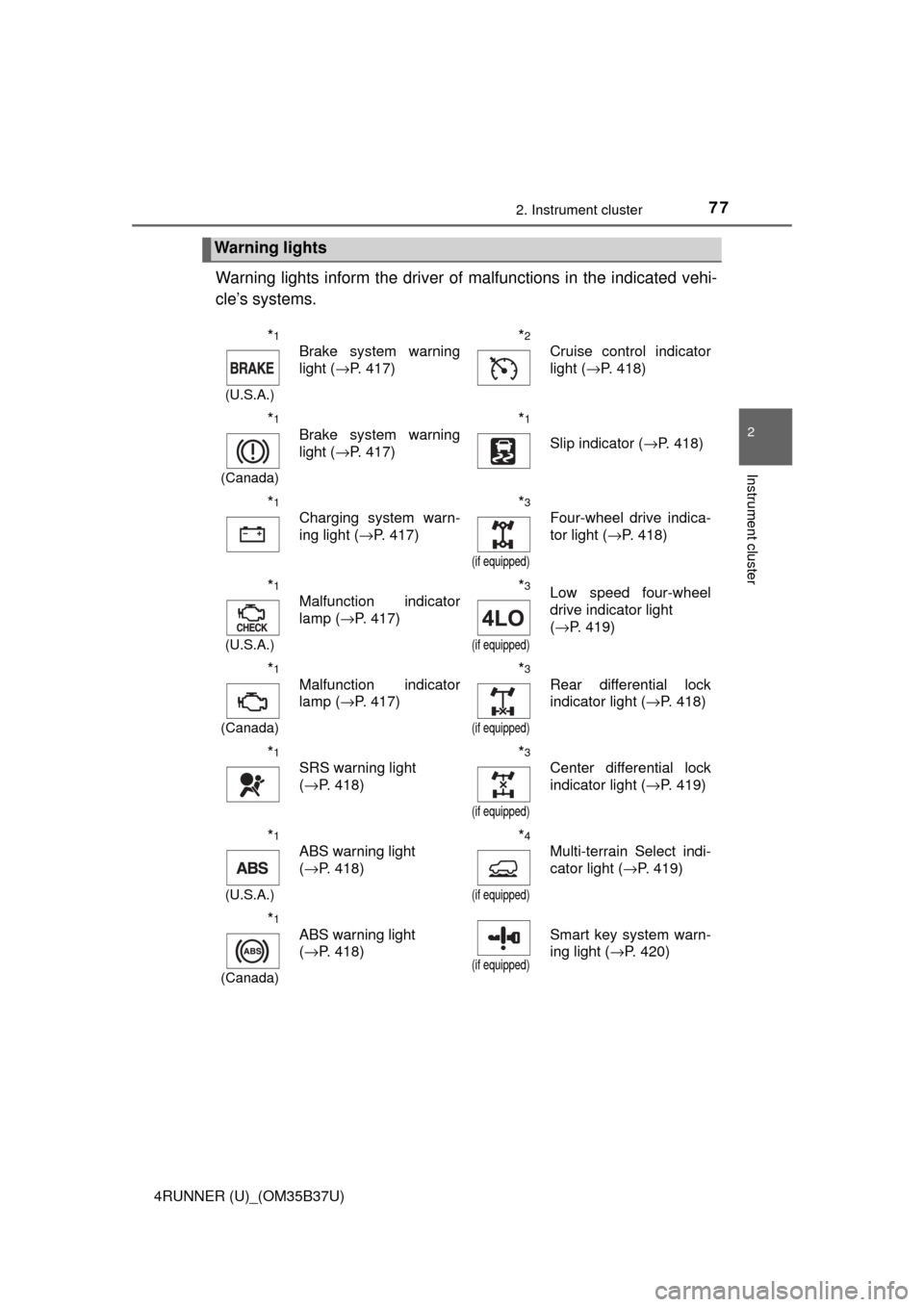
Warning lights inform the driver of malfunctions in the indicated vehi-
cle’s systems.
Warning lights
*1
(U.S.A.)
Brake system warning
light ( →P. 417)*2
Cruise control indicator
light (→P. 418)
*1
(Canada)
Brake system warning
light (→P. 417)*1
Slip indicator ( →P. 418)
*1
Charging system warn-
ing light (→P. 417)*3
(if equipped)
Four-wheel drive indica-
tor light (→P. 418)
*1
(U.S.A.)
Malfunction indicator
lamp (→P. 417)*3
(if equipped)
Low speed four-wheel
drive indicator light
(→P. 419)
*1
(Canada)
Malfunction indicator
lamp ( →P. 417)*3
(if equipped)
Rear differential lock
indicator light ( →P. 418)
*1
SRS warning light
(→P. 418)*3
(if equipped)
Center differential lock
indicator light ( →P. 419)
*1
(U.S.A.)
ABS warning light
(→P. 418)*4
(if equipped)
Multi-terrain Select indi-
cator light ( →P. 419)
*1
(Canada)
ABS warning light
(→P. 418)
(if equipped)
Smart key system warn-
ing light ( →P. 420)
Page 94 of 528
943-1. Key information
4RUNNER (U)_(OM35B37U)■
Key battery depletion
Vehicles with a smart key system
● The standard battery life is 1 to 2 years.
● If the battery becomes low, an alarm will sound in the cabin when the engine
stops. ( →P. 431)
● As the electronic key always receives radio waves, the battery will become
depleted even if the electronic key is not used. The following symptoms indi-
cate that the electronic key battery may be depleted. Replace the battery
when necessary. ( →P. 383)
• The smart key system or the wireless remote control does not operate.
• The detection area becomes smaller.
• The LED indicator on the key surface does not turn on.
● To avoid serious deterioration, do not leave the electronic key within 3 ft. (1
m) of the following electrical appl iances that produce a magnetic field:
•TVs
• Personal computers
• Cellular phones, cordless phones and battery chargers
• Recharging cellular phones or cordless phones
• Table lamps
• Induction cookers
Vehicles without a smart key system
If the wireless remote control function does not operate, the battery may be
depleted. Replace the battery when necessary. (→ P. 383)
■ Precautions when disconnecting the battery (vehicles with a smart key
system)
● In some cases, it may not be possible to unlock the doors using the smart
key system immediately after the battery has been disconnected. Use the
wireless remote control or the mechanical key to lock or unlock the doors.
● The engine may not start on the first attempt after reconnecting the battery
but will start normally after the second attempt. This is not a malfunction.
● The engine switch mode is memorized by the vehicle. When the battery is
reconnected, the system will return to the mode it was in before the battery
was disconnected. Before disconnecting the battery, turn the engine switch
off.
If you are unsure what mode the engine switch was in when the battery was
disconnected, be especially careful when reconnecting the battery.
Page 113 of 528
1133-2. Opening, closing and locking the doors
3
Operation of each component
4RUNNER (U)_(OM35B37U)
■Jam protection function
During Automatic running boards operation:
If a board contacts an obstacle when extending, it will retract. If an obstacle
gets caught between a board and the vehicle when retracting, the board will
extend.
If an obstacle is detected 3 times in a row during Automatic running boards
operation, the board will stop at the position it contacts the obstacle. When a
side door on the same side as the board is opened and closed one more
time, the board will extend and retract, or retract and extend. After this, the
board will resume normal operation.
■ Automatic retraction function
The boards will be automatically retracted, for safety, under the following con-
ditions:
●A board is not completely retracted
● Vehicle speed is approximately 5 mph (8 km/h) or higher
The boards will not automatically extend again when vehicle speed returns to
less than 5 mph (8 km/h).
■ If the Automatic running boards indicator comes on when driving first
commences
A board has not completely retracted. Check that nothing is caught between
the board and the vehicle.
Additionally, if the engine is started immediately after a door has been closed,
the automatic running board may not retract completely and the automatic
running boards indicator may illuminate. In this case, open and close the door
to retract the running board and turn off the indicator.
■ If the Automatic running boa rds indicator light flashes
There may be a malfunction in the Automatic running boards system. Have
the vehicle inspected by your Toyota dealer immediately.
■ When snow or mud is attached to the board or the board is frozen
The Automatic running boards may not operate correctly. Before stepping on
a board, check that it is completely extended. If the Automatic running boards
are not operating correctly, turn the Automatic running boards switch off and
refrain from use.
When removing snow or mud, turn the Automatic running boards switch off.
■ After recharging/reco nnecting the battery
If the Automatic running boards have not completely extended or retracted,
the boards may not move in the intended direction the first time they are oper-
ated. However, from the second time onwards, the boards will resume normal
operation.
■ When getting in and out of the vehicle
Take care because clothes and shoes may become dirty due to contact with
the lower part of the vehicle body.
Page 186 of 528

1864-1. Before driving
4RUNNER (U)_(OM35B37U)
●Avoid jerky starts or sudden acceleration.
● Avoid jerky steering and sharp turns, and slow down before making
turn.
● Note that when making a turn, the trailer wheels will be closer than
the vehicle wheels to the inside of the turn. Compensate by making
a wider than normal turning radius.
● Slow down before making a turn, in cross winds, on wet or slippery
surfaces, etc.
Increasing vehicle speed c an destabilize the trailer.
● Take care when passing other vehicles. Passing requires consider-
able distance. After passing a vehi cle, do not forget the length of
your trailer, and be sure you hav e plenty of room before changing
lanes.
● To maintain engine braking efficiency and charging system perfor-
mance when using engine braking, do not put the transmission in
D.
● Instability happens more frequently when descending steep or long
downhill grades. Before descending, slow down and downshift. Do
not make sudden downshifts while descending steep or long down-
hill grades.
● Avoid holding the brake pedal down too long or applying the brakes
too frequently. This could cause the brakes to overheat and result in
reduced braking efficiency.
● Due to the added load of the trailer, your vehicle’s engine may over-
heat on hot days (at temperatures over 85°F [30°C]) when driving
up a long or steep grade. If t he engine coolant temperature gauge
indicates overheating, immediately turn off the air conditioning (if in
use), pull your vehicle off the road and stop in a safe spot.
( → P. 457)
Page 364 of 528
3646-3. Do-it-yourself maintenance
4RUNNER (U)_(OM35B37U)
Check the battery as follows.
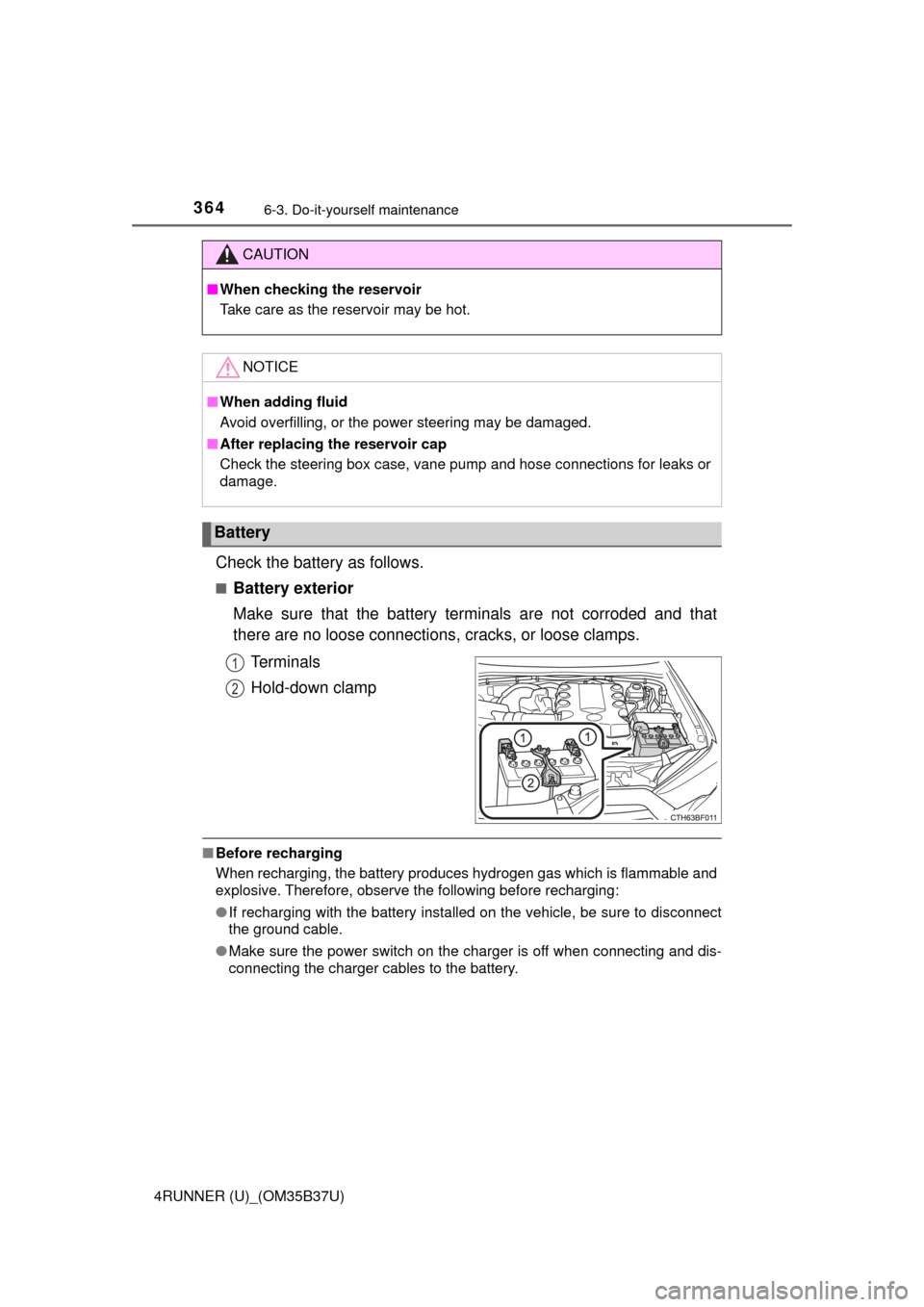
■Battery exterior
Make sure that the battery terminals are not corroded and that
there are no loose connections, cracks, or loose clamps.
Terminals
Hold-down clamp
■ Before recharging
When recharging, the battery produces hydrogen gas which is flammable and
explosive. Therefore, observe the following before recharging:
●If recharging with the battery installed on the vehicle, be sure to disconnect
the ground cable.
● Make sure the power switch on the charger is off when connecting and dis-
connecting the charger cables to the battery.
CAUTION
■When checking the reservoir
Take care as the reservoir may be hot.
NOTICE
■When adding fluid
Avoid overfilling, or the power steering may be damaged.
■ After replacing the reservoir cap
Check the steering box case, vane pump and hose connections for leaks or
damage.
Battery
1
2
Page 365 of 528
3656-3. Do-it-yourself maintenance
6
Maintenance and care
4RUNNER (U)_(OM35B37U)■
After recharging/reconnecting the ba ttery (vehicles with a smart key sys-
tem)
The engine may not start. Follow the procedure below to initialize the system.
Shift the shift lever to P.
Open and close any of the doors.
Restart the engine.
● Unlocking the doors using the smart key system may not be possible imme-
diately after reconnecting the battery. If this happens, use the wireless
remote control or the mechanical key to lock/unlock the doors.
● Start the engine with the engine switch in ACCESSORY mode. The engine
may not start when the engine switch turned from off. However, the engine
will operate normally from the second attempt.
● The engine switch mode is recorded by the vehicle. If the battery is recon-
nected, the vehicle will return the engine switch mode to the status it was in
before the battery was disconnected. Make sure to turn off the engine
before disconnect the battery. Take extra care when connecting the battery
if the engine switch mode prior to discharge is unknown.
If the system will not start even after multiple attempts, contact your Toyota
dealer.
CAUTION
■ Chemicals in the battery
Batteries contain poisonous and corrosive sulfuric acid and may produce
hydrogen gas which is flammable and explosive. To reduce the risk of death
or serious injury, take the following precautions while working on or near the
battery:
● Do not cause sparks by touching the battery terminals with tools.
● Do not smoke or light a match near the battery.
● Avoid contact with eyes, skin and clothes.
● Never inhale or swallow electrolyte.
● Wear protective safety glasses when working near the battery.
● Keep children away from the battery.
1
2
3
Page 366 of 528
3666-3. Do-it-yourself maintenance
4RUNNER (U)_(OM35B37U)
CAUTION
■Where to safely charge the battery
Always charge the battery in an open area. Do not charge the battery in a
garage or closed room where there is insufficient ventilation.
■ How to recharge the battery
Only perform a slow charge (5 A or less). The battery may explode if
charged at a quicker rate.
■ Emergency measures regarding electrolyte
● If electrolyte gets in your eyes
Flush your eyes with clean water for at least 15 minutes and get immedi-
ate medical attention. If possible, continue to apply water with a sponge or
cloth while traveling to the nearest medical facility.
● If electrolyte gets on your skin
Wash the affected area thoroughly. If you feel pain or burning, get medical
attention immediately.
● If electrolyte gets on your clothes
It can soak through clothing on to your skin. Immediately take off the cloth-
ing and follow the procedure above if necessary.
● If you accidentally swallow electrolyte
Drink a large quantity of water or milk. Get emergency medical attention
immediately.
NOTICE
■When recharging the battery
Never recharge the battery while the engine is running. Also, be sure all
accessories are turned off.
Page 417 of 528
4177-2. Steps to take in an emergency
7
When trouble arises
4RUNNER (U)_(OM35B37U)
If a warning light turns on or a warning
buzzer sounds
Calmly perform the following actions if any of the warning lights
comes on or flashes. If a light comes on or flashes, but then
goes off, this does not necessarily indicate a malfunction in the
system. However, if this continues to occur, have the vehicle
inspected by your Toyota dealer.
Warning light and warning buzzer list
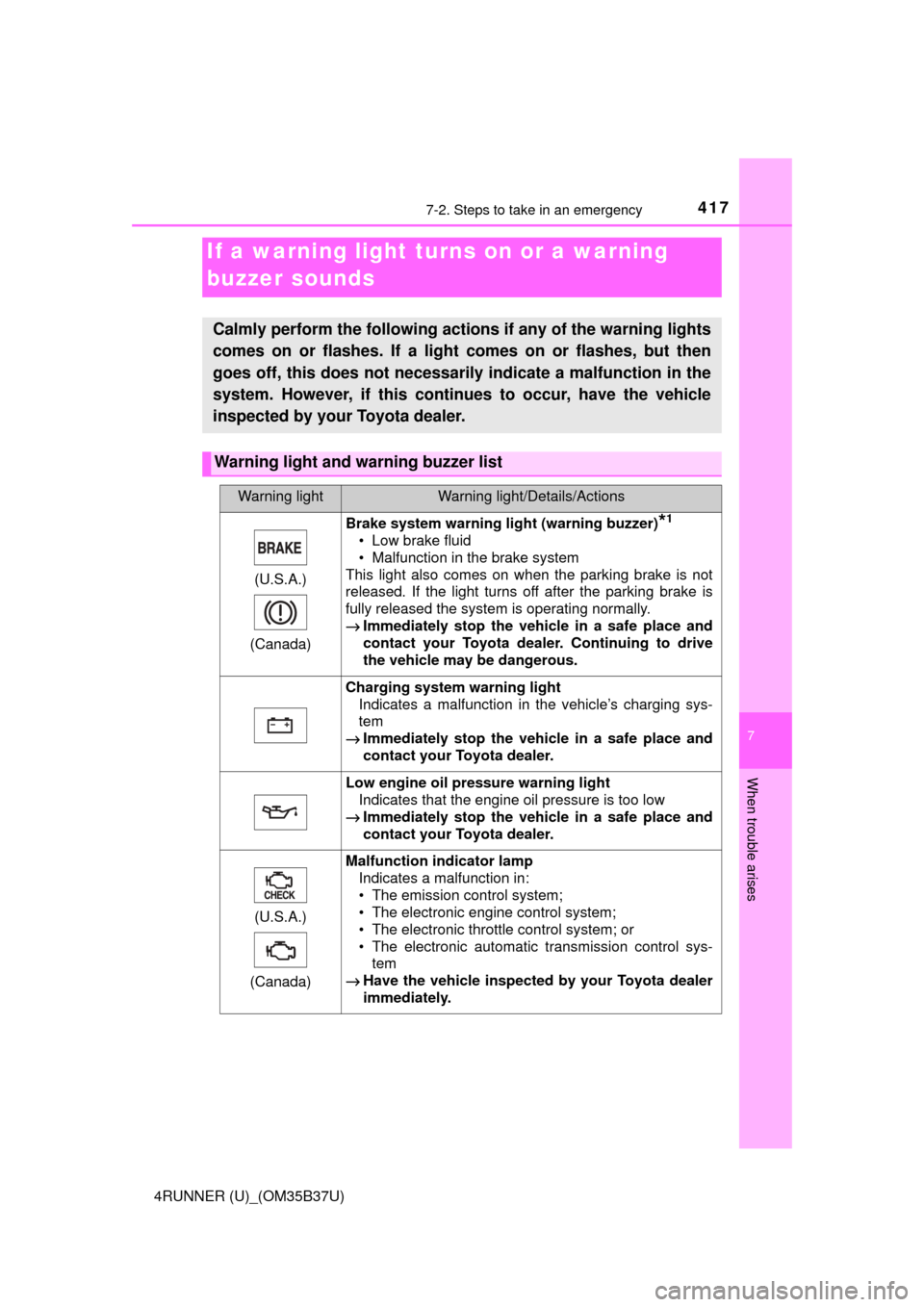
Warning lightWarning light/Details/Actions
(U.S.A.)
(Canada)
Brake system warning light (warning buzzer)*1
• Low brake fluid
• Malfunction in the brake system
This light also comes on when the parking brake is not
released. If the light turns off after the parking brake is
fully released the system is operating normally.
→ Immediately stop the vehicle in a safe place and
contact your Toyota dealer. Continuing to drive
the vehicle may be dangerous.
Charging system warning light
Indicates a malfunction in the vehicle’s charging sys-
tem
→ Immediately stop the vehicle in a safe place and
contact your Toyota dealer.
Low engine oil pressure warning light
Indicates that the engine oil pressure is too low
→ Immediately stop the vehicle in a safe place and
contact your Toyota dealer.
(U.S.A.)
(Canada)
Malfunction indicator lamp Indicates a malfunction in:
• The emission control system;
• The electronic engine control system;
• The electronic throttle control system; or
• The electronic automatic transmission control sys-tem
→ Have the vehicle inspected by your Toyota dealer
immediately.
Page 455 of 528
4557-2. Steps to take in an emergency
7
When trouble arises
4RUNNER (U)_(OM35B37U)
■Starting the engine when the battery is discharged
The engine cannot be started by push-starting.
■ To prevent battery discharge
●Turn off the headlights and the audio system while the engine is off.
● Turn off any unnecessary electrical components when the vehicle is running
at a low speed for an extended period, such as in heavy traffic.
■ Charging the battery
The electricity stored in the battery will discharge gradually even when the
vehicle is not in use, due to natural discharge and the draining effects of cer-
tain electrical appliances. If the vehicle is left for a long time, the battery may
discharge, and the engine may be unable to start. (The battery recharges
automatically during driving.)
■ When recharging or replacing the battery
●Vehicles with a smart key system: In some cases, it may not be possible to
unlock the doors using the smart key system when the battery is dis-
charged. Use the wireless remote control or the mechanical key to lock or
unlock the doors.
● The engine may not start on the first attempt after the battery has recharged
but will start normally after the second attempt. This is not a malfunction.
● Vehicles with a smart key system: The engine switch mode is memorized by
the vehicle. When the battery is reconnected, the system will return to the
mode it was in before the battery was discharged. Before disconnecting the
battery, turn the engine switch off.
If you are unsure what mode the engine switch was in before the battery dis-
charged, be especially careful when reconnecting the battery.
● Make sure that the key is not inside the vehicle when recharging or replac-
ing the battery. The key may be locked in the vehicle if the alarm is acti-
vated. ( →P. 73)