key TOYOTA 4RUNNER 2019 Accessories, Audio & Navigation (in English)
[x] Cancel search | Manufacturer: TOYOTA, Model Year: 2019, Model line: 4RUNNER, Model: TOYOTA 4RUNNER 2019Pages: 286, PDF Size: 5.4 MB
Page 32 of 286
32
4RUNNER_Navi_U
1. BASIC INFORMATION BEFORE OPERATION
1. INITIAL SCREEN
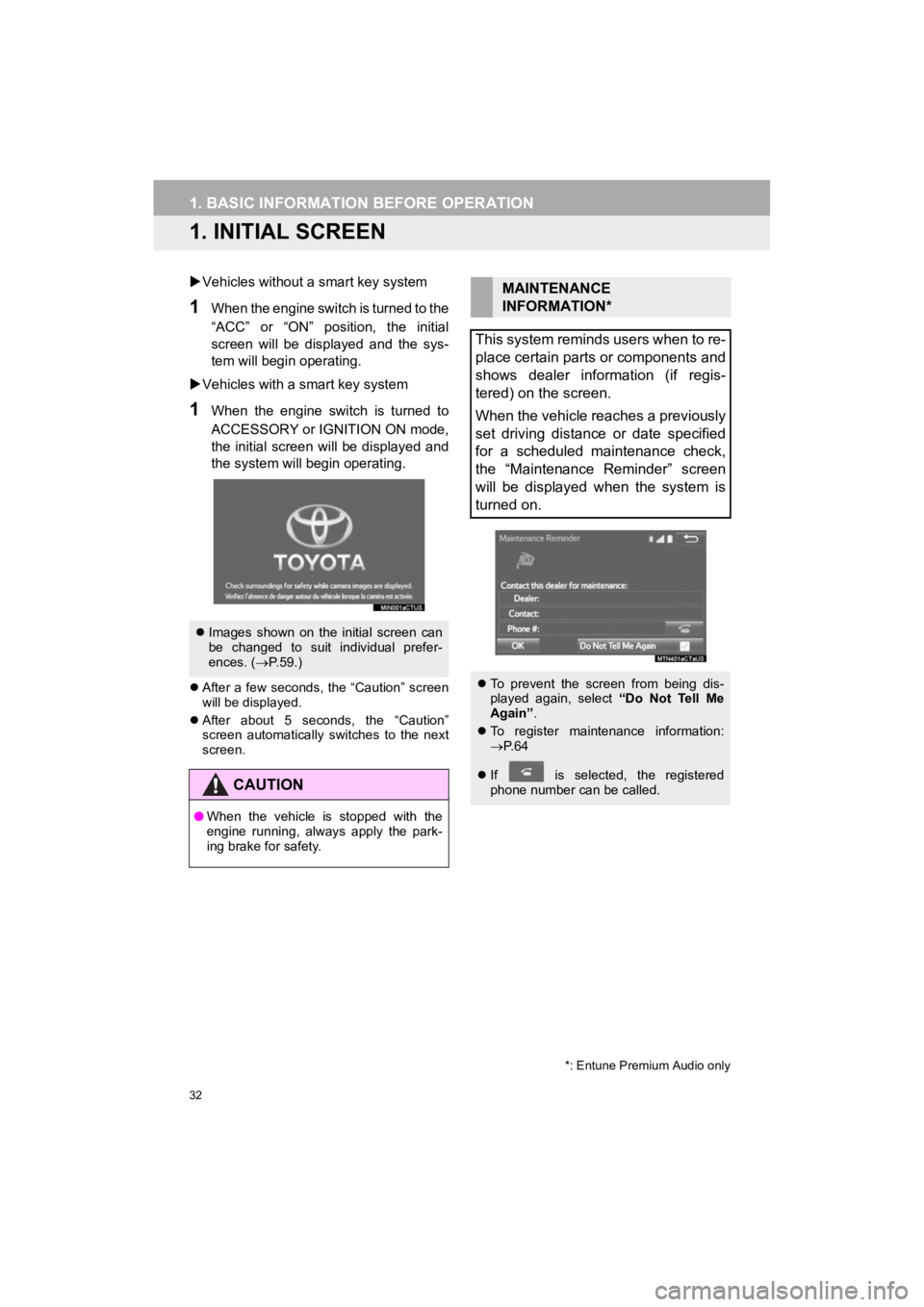
Vehicles without a smart key system
1When the engine switch is turned to the
“ACC” or “ON” position, the initial
screen will be displayed and the sys-
tem will begin operating.
Vehicles with a smart key system
1When the engine switch is turned to
ACCESSORY or IGNITION ON mode,
the initial screen will be displayed and
the system will begin operating.
After a few seconds, the “Caution” screen
will be displayed.
After about 5 seconds, the “Caution”
screen automatically switches to the next
screen.
Images shown on the initial screen can
be changed to suit individual prefer-
ences. ( P.59.)
CAUTION
● When the vehicle is stopped with the
engine running, always apply the park-
ing brake for safety.
*: Entune Premium Audio only
MAINTENANCE
INFORMATION*
This system reminds users when to re-
place certain parts or components and
shows dealer information (if regis-
tered) on the screen.
When the vehicle reaches a previously
set driving distance or date specified
for a scheduled maintenance check,
the “Maintenance Reminder” screen
will be displayed when the system is
turned on.
To prevent the screen from being dis-
played again, select “Do Not Tell Me
Again” .
To register maintenance information:
P. 6 4
If is selected, the registered
phone number can be called.
Page 37 of 286
37
1. BASIC INFORMATION BEFORE OPERATION
4RUNNER_Navi_U
BASIC FUNCTION
2
5. ENTERING LETTERS AND NUMBERS/LIST SCREEN OPERATION
On certain letter entry screens, letters can
be entered in upper or lower case.
: Select to enter in lower case.
: Select to enter in upper case.
1Enter characters and select “OK”.
Matching items from the database are
listed even if the entered address or name
is incomplete.
The list will be displayed automatically if
the maximum number of characters is
entered or matching items can be dis-
played on a single list screen.
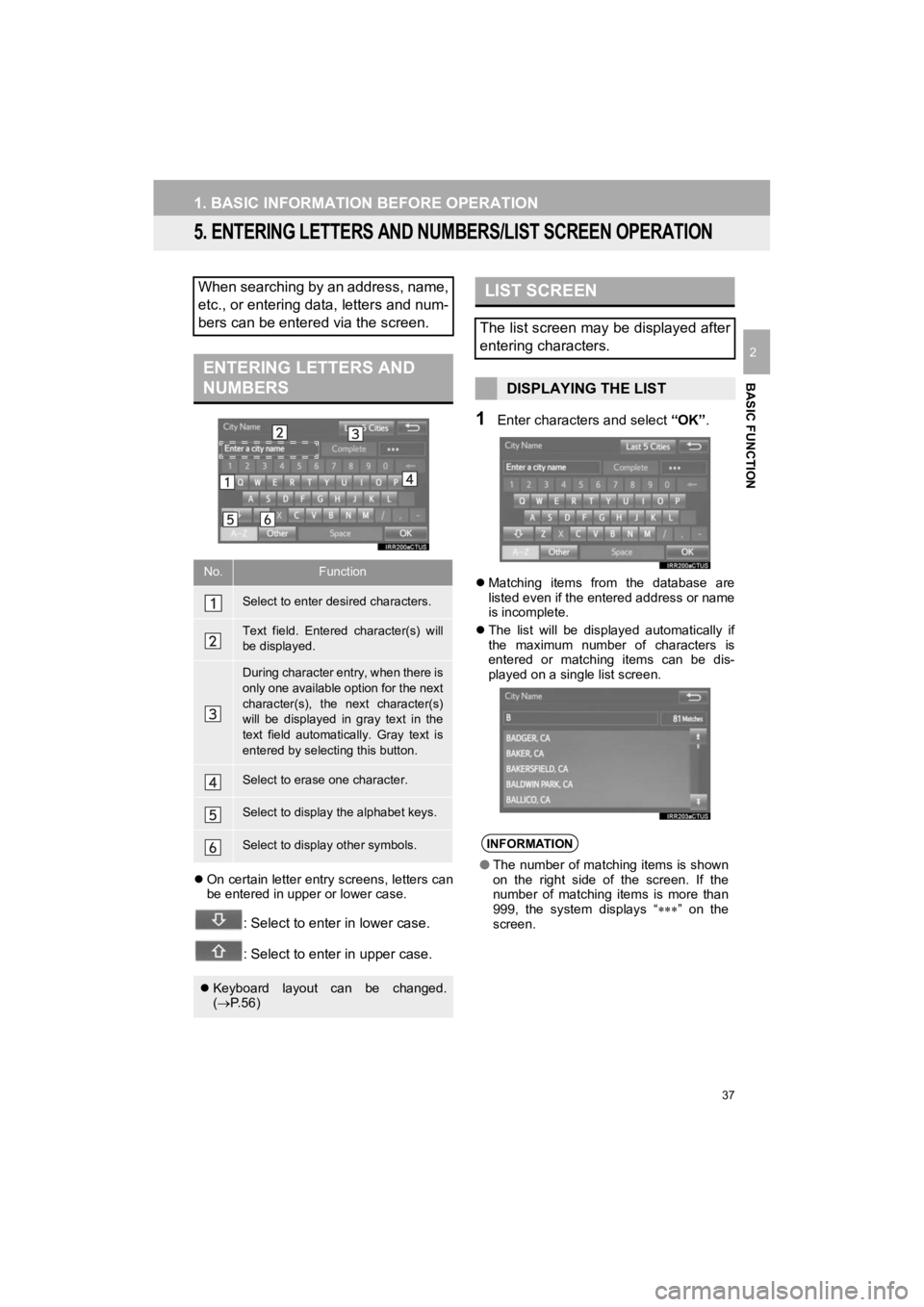
When searching by an address, name,
etc., or entering data, letters and num-
bers can be entered via the screen.
ENTERING LETTERS AND
NUMBERS
No.Function
Select to enter desired characters.
Text field. Entered character(s) will
be displayed.
During character entry, when there is
only one available option for the next
character(s), the next character(s)
will be displayed in gray text in the
text field automatically. Gray text is
entered by selecting this button.
Select to erase one character.
Select to display the alphabet keys.
Select to display other symbols.
Keyboard layout can be changed.
( P.56)
LIST SCREEN
The list screen may be displayed after
entering characters.
DISPLAYING THE LIST
INFORMATION
● The number of matching items is shown
on the right side of the screen. If the
number of matching items is more than
999, the system displays “ ” on the
screen.
Page 52 of 286

52
2. Bluetooth® SETTINGS
4RUNNER_Navi_U
■AUTO CONNECTION MODE
Vehicles without a smart key system
When the engine switch is turned to the
“ACC” or “ON” position, the system
searches for a nearby registered device.
The system will connect with the regis-
tered device that was last connected, if it
is nearby.
Vehicles with a smart key system
When the engine switch is turned to
ACCESSORY or IGNITION ON mode, the
system searches for a nearby registered
device.
The system will connect with the regis-
tered device that was last connected, if it
is nearby.
■CONNECTING MANUALLY
1Press the “APPS” button and select
“Setup” .
2Select “Bluetooth*” .
3Follow the steps in “CONNECTING A
Bluetooth
® DEVICE” from “STEP 2”.
(P.51)
*: Bluetooth is a registered trademark of Bluetooth SIG, Inc.
■RECONNECTING THE Bluetooth®
PHONE
To turn auto connection mode on, set
“Bluetooth* Power” to on. ( P.54)
Leave the Bluetooth
® device in a loca-
tion where the connection can be es-
tablished.
When the auto connection has failed or
“Bluetooth* Power” is turned off, it is
necessary to connect Bluetooth
® man-
ually.
If a Bluetooth® phone is disconnected
due to poor reception from the
Bluetooth
® network when the engine
switch is in the following, the system
automatically reconnects the
Bluetooth
® phone.
Vehicles without a smart key system
The engine switch is in the “ACC” or
“ON” position.
Vehicles with a smart key system
The engine switch is in ACCESSORY
or IGNITION ON mode.
Page 55 of 286
55
2. Bluetooth® SETTINGS
4RUNNER_Navi_U
BASIC FUNCTION
21Select “Bluetooth* Power” .
When “Bluetooth* Power” is on:
Vehicles without a smart key system
The Bluetooth
® device is automatically
connected when the engine switch is
turned to the “ACC” or “ON” position.
Vehicles with a smart key system
The Bluetooth
® device is automatically
connected when the engine switch is
turned to ACCESSORY or IGNITION
ON mode.
When “Bluetooth* Power” is off :
The Bluetooth
® device is disconnected,
and the system will not connect to it next
time.
1Select “Bluetooth* Name” .
2Enter a name and select “OK”.
1Select “Bluetooth* PIN” .
2Enter a PIN-code and select “OK”.
*: Bluetooth is a registered trademark of Bluetooth SIG, Inc.
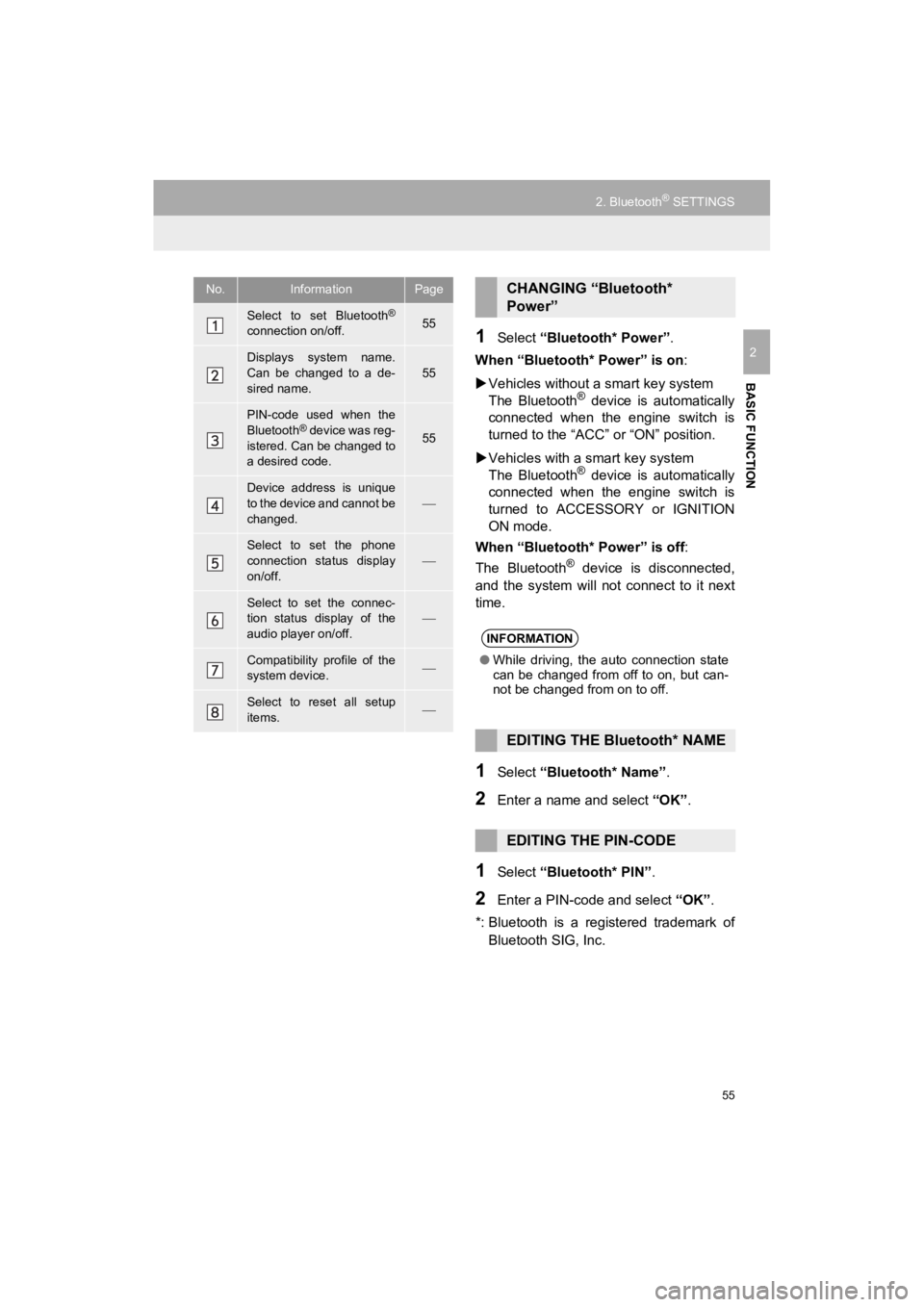
No.InformationPage
Select to set Bluetooth®
connection on/off.55
Displays system name.
Can be changed to a de-
sired name.55
PIN-code used when the
Bluetooth® device was reg-
istered. Can be changed to
a desired code.55
Device address is unique
to the device and cannot be
changed.
Select to set the phone
connection status display
on/off.
Select to set the connec-
tion status display of the
audio player on/off.
Compatibility profile of the
system device.
Select to reset all setup
items.
CHANGING “Bluetooth*
Power”
INFORMATION
● While driving, the auto connection state
can be changed from off to on, but can-
not be changed from on to off.
EDITING THE Bluetooth* NAME
EDITING THE PIN-CODE
Page 57 of 286
57
3. OTHER SETTINGS
4RUNNER_Navi_U
BASIC FUNCTION
2
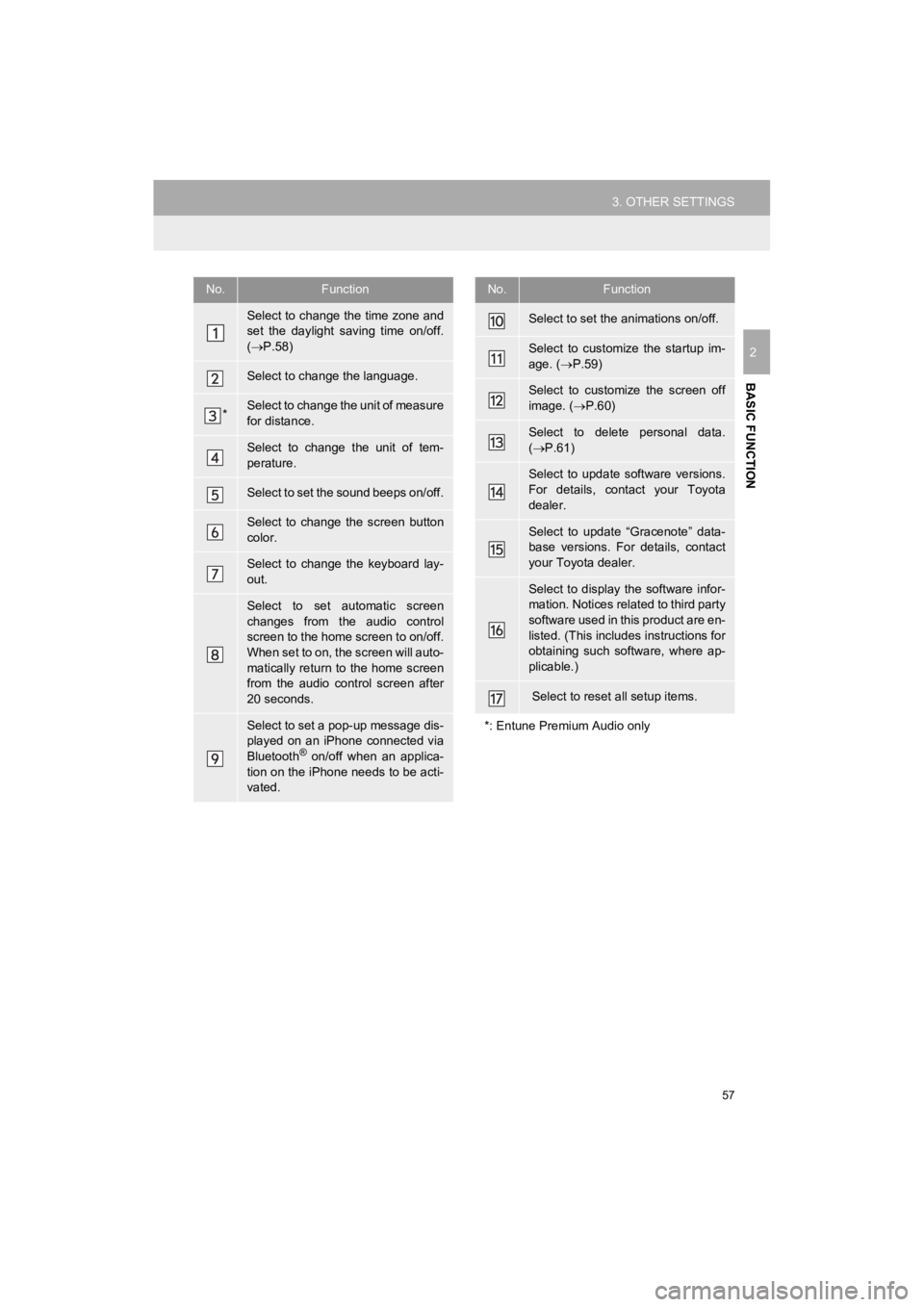
No.Function
Select to change the time zone and
set the daylight saving time on/off.
( P.58)
Select to change the language.
*Select to change the unit of measure
for distance.
Select to change the unit of tem-
perature.
Select to set the sound beeps on/off.
Select to change the screen button
color.
Select to change the keyboard lay-
out.
Select to set automatic screen
changes from the audio control
screen to the home screen to on/off.
When set to on, the screen will auto-
matically return to the home screen
from the audio control screen after
20 seconds.
Select to set a pop-up message dis-
played on an iPhone connected via
Bluetooth
® on/off when an applica-
tion on the iPhone needs to be acti-
vated.
Select to set the animations on/off.
Select to customize the startup im-
age. ( P.59)
Select to customize the screen off
image. ( P.60)
Select to delete personal data.
( P.61)
Select to update software versions.
For details, contact your Toyota
dealer.
Select to update “Gracenote” data-
base versions. For details, contact
your Toyota dealer.
Select to display the software infor-
mation. Notices related to third party
software used in this product are en-
listed. (This includes instructions for
obtaining such software, where ap-
plicable.)
Select to reset all setup items.
*: Entune Premium Audio only
No.Function
Page 59 of 286
59
3. OTHER SETTINGS
4RUNNER_Navi_U
BASIC FUNCTION
2
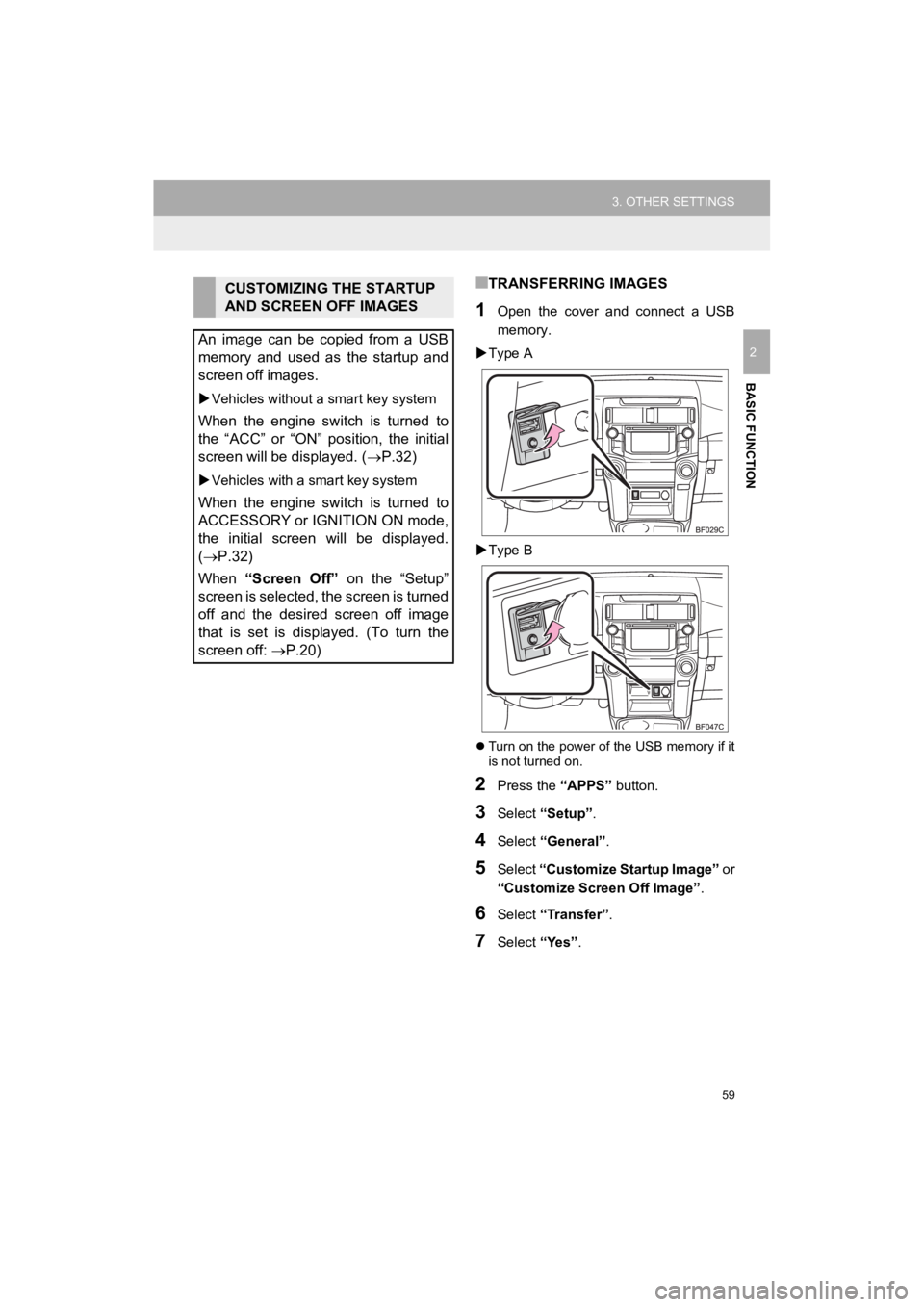
■TRANSFERRING IMAGES
1Open the cover and connect a USB
memory.
Type A
Type B
Turn on the power of the USB memory if it
is not turned on.
2Press the “APPS” button.
3Select “Setup” .
4Select “General” .
5Select “Customize Startup Image” or
“Customize Screen Off Image” .
6Select “Transfer”.
7Select “Yes”.
CUSTOMIZING THE STARTUP
AND SCREEN OFF IMAGES
An image can be copied from a USB
memory and used as the startup and
screen off images.
Vehicles without a smart key system
When the engine switch is turned to
the “ACC” or “ON” position, the initial
screen will be displayed. ( P.32)
Vehicles with a smart key system
When the engine switch is turned to
ACCESSORY or IGNITION ON mode,
the initial screen will be displayed.
(P.32)
When “Screen Off” on the “Setup”
screen is selected, the screen is turned
off and the desired screen off image
that is set is displayed. (To turn the
screen off: P.20)
Page 61 of 286
61
3. OTHER SETTINGS
4RUNNER_Navi_U
BASIC FUNCTION
2
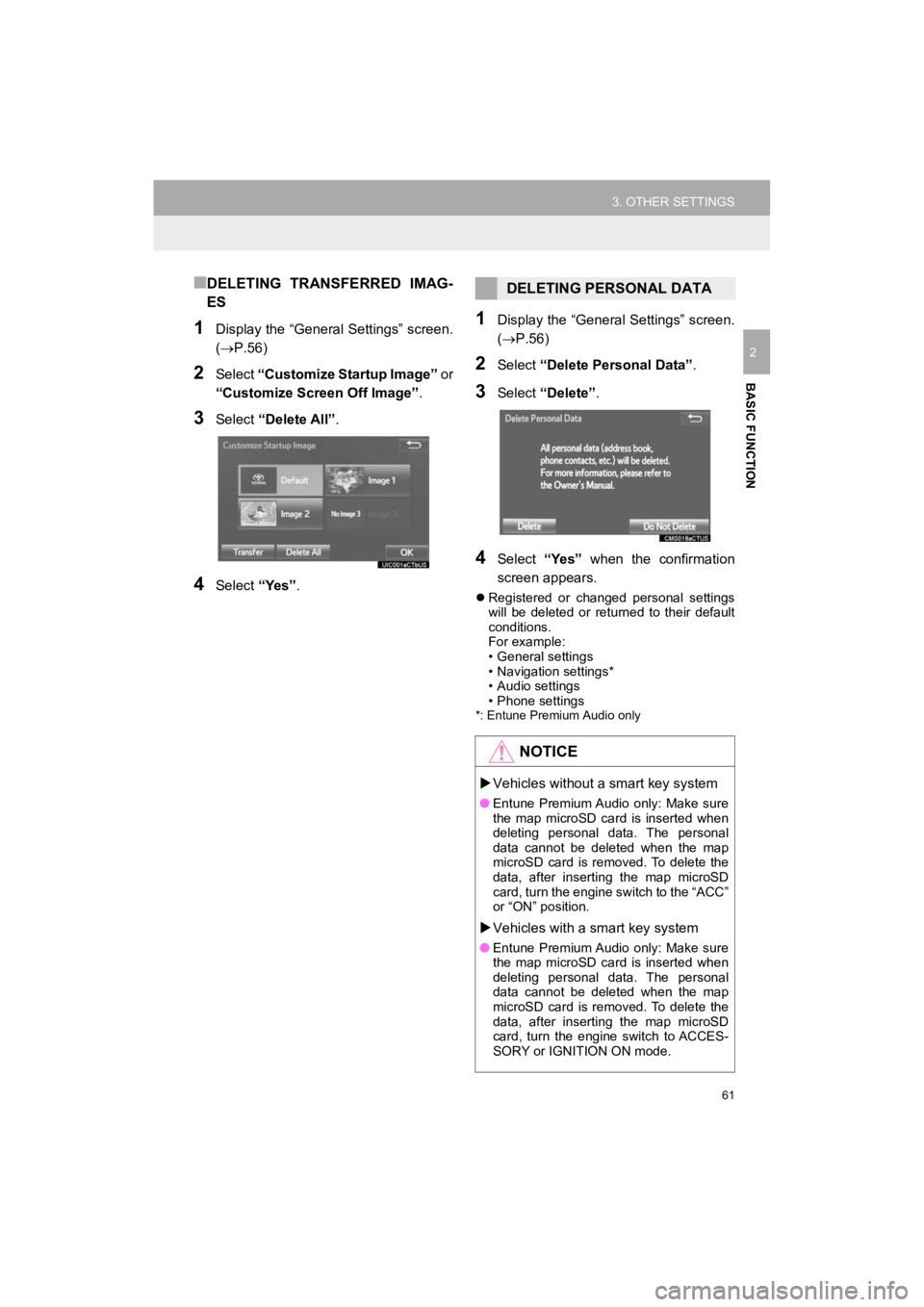
■DELETING TRANSFERRED IMAG-
ES
1Display the “General Settings” screen.
(P.56)
2Select “Customize Startup Image” o r
“Customize Screen Off Image” .
3Select “Delete All” .
4Select “Yes”.
1Display the “General Settings” screen.
(P.56)
2Select “Delete Personal Data” .
3Select “Delete” .
4Select “Yes” when the confirmation
screen appears.
Registered or changed personal settings
will be deleted or returned to their default
conditions.
For example:
• General settings
• Navigation settings*
• Audio settings
• Phone settings
*: Entune Premium Audio only
DELETING PERSONAL DATA
NOTICE
Vehicles without a smart key system
●Entune Premium Audio only: Make sure
the map microSD card is inserted when
deleting personal data. The personal
data cannot be deleted when the map
microSD card is removed. To delete the
data, after inserting the map microSD
card, turn the engine switch to the “ACC”
or “ON” position.
Vehicles with a smart key system
●Entune Premium Audio only: Make sure
the map microSD card is inserted when
deleting personal data. The personal
data cannot be deleted when the map
microSD card is removed. To delete the
data, after inserting the map microSD
card, turn the engine switch to ACCES-
SORY or IGNITION ON mode.
Page 72 of 286
72
1. BASIC OPERATION
4RUNNER_Navi_U
2. SOME BASICS
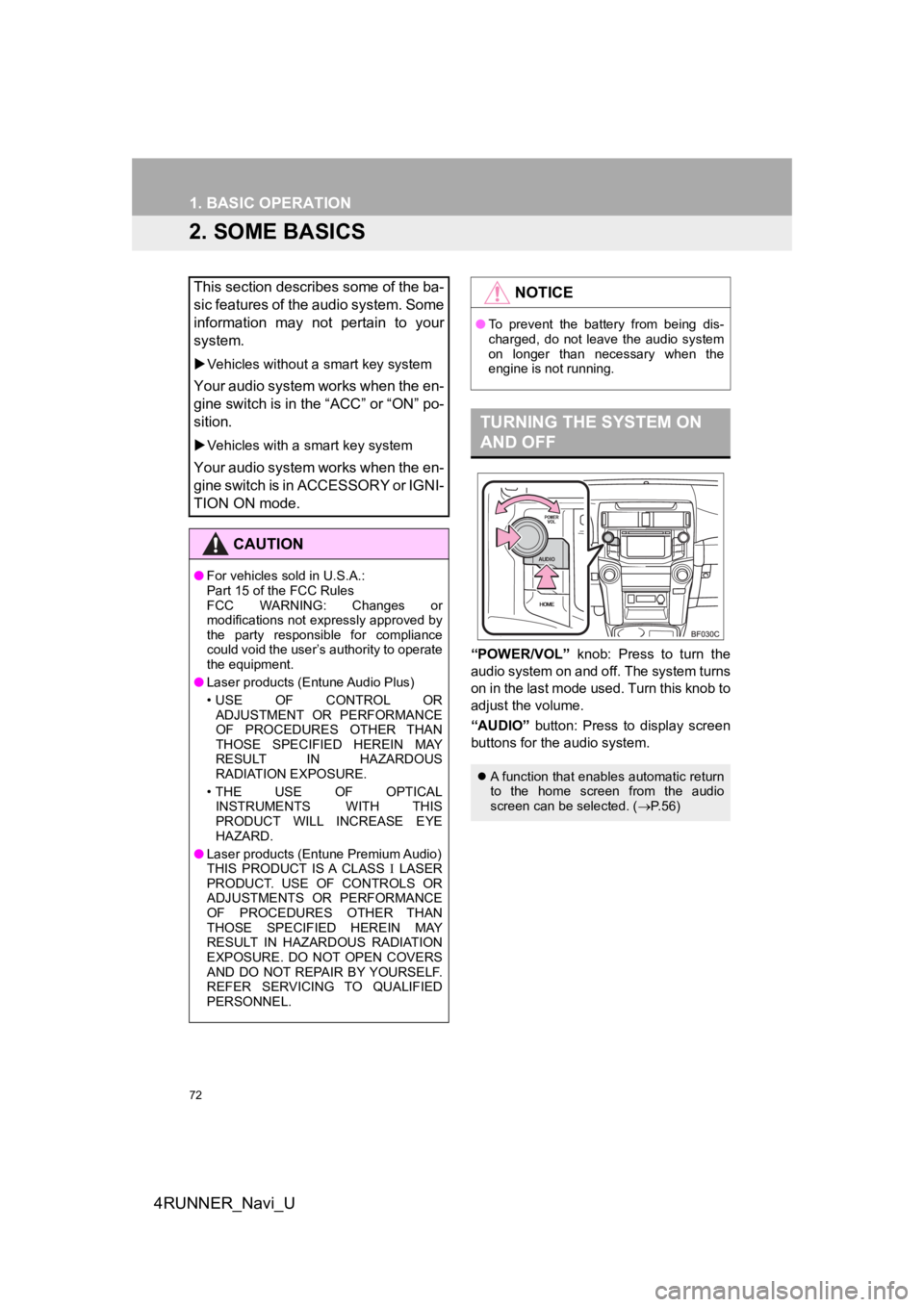
“POWER/VOL” knob: Press to turn the
audio system on and o ff. The system turns
on in the last mode used. Turn this knob to
adjust the volume.
“AUDIO” button: Press to display screen
buttons for the audio system.
This section describes some of the ba-
sic features of the audio system. Some
information may not pertain to your
system.
Vehicles without a smart key system
Your audio system works when the en-
gine switch is in the “ACC” or “ON” po-
sition.
Vehicles with a smart key system
Your audio system works when the en-
gine switch is in ACCESSORY or IGNI-
TION ON mode.
CAUTION
●For vehicles sold in U.S.A.:
Part 15 of the FCC Rules
FCC WARNING: Changes or
modifications not expressly approved by
the party responsible for compliance
could void the user’s authority to operate
the equipment.
● Laser products (Entune Audio Plus)
• USE OF CONTROL OR
ADJUSTMENT OR PERFORMANCE
OF PROCEDURES OTHER THAN
THOSE SPECIFIED HEREIN MAY
RESULT IN HAZARDOUS
RADIATION EXPOSURE.
•THE USE OF OPTICAL INSTRUMENTS WITH THIS
PRODUCT WILL INCREASE EYE
HAZARD.
● Laser products (Entune Premium Audio)
THIS PRODUCT IS A CLASS LASER
PRODUCT. USE OF CONTROLS OR
ADJUSTMENTS OR PERFORMANCE
OF PROCEDURES OTHER THAN
THOSE SPECIFIED HEREIN MAY
RESULT IN HAZARDOUS RADIATION
EXPOSURE. DO NOT OPEN COVERS
AND DO NOT REPAIR BY YOURSELF.
REFER SERVICING TO QUALIFIED
PERSONNEL.
NOTICE
● To prevent the battery from being dis-
charged, do not leave the audio system
on longer than necessary when the
engine is not running.
TURNING THE SYSTEM ON
AND OFF
A function that enables automatic return
to the home screen from the audio
screen can be selected. ( P. 5 6 )
Page 108 of 286
108
3. MEDIA OPERATION
4RUNNER_Navi_U
CAUTION
●Do not operate the player’s controls or connect to the Bluetoot h® audio system while driv-
ing.
● Your audio unit is fitted with Bluetooth
® antennas. People with implantable cardiac pace-
makers, cardiac resynchronization therapy-pacemakers or implant able cardioverter
defibrillators should maintain a reasonable distance between th emselves and the
Bluetooth
® antennas. The radio waves may affect the operation of such dev ices.
● Before using Bluetooth
® devices, users of any electrical medical device other than
implantable cardiac pacemakers, cardiac resynchronization thera py-pacemakers or
implantable cardioverter defibrillators should consult the manu facturer of the device for
information about its operation under the influence of radio waves. Radio waves could
have unexpected effects on the operation of such medical device s.
NOTICE
●Do not leave your portable player in the vehicle. In particular, high temperatures inside
the vehicle may damage the portable player.
INFORMATION
●Depending on the Bluetooth® device that is connected to the system, the music may start
playing when selecting while it is paused. Conversely, the mus ic may pause when
selecting while it is playing.
● In the following conditions, the system may not function:
• The Bluetooth
® device is turned off.
• The Bluetooth
® device is not connected.
• The Bluetooth
® device has a low battery.
● It may take time to connect the phone when Bluetooth
® audio is being played.
● For operating the portable player, see the instruction manual that comes with it.
● If the Bluetooth
® device is disconnected due to poor reception from the Bluetoot h® net-
work when the engine switch is in the following, the system wil l automatically reconnect
to the portable player.
Vehicles without a smart key system
The engine switch is in the “ACC” or “O N” position.
Vehicles with a smart key system
The engine switch is in ACCESSORY or IGNITION ON mode.
●If the Bluetooth® device is disconnected on purpose, such as it was turned off, this does
not happen. Reconnect the portable player manually.
● Bluetooth
® device information is registered when the Bluetooth® device is connected to
the Bluetooth® audio system. When selling or disposing of the vehicle, remove the
Bluetooth® audio information from the system. ( P. 6 1 )
Page 147 of 286
147
1. REAR VIEW MONITOR SYSTEM
PERIPHERAL MONITORING SYSTEM
4RUNNER_Navi_U
6
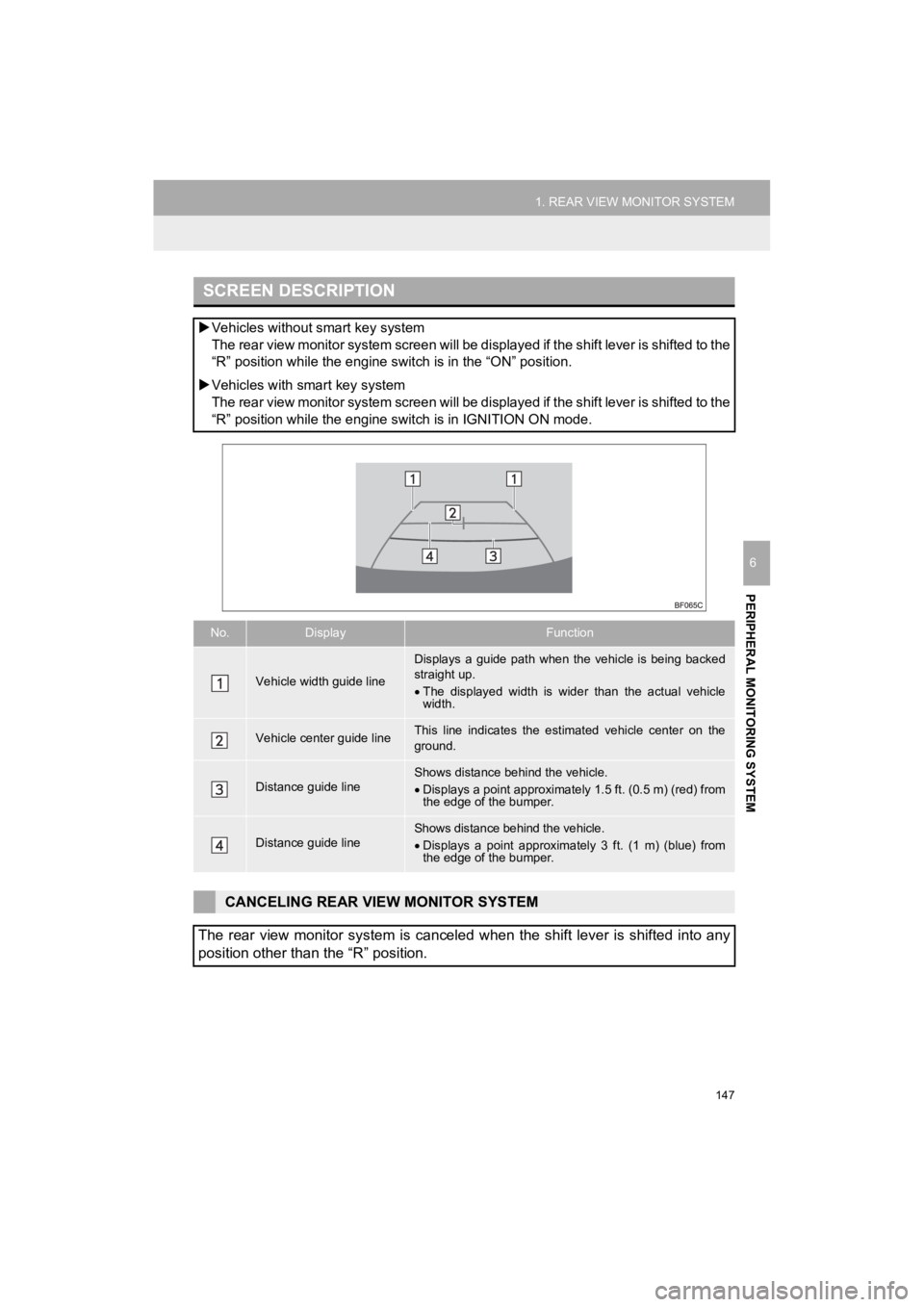
SCREEN DESCRIPTION
Vehicles withou t smart key system
The rear view monitor system screen will be displayed if the shift lever is shifted to the
“R” position while the engine s witch is in the “ON” position.
Vehicles with smart key system
The rear view monitor system screen will be displayed if the shift lever is shifted to the
“R” position while the engine s witch is in IGNITION ON mode.
No.DisplayFunction
Vehicle width guide line
Displays a guide path when the vehicle is being backed
straight up.
The displayed width is wider than the actual vehicle
width.
Vehicle center guide lineThis line indicates the estimated vehicle center on the
ground.
Distance guide lineShows distance behind the vehicle.
Displays a point approximately 1.5 ft. (0.5 m) (red) from
the edge of the bumper.
Distance guide lineShows distance behind the vehicle.
Displays a point approximatel y 3 ft. (1 m) (blue) from
the edge of the bumper.
CANCELING REAR VIEW MONITOR SYSTEM
The rear view monitor system is canceled when the shift lever i s shifted into any
position other than the “R” position.