fog light TOYOTA 4RUNNER 2020 (in English) User Guide
[x] Cancel search | Manufacturer: TOYOTA, Model Year: 2020, Model line: 4RUNNER, Model: TOYOTA 4RUNNER 2020Pages: 596, PDF Size: 13.35 MB
Page 236 of 596
2364-3. Operating the lights and wipers
4RUNNER (U)
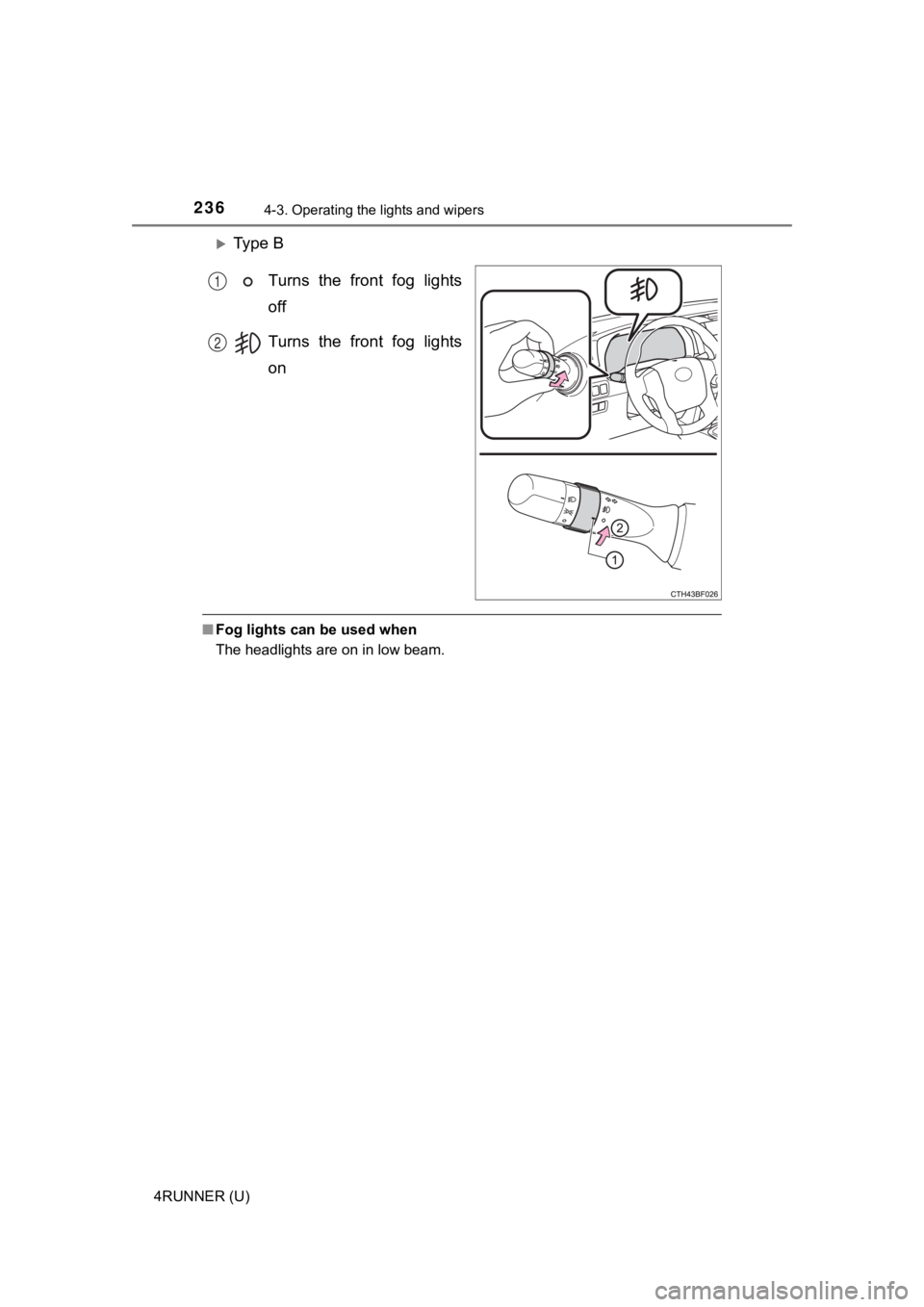
Ty p e BTurns the front fog lights
off
Turns the front fog lights
on
■Fog lights can be used when
The headlights are on in low beam.
1
2
Page 250 of 596
2504-5. Using the driving support systems
4RUNNER (U)
WARNING
■To avoid malfunction of the camera sensor
Observe the following precautions.
Otherwise, the camera sensor may not operate properly, possibly leading to
an accident resulting in death or serious injury.
● Keep the windshield clean at all times.
• If the windshield is dirty or covered with an oily film, water droplets,
snow, etc., clear the windshield.
• If a glass coating agent is applied to the windshield, it will still be neces-
sary to use the windshield wipers to remove water droplets, etc . from
the area of the windshield in front of the camera sensor.
• If the inner side of the windshield where the camera sensor is installed
is dirty, contact your Toyota dealer.
● If the part of the windshield in front of the camera sensor is fogged up or
covered with condensation or ice, use the windshield defogger t o remove
the fog, condensation or ice. ( P. 342)
● If water droplets cannot be properly removed from the area of t he wind-
shield in front of the camera sensor by the windshield wipers, replace the
wiper insert or wiper blade.
If the wiper inserts or wiper blades need to be replaced, contact your Toy-
ota dealer.
● Do not attach window tinting to the windshield.
● Replace the windshield if it is damaged or cracked.
If the windshield needs to be replaced, contact your Toyota dea ler.
● Do not get the camera sensor wet.
● Do not allow bright lights to shine into the camera sensor.
● Do not dirty or damage the camera sensor.
When cleaning the inside of the windshield, do not allow glass cleaner to
contact the lens. Also, do not touch the lens.
If the lens is dirty or damaged, contact your Toyota dealer.
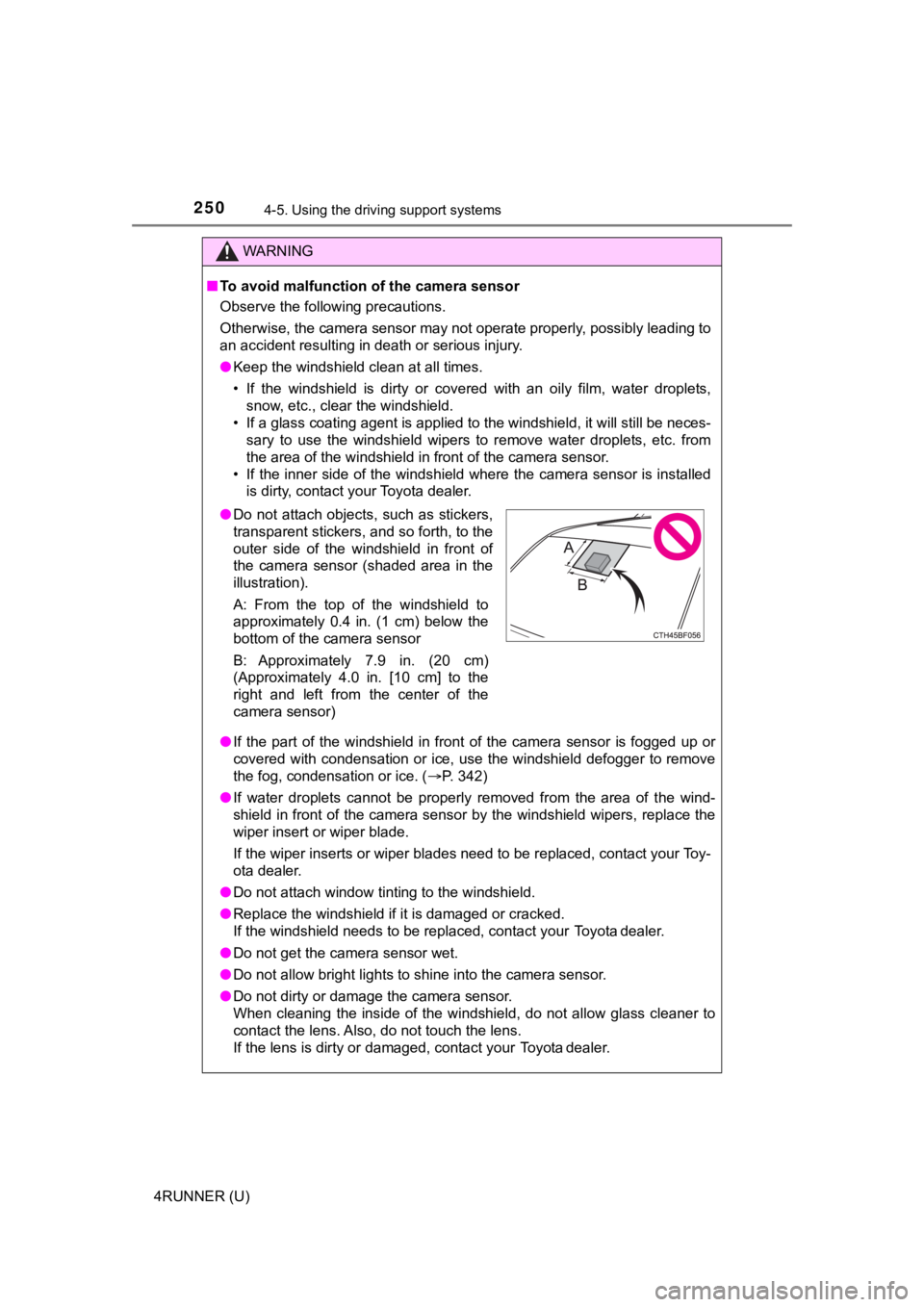
● Do not attach objects, such as stickers,
transparent stickers, and so forth, to the
outer side of the windshield in front of
the camera sensor (shaded area in the
illustration).
A: From the top of the windshield to
approximately 0.4 in. (1 cm) below the
bottom of the camera sensor
B: Approximately 7.9 in. (20 cm)
(Approximately 4.0 in. [10 cm] to the
right and left from the center of the
camera sensor)
Page 262 of 596
2624-5. Using the driving support systems
4RUNNER (U)• If a vehicle ahead makes an abrupt maneuver (such as sudden sw
erving,
acceleration or deceleration)
• When suddenly cutting behind a preceding vehicle
• When driving in inclement weather such as heavy rain, fog, snow or a
sandstorm
• When the vehicle is hit by water, snow, dust, etc. from a vehicle ahead
• When driving through steam or smoke
• When driving in a place where the surrounding brightness changes sud- denly, such as at the entrance or exit of a tunnel
• When a very bright light, such as the sun or the headlights of oncoming
traffic, shines directly into the camera sensor
• When the surrounding area is dim, such as at dawn or dusk, or while at
night or in a tunnel
• After the engine has started the vehicle has not been driven for a certain amount of time
• While making a left/right turn and for a few seconds after mak ing a left/
right turn
• While driving on a curve and for a few seconds after driving o n a curve
• If your vehicle is skidding
• If the wheels are misaligned
• If a wiper blade is blocking the camera sensor
• The vehicle is wobbling.
• The vehicle is being driven at extremely high speeds.
• When driving on a hill
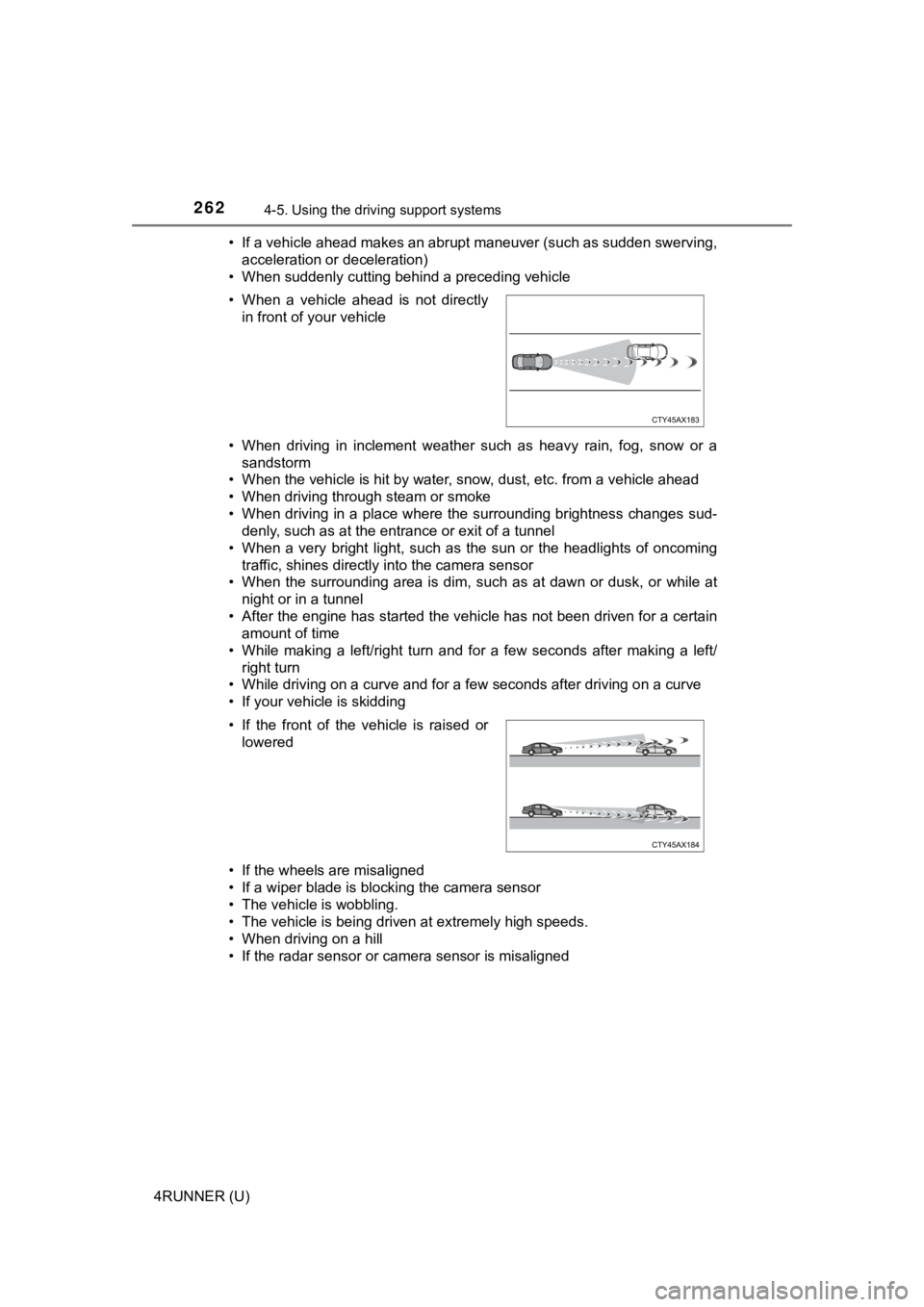
• If the radar sensor or camera sensor is misaligned • When a vehicle ahead is not directly in front of your vehicle
• If the front of the vehicle is raised or lowered
Page 264 of 596

2644-5. Using the driving support systems
4RUNNER (U)■
If the PCS warning light flashes or illuminates and a warning m essage is
displayed on the multi-information display
The pre-collision system may be temporarily unavailable or ther e may be a
malfunction in the system.
● In the following situations, the warning light will turn off, t he message will
disappear and the system will become operational when normal op erating
conditions return:
• When the radar sensor or camera sensor or the area around eith er sen-
sor is hot, such as in the sun
• When the radar sensor or camera sensor or the area around eith er sen-
sor is cold, such as in an extremely cold environment
• When a front sensor is dirty or covered with snow, etc.
• When the part of the windshield in front of the camera sensor is fogged
up or covered with condensation or ice
(Defogging the windshield:
P. 342, 348)
• If the camera sensor is obstructed, such as when the hood is open or a sticker is attached to the windshield near the camera sensor
● If the PCS warning light continues to flash or remains illuminated or the
warning message does not disappear even though the vehicle has returned
to normal, the system may be malfunctioning. Have the vehicle inspected by
your Toyota dealer immediately.
■ If VSC is disabled
●If VSC is disabled ( P. 323, 324), the pre-collision brake assist and pre-col-
lision braking functions are also disabled.
● The PCS warning light will turn on and “VSC Turned Off Pre-Coll ision Brake
System Unavailable” will be displayed on the multi-information display.
Page 339 of 596

339
Interior features5
4RUNNER (U)5-1. Using the
air conditioning system
and defogger
Manual air conditioning system............................. 340
Automatic air conditioning system............................. 346
Seat heaters/ seat ventilators ................ 353
5-2. Using the interior lights Interior lights list ................ 355
• Interior lights ................. 356
• Personal lights .............. 356
5-3. Using the storage features
List of storage features ..... 358
• Glove box...................... 359
• Console box .................. 359
• Cup holders .................. 360
• Auxiliary box ................. 362
• Coin holder/tissue pocket/
pen holder ..................... 363
• Bottle holders ................ 364
Luggage compartment features ........................... 365 5-4. Other interior features
Other interior features ....... 370
• Sun visors ..................... 370
• Vanity mirrors................ 370
• Clock ............................. 371
• Power outlets (120 V AC) .................... 372
• Power outlets ................ 376
• USB charging ports....... 379
• Armrest ......................... 381
• Assist grips ................... 381
Garage door opener.......... 382
Page 344 of 596
3445-1. Using the air conditioning system and defogger
4RUNNER (U)
■Fogging up of the windows
●The windows will easily fog up when the humidity in the vehicle is high.
Turning on will dehumidify the air from the outlets and defog the wind-
shield effectively.
● If you turn off, the windows may fog up more easily.
● The windows may fog up if the recirculated air mode is used.
■ When driving on dusty roads
Close all windows. If dust thrown up by the vehicle is still drawn into the vehi-
cle after closing the windows, it is recommended that the air intake mode be
set to outside air mode and the fan speed to any setting except off.
■ Outside/recirculated air mode
Setting to the recirculated air mode temporarily is recommended in prevent-
ing dirty air from entering the vehicle interior and helping to cool the vehicle
when the outside air temperature is high.
■ When the outside temperature exceeds 75°F (24°C) and the air co ndition-
ing system is on
● In order to reduce the air conditioning power consumption, the air condition-
ing system may switch to recirculated air mode automatically. This may also
reduce fuel consumption.
● Recirculated air mode is selected as a default mode when the en gine switch
is turned to the “ON” position (vehicles without a smart key system) or the
engine switch is turned to IGNITION ON mode (vehicles with a sm art key
system).
● It is possible to switch to outside air mode at any time by pre ssing
.
■When the indicator light on flashes
Press
to turn off the cooling and dehumidification function and turn it on
again. There may be a problem in the air conditioning system if the indicator
light continues to flash. Turn the air conditioning system off and have it
inspected by your Toyota dealer.
Page 351 of 596
3515-1. Using the air conditioning system and defogger
5
Interior features
4RUNNER (U)■
Fogging up of the windows
●The windows will easily fog up when the humidity in the vehicle is high.
Turning on will dehumidify the air from the outlets and defog the wind-
shield effectively.
● If you turn off, the windows may fog up more easily.
● The windows may fog up if the recirculated air mode is used.
■ When driving on dusty roads
Close all windows. If dust thrown up by the vehicle is still drawn into the vehi-
cle after closing the windows, it is recommended that the air intake mode be
set to outside air mode and the fan speed to any setting except off.
■ Outside/recirculated air mode
●Setting to the recirculated air mode temporarily is recommended in prevent-
ing dirty air from entering the vehicle interior and helping to cool the vehicle
when the outside air temperature is high.
● Outside/recirculated air mode may automatically switch dependin g on the
temperature setting, outside temperature, pressure, engine cool ant tem-
perature or inside temperature.
■ When the outside temperature exceeds 75°F (24°C) and the air co ndition-
ing system is on
● In order to reduce the air conditioning power consumption, the air condition-
ing system may switch to recirculated air mode automatically. This may also
reduce fuel consumption.
● Recirculated air mode is selected as a default mode when the en gine switch
is turned to the “ON” position (vehicles without a smart key system) or the
engine switch is turned to IGNITION ON mode (vehicles with a sm art key
system).
● It is possible to switch to outside air mode at any time by pre ssing
.
■When the outside tempera ture falls to nearly 32F (0 C)
The dehumidification function may not operate even when is pre ssed.
■ When driving on dusty roads
Close all windows. If dust thrown up by the vehicle is still drawn into the vehi-
cle after closing the windows, it is recommended that the air intake mode be
set to outside air mode and the fan speed to any setting except off.
■ When the indicator light on flashes
Press
to turn off the cooling and dehumidification function and turn it on
again. There may be a problem in the air conditioning system if the indicator
light continues to flash. Turn the air conditioning system off and have it
inspected by your Toyota dealer.
Page 354 of 596
3545-1. Using the air conditioning system and defogger
4RUNNER (U)
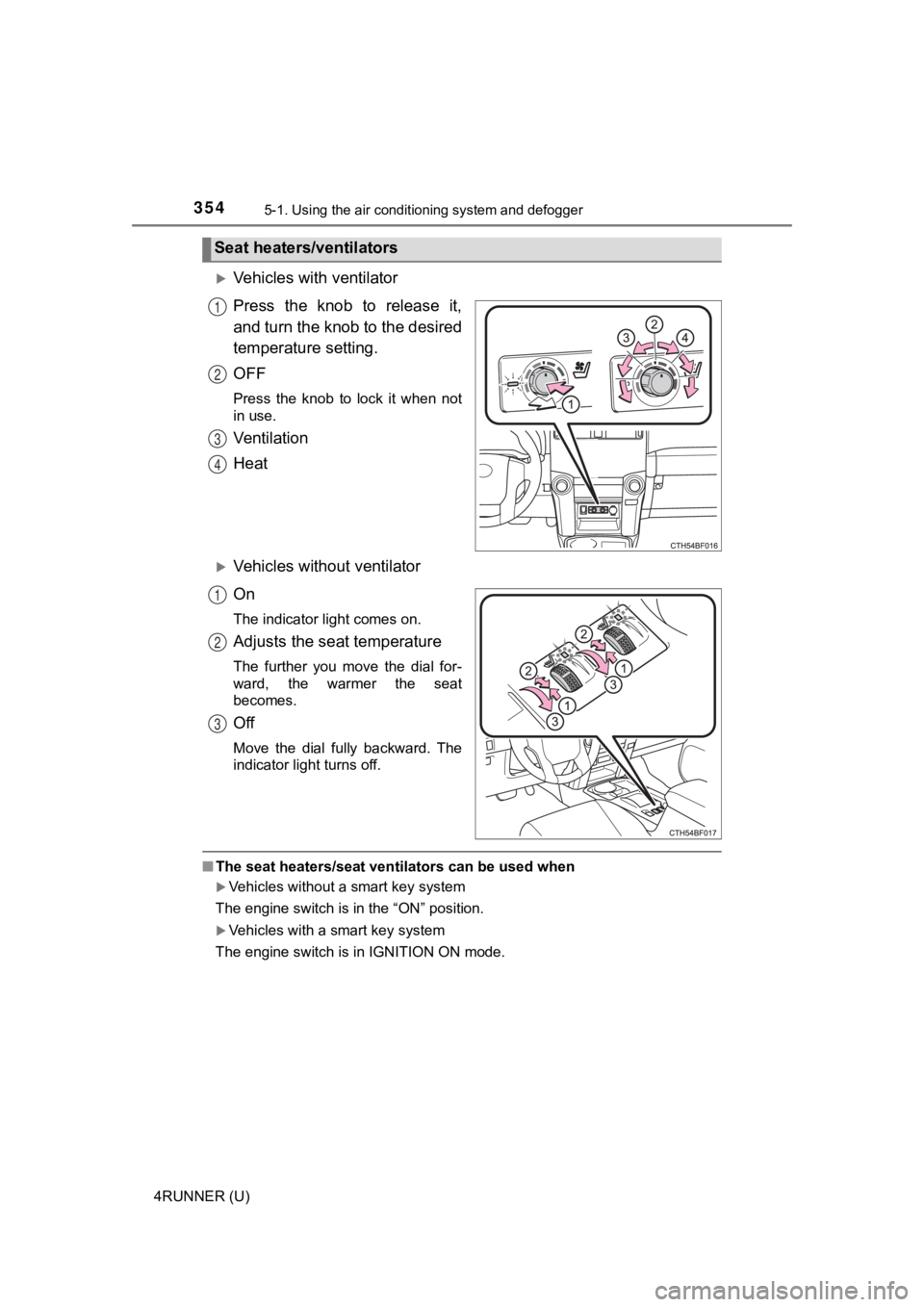
Vehicles with ventilator
Press the knob to release it,
and turn the knob to the desired
temperature setting.
OFF
Press the knob to lock it when not
in use.
Ventilation
Heat
Vehicles without ventilator
On
The indicator light comes on.
Adjusts the seat temperature
The further you move the dial for-
ward, the warmer the seat
becomes.
Off
Move the dial fully backward. The
indicator light turns off.
■The seat heaters/seat ventilators can be used when
Vehicles without a smart key system
The engine switch is in the “ON” position.
Vehicles with a smart key system
The engine switch is in IGNITION ON mode.
Seat heaters/ventilators
1
2
3
4
1
2
3
Page 395 of 596

3956-1. Maintenance and care
6
Maintenance and care
4RUNNER (U)
NOTICE
■Cleaning detergents
● Do not use the following types of detergent, as they may discol or the vehi-
cle interior or cause streaks or damage to painted surfaces:
• Non-seat portions: Organic substances such as benzene or gasol ine,
alkaline or acidic solutions, dye, and bleach
• Seats: Alkaline or acidic solutions, such as thinner, benzene, and alco-
hol
● Do not use polish wax or polish cleaner. The instrument panel’s or other
interior part’s painted surface may be damaged.
■ Preventing damage to leather surfaces
Observe the following precautions to avoid damage to and deterioration of
leather surfaces:
● Remove any dust or dirt from leather surfaces immediately.
● Do not expose the vehicle to direct sunlight for extended perio ds of time.
Park the vehicle in the shade, especially during summer.
● Do not place items made of vinyl, plastic, or containing wax on the uphol-
stery, as they may stick to the leather surface if the vehicle interior heats
up significantly.
■ Water on the floor
Do not wash the vehicle floor with water.
Vehicle systems such as the audio system may be damaged if wate r comes
into contact with electrical components such as the audio syste m above or
under the floor of the vehicle. Water may also cause the body to rust.
■ When cleaning the inside of the windshield
Do not allow glass cleaner to contact the lens. Also, do not to uch the lens.
( P. 248)
■ Cleaning the inside of the rear quarter windows and back window
● Do not use glass cleaner to clean the rear quarter windows and back win-
dow, as this may cause damage to the rear window defogger heate r wires
or antenna. Use a cloth dampened with lukewarm water to gently wipe the
window clean. Wipe the window i n strokes running parallel to the heater
wires or antenna.
● Be careful not to scratch or damage the heater wires or antenna .
Page 449 of 596
4496-3. Do-it-yourself maintenance
6
Maintenance and care
4RUNNER (U)■
Front
■Rear
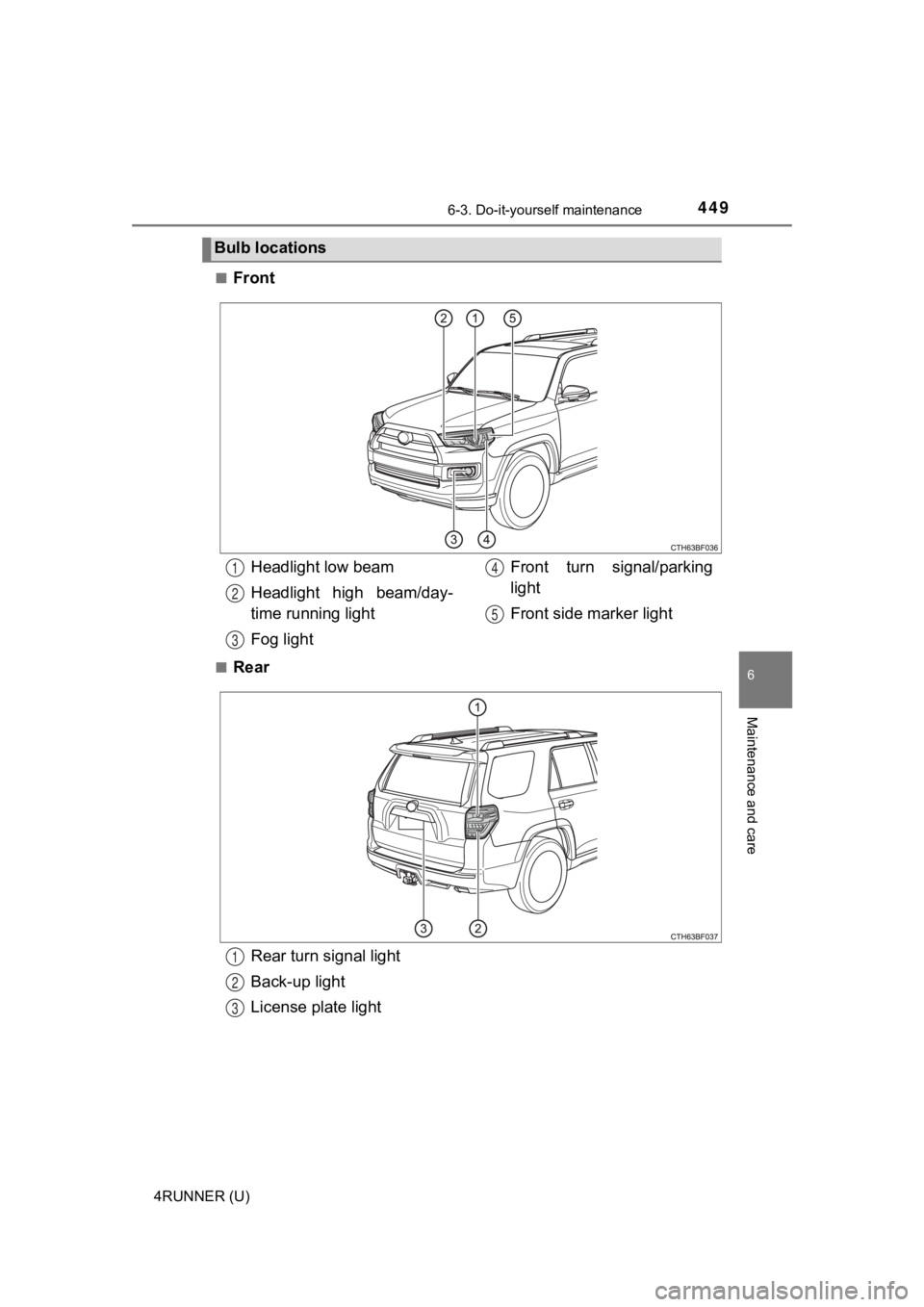
Bulb locations
Headlight low beam
Headlight high beam/day-
time running light
Fog light
Front turn signal/parking
light
Front side marker light1
2
3
4
5
Rear turn signal light
Back-up light
License plate light1
2
3