shift lever p TOYOTA 4RUNNER 2020 (in English) Owner's Guide
[x] Cancel search | Manufacturer: TOYOTA, Model Year: 2020, Model line: 4RUNNER, Model: TOYOTA 4RUNNER 2020Pages: 596, PDF Size: 13.35 MB
Page 290 of 596

2904-5. Using the driving support systems
4RUNNER (U)
■Intuitive parking assist can be operated when
●Front corner sensors:
• The engine switch is in the “ON” position (without a smart key system) or
the engine switch is in IGNITION ON mode (with a smart key syst em).
• The shift lever is in a position other than P.
• The vehicle speed is less than approximately 6 mph (10 km/h).
● Rear corner and rear center sensors:
• The engine switch is in the “ON” position (without a smart key system) or
the engine switch is in IGNITION ON mode (with a smart key syst em).
• The shift lever is in R.
■ Intuitive parking assist display
When an obstacle is detected while the Toyota parking assist mo nitor is in
use, the warning indicator will appear in the upper part of the screen even if
the display setting has been set to off.
■ Sensor detection information
●The sensor’s detection areas are limited to the areas around th e vehicle’s
front corner and rear bumpers.
● Certain vehicle conditions and the surrounding environment may affect the
ability of the sensor to correctly detect obstacles. Particular instances where
this may occur are listed below.
• There is dirt, snow or ice on the sensor. (Wiping the sensors will resolve
this problem.)
• The sensor is frozen. (Thawing the area will resolve this problem.)
In especially cold weather, if a sensor is frozen the screen ma y show an
abnormal display, or obstacles may not be detected.
• The sensor is covered in any way.
• The vehicle is leaning considerably to one side.
• On an extremely bumpy road, on an incline, on gravel, or on gr ass.
• The vicinity of the vehicle is noisy due to vehicle horns, motorcycle
engines, air brakes of large vehicles, or other loud noises pro ducing ultra-
sonic waves.
• There is another vehicle equipped with parking assist sensors in the
vicinity.
• The sensor is coated with a sheet of spray or heavy rain.
• The vehicle is equipped with a fender pole or wireless antenna .
• Towing eyelet is installed.
• The bumper or sensor receives a strong impact.
• The vehicle is approaching a tall or curved curb.
• In harsh sunlight or intense cold weather.
• The area directly under the bumpers is not detected.
• If obstacles draw too close to the sensor.
• A non-genuine Toyota suspension (lowered suspension etc.) is i nstalled.
• People may not be detected if they are wearing certain types o f clothing.
In addition to the examples above, there are instances in which, because of
their shape, signs and other objects may be judged by the senso r to be
closer than they are.
Page 295 of 596
2954-5. Using the driving support systems
4
Driving
4RUNNER (U)■
Shifting from H2 to H4
Ty p e A
Reduce vehicle sp
eed to less than 50 mph (80 km/h).
Shift the front-wheel drive control lever to H4.
Ty p e B
Reduce vehicle speed to less than 62 mph (100 km/h).
Push the “UNLOCK” button and turn the front-wheel drive control
switch to H4.
The four-wheel drive indicator will turn on.
■
Shifting from H4 to H2
Ty p e A
Shift the front-wheel drive control lever to H2.
Ty p e B
Push the “UNLOCK” button and turn the front-wheel drive control
switch to H2.
This can be done at any speed.
The four-wheel drive indicator will go off.
■
Shifting from H4 to L4 Stop the vehicle completely and continue to depress the brake
pedal.
Shift the shift lever to N.
Ty p e A
Shift the front-wheel dri ve control lever to L4.
Ty p e B
Push the “UNLOCK” button and then push and turn the front-
wheel drive control switch to L4.
The low speed four-wheel drive indicator will turn on.
Shifting between H2 and H4
Shifting between H4 and L4
1
2
1
2
1
2
3
3
Page 296 of 596

2964-5. Using the driving support systems
4RUNNER (U)■
Shifting from L4 to H4
Stop the vehicle completely and continue to depress the brake
pedal.
Shift the shift lever to N.
Ty p e A
Shift the front-wheel drive control lever to H4.
Ty p e B
Push the “UNLOCK” button and turn the front-wheel drive control
switch to H4.
The low speed four-wheel drive indicator will go off.
■When the front-wheel drive control lever or switch is shifted t o L4
VSC and TRAC are automatically turned off.
■ If the four-wheel dri ve indicator flashes
The transfer mode may not successfully change. Drive straight a head while
accelerating or decelerating, or drive in reverse.
■ If the low speed four-wheel dri ve indicator continues to flash
The transfer mode may not successfully change. Operate the four -wheel
drive control switch again.
■ If the low speed four-wheel dri ve indicator continues to flash and a
buzzer sounds
The shift lever is not in N and/or the vehicle is moving. Stop the vehicle com-
pletely, shift the shift lever to N and make sure that the indi cator stops flash-
ing.
■ If the four-wheel drive or low speed four-wheel drive indicator flashes
rapidly
There may be a malfunction in the four-wheel drive system. Have the vehicle
inspected by your Toyota dealer immediately.
■ Four-wheel drive usage frequency
You should drive in four-wheel drive for at least 10 miles (16 km) each month.
This will assure that the front drive components are lubricated .
WARNING
■Shifting the front-wheel drive co ntrol lever or switch from H2 to H4
while driving
Never operate the front-wheel drive control lever or switch if the wheels are
slipping.
Stop the slipping or spinning before shifting.
1
2
3
3
Page 298 of 596
2984-5. Using the driving support systems
4RUNNER (U)
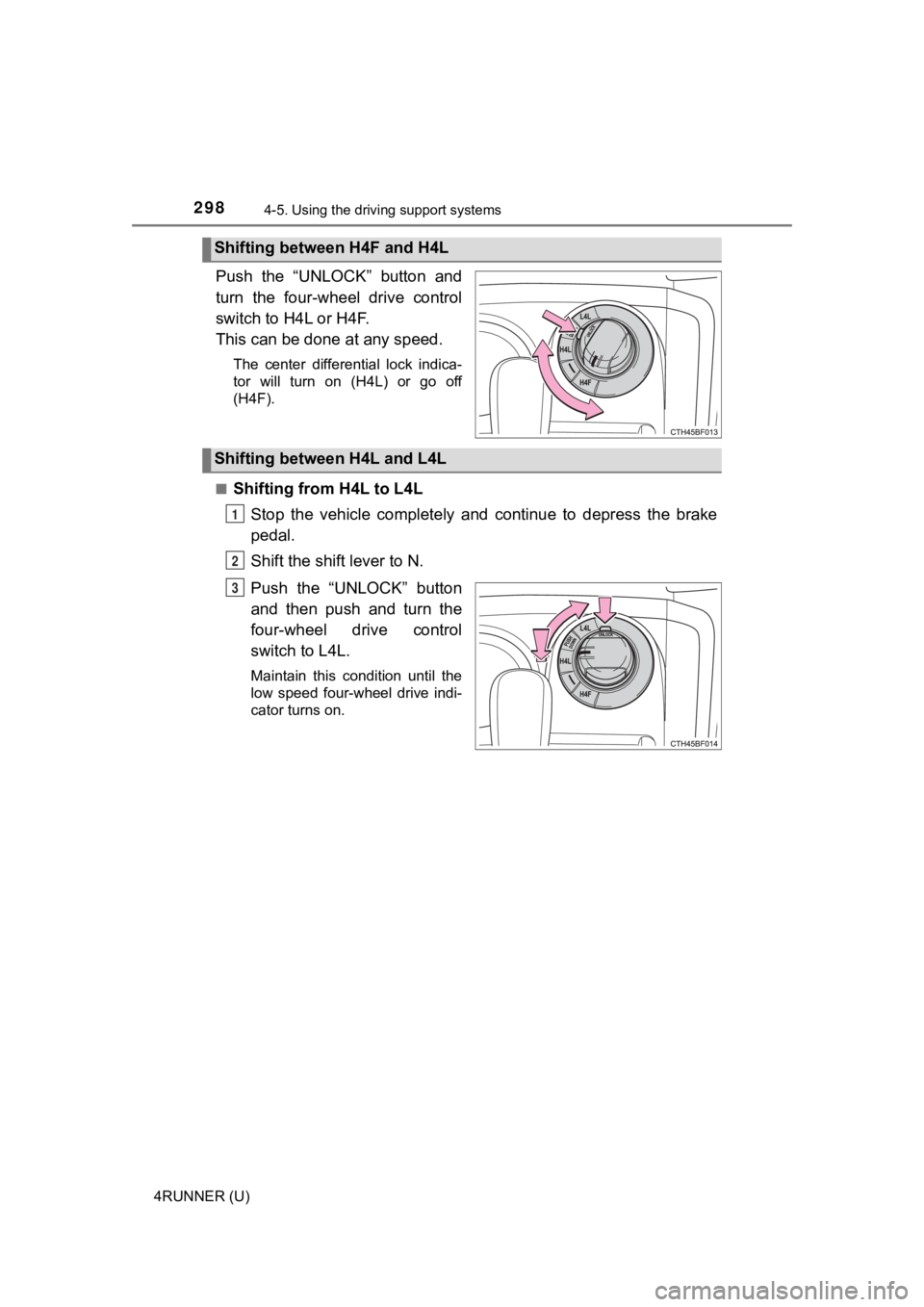
Push the “UNLOCK” button and
turn the four-wheel drive control
switch to H4L or H4F.
This can be done at any speed.
The center differential lock indica-
tor will turn on (H4L) or go off
(H4F).
■
Shifting from H4L to L4L Stop the vehicle completely and continue to depress the brake
pedal.
Shift the shift lever to N.
Push the “UNLOCK” button
and then push and turn the
four-wheel drive control
switch to L4L.
Maintain this condition until the
low speed four-wheel drive indi-
cator turns on.
Shifting between H4F and H4L
Shifting between H4L and L4L
1
2
3
Page 299 of 596
2994-5. Using the driving support systems
4
Driving
4RUNNER (U)■
Shifting from L4L to H4L
Stop the vehicle completely and continue to depress the brake
pedal.
Shift the shift lever to N.
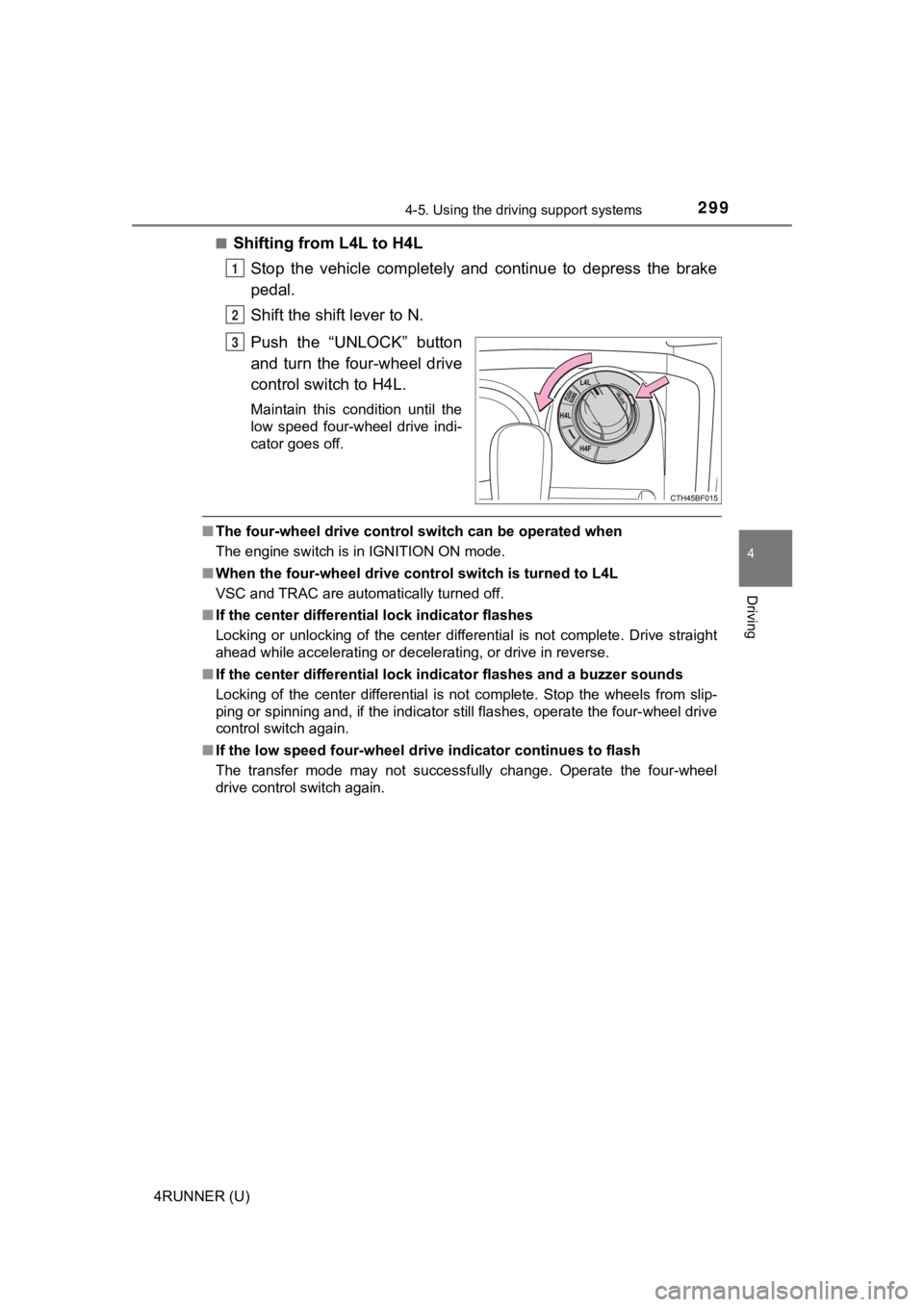
Push the “UNLOCK” button
and turn the four-wheel drive
control switch to H4L.
Maintain this condition until the
low speed four-wheel drive indi-
cator goes off.
■The four-wheel drive control sw itch can be operated when
The engine switch is in IGNITION ON mode.
■ When the four-wheel d rive control switch is turned to L4L
VSC and TRAC are automatically turned off.
■ If the center differential lock indicator flashes
Locking or unlocking of the center differential is not complete . Drive straight
ahead while accelerating or decelerating, or drive in reverse.
■ If the center differential lock indicator flashes and a buzzer sounds
Locking of the center differential is not complete. Stop the wh eels from slip-
ping or spinning and, if the indicator still flashes, operate the four-wheel drive
control switch again.
■ If the low speed four-wheel dri ve indicator continues to flash
The transfer mode may not successfully change. Operate the four -wheel
drive control switch again.
1
2
3
Page 300 of 596
3004-5. Using the driving support systems
4RUNNER (U)■
If the low speed four-wheel dri ve indicator continues to flash and a
buzzer sounds
The shift lever is not in N and/or the vehicle is moving. Stop the vehicle com-
pletely, shift the shift lever to N and make sure that the indi cator stops flash-
ing.
■ If the low speed four-wheel dri ve indicator or the center differential lock
indicator flashes rapidly
There may be a malfunction in the four-wheel drive system. Have the vehicle
inspected by your Toyota dealer immediately.
WARNING
■ Operating the four-wh eel drive control switch
Never operate the four-wheel drive control switch if the wheels have lost
traction. Doing so may cause an accident resulting in death or serious
injury.
Stop the wheels from slipping or spinning before operating the switch.
NOTICE
■To prevent damage to the center differential
● For normal driving on dry and hard surface roads, unlock the ce nter differ-
ential.
● Unlock the center differential after the wheels are out of the ditch or off the
slippery or bumpy surface.
● Do not lock or unlock the center differential when the vehicle is turning or
when its wheels are spinning freely off the ground.
Page 301 of 596
3014-5. Using the driving support systems
4
Driving
4RUNNER (U)■
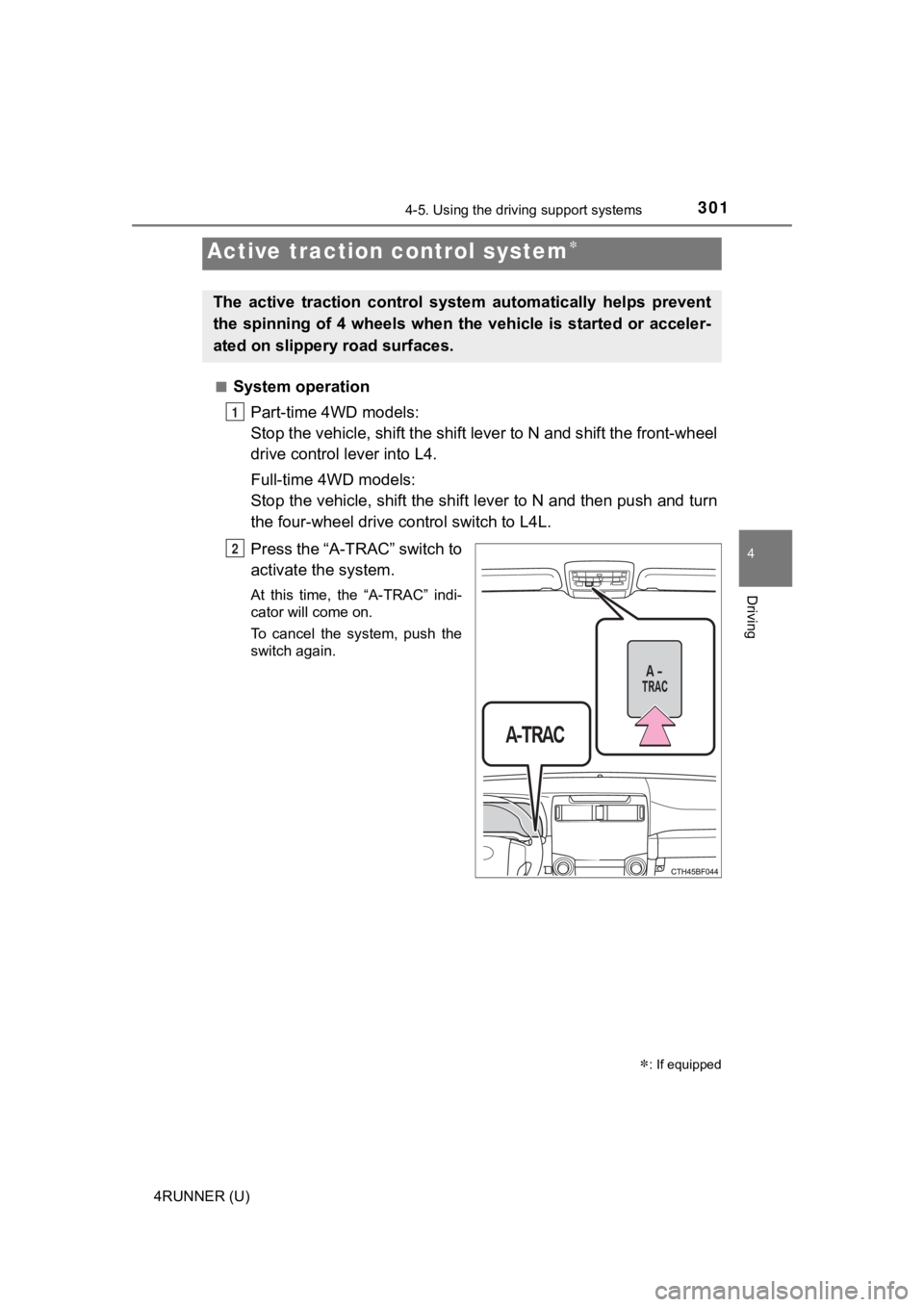
System operation
Part-time 4WD models:
Stop the vehicle, shift the shif t lever to N and shift the front-wheel
drive control lever into L4.
Full-time 4WD models:
Stop the vehicle, shift the shift lever to N and then push and turn
the four-wheel drive c ontrol switch to L4L.
Press the “A-TRAC” switch to
activate the system.
At this time, the “A-TRAC” indi-
cator will come on.
To cancel the system, push the
switch again.
Active traction control system
: If equipped
The active traction control syst em automatically helps prevent
the spinning of 4 wheels when the vehicle is started or acceler -
ated on slippery road surfaces.
1
2
Page 306 of 596

3064-5. Using the driving support systems
4RUNNER (U)
Before using the rear differential lock system:
Stop the vehicle, shift the shift lever to N and shift the front-wheel
drive control lever into L4 to see if this is sufficient. If th is has no
effect, additionally use the re ar differential lock system.
Be sure the wheels have stopped spinning.
Press the rear differential lock switch.
Gently depress the accelerator pedal.
After the rear differential is locked, the indicator will come on.
Unlock the rear differential as soon as the vehicle moves.
To unlock the rear different ial, press the switch again.
■Locking the rear differential
The following systems do not operate when the rear differential is locked. It is
normal operation for the ABS warning light and VSC OFF indicato r to be on at
this time.
•ABS
• Multi Terrain ABS
• Brake assist system
•VSC
• Hill-start assist control
■ The rear differential lock is disengaged when
The front-wheel drive control lever or switch is shifted to H2 or H4.
Never forget to turn off the switch after using this feature.
■ After unlocking the rear differential
Check that the indicator goes off.
■ If the rear differential lo ck indicator flashes rapidly
There may be a malfunction in the rear differential lock system . Have the
vehicle inspected by your Toyota dealer immediately.
Using the rear diffe rential lock system
1
2
3
4
Page 309 of 596

3094-5. Using the driving support systems
4
Driving
4RUNNER (U)
■Operating tips
The system will operate when the shift lever is in a position other than P, how-
ever to make effective use of the system it is recommended to select a lower
shift range.
■ The system will not operate when
●Part-time 4WD models: The transfer mode is in H2 or H4.
● Full-time 4WD models: The transfer mode is in H4L or H4F.
■ If the downhill assist control system indicator flashes
●In the following situations, the indicator flashes and the syst em will not oper-
ate:
• The transfer mode is not in L4 (part-time 4WD models) or L4L ( full-time
4WD models).
• The shift lever is in P.
• The accelerator or brake pedal is depressed.
• The vehicle speed exceeds approximately 15 mph (25 km/h).
• The brake system overheats.
● In the following situations, the indicator flashes to alert the driver, but the
system will operate:
• The shift lever is in N.
• The “DAC” switch is turned off while the system is operating. The system will gradually ceases operation. The indicator will flash during
operation, and then go off when the system is fully off.
■ When the downhill assist contro l system is operated continuously
This may cause the brake actuator to overheat. In this case, th e downhill
assist control system will stop operating, a buzzer will sound and the downhill
assist control system indicator will start flashing, and the “T RAC OFF” indica-
tor light will come on. Refrain from using the system until the downhill assist
control system indicator stays on and “TRAC OFF” indicator light turns off.
(The vehicle can be driven normally during this time.)
Page 312 of 596
3124-5. Using the driving support systems
4RUNNER (U)■
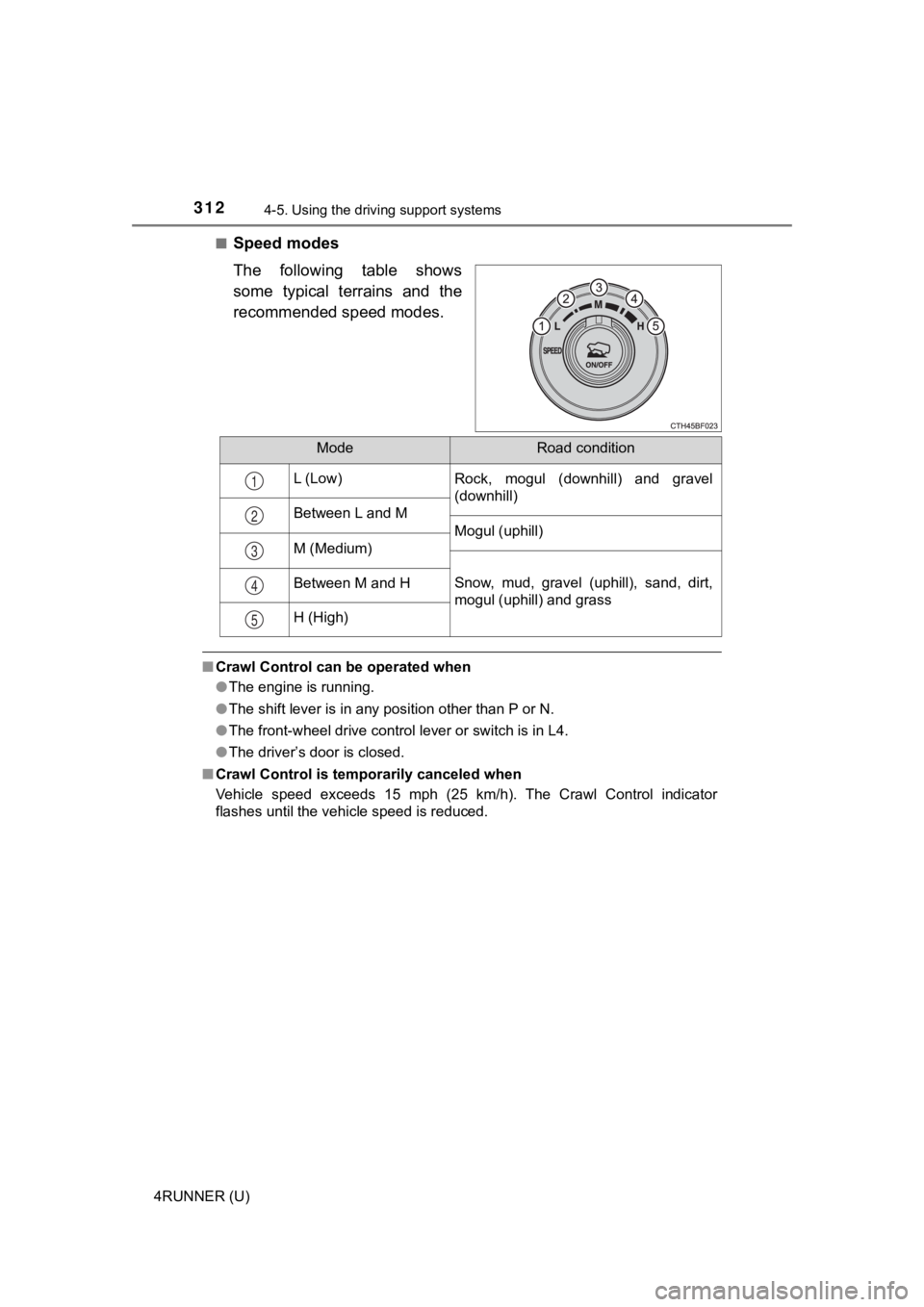
Speed modes
The following table shows
some typical terrains and the
recommended speed modes.
■
Crawl Control can be operated when
●The engine is running.
● The shift lever is in any position other than P or N.
● The front-wheel drive control lever or switch is in L4.
● The driver’s door is closed.
■ Crawl Control is temporarily canceled when
Vehicle speed exceeds 15 mph (25 km/h). The Crawl Control indic ator
flashes until the vehicle speed is reduced.
ModeRoad condition
L (Low)Rock, mogul (downhill) and gravel
(downhill)
Between L and M
Mogul (uphill)
M (Medium)
Snow, mud, gravel (uphill), sand, dirt,
mogul (uphill) and grassBetween M and H
H (High)
1
2
3
4
5