steering TOYOTA 4RUNNER 2020 (in English) Workshop Manual
[x] Cancel search | Manufacturer: TOYOTA, Model Year: 2020, Model line: 4RUNNER, Model: TOYOTA 4RUNNER 2020Pages: 596, PDF Size: 13.35 MB
Page 414 of 596
4146-3. Do-it-yourself maintenance
4RUNNER (U)■
Fluid level
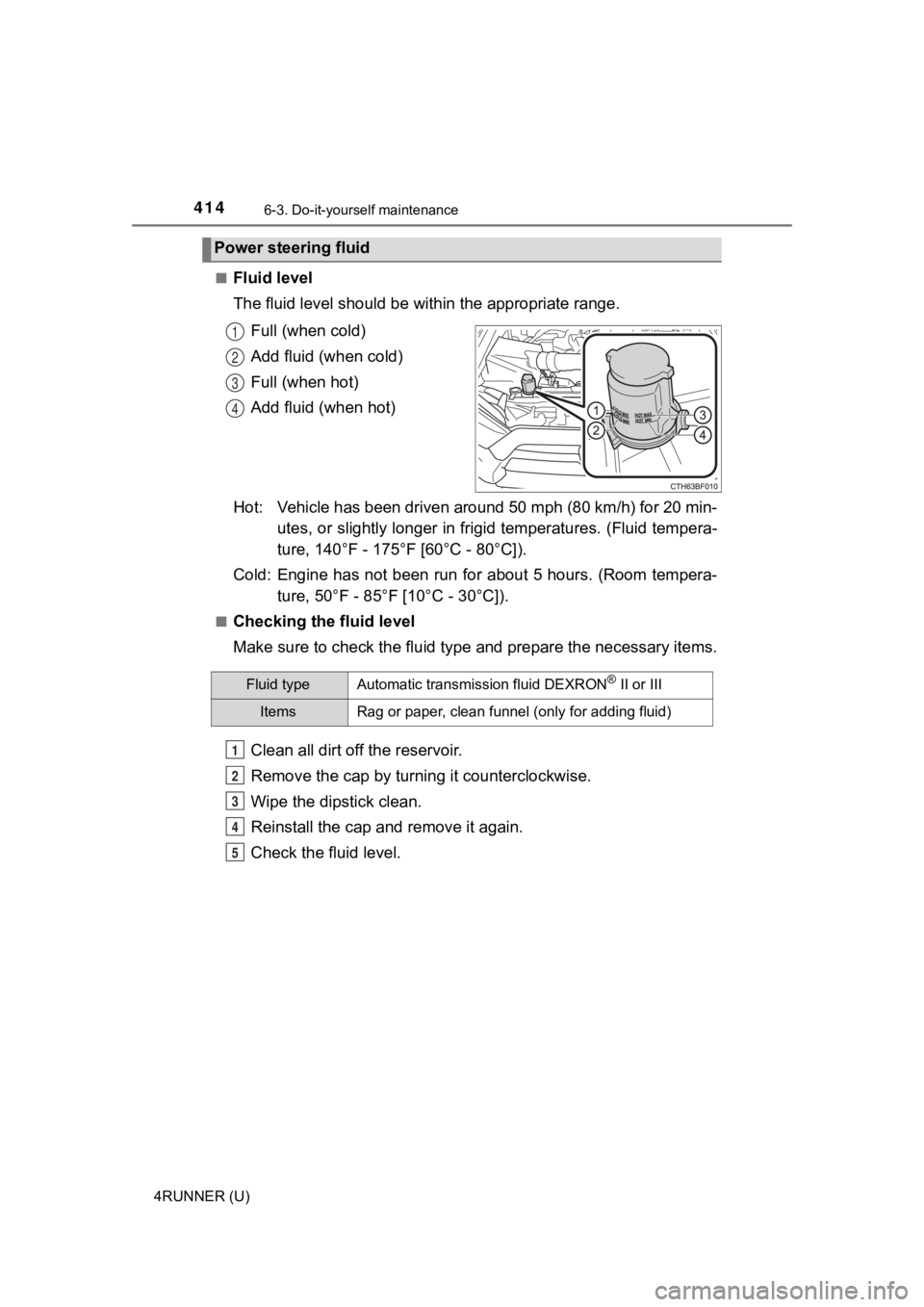
The fluid level should be within the appropriate range.
Full (when cold)
Add fluid (when cold)
Full (when hot)
Add fluid (when hot)
Hot: Vehicle has been driven around 50 mph (80 km/h) for 20 min- utes, or slightly longer in frigid temperatures. (Fluid tempera-
ture, 140°F - 175°F [60°C - 80°C]).
Cold: Engine has not been run for about 5 hours. (Room tempera- ture, 50°F - 85°F [10°C - 30°C]).
■Checking the fluid level
Make sure to check the fluid type and prepare the necessary items.
Clean all dirt off the reservoir.
Remove the cap by turni ng it counterclockwise.
Wipe the dipstick clean.
Reinstall the cap and remove it again.
Check the fluid level.
Power steering fluid
1
2
3
4
Fluid typeAutomatic transmission fluid DEXRON® II or III
ItemsRag or paper, clean funnel (only for adding fluid)
1
2
3
4
5
Page 415 of 596
4156-3. Do-it-yourself maintenance
6
Maintenance and care
4RUNNER (U)
Check the battery as follows.
■Battery exterior
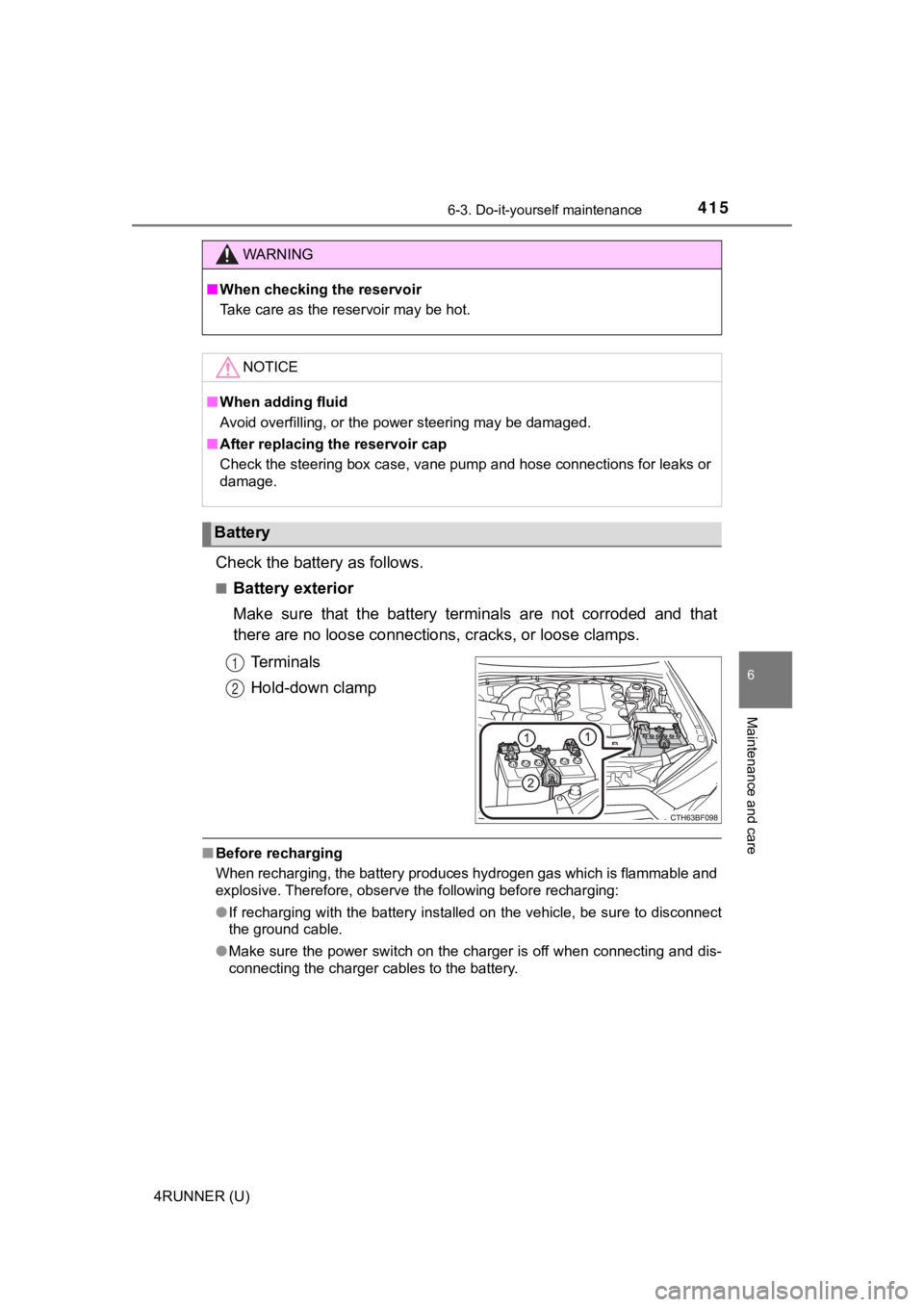
Make sure that the battery terminals are not corroded and that
there are no loose connections, cracks, or loose clamps.
Terminals
Hold-down clamp
■ Before recharging
When recharging, the battery produces hydrogen gas which is flammable and
explosive. Therefore, observe the following before recharging:
●If recharging with the battery installed on the vehicle, be sur e to disconnect
the ground cable.
● Make sure the power switch on the charger is off when connectin g and dis-
connecting the charger cables to the battery.
WARNING
■ When checking the reservoir
Take care as the reservoir may be hot.
NOTICE
■When adding fluid
Avoid overfilling, or the power steering may be damaged.
■ After replacing the reservoir cap
Check the steering box case, vane pump and hose connections for leaks or
damage.
Battery
1
2
Page 423 of 596

4236-3. Do-it-yourself maintenance
6
Maintenance and care
4RUNNER (U)
◆Installing tire pressure warning valve and transmitters
When replacing the tires or wheels, the tire pressure warning v alve
and transmitters must be install ed to the wheels which will be
installed to the vehicle.
When new tire pressure warning valve and transmitters are
installed, new ID codes must be registered in the tire pressure
warning computer and the tire pressure warning system must be
initialized. ( P. 424)
◆Initializing the tire pressure warning system
■The tire pressure warning system must be initialized in the fol-
lowing circumstances:
● When the tire inflation pressure is changed such as when chang-
ing traveling speed or load weight.
● When the tire inflation pressure is changed such as when the ti re
size is changed.
● When rotating the tires.
● After performing the transmitter ID code registration procedure .
( P. 424)
When the tire pressure warning sy stem is initialized, the current tire
inflation pressure is set as the benchmark pressure.
■How to initialize the tire pressure warning system
Park the vehicle in a safe place and turn the engine switch off .
The initialization procedure cannot be started while the vehicle is
moving.
Adjust the tire inflation pressure to the specified cold tire i nflation
pressure level. ( P. 530)
Make sure to adjust the tire pre ssure to the specified cold tire infla-
tion pressure level. The tire pressure warning system will oper ate
based on this pr essure level.
Start the engine. ( P. 209, 212)
Select on the multi-information display using the meter con-
trol switches on the steering wheel. ( P. 9 6 )
Select “Vehicle Settings” and then press and hold .
Select “TPWS” and then press .
1
2
3
4
5
6
Page 425 of 596
4256-3. Do-it-yourself maintenance
6
Maintenance and care
4RUNNER (U)■
How to register the ID codes
Select on the multi-information display using the meter con-
trol switches on the steering wheel. ( P. 9 6 )
Select “Vehicle Settings” and then press and hold .
Select “TPWS” and then press .
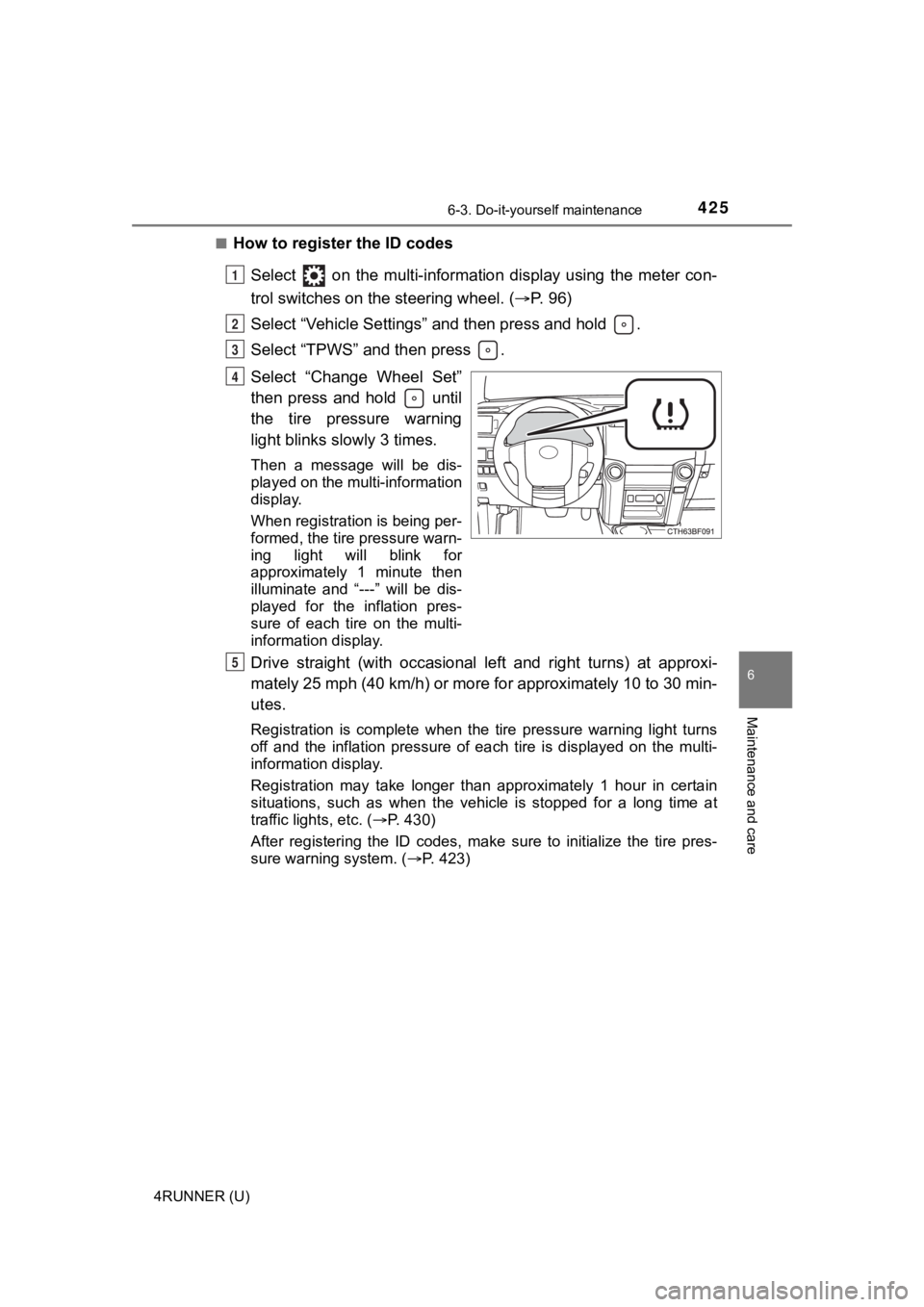
Select “Change Wheel Set”
then press and hold until
the tire pressure warning
light blinks slowly 3 times.
Then a message will be dis-
played on the multi-information
display.
When registration is being per-
formed, the tire pressure warn-
ing light will blink for
approximately 1 minute then
illuminate and “---” will be dis-
played for the inflation pres-
sure of each tire on the multi-
information display.
Drive straight (with occasional left and right turns) at approxi-
mately 25 mph (40 km/h) or more for approximately 10 to 30 min-
utes.
Registration is complete when the tire pressure warning light t urns
off and the inflation pressure of each tire is displayed on the multi-
information display.
Registration may take longer than approximately 1 hour in certain
situations, such as when the veh icle is stopped for a long time at
traffic lights, etc. ( P. 430)
After registering the ID codes, make sure to initialize the tir e pres-
sure warning system. ( P. 423)
1
2
3
4
5
Page 453 of 596
4536-3. Do-it-yourself maintenance
6
Maintenance and care
4RUNNER (U)■
Front turn signal/parking light
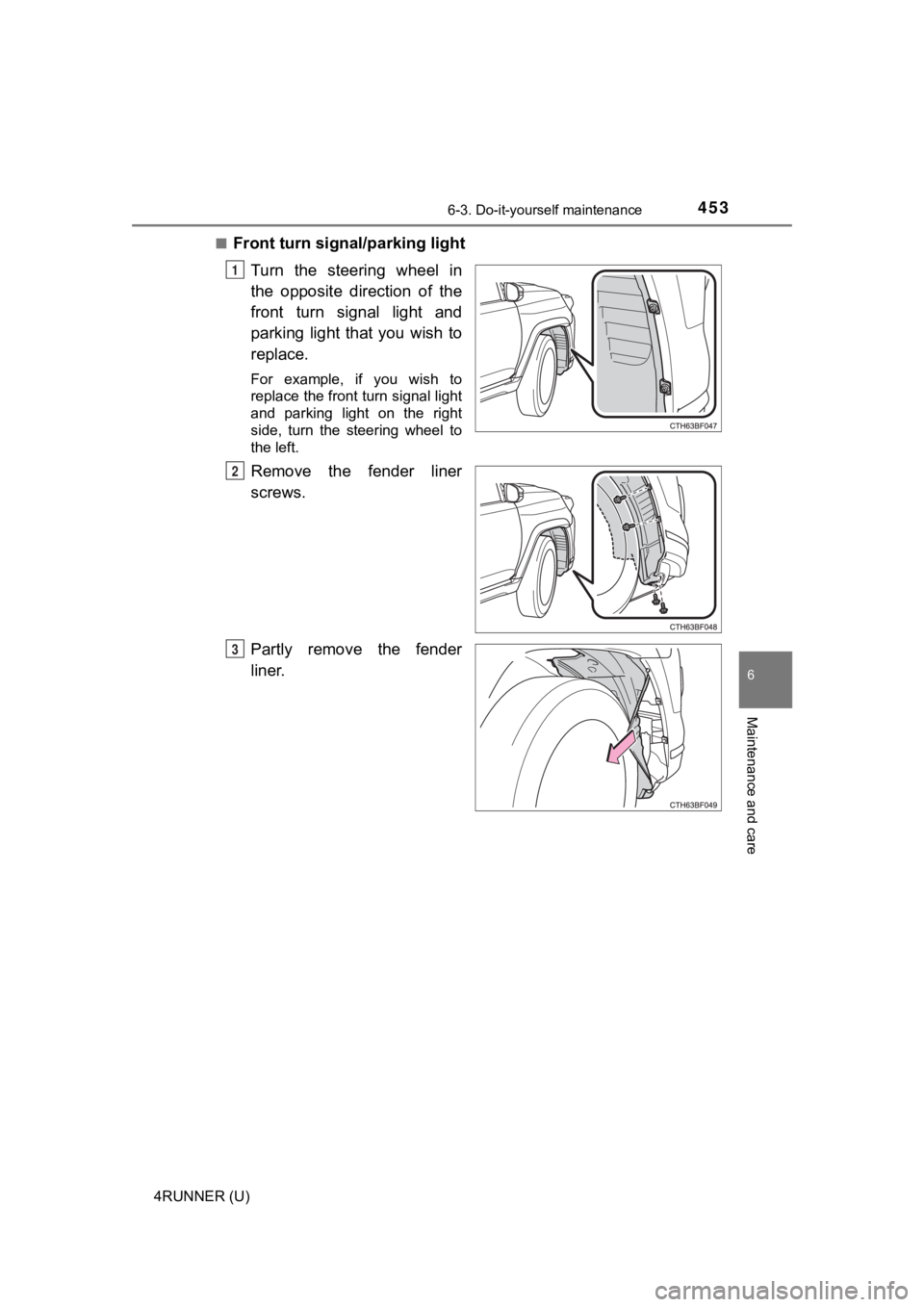
Turn the steering wheel in
the opposite direction of the
front turn signal light and
parking light that you wish to
replace.
For example, if you wish to
replace the front turn signal light
and parking light on the right
side, turn the steering wheel to
the left.
Remove the fender liner
screws.
Partly remove the fender
liner.
1
2
3
Page 455 of 596
4556-3. Do-it-yourself maintenance
6
Maintenance and care
4RUNNER (U)■
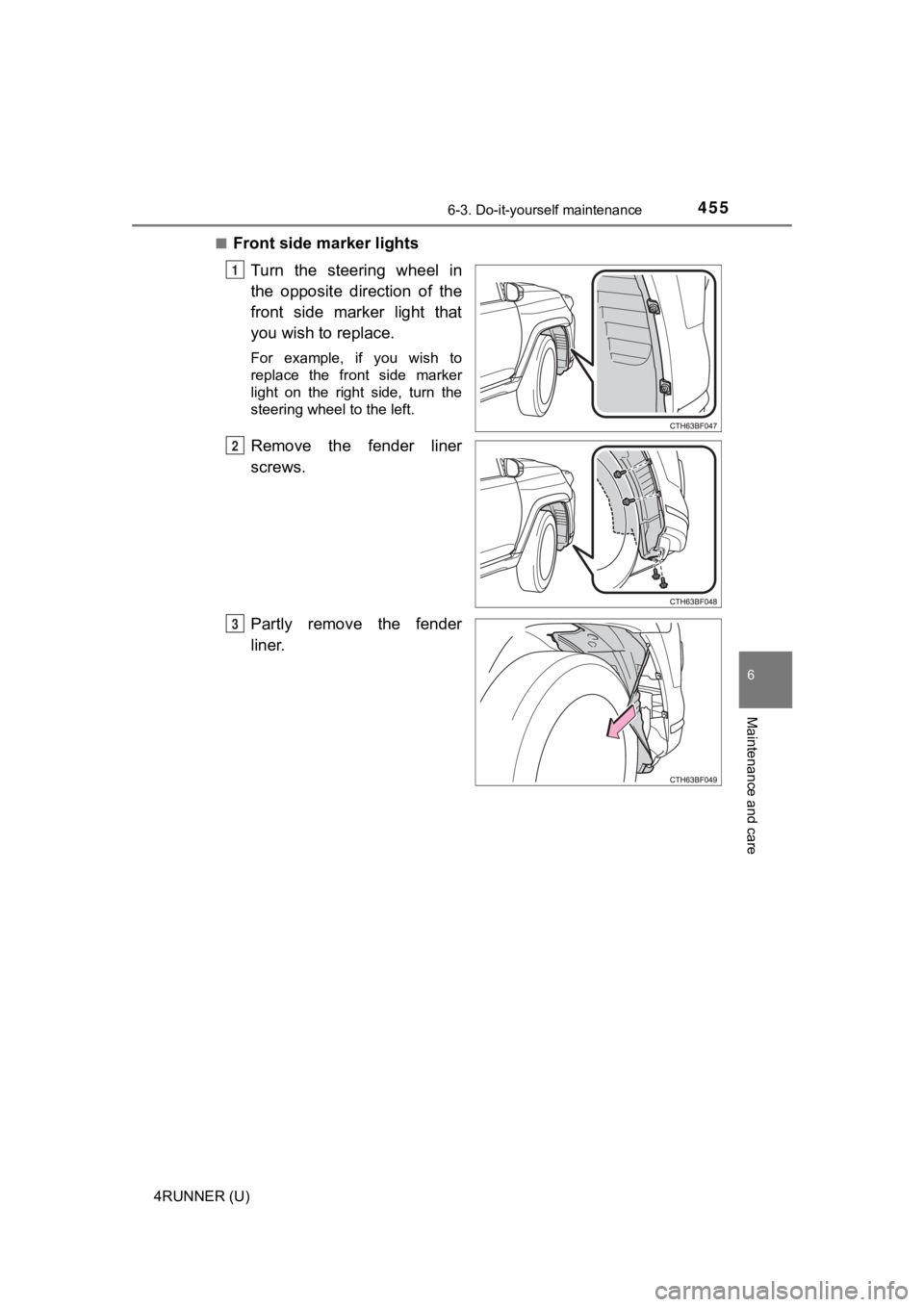
Front side marker lights
Turn the steering wheel in
the opposite direction of the
front side marker light that
you wish to replace.
For example, if you wish to
replace the front side marker
light on the right side, turn the
steering wheel to the left.
Remove the fender liner
screws.
Partly remove the fender
liner.
1
2
3
Page 457 of 596
4576-3. Do-it-yourself maintenance
6
Maintenance and care
4RUNNER (U)■
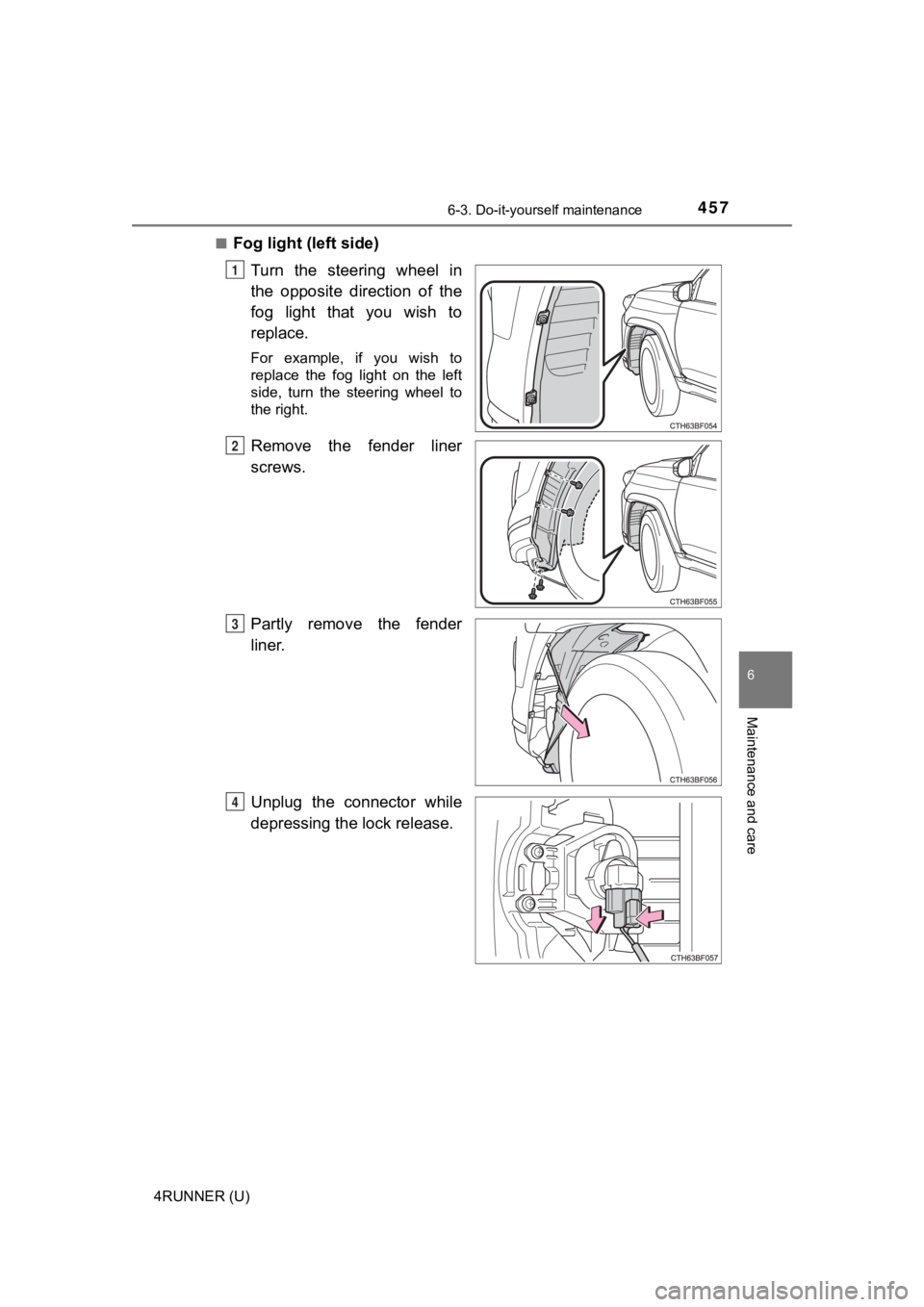
Fog light (left side)
Turn the steering wheel in
the opposite direction of the
fog light that you wish to
replace.
For example, if you wish to
replace the fog light on the left
side, turn the steering wheel to
the right.
Remove the fender liner
screws.
Partly remove the fender
liner.
Unplug the connector while
depressing the lock release.
1
2
3
4
Page 466 of 596

4667-1. Essential information
4RUNNER (U)
WARNING
■If the engine has to be tu rned off while driving
● Power assist for the brakes and steering wheel will be lost, ma king the
brake pedal harder to depress and the steering wheel heavier to turn.
Decelerate as much as possible before turning off the engine.
● Vehicles without a smart key system:
Never attempt to remove the key, as doing so will lock the stee ring wheel.
Page 469 of 596
4697-2. Steps to take in an emergency
7
When trouble arises
4RUNNER (U)
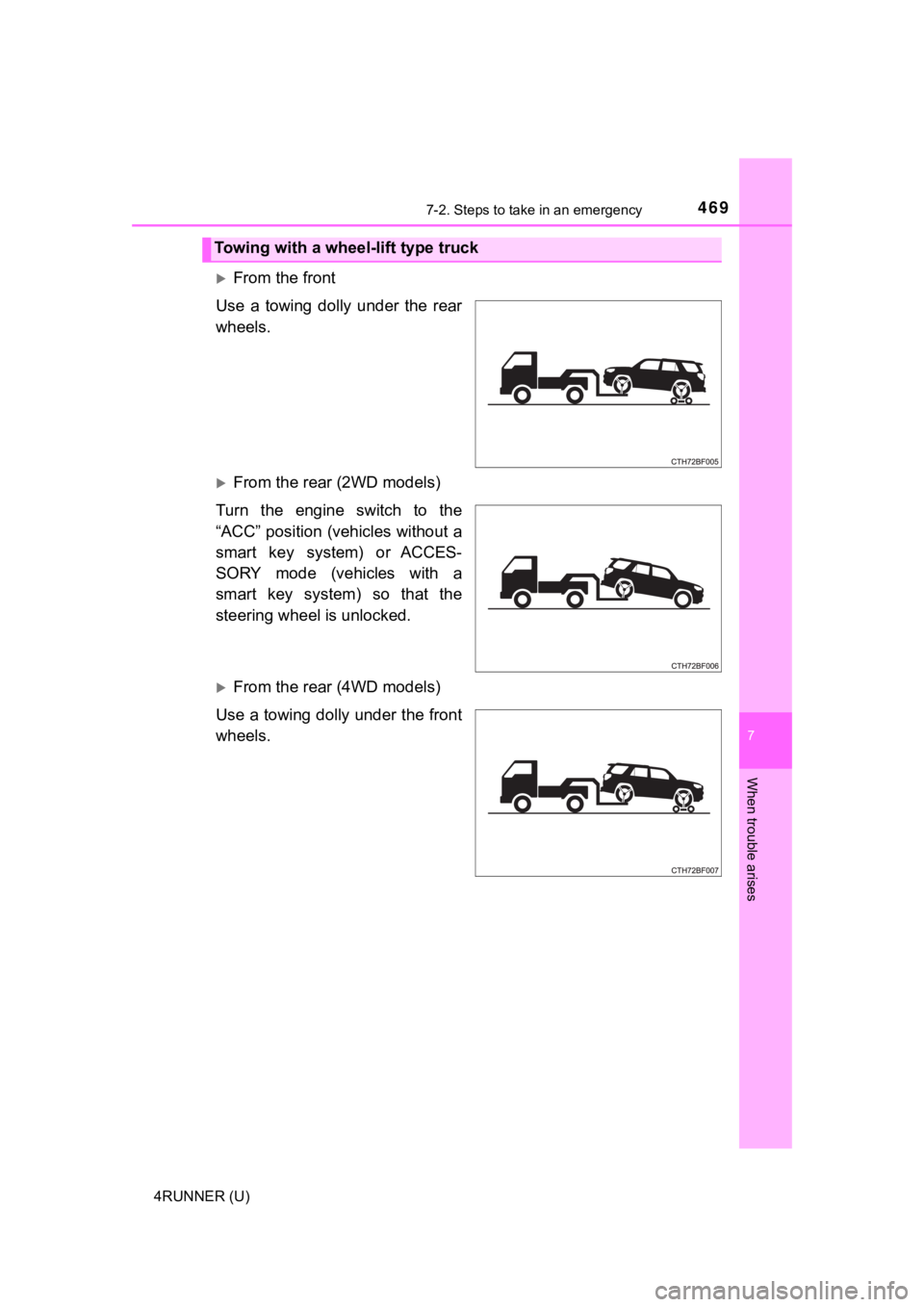
From the front
Use a towing dolly under the rear
wheels.
From the rear (2WD models)
Turn the engine switch to the
“ACC” position (vehicles without a
smart key system) or ACCES-
SORY mode (vehicles with a
smart key system) so that the
steering wheel is unlocked.
From the rear (4WD models)
Use a towing dolly under the front
wheels.
Towing with a wheel-lift type truck
Page 470 of 596
4707-2. Steps to take in an emergency
4RUNNER (U)
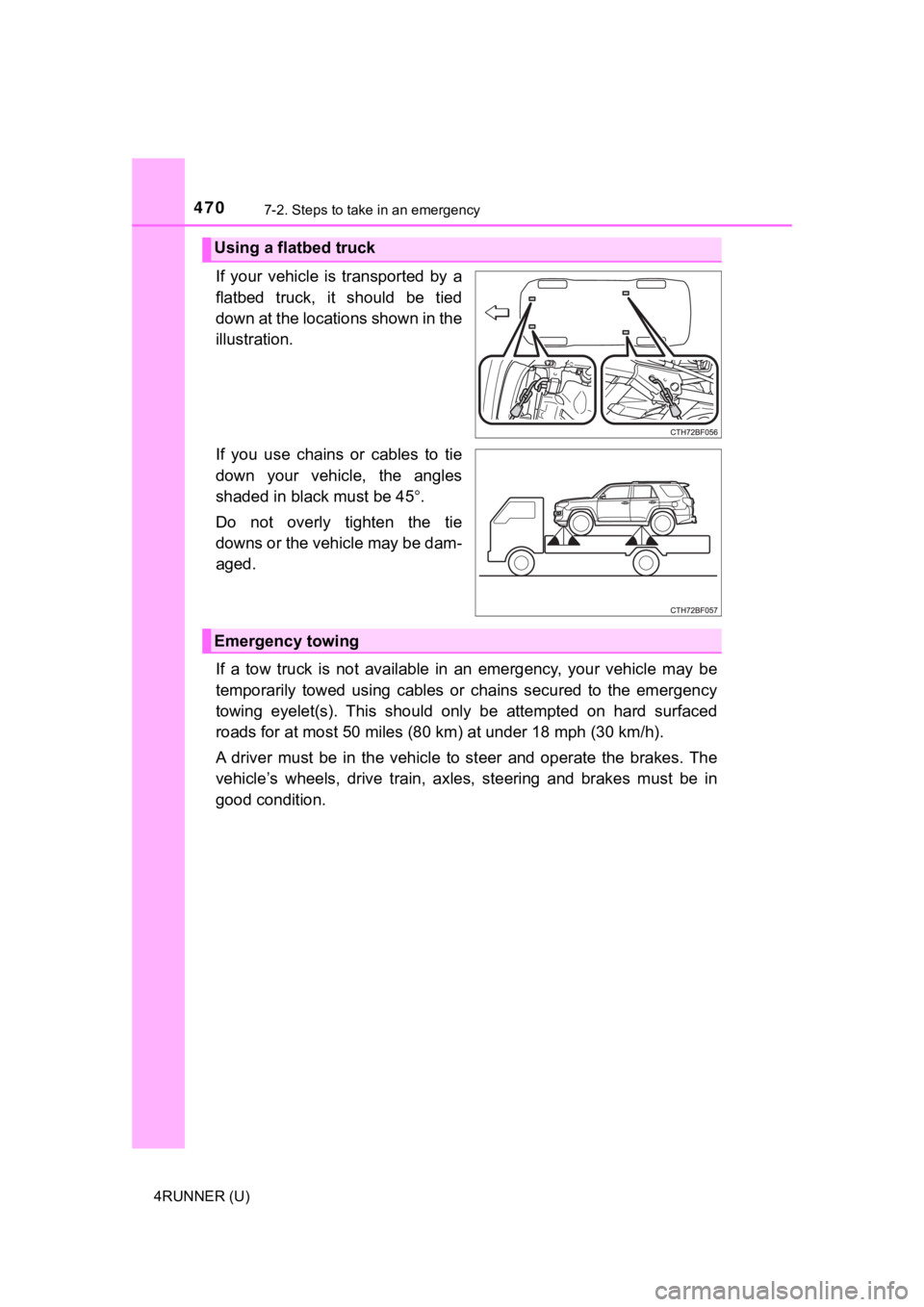
If your vehicle is transported by a
flatbed truck, it should be tied
down at the locations shown in the
illustration.
If you use chains or cables to tie
down your vehicle, the angles
shaded in black must be 45.
Do not overly tighten the tie
downs or the vehicle may be dam-
aged.
If a tow truck is not available in an emergency, your vehicle m ay be
temporarily towed using cables or chains secured to the emergen cy
towing eyelet(s). This should only be attempted on hard surface d
roads for at most 50 miles (80 km) at under 18 mph (30 km/h).
A driver must be in the vehicle to steer and operate the brakes . The
vehicle’s wheels, drive train, a xles, steering and brakes must be in
good condition.
Using a flatbed truck
Emergency towing