park assist TOYOTA 4RUNNER 2021 Owners Manual (in English)
[x] Cancel search | Manufacturer: TOYOTA, Model Year: 2021, Model line: 4RUNNER, Model: TOYOTA 4RUNNER 2021Pages: 592, PDF Size: 13.3 MB
Page 3 of 592

3
1
8 7
6
5
4
3
2
9
4RUNNER (U)4-1. Before driving
Driving the vehicle ............. 176
Cargo and luggage............ 186
Vehicle load limits ............. 191
Trailer towing..................... 192
Dinghy towing.................... 208
4-2. Driving procedures Engine (ignition) switch (vehicles without a
smart key system) ........... 209
Engine (ignition) switch (vehicles with a
smart key system) ........... 212
Automatic transmission ..... 218
Turn signal lever................ 223
Parking brake .................... 224
4-3. Operating the lights and wipers
Headlight switch ................ 225
Automatic High Beam ....... 230
Fog light switch ................. 234
Windshield wipers and washer ............................ 236
Rear window wiper and washer ............................ 239 4-4. Refueling
Opening the fuel tank cap................................... 242
4-5. Using the driving support systems
Toyota Safety Sense P ...... 245
PCS (Pre-Collision System) ........................... 254
LDA (Lane Departure Alert) ................................ 264
Dynamic radar cruise control.............................. 272
Intuitive parking assist ....... 285
Four-wheel drive system (part-time 4WD
models)............................ 292
Four-wheel drive system (full-time 4WD
models)............................ 296
Active traction control system ............................. 300
AUTO LSD system (2WD models) ................. 302
Rear differential lock system ............................. 304
Downhill assist control system ............................. 307
Crawl Control ..................... 310
Multi-terrain Select............. 313
Driving assist systems ....... 320
4-6. Driving tips Winter driving tips .............. 329
Off-road precautions .......... 333
4Driving
Page 86 of 592
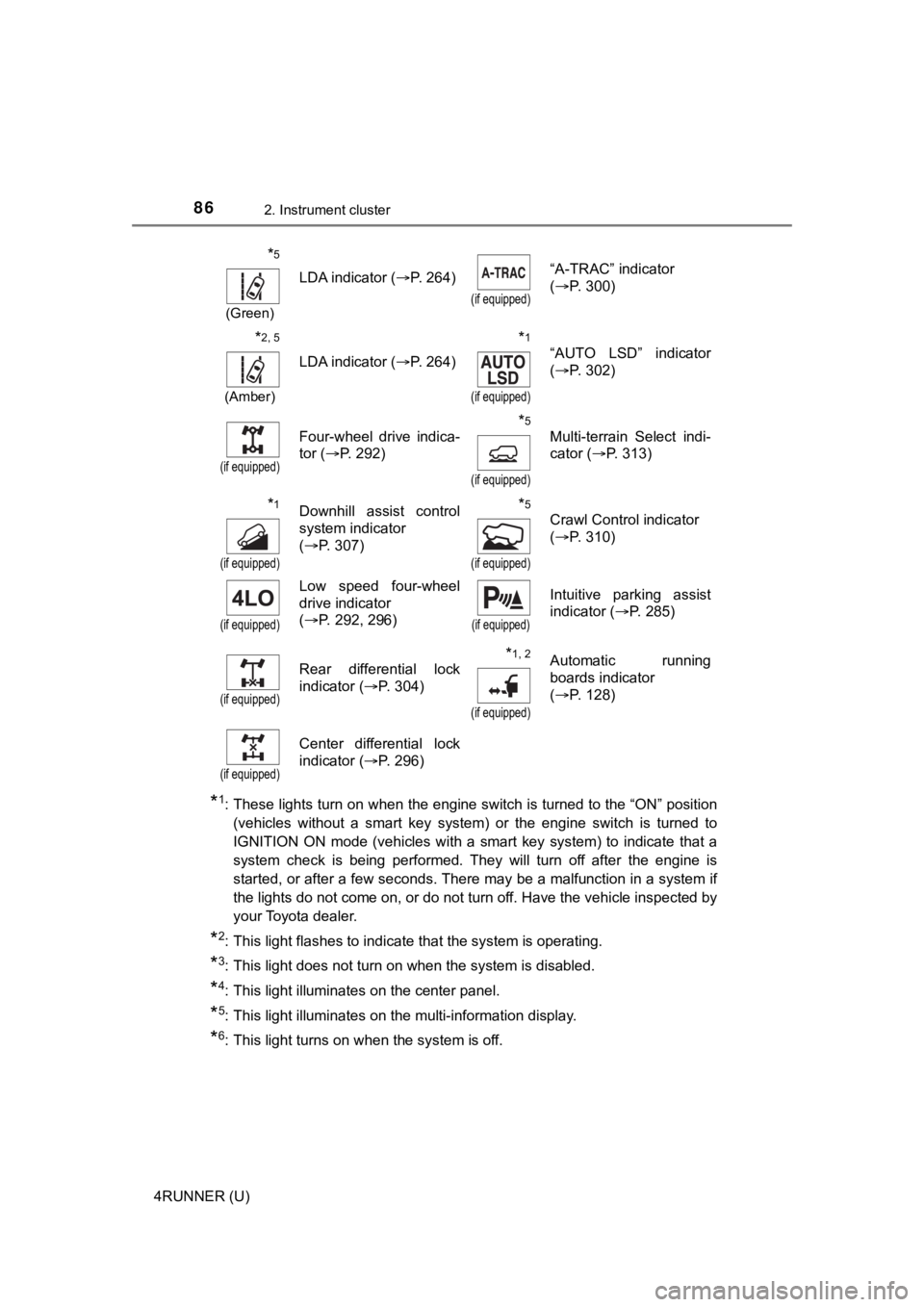
862. Instrument cluster
4RUNNER (U)
*1: These lights turn on when the engine switch is turned to the “ON” position
(vehicles without a smart key system) or the engine switch is turned to
IGNITION ON mode (vehicles with a smart key system) to indicate that a
system check is being performed. They will turn off after the engine is
started, or after a few seconds. There may be a malfunction in a system if
the lights do not come on, or do not turn off. Have the vehicle inspected by
your Toyota dealer.
*2: This light flashes to indicate that the system is operating.
*3: This light does not turn on when the system is disabled.
*4: This light illuminates on the center panel.
*5: This light illuminates on the multi-information display.
*6: This light turns on when the system is off.
*5
(Green)
LDA indicator ( P. 264)
(if equipped)
“A-TRAC” indicator
(P. 300)
*2, 5
(Amber)
LDA indicator ( P. 264)
*1
(if equipped)
“AUTO LSD” indicator
(P. 302)
(if equipped)
Four-wheel drive indica-
tor ( P. 292)*5
(if equipped)
Multi-terrain Select indi-
cator ( P. 313)
*1
(if equipped)
Downhill assist control
system indicator
(P. 307)*5
(if equipped)
Crawl Control indicator
(P. 310)
(if equipped)
Low speed four-wheel
drive indicator
(P. 292, 296)
(if equipped)
Intuitive parking assist
indicator ( P. 285)
(if equipped)
Rear differential lock
indicator ( P. 304)*1, 2
(if equipped)
Automatic running
boards indicator
(P. 128)
(if equipped)
Center differential lock
indicator ( P. 296)
Page 96 of 592

962. Instrument cluster
4RUNNER (U)■
Setting items
●
LDA (Lane Departure Alert)
Select to set up LDA. ( P. 556)
• Alert sensitivity
• Sway warning
• Sway sensitivity
● PCS (Pre-Collision System)
Select to set the f ollowing items. (P. 257)
• PCS on/off
• PCS sensitivity
● Intuitive parking assist (if equipped)
Select to set the Intuiti ve parking assist on/off
● Vehicle settings
“TPWS” (Tire Pressure Warning System) ( P. 425)
• “Set Pressure” Select to initialize the tire pressure warning system.
• “Change Wheel Set” Select to register the ID codes of the tire pressure sensors to
the tire pressure warning system.3
● Meter settings ( P. 5 5 5 )
Select to set the following items.
• Language Select to change the language on the display.
•Units Select to change the unit for measure.
• Eco Driving Indicator Light Select to activate/deactivate the Eco Driving Indicator Light.
(
P. 9 7 )
• switch settings You can register 1 screen as the top screen. To register, press
and hold while the desired screen is displayed.
• Pop-up display Select to set the pop-up displays ( P. 98), which may appear
in some situations, on/off.
• Initialization Select to reset the mete r display settings.
Page 122 of 592

1223-2. Opening, closing and locking the doors
4RUNNER (U)■
Conditions affecting operation
The smart key system uses weak radio waves. In the following si tuations, the
communication between the electronic key and the vehicle may be affected,
preventing the smart key system, wireless remote control and en gine immobi-
lizer system from operating properly. (Ways of coping: P. 507)
● When the electronic key battery is depleted
● Near a TV tower, electric power plant, gas station, radio stati on, large dis-
play, airport or other facility that generates strong radio wav es or electrical
noise
● When carrying a portable radio, cellular phone, cordless phone or other
wireless communication device
● When the electronic key is in contact with, or is covered by the following
metallic objects
• Cards to which aluminum foil is attached
• Cigarette boxes that have aluminum foil inside
• Metallic wallets or bags
• Coins
• Hand warmers made of metal
• Media such as CDs and DVDs
● When multiple electronic keys are in the vicinity
● When other wireless keys (that emit radio waves) are being used nearby
● When carrying the electronic key together with the following devices that
emit radio waves
• Another vehicle’s electronic key or a wireless key that emits radio waves
• Personal computers or personal digital assistants (PDAs)
• Digital audio players
• Portable game systems
● If window tint with a metallic content or metallic objects are attached to the
back window
● When the electronic key is placed near a battery charger or ele ctronic
devices
● When the vehicle is parked in a pay parking spot where radio wa ves are
emitted.
If the doors cannot be locked/unlocked using the smart key syst em, lock/
unlock the doors by performing any of the following:
● Bring the electronic key close to either front door handle and operate the
entry function.
● Operate the wireless remote control.
If the doors cannot be locked/unlocked using the above methods, use the
mechanical key. ( P. 507)
If the engine cannot be started using the smart key system, ref er to P. 508.
Page 175 of 592

175
Driving4
4RUNNER (U)4-1. Before driving
Driving the vehicle ............. 176
Cargo and luggage ........... 186
Vehicle load limits ............. 191
Trailer towing..................... 192
Dinghy towing ................... 208
4-2. Driving procedures Engine (ignition) switch (vehicles without a
smart key system) ........... 209
Engine (ignition) switch (vehicles with a
smart key system) ........... 212
Automatic transmission ..... 218
Turn signal lever................ 223
Parking brake .................... 224
4-3. Operating the lights and wipers
Headlight switch ................ 225
Automatic High Beam ....... 230
Fog light switch ................. 234
Windshield wipers and washer ............................ 236
Rear window wiper and washer ............................ 239 4-4. Refueling
Opening the fuel tank cap .................................. 242
4-5. Using the driving support systems
Toyota Safety Sense P ..... 245
PCS (Pre-Collision System)........................... 254
LDA (Lane Departure Alert) ............................... 264
Dynamic radar cruise control ............................. 272
Intuitive parking assist....... 285
Four-wheel drive system (part-time 4WD
models) ........................... 292
Four-wheel drive system (full-time 4WD
models) ........................... 296
Active traction control system ............................ 300
AUTO LSD system (2WD models) ................. 302
Rear differential lock system ............................ 304
Downhill assist control system ............................ 307
Crawl Control .................... 310
Multi-terrain Select ............ 313
Driving assist systems ...... 320
4-6. Driving tips Winter driving tips ............. 329
Off-road precautions ......... 333
Page 183 of 592

1834-1. Before driving
4
Driving
4RUNNER (U)
WARNING
Observe the following precautions.
Failure to do so may result in death or serious injury.
■When taking a nap in the vehicle
Always turn the engine off. Otherwise, if you accidentally move the shift
lever or depress the accelerator pedal, this could cause an acc ident or fire
due to engine overheating. Additionally, if the vehicle is park ed in a poorly
ventilated area, exhaust gases may collect and enter the vehicl e, leading to
death or a serious health hazard.
■ When braking
● When the brakes are wet, drive more cautiously.
Braking distance increases when the brakes are wet, and this ma y cause
one side of the vehicle to brake differently than the other sid e. Also, the
parking brake may not securely hold the vehicle.
● If the brake booster device does not operate, do not follow oth er vehicles
closely and avoid hills or shar p turns that require braking.
In this case, braking is still possible, but the brake pedal sh ould be
depressed more firmly than usual. Also, the braking distance wi ll increase.
● Do not pump the brake pedal if the engine stalls.
Each push on the brake pedal uses up the reserve for the power-assisted
brakes.
● The brake system consists of 2 individual hydraulic systems; if one of the
systems fails, the other will still operate. In this case, the brake pedal
should be depressed more firmly than usual and the braking dist ance will
increase.
If this happens, do not continue to drive the vehicle. Have you r brakes
fixed immediately.
Page 216 of 592

2164-2. Driving procedures
4RUNNER (U)
WARNING
■When starting the engine
Always start the engine while sitting in the driver’s seat. Do not depress the
accelerator pedal while starting the engine under any circumsta nces.
Doing so may cause an accident resulting in death or serious in jury.
■ Caution while driving
If engine failure occurs while the vehicle is moving, do not lo ck or open the
doors until the vehicle reaches a safe and complete stop. Activ ation of the
steering lock in this circumstance may lead to an accident, res ulting in
death or serious injury.
■ Stopping the engine in an emergency
● If you want to stop the engine in an emergency while driving th e vehicle,
press and hold the engine switch for more than 2 seconds, or press it
briefly 3 times or more in succession. ( P. 463)
However, do not touch the engine switch while driving except in an emer-
gency. Turning the engine off while driving will not cause loss of steering or
braking control, but the power assist to these systems will be lost. This will
make it more difficult to steer and brake, so you should pull o ver and stop
the vehicle as soon as it is safe to do so.
● If the engine switch is operated while the vehicle is running, a warning
message will be shown on the multi-information display and a bu zzer
sounds.
■ When parking
Exhaust gases include harmful carbon monoxide (CO), which is colorless
and odorless. Observe the following precautions.
Failure to do so may cause exhaust gases to enter the vehicle a nd may
lead to an accident caused by light-headedness, or may lead to death or a
serious health hazard.
● If the vehicle is in a poorly ventilated area or a closed area, such as a
garage, stop the engine.
● Do not leave the vehicle with the engine running for a long tim e. If such a
situation cannot be avoided, park the vehicle in an open space and ensure
that exhaust fumes do not enter the vehicle interior.
● Do not leave the engine running in an area with snow build-up, or where it
is snowing. If snowbanks build up around the vehicle while the engine is
running, exhaust gases may collect and enter the vehicle.
Page 285 of 592
2854-5. Using the driving support systems
4
Driving
4RUNNER (U)
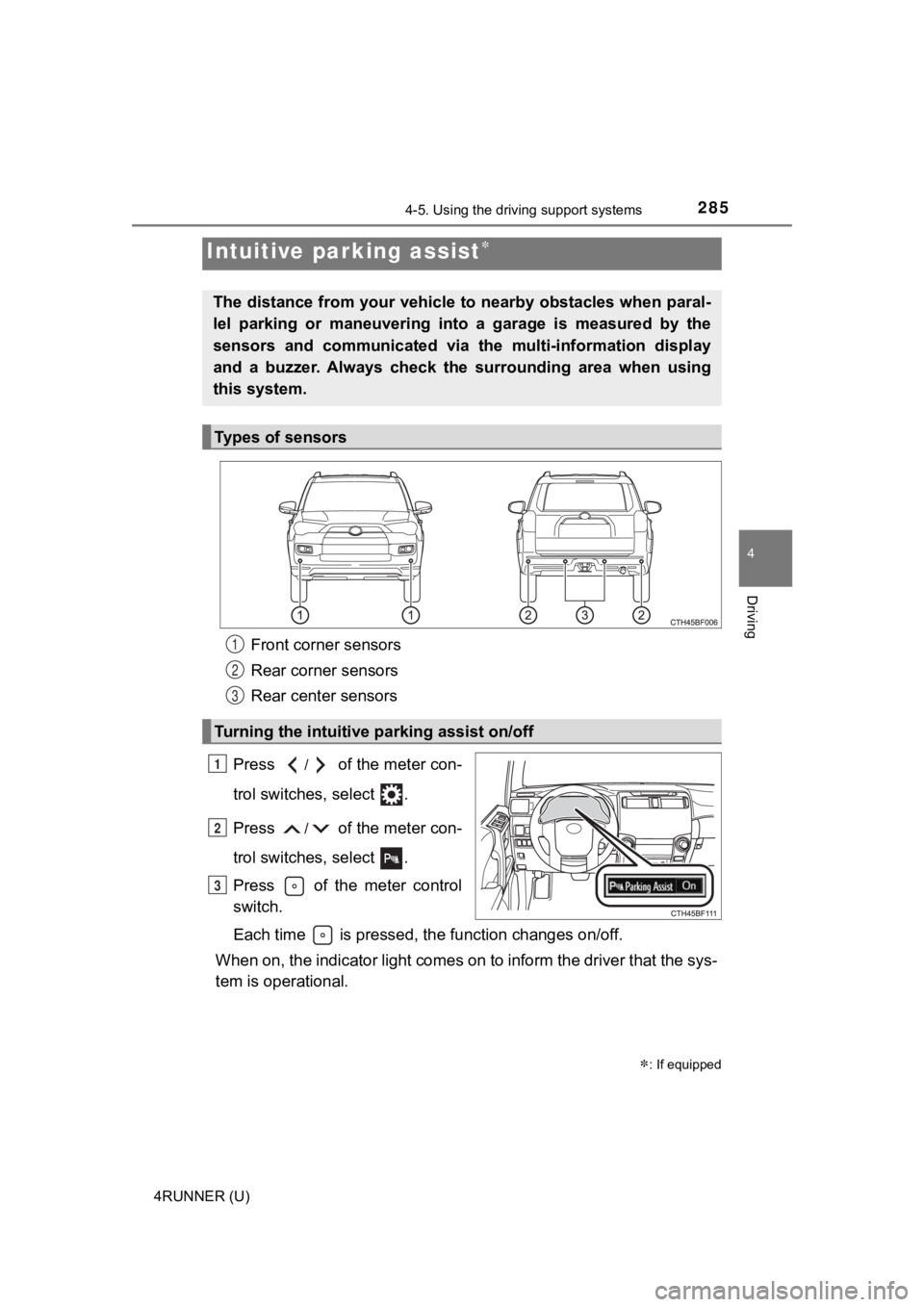
Front corner sensors
Rear corner sensors
Rear center sensors
Press
/ of the meter con-
trol switches, select .
Press
/ of the meter con-
trol switches, select .
Press of the meter control
switch.
Each time is pressed, the function changes on/off.
When on, the indicator light comes on to inform the driver that the sys-
tem is operational.
Intuitive parking assist
: If equipped
The distance from your vehicle to nearby obstacles when paral-
lel parking or maneuvering into a garage is measured by the
sensors and communicated via t he multi-information display
and a buzzer. Always check the surrounding area when using
this system.
Types of sensors
Turning the intuitive parking assist on/off
1
2
3
1
2
3
Page 289 of 592

2894-5. Using the driving support systems
4
Driving
4RUNNER (U)
■Intuitive parking assist can be operated when
●Front corner sensors:
• The engine switch is in the “ON” position (without a smart key system) or
the engine switch is in IGNITION ON mode (with a smart key syst em).
• The shift lever is in a position other than P.
• The vehicle speed is less than approximately 6 mph (10 km/h).
● Rear corner and rear center sensors:
• The engine switch is in the “ON” position (without a smart key system) or
the engine switch is in IGNITION ON mode (with a smart key syst em).
• The shift lever is in R.
■ Intuitive parking assist display
When an obstacle is detected while the Toyota parking assist mo nitor is in
use, the warning indicator will appear in the upper part of the screen even if
the display setting has been set to off.
■ Sensor detection information
●The sensor’s detection areas are limited to the areas around th e vehicle’s
front corner and rear bumpers.
● Certain vehicle conditions and the surrounding environment may affect the
ability of the sensor to correctly detect obstacles. Particular instances where
this may occur are listed below.
• There is dirt, snow or ice on the sensor. (Wiping the sensors will resolve
this problem.)
• The sensor is frozen. (Thawing the area will resolve this problem.)
In especially cold weather, if a sensor is frozen the screen ma y show an
abnormal display, or obstacles may not be detected.
• The sensor is covered in any way.
• The vehicle is leaning considerably to one side.
• On an extremely bumpy road, on an incline, on gravel, or on gr ass.
• The vicinity of the vehicle is noisy due to vehicle horns, motorcycle
engines, air brakes of large vehicles, or other loud noises pro ducing ultra-
sonic waves.
• There is another vehicle equipped with parking assist sensors in the
vicinity.
• The sensor is coated with a sheet of spray or heavy rain.
• The vehicle is equipped with a fender pole or wireless antenna .
• Towing eyelet is installed.
• The bumper or sensor receives a strong impact.
• The vehicle is approaching a tall or curved curb.
• In harsh sunlight or intense cold weather.
• The area directly under the bumpers is not detected.
• If obstacles draw too close to the sensor.
• A non-genuine Toyota suspension (lowered suspension etc.) is i nstalled.
• People may not be detected if they are wearing certain types o f clothing.
In addition to the examples above, there are instances in which, because of
their shape, signs and other objects may be judged by the senso r to be
closer than they are.
Page 291 of 592

2914-5. Using the driving support systems
4
Driving
4RUNNER (U)
WARNING
■When using the intuitive parking assist
Observe the following precautions.
Failing to do so may result in the vehicle being unable to be d riven safely
and possibly cause an accident.
● Do not use the sensor at speeds in excess of 6 mph (10 km/h).
● The sensors’ detection areas and reaction times are limited. When moving
forward or reversing, check the areas surrounding the vehicle ( especially
the sides of the vehicle) for safety, and drive slowly, using t he brake to
control the vehicle’s speed.
● Do not install accessories within the sensors’ detection areas.
NOTICE
■When using intuitive parking assist-sensor
In the following situations, the system may not function correctly due to a
sensor malfunction etc. Have the vehicle checked by your Toyota dealer.
● The intuitive parking assist operation display flashes, and a beep sounds
when no obstacles are detected.
● If the area around a sensor collides with something, or is subjected to
strong impact.
● If the bumper collides with something.
● If the display shows continuously without a beep.
● If a display error occurs, first check the sensor.
If the error occurs even if there is no ice, snow or mud on the sensor, it is
likely that the sensor is malfunctioning.
■ Notes when washing the vehicle
Do not apply intensive bursts of water or steam to the sensor a rea.
Doing so may result in the sensor malfunctioning.