lock TOYOTA 4RUNNER 2022 Owners Manual
[x] Cancel search | Manufacturer: TOYOTA, Model Year: 2022, Model line: 4RUNNER, Model: TOYOTA 4RUNNER 2022Pages: 616, PDF Size: 12.01 MB
Page 220 of 616

2204-2. Driving procedures
4RUNNER (U)
WARNING
■When driving on slippery road surfaces
Be careful of downshifting and sudden acceleration, as this could result in
the vehicle skidding to the side or spinning.
■ To prevent an accident when releasing the shift lock
Before pressing the shift lock override button, make sure to se t the parking
brake and depress the brake pedal.
If the accelerator pedal is accidentally depressed instead of t he brake pedal
when the shift lock override button is pressed and the shift le ver is shifted
out of P, the vehicle may suddenly start, possibly leading to an accident
resulting in death or serious injury.
Page 226 of 616
2264-3. Operating the lights and wipers
4RUNNER (U)
■Daytime running light system
●Vehicles with a headlight high beam/daytime running lights: The daytime
running lights illuminate using the same lights as the headligh t high beam
and illuminate dimmer than the headlight high beam.
● To make your vehicle more visible to other drivers during dayti me driving,
the daytime running lights turn on automatically when all of the following
conditions are met. (The daytime running lights are not designe d for use at
night.)
• The engine is running
• The parking brake is released
• The headlight switch is in the , (type A only),
* (type B
and C) position
*: When the surroundings are bright
The daytime running lights remain on after they illuminate, eve n if the park-
ing brake is set again.
Type A and B: Daytime running lights can be turned off by opera ting the
switch.
● Compared to turning on the headlights, the daytime running ligh t system
offers greater durability and consumes less electricity, so it can help improve
fuel economy.
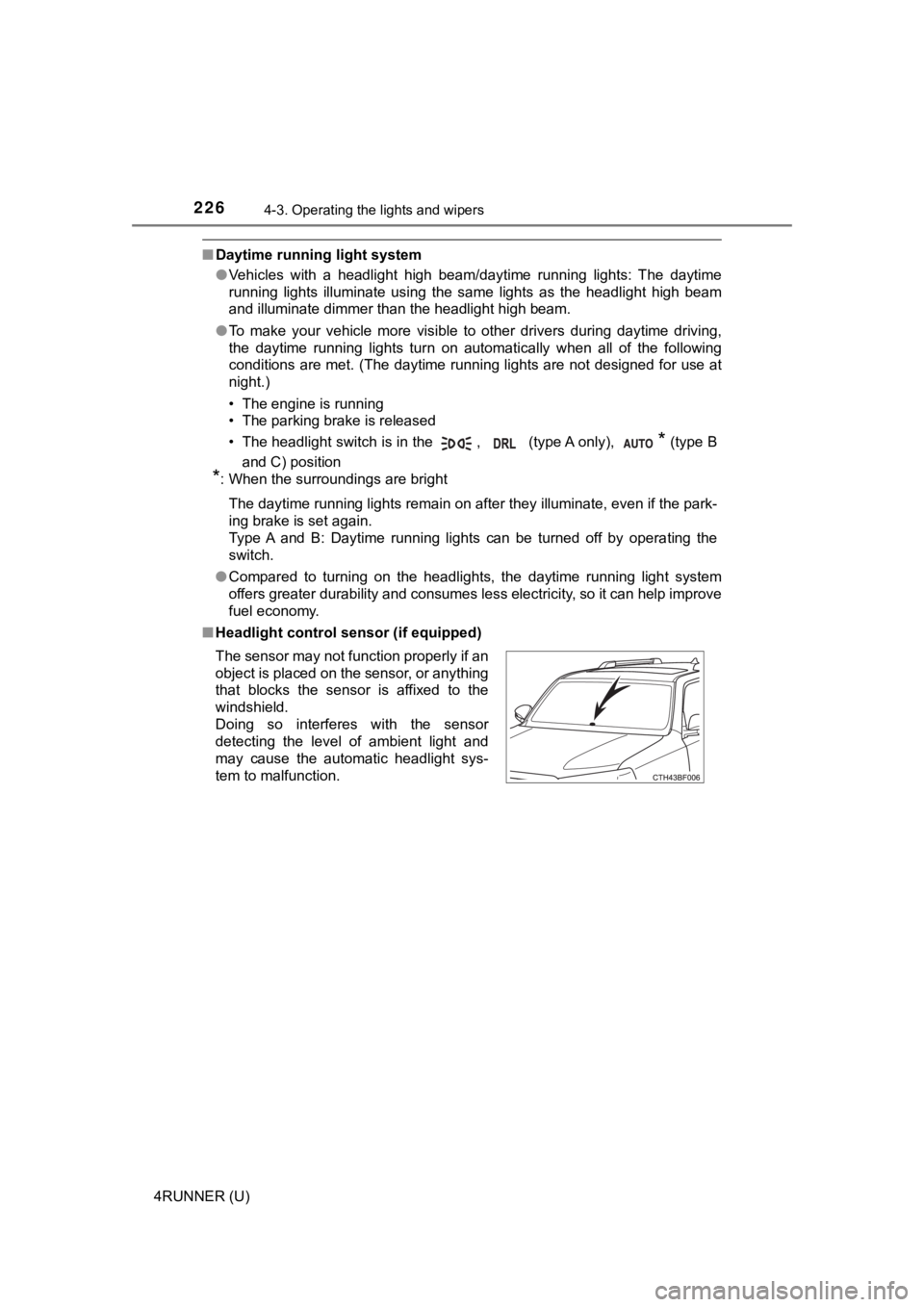
■ Headlight control sensor (if equipped)
The sensor may not function properly if an
object is placed on the sensor, or anything
that blocks the sensor is affixed to the
windshield.
Doing so interferes with the sensor
detecting the level of ambient light and
may cause the automatic headlight sys-
tem to malfunction.
Page 227 of 616
2274-3. Operating the lights and wipers
4
Driving
4RUNNER (U)■
Automatic light off system (if equipped)
Vehicles without a smart key system
● When the headlights come on: The headlights and tail lights turn off 30 sec-
onds after a door is opened and closed if the engine switch is turned to the
“ACC” or “LOCK” position. (The lights turn off immediately if on the
key is pressed after all the doors are locked.)
● When only the tail lights come on: The tail lights turn off automatically if the
engine switch is turned to the “ACC” or “LOCK” position and the driver’s
door is opened.
To turn the lights on again, turn the engine switch to the “ON” position, or turn
the lights off and then back to or .
Vehicles with a smart key system
● When the headlights come on: The headlights and tail lights turn off 30 sec-
onds after a door is opened and closed if the engine switch is turned to
ACCESSORY mode or turned off. (The lights turn off immediately if
on the key is pressed after all the doors are locked.)
● When only the tail lights come on: The tail lights turn off automatically if the
engine switch is turned off and the driver’s door is opened.
To turn the lights on again, turn the engine switch to IGNITION ON mode, or
turn the light switch off and then back to or .
■ Customization
Settings (e.g. light sensor sensitivity) can be changed.
(Customizable features: P. 557)
NOTICE
■To prevent battery discharge
Do not leave the lights on longer than necessary when the engin e is not
running.
Page 236 of 616
2364-3. Operating the lights and wipers
4RUNNER (U)
■The windshield wiper and washer can be operated when
Vehicles without a smart key system
The engine switch is in the “ON” position.
Vehicles with a smart key system
The engine switch is in IGNITION ON mode.
■ If no windshield washer fluid sprays
Check that the washer nozzles are not blocked if there is washe r fluid in the
washer fluid reservoir.
WARNING
■ Caution regarding the use of washer fluid
When it is cold, do not use the washer fluid until the windshie ld becomes
warm. The fluid may freeze on the windshield and cause low visi bility. This
may lead to an accident, resulting in death or serious injury.
NOTICE
■ When the windshield is dry
Do not use the wipers, as they may damage the windshield.
■ When the washer fluid tank is empty
Do not operate the switch continually as the washer fluid pump may over-
heat.
■ When a nozzle becomes blocked
In this case, contact your Toyota dealer.
Do not try to clear it with a pin or other object. The nozzle will be damaged.
Page 239 of 616
2394-3. Operating the lights and wipers
4
Driving
4RUNNER (U)■
When the rear window wiper and washer switch is turned off
The rear wiper will stop operation, and return to the retracted position after
approximately 3 seconds.
However, if the engine switch is turned to the “ACC” or “LOCK” position (vehi-
cles without a smart key system) or the engine switch is turned to ACCES-
SORY mode or turned off (vehicles with a smart key system) whil e the rear
wiper is operating, the rear wiper will stop at that position and will not return to
the retracted position.
■ If no washer fluid sprays
Check that the washer nozzle is not blocked if there is washer fluid in the
washer fluid reservoir.
■ Customization
Settings (e.g. drip prevention function) can be changed.
(Customizable features P. 557)
NOTICE
■When the rear window is dry
Do not use the wiper, as it may damage the rear window.
■ When the washer fluid tank is empty
Do not operate the switch continually as the washer fluid pump may over-
heat.
■ When a nozzle becomes blocked
In this case, contact your Toyota dealer.
Do not try to clear it with a pin or other object. The nozzle will be damaged.
Page 240 of 616
240
4RUNNER (U)
4-4. Refueling
●Turn the engine switch to the “LOCK” position and ensure that a ll
the doors and windows are closed.
● Confirm the type of fuel.
■Fuel types
P. 542
■ Fuel tank opening for unleaded gasoline
To help prevent incorrect fueling, your vehicle has a fuel tank opening that
only accommodates the special nozzle on unleaded fuel pumps.
■ If the malfunction indicator lamp illuminates
The malfunction indicator lamp may illuminate erroneously if re fueling is per-
formed repeatedly when the fuel tank is nearly full.
Opening the fuel tank cap
Perform the following steps to open the fuel tank cap:
Before refueling the vehicle
Page 258 of 616
2584-5. Using the driving support systems
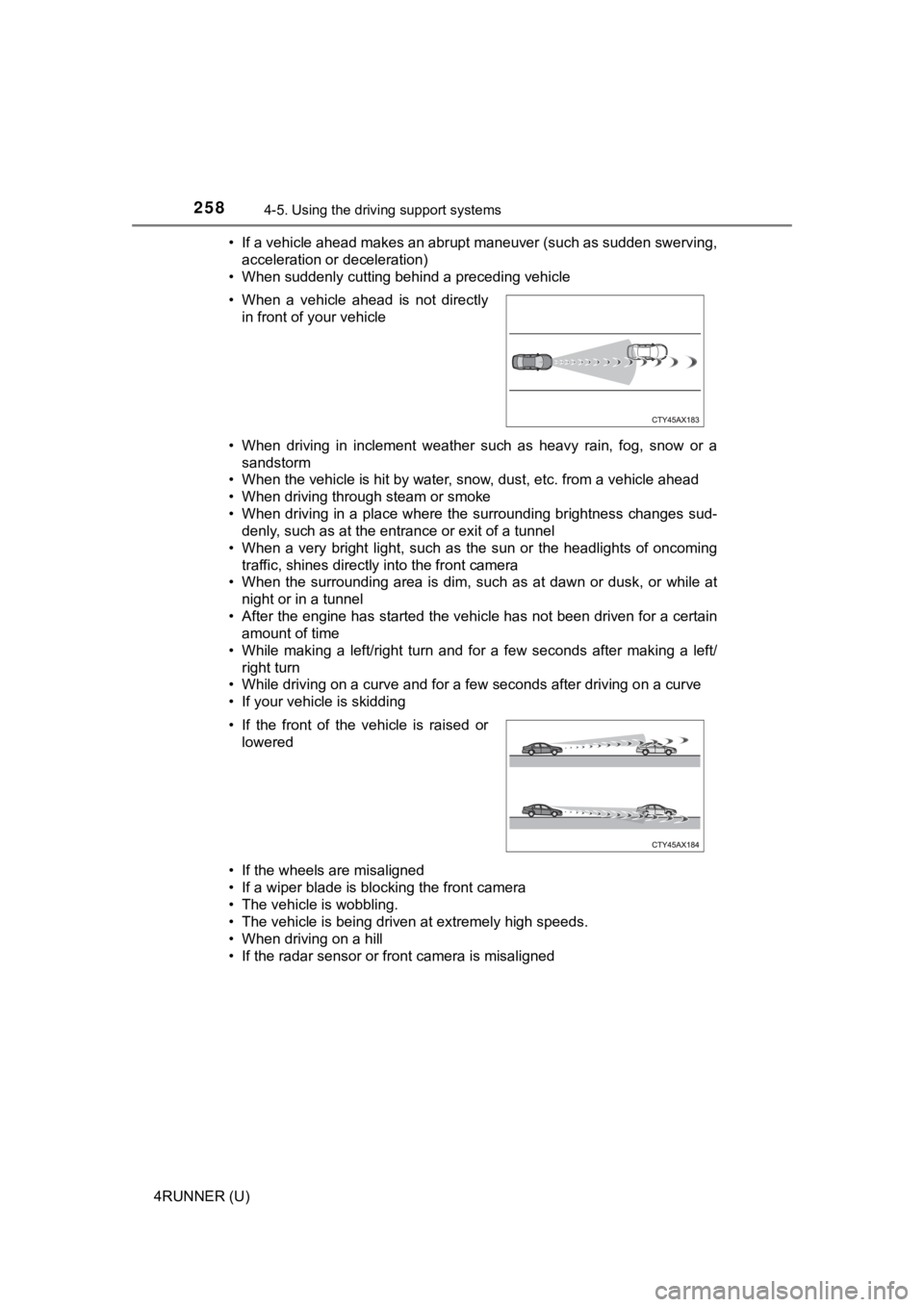
4RUNNER (U)• If a vehicle ahead makes an abrupt maneuver (such as sudden sw
erving,
acceleration or deceleration)
• When suddenly cutting behind a preceding vehicle
• When driving in inclement weather such as heavy rain, fog, snow or a
sandstorm
• When the vehicle is hit by water, snow, dust, etc. from a vehicle ahead
• When driving through steam or smoke
• When driving in a place where the surrounding brightness changes sud- denly, such as at the entrance or exit of a tunnel
• When a very bright light, such as the sun or the headlights of oncoming
traffic, shines directly into the front camera
• When the surrounding area is dim, such as at dawn or dusk, or while at
night or in a tunnel
• After the engine has started the vehicle has not been driven for a certain amount of time
• While making a left/right turn and for a few seconds after mak ing a left/
right turn
• While driving on a curve and for a few seconds after driving o n a curve
• If your vehicle is skidding
• If the wheels are misaligned
• If a wiper blade is blocking the front camera
• The vehicle is wobbling.
• The vehicle is being driven at extremely high speeds.
• When driving on a hill
• If the radar sensor or front camera is misaligned • When a vehicle ahead is not directly in front of your vehicle
• If the front of the vehicle is raised or lowered
Page 297 of 616
2974-5. Using the driving support systems
4
Driving
4RUNNER (U)
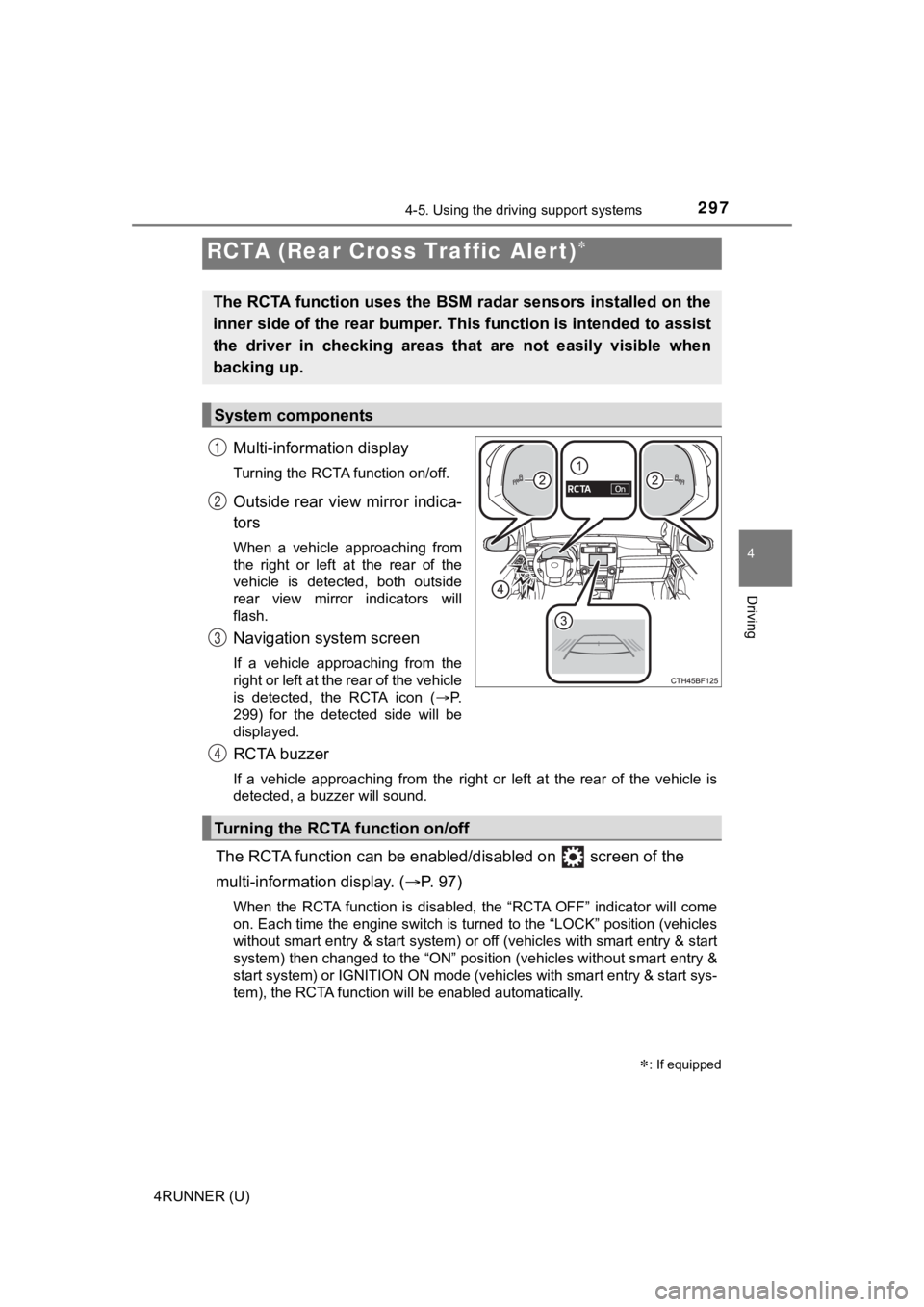
Multi-information display
Turning the RCTA function on/off.
Outside rear view mirror indica-
tors
When a vehicle approaching from
the right or left at the rear of the
vehicle is detected, both outside
rear view mirror indicators will
flash.
Navigation system screen
If a vehicle approaching from the
right or left at the rear of the vehicle
is detected, the RCTA icon (P.
299) for the detected side will be
displayed.
RCTA buzzer
If a vehicle approaching from the right or left at the rear of the vehicle is
detected, a buzzer will sound.
The RCTA function can be enabl ed/disabled on screen of the
multi-information display. ( P. 9 7 )
When the RCTA function is disabled, the “RCTA OFF” indicator wi ll come
on. Each time the engine switch is turned to the “LOCK” position (vehicles
without smart entry & start system) or off (vehicles with smart entry & start
system) then changed to the “ON” position (vehicles without sma rt entry &
start system) or IGNITION ON mode (vehicles with smart entry & start sys-
tem), the RCTA function will be enabled automatically.
RCTA (Rear Cross Traffic Alert)
: If equipped
The RCTA function uses the BSM radar sensors installed on the
inner side of the rear bumper. This function is intended to ass ist
the driver in checking areas that are not easily visible when
backing up.
System components
1
2
3
Turning the RCTA function on/off
4
Page 301 of 616
3014-5. Using the driving support systems
4
Driving
4RUNNER (U)
■The RCTA function is operational when
The RCTA function operates when all of the following conditions are met:
● The engine switch is in the “ON” position (vehicles without sma rt entry &
start system) or IGNITION ON m ode (vehicles with smart entry & start sys-
tem).
● The RCTA function is on.
● The shift lever is in R.
● The vehicle speed is less than approximately 9 mph (15 km/h).
● The approaching vehicle speed is between approximately 5 mph (8 km/h)
and 35 mph (56 km/h).
■ Muting a buzzer temporarily
A mute button will be displayed on the multi-information displa y when a vehi-
cle or an object is detected. To mute the buzzer, press. The bu zzers for the
RCTA function and Toyota parking assist-sensor will be muted si multane-
ously.
Mute will be automatically canceled in the following situations :
● When the shift position is changed.
● When there is a malfunction in a sensor or the system is temporarily
unavailable.
● When the function is disabled while it is operating.
● The engine switch is in the “LOCK” position (vehicles without s mart entry &
start system) or turned off (vehicles with smart entry & start system).
■ Conditions under which the system will not detect a vehicle
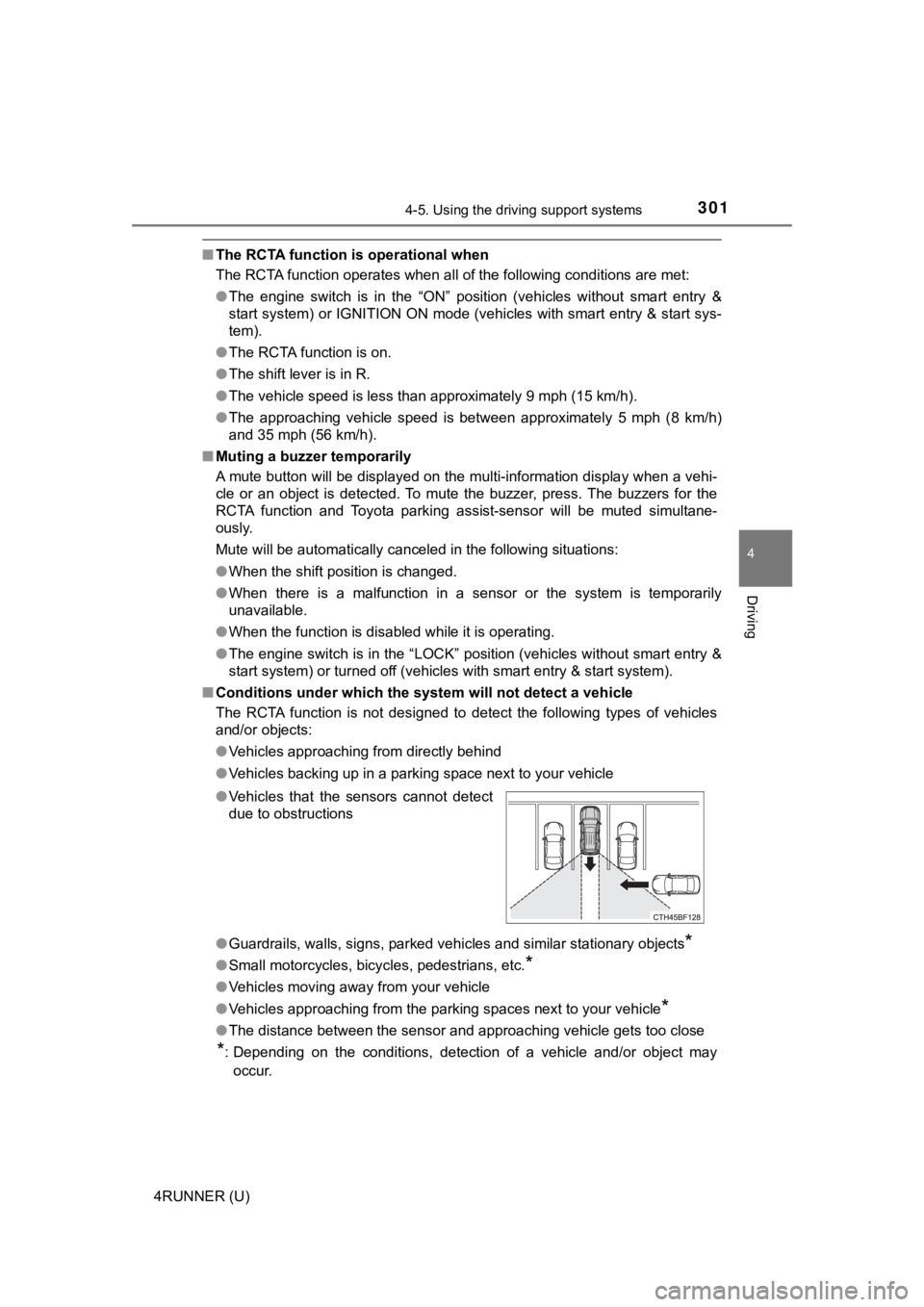
The RCTA function is not designed to detect the following types of vehicles
and/or objects:
● Vehicles approaching from directly behind
● Vehicles backing up in a parking space next to your vehicle
● Guardrails, walls, signs, parked vehicles and similar stationar y objects
*
●Small motorcycles, bicycles, pedestrians, etc.*
●Vehicles moving away from your vehicle
● Vehicles approaching from the parking spaces next to your vehic le
*
●The distance between the sensor and approaching vehicle gets to o close
*: Depending on the conditions, detection of a vehicle and/or obj ect may
occur.
●
Vehicles that the sensors cannot detect
due to obstructions
Page 307 of 616
3074-5. Using the driving support systems
4
Driving
4RUNNER (U)■
Shifting from H2 to H4
Ty p e A
Reduce vehicle sp
eed to less than 50 mph (80 km/h).
Shift the front-wheel drive control lever to H4.
Ty p e B
Reduce vehicle speed to less than 62 mph (100 km/h).
Push the “UNLOCK” button and turn the front-wheel drive control
switch to H4.
The four-wheel drive indicator will turn on.
■
Shifting from H4 to H2
Ty p e A
Shift the front-wheel drive control lever to H2.
Ty p e B
Push the “UNLOCK” button and turn the front-wheel drive control
switch to H2.
This can be done at any speed.
The four-wheel drive indicator will go off.
■
Shifting from H4 to L4 Stop the vehicle completely and continue to depress the brake
pedal.
Shift the shift lever to N.
Ty p e A
Shift the front-wheel dri ve control lever to L4.
Ty p e B
Push the “UNLOCK” button and then push and turn the front-
wheel drive control switch to L4.
The low speed four-wheel drive indicator will turn on.
Shifting between H2 and H4
Shifting between H4 and L4
1
2
1
2
1
2
3
3