lock TOYOTA 4RUNNER 2022 Owners Manual
[x] Cancel search | Manufacturer: TOYOTA, Model Year: 2022, Model line: 4RUNNER, Model: TOYOTA 4RUNNER 2022Pages: 616, PDF Size: 12.01 MB
Page 405 of 616

4056-1. Maintenance and care
6
Maintenance and care
4RUNNER (U)■
Wheels and wheel ornaments
●Remove any dirt immediately by using a neutral detergent.
● Wash detergent off with water immediately after use.
● To protect the paint from damage, make sure to observe the following pre-
cautions.
• Do not use acidic, alkaline or abrasive detergent
• Do not use hard brushes
• Do not use detergent on the wheels when they are hot, such as after driv-
ing or parking in hot weather
■ Brake pads and calipers
Rust may form if the vehicle is parked with wet brake pads or d isc rotors,
causing them to stick. Before parking the vehicle after it is washed, drive
slowly and apply the brakes several times to dry the parts.
■ Bumpers and side moldings
Do not scrub with abrasive cleaners.
■ Plated portions
If dirt cannot be remove, clean the parts as follows:
●Use a soft cloth dampened with an approximately 5% solution of neutral
detergent and water to clean the dirt off.
● Wipe the surface with a dry, soft cloth to remove any remaining moisture.
● To remove oily deposits, use alcohol wet wipes or a similar product.
■ Notes for a smart key system (if equipped)
If the door handle becomes wet while the electronic key is within the effective
range, the door may lock and unlock repeatedly. In this case, follow the fol-
lowing correction procedures to wash the vehicle:
• Place the electronic key in a location 6 ft. (2 m) or more awa y from the vehi-
cle. (Take care to ensure that the key is not stolen.)
• Set the electronic key to battery-saving mode to disable the smart key sys- tem. ( P. 122)
WARNING
■When washing the vehicle
Do not apply water to the inside of the engine compartment. Doing so may
cause the electrical components etc. to catch fire.
■ Precautions regarding the exhaust pipe
Exhaust gases cause the exhaust pipe to become quite hot.
When washing the vehicle, be careful not to touch the pipe unti l it has
cooled sufficiently, as touching hot exhaust pipe can cause burns.
Page 414 of 616
4146-2. Maintenance
4RUNNER (U)
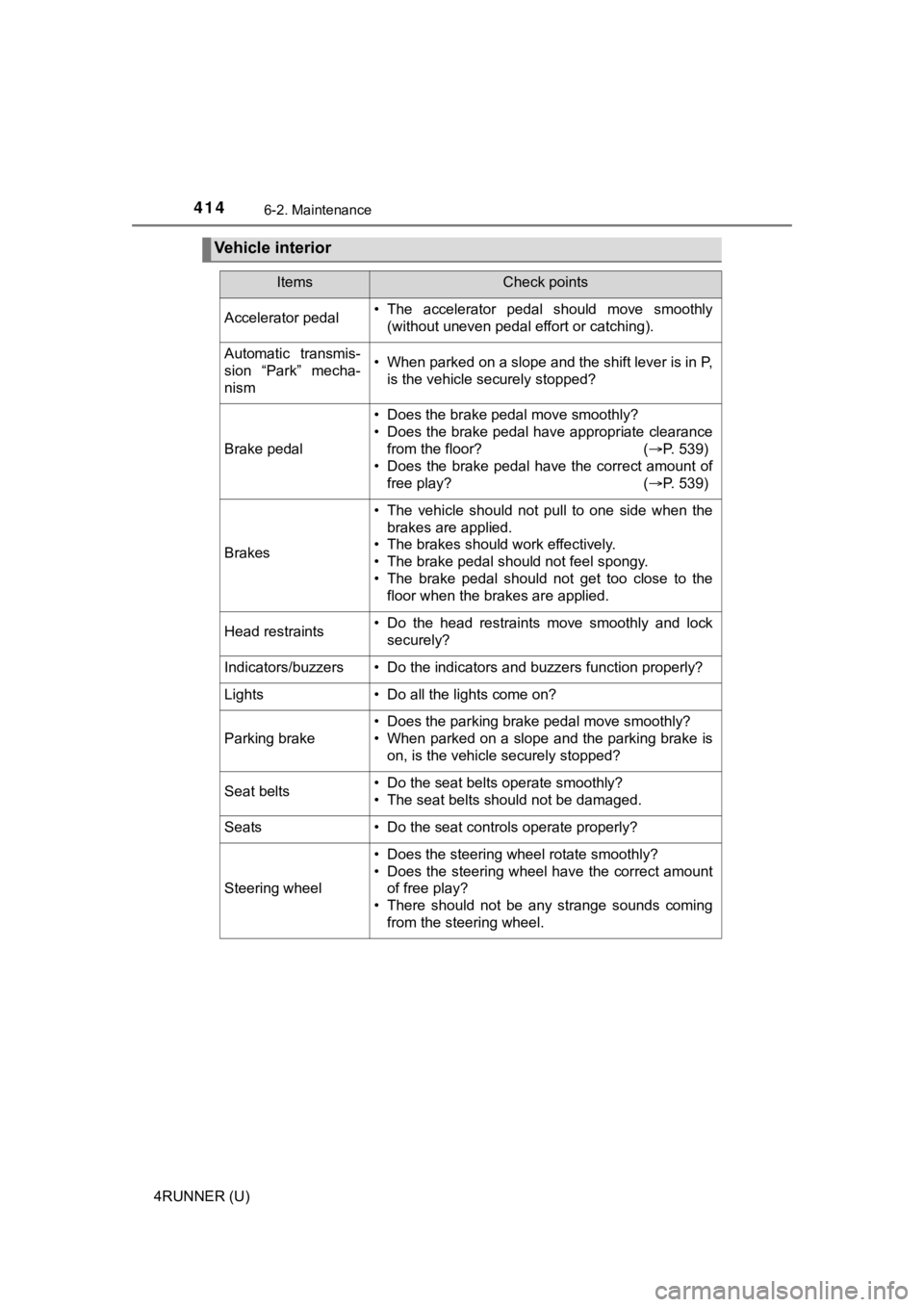
Vehicle interior
ItemsCheck points
Accelerator pedal• The accelerator pedal should move smoothly(without uneven pedal effort or catching).
Automatic transmis-
sion “Park” mecha-
nism• When parked on a slope and the shift lever is in P,is the vehicle securely stopped?
Brake pedal
• Does the brake pedal move smoothly?
• Does the brake pedal have appropriate clearancefrom the floor? ( P. 539)
• Does the brake pedal have the correct amount of
free play? ( P. 539)
Brakes
• The vehicle should not pull to one side when the
brakes are applied.
• The brakes should work effectively.
• The brake pedal should not feel spongy.
• The brake pedal should not get too close to the floor when the brakes are applied.
Head restraints• Do the head restraints move smoothly and locksecurely?
Indicators/buzzers• Do the indicators and buzzers function properly?
Lights • Do all the lights come on?
Parking brake
• Does the parking brake pedal move smoothly?
• When parked on a slope and the parking brake is
on, is the vehicle securely stopped?
Seat belts• Do the seat belts operate smoothly?
• The seat belts should not be damaged.
Seats• Do the seat controls operate properly?
Steering wheel
• Does the steering wheel rotate smoothly?
• Does the steering wheel have the correct amountof free play?
• There should not be any strange sounds coming
from the steering wheel.
Page 415 of 616
4156-2. Maintenance
6
Maintenance and care
4RUNNER (U)
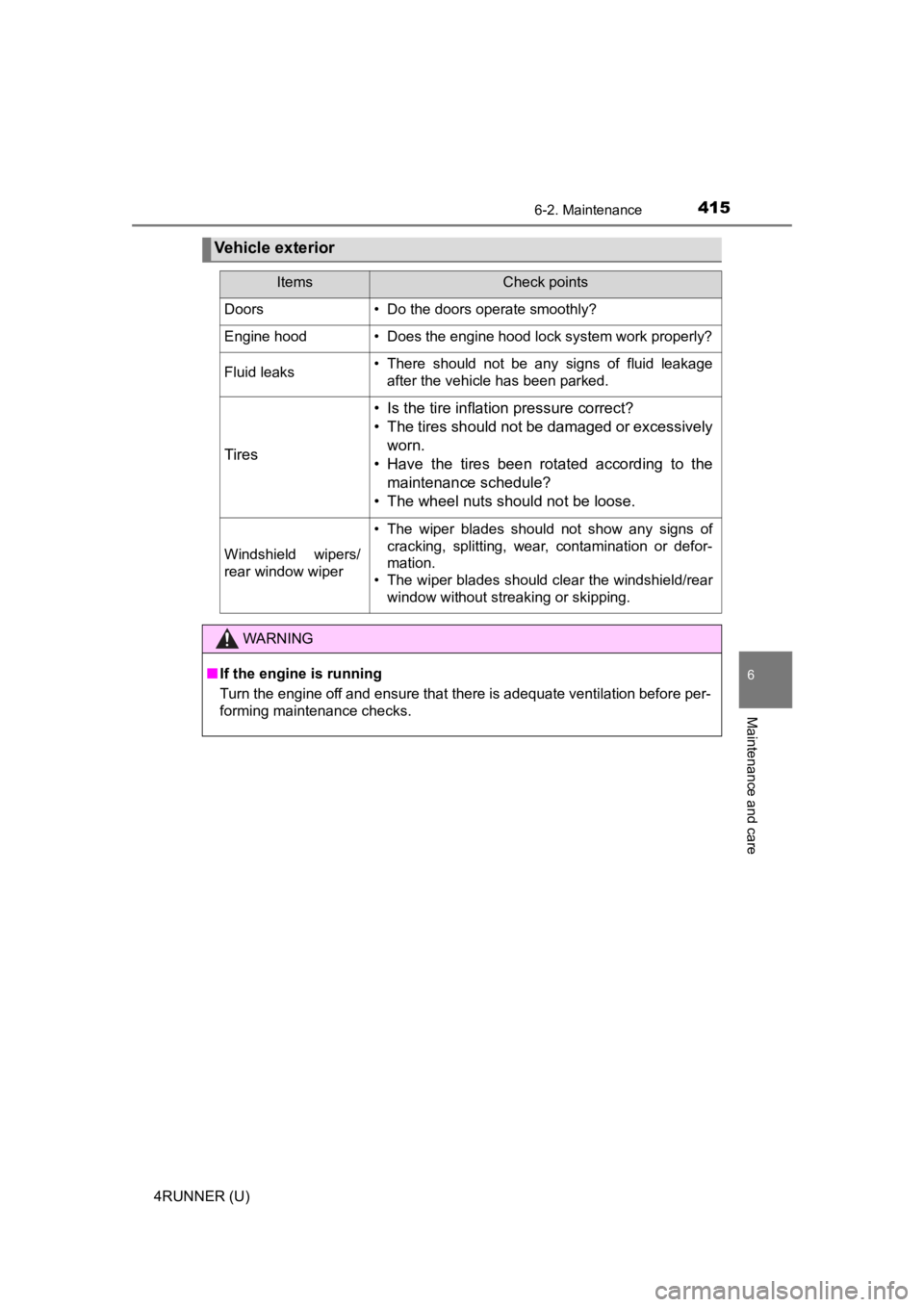
Vehicle exterior
ItemsCheck points
Doors• Do the doors operate smoothly?
Engine hood• Does the engine hood lock system work properly?
Fluid leaks• There should not be any signs of fluid leakageafter the vehicle has been parked.
Tires
• Is the tire inflation pressure correct?
• The tires should not be damaged or excessively
worn.
• Have the tires been rotated according to the maintenance schedule?
• The wheel nuts should not be loose.
Windshield wipers/
rear window wiper
• The wiper blades should not show any signs of cracking, splitting, wear, contamination or defor-
mation.
• The wiper blades should clear the windshield/rear
window without streaking or skipping.
WARNING
■If the engine is running
Turn the engine off and ensure that there is adequate ventilation before per-
forming maintenance checks.
Page 420 of 616
4206-3. Do-it-yourself maintenance
4RUNNER (U)
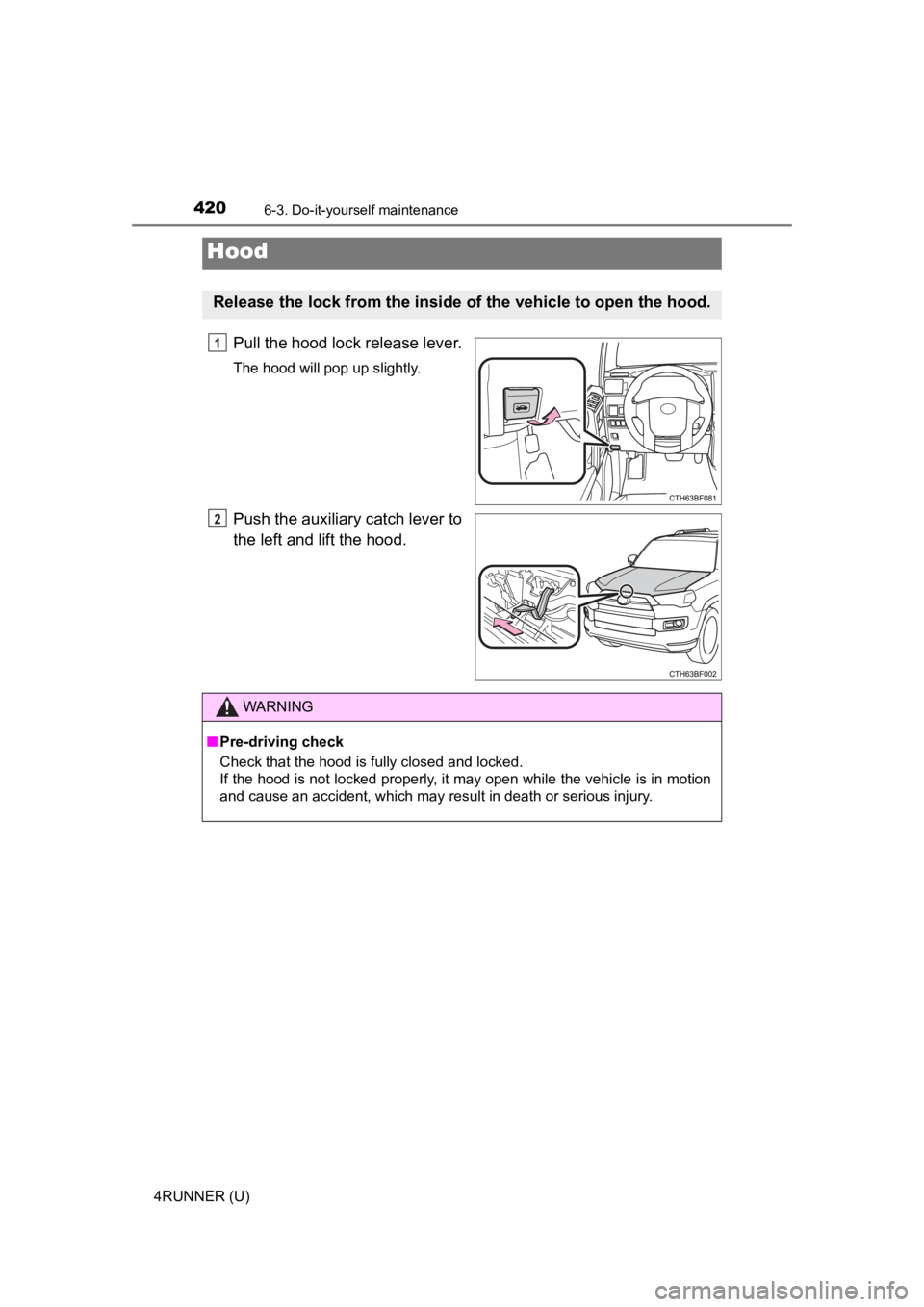
Pull the hood lock release lever.
The hood will pop up slightly.
Push the auxiliary catch lever to
the left and lift the hood.
Hood
Release the lock from the inside of the vehicle to open the hood.
1
2
WARNING
■Pre-driving check
Check that the hood is fully closed and locked.
If the hood is not locked properly, it may open while the vehic le is in motion
and cause an accident, which may result in death or serious inj u r y.
Page 424 of 616
4246-3. Do-it-yourself maintenance
4RUNNER (U)■
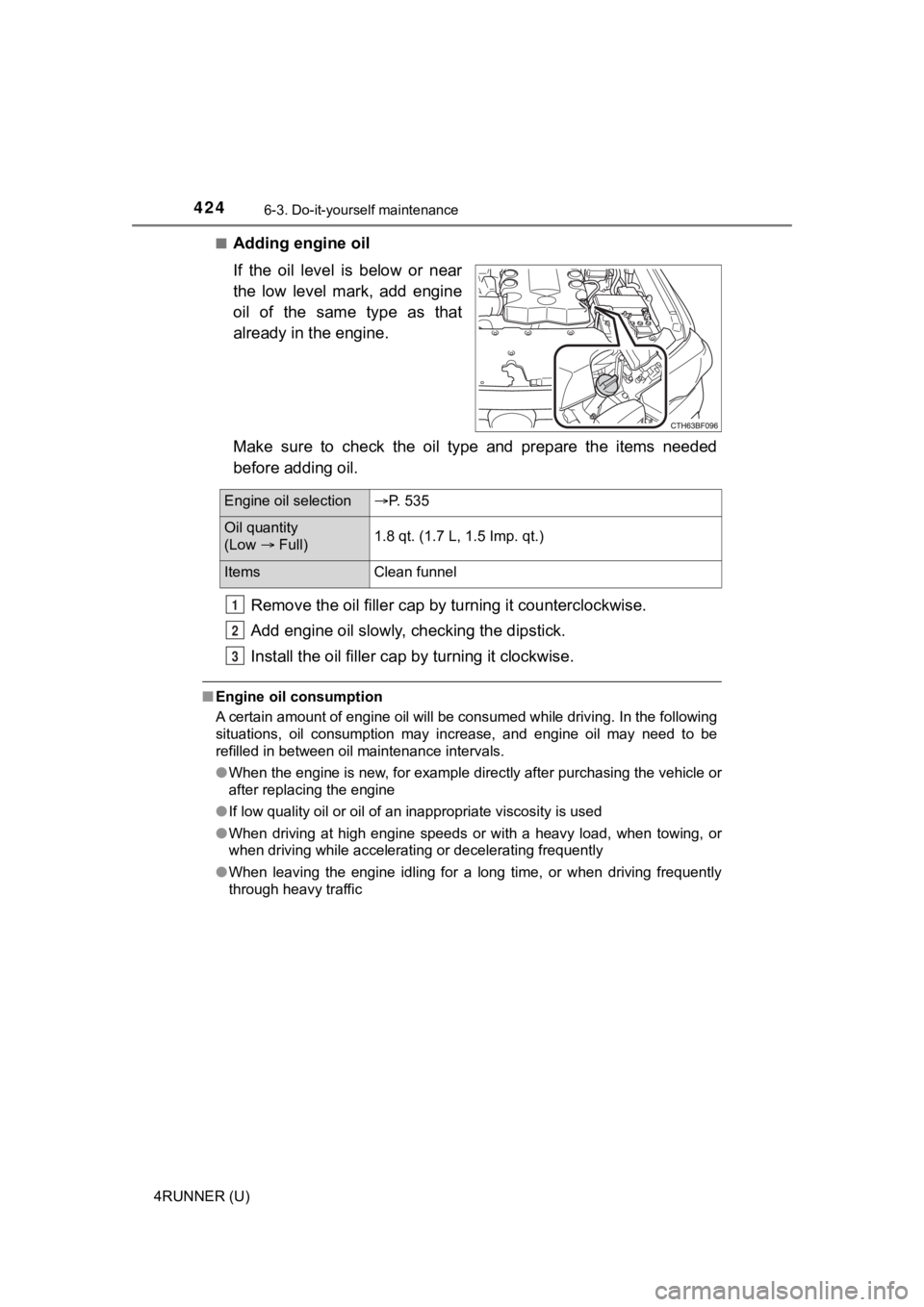
Adding engine oil
If the oil level is below or near
the low level mark, add engine
oil of the same type as that
already in the engine.
Make sure to check the oil type and prepare the items needed
before adding oil.
Remove the oil fille r cap by turning it counterclockwise.
Add engine oil slowly, checking the dipstick.
Install the oil filler cap by turning it clockwise.
■Engine oil consumption
A certain amount of engine oil will be consumed while driving. In the following
situations, oil consumption may increase, and engine oil may ne ed to be
refilled in between oil maintenance intervals.
● When the engine is new, for example directly after purchasing t he vehicle or
after replacing the engine
● If low quality oil or oil of an inappropriate viscosity is used
● When driving at high engine speeds or with a heavy load, when t owing, or
when driving while accelerating or decelerating frequently
● When leaving the engine idling for a long time, or when driving frequently
through heavy traffic
Engine oil selection P. 535
Oil quantity
(Low Full) 1.8 qt. (1.7 L, 1.5 Imp. qt.)
Items
Clean funnel
1
2
3
Page 429 of 616
4296-3. Do-it-yourself maintenance
6
Maintenance and care
4RUNNER (U)■
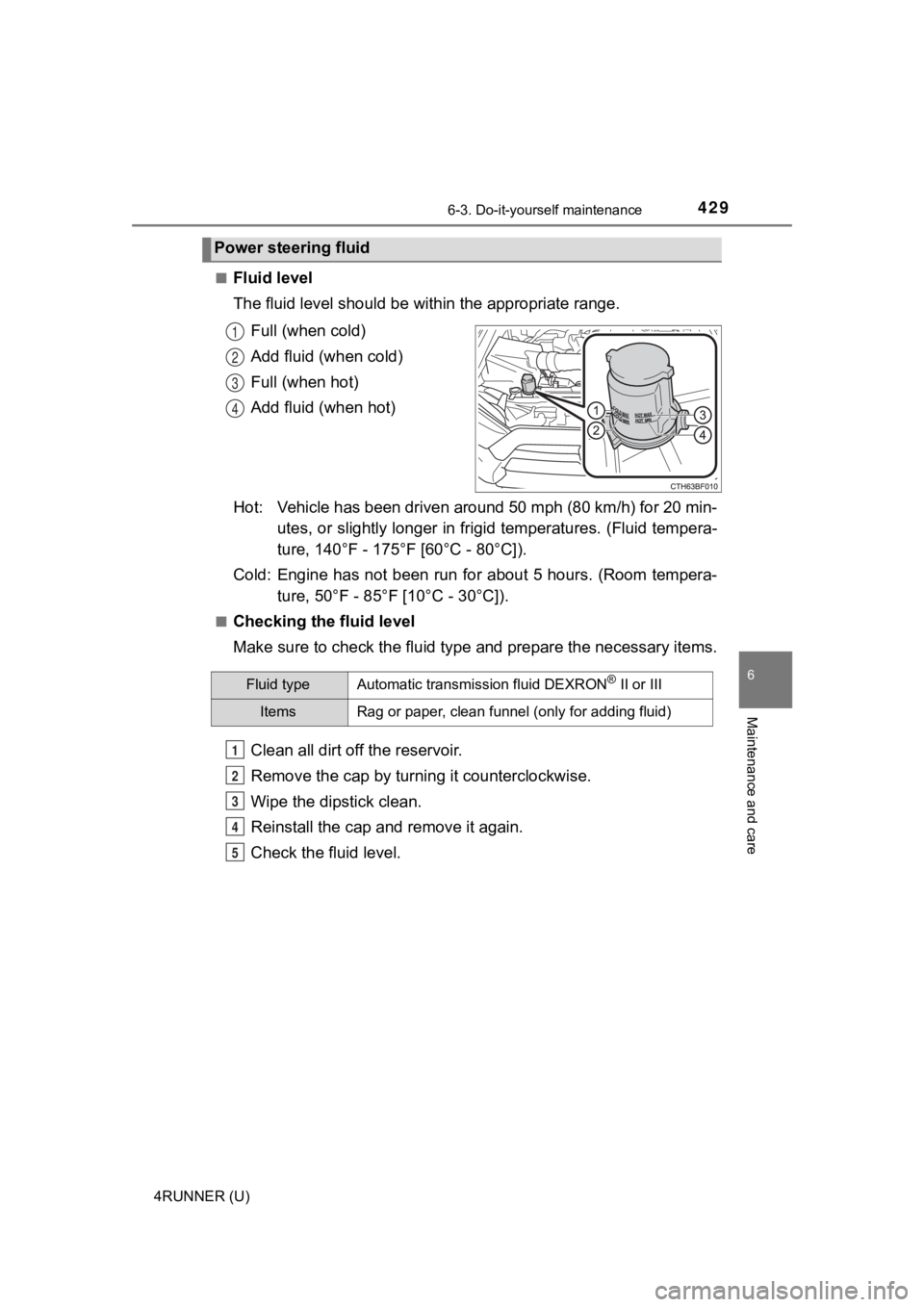
Fluid level
The fluid level should be within the appropriate range.
Full (when cold)
Add fluid (when cold)
Full (when hot)
Add fluid (when hot)
Hot: Vehicle has been driven around 50 mph (80 km/h) for 20 min- utes, or slightly longer in frigid temperatures. (Fluid tempera-
ture, 140°F - 175°F [60°C - 80°C]).
Cold: Engine has not been run for about 5 hours. (Room tempera- ture, 50°F - 85°F [10°C - 30°C]).
■Checking the fluid level
Make sure to check the fluid type and prepare the necessary items.
Clean all dirt off the reservoir.
Remove the cap by turni ng it counterclockwise.
Wipe the dipstick clean.
Reinstall the cap and remove it again.
Check the fluid level.
Power steering fluid
1
2
3
4
Fluid typeAutomatic transmission fluid DEXRON® II or III
ItemsRag or paper, clean funnel (only for adding fluid)
1
2
3
4
5
Page 431 of 616
4316-3. Do-it-yourself maintenance
6
Maintenance and care
4RUNNER (U)■
After recharging/reconnecting the battery (vehicles with a smart key sys-
tem)
The engine may not start. Follow the procedure below to initialize the system.
Shift the shift lever to P.
Open and close any of the doors.
Restart the engine.
● Unlocking the doors using the smart key system may not be possible imme-
diately after reconnecting the battery. If this happens, use the wireless
remote control or the mechanical key to lock/unlock the doors.
● Start the engine with the engine switch in ACCESSORY mode. The engine
may not start when the engine switch turned from off. However, the engine
will operate normally from the second attempt.
● The engine switch mode is recorded by the vehicle. If the battery is recon-
nected, the vehicle will return the engine switch mode to the s tatus it was in
before the battery was disconnected. Make sure to turn off the engine
before disconnect the battery. Take extra care when connecting the battery
if the engine switch mode prior to discharge is unknown.
If the system will not start even after multiple attempts, contact your Toyota
dealer.
WARNING
■ Chemicals in the battery
Batteries contain poisonous and corrosive sulfuric acid and may produce
hydrogen gas which is flammable and explosive. To reduce the ri sk of death
or serious injury, take the following precautions while working on or near the
battery:
● Do not cause sparks by touching the battery terminals with tools.
● Do not smoke or light a match near the battery.
● Avoid contact with eyes, skin and clothes.
● Never inhale or swallow electrolyte.
● Wear protective safety glasses when working near the battery.
● Keep children away from the battery.
1
2
3
Page 444 of 616

4446-3. Do-it-yourself maintenance
4RUNNER (U)■
The initialization operation
●Make sure to carry out initializ
ation after adjusting the tire inflation pres-
sure.
Also, make sure the tires are co ld before carrying out initialization or tire
inflation pressure adjustment.
●If you have accidentally turned the engine switch to the “LOCK” position
(vehicles without a smart key system) or off (vehicles with a s mart key
system) during initialization, it is not necessary to press the reset switch
again as initialization will rest art automatically when the engine switch
has been turned to the “ON” posi tion (vehicles without a smart key sys-
tem) or IGNITION ON mode (vehicl es with a smart key system) for the
next time.
●If you accidentally press the reset switch when initialization is not neces-
sary, adjust the tire inflation pressure to the specified level when the
tires are cold, and cond uct initialization again.
●While the position of each tire is being determined and the inf lation pres-
sures are not being displayed on the multi-information display, if the
inflation pressure of a tire drops, the tire pressure warning l ight will come
on.
■When initialization of the tire pressure warning system has fai led
●Do not move the vehicle backward during initialization. Initialization is
started again from the beginning and it may take longer than usual.
●Initialization may take longer to complete if the vehicle is driven on an
unpaved road.
When performing initialization, drive on a paved road if possib le.
Depending on the driving environment and condition of the tires , initial-
ization will be complet ed in approximately 10 to 30 minutes.
• If initialization is not complet e after driving approximately 30 minutes,
continue driving for a while.
• If initialization is not complet e after driving approximately 1 hour, park
the vehicle in a safe place for approximately 20 minutes. Then drive
straight (with occasional left a nd right turns) at approximatel y 25 mph
(40 km/h) or more
* for approximately 10 to 30 minutes.
• If initialization is still not co mplete, have the vehicle inspected by your
Toyota dealer.
*: Except when making a left/right turn
●In the following situations, the tire inflation pressure will n ot be recorded
and the system will not operate p roperly. Perform initialization again.
• When operating the tire pressure warning reset switch, the tir e pres-
sure warning light does not blink 3 times.
• After performing initialization, the tire pressure warning light blinks for
1 minute then stays on after driving for about 20 minutes.
Page 445 of 616

4456-3. Do-it-yourself maintenance
6
Maintenance and care
4RUNNER (U)■
When ID code registration has failed
●Registration may take long time or the ID codes may not be regi
stered in
the following situations.
• When the vehicle is moved backward during registration.
Registration is started again from the beginning and it may tak e lon-
ger than usual.
• When another vehicle is running the side of the vehicle such a s in
heavy traffic.
It may take longer to detect the vehicle’ tire pressure warning valves
and transmitters.
• If tire pressure warning valves and transmitters are in the vehicle.
The ID codes may n ot be registered.
●When performing registration, drive on a paved road if possible .
Depending on the driving environment and condition of the tires, regis-
tration will be complet ed in approximately 10 to 30 minutes.
• If registration is not complete after driving approximately 30 minutes,
continue driving for a while.
• If registration is not complete after driving approximately 1 hour, park
the vehicle in a safe place for approximately 20 minutes. Then drive
straight (with occasional left and right turns) at approximatel y 40 km/h
(25 mph) or more
* for approximately 10 to 30 minutes.
If registration is still not comp lete, have the vehicle inspected by your
Toyota dealer.
*: Except when making a left/right turn
●When the tire pressure warning light does not blink slowly 3 ti mes, the
ID code will not be registered and the system will not operate properly.
Perform registration again.
■When registering ID codes
●Initialize the tire pressure war ning system after ID code regis tration. Ini-
tialization is disable d if the system was initialized before re gistration.
●After ID code registration, the tires are hot by driving. Initi alize the tire
pressure warning system af ter the tires become cold.
■Canceling the change wheel set mode
●If turning the engine switch to the “LOCK” position (vehicles w ithout a
smart key system) or off (vehicles with a smart key system) whe n in the
change wheel set mode before driving, the change wheel set mode is
canceled.
●After driving when in the change wheel set mode, the change whe el set
mode cannot be canceled. To cancel the mode, perform the proced ure
for ID code registration again and turn the engine switch to th e “LOCK”
position (vehicles without a smart key system) or off (vehicles with a
smart key system ) before driving.
●If the change wheel set mode is canceled, the ID codes that hav e
already been registered are commu nicated. When communication is fin-
ished, the tir e pressure warning light will turn off.
Page 456 of 616
4566-3. Do-it-yourself maintenance
4RUNNER (U)
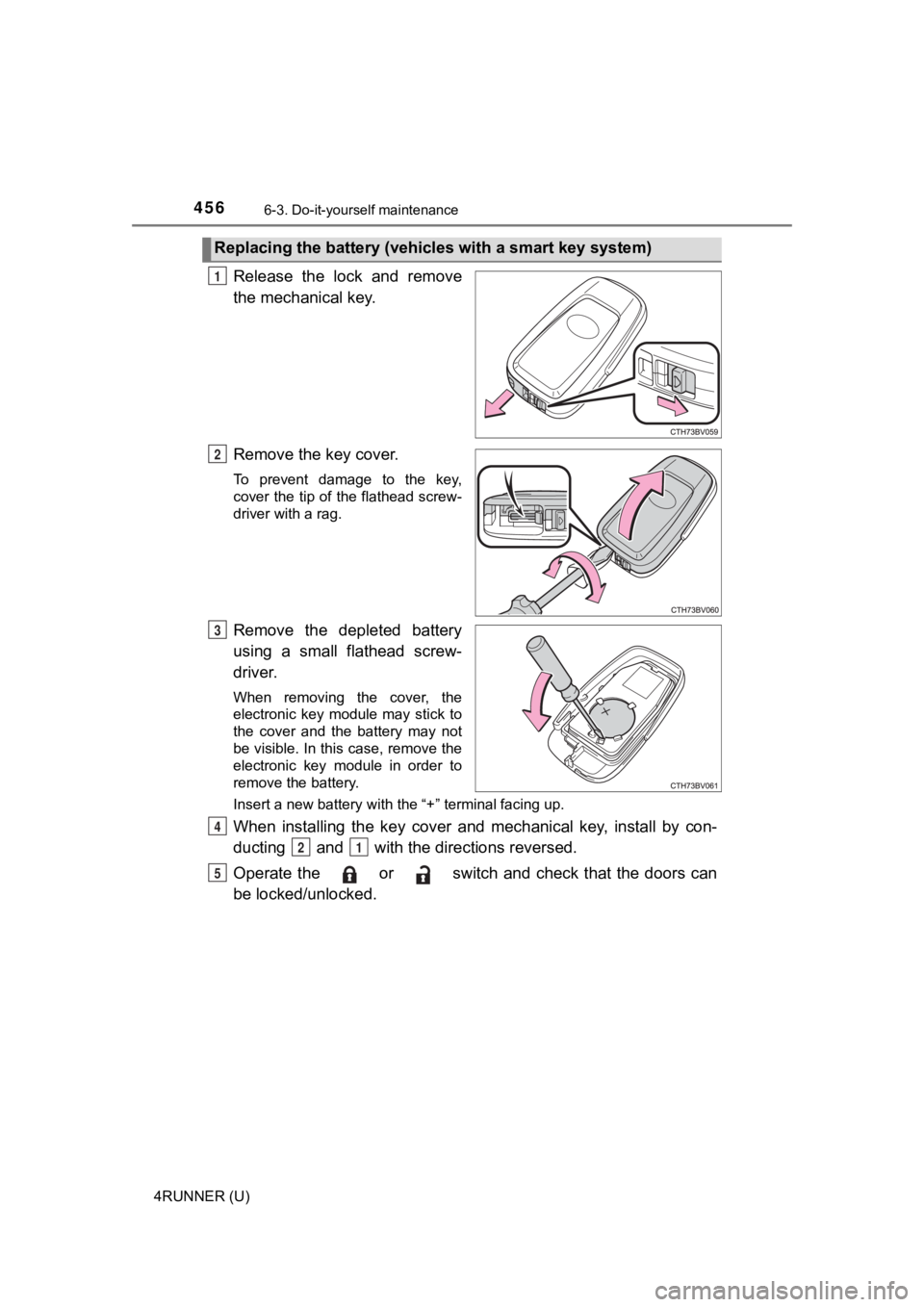
Release the lock and remove
the mechanical key.
Remove the key cover.
To prevent damage to the key,
cover the tip of the flathead screw-
driver with a rag.
Remove the depleted battery
using a small flathead screw-
driver.
When removing the cover, the
electronic key module may stick to
the cover and the battery may not
be visible. In this case, remove the
electronic key module in order to
remove the battery.
Insert a new battery with the “+” terminal facing up.
When installing the key cover and mechanical key, install by con-
ducting and with the directions reversed.
Operate the or switch and check that the doors can
be locked/unlocked.
Replacing the battery (vehic les with a smart key system)
1
2
3
4
21
5