light TOYOTA 4RUNNER 2022 Owners Manual
[x] Cancel search | Manufacturer: TOYOTA, Model Year: 2022, Model line: 4RUNNER, Model: TOYOTA 4RUNNER 2022Pages: 616, PDF Size: 12.01 MB
Page 499 of 616
4997-2. Steps to take in an emergency
7
When trouble arises
4RUNNER (U)
■Warning messages
The warning messages explained below may differ from the actual messages
according to operation conditions and vehicle specifications.
■ System warning lights
The master warning light does not come on or flash in the following cases.
Instead, a separate system warning light will come on along wit h a message
or image shown on the multi-information display.
● Malfunction in the ABS
The ABS warning light comes on. ( P. 487)
● Indicates that the PCS (Pre-Collision System) is not currently functional
The PCS warning light comes on or flashes. ( P. 490)
● Malfunction in the tire pressure warning system
The tire pressure warning light comes on. ( P. 490)
■ If a message instructing to refer to the Owner’s Manual is disp layed
● If the following message is shown, there may be a malfunction.
Immediately stop the vehicle in a safe place and contact your T oyota dealer.
Continuing to drive the vehicle may be dangerous.
• “Braking Power Low Stop in a Safe Place See Owner’s Manual”
• “Oil Pressure Low Stop in a Safe Place See Owner’s Manual”
● If “Engine Coolant Temp High Stop in a Safe Place See Owner’s M anual” is
displayed, follow the instructions accordingly. ( P. 527)
● If “Front Camera Unavailable See Owner’s Manual” is displayed, follow the
instructions accordingly. ( P. 248, 497)
● If the following message is shown, there may be a malfunction.
Immediately have the vehicle inspected by your Toyota dealer.
• “Smart Key System Malfunction See Owner’s Manual”
■ If “High transmission fluid temperature” is shown, it indicates that the
automatic transmission fluid temperature is too high.
Immediately stop the vehicle in a safe place, shift the shift l ever to P and wait
until the warning message and light go off. If the warning message and light
go off, you may start the vehicle again. If the warning message and light do
not go off, contact your Toyota dealer.
Page 500 of 616
5007-2. Steps to take in an emergency
4RUNNER (U)■
If “Auto power off to co nserve battery” is shown
Power was turned off due to the automatic power off function.
Next time when starting the engine, increase the engine speed s lightly and
maintain that level for approximately 5 minutes to recharge the battery.
■ When a message that indicates the need for the shift lever oper ation is
shown
To prevent the shift lever from being operated incorrectly or t he vehicle from
moving unexpectedly, a message that requires shifting the shift lever may be
shown on the multi-information display. In that case, follow th e instruction of
the message and shift the shift lever.
■ When “Headlight System Malfuncti on Visit Your Dealer” is displayed on
the multi-information display
The following system may be malfunctioning. Have the vehicle in spected by
your Toyota dealer.
● Automatic High Beam
■ If a message that indicates the malfunction of front camera is displayed
The following systems may be suspended until the problem shown in the
message is resolved. ( P. 248, 497)
● PCS (Pre-Collision System)
● LDA (Lane Departure Alert)
● Dynamic radar cruise control
● Automatic High Beam
■ If a message that indicates the m alfunction of radar sensor is displayed
The following systems may be suspended until the problem shown in the
message is resolved. ( P. 248, 497)
● PCS (Pre-Collision System)
● LDA (Lane Departure Alert)
● Dynamic radar cruise control
■ If a following message is shown, take appropriate action and co nfirm
that the message has disappeared.
*
● “Crawl Not Available Select L4 and Shift to [D] or [R] Position ”
● “Crawl Not Available Check System Operation Conditions”
*: Refer to the “Off-road Driving Owner’s Manual”.
■ If “Oil Maintenance Required Soon” is displayed (U.S.A. only)
Indicates that all maintenance according to the driven distance on the mainte-
nance schedule
* should be performed soon.
Comes on approximately 4500 miles (7200 km) after the message has been
reset.
If necessary, perform maintenance. Please reset the message aft er the main-
tenance is performed. ( P. 412)
*: Refer to the separate “Scheduled Maintenance Guide” or “Owner’ s Manual
Supplement” for the maintenance interval applicable to your veh icle.
Page 508 of 616
5087-2. Steps to take in an emergency
4RUNNER (U)
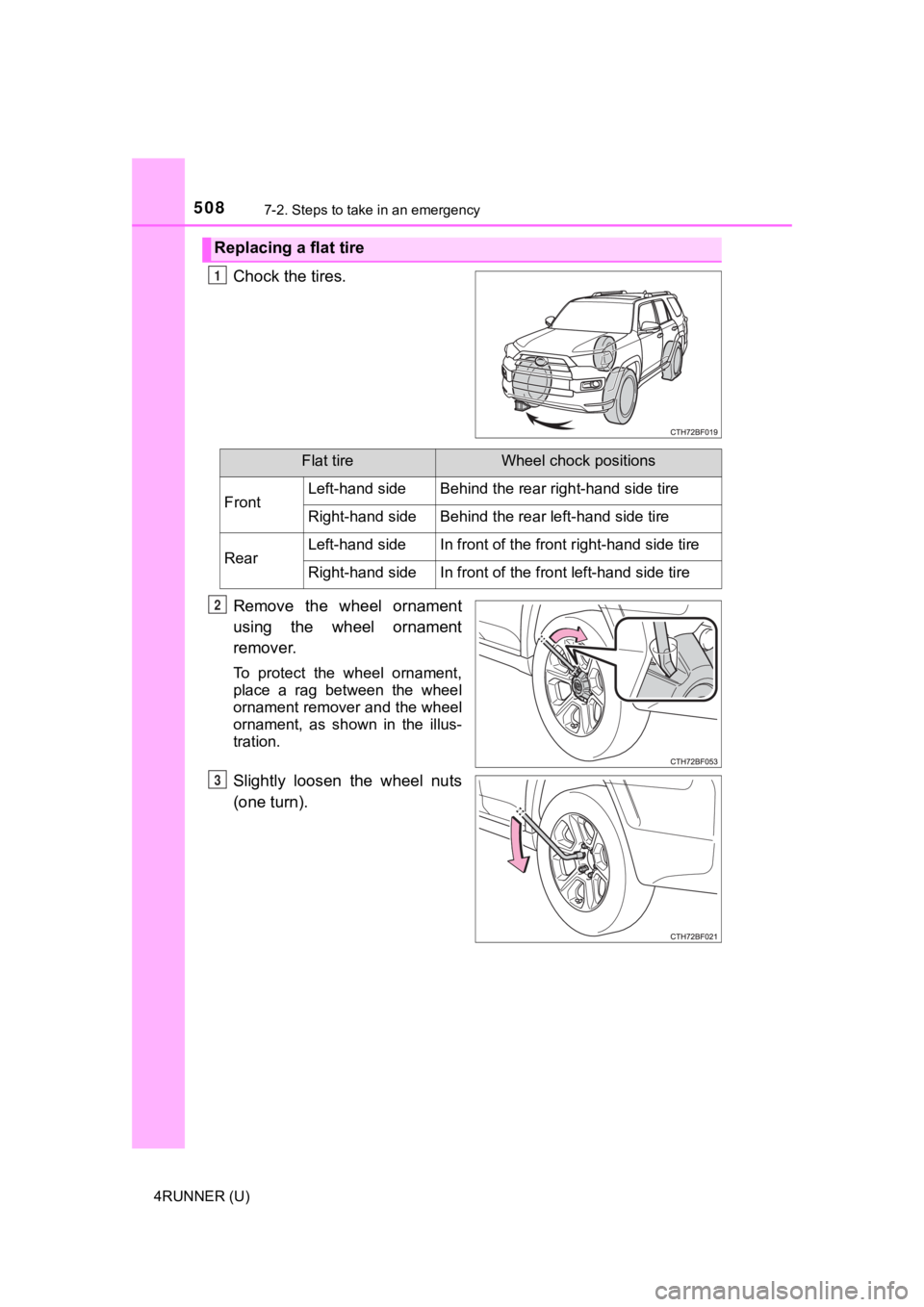
Chock the tires.
Remove the wheel ornament
using the wheel ornament
remover.
To protect the wheel ornament,
place a rag between the wheel
ornament remover and the wheel
ornament, as shown in the illus-
tration.
Slightly loosen the wheel nuts
(one turn).
Replacing a flat tire
1
Flat tireWheel chock positions
FrontLeft-hand sideBehind the rear right-hand side tire
Right-hand sideBehind the rear left-hand side tire
RearLeft-hand sideIn front of the front right-hand side tire
Right-hand sideIn front of the front left-hand side tire
2
3
Page 510 of 616
5107-2. Steps to take in an emergency
4RUNNER (U)
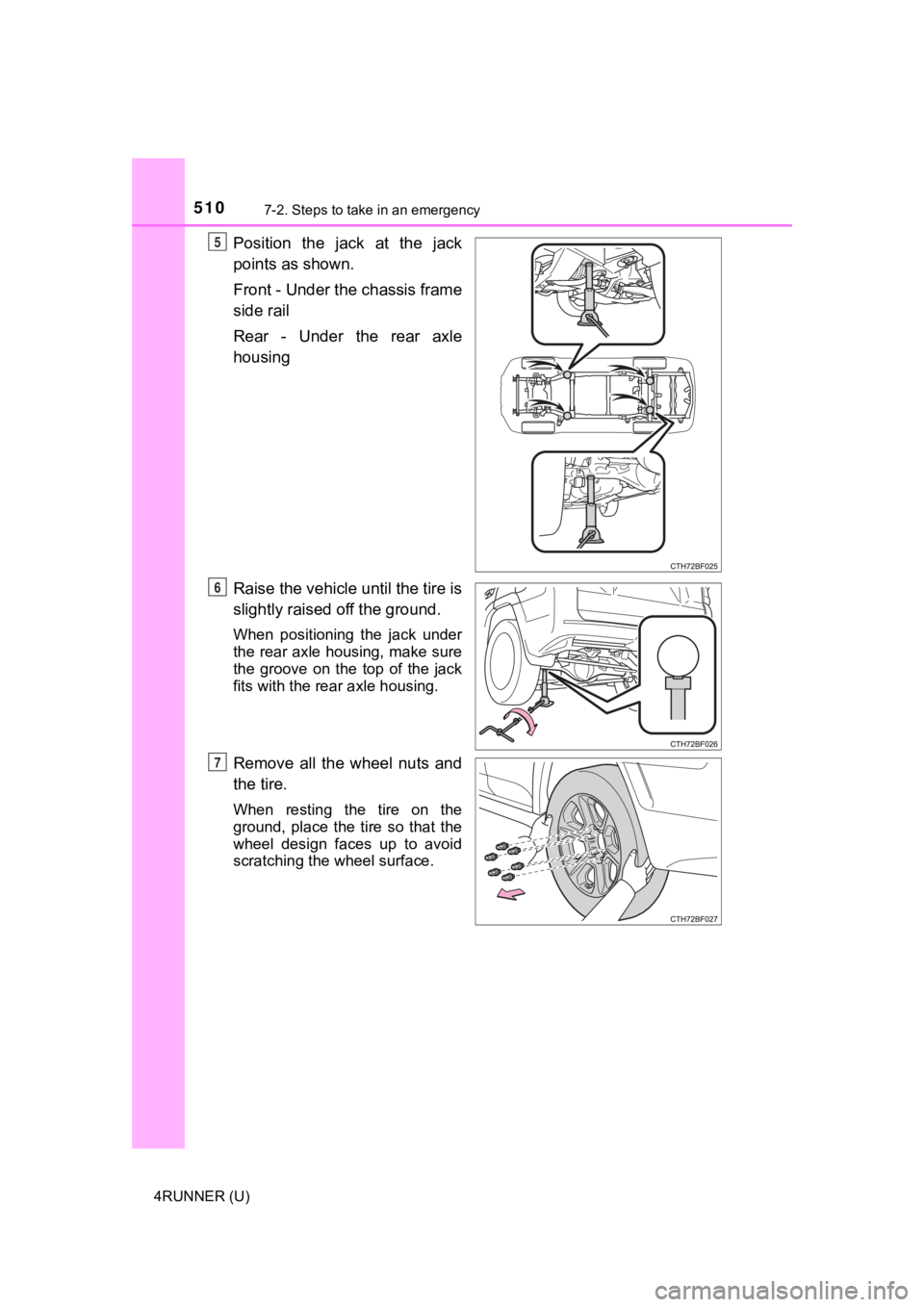
Position the jack at the jack
points as shown.
Front - Under the chassis frame
side rail
Rear - Under the rear axle
housing
Raise the vehicle until the tire is
slightly raised off the ground.
When positioning the jack under
the rear axle housing, make sure
the groove on the top of the jack
fits with the rear axle housing.
Remove all the wheel nuts and
the tire.
When resting the tire on the
ground, place the tire so that the
wheel design faces up to avoid
scratching the wheel surface.
5
6
7
Page 515 of 616
5157-2. Steps to take in an emergency
7
When trouble arises
4RUNNER (U)
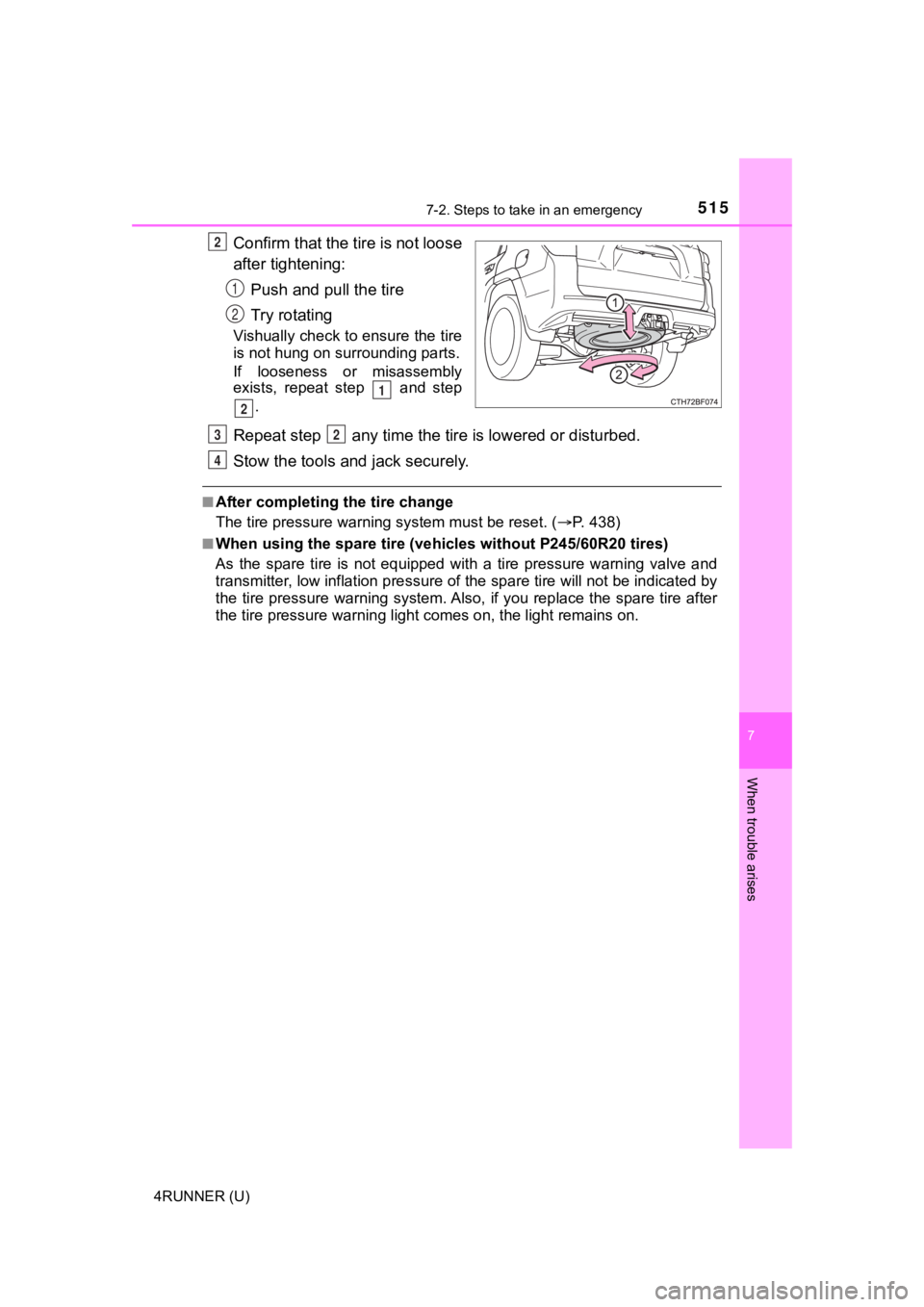
Confirm that the tire is not loose
after tightening:Push and pull the tire
Try rotating
Vishually check to ensure the tire
is not hung on su rrounding parts.
If looseness or misassembly
exists, repeat step and step
.
Repeat step any time the tire is lowered or disturbed.
Stow the tools and jack securely.
■After completing the tire change
The tire pressure warni ng system must be reset. ( P. 438)
■When using the spare tire (veh icles without P245/60R20 tires)
As the spare tire is not equipped with a tire pressure warning valve and
transmitter, low inflation pre ssure of the spare tire will not be indicated by
the tire pressure warning system. Also, if you replace the spar e tire after
the tire pressure wa rning light comes on, the light remains on.
2
1
2
1
2
32
4
Page 517 of 616
5177-2. Steps to take in an emergency
7
When trouble arises
4RUNNER (U)
One of the following may be the cause of the problem:
● There may not be sufficient fuel in the vehicle’s tank.
Refuel the vehicle.
● The engine may be flooded.
Try to restart the engine again following correct starting proc edures.
( P. 207, 210)
● There may be a malf unction in the engine immobilizer system.
( P. 78)
One of the following may be the cause of the problem:
● The battery may be discharged. ( P. 523)
● The battery terminal connecti ons may be loose or corroded.
The engine starting system may be malfunctioning due to an elec trical
problem such as an open circuit or a blown fuse. However, an in terim
measure is available to start the engine. ( P. 518)
If the engine will not star t
If the engine will not start eve n though correct starting proce -
dures are being followed ( P. 207, 210), consider each of the fol-
lowing points:
The engine will not start even t hough the starter motor operates
normally.
The starter motor turns over slowly, the interior lights and he ad-
lights are dim, or the horn does not sound or sounds at a low
volume.
The starter motor d oes not turn over
Page 518 of 616
5187-2. Steps to take in an emergency
4RUNNER (U)
One of the following may be the cause of the problem:
● One or both of the battery t erminals may be disconnected.
● The battery may be discharged. ( P. 523)
Contact your Toyota dealer if the problem cannot be repaired, o r if repair
procedures are unknown.
When the engine does not start, the following steps can be used as an
interim measure to start the engine if the engine switch is fun ctioning
normally:
Set the parking brake.
Shift the shift lever to P.
Turn the engine switch to ACCESSORY mode.
Press and hold the engine switch for about 15 seconds while
depressing the brake pedal firmly.
Even if the engine can be start ed using the above steps, the sy stem
may be malfunctioning. Have the vehicle inspected by your Toyot a
dealer.
The starter motor does not turn over, the interior lights and h ead-
lights do not turn on, o r the horn does not sound.
Emergency start function (vehicles with a smart key system)
1
2
3
4
Page 524 of 616
5247-2. Steps to take in an emergency
4RUNNER (U)
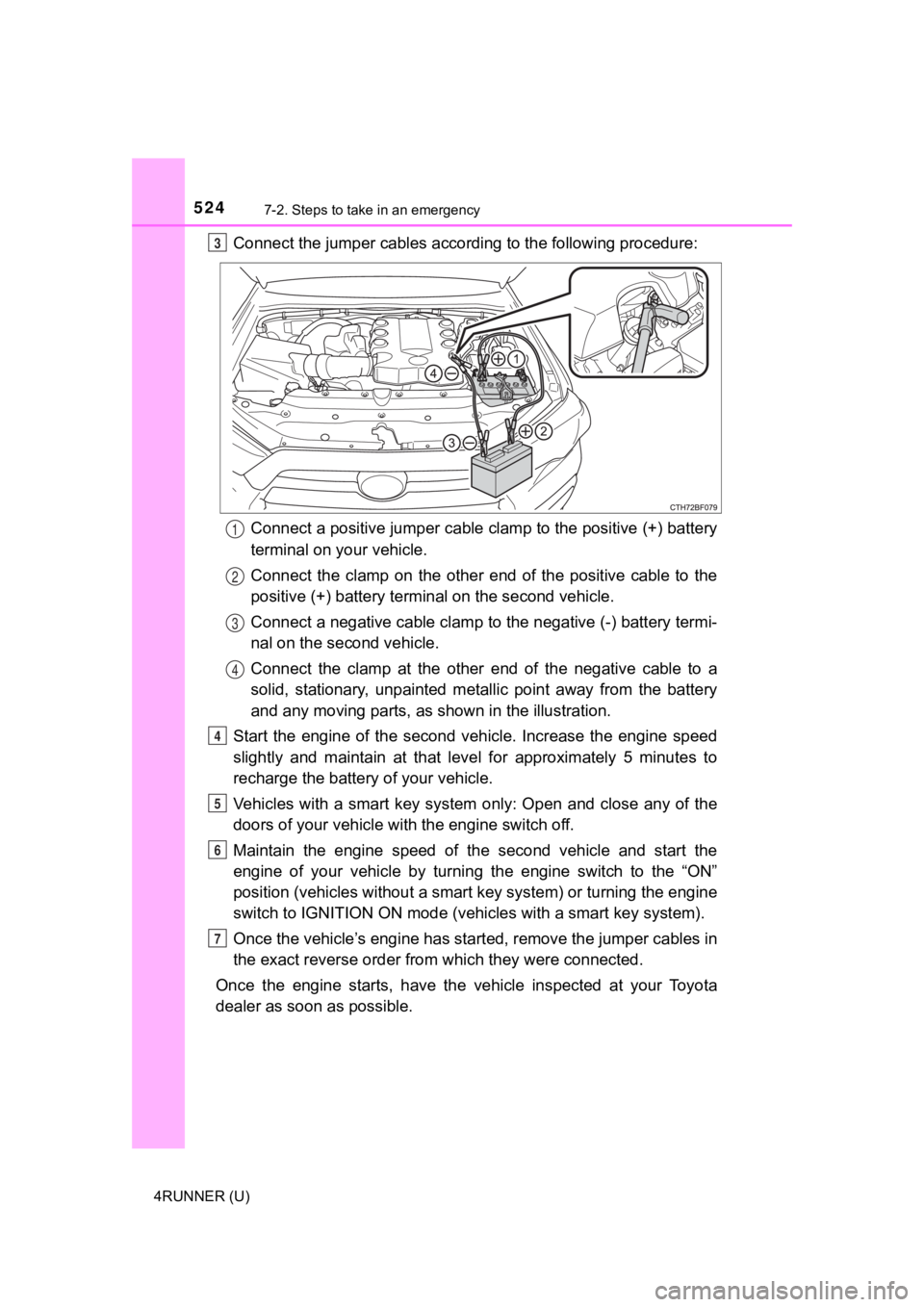
Connect the jumper cables according to the following procedure:Connect a positive jumper cable clamp to the positive (+) batte ry
terminal on your vehicle.
Connect the clamp on the other end of the positive cable to the
positive (+) battery termi nal on the second vehicle.
Connect a negative cable clamp to the negative (-) battery term i-
nal on the s econd vehicle.
Connect the clamp at the other e nd of the negative cable to a
solid, stationary, unpainted meta llic point away from the battery
and any moving parts, as shown in the illustration.
Start the engine of the second v ehicle. Increase the engine speed
slightly and maintain at that lev el for approximately 5 minutes to
recharge the batter y of your vehicle.
Vehicles with a smart key system only: Open and close any of th e
doors of your vehicle wi th the engine switch off.
Maintain the engine speed of the second vehicle and start the
engine of your vehicle by turning the engine switch to the “ON”
position (vehicles without a smart key system) or turning the e ngine
switch to IGNITION ON mode (vehi cles with a smart key system).
Once the vehicle’s engine has st arted, remove the jumper cables in
the exact reverse order from which they were connected.
Once the engine starts, have the vehicle inspected at your Toyota
dealer as soon as possible.3
1
2
3
4
4
5
6
7
Page 525 of 616
5257-2. Steps to take in an emergency
7
When trouble arises
4RUNNER (U)
■Starting the engine when t he battery is discharged
The engine cannot be started by push-starting.
■ To prevent battery discharge
●Turn off the headlights and the audio system while the engine is off.
● Turn off any unnecessary electrical components when the vehicle is running
at a low speed for an extended period, such as in heavy traffic .
■ Charging the battery
The electricity stored in the battery will discharge gradually even when the
vehicle is not in use, due to natural discharge and the draining effects of cer-
tain electrical appliances. If the vehicle is left for a long t ime, the battery may
discharge, and the engine may be unable to start. (The battery recharges
automatically during driving.)
■ When recharging or replacing the battery
●Vehicles with a smart key system: In some cases, it may not be possible to
unlock the doors using the smart key system when the battery is dis-
charged. Use the wireless remote control or the mechanical key to lock or
unlock the doors.
● The engine may not start on the first attempt after the battery has recharged
but will start normally after the second attempt. This is not a malfunction.
● Vehicles with a smart key system: The engine switch mode is memorized by
the vehicle. When the battery is reconnected, the system will r eturn to the
mode it was in before the battery was discharged. Before disconnecting the
battery, turn the engine switch off.
If you are unsure what mode the engine switch was in before the battery dis-
charged, be especially careful when reconnecting the battery.
● Make sure that the key is not inside the vehicle when rechargin g or replac-
ing the battery. The key may be locked in the vehicle if the al arm is acti-
vated. ( P. 81)
Page 526 of 616
5267-2. Steps to take in an emergency
4RUNNER (U)
WARNING
■Avoiding battery fires or explosions
Observe the following precautions to prevent accidentally ignit ing the flam-
mable gas that may be emitted from the battery:
● Make sure each jumper cable is connected to the correct terminal and that
it is not unintentionally in contact with any other than the in tended terminal.
● Do not allow the other end of the jumper cable connected to the “+” termi-
nal to come into contact with any other parts or metal surfaces in the area,
such as brackets or unpainted metal.
● Do not allow the + and - clamps of the jumper cables to come in to contact
with each other.
● Do not smoke, use matches, cigarette lighters or allow open fla me near
the battery.
■ Battery precautions
The battery contains poisonous and corrosive acidic electrolyte , while
related parts contain lead and lead compounds. Observe the following pre-
cautions when handling the battery:
● When working with the battery, always wear safety glasses and take care
not to allow any battery fluids (acid) to come into contact with skin, clothing
or the vehicle body.
● Do not lean over the battery.
● In the event that battery fluid comes into contact with the skin or eyes,
immediately wash the affected area with water and seek medical attention.
Place a wet sponge or cloth over the affected area until medical attention
can be received.
● Always wash your hands after handling the battery support, terminals, and
other battery-related parts.
● Do not allow children near the battery.
NOTICE
■When handling jumper cables
When connecting the jumper cables, ensure that they do not beco me entan-
gled in the cooling fans or engine drive belt.