lock TOYOTA 4RUNNER 2023 Owners Manual
[x] Cancel search | Manufacturer: TOYOTA, Model Year: 2023, Model line: 4RUNNER, Model: TOYOTA 4RUNNER 2023Pages: 608, PDF Size: 11.8 MB
Page 512 of 608
5127-2. Steps to take in an emergency
4RUNNER (U)
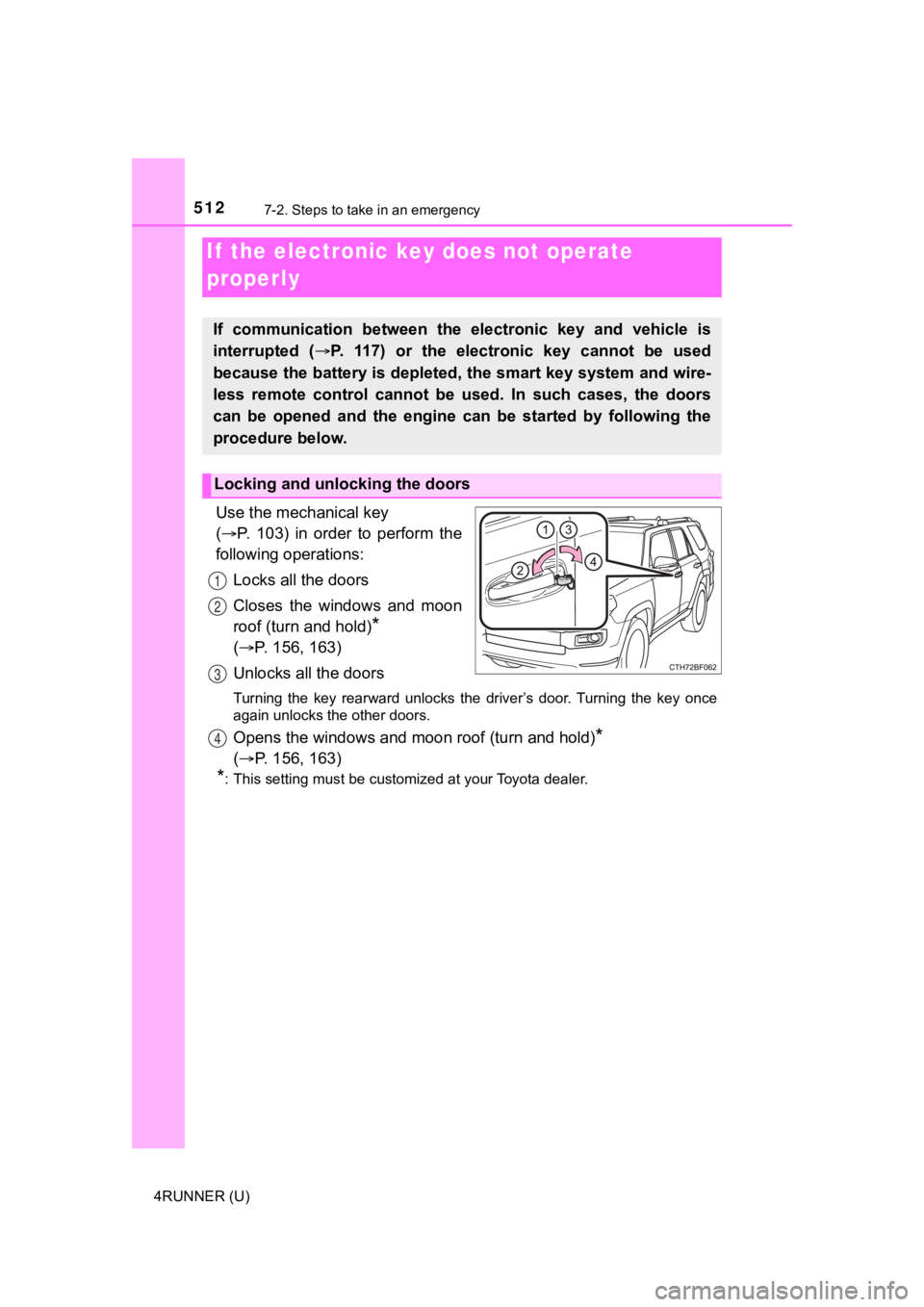
Use the mechanical key
( P. 103) in order to perform the
following operations:
Locks all the doors
Closes the windows and moon
roof (turn and hold)
*
( P. 156, 163)
Unlocks all the doors
Turning the key rearward unlocks the driver’s door. Turning the key once
again unlocks the other doors.
Opens the windows and moon roof (turn and hold)*
( P. 156, 163)
*: This setting must be customized at your Toyota dealer.
If the electronic key does not operate
properly
If communication between the electronic key and vehicle is
interrupted ( P. 117) or the electr onic key cannot be used
because the battery is depleted, the smart key system and wire-
less remote control cannot be used. In such cases, the doors
can be opened and the engine c an be started by following the
procedure below.
Locking and unlocking the doors
1
2
3
4
Page 515 of 608
5157-2. Steps to take in an emergency
7
When trouble arises
4RUNNER (U)
If you have a set of jumper (or booster) cables and a second vehicle
with a 12-volt battery, you can jump start your vehicle by foll owing the
steps below.
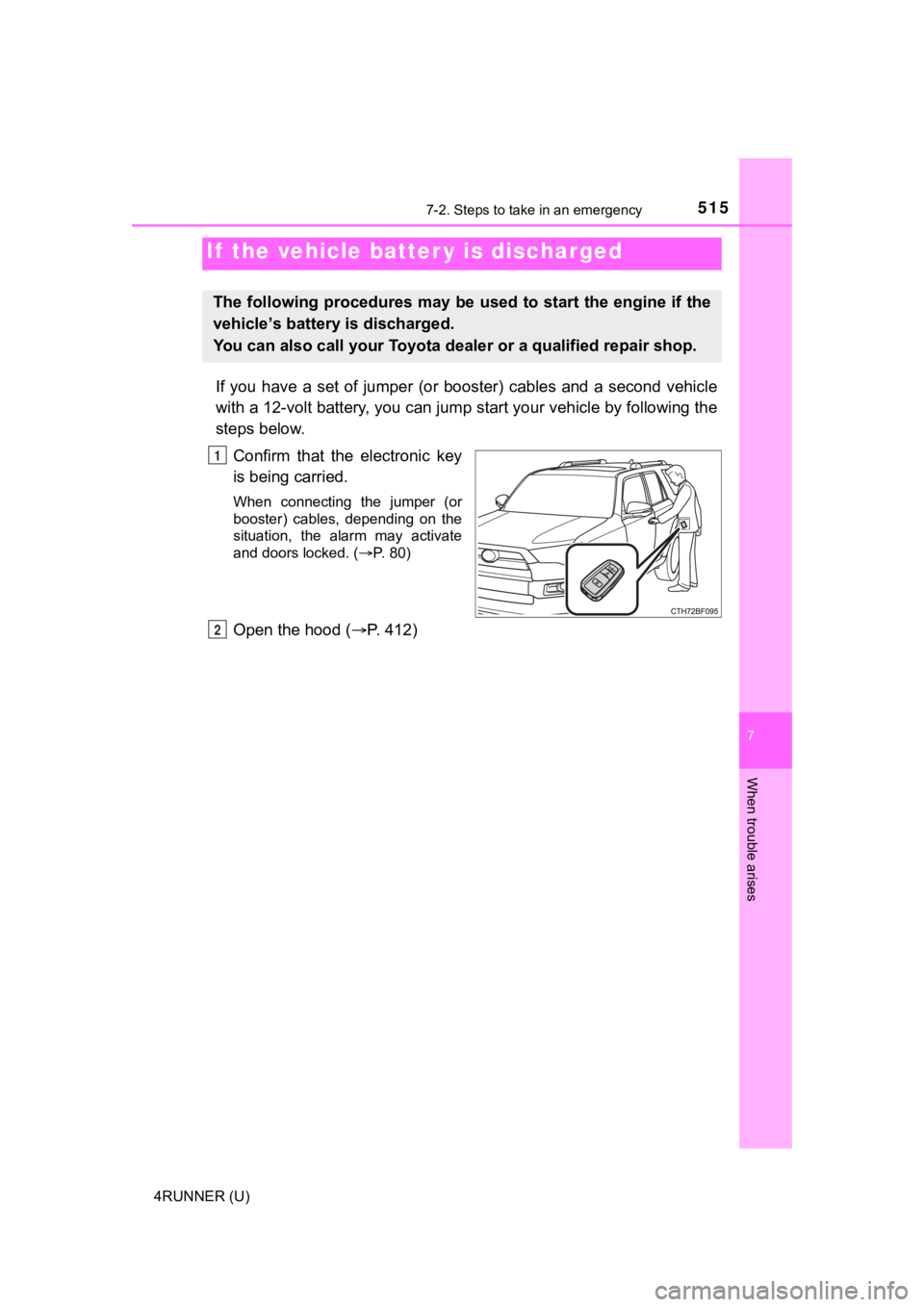
Confirm that the electronic key
is being carried.
When connecting the jumper (or
booster) cables, depending on the
situation, the alarm may activate
and doors locked. ( P. 80)
Open the hood ( P. 412)
If the vehicle batt er y is discharged
The following procedures may be used to start the engine if the
vehicle’s battery is discharged.
You can also call your Toyota de aler or a qualified repair shop.
1
2
Page 517 of 608
5177-2. Steps to take in an emergency
7
When trouble arises
4RUNNER (U)
■Starting the engine when t he battery is discharged
The engine cannot be started by push-starting.
■ To prevent battery discharge
●Turn off the headlights and the audio system while the engine is off.
● Turn off any unnecessary electrical components when the vehicle is running
at a low speed for an extended period, such as in heavy traffic .
■ Charging the battery
The electricity stored in the battery will discharge gradually even when the
vehicle is not in use, due to natural discharge and the draining effects of cer-
tain electrical appliances. If the vehicle is left for a long t ime, the battery may
discharge, and the engine may be unable to start. (The battery recharges
automatically during driving.)
■ When recharging or replacing the battery
●In some cases, it may not be possible to unlock the doors using the smart
key system when the battery is discharged. Use the wireless rem ote control
or the mechanical key to lock or unlock the doors.
● The engine may not start on the first attempt after the battery has recharged
but will start normally after the second attempt. This is not a malfunction.
● The engine switch mode is memorized by the vehicle. When the ba ttery is
reconnected, the system will return to the mode it was in befor e the battery
was discharged. Before disconnecting the battery, turn the engine switch off.
If you are unsure what mode the engine switch was in before the battery dis-
charged, be especially careful when reconnecting the battery.
● Make sure that the key is not inside the vehicle when rechargin g or replac-
ing the battery. The key may be locked in the vehicle if the al arm is acti-
vated. ( P. 80)
Page 525 of 608
5258-1. Specifications
8
Vehicle specifications
4RUNNER (U)■
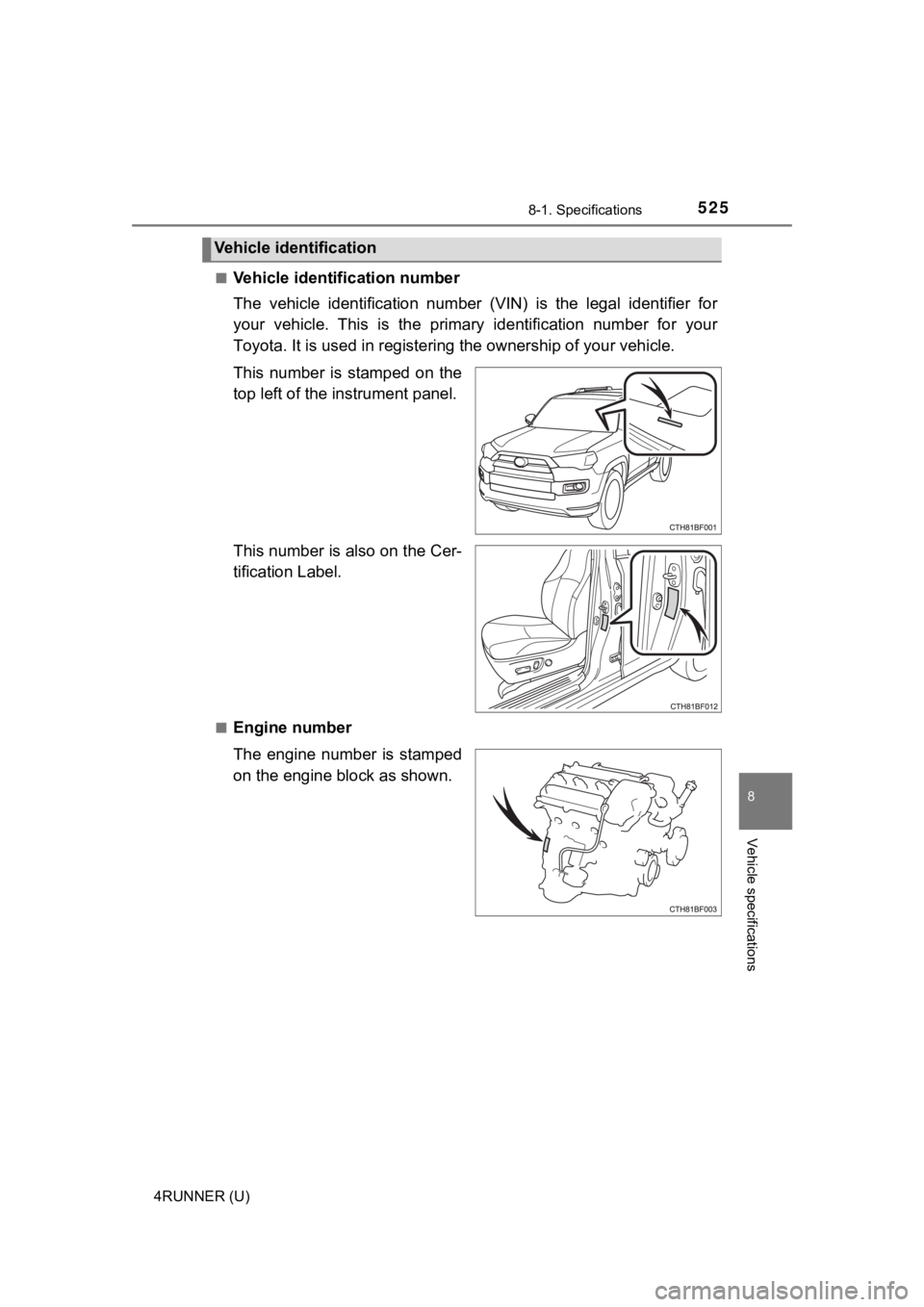
Vehicle identification number
The vehicle identification number (VIN) is the legal identifier
for
your vehicle. This is the primary identification number for you r
Toyota. It is used in registering the ownership of your vehicle.
This number is stamped on the
top left of the instrument panel.
This number is also on the Cer-
tification Label.
■Engine number
The engine number is stamped
on the engine block as shown.
Vehicle identification
Page 530 of 608
5308-1. Specifications
4RUNNER (U)
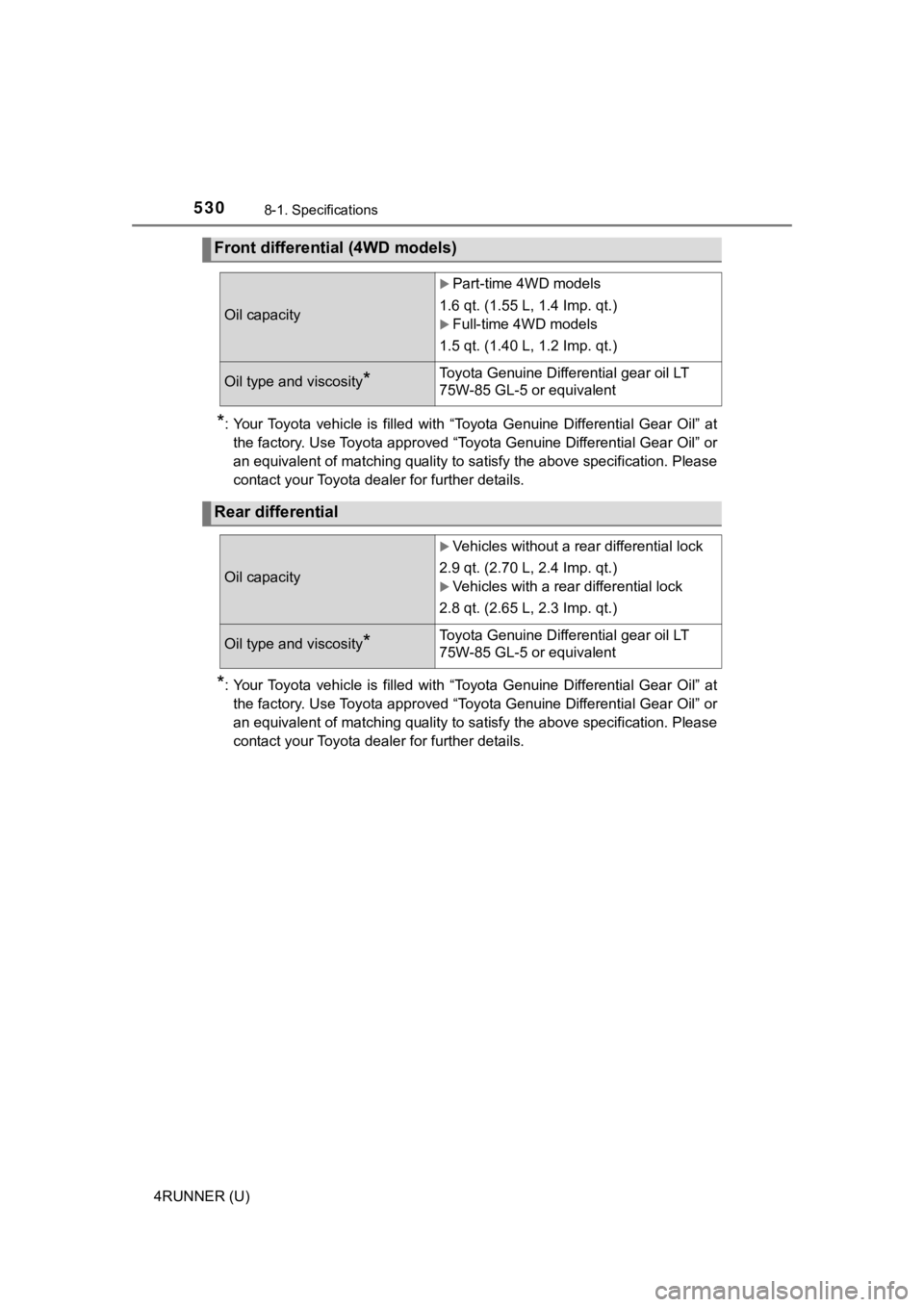
*: Your Toyota vehicle is filled with “Toyota Genuine Differential Gear Oil” at
the factory. Use Toyota approved “Toyota Genuine Differential Gear Oil” or
an equivalent of matching quality to satisfy the above specific ation. Please
contact your Toyota dealer for further details.
*: Your Toyota vehicle is filled with “Toyota Genuine Differentia l Gear Oil” at
the factory. Use Toyota approved “Toyota Genuine Differential Gear Oil” or
an equivalent of matching quality to satisfy the above specific ation. Please
contact your Toyota dealer for further details.
Front differential (4WD models)
Oil capacity
Part-time 4WD models
1.6 qt. (1.55 L, 1.4 Imp. qt.)
Full-time 4WD models
1.5 qt. (1.40 L, 1.2 Imp. qt.)
Oil type and viscosity*Toyota Genuine Differential gear oil LT
75W-85 GL-5 or equivalent
Rear differential
Oil capacity
Vehicles without a rear differential lock
2.9 qt. (2.70 L, 2.4 Imp. qt.)
Vehicles with a rear differential lock
2.8 qt. (2.65 L, 2.3 Imp. qt.)
Oil type and viscosity*Toyota Genuine Differential gear oil LT
75W-85 GL-5 or equivalent
Page 550 of 608
5508-2. Customization
4RUNNER (U)
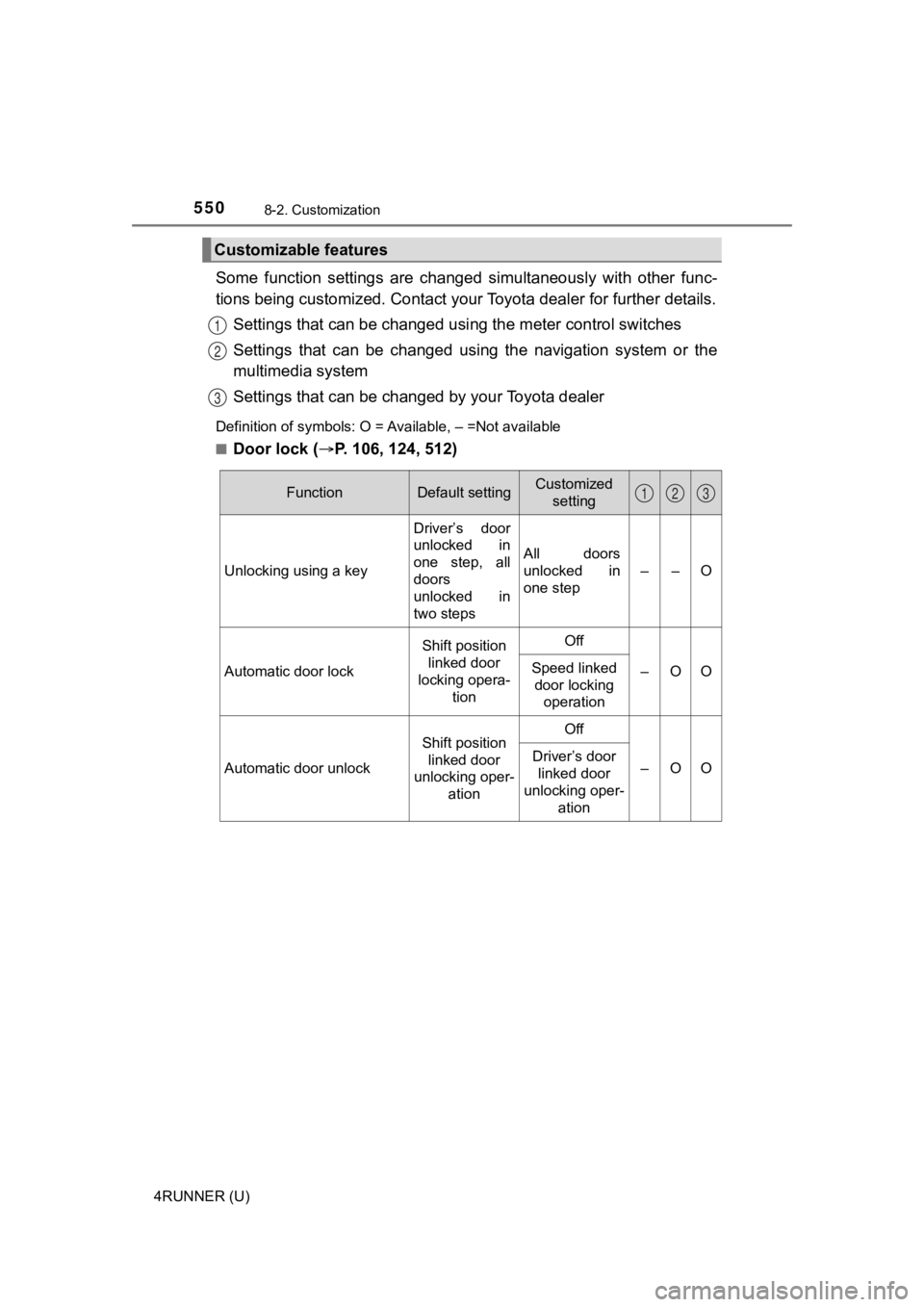
Some function settings are changed simultaneously with other func-
tions being customized. Contact your Toyota dealer for further details.
Settings that can be changed usi ng the meter control switches
Settings that can be changed usin g the navigation system or the
multimedia system
Settings that can be chan ged by your Toyota dealer
Definition of symbols: O = Available, – =Not available
■
Door lock (P. 106, 124, 512)
Customizable features
1
2
3
FunctionDefault settingCustomized
setting
Unlocking using a key Driver’s door
unlocked in
one step, all
doors
unlocked in
two stepsAll doors
unlocked in
one step
––O
Automatic door lock
Shift position
linked door
locking opera-
tionOff
–OOSpeed linked door locking operation
Automatic door unlock
Shift position
linked door
unlocking oper- ationOff
–OODriver’s door
linked door
unlocking oper- ation
123
Page 551 of 608
5518-2. Customization
8
Vehicle specifications
4RUNNER (U)■
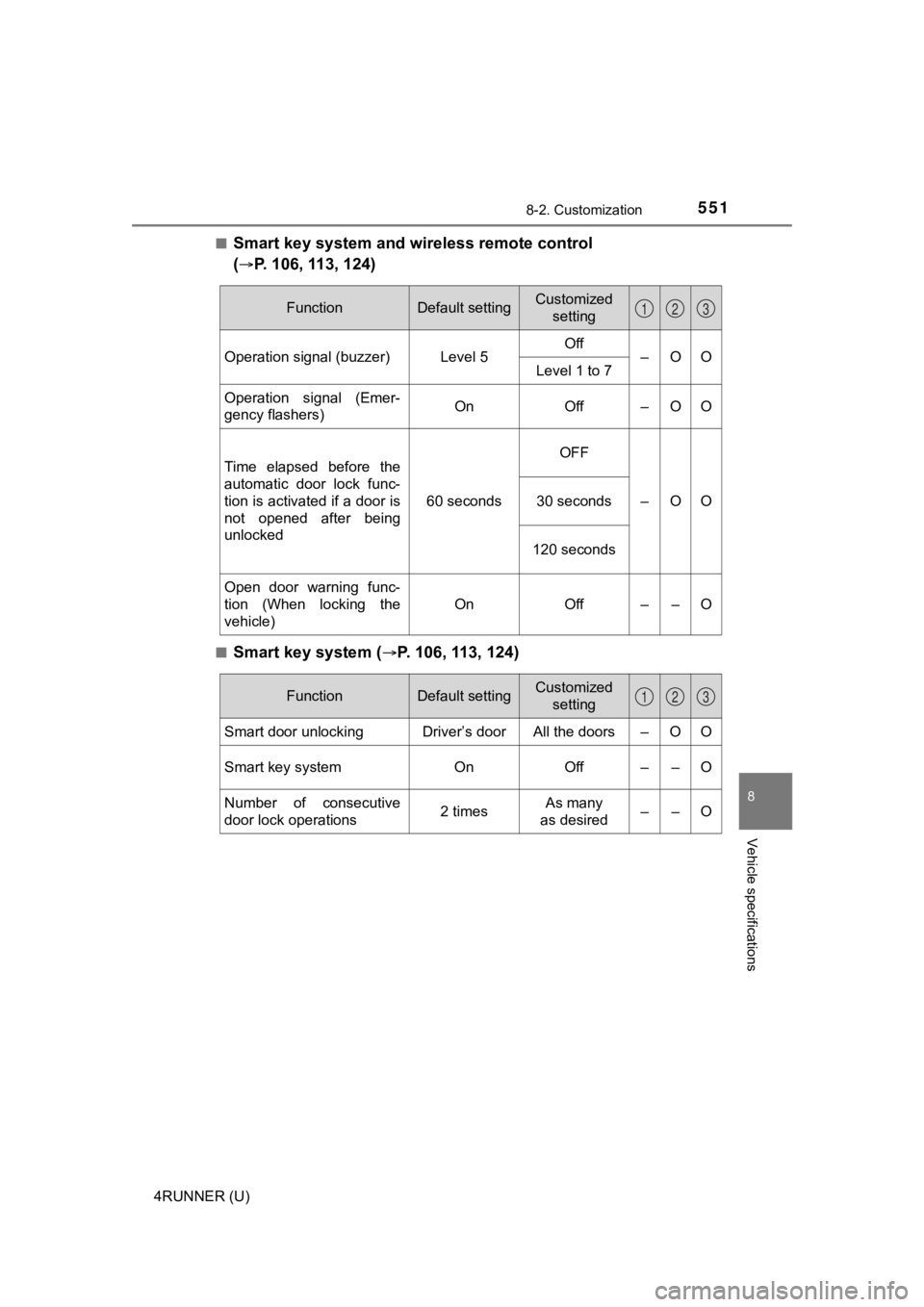
Smart key system and wireless remote control
(
P. 106, 113, 124)
■Smart key system (P. 106, 113, 124)
FunctionDefault settingCustomized
setting
Operation signal (buzzer) Level 5 Off
–OO
Level 1 to 7
Operation signal (Emer-
gency flashers) On Off – O O
Time elapsed before the
automatic door lock func-
tion is activated if a door is
not opened after being
unlocked 60 secondsOFF
–OO
30 seconds
120 seconds
Open door warning func-
tion (When locking the
vehicle) On Off – – O
123
FunctionDefault settingCustomized
setting
Smart door unlocking Driver’s door All the doors – O O
Smart key system On Off – – O
Number of consecutive
door lock operations 2 timesAs many
as desired ––O
123
Page 552 of 608
5528-2. Customization
4RUNNER (U)■
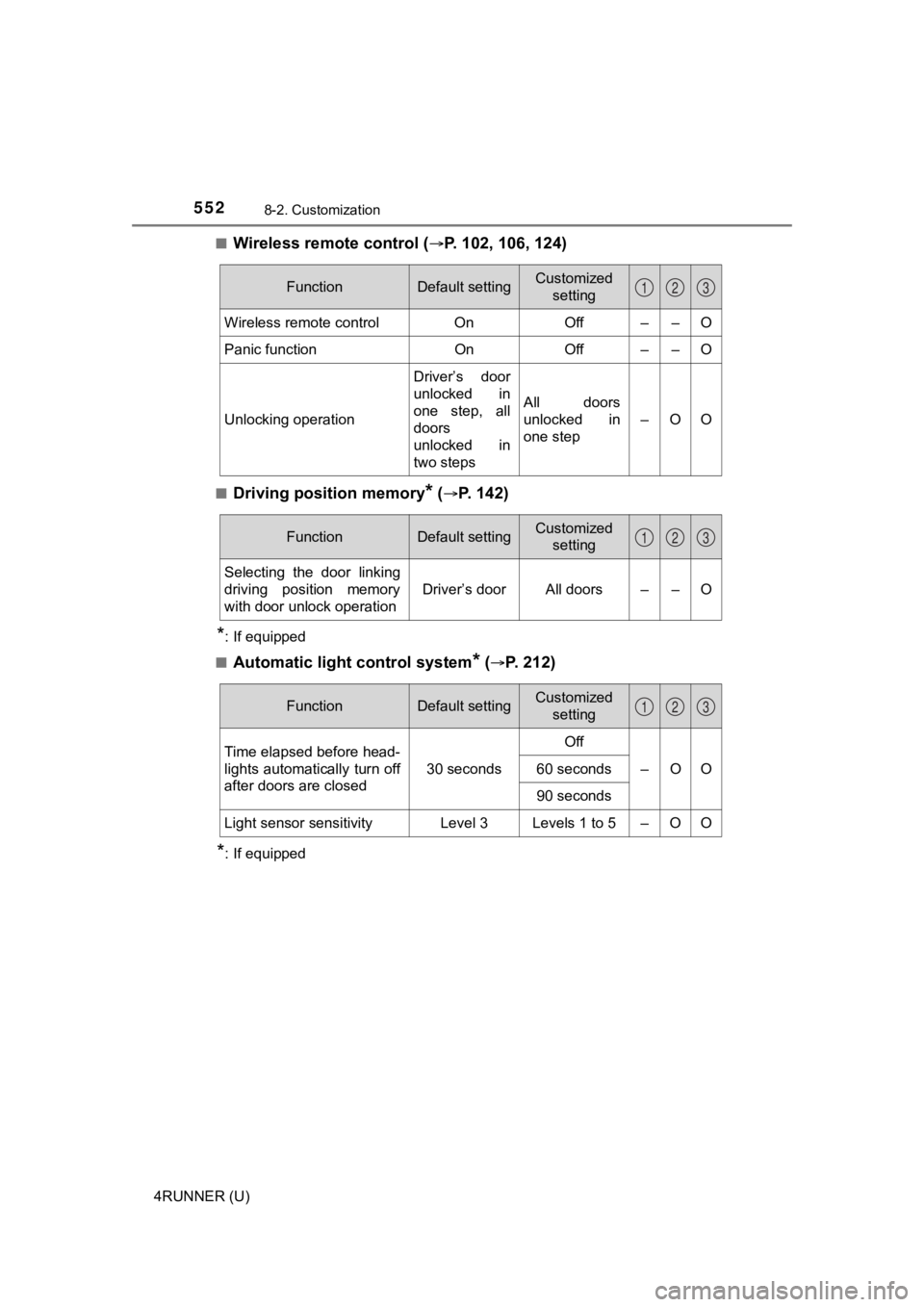
Wireless remote control (P. 102, 106, 124)
■Driving position memory* (P. 142)
*: If equipped
■
Automatic light control system* (P. 212)
*: If equipped
FunctionDefault settingCustomized setting
Wireless remote control OnOff – – O
Panic functionOnOff – – O
Unlocking operation Driver’s door
unlocked in
one step, all
doors
unlocked in
two stepsAll doors
unlocked in
one step
–OO
123
FunctionDefault settingCustomized
setting
Selecting the door linking
driving position memory
with door unlock operation Driver’s door All doors – – O
123
FunctionDefault settingCustomized
setting
Time elapsed before head-
lights automatically turn off
after doors are closed 30 secondsOff
–OO
60 seconds
90 seconds
Light sensor sensitivity Level 3 Levels 1 to 5 – O O
123
Page 553 of 608

5538-2. Customization
8
Vehicle specifications
4RUNNER (U)■
Interior lights (P. 3 6 0 )
*: If equipped
FunctionDefault settingCustomized
setting
Time elapsed before the
interior lights turn off 15 secondsOff
–OO
7.5 seconds
30 seconds
Operation after the engine
switch is turned to OFF On Off – – O
Operation when the doors
are unlocked with the
smart key system or wire-
less remote control On Off – – O
Operation when you
approach the vehicle with
the electronic key on your
person On Off – – O
Operation of the footwell
lights
*On Off – – O
Lounge illumination con-
trol
*On Off – – O
123
Page 554 of 608

5548-2. Customization
4RUNNER (U)■
Exterior lights (
P. 212, 240)
*1: If equipped
*2: Except for Canada
FunctionDefault settingCustomized
setting
Daytime running light sys-
tem On Off*2–OO
Time elapsed before the
exterior lights turn off 15 secondsOff
–OO
7.5 seconds
30 seconds
Operation of the outer foot
lights
*1 when you
approach the vehicle with
the electronic key on your
person On Off – – O
Operation of the outer foot
lights
*1 when the doors
are unlocked with the
power door lock switch On Off – – O
123