cruise control TOYOTA 4RUNNER 2023 User Guide
[x] Cancel search | Manufacturer: TOYOTA, Model Year: 2023, Model line: 4RUNNER, Model: TOYOTA 4RUNNER 2023Pages: 608, PDF Size: 11.8 MB
Page 258 of 608
2584-5. Using the driving support systems
4RUNNER (U)
WARNING
■Before using dynamic r adar cruise control
● Driving safely is the sole responsibility of the driver. Do not rely solely on
the system, and drive safely by always paying careful attention to your sur-
roundings.
● The dynamic radar cruise control provides driving assistance to reduce the
driver's burden. However, there are limitations to the assistance provided.
Read the following conditions carefully. Do not overly rely on this system
and always drive carefully.
• When the sensor may not be correctly detecting the vehicle ahead: P. 268
• Conditions under which the vehicle-to-vehicle distance control mode may not function correctly: P. 269
● Set the speed appropriately depending on the speed limit, traffic flow, road
conditions, weather conditions, etc. The driver is responsible for checking
the set speed.
● Even when the system is functioning normally, the condition of the preced-
ing vehicle as detected by the system may differ from the condition
observed by the driver. Therefore, the driver must always remain alert,
assess the danger of each situation and drive safely. Relying on this sys-
tem or assuming the system ensures safety while driving can lea d to an
accident, resulting in death or serious injury.
● Switch the dynamic radar cruise control off using the “ON-OFF” button
when not in use.
Page 259 of 608
2594-5. Using the driving support systems
4
Driving
4RUNNER (U)
WARNING
■Cautions regarding the driving assist systems
Observe the following precautions, as there are limitations to the assistance
provided by the system.
Failure to do so may cause an accident resulting in death or se rious injury.
● Assisting the driver to measure following distance
The dynamic radar cruise control is only intended to help the d river in
determining the following distance between the driver’s own vehicle and a
designated vehicle traveling ahead. It is not a mechanism that allows care-
less or inattentive driving, and it is not a system that can as sist the driver in
low-visibility conditions. It is still necessary for driver to pay close attention
to the vehicle’s surroundings.
● Assisting the driver to judge proper following distance
The dynamic radar cruise control determines whether the followi ng dis-
tance between the driver’s own vehicle and a designated vehicle traveling
ahead is within a set range. It is not capable of making any other type of
judgement. Therefore, it is absolutely necessary for the driver to remain
vigilant and to determine whether or not there is a possibility of danger in
any given situation.
● Assisting the driver to operate the vehicle
The dynamic radar cruise control has limited capability to prev ent or avoid
a collision with a vehicle traveling ahead. Therefore, if there is ever any
danger, the driver must take immediate and direct control of th e vehicle
and act appropriately in order to ensure the safety of all involved.
Page 260 of 608
2604-5. Using the driving support systems
4RUNNER (U)
WARNING
■Situations unsuitable for dynamic radar cruise control
Do not use dynamic radar cruise control in any of the following situations.
Doing so may result in inappropriate speed control and could ca use an acci-
dent resulting in death or serious injury.
● Roads where there are pedestrians, cyclers, etc.
● In heavy traffic
● On roads with sharp bends
● On winding roads
● On slippery roads, such as those covered with rain, ice or snow
● On steep downhills, or where there are sudden changes between s harp up
and down gradients
Vehicle speed may exceed the set speed when driving down a stee p hill.
● At entrances to freeways and highways
● When weather conditions are bad enough that they may prevent the sen-
sors from detecting correctly (fog, snow, sandstorm, heavy rain, etc.)
● When there is rain, snow, etc. on the front surface of the rada r sensor or
camera sensor
● In traffic conditions that require frequent repeated acceleration and decel-
eration
● When your vehicle is towing a trailer or during emergency towin g
● When an approach warning buzzer is heard often
Page 262 of 608
2624-5. Using the driving support systems
4RUNNER (U)
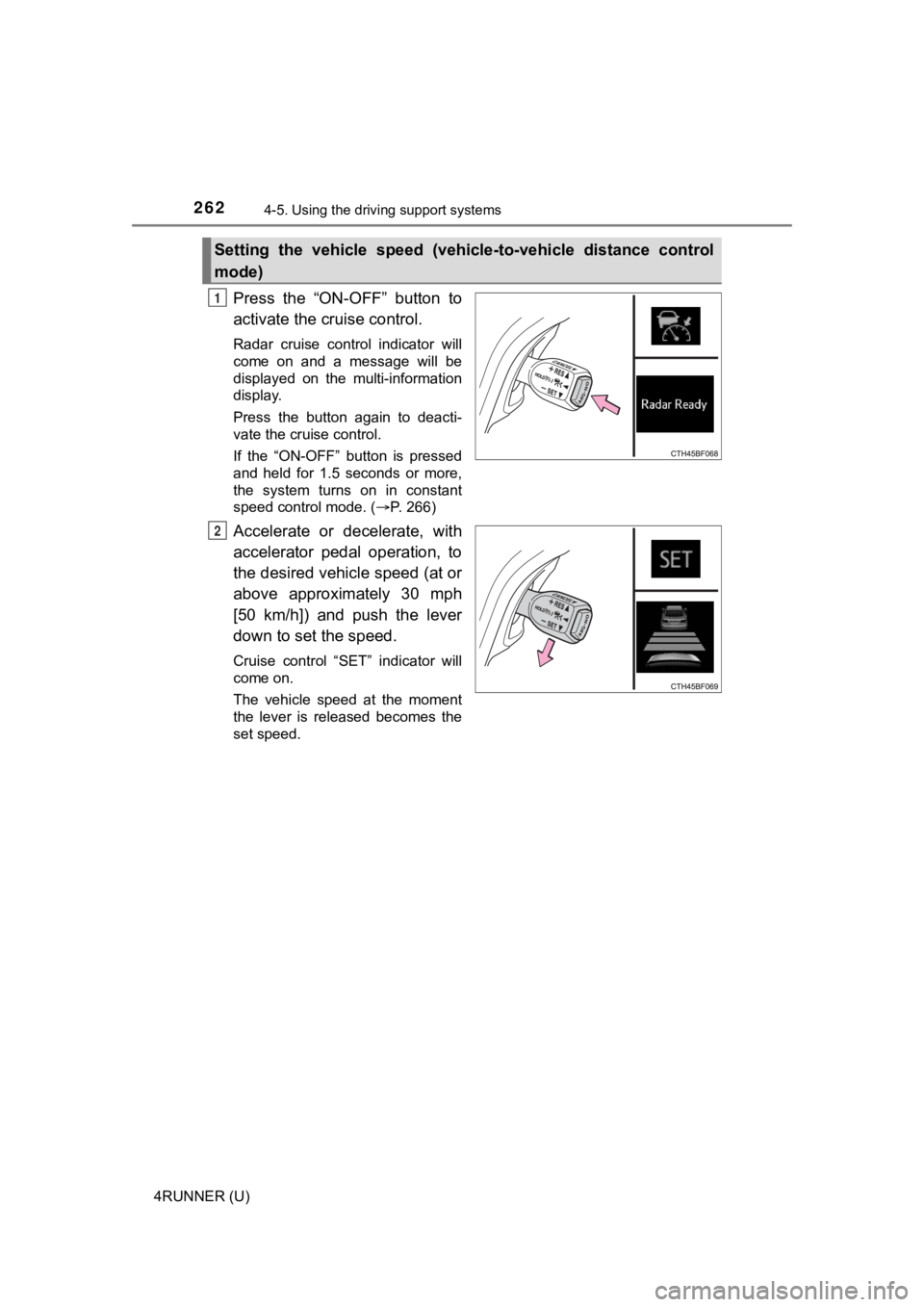
Press the “ON-OFF” button to
activate the cruise control.
Radar cruise control indicator will
come on and a message will be
displayed on the multi-information
display.
Press the button again to deacti-
vate the cruise control.
If the “ON-OFF” button is pressed
and held for 1.5 seconds or more,
the system turns on in constant
speed control mode. ( P. 266)
Accelerate or decelerate, with
accelerator pedal operation, to
the desired vehicle speed (at or
above approximately 30 mph
[50 km/h]) and push the lever
down to set the speed.
Cruise control “SET” indicator will
come on.
The vehicle speed at the moment
the lever is released becomes the
set speed.
Setting the vehicle speed (vehicle-to-vehicle distance control
mode)
1
2
Page 265 of 608
2654-5. Using the driving support systems
4
Driving
4RUNNER (U)
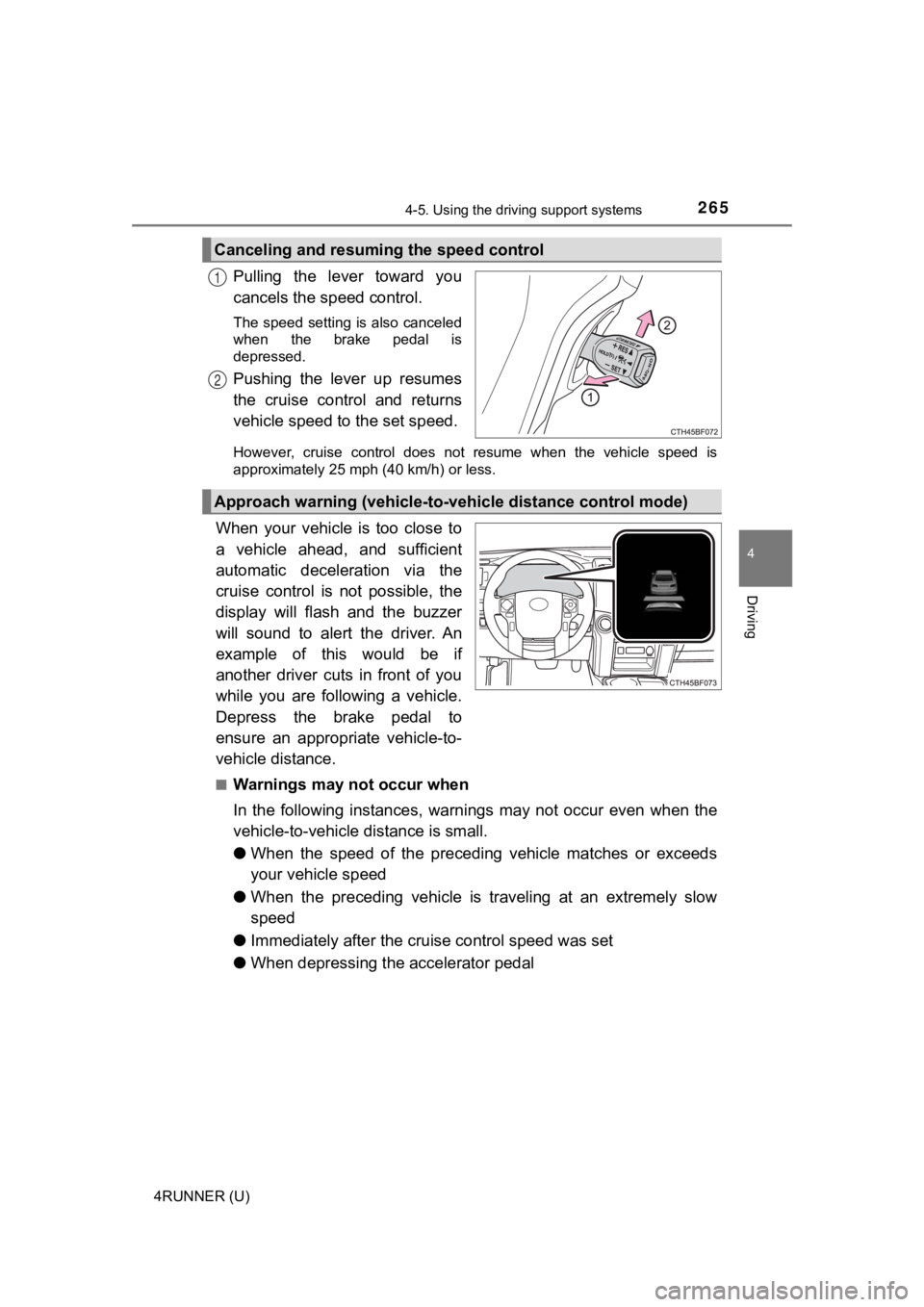
Pulling the lever toward you
cancels the speed control.
The speed setting is also canceled
when the brake pedal is
depressed.
Pushing the lever up resumes
the cruise control and returns
vehicle speed to the set speed.
However, cruise control does not resume when the vehicle speed is
approximately 25 mph (40 km/h) or less.
When your vehicle is too close to
a vehicle ahead, and sufficient
automatic deceleration via the
cruise control is not possible, the
display will flash and the buzzer
will sound to alert the driver. An
example of this would be if
another driver cuts in front of you
while you are following a vehicle.
Depress the brake pedal to
ensure an appropriate vehicle-to-
vehicle distance.
■Warnings may not occur when
In the following instances, war nings may not occur even when th e
vehicle-to-vehicle distance is small.
● When the speed of the preceding vehicle matches or exceeds
your vehicle speed
● When the preceding vehicle is traveling at an extremely slow
speed
● Immediately after the cruise control speed was set
● When depressing the accelerator pedal
Canceling and resuming the speed control
1
2
Approach warning (vehicle-to-v ehicle distance control mode)
Page 266 of 608
2664-5. Using the driving support systems
4RUNNER (U)
When constant speed control mode is selected, your vehicle will main-
tain a set speed without controllin g the vehicle-to-vehicle distance.
Select this mode only when vehic le-to-vehicle distance control mode
does not function correctly due to a dirty radar sensor, etc.
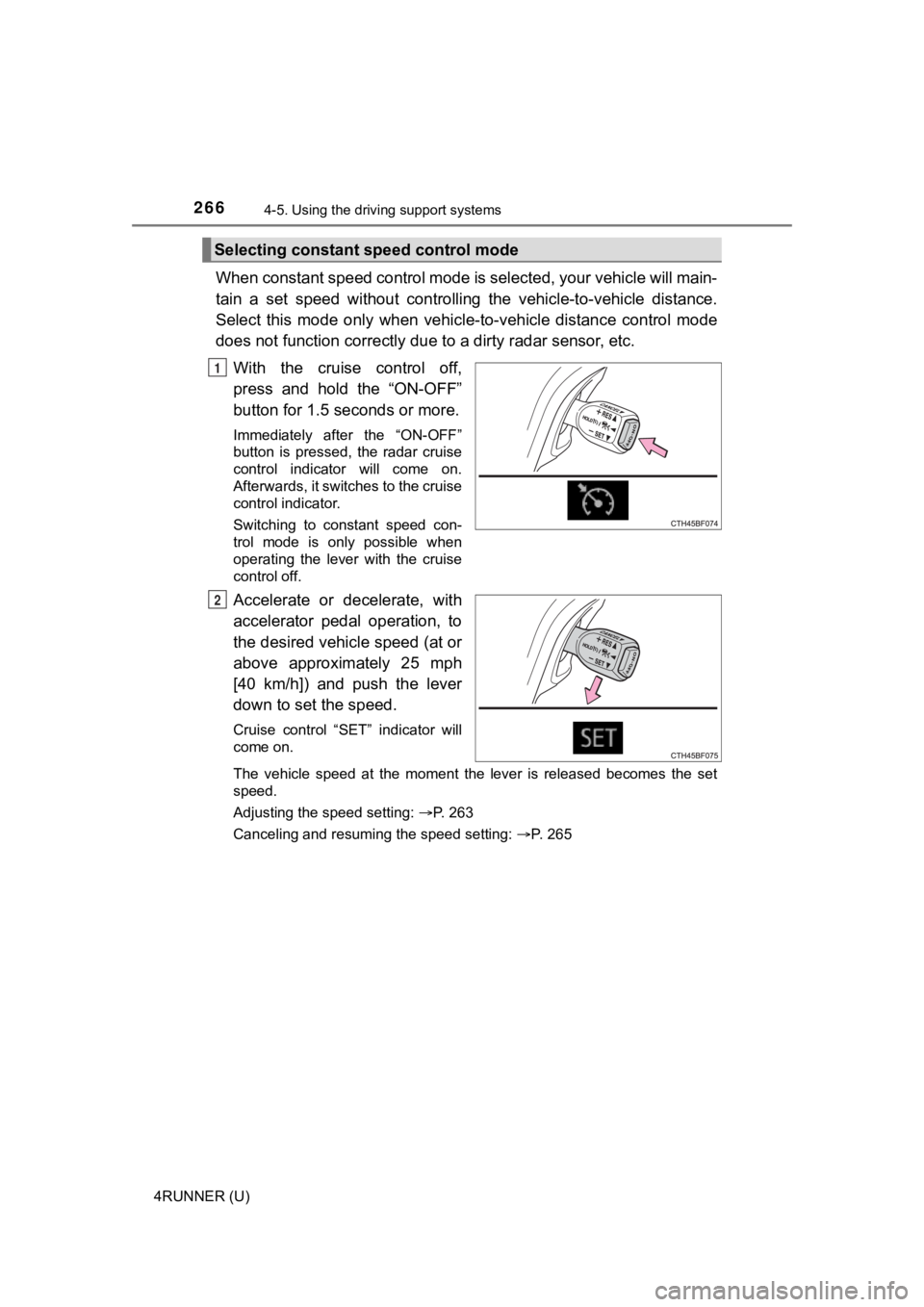
With the cruise control off,
press and hold the “ON-OFF”
button for 1.5 seconds or more.
Immediately after the “ON-OFF”
button is pressed, the radar cruise
control indicator will come on.
Afterwards, it switches to the cruise
control indicator.
Switching to constant speed con-
trol mode is only possible when
operating the lever with the cruise
control off.
Accelerate or decelerate, with
accelerator pedal operation, to
the desired vehicle speed (at or
above approximately 25 mph
[40 km/h]) and push the lever
down to set the speed.
Cruise control “SET” indicator will
come on.
The vehicle speed at the moment the lever is released becomes the set
speed.
Adjusting the speed setting: P. 263
Canceling and resuming the speed setting: P. 265
Selecting constant speed control mode
1
2
Page 267 of 608

2674-5. Using the driving support systems
4
Driving
4RUNNER (U)
■Dynamic radar cruise control can be set when
●The shift lever is in D or range 3 or higher of S has been sele cted.
● Vehicle speed is at or above approximately 30 mph (50 km/h).
■ Accelerating after setting the vehicle speed
The vehicle can accelerate by operating the accelerator pedal. After acceler-
ating, the set speed resumes. However, during vehicle-to-vehicl e distance
control mode, the vehicle speed may decrease below the set spee d in order
to maintain the distance to the preceding vehicle.
■ Automatic cancelation of vehicle-to-vehicle distance control mode
Vehicle-to-vehicle distance control mode is automatically cance led in the fol-
lowing situations:
● Actual vehicle speed falls at or below approximately 25 mph (40 km/h).
● VSC is activated.
● TRAC is activated for a period of time.
● When the VSC or TRAC system is turned off.
● The sensor cannot detect correctly because it is covered in some way.
● Pre-collision braking is activated.
If vehicle-to-vehicle distance control mode is automatically ca nceled for any
other reason, there may be a malfunction in the system. Contact your Toyota
dealer.
Page 268 of 608
2684-5. Using the driving support systems
4RUNNER (U)■
Automatic cancelation of c onstant speed control mode
Constant speed control mode is automatically canceled in the following situa-
tions:
● Actual vehicle speed is more than approximately 10 mph (16 km/h ) below
the set vehicle speed.
● Actual vehicle speed falls below approximately 25 mph (40 km/h) .
● VSC is activated.
● TRAC is activated for a period of time.
● When the VSC or TRAC system is turned off.
● Pre-collision braking is activated.
If constant speed control mode is automatically canceled for an y other rea-
son, there may be a malfunction in the system. Contact your Toyota dealer.
■ Brake system operation sound
If the brakes are applied automatically while the vehicle is in vehicle-to-vehi-
cle distance control mode, a brake system operation sound may b e heard.
This does not indicate a malfunction.
■ Warning messages and buzzers for d ynamic radar cruise control
Warning messages and buzzers are used to indicate a system malfunction or
to inform the driver of the need for caution while driving. If a warning message
is shown on the multi-information display, read the message and follow the
instructions.
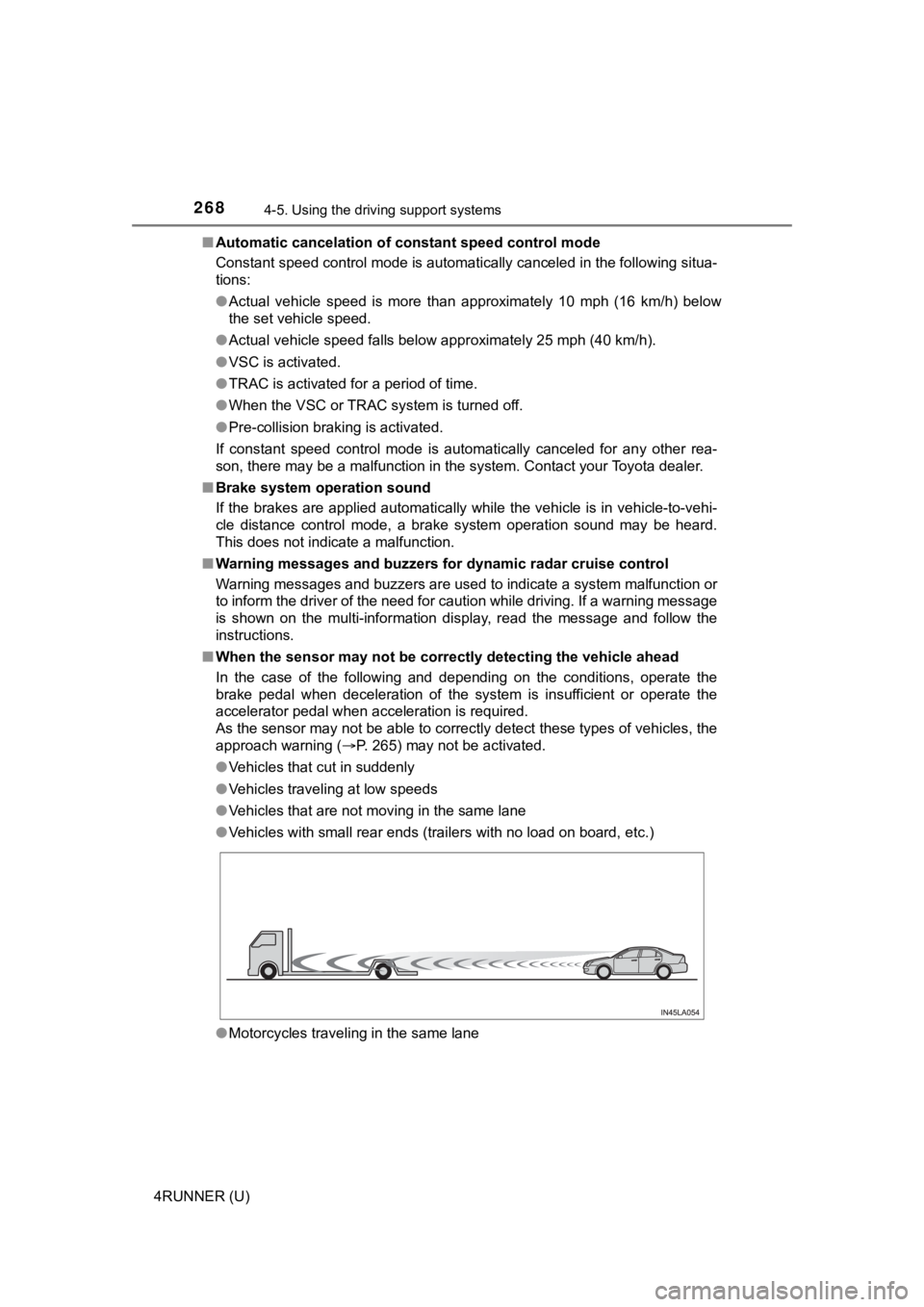
■ When the sensor may not be correctly detect ing the vehicle ahead
In the case of the following and depending on the conditions, o perate the
brake pedal when deceleration of the system is insufficient or operate the
accelerator pedal when acceleration is required.
As the sensor may not be able to correctly detect these types o f vehicles, the
approach warning ( P. 265) may not be activated.
● Vehicles that cut in suddenly
● Vehicles traveling at low speeds
● Vehicles that are not moving in the same lane
● Vehicles with small rear ends (trailers with no load on board, etc.)
● Motorcycles traveling in the same lane
Page 491 of 608
4917-2. Steps to take in an emergency
7
When trouble arises
4RUNNER (U)■
If “Auto power off to co nserve battery” is shown
Power was turned off due to the automatic power off function.
Next time when starting the engine, increase the engine speed s lightly and
maintain that level for approximately 5 minutes to recharge the battery.
■ When a message that indicates the need for the shift lever oper ation is
shown
To prevent the shift lever from being operated incorrectly or t he vehicle from
moving unexpectedly, a message that requires shifting the shift lever may be
shown on the multi-information display. In that case, follow th e instruction of
the message and shift the shift lever.
■ When “Headlight System Malfuncti on Visit Your Dealer” is displayed on
the multi-information display
The following system may be malfunctioning. Have the vehicle in spected by
your Toyota dealer.
● Automatic High Beam
■ If a message that indicates the malfunction of front camera is displayed
The following systems may be suspended until the problem shown in the
message is resolved. ( P. 237, 488)
● PCS (Pre-Collision System)
● LDA (Lane Departure Alert)
● Dynamic radar cruise control
● Automatic High Beam
■ If a message that indicates the m alfunction of radar sensor is displayed
The following systems may be suspended until the problem shown in the
message is resolved. ( P. 237, 488)
● PCS (Pre-Collision System)
● LDA (Lane Departure Alert)
● Dynamic radar cruise control
■ If a following message is shown, take appropriate action and co nfirm
that the message has disappeared.
*
● “Crawl Not Available Select L4 and Shift to [D] or [R] Position ”
● “Crawl Not Available Check System Operation Conditions”
*: Refer to the “Off-road Driving Owner’s Manual”.
■ If “Oil Maintenance Required Soon” is displayed (U.S.A. only)
Indicates that all maintenance according to the driven distance on the mainte-
nance schedule
* should be performed soon.
Comes on approximately 4500 miles (7200 km) after the message has been
reset.
If necessary, perform maintenance. Please reset the message aft er the main-
tenance is performed. ( P. 404)
*: Refer to the separate “Scheduled Maintenance Guide” or “Owner’ s Manual
Supplement” for the maintenance interval applicable to your veh icle.
Page 584 of 608

584Alphabetical index
4RUNNER (U)
Child safety ................................ 54Airbag precautions .................. 39
Back door precautions .......... 126
Battery precautions ....... 423, 518
Child restraint system ............. 55
How your child should
wear the seat belt ................. 33
Installing child restraints ......... 59
Moon roof precautions .......... 164
Power window lock switch .... 155
Power window precautions ... 157
Rear door child-protectors .... 109
Removed electronic key battery precautions ...... 448
Seat belt extender precautions ........................... 36
Seat belt precautions .............. 58
Seat heater precautions........ 357
Child-protectors....................... 109
Cleaning ........................... 396, 400 Exterior ................................. 396
Interior................................... 400
Seat belts .............................. 401
Wheels and wheel ornaments .......................... 397
Clock ......................................... 376
Compass .................................... 92
Condenser ................................ 419
Console box ............................. 364
Cooling system Engine overheating ............... 519
Crawl Control ........................... 312
Cruise control Dynamic radar cruise control................................. 257
Cup holders.............................. 365
Curtain shield airbags ............... 37
Customizable features ............ 549 Daytime running light
system.................................... 215
Defogger Front windshield ................... 351
Outside rear view
mirrors ........................ 344, 351
Rear window ................. 344, 351
Dimension ................................ 524
Dinghy towing.......................... 198
Display Dynamic radar cruise control ................................ 257
LDA
(Lane Departure Alert) ....... 249
Multi-information display ......... 90
Trip information....................... 90
Warning message................. 488
Do-it-yourself maintenance .... 409
Door courtesy lights Wattage ................................ 533
Doors Automatic door locking
and unlocking system......... 109
Back door ............................. 124
Door lock ...................... 108, 124
Door windows ....................... 155
Open door warning buzzer ... 115
Open door warning light ....... 479
Outside rear view mirrors ..... 153
Rear door child-protector ...... 109
Side doors ............................ 106
Downhill assist control
system.................................... 309
Drive-Start Control .................. 167
Driver’s seat position memory .................................. 142D