lock TOYOTA 4RUNNER 2023 Manual Online
[x] Cancel search | Manufacturer: TOYOTA, Model Year: 2023, Model line: 4RUNNER, Model: TOYOTA 4RUNNER 2023Pages: 608, PDF Size: 11.8 MB
Page 207 of 608

2074-2. Driving procedures
4
Driving
4RUNNER (U)
■S mode
When the shift range is “3” or lower, holding the shift lever t oward “+” sets the
shift range to “5”.
■ AI-SHIFT
AI-SHIFT automatically selects the optimal gear according to driver perfor-
mance and driving conditions.
AI-SHIFT automatically operates when the shift lever is in the D position.
(Shifting the shift lever to the S position or paddle shifting cancels the func-
tion.)
The engine speed may remain high after releasing the accelerato r pedal. This
does not indicate a malfunction.
■ When driving with Dynamic r adar cruise control system
Engine braking will not occur in S mode, even when downshifting to “3”.
( P. 257)
■ Restraining sudden start (Drive-start Control)
P. 167
■ Shift lock system
The shift lock system is a system to prevent accidental operation of the shift
lever in starting.
The shift lever can be shifted from P only when the engine switch is in the
IGNITION ON mode the brake pedal is depressed and the shift release but-
ton is pushed.
Page 208 of 608
2084-2. Driving procedures
4RUNNER (U)■
If the shift lever cannot be shifted from P
First, check whether the brake pedal is being depressed.
If the shift lever cannot be shifted with your foot on the brak e pedal, there may
be a problem with the shift lock system. Have the vehicle inspected by your
Toyota dealer immediately.
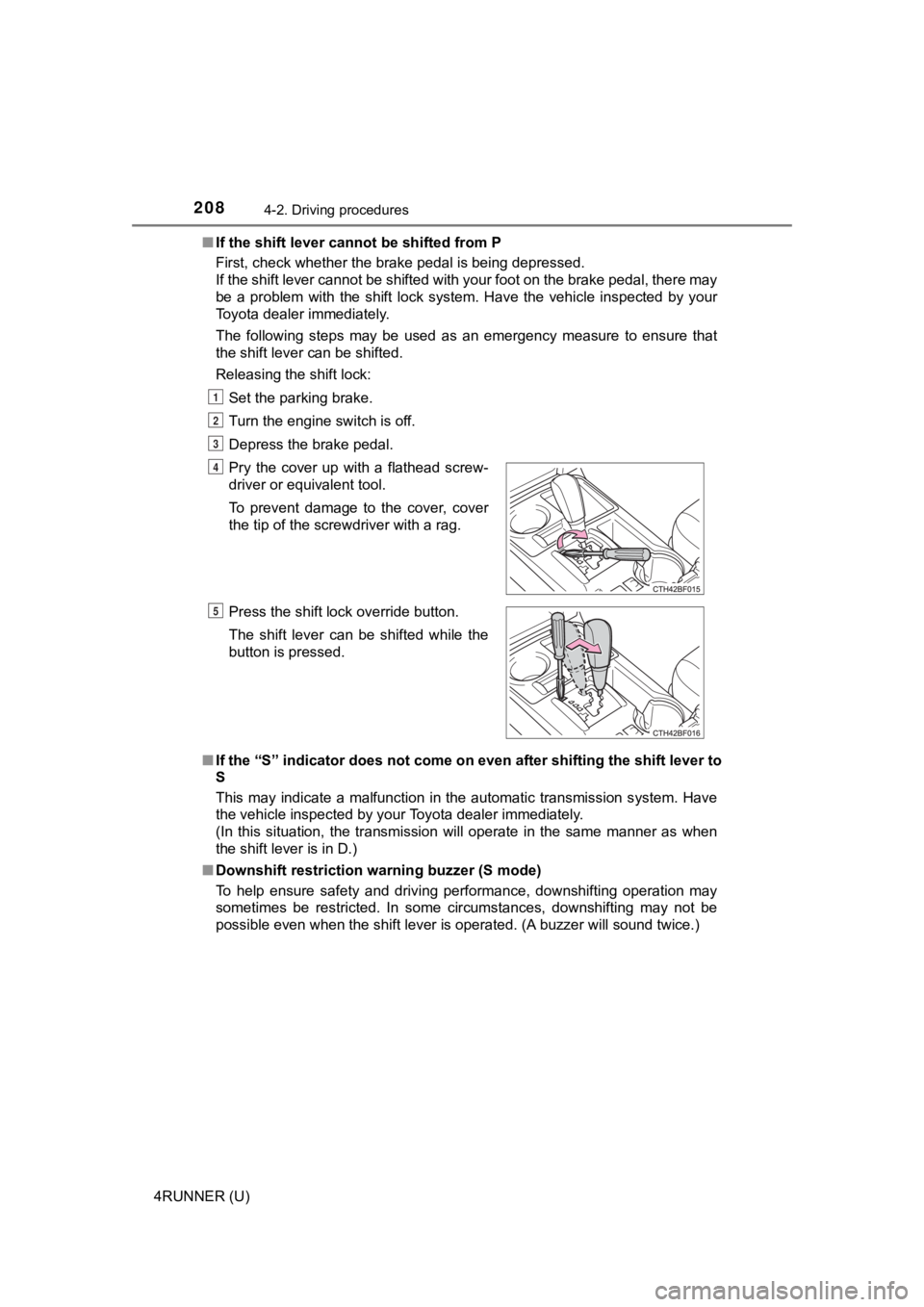
The following steps may be used as an emergency measure to ensu re that
the shift lever can be shifted.
Releasing the shift lock:
Set the parking brake.
Turn the engine switch is off.
Depress the brake pedal.
■ If the “S” indicator does not come on even after shifting the s hift lever to
S
This may indicate a malfunction in the automatic transmission s ystem. Have
the vehicle inspected by your Toyota dealer immediately.
(In this situation, the transmission will operate in the same m anner as when
the shift lever is in D.)
■ Downshift restriction warning buzzer (S mode)
To help ensure safety and driving performance, downshifting ope ration may
sometimes be restricted. In some circumstances, downshifting ma y not be
possible even when the shift lever is operated. (A buzzer will sound twice.)
Pry the cover up with a flathead screw-
driver or equivalent tool.
To prevent damage to the cover, cover
the tip of the screwdriver with a rag.
Press the shift lock override button.
The shift lever can be shifted while the
button is pressed.
1
2
3
4
5
Page 209 of 608

2094-2. Driving procedures
4
Driving
4RUNNER (U)
WARNING
■When driving on slippery road surfaces
Be careful of downshifting and sudden acceleration, as this could result in
the vehicle skidding to the side or spinning.
■ To prevent an accident when releasing the shift lock
Before pressing the shift lock override button, make sure to se t the parking
brake and depress the brake pedal.
If the accelerator pedal is accidentally depressed instead of t he brake pedal
when the shift lock override button is pressed and the shift le ver is shifted
out of P, the vehicle may suddenly start, possibly leading to an accident
resulting in death or serious injury.
Page 215 of 608
2154-3. Operating the lights and wipers
4
Driving
4RUNNER (U)
■Daytime running light system
●Vehicles with a headlight high beam/daytime running lights: The daytime
running lights illuminate using the same lights as the headligh t high beam
and illuminate dimmer than the headlight high beam.
● To make your vehicle more visible to other drivers during dayti me driving,
the daytime running lights turn on automatically when all of the following
conditions are met. (The daytime running lights are not designe d for use at
night.)
• The engine is running
• The parking brake is released
• The headlight switch is in the , (type A only),
* (type B
and C) position
*: When the surroundings are bright
The daytime running lights remain on after they illuminate, eve n if the park-
ing brake is set again.
Type A and B: Daytime running lights can be turned off by opera ting the
switch.
● Compared to turning on the headlights, the daytime running ligh t system
offers greater durability and consumes less electricity, so it can help improve
fuel economy.
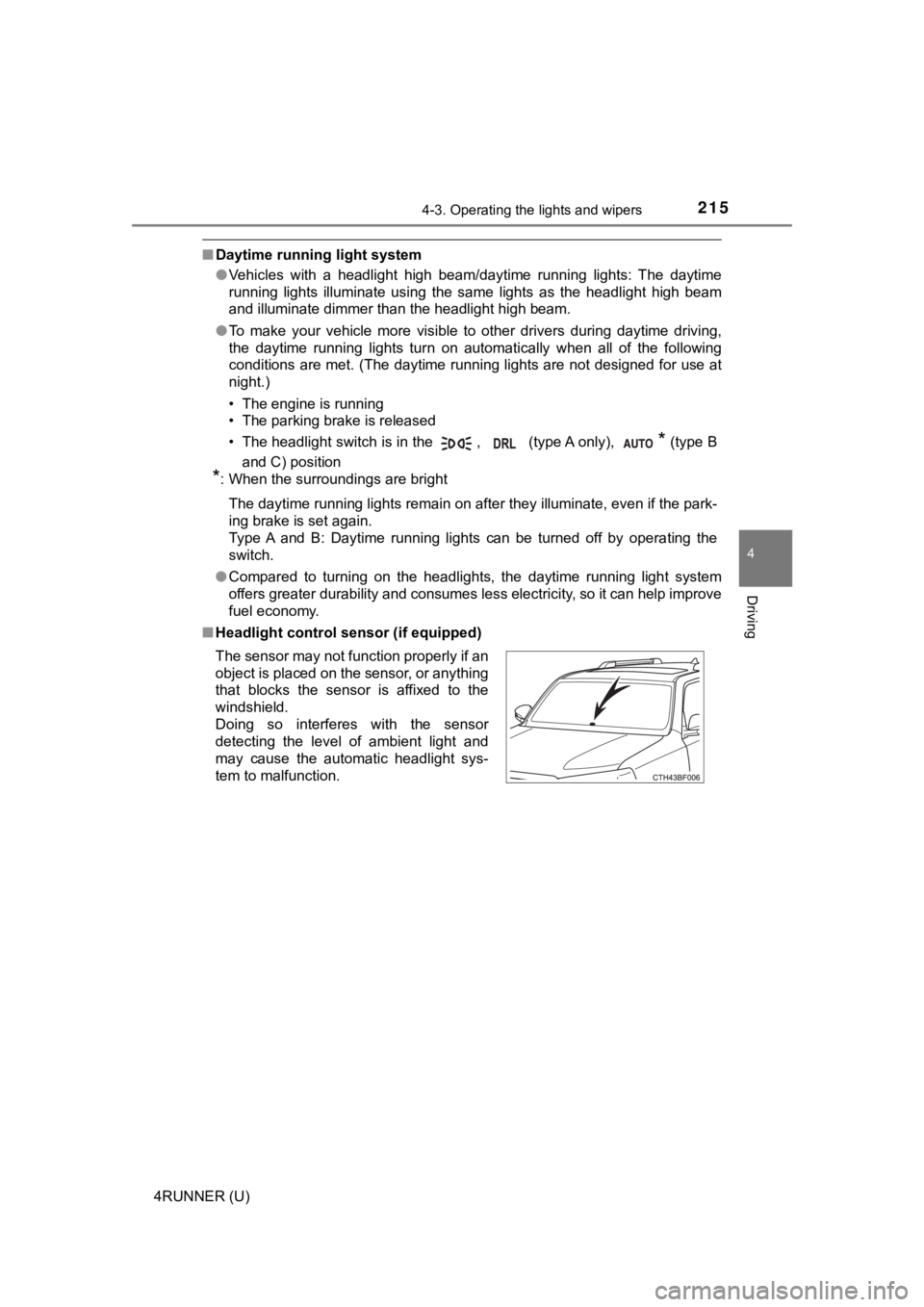
■ Headlight control sensor (if equipped)
The sensor may not function properly if an
object is placed on the sensor, or anything
that blocks the sensor is affixed to the
windshield.
Doing so interferes with the sensor
detecting the level of ambient light and
may cause the automatic headlight sys-
tem to malfunction.
Page 216 of 608

2164-3. Operating the lights and wipers
4RUNNER (U)■
Automatic light off system (if equipped)
●When the headlights come on: The headlights and tail lights turn off 30 sec-
onds after a door is opened and closed if the engine switch is turned to
ACCESSORY mode or turned off. (The lights turn off immediately if
on the key is pressed after all the doors are locked.)
● When only the tail lights come on: The tail lights turn off automatically if the
engine switch is turned off and the driver’s door is opened.
To turn the lights on again, turn the engine switch to IGNITION ON mode, or
turn the light switch off and then back to or .
■ Customization
Settings (e.g. light sensor sensitivity) can be changed.
(Customizable features: P. 549)
NOTICE
■To prevent battery discharge
Do not leave the lights on longer than necessary when the engin e is not
running.
Page 225 of 608

2254-3. Operating the lights and wipers
4
Driving
4RUNNER (U)
■The windshield wiper and washer can be operated when
The engine switch is in IGNITION ON mode.
■ If no windshield washer fluid sprays
Check that the washer nozzles are not blocked if there is washe r fluid in the
washer fluid reservoir.
WARNING
■ Caution regarding the use of washer fluid
When it is cold, do not use the washer fluid until the windshie ld becomes
warm. The fluid may freeze on the windshield and cause low visi bility. This
may lead to an accident, resulting in death or serious injury.
NOTICE
■ When the windshield is dry
Do not use the wipers, as they may damage the windshield.
■ When the washer fluid tank is empty
Do not operate the switch continually as the washer fluid pump may over-
heat.
■ When a nozzle becomes blocked
In this case, contact your Toyota dealer.
Do not try to clear it with a pin or other object. The nozzle will be damaged.
Page 227 of 608
2274-3. Operating the lights and wipers
4
Driving
4RUNNER (U)
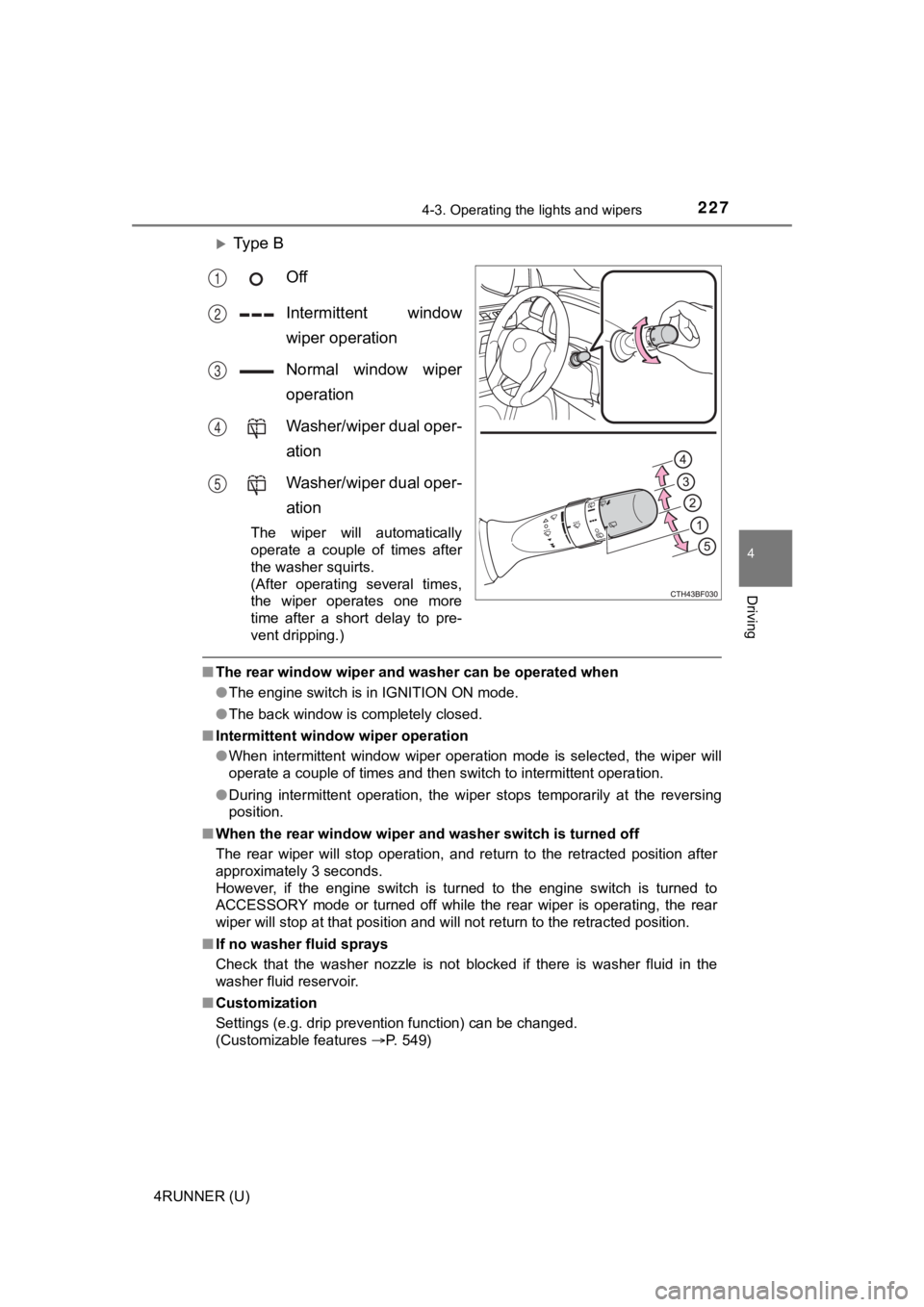
Ty p e B
Off
Intermittent window
wiper operation
Normal window wiper
operation
Washer/wiper dual oper-
ation
Washer/wiper dual oper-
ation
The wiper will automatically
operate a couple of times after
the washer squirts.
(After operating several times,
the wiper operates one more
time after a short delay to pre-
vent dripping.)
■The rear window wiper and washer can be operated when
●The engine switch is in IGNITION ON mode.
● The back window is completely closed.
■ Intermittent window wiper operation
●When intermittent window wiper operation mode is selected, the wiper will
operate a couple of times and then switch to intermittent opera tion.
● During intermittent operation, the wiper stops temporarily at the reversing
position.
■ When the rear window wiper and washer switch is turned off
The rear wiper will stop operation, and return to the retracted position after
approximately 3 seconds.
However, if the engine switch is turned to the engine switch is turned to
ACCESSORY mode or turned off while the rear wiper is operating, the rear
wiper will stop at that position and will not return to the retracted position.
■ If no washer fluid sprays
Check that the washer nozzle is not blocked if there is washer fluid in the
washer fluid reservoir.
■ Customization
Settings (e.g. drip prevention function) can be changed.
(Customizable features P. 549)
1
2
3
4
5
Page 228 of 608

2284-3. Operating the lights and wipers
4RUNNER (U)
NOTICE
■When the rear window is dry
Do not use the wiper, as it may damage the rear window.
■ When the washer fluid tank is empty
Do not operate the switch continually as the washer fluid pump may over-
heat.
■ When a nozzle becomes blocked
In this case, contact your Toyota dealer.
Do not try to clear it with a pin or other object. The nozzle will be damaged.
Page 247 of 608
2474-5. Using the driving support systems
4
Driving
4RUNNER (U)• If a vehicle ahead makes an abrupt maneuver (such as sudden sw
erving,
acceleration or deceleration)
• When suddenly cutting behind a preceding vehicle
• When driving in inclement weather such as heavy rain, fog, snow or a
sandstorm
• When the vehicle is hit by water, snow, dust, etc. from a vehicle ahead
• When driving through steam or smoke
• When driving in a place where the surrounding brightness changes sud- denly, such as at the entrance or exit of a tunnel
• When a very bright light, such as the sun or the headlights of oncoming
traffic, shines directly into the front camera
• When the surrounding area is dim, such as at dawn or dusk, or while at
night or in a tunnel
• After the engine has started the vehicle has not been driven for a certain amount of time
• While making a left/right turn and for a few seconds after mak ing a left/
right turn
• While driving on a curve and for a few seconds after driving o n a curve
• If your vehicle is skidding
• If the wheels are misaligned
• If a wiper blade is blocking the front camera
• The vehicle is wobbling.
• The vehicle is being driven at extremely high speeds.
• When driving on a hill
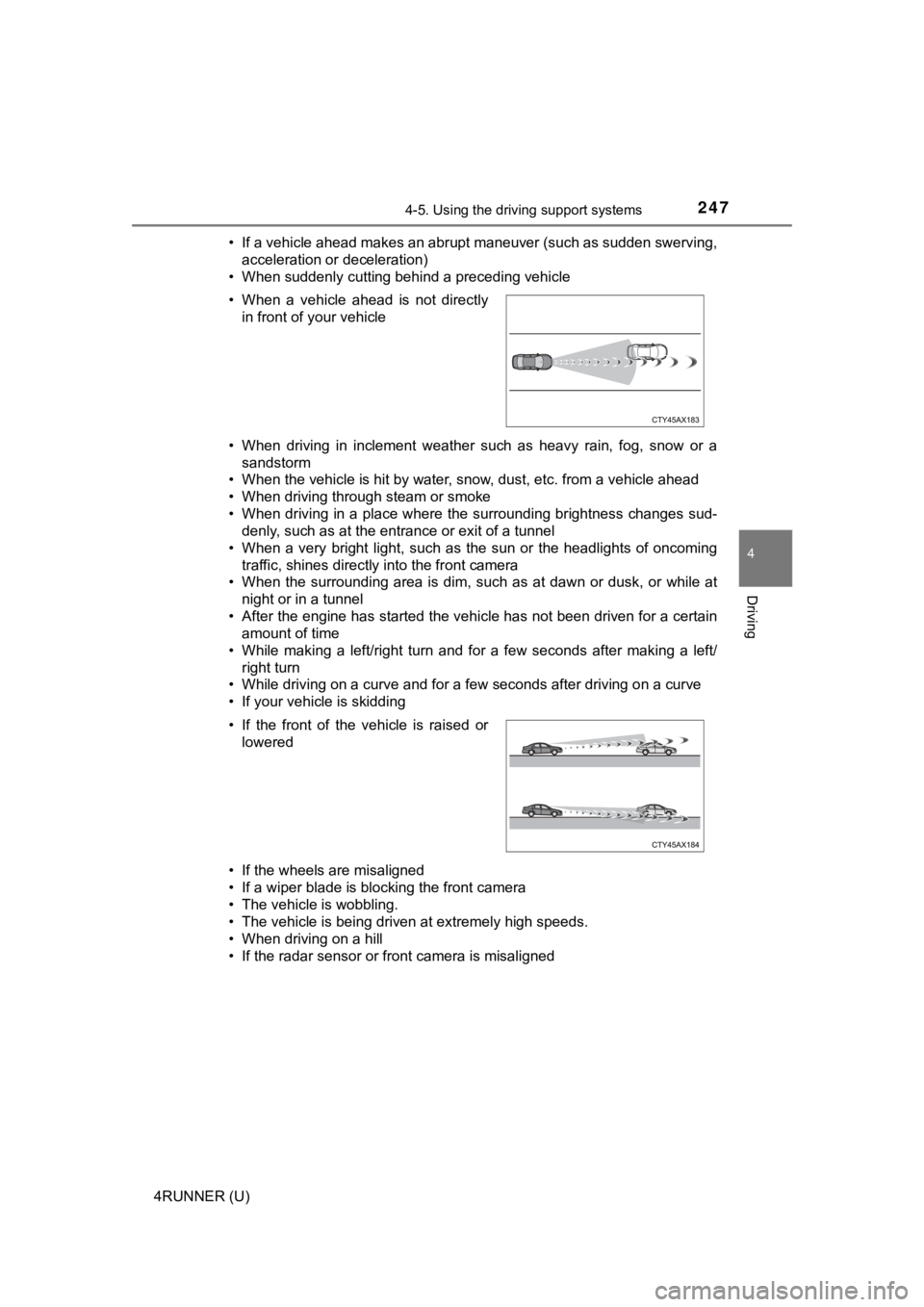
• If the radar sensor or front camera is misaligned • When a vehicle ahead is not directly in front of your vehicle
• If the front of the vehicle is raised or lowered
Page 296 of 608
2964-5. Using the driving support systems
4RUNNER (U)■
Shifting from H2 to H4
Ty p e A
Reduce vehicle sp
eed to less than 50 mph (80 km/h).
Shift the front-wheel drive control lever to H4.
Ty p e B
Reduce vehicle speed to less than 62 mph (100 km/h).
Push the “UNLOCK” button and turn the front-wheel drive control
switch to H4.
The four-wheel drive indicator will turn on.
■
Shifting from H4 to H2
Ty p e A
Shift the front-wheel drive control lever to H2.
Ty p e B
Push the “UNLOCK” button and turn the front-wheel drive control
switch to H2.
This can be done at any speed.
The four-wheel drive indicator will go off.
■
Shifting from H4 to L4 Stop the vehicle completely and continue to depress the brake
pedal.
Shift the shift lever to N.
Ty p e A
Shift the front-wheel dri ve control lever to L4.
Ty p e B
Push the “UNLOCK” button and then push and turn the front-
wheel drive control switch to L4.
The low speed four-wheel drive indicator will turn on.
Shifting between H2 and H4
Shifting between H4 and L4
1
2
1
2
1
2
3
3