remote control TOYOTA 86 2019 Owners Manual
[x] Cancel search | Manufacturer: TOYOTA, Model Year: 2019, Model line: 86, Model: TOYOTA 86 2019Pages: 532, PDF Size: 6.89 MB
Page 2 of 532

TABLE OF CONTENTS Index
21-1. Key information
Keys ..................................... 22
1-2. Opening, closing and
locking the doors and
trunk
Smart key system................. 25
Wireless remote control ....... 38
Doors.................................... 43
Trunk .................................... 46
1-3. Adjustable components
(seats, mirrors,
steering wheel)
Front seats ........................... 53
Rear seats ............................ 56
Head restraints ..................... 58
Seat belts ............................. 60
Steering wheel ..................... 67
Anti-glare inside rear
view mirror.......................... 68
Outside rear view mirrors ..... 69
1-4. Opening and closing
the windows
Power windows .................... 72
1-5. Refueling
Opening the fuel tank cap .... 75 1-6. Theft deterrent system
Engine immobilizer
system ................................ 79
Alarm .................................... 82
Theft prevention labels
(U.S.A.)............................... 86
1-7. Safety information
Correct driving posture ......... 87
SRS airbag
(Supplemental Restraint
System airbag) ................... 89
Front passenger occupant
classification system ......... 128
Child restraint systems ....... 137
Installing child restraints ..... 141
2-1. Driving procedures
Driving the vehicle .............. 152
Engine (ignition) switch
(vehicles with a smart
key system) ...................... 166
Engine (ignition) switch
(vehicles without a
smart key system) ............ 175
Automatic transmission ...... 178
Manual Transmission ......... 185
Turn signal lever ................. 188
Parking brake ..................... 189
Horn .................................... 1901
Before driving
2
When driving
Page 4 of 532

TABLE OF CONTENTS Index
43-5. Other interior features
Sun visors .......................... 296
Vanity mirrors ..................... 297
Clock .................................. 298
Power outlets ..................... 299
Seat heaters ....................... 301
Floor mat ............................ 303
4-1. Maintenance and care
Cleaning and protecting
the vehicle exterior ........... 308
Cleaning and protecting
the vehicle interior ............ 312
Cleaning and protecting
the Alcantara ®
area.......... 316
4-2. Maintenance
Maintenance
requirements .................... 318
General maintenance ......... 320
Emission inspection and
maintenance (I/M)
programs .......................... 323 4-3. Do-it-yourself
maintenance
Do-it-yourself service
precautions ....................... 324
Hood ................................... 327
Positioning a floor jack........ 329
Engine compartment .......... 331
Tires.................................... 345
Tire inflation pressure ......... 353
Wheels................................ 357
Air conditioning filter ........... 360
Wireless remote control/
electronic key battery ....... 363
Checking and replacing
fuses ................................. 367
Light bulbs .......................... 375
5-1. Essential information
Emergency flashers ............ 384
If your vehicle needs to
be towed ........................... 385
If you think something
is wrong ............................ 393
Fuel pump shut off
system .............................. 3944
Maintenance and care
5
When trouble arises
Page 13 of 532
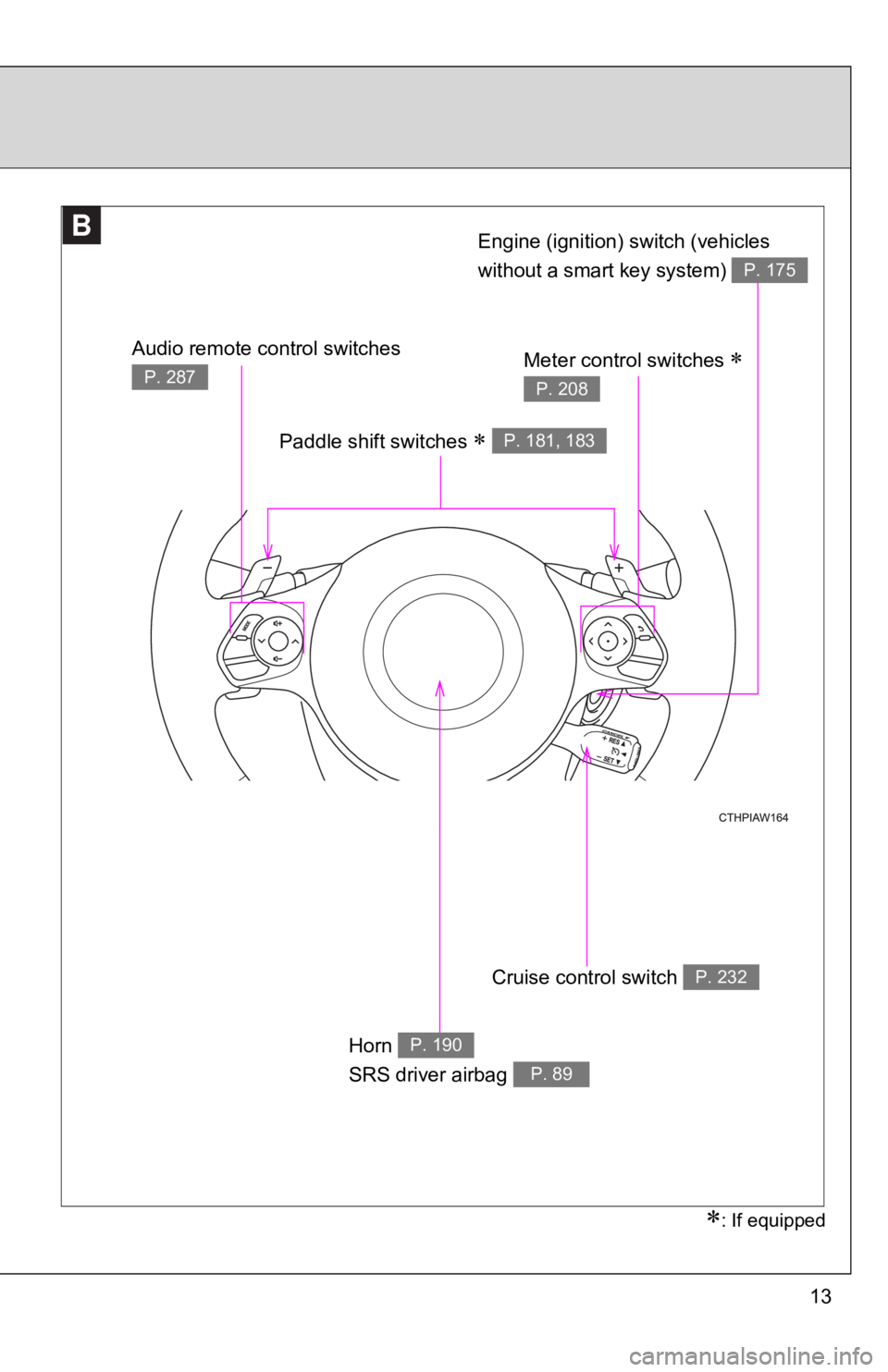
13BB Paddle shift switches
P. 181, 183
Cruise control switch P. 232
Horn
SRS driver airbag P. 190
P. 89
: If equippedAudio remote control switches P. 287
Meter control switches
P. 208Engine (ignition) switch (vehicles
without a smart key system) P. 175
Page 19 of 532

19Scrapping of your Toyota The SRS airbag and seat belt pretensioner devices in your Toyot a contain
explosive chemicals. If the vehicle is scrapped with the airbags and seat belt
pretensioners left as they are, this may cause an accident such as fire. Be
sure to have the systems of the SRS airbag and seat belt preten sioner
removed and disposed of by a qualified service shop or by your To y o t a
dealer before you scrap your vehicle.
Perchlorate Material Special handling may apply, See www.dtsc.ca.gov/hazardouswaste/ perchlorate.
Your vehicle has components that may contain perchlorate. These
components may include airbag, seat belt pretensioners, and wir eless
remote control batteries.
WARNING■ General precautions while driving
Driving under the influence: Never drive your vehicle when unde r the influ-
ence of alcohol or drugs that have impaired your ability to ope rate your vehi-
cle. Alcohol and certain drugs delay reaction time, impair judg ment and
reduce coordination, which could lead to an accident that could result in
death or serious injury.
Defensive driving: Always drive defensively. Anticipate mistake s that other
drivers or pedestrians might make and be ready to avoid acciden ts.
Driver distraction: Always give your full attention to driving. Anything that dis-
tracts the driver, such as adjusting controls, talking on a cel lular phone or
reading can result in a collision with resulting death or serio us injury to you,
your occupants or others.
■ General precaution regarding children’s safety
Never leave children unattended in the vehicle, and never allow children to
have or use the key.
Children may be able to start the vehicle or shift the vehicle into neutral.
There is also a danger that children may injure themselves by p laying with
the windows or other features of the vehicle. In addition, heat build-up or
extremely cold temperatures inside the vehicle can be fatal to children.
Page 21 of 532
Before driving
1
211-1. Key information
Keys ................................... 22
1-2. Opening, closing and
locking the doors and
trunk
Smart key system .............. 25
Wireless remote control ..... 38
Doors ................................. 43
Trunk .................................. 46
1-3. Adjustable components
(seats, mirrors,
steering wheel)
Front seats ......................... 53
Rear seats.......................... 56
Head restraints................... 58
Seat belts ........................... 60
Steering wheel ................... 67
Anti-glare inside rear
view mirror ....................... 68
Outside rear view
mirrors.............................. 69 1-4. Opening and closing
the windows
Power windows .................. 72
1-5. Refueling
Opening the fuel
tank cap ........................... 75
1-6. Theft deterrent system
Engine immobilizer
system ............................. 79
Alarm.................................. 82
Theft prevention labels
(U.S.A.) ............................ 86
1-7. Safety information
Correct driving posture....... 87
SRS airbag
(Supplemental Restraint
System airbag)................. 89
Front passenger occupant
classification system ...... 128
Child restraint systems..... 137
Installing child restraints... 141
Page 22 of 532
221-1. Key information
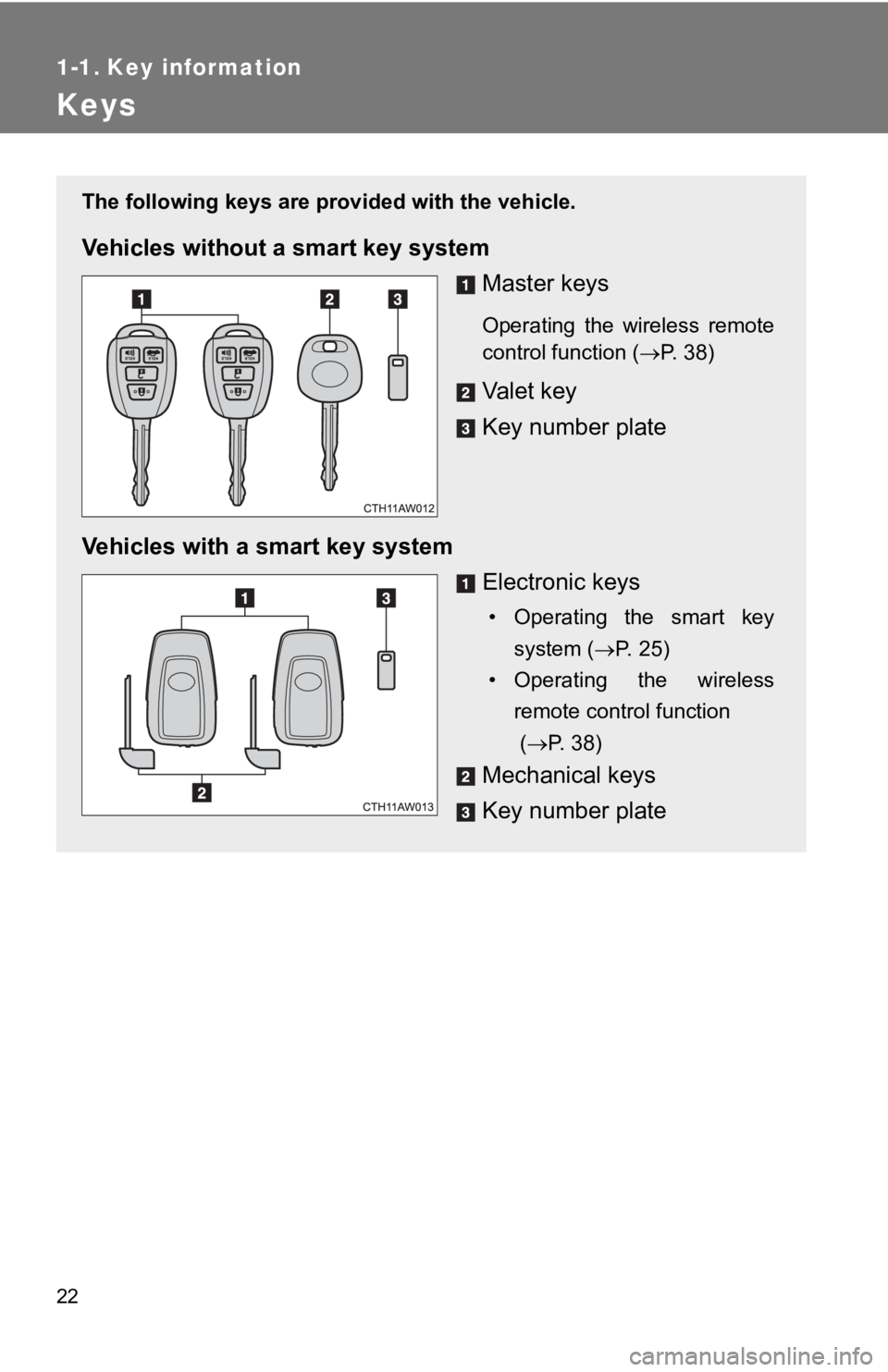
Keys The following keys are prov ided with the vehicle.
Vehicles without a smart key system
Master keys Operating the wireless remote
control function ( P. 38)
Valet key
Key number plate
Vehicles with a smart key system
Electronic keys • Operating the smart key
system ( P. 25)
• Operating the wireless
remote control function
( P. 38)
Mechanical keys
Key number plate
Page 23 of 532
231-1. Key information
1
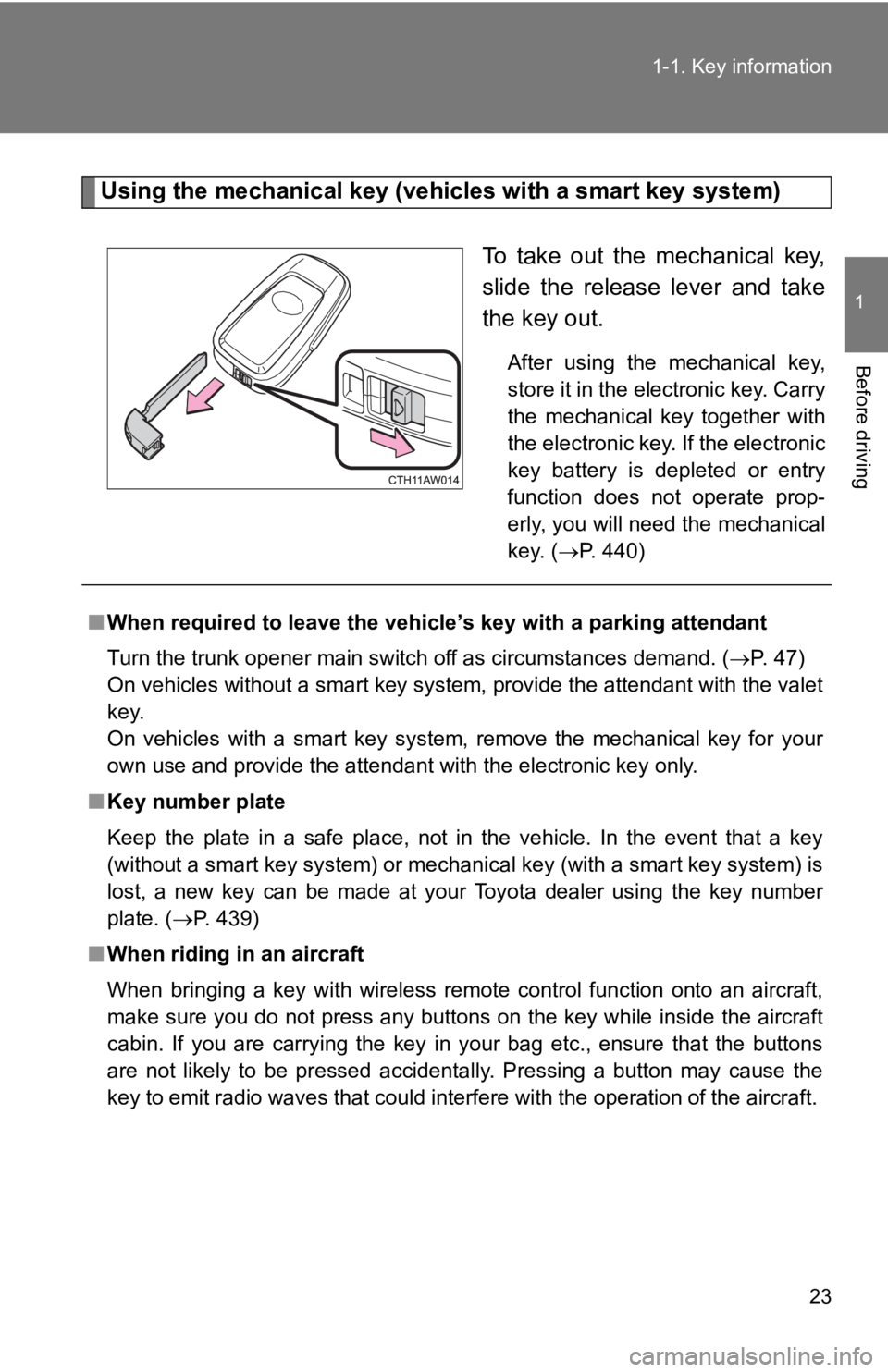
Before driving Using the mechanical key (vehic les with a smart key system)
To take out the mechanical key,
slide the release lever and take
the key out. After using the mechanical key,
store it in the electronic key. Carry
the mechanical key together with
the electronic key. If the electronic
key battery is depleted or entry
function does not operate prop-
erly, you will need the mechanical
key. ( P. 440)
■ When required to leave the vehicle’s key with a parking attenda nt
Turn the trunk opener main switch off as circumstances demand. ( P. 47)
On vehicles without a smart key system, provide the attendant w ith the valet
key.
On vehicles with a smart key system, remove the mechanical key for your
own use and provide the attendant with the electronic key only.
■ Key number plate
Keep the plate in a safe place, not in the vehicle. In the even t that a key
(without a smart key system) or mechanical key (with a smart ke y system) is
lost, a new key can be made at your Toyota dealer using the key number
plate. ( P. 439)
■ When riding in an aircraft
When bringing a key with wireless remote control function onto an aircraft,
make sure you do not press any buttons on the key while inside the aircraft
cabin. If you are carrying the key in your bag etc., ensure that the buttons
are not likely to be pressed accidentally. Pressing a button ma y cause the
key to emit radio waves that could interfere with the operation of the aircraft.
Page 30 of 532
301-2. Opening, closing and locking the doors and trunk
■ Security feature
If a door is not opened within approximately 60 seconds after t he vehicle is
unlocked, the security feature automatically locks the vehicle again. (How-
ever, depending on the location of the electronic key, the key may be
detected as being in the vehicle. In this case, the vehicle may be unlocked.)
■ Battery-saving function
The battery-saving function will be activated in order to preve nt the elec-
tronic key battery and the vehicle battery from being discharge d while the
vehicle is not in operation for a long time.
● In the following situations, the smart key system may take some time to
unlock the doors.
• The electronic key has been left in an area of approximately 6 ft. (2 m)
of the outside of the vehicle for 10 minutes or longer.
• The smart key system has not been used for 5 days or longer.
● If the smart key system has not been used for 14 days or longer , the
doors cannot be unlocked at any door except the driver’s door.
In this case, take hold of the driver’s door handle, or use the wireless
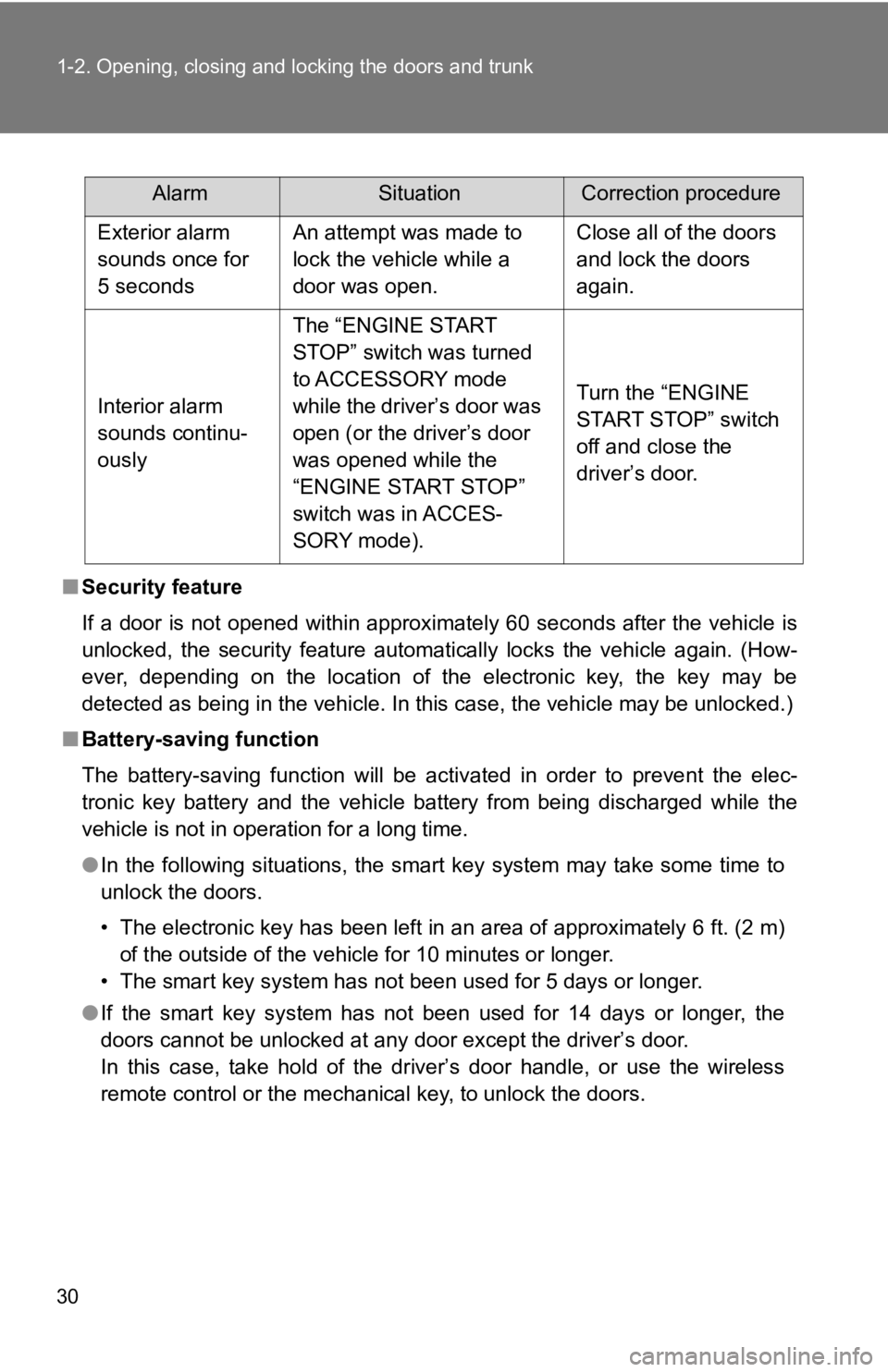
remote control or the mechanical key, to unlock the doors. Alarm Situation Correction procedure
Exterior alarm
sounds once for
5 seconds An attempt was made to
lock the vehicle while a
door was open. Close all of the doors
and lock the doors
again.
Interior alarm
sounds continu-
ously The “ENGINE START
STOP” switch was turned
to ACCESSORY mode
while the driver’s door was
open (or the driver’s door
was opened while the
“ENGINE START STOP”
switch was in ACCES-
SORY mode). Turn the “ENGINE
START STOP” switch
off and close the
driver’s door.
Page 31 of 532

311-2. Opening, closing and locking the doors and trunk
1
Before driving ■ Conditions affecting operation
The smart key system uses weak radio waves. In the following si tuations,
the communication between the electronic key and the vehicle ma y be
affected, preventing the smart key system, wireless remote control and
engine immobilizer system from operating properly.
(Way of coping P. 440)
● When the electronic key battery is depleted
● Near a TV tower, electric power plant, gas station, radio stati on, large dis-
play, airport or other facility that generates strong radio wav es or electri-
cal noise
● When the electronic key is in contact with, or is covered by th e following
metallic objects
• Cards to which aluminum foil is attached
• Cigarette boxes that have aluminum foil inside
• Metallic wallets or bags
• Coins
• Hand warmers made of metal
• Media such as CDs and DVDs
● When other wireless keys (that emit radio waves) are being used nearby
● When carrying the electronic key together with the following de vices that
emit radio waves
• A portable radio, cellular phone, cordless phone or other wire less com-
munication device
• Another vehicle's electronic key or a wireless key that emits radio
waves
• Personal computers or personal digital assistants (PDAs)
• Digital audio players
• Portable game systems
● If window tint with a metallic content or metallic objects are attached to
the rear window
● When the electronic key is placed near a battery charger or electronic
devices
Page 32 of 532

321-2. Opening, closing and locking the doors and trunk
■ Notes for the entry function
● Even when the electronic key is within the effective range (detection
areas), the system may not operate properly in the following ca ses:
• The electronic key is too close to the window or outside door handle,
near the ground, or in a high place when the doors are locked o r
unlocked.
• The electronic key is near the ground or in a high place, or t oo close to
the rear bumper center when the trunk is unlocked.
• The electronic key is on the instrument panel, rear shelf or f loor, in the
door pockets or glove box, auxiliary box when the engine is sta rted or
“ENGINE START STOP” switch modes are changed.
● Do not leave the electronic key on top of the instrument panel or near the
door pockets when exiting the vehicle. Depending on the radio w ave
reception conditions, it may be detected by the antenna outside the cabin
and the door will become lockable from the outside, possibly tr apping the
electronic key inside the vehicle.
● As long as the electronic key is within the effective range, th e doors may
be locked or unlocked by anyone.
● Even if the electronic key is not inside the vehicle, it may be possible to
start the engine if the electronic key is near the window.
● The doors may unlock if a large amount of water splashes on the door
handle, such as in the rain or in a car wash when the electroni c key is
within the effective range. (The door will automatically be loc ked after
approximately 60 seconds if the doors are not opened and closed .)
● Gripping the door handle when wearing a glove may not unlock th e door.
● If the wireless remote control is used to lock the doors when t he elec-
tronic key is near the vehicle, there is a possibility that the door may not
be unlocked by the entry function. (Use the wireless remote con trol to
unlock the doors.)
● A sudden approach to the effective range or door handle may prevent the
doors from being unlocked. In this case, return the door handle to the
original position and check that the doors unlock before pullin g the door
handle again.