mirror TOYOTA 86 2022 User Guide
[x] Cancel search | Manufacturer: TOYOTA, Model Year: 2022, Model line: 86, Model: TOYOTA 86 2022Pages: 449, PDF Size: 8.5 MB
Page 127 of 449
1273-4. Adjusting the steering wheel and mirrors
3
Before driving
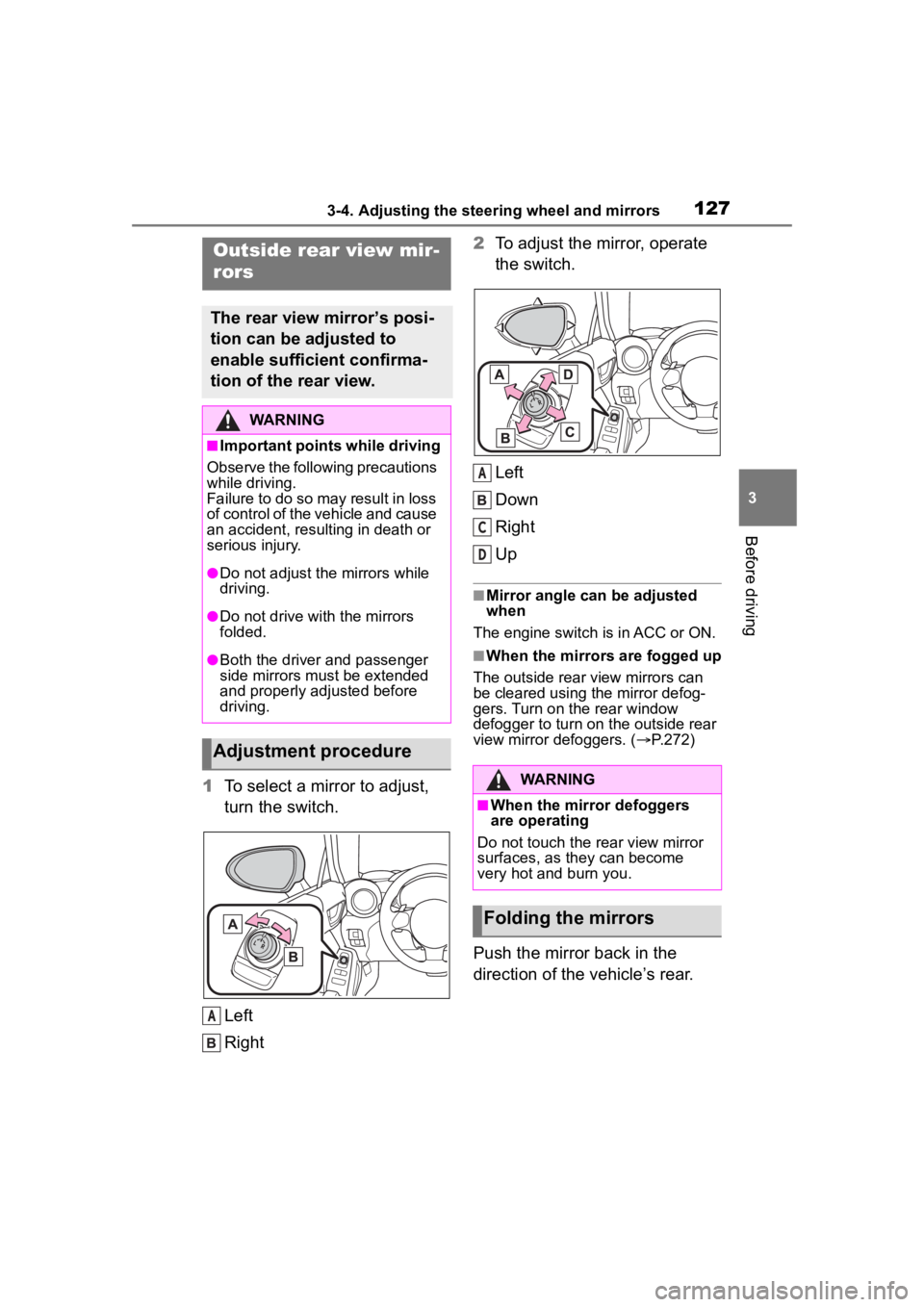
1To select a mirror to adjust,
turn the switch.
Left
Right 2
To adjust the mirror, operate
the switch.
Left
Down
Right
Up
■Mirror angle can be adjusted
when
The engine switch i s in ACC or ON.
■When the mirrors are fogged up
The outside rear view mirrors can
be cleared using the mirror defog-
gers. Turn on the rear window
defogger to turn on the outside rear
view mirror defoggers. ( P.272)
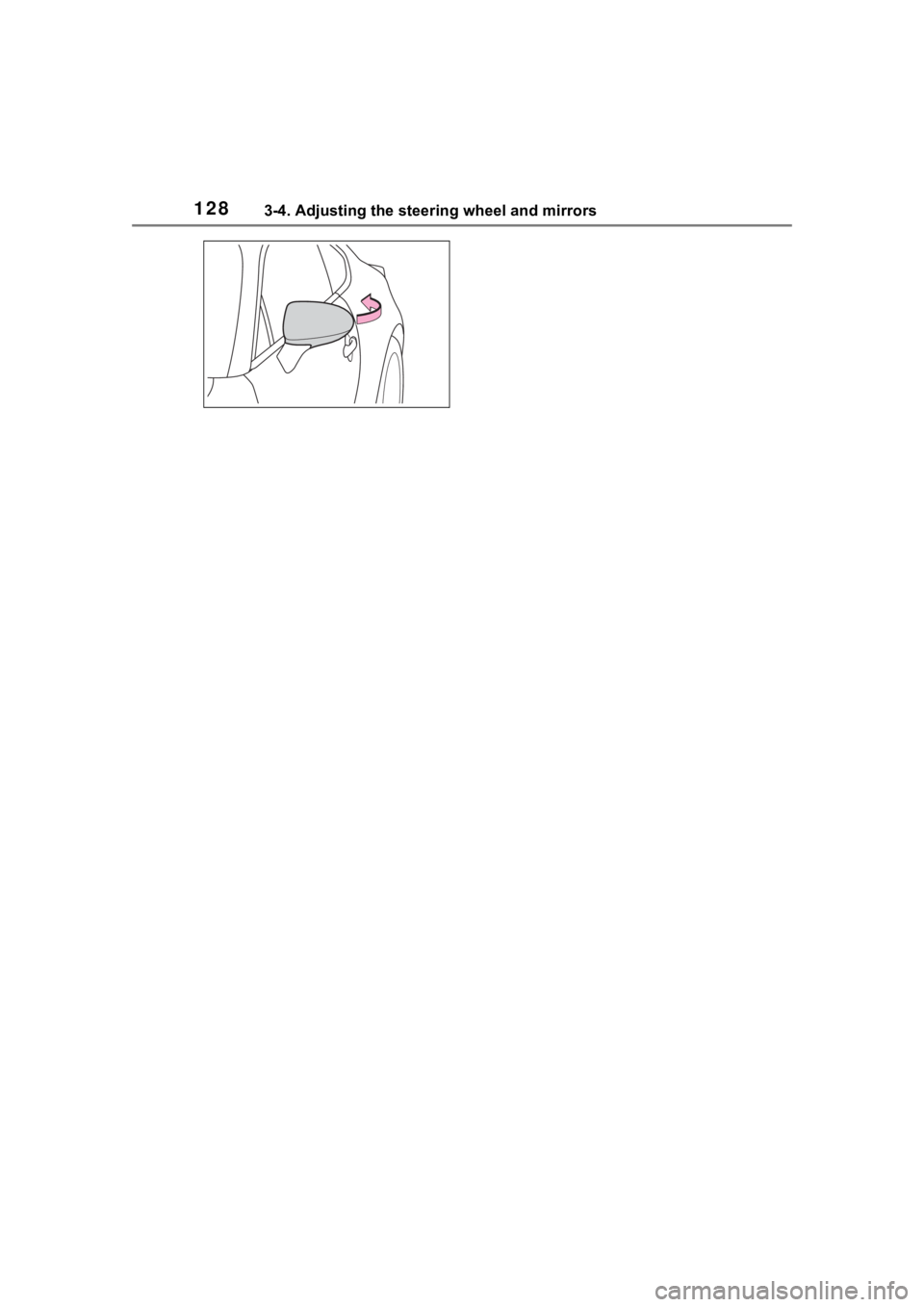
Push the mirror back in the
direction of the vehicle’s rear.
Outside rear view mir-
rors
The rear view mirror’s posi-
tion can be adjusted to
enable sufficient confirma-
tion of the rear view.
WARNING
■Important points while driving
Observe the following precautions
while driving.
Failure to do so may result in loss
of control of the vehicle and cause
an accident, resul ting in death or
serious injury.
●Do not adjust the mirrors while
driving.
●Do not drive with the mirrors
folded.
●Both the driver and passenger
side mirrors must be extended
and properly adjusted before
driving.
Adjustment procedure
A
WARNING
■When the mirror defoggers
are operating
Do not touch the rear view mirror
surfaces, as they can become
very hot and burn you.
Folding the mirrors
A
C
D
Page 128 of 449
1283-4. Adjusting the steering wheel and mirrors
Page 135 of 449
1354-1. Before driving
4
Driving
WARNING
●Do not drive the vehicle over or
stop the vehicle near flammable
materials.
The exhaust system and
exhaust gases can be
extremely hot. These hot parts
may cause a fire if there is any
flammable material nearby.
●Vehicles with a manual trans-
mission: Do not release the
clutch pedal too quickly. Doing
so may propel the vehicle for-
ward, possibly causing an acci-
dent.
●During normal driving, do not
turn off the engine. Turning the
engine off while driving will not
cause loss of steering or brak-
ing control, but the power assist
to these systems will be lost.
This will make it more difficult to
steer and brake, so you should
pull over and stop the vehicle as
soon as it is safe to do so.
However, in the event of an
emergency, such as if it
becomes impossible to stop the
vehicle in the normal way:
P. 3 3 8
●Use engine braking (downshift)
to maintain a safe speed when
driving down a steep hill.
Using the brakes continuously
may cause the brakes to over-
heat and lose effectiveness.
(
P.149, 153)
●Do not adjust the positions of
the steering wheel, the seat, or
the inside or outside rear view
mirrors while driving.
Doing so may result in a loss of
vehicle control.
●Always check that all passen-
gers’ arms, heads or other parts
of their body are not outside the
vehicle.
●Do not drive in excess of the
speed limit. Even if the legal
speed limit permits it, do not
drive over 85 mph (140 km/h)
unless your vehicle has
high-speed capability tires. Driv-
ing over 85 mph (140 km/h)
may result in tire failure, loss of
control and possible injury. Be
sure to consult a tire dealer to
determine whether the tires on
your vehicle are high-speed
capability tires or not before
driving at such speeds.
■When driving on slippery
road surfaces
●Sudden braking, acceleration
and steering may cause tire
slippage and reduce your ability
to control the vehicle.
●Sudden acceleration, engine
braking due to shifting, or
changes in engine speed could
cause the vehicle to skid.
●After driving through a puddle,
lightly depress the brake pedal
to make sure that the brakes
are functioning properly. Wet
brake pads may prevent the
brakes from functioning prop-
erly. If the brakes on only one
side are wet and not functioning
properly, steering control may
be affected.
■When shifting the shift lever
●Vehicles with an automatic
transmission: Do not let the
vehicle roll backward while the
shift lever is in a driving posi-
tion, or roll forw ard while the
shift lever is in R.
Doing so may cause the engine
to stall or lead to poor brake and
steering performance, resulting
in an accident or damage to the
vehicle.
Page 163 of 449
1634-3. Operating the lights and wipers
4
Driving
detected due to repeated curves,
road dividers or roadside trees
• When vehicles ahead appear in a
faraway lane on a wide road
• When the lights of vehicles ahead are not on
●The high beams may be turned off
if a vehicle ahead that is using fog
lights without its headlights turned
on is detected.
●House lights, street lights, traffic
signals, and illumi nated billboards
or signs and other reflective
objects may cause the high
beams to change to the low
beams, or the low beams to
remain on.
●The following factors may affect
the amount of time taken for the
high beams to turn on or off:
• The brightness of the headlights,
fog lights, and ta il lights of vehi-
cles ahead
• The movement and direction of
vehicles ahead
• When a vehicle ahead only has operational lights on one side
• When a vehicle ahead is a two-wheeled vehicle
• The condition of the road (gradi-
ent, curve, condi tion of the road
surface, etc.)
• The number of passengers and
amount of luggage in the vehicle
• When there is a lag in response due to the limitat ions of the detec-
tion range of the stereo camera
●The high beams may turn on or off
unexpectedly.
●Bicycles or similar vehicles may
not be detected.
●In the following situations the sys-
tem may not be abl e to correctly
detect the surrounding brightness
level. This may cause the low
beams to remain on or the high
beams to flash or dazzle pedestri-
ans or vehicles ahead. In such a
case, it is necess ary to manually
switch between the high and low
beams.
• When driving in inclement weather (heavy rain, snow, fog, sand-
storms, etc.)
• When the windshi eld is obscured
by fog, mist, ice, dirt, etc.
• When the windshield is cracked or damaged
• When the stereo camera is deformed or dirty
• When the temperature of the ste-
reo camera is extremely high
• When the surrounding brightness level is equal to that of headlights,
tail lights or fog lights
• When headlights or tail lights of vehicles ahead are turned off,
dirty, changing color, or not aimed
properly
• When the vehicle is hit by water,
snow, dust, etc. from a preceding
vehicle
• When driving through an area of
intermittently changing brightness
and darkness
• When frequently and repeatedly
driving ascending/descending
roads, or roads with rough, bumpy
or uneven surfaces (such as
stone-paved roads, gravel roads,
etc.)
• When frequently and repeatedly
taking curves or driving on a wind-
ing road
• When there is a h ighly reflective
object ahead of the vehicle, such
as a sign or mirror
• When the back of a preceding
vehicle is highly reflective, such as
a container on a truck
• When the vehicle’s headlights are
damaged or dirty, or are not aimed
properly
• When the vehicle is listing or titling
due to a flat tire, a trailer being
towed, etc.
• Immediately after the engine is
started
• When the headlights are changed between the high beams and low
beams repeatedly in an abnormal
manner
• When the driver believes that the high beams may be flashing or
dazzling pedestrians or other driv-
ers
Page 173 of 449

1734-5. EyeSight
4
Driving
NOTICE
●Under the conditions listed
below, it will become more diffi-
cult for the system to detect the
vehicle in front, motorcycles,
bicycles, pedestrians and obsta-
cles on the road, and lane mark-
ers. Also, EyeSight may
temporarily stop operating.
However, the temporary stop
will be canceled once these
conditions have improved and
the vehicle is driven for a short
period of time.
• Bad weather (for example heavy rain, a blizzard or thick
fog). In particular, the system is
more likely to temporarily stop
operating when there is an oil
film adhering to the windshield,
a glass coating has been
applied, or poorly performing
wipers are used.
• Strong light is coming from the front (sunlight or headlight
beams of oncoming traffic, etc.).
• The windshield washer is in use.
• Raindrops, water drops, or dirt on the windshield are not wiped
off sufficiently.
• The windshield has become fogged, scratched or smeared,
or snow, dirt ,dust or frost has
adhered to it, or it is otherwise
affected. These will reduce the
stereo camera’s field of view.
Also, light is reflecting off the
dirt, etc.
• The vehicle is tilted at an extreme angle due to loaded
cargo or other factors.
• Visibility is poo r due to sand,
smoke or water vapor blowing in
the wind, or the front vision is
obscured due to water
splashes, snow, dirt or dust stir
up generated by the vehicle in
front or oncoming traffic.
• The stereo came ra’s field of
view is obstructed.
• Through the entra nce or exit of
a tunnel
• The rear aspect of the vehicle in front is low, small or irregular
(for example a low bed trailer,
etc.).
• The obstacle is a fence, a wall or a shutter, etc. with a uniform
pattern (a striped pattern, brick,
etc.) or with no pattern in front.
• The obstacle is a wall or door made of glass or a mirror in
front.
• Driving at night or in a tunnel when there is a ve hicle in front
that does not ha ve its taillights
on
• Driving through a banner or flag, low branches on a tree or
thick/tall vegetation
• On steep uphill or downhill grades
• The stereo camera is obstructed by a hand, etc. (If
even one of the lenses is
obstructed, the system does not
operate properly.)
• It is completel y dark and no
objects are detected.
• The area around the vehicle has a uniform color (such as when
completely covered in snow,
etc.).
Page 175 of 449
1754-5. EyeSight
4
Driving
NOTICE
●The stereo camera monitors
and detects smears or blurs on
the front of the camera. How-
ever, detection is not 100%
accurate.
Under certain conditions, the
function may fail to detect
smears or blurs on the front of
the stereo camera accurately. In
addition, this function may not
detect that there is snow or ice
on the windshield close to the
stereo camera. In such condi-
tions, be sure to keep the wind-
shield clean at all times
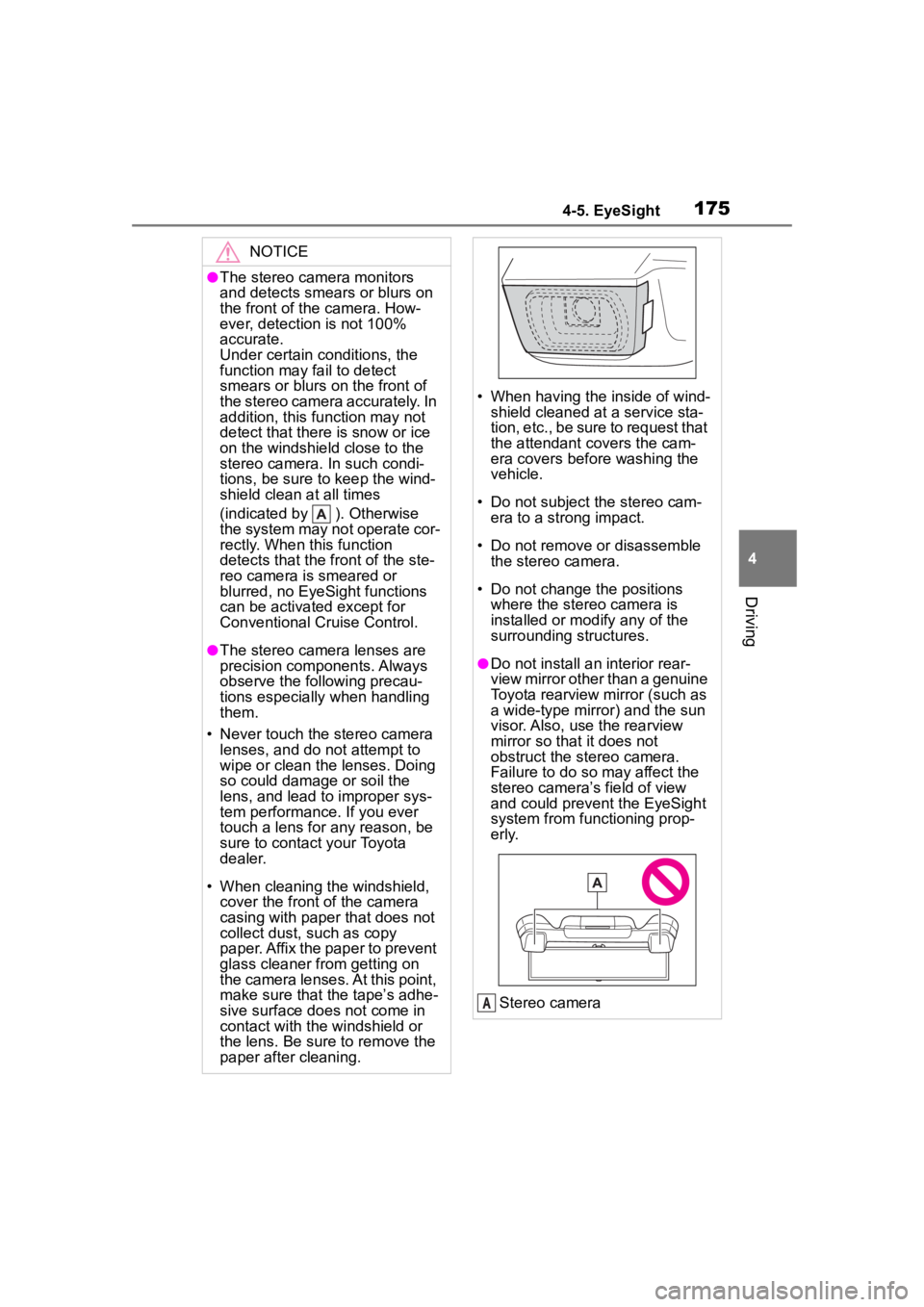
(indicated by ). Otherwise
the system may not operate cor-
rectly. When this function
detects that the front of the ste-
reo camera is smeared or
blurred, no EyeSight functions
can be activated except for
Conventional Cruise Control.
●The stereo camera lenses are
precision components. Always
observe the following precau-
tions especially when handling
them.
• Never touch the stereo camera lenses, and do not attempt to
wipe or clean the lenses. Doing
so could damage or soil the
lens, and lead to improper sys-
tem performance. If you ever
touch a lens for any reason, be
sure to contact your Toyota
dealer.
• When cleaning the windshield, cover the front of the camera
casing with paper that does not
collect dust, such as copy
paper. Affix the paper to prevent
glass cleaner from getting on
the camera lenses. At this point,
make sure that the tape’s adhe-
sive surface does not come in
contact with the windshield or
the lens. Be sure to remove the
paper after cleaning.
• When having the inside of wind- shield cleaned at a service sta-
tion, etc., be sure to request that
the attendant covers the cam-
era covers before washing the
vehicle.
• Do not subject the stereo cam- era to a strong impact.
• Do not remove or disassemble the stereo camera.
• Do not change the positions where the stereo camera is
installed or mod ify any of the
surrounding structures.
●Do not install an interior rear-
view mirror other than a genuine
Toyota rearview mirror (such as
a wide-type mirror) and the sun
visor. Also, use the rearview
mirror so that it does not
obstruct the stereo camera.
Failure to do so may affect the
stereo camera’s field of view
and could prevent the EyeSight
system from functioning prop-
erly.
Stereo camera
A
Page 182 of 449
1824-5. EyeSight
WARNING
Fluid has not been fully wiped
off the windshield during or after
washer use.
The target cannot be correctly
recognized because the stereo
camera’s view is obstructed by
water droplets from rain or the
window washer, or by the wiper
blades.
The stereo camera’s field of
view is obstructed.
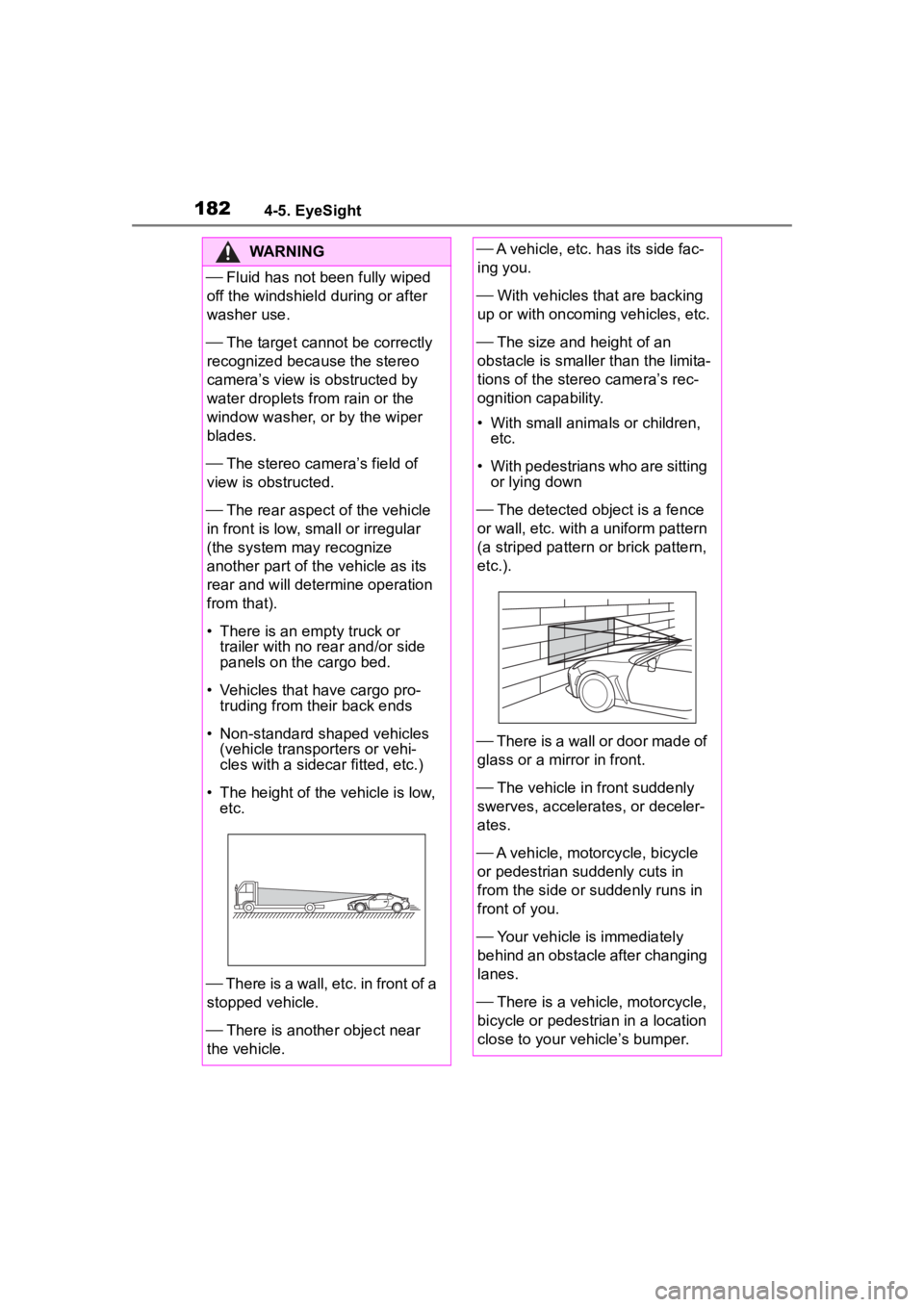
The rear aspect of the vehicle
in front is low, s mall or irregular
(the system may recognize
another part of the vehicle as its
rear and will determine operation
from that).
• There is an empty truck or trailer with no r ear and/or side
panels on the cargo bed.
• Vehicles that have cargo pro- truding from their back ends
• Non-standard shaped vehicles (vehicle transporters or vehi-
cles with a sidecar fitted, etc.)
• The height of the vehicle is low, etc.
There is a wall, etc. in front of a
stopped vehicle.
There is another object near
the vehicle.
A vehicle, etc. has its side fac-
ing you.
With vehicles that are backing
up or with oncoming vehicles, etc.
The size and height of an
obstacle is smaller than the limita-
tions of the stereo camera’s rec-
ognition capability.
• With small animals or children, etc.
• With pedestrians who are sitting or lying down
The detected ob ject is a fence
or wall, etc. with a uniform pattern
(a striped pattern or brick pattern,
etc.).
There is a wall or door made of
glass or a mirror in front.
The vehicle in front suddenly
swerves, accelerates, or deceler-
ates.
A vehicle, motorcycle, bicycle
or pedestrian suddenly cuts in
from the side or suddenly runs in
front of you.
Your vehicle is immediately
behind an obstacle after changing
lanes.
There is a vehicle, motorcycle,
bicycle or pedestrian in a location
close to your vehicle’s bumper.
Page 231 of 449
2314-6. Using other driving systems
4
Driving
4-6.Using other driving systems
*: If equippedBSD/RCTA consists of the fol-
lowing functions.
To detect a vehicle in a blind
spot on an adjacent lane or a
vehicle approaching at high
speed while driving the vehi-
cle (Blind Spot Detection)
To detect a vehicle approach-
ing from the right or left while
reversing the vehicle (Rear
Cross Traffic Alert)
The system uses radar sensors
for the following features.
The BSD/RCTA radar sensor has
been certified by the radio wave
related laws of the U.S. and other
FCC compliant countries and Can-
ada. When drivi ng in other coun-
tries, certification of the country
where the vehicle is driven must be
obtained. For certif ication in the U.S.
and other FCC comp liant countries
and Canada, refer to P.440.
■Blind Spot Detection (BSD)
The system notifies the driver of
the presence of vehicles in its
blind spot.
If the system detects a vehicle
in its blind spot, it warns the
driver by illuminating the
BSD/RCTA approach indica-
tor(s) on the outside mirror(s).
If the driver operates the turn
signal lever in the direction
where the BSD/RCTA
approach indicator is illumi-
nating, the system warns the
BSD/RCTA*
The BSD/RCTA consists of
rear corner radars with
Blind Spot Detection, Lane
Change Assist and Rear
Cross Traffic Alert.
These functions of
BSD/RCTA are the systems
that detect objects and vehi-
cles to the rear and draw
attention to the driver when
changing a lane or when
driving in reverse.
WARNING
The driver is responsible for driv-
ing safely. Always be sure to
check the surroundings with your
eyes when changing lanes or
reversing the vehicle.
The system is designed to assist
the driver in changing lanes or
reversing safely by monitoring the
rear and side areas of the vehicle.
However, you cannot rely on this
system alone in assuring the
safety during a lane change or
reversing. Overconfidence in this
system could result in an accident
and lead to serious injury or
death. Since the system operation
has various limitations, the flash-
ing or illumination of the
BSD/RCTA approach indicator
may be delayed or it may not
operate at all even when a vehicle
is present in a neighboring lane or
approaching from either side.
The driver is responsible for pay-
ing attention to t he rear and side
areas of the vehicle.
System features
Page 232 of 449
2324-6. Using other driving systems
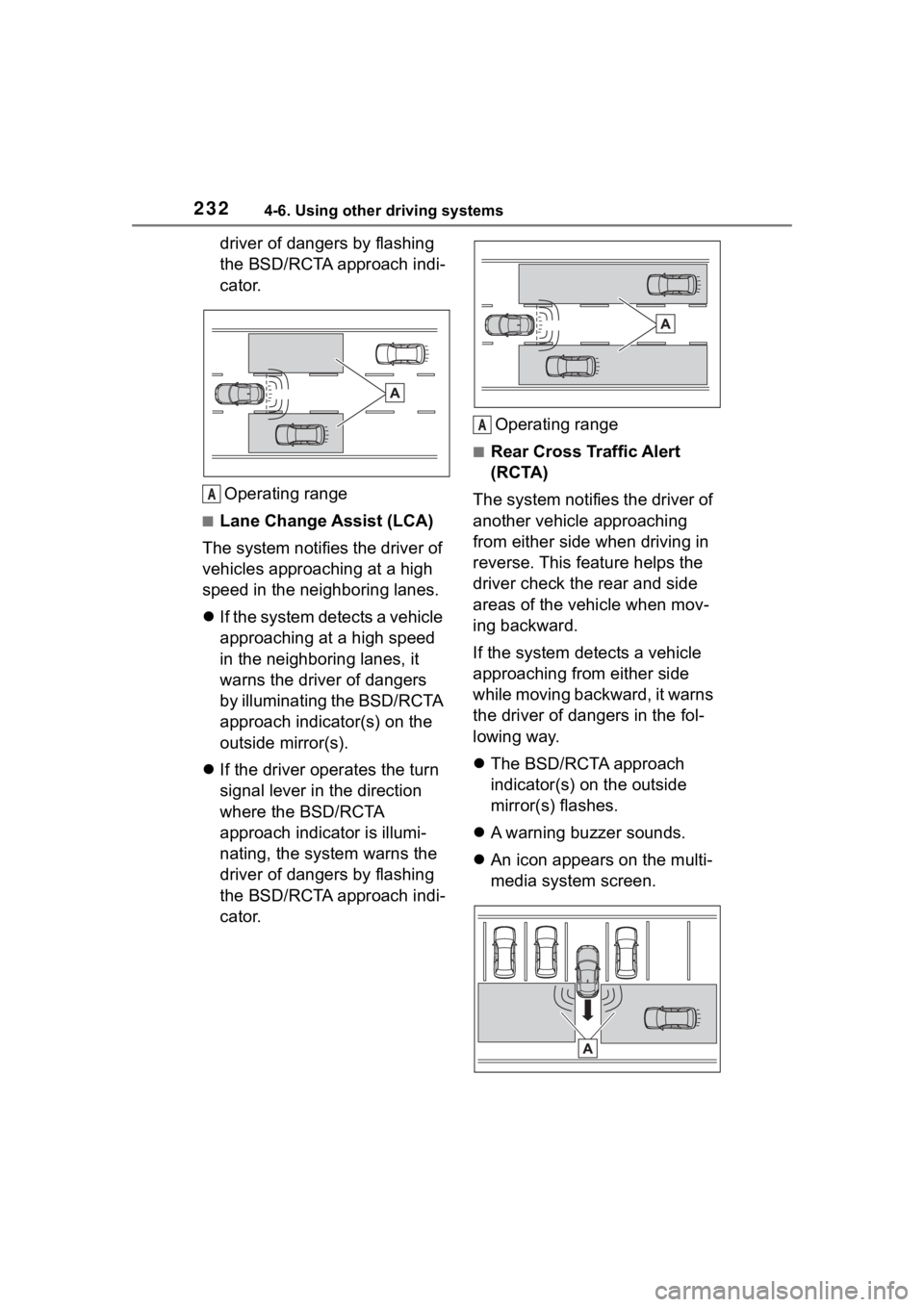
driver of dangers by flashing
the BSD/RCTA approach indi-
cator.Operating range
■Lane Change Assist (LCA)
The system notifies the driver of
vehicles approaching at a high
speed in the neighboring lanes.
If the system detects a vehicle
approaching at a high speed
in the neighboring lanes, it
warns the driver of dangers
by illuminating the BSD/RCTA
approach indicator(s) on the
outside mirror(s).
If the driver operates the turn
signal lever in the direction
where the BSD/RCTA
approach indicator is illumi-
nating, the system warns the
driver of dangers by flashing
the BSD/RCTA approach indi-
cator. Operating range
■Rear Cross Traffic Alert
(RCTA)
The system notifies the driver of
another vehicle approaching
from either side when driving in
reverse. This feature helps the
driver check the rear and side
areas of the vehicle when mov-
ing backward.
If the system detects a vehicle
approaching from either side
while moving backward, it warns
the driver of dangers in the fol-
lowing way.
The BSD/RCTA approach
indicator(s) on the outside
mirror(s) flashes.
A warning buzzer sounds.
An icon appears on the multi-
media system screen.
A
A
Page 235 of 449
2354-6. Using other driving systems
4
Driving
trying to overtake
●On a road with extremely narrow
lanes, the system may detect
vehicles driving in a lane next to
the neighboring lane.
While the BSD/RCTA is active,
the following item(s) will operate
to alert the driver:
The BSD/RCTA approach
indicator (when there are
vehicles in the neighboring
lanes).
The BSD/RCTA approach
indicator and warning buzzer
(when a vehicle is approach-
ing from the left or right side
while your vehicle is revers-
ing)
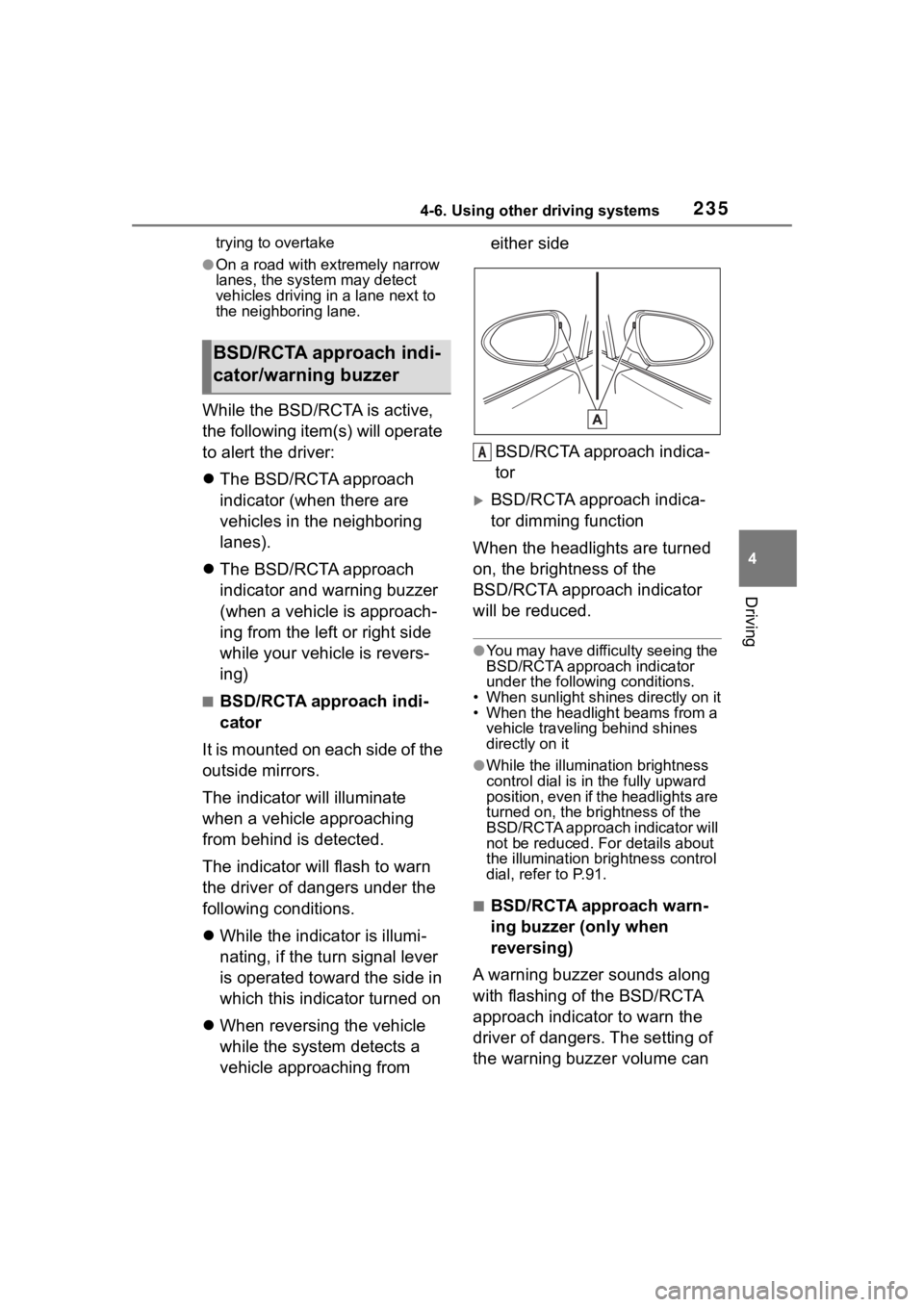
■BSD/RCTA approach indi-
cator
It is mounted on each side of the
outside mirrors.
The indicator will illuminate
when a vehicle approaching
from behind is detected.
The indicator will flash to warn
the driver of dangers under the
following conditions.
While the indicator is illumi-
nating, if the turn signal lever
is operated toward the side in
which this indicator turned on
When reversing the vehicle
while the system detects a
vehicle approaching from either side
BSD/RCTA approach indica-
tor
BSD/RCTA approach indica-
tor dimming function
When the headlights are turned
on, the brightness of the
BSD/RCTA approach indicator
will be reduced.
●You may have difficulty seeing the
BSD/RCTA approach indicator
under the following conditions.
• When sunlight shi nes directly on it
• When the headlight beams from a vehicle traveling behind shines
directly on it
●While the illumination brightness
control dial is in the fully upward
position, even if the headlights are
turned on, the brightness of the
BSD/RCTA approach indicator will
not be reduced. For details about
the illumination bri ghtness control
dial, refer to P.91.
■BSD/RCTA approach warn-
ing buzzer (only when
reversing)
A warning buzzer sounds along
with flashing of the BSD/RCTA
approach indicator to warn the
driver of dangers. The setting of
the warning buzzer volume can
BSD/RCTA approach indi-
cator/warning buzzer
A