mirror TOYOTA 86 2022 Owner's Manual
[x] Cancel search | Manufacturer: TOYOTA, Model Year: 2022, Model line: 86, Model: TOYOTA 86 2022Pages: 449, PDF Size: 8.5 MB
Page 249 of 449
2494-6. Using other driving systems
4
Driving
●Do not wipe the camera with alco-
hol, benzine or paint thinner.
Otherwise, discoloration may
occur. To remove contamination,
wipe the camera with a cloth
moistened with a diluted neutral
detergent. Then wipe it with a soft,
dry cloth.
●When waxing the vehicle, be care-
ful not to apply the wax to the
camera. If it comes in contact with
the camera, moisten a clean cloth
with a diluted neutral detergent to
remove the wax.
●The camera lens has a hard coat-
ing to help prevent scratches.
However, when washing the vehi-
cle or cleaning the camera lens,
be careful not to scratch the cam-
era lens. Do not use a washing
brush directly on the camera lens.
The image quality of the rear view
camera may deteriorate.
●Strong light shined on the camera
lens may develop vertical lines
around the light source. This is not
a malfunction.
●Under the fluorescent light, the
display may flicker. However, this
is not a malfunction.
●The image of the rear view cam-
era may be slightly different from
the actual color of the objects.
●If there is a mal function on the
multimedia system screen, refer to
“MULTIMEDIA OWNER'S MAN-
UAL”.
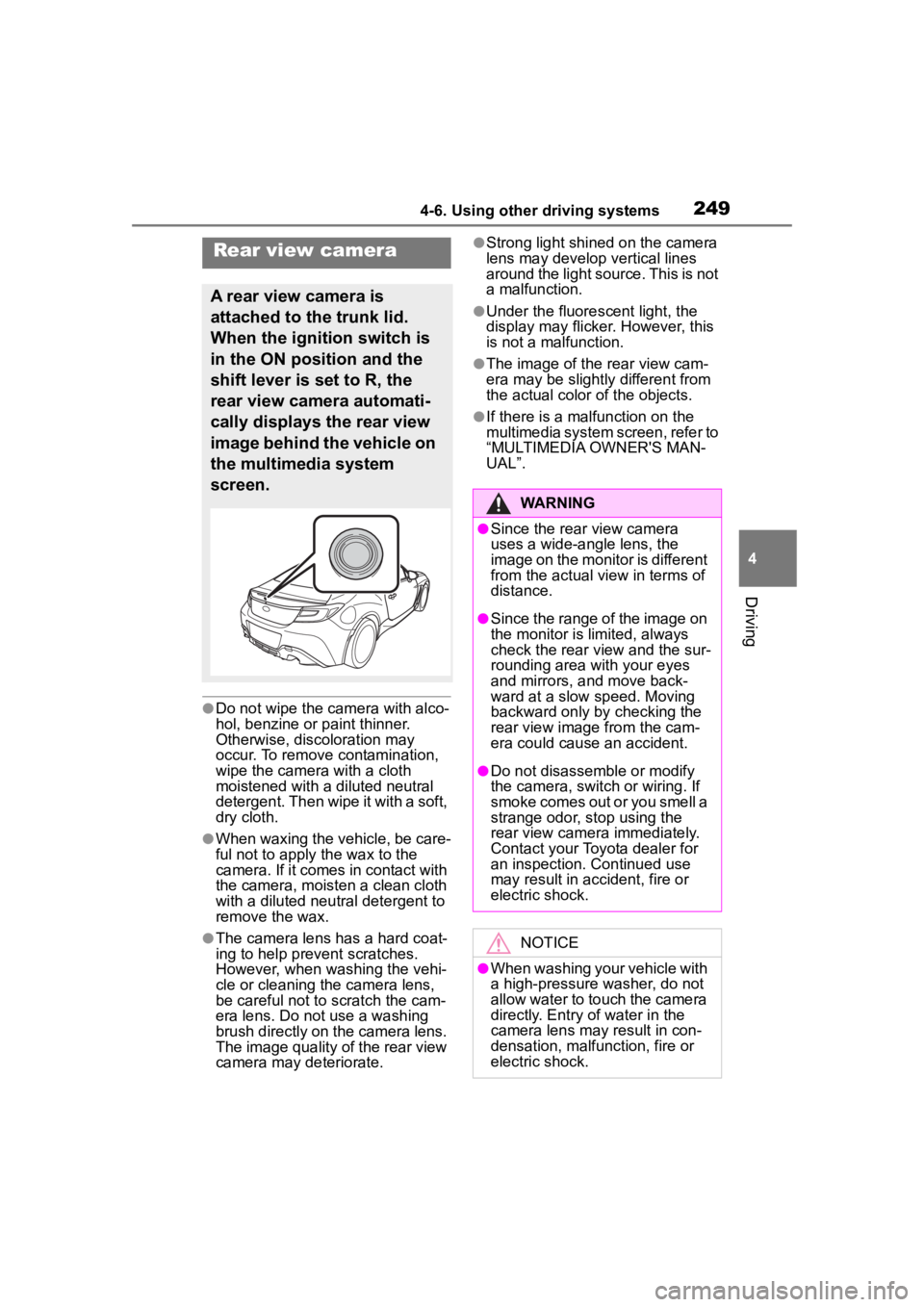
Rear view camera
A rear view camera is
attached to the trunk lid.
When the ignition switch is
in the ON position and the
shift lever is set to R, the
rear view camera automati-
cally displays the rear view
image behind the vehicle on
the multimedia system
screen.
WARNING
●Since the rear view camera
uses a wide-angle lens, the
image on the monitor is different
from the actual view in terms of
distance.
●Since the range of the image on
the monitor is limited, always
check the rear view and the sur-
rounding area with your eyes
and mirrors, and move back-
ward at a slow speed. Moving
backward only by checking the
rear view image from the cam-
era could cause an accident.
●Do not disassemble or modify
the camera, switch or wiring. If
smoke comes out or you smell a
strange odor, stop using the
rear view camera immediately.
Contact your Toyota dealer for
an inspection. Continued use
may result in accident, fire or
electric shock.
NOTICE
●When washing your vehicle with
a high-pressure washer, do not
allow water to touch the camera
directly. Entry of water in the
camera lens may result in con-
densation, malfunction, fire or
electric shock.
Page 250 of 449
2504-6. Using other driving systems
When the shift lever is set to R,
the rear view camera automati-
cally displays the rear view
image from the vehicle. When
the lever is set to other posi-
tions, the image before setting
to R is displayed.
1Set the ignition switch to ON.
2 Set the shift lever to R.
●The image of the rear view cam-
era is horizontally reversed as is
the case with the vehicle inside mirror or the outside mirror.
●When “Rear Camera Delay Con-
trol” is on, the r
ear view image
from the r ear view camera will be
displayed on the multimedia sys-
tem screen for a certain amount of
time after the shift lever is shifted
from R to another position. When
any of the following conditions are
met, the rear view image will be
canceled:
• The shift lever is shifted to P (vehi- cles with an automatic transmis-
sion)
• The vehicle speed becomes approximately 5 mph (8 km/h) or
more
• The parking brake is engaged
• 9 seconds have elapsed since the shift lever was shifted from R to
another position
To turn the function on and off, refer
to “MULTIMEDIA OWNER'S MAN-
UAL”.
●It may be difficult to see the image
of the rear view camera in the fol-
lowing cases. This is not a mal-
function of the camera.
• The vehicle is in a dark place (at night, in a tunnel, etc.).
• The vehicle is in an extremely hot or cold place.
• An object (such as raindrops,
snow, dirt, etc.) that disturbs the
view of the rear view camera
sticks to the lens of the camera.
• Strong light is shining directly on the camera lens ( occasionally,
there are vertical lines on the
screen).
The area from the rear end of
the bumper can be viewed.
Areas at both ends of the
bumper and areas just under the
bumper cannot be viewed.
NOTICE
●Since the camera is a precision
device, do not subject it to
strong impacts. Otherwise, mal-
function, fire or electric shock
may occur.
●If mud or snow sticks to or is fro-
zen on the camera, you must be
very careful when removing it.
Otherwise, damage to the cam-
era may cause a fire or electric
shock. Pour water or lukewarm
water over the camera to
remove mud and ice, and wipe
it with a soft, dry cloth.
●Do not put a flame close to the
camera or wirin g. Otherwise,
damage or fire may occur.
●When replacing the fuse, be
sure to use a fuse with the spec-
ified rating. Use of a fuse with a
different rating may result in a
malfunction.
●If you use the rear view camera
for a long time while the engine
is not operated, the battery may
become completely discharged.
How to use the rear view
camera
Viewing range on the
screen
Page 270 of 449
2705-1. Using the air conditioning system
5-1.Using the air conditioning system
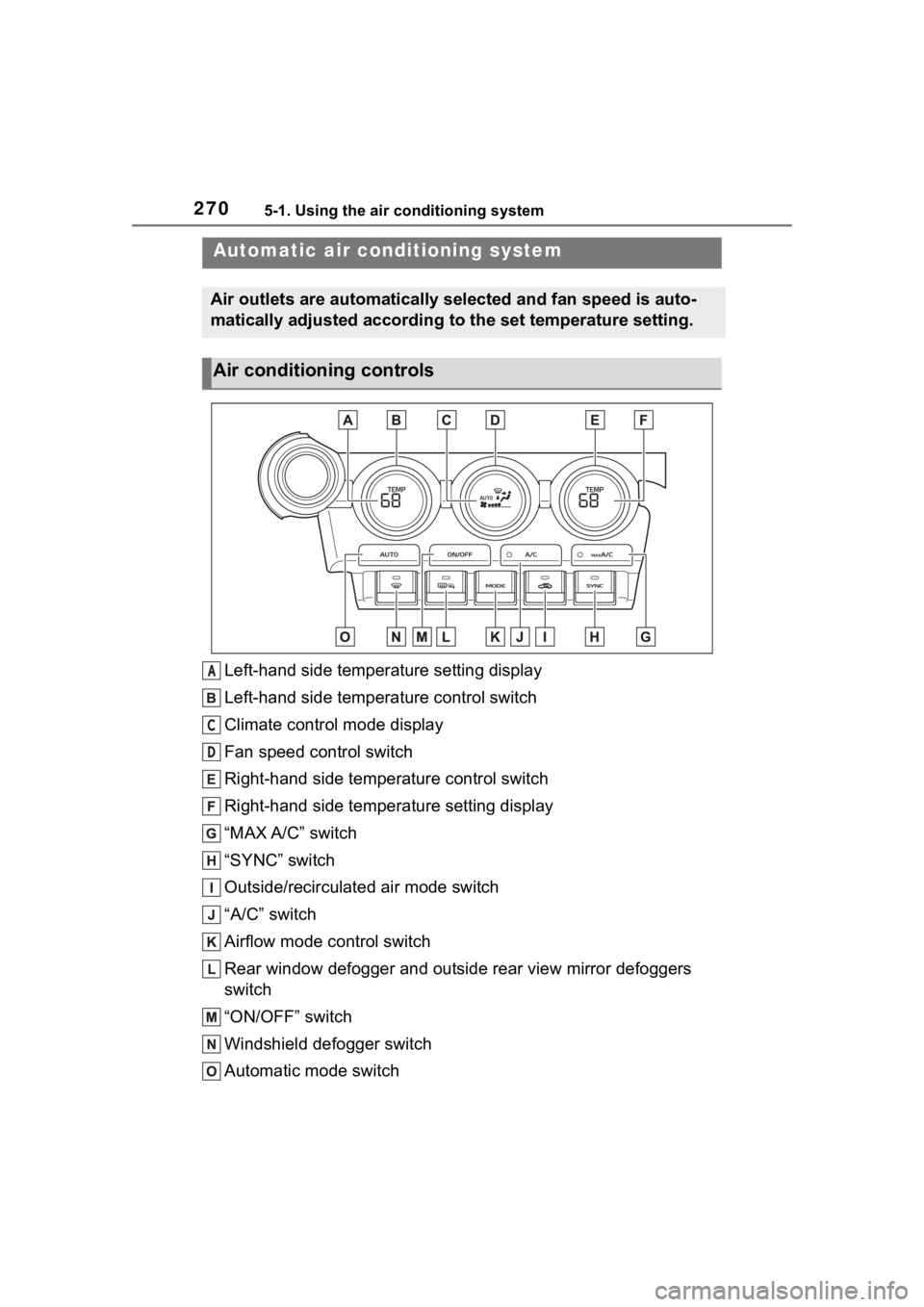
Left-hand side temperature setting display
Left-hand side temperature control switch
Climate control mode display
Fan speed control switch
Right-hand side temperature control switch
Right-hand side temperature setting display
“MAX A/C” switch
“SYNC” switch
Outside/recirculated air mode switch
“A/C” switch
Airflow mode control switch
Rear window defogger and outside rear view mirror defoggers
switch
“ON/OFF” switch
Windshield defogger switch
Automatic mode switch
Automatic air conditioning system
Air outlets are automatically selected and fan speed is auto-
matically adjusted according to the set temperature setting.
Air conditioning controls
A
C
D
Page 272 of 449

2725-1. Using the air conditioning system
■Fast cooling function
Press the “MAX A/C” switch.
When the switch is turned on, the
air conditioning will turn on, the
temperature will be set to LO, the
fan speed will be set to MAX, the air
outlets will be set to upper body,
and the air mode will change to
recirculated air mode automatically.
To turn off fast cooling function and
return the previous setting, press
the “MAX A/C” s witch again.
■Suspend function
Press the “ON/OFF” switch.
While the air conditioning system is
being used, when the “ON/OFF”
switch is pressed, the air condition-
ing system will st op and the tem-
perature setting display, etc. will
turn off.
If the “ON/OFF” switch is pushed
and turned on, the air conditioning
system will operate in the operating
state it was in when turned off.
However, if the fast cooling function
was operating when the air condi-
tioning system was turned off, it will
operate in the operating state it was
in before the fast cooling function
was turned on.
■Defogging the windshield
Defoggers are used to defog the
windshield and front side win-
dows.
Press the windshield defogger
switch.
Set the outside/recirculated air
mode switch to outside air mode if
the recirculated a ir mode is used.
(Changes automatically) To defog the windshield and the
side windows quickly, turn the air
flow and temperature up.
To return to the previous mode,
press the windshield defogger
switch again when the windshield is
defogged.
When the windshield defogger
switch is on, the
indicator illumi-
nates on the windshield defogger
switch.
■Defogging the rear window
and outside rear view mir-
rors
Defoggers are used to defog the
rear window, and to remove
raindrops, dew and frost from
the outside rear view mirrors.
Press the rear window and out-
side rear view mirror defoggers
switch.
The defoggers will automatically
turn off afte r approximately 15 min-
utes.
When the rear window and outside
rear view mirror defoggers switch is
on, the indicator illuminates on the
rear window and outside rear view
mirror defoggers switch.
■Fogging up of the windows
●The windows will easily fog up
when the humidity in the vehicle is
high. Turning “A/C” on will dehu-
midify the air from the outlets and
defog the windshield effectively.
●If you turn “A/C” off, the windows
may fog up more easily.
●The windows may fog up if the
recirculated air mode is used.
Page 274 of 449
2745-1. Using the air conditioning system
operating light remains illuminated.
The rear window defogger will con-
tinue to operate in this cycle until it
is turned off.
■Customization
Some functions can be customized.
( P.400)
1 Press the automatic mode
switch.
2 Adjust the temperature set-
ting.
3 To stop the operation, press
the “ON/OFF” switch.
If the fan speed setting or air
flow modes are operated, the
automatic mode indicator goes
off. However, automatic mode
for functions other than that
operated is maintained.
■Using automatic mode
Fan speed is adjusted automati-
cally according to the temperature
setting and the ambient conditions.
Therefore, the fan may stop for a
while until warm or cool air is ready
to flow immediately after the auto-
matic mode switch pressed.
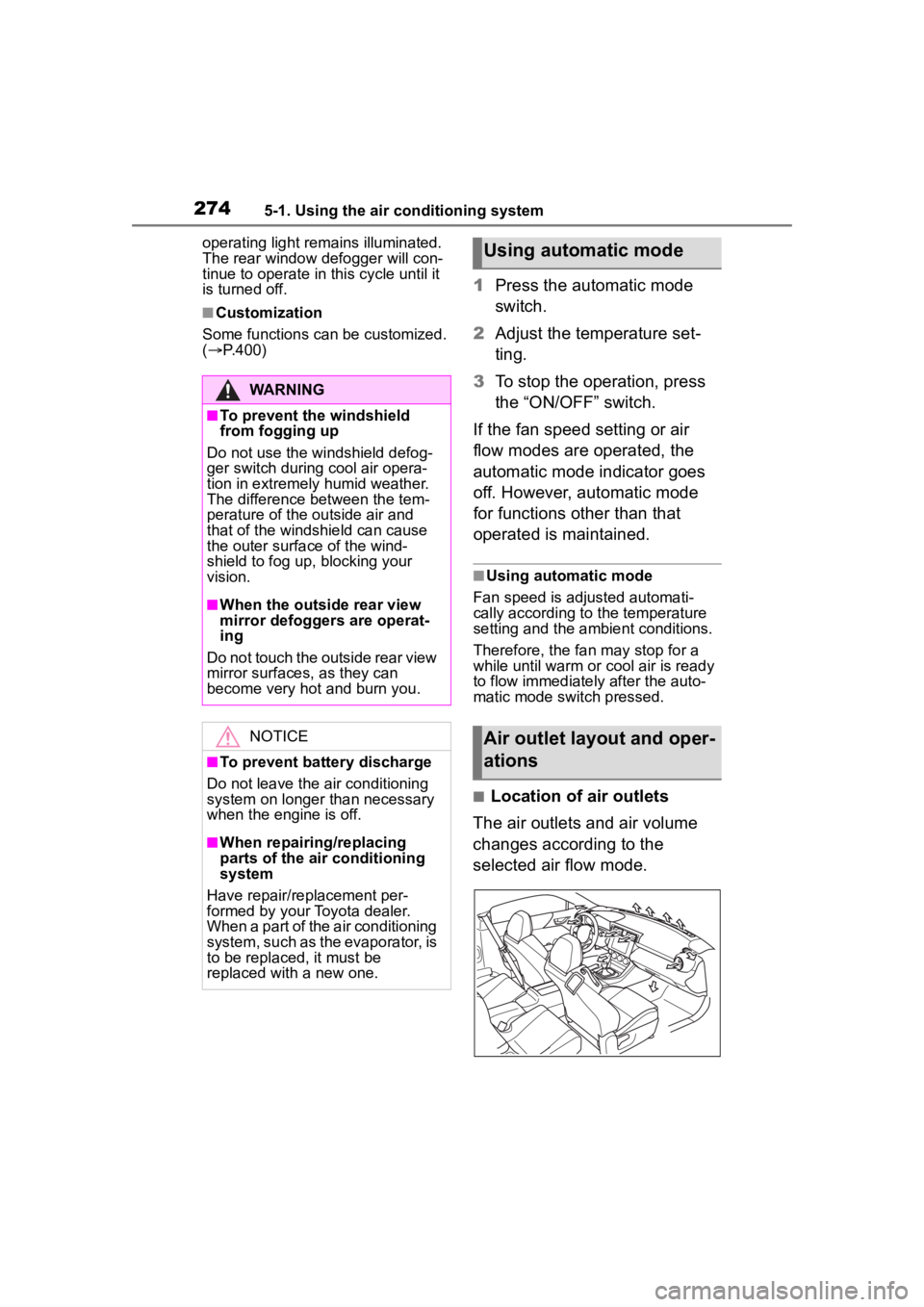
■Location of air outlets
The air outlets and air volume
changes according to the
selected air flow mode.
WARNING
■To prevent the windshield
from fogging up
Do not use the windshield defog-
ger switch during cool air opera-
tion in extremely humid weather.
The difference between the tem-
perature of the outside air and
that of the windshield can cause
the outer surface of the wind-
shield to fog up, blocking your
vision.
■When the outside rear view
mirror defoggers are operat-
ing
Do not touch the outside rear view
mirror surfaces, as they can
become very hot and burn you.
NOTICE
■To prevent battery discharge
Do not leave the air conditioning
system on longer than necessary
when the engine is off.
■When repairing/replacing
parts of the air conditioning
system
Have repair/replacement per-
formed by your Toyota dealer.
When a part of the air conditioning
system, such as the evaporator, is
to be replaced, it must be
replaced with a new one.
Using automatic mode
Air outlet layout and oper-
ations
Page 284 of 449
2845-4. Using the other interior features
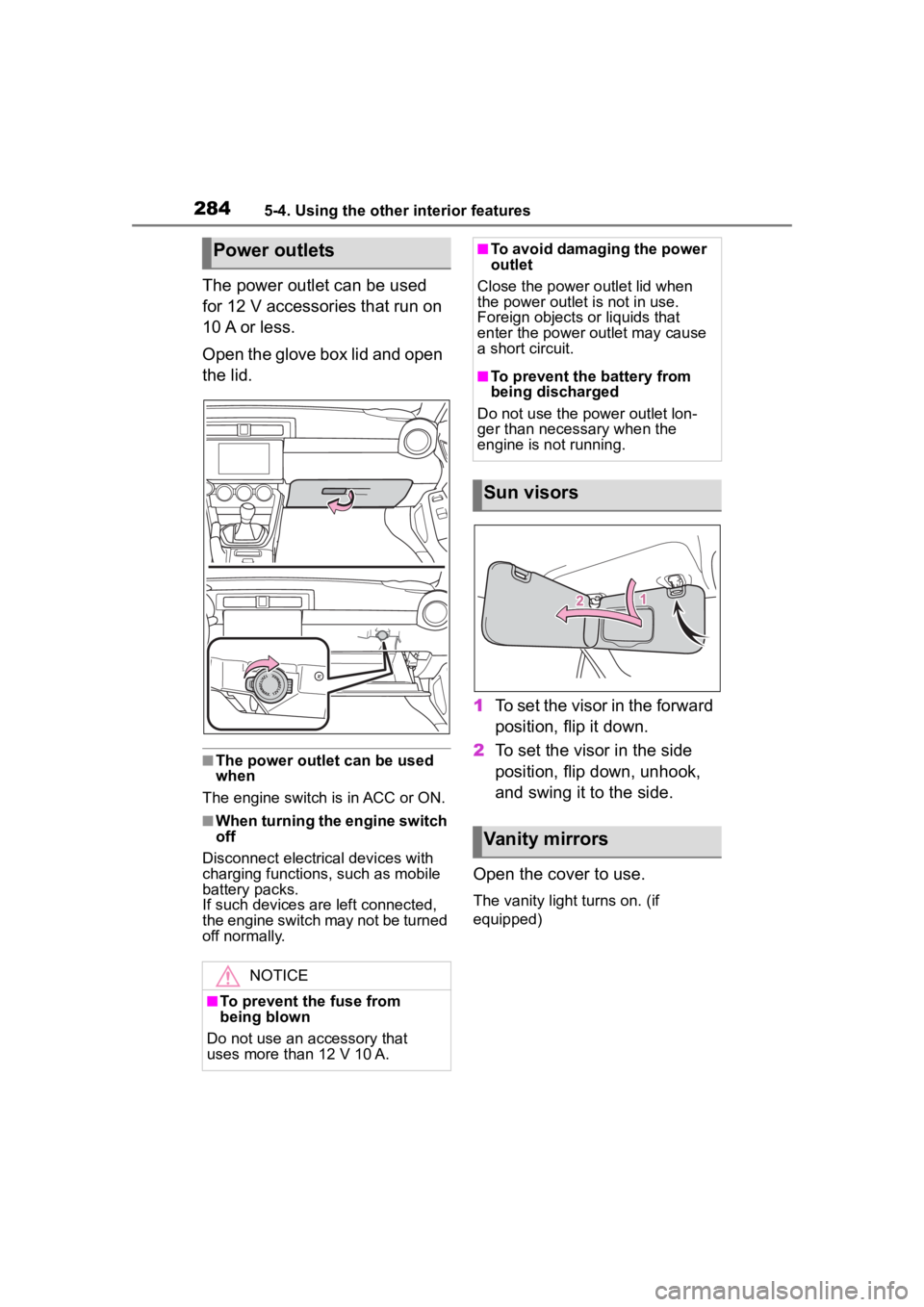
The power outlet can be used
for 12 V accessories that run on
10 A or less.
Open the glove box lid and open
the lid.
■The power outlet can be used
when
The engine switch is in ACC or ON.
■When turning the engine switch
off
Disconnect electrical devices with
charging functions, such as mobile
battery packs.
If such devices are left connected,
the engine switch may not be turned
off normally.
1 To set the visor in the forward
position, flip it down.
2 To set the visor in the side
position, flip down, unhook,
and swing it to the side.
Open the cover to use.
The vanity light turns on. (if
equipped)
Power outlets
NOTICE
■To prevent the fuse from
being blown
Do not use an accessory that
uses more than 12 V 10 A.
■To avoid damaging the power
outlet
Close the power outlet lid when
the power outlet is not in use.
Foreign objects or liquids that
enter the power outlet may cause
a short circuit.
■To prevent the battery from
being discharged
Do not use the p ower outlet lon-
ger than necessary when the
engine is not running.
Sun visors
Vanity mirrors
Page 288 of 449
2886-1. Maintenance and care
6-1.Maintenance and care
Working from top to bottom,
liberally apply water to the
vehicle body, wheel wells and
underside of the vehicle to
remove any dirt and dust.
Wash the vehicle body using
a sponge or soft cloth, such
as a chamois.
If very dirty, use a car wash
soap that does not contain
abrasives and then thor-
oughly rinse with water.
Wipe away any water.
Wax the vehicle when the
waterproof coating deterio-
rates.
If water does not bead on a clean
surface, apply wax when the vehi-
cle body is cool.
■Automatic car washes
●Fold the mirrors before washing
the vehicle. Start washing from the
front of the vehicle. Make sure to
extend the mirrors before driving.
●Brushes used in automatic car
washes may scratch the vehicle
surface, parts (wheel, etc.) and
harm your vehicle’s paint.
■High pressure car washes
As water may enter the cabin, do
not bring the nozzle tip near the
gaps around the doors or perimeter
of the windows, or spray these
areas continuously.
■When using a car wash
If the door handle becomes wet
while the electronic key is within the
effective range, the door may lock
and unlock repeatedly. In that case,
follow the following correction pro-
cedures to wash the vehicle:
●Place the key in a position 6 ft. (2
m) or more separate from the
vehicle while the vehicle is being
washed. (Take care to ensure that
the key is not stolen.)
●Set the electronic key to bat-
tery-saving mode to disable the
smart key system. ( P. 1 1 1 )
■Wheels and wheel ornaments
●Remove any dirt immediately by
using a neutral detergent.
●Wash detergent off with water
immediately after use.
●To protect the paint from damage,
make sure to obs erve the follow-
ing precautions.
• Do not use acidic, alkaline or abrasive detergent
• Do not use hard brushes
• Do not use detergent on the wheels when they are hot, such
as after driving or parking in hot
weather
■Wheels and wheel ornaments
(vehicles with matte painted
wheels)
As matte painted wheels require dif-
ferent cleaning methods than con-
ventional wheels, be sure to
observe the following. For details,
consult your Toyota dealer.
●Remove dirt using water. If the
wheels are excessively dirty, use
a sponge or soft cloth dampened
with a diluted neutral detergent to
remove the dirt.
Cleaning and protect-
ing the vehicle exte-
rior
Perform cleaning in a man-
ner appropriate to each
component and its material.
Cleaning instructions
Page 430 of 449

430Alphabetical Index
Fixed with a seat belt ............. 66
Front passenger occupant clas-sification system ................... 55
Points to remember ................ 63
Riding with children ................ 62
Types of child restraint system installation met hod ............... 65
Using an anchor bracket ........ 72
Child safety Battery precautions ...... 311, 373
Child restraint system............. 65
How your child should wear the seat belt................................ 24
Power window lock switch.... 130
Removed electronic key battery precautions......................... 330
Seat belt precautions ............. 62
Seat heater precautions ....... 276
Trunk precautions................. 107
Cleaning Exterior ................................. 288
Interior .......................... 291, 293
Seat belts ............................. 291
Wheels and wheel ornaments........................................... 288
Clock ................................... 88, 91
Condenser .............................. 308
Console box ............................ 280
Conventional Cruise Control207, 254
Cooling system ...................... 307 Engine overheating .............. 374
Cruise control Adaptive Cruise Control ....... 190
Conventional Cruise Control207, 254
Cup holders ............................ 281
Current fuel consumption ....... 94
Curtain shield airbags ............. 27
Customizable features ........... 400D
Daytime running light system158
Daytime running lights Replacing light bulbs ............334
Defogger Outside rear view mirrors .....272
Rear window.........................272
Windshield ............................272
Dimension ...............................380
Dinghy towing .........................144
Display Driving information .................94
Multi-information display.........93
Display change button .............90
Do-it-yourself maintenance ...296
Door courtesy lights...............277
Door lock Doors ....................................105
Smart key system ................. 111
Wireless remote control........103
Doors Door glasses ........................129
Door lock ..............................105
Open door warning buzzer ...106
Open door warning light .......351
Outside rear view mirrors .....127
Driving Break-in tips .........................133
Correct driving posture ...........21
Driving mode select switch ...257
Procedures ...........................132
Winter drive tips....................265
Driving distance........................94
Driving information ..................94
Driving information display .....94
Driving range ............................94
Driving time ...............................94
E
EDR (Event data recorder) .........7
Page 432 of 449
432Alphabetical Index
Pre-Collision Throttle Manage-ment ................................... 215
Temporary stop .................... 227
F
Flat tire Tire pressure warning system........................................... 315
Vehicles without a spare tire 358
Floor mats ................................. 20
Fluid Automatic transmission ........ 384
Brake ............................ 308, 385
Clutch ................................... 308
Manual transmission ............ 385
Washer ................................. 311
Front passenger occupant clas- sification system .................... 55
Front position lights Wattage ................................ 387
Front seats Adjustment ........................... 119
Cleaning ....................... 291, 293
Correct driving posture ........... 21
Head restraints ..................... 123
Seat heaters ......................... 276
Front side marker light Light switch .......................... 158
Front turn signal lights Replacing light bulbs ............ 334
Turn signal lever ................... 155
Wattage ................................ 387
Fuel Capacity ............................... 381
Fuel gauge ............................. 88
Fuel pump shut off system ... 347
Information ........................... 388
Refueling .............................. 167
Type ..................................... 381
Warning light ........................ 351 Fuel filler door
If the fuel filler door cannot be opened ...............................369
Refueling ..............................167
Fuel gauge.................................88
Fuel pump shut off system ....347
Fuses .......................................331
G
Gauges ......................................88
G-force .......................................96
Glove box ................................279
H
Head restraints .......................123
Headlight aim ..........................333
Headlights High Beam Assist system .....162
Light switch...........................158
Replacing light bulbs ............334
Wattage ................................387
Heaters Automatic air conditioning sys-tem .....................................270
Outside rear view mirrors .....272
Seat heaters ....... ..................276
High Beam Assist ...................162
High mounted stoplight Replacing light bulbs ............334
Hill-start assist control...........261
Hood Open.....................................302
Hooks Retaining hooks (floor mat) ....20
Horn .........................................125
I
I/M test .....................................299
Identification Engine ..................................381
Page 433 of 449
433Alphabetical Index
Vehicle.................................. 380
Ignition switch (engine switch) ............................................... 145Auto power off function ........ 148
Changing the engine switch modes ................................ 147
If your vehicle has to be stopped in an emergency................. 338
Illuminated entry system ....... 277
Indicators .................................. 85
Initialization Power windows .................... 129
Tire pressure warning system........................................... 317
Inside rear view mirror........... 126
Instrument panel light control. 91
Interior lights .......................... 277
J
Jack Positioning a floor jack ......... 303
Vehicle-equipped jack .......... 359
Jack handle ............................. 359
Jam protection function Power windows .................... 129
K
Keyless entrySmart key system................. 111
Wireless remote control ....... 103
Keys Battery-saving fun ction......... 112
Electronic key ....................... 102
Engine switch ....................... 145
If the electronic key does not operate properly ................. 369
If you lose your keys ............ 368
Key number plate ................. 102
Keyless entry................ 105, 111
Mechanical key .................... 102
Replacing the battery ........... 329 Warning buzzer .................... 111
Wireless remote control........103
Knee airbags .............................27
L
Lane Departure Warning ........219
Lane Sway Warning ................221
Language (multi-information dis- play) .........................................98
LATCH anchors.........................70
Lead Vehicle Start Alert .........223
Lever Auxiliary catch lever .............302
Hood lock release lever ........302
Shift lever .....................149, 153
Turn signal lever ...................155
Wiper lever ...........................165
License plate lights Light switch...........................158
Replacing light bulbs ............334
Light Wattage ................................387
Light bulbs Replacing .............................334
Lights Headlight switch ...................158
High Beam Assist system .....162
Interior lights .........................277
Interior lights list ...................277
Replacing light bulbs ............334
Trunk light ............................. 110
Turn signal lever ...................155
Vanity lights ..........................284
Wattage ................................387
Welcome light illumination con-trol ......................................160
Lock steering column ............145
M
Maintenance Do-it-yourself maintenance ..300