steering TOYOTA 86 2022 User Guide
[x] Cancel search | Manufacturer: TOYOTA, Model Year: 2022, Model line: 86, Model: TOYOTA 86 2022Pages: 449, PDF Size: 8.5 MB
Page 85 of 449
852-1. Instrument cluster
2
Vehicle status information and indicators
*1: These lights turn on when the
engine switch is turned to ON to
indicate that a system check is
being performed. They will turn
off after the engine is started, or
after a few seconds. There may
be a malfunction in a system if a
light does not come on, or turn
off. Have the vehicle inspected
by your Toyota dealer.
*2: The front passenger’s seat belt reminder light is located on the
overhead console.
*3: This light illuminates on the over-head console.
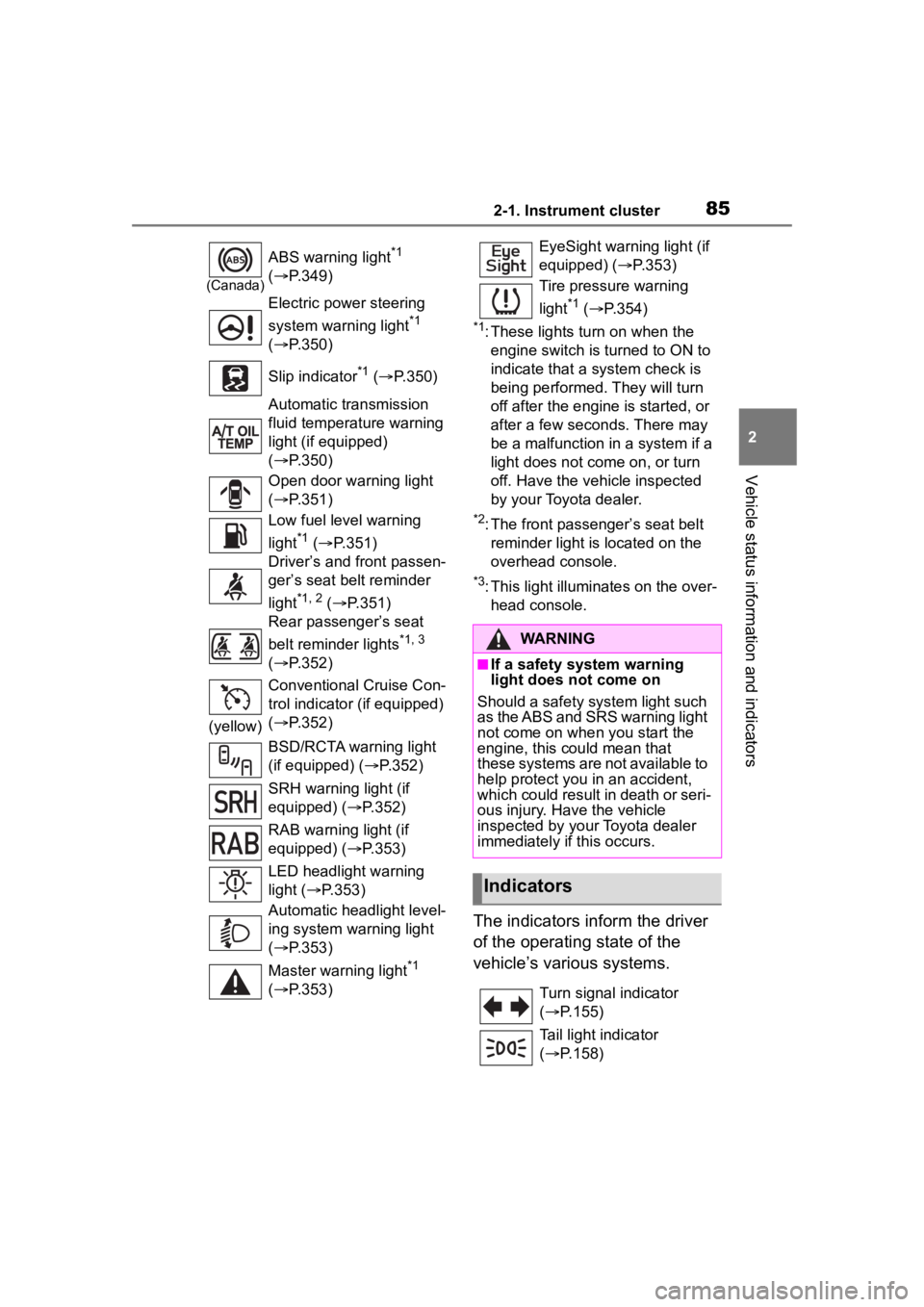
The indicators inform the driver
of the operating state of the
vehicle’s various systems.
(Canada)
ABS warning light*1
( P.349)
Electric power steering
system warning light
*1
( P.350)
Slip indicator
*1 ( P.350)
Automatic transmission
fluid temperature warning
light (if equipped)
( P.350)
Open door warning light
( P.351)
Low fuel level warning
light
*1 ( P.351)
Driver’s and front passen-
ger’s seat belt reminder
light
*1, 2 ( P.351)
Rear passenger’s seat
belt reminder lights
*1, 3
( P.352)
(yellow) Conventional Cruise Con-
trol indicator (if equipped)
(
P.352)
BSD/RCTA warning light
(if equipped) ( P.352)
SRH warning light (if
equipped) ( P.352)
RAB warning light (if
equipped) ( P.353)
LED headlight warning
light ( P.353)
Automatic headlight level-
ing system warning light
( P.353)
Master warning light
*1
( P.353)
EyeSight warning light (if
equipped) ( P.353)
Tire pressure warning
light
*1 ( P.354)
WARNING
■If a safety system warning
light does not come on
Should a safety system light such
as the ABS and SRS warning light
not come on when you start the
engine, this could mean that
these systems are not available to
help protect you in an accident,
which could result in death or seri-
ous injury. Have the vehicle
inspected by you r Toyota dealer
immediately if this occurs.
Indicators
Turn signal indicator
( P.155)
Tail light indicator
( P.158)
Page 96 of 449

962-1. Instrument cluster
tance.
■Driving information (page 4)
Displays each tire pressure.
( P.315)
■Display items
Press or of the meter
control switch and select .
Then press or to display
the following items:
G-force
Suitable for confirming current lat-
eral G-forces on the vehicle.
G-force (peak hold function)
Suitable for confirming the size and
direction of the maximum lateral
G-forces on the vehicle.
Power and torque curve
Stopwatch
■G-force
Displays lateral G-forces on the
vehicle.
Also displays, around the
periphery of the G-force display,
the left and right steering
amount, accelerator pedal input,
and brake fluid pressure.
This display is intended for use
as a guideline. Depending on
factors such as the road surface
condition, temperature and vehi-
cle speed, the display may not
show the actual condition of the
vehicle. Acceleration G-force on the
vehicle
Accelerator pedal input
Brake fluid pressure
Steering amount
Press and hold to change
the range of the acceleration
G-force display between 1.0 G
and 0.5 G.
■G-force (peak hold func-
tion)
Displays lateral G-forces on the
vehicle.
Also displays, around the
periphery of the G-force display,
the left and right steering
amount, accelerator pedal input,
and brake fluid pressure.
This display is intended for use
as a guideline. Depending on
factors such as the road surface
condition, temperature and vehi-
cle speed, the display may not
show the actual condition of the
vehicle.
Sport information
A
C
D
Page 97 of 449

972-1. Instrument cluster
2
Vehicle status information and indicators
Record of the maximum
G-forces
Press and hold to reset the
record of maximum G-forces.
Acceleration G-force on the
vehicle
Accelerator pedal input
Brake fluid pressure
Steering amount
■Power and torque curve
This chart is intended for refer-
ence only and does not show
the actual engine torque or out-
put.
Power output
Torque
Current engine speed
The vertical bar will slide laterally
according to the current engine
speed.
■Stopwatch
Measures and displays current
lap time and previous lap times.
Top screen
Fastest lap time (top screen)
When the timer is reset, “- -’- -”- -”
will be displayed.
Measurement screenFastest lap time (measure-
ment screen)
Current lap time
Total lap time
Past lap times
Records of the 50 most recent lap
times will be displayed.
Meter control switch opera-
tion guide
Changing between the stop-
watch screens
To change to the measurement
A
C
D
A
C
A
A
C
D
Page 98 of 449

982-1. Instrument cluster
screen: Press .
To change to the top screen: Press .
Operating the measurement
screen
: Start/stop measurement
: Mark off one lap
: Reset measured lap times
: Scroll through the lap
times
Resetting measured lap times
After stopping the measurement,
press .
To display other content while
the stopwatch is operating
If the measurement screen is dis-
played, press to display the top
screen.
Then operate the meter control
switches to display other content.
While other items are displayed,
the measurement will continue but
the stopwatch cannot be operated.
Select to display the route guid-
ance information.
Select to enable selection of an
audio source or track on the dis-
play using the meter control switches.
Select to display the operational
status of the Adaptive Cruise
Control system (
P.190, 207)
The settings of the following
systems can be changed.
LDW (Lane Departure Warn-
ing) (if equipped)
PCB (Pre-Colli sion Braking)
(if equipped)
BSD/RCTA (if equipped)
RAB (Reverse Automatic
Braking system) (if equipped)
(Sonar Audible Alarm) (if
equipped)
SRH (Steering Responsive
Headlight) (if quipped)■Meter display settings that
can be changed
Units
Select to change the units of mea-
sure displayed.
Startup Scrn
Navigation system-linked
display
Audio system-linked dis-
play
Driving support system
information display (if
equipped)
Driving support system
setting display
Settings display
Page 101 of 449

101
3
3
Before driving
Before driving
.3-1. Key informationKeys ............................ 102
3-2. Opening, closing and locking the doors and
trunk
Doors .......................... 105
Trunk ........................... 107
Smart key system ....... 111
3-3. Adjusting the seats Front seats .................. 119
Rear seats................... 121
Head restraints............ 123
3-4. Adjusting the steering wheel and mirrors
Steering wheel ............ 125
Inside rear view mirror .................................. 126
Outside rear view mirrors .................................. 127
3-5. Opening, closing the win- dows and moon roof
Power windows ........... 129
Page 125 of 449
1253-4. Adjusting the steering wheel and mirrors
3
Before driving
3-4.Adjusting the steering wheel and mirrors
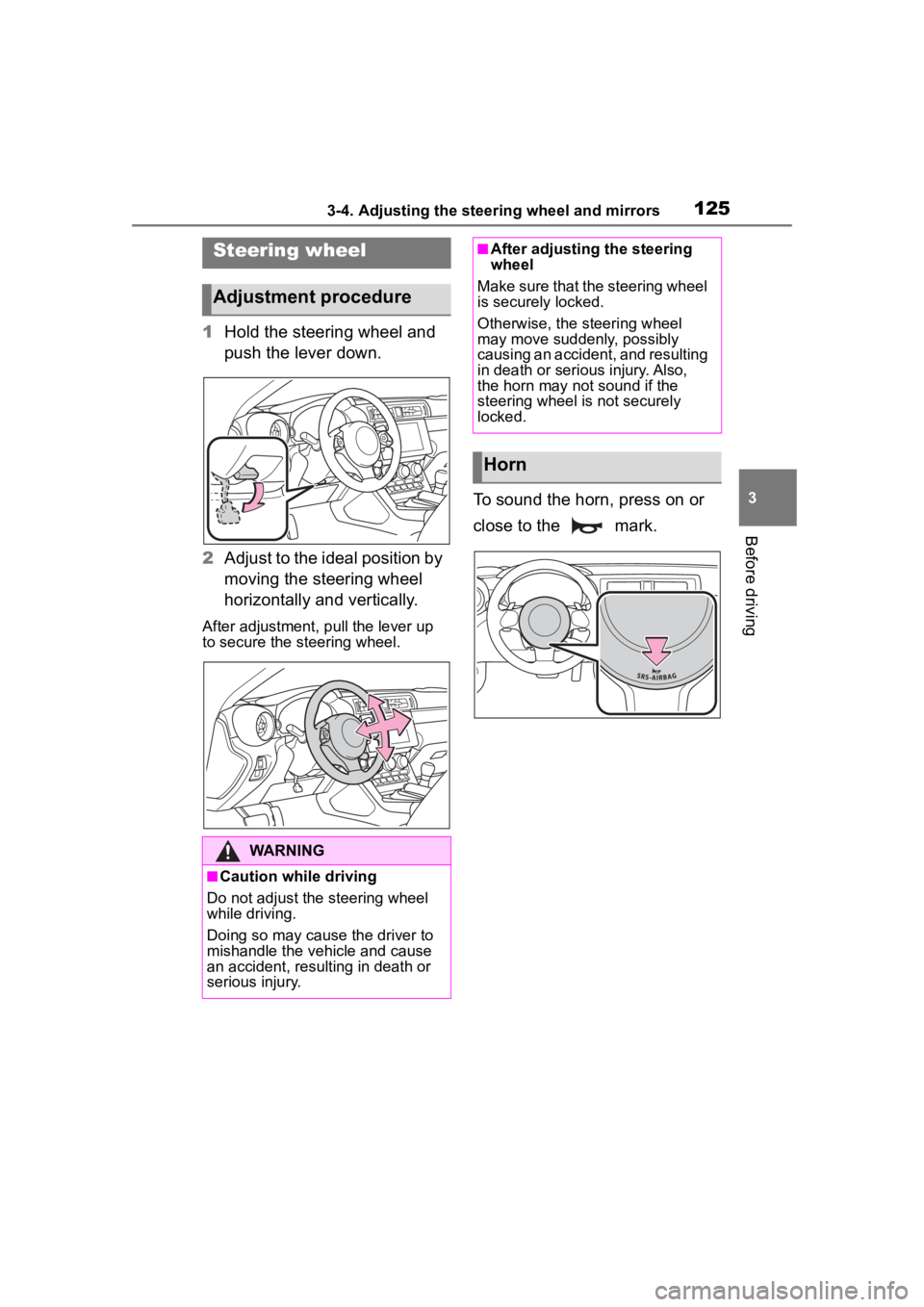
1Hold the steering wheel and
push the lever down.
2 Adjust to the ideal position by
moving the steering wheel
horizontally and vertically.
After adjustment, pull the lever up
to secure the steering wheel.
To sound the horn, press on or
close to the mark.
Steering wheel
Adjustment procedure
WARNING
■Caution while driving
Do not adjust the steering wheel
while driving.
Doing so may cause the driver to
mishandle the vehicle and cause
an accident, resul ting in death or
serious injury.
■After adjusting the steering
wheel
Make sure that the steering wheel
is securely locked.
Otherwise, the steering wheel
may move suddenly, possibly
causing an accident, and resulting
in death or serious injury. Also,
the horn may not sound if the
steering wheel is not securely
locked.
Horn
Page 126 of 449
1263-4. Adjusting the steering wheel and mirrors
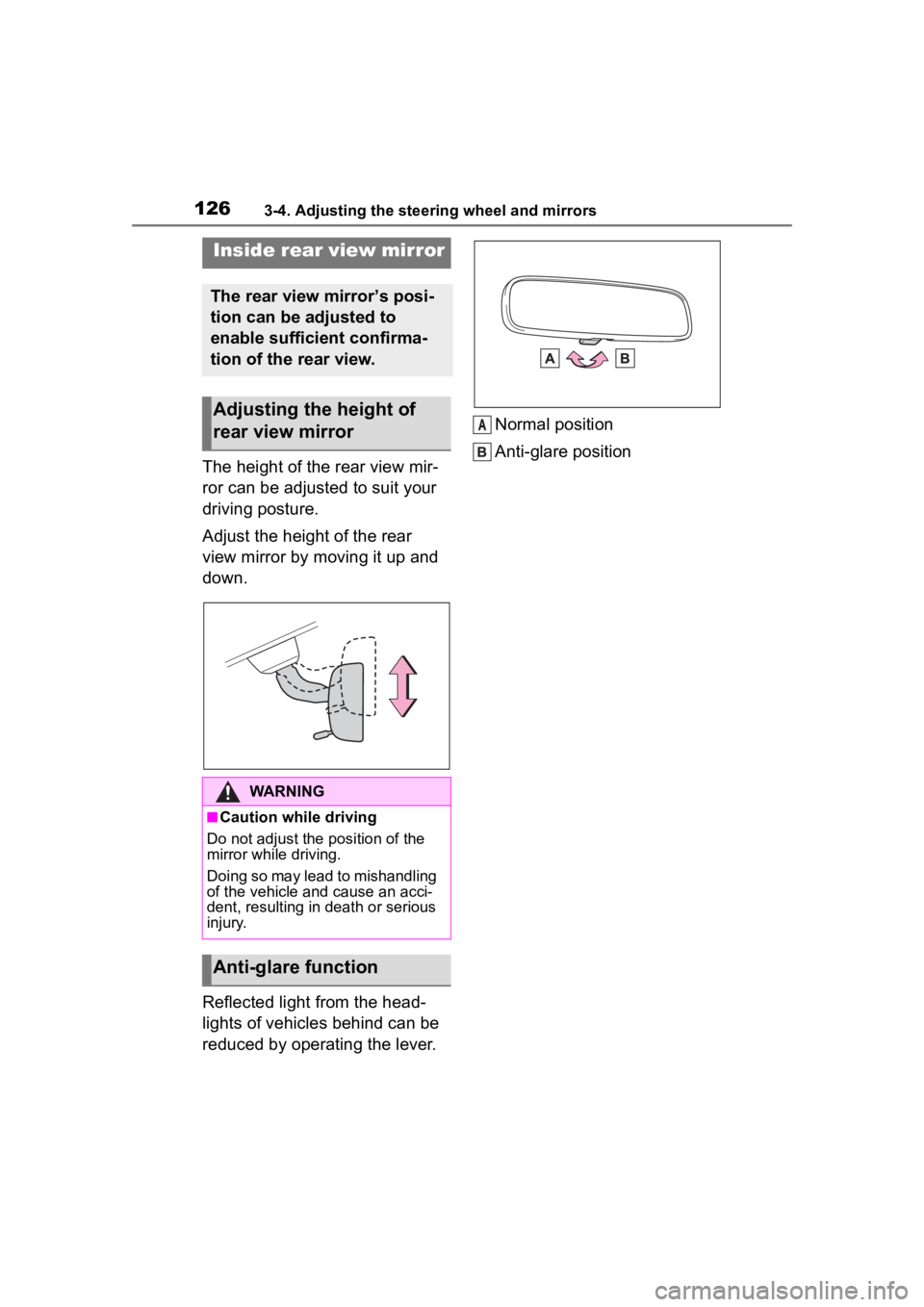
The height of the rear view mir-
ror can be adjusted to suit your
driving posture.
Adjust the height of the rear
view mirror by moving it up and
down.
Reflected light from the head-
lights of vehicles behind can be
reduced by operating the lever.Normal position
Anti-glare position
Inside rear view mirror
The rear view mirror’s posi-
tion can be adjusted to
enable sufficient confirma-
tion of the rear view.
Adjusting the height of
rear view mirror
WARNING
■Caution while driving
Do not adjust the position of the
mirror while driving.
Doing so may lead to mishandling
of the vehicle and cause an acci-
dent, resulting in death or serious
injury.
Anti-glare function
A
Page 127 of 449
1273-4. Adjusting the steering wheel and mirrors
3
Before driving
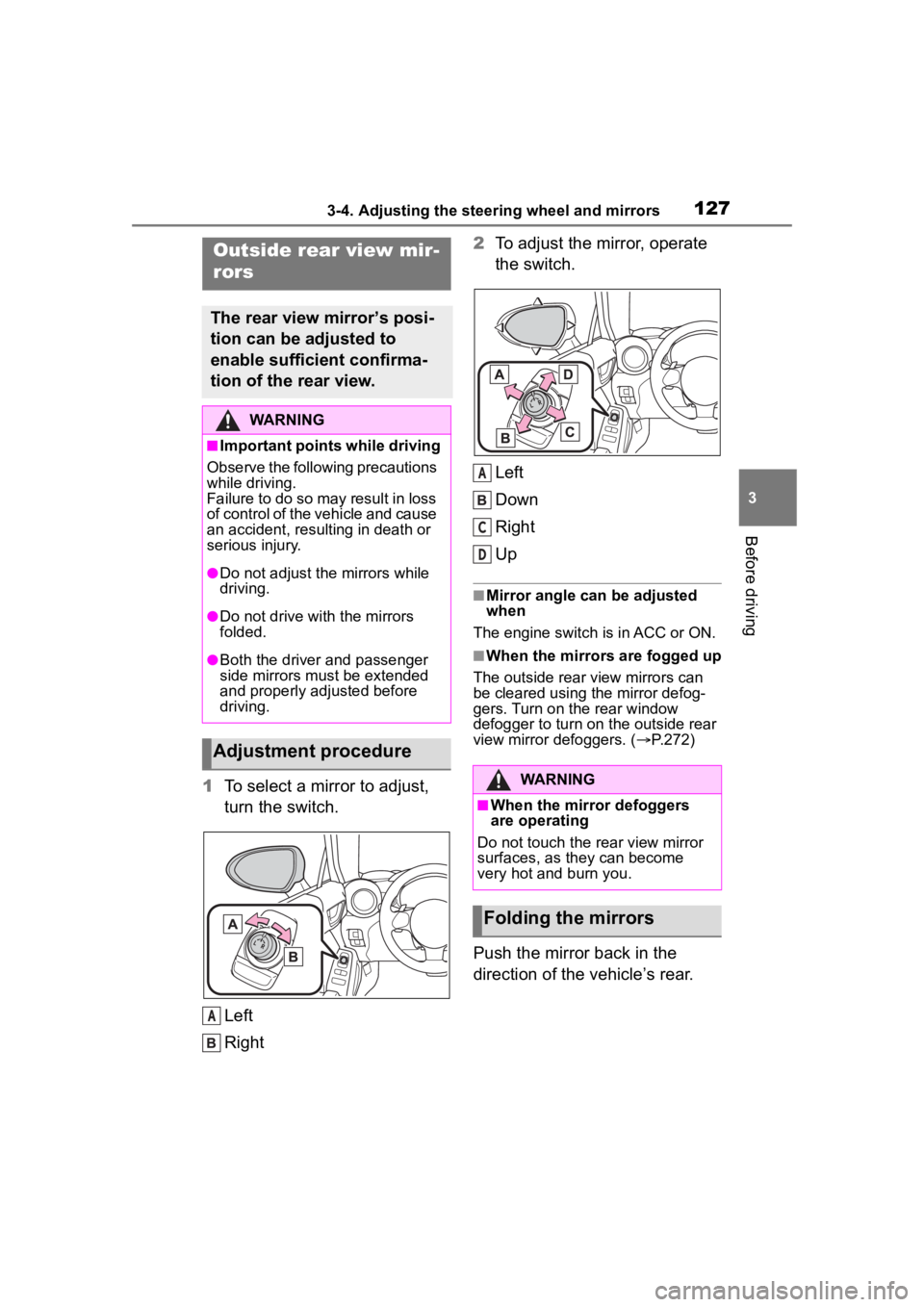
1To select a mirror to adjust,
turn the switch.
Left
Right 2
To adjust the mirror, operate
the switch.
Left
Down
Right
Up
■Mirror angle can be adjusted
when
The engine switch i s in ACC or ON.
■When the mirrors are fogged up
The outside rear view mirrors can
be cleared using the mirror defog-
gers. Turn on the rear window
defogger to turn on the outside rear
view mirror defoggers. ( P.272)
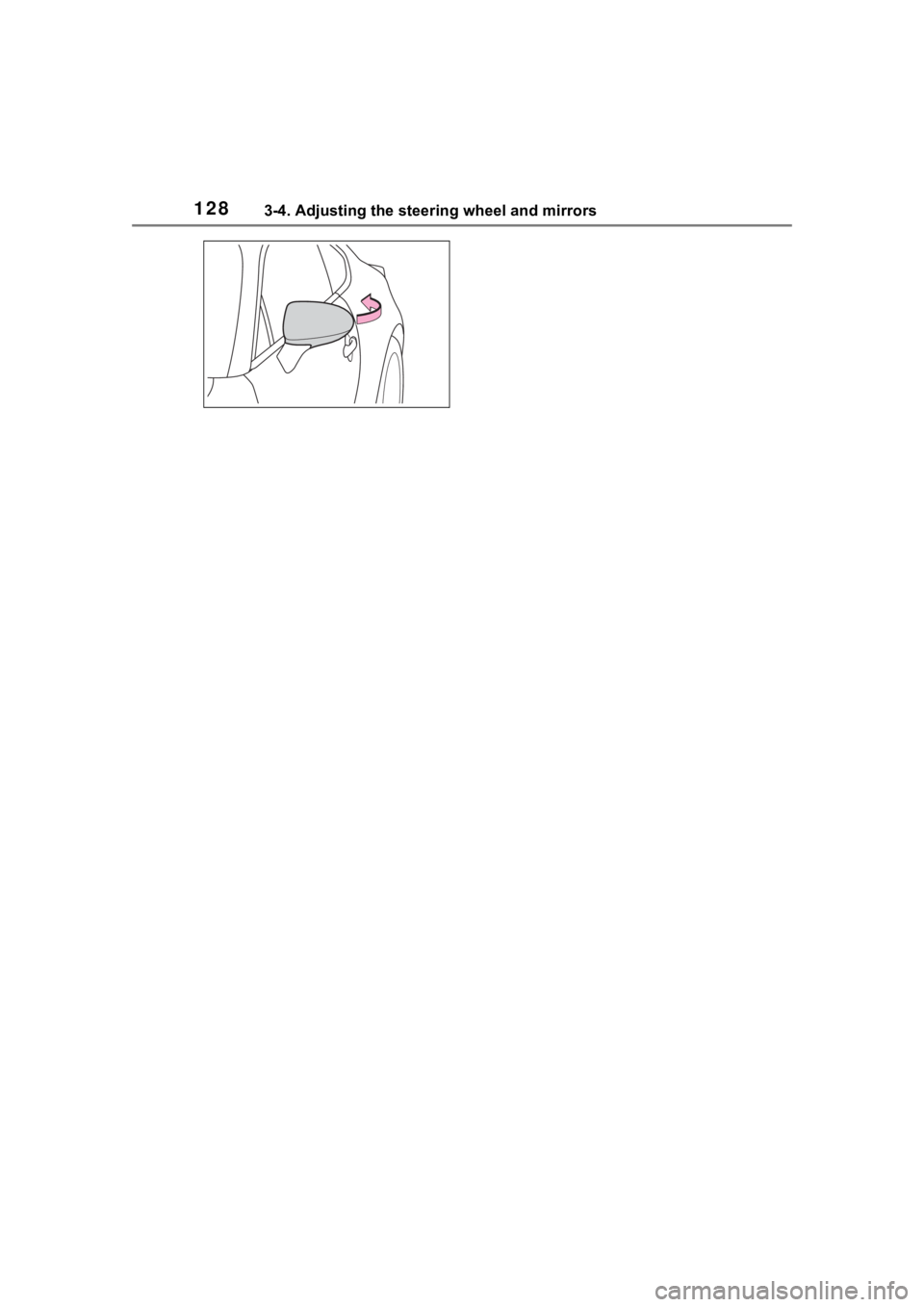
Push the mirror back in the
direction of the vehicle’s rear.
Outside rear view mir-
rors
The rear view mirror’s posi-
tion can be adjusted to
enable sufficient confirma-
tion of the rear view.
WARNING
■Important points while driving
Observe the following precautions
while driving.
Failure to do so may result in loss
of control of the vehicle and cause
an accident, resul ting in death or
serious injury.
●Do not adjust the mirrors while
driving.
●Do not drive with the mirrors
folded.
●Both the driver and passenger
side mirrors must be extended
and properly adjusted before
driving.
Adjustment procedure
A
WARNING
■When the mirror defoggers
are operating
Do not touch the rear view mirror
surfaces, as they can become
very hot and burn you.
Folding the mirrors
A
C
D
Page 128 of 449
1283-4. Adjusting the steering wheel and mirrors
Page 133 of 449
1334-1. Before driving
4
Driving
2Set the parking brake.
( P.156)
Check that the park ing brake indi-
cator is illuminated.
3 Shift the shift lever to N.
( P.153)
If parking on a hill, shift the shift
lever to 1 or R and block the wheels
as needed.
4Press the engine switch to
stop the engine.
5 Slowly release the brake
pedal.
6 Lock the door, making sure
that you have the key on your
person.
■Starting off on a steep
uphill
Automatic transmission
1 Make sure that the parking
brake is set and shift the shift
lever to D.
2 Gently depress the accelera-
tor pedal.
3 Release the parking brake.
Manual transmission
1 Make sure that the parking
brake is set and shift the shift
lever to 1.
2 Lightly depress the accelera-
tor pedal at the same time as
gradually releasing the clutch
pedal.
3 Release the parking brake.
■When starting off on an uphill
The hill-start assis t control will acti- vate. (
P.258)
■Driving in the rain
●Drive carefully whe n it is raining,
because visibility will be reduced,
the windows may become
fogged-up, and the road will be
slippery.
●Drive carefully whe n it starts to
rain, because the road surface will
be especially slippery.
●Refrain from hig h speeds when
driving on an expressway in the
rain, because there may be a
layer of water between the tires
and the road surface, preventing
the steering and brakes from
operating properly.
■Engine speed while driving
(vehicles with an automatic
transmission)
In the following conditions, the
engine speed may become high
while driving. This is due to auto-
matic up-shifting control or
down-shifting implementation to
meet driving conditions. It does not
indicate sudden acceleration.
●The vehicle is judged to be driving
uphill or downhill
●When the accele rator pedal is
released
●When driving on curves
●When the brake p edal is firmly
depressed
■Restraining the engine output
(Brake Override System)
When the accelerator and brake
pedals are depressed at the same
time, the engine output may be
restrained.
■New vehicle break-in driving
(the first 1000 miles [1600 km])
The performance a nd long life of
your vehicle are dependent on how
you handle and care for your vehicle
while it is new. Follow these instruc-
tions during the first 1000 miles
(1600 km):