key TOYOTA 86 2022 Owner's Manual
[x] Cancel search | Manufacturer: TOYOTA, Model Year: 2022, Model line: 86, Model: TOYOTA 86 2022Pages: 449, PDF Size: 8.5 MB
Page 112 of 449

1123-2. Opening, closing and locking the doors and trunk
●When an exterior alarm sounds
once for 2 seconds
●When an interior alarm sounds
continuously
■Battery-saving function
The battery-saving function will be
activated in order to prevent the
electronic key battery and the vehi-
cle battery from being discharged
while the vehicle is not in operation
for a long time.
●In the following situations, the smart key system
may take some
time to unlock the doors.
• The electronic key has been left
within approximately 6 ft. (2 m) of
the outside of the vehicle for 10
minutes or longer.
• The smart key system has not been used for 5 days or longer.
●If the smart key system has not
been used for 14 days or longer,
the doors cannot be unlocked at
the passenger door. In this case,
take hold of the d river’s door han-
dle, or use the wireless remote
control or mechanical key, to
unlock the doors.
■Electronic Key Battery-Saving
Function
When battery-saving mode is set,
battery depletion is minimized by
stopping the electronic key from
receiving radio waves.
Press twice while pressing and
holding . Confirm that the elec-
tronic key indicator flashes 4 times.
While the battery-saving mode is
set, the smart key system cannot be
used. To cancel the function, press
any of the electronic key buttons.
■Conditions affecting operation
The smart key system uses weak
radio waves. In the following situa-
tions, the communication between
the electronic key and the vehicle
may be affected, preventing the
smart key system, wireless remote
control and engi ne immobilizer sys-
tem from operating properly.
(Ways of coping: P.369)
●When the electronic key battery is
SituationCorrection
procedure
An attempt was
made to lock the
vehicle while a door
was open.Close both
side doors
and lock the
doors again.
SituationCorrection procedure
The trunk was closed
while the electronic
key was still inside
the trunk and both
side doors were
locked.Retrieve the
electronic
key from the
trunk and
close the
trunk lid.
SituationCorrection procedure
The engine switch
was turned to ACC
while the driver’s
door was open (or
the driver’s door was
opened while the
engine switch was in
ACC).
Turn the
engine
switch off
and close
the driver’s
door.
The engine switch
was turned off while
the driver’s door was
open.Close the
driver’s
door.
Page 113 of 449

1133-2. Opening, closing and locking the doors and trunk
3
Before driving
depleted
●Near a TV tower, electric power
plant, gas station, radio station,
large display, airpo rt or other facil-
ity that generates strong radio
waves or electrical noise
●When carrying a portable radio,
cellular phone, cordless phone or
other wireless communication
device
●When the electronic key is in con-
tact with, or is covered by the fol-
lowing metallic objects
• Cards to which al uminum foil is
attached
• Cigarette boxes that have alumi- num foil inside
• Metallic wallets or bags
• Coins
• Hand warmers made of metal
• Media such as CDs and DVDs
●When other wireless keys (that
emit radio waves) are being used
nearby
●When carrying the electronic key
together with the following devices
that emit radio waves
• Another vehicle’s electronic key or
a wireless key that emits radio
waves
• Personal computers or personal
digital assistants (PDAs)
• Digital audio players
• Portable game systems
●If window tint with a metallic con-
tent or metallic objects are
attached to the rear window
●When the electronic key is placed
near a battery charger or elec-
tronic devices
■Note for the entry function
●Even when the electronic key is
within the effective range (detec-
tion areas), the system may not
operate properly in the following
cases:
• The electronic key is too close to the window or outside door han-
dle, near the ground, or in a high
place when the doors are locked or unlocked.
• The electronic key is near the ground or in a high place, or too
close to the rear bumper center
when the trunk is unlocked.
• The electronic key is on the instru-
ment panel, rear package tray or
floor, or in the door pockets or
glove box when the engine is
started or engine switch modes
are changed.
●Do not leave the electronic key on
top of the instrument panel or near
the door pockets when exiting the
vehicle. Depending on the radio
wave reception conditions, it may
be detected by the antenna out-
side the cabin and the doors will
become lockable from the outside,
possibly trapping the electronic
key inside the vehicle.
●As long as the electronic key is
within the effective range, the
doors may be locked or unlocked
by anyone. However, only the
doors detecting the electronic key
can be used to unlock the vehicle.
●Even if the electro nic key is not
inside the vehicle, it may be possi-
ble to start the engine if the elec-
tronic key is near the window.
●The doors may unlock or lock if a
large amount of water splashes on
the door handle, such as in the
rain or in a car wash, when the
electronic key is within the effec-
tive range. (The doors will auto-
matically be locked after
approximately 60 seconds if the
doors are not opened and closed.)
●If the wireless remote control is
used to lock the doors when the
electronic key is near the vehicle,
there is a possib ility that the door
may not be unlocked by the entry
function. (Use the wireless remote
control to unlock the doors.)
●Touching the door lock or unlock
sensor while wearing gloves may
prevent lock or unlock operation.
●When the lock operation is per-
Page 114 of 449

1143-2. Opening, closing and locking the doors and trunk
formed using the lock sensor, rec-
ognition signals will be shown up
to three consecuti ve times. After
this, no recogniti on signals will be
given.
●If the door handle becomes wet
while the electronic key is within
the effective ran ge, the door may
lock and unlock repeatedly. In this
case, follow the fo llowing correc-
tion procedures to wash the vehi-
cle:
• Place the electronic key in a loca- tion 6 ft. (2 m) or more away from
the vehicle. (Take care to ensure
that the key is not stolen.)
• Set the electronic key to bat-
tery-saving mode to disable the
smart key system. ( P. 1 1 2 )
●If the electronic key is inside the
vehicle and a door handle
becomes wet during a car wash, a
message may be shown on the
multi-information display and a
buzzer will sound outside the vehi-
cle. To turn off the alarm, lock both
side doors.
●The lock sensor may not work
properly if it com es into contact
with ice, snow, mud, etc. Clean
the lock sensor and attempt to
operate it again.
●A sudden handle operation or a
handle operation immediately
after entering the effective range
may prevent the doors from being
unlocked. Touch the door unlock
sensor and check that the doors
are unlocked bef ore pulling the
door handle again.
●Unlocking the vehicle may take
more time if another electronic key
is within the effective range.
■When the vehicle is not driven
for extended periods
●To prevent theft of the vehicle, do
not leave the electronic key within
6 ft. (2 m) of the vehicle.
●The smart key system can be
deactivated in advance. ( P. 1 1 5 )
●Setting the electronic key to bat-
tery-saving mode helps to reduce
key battery depletion. ( P. 1 1 2 )
■To operate the system properly
●Make sure to carry the electronic
key when operating the system.
Do not get the electronic key too
close to the vehicle when operat-
ing the system from the outside of
the vehicle.
Depending on the position and hold-
ing condition of the electronic key,
the key may not be detected cor-
rectly and the system may not oper-
ate properly. (The alarm may go off
accidentally, or the door lock pre-
vention function m ay not operate.)
●Do not leave the electronic key
inside the trunk.
The key confinement prevention
function may not operate, depend-
ing on the location of the key (the
inside edge of the Trunk), condi-
tions (inside a metal bag, close to
metallic objects) and the radio
waves in the surrounding area.
( P. 111 )
■If the smart key system does
not operate properly
●Locking and unlocking the doors:
P. 3 6 9
●Starting the engine: P. 3 7 0
■Customization
Some functions can be customized.
( P.400)
■If the smart key system has
been disabled
●Locking and unlocking the doors:
Use the wireless remote control or
mechanical key. ( P.105, 369)
●Starting the engi ne and changing
engine switch modes: P. 3 7 0
●Stopping the engine: P. 1 4 7
Page 115 of 449

1153-2. Opening, closing and locking the doors and trunk
3
Before driving
In the following situations, the
smart key system should be dis-
abled.
When people with implantable
cardiac pacemakers, cardiac
resynchronization therapy
pacemakers or implantable cardioverter defibrillators ride
in the vehicle.
When the vehicle will not be
used for a long time, or the
smart key system is not used.
When storing an electronic
key near or inside the vehicle
cannot be avoided.
When the smart key system is
disabled, use the wireless
remote control to lock and
unlock the doors.
When starting the engine, it will
be necessary to hold the elec-
tronic key near the engine
switch. ( P.370)
■Disabling the smart key
system
The smart key system can be
disabled by opening and closing
the doors or using the wireless
remote control.
Door opening/closing method
1 While sitting in the driver’s
seat, close the door.
2 Press of the door lock
switch.
3 Within 5 seconds of perform-
ing step 2, open the driver’s
door.
4 Within 5 seconds of perform-
ing step 3, press of the
door lock switch 2 times with
the door open.
5 Within 10 seconds of per-
forming step 4, close and
WARNING
■Caution regarding interfer-
ence with electronic devices
●People with implantable car-
diac pacemakers, cardiac
resynchronization ther-
apy-pacemakers or implantable
cardioverter defib rillators should
keep away from the smart key
system antennas. ( P. 1 1 1 )
The radio waves may affect the
operation of such devices. If
necessary, the entry function
can be disabled. Ask your Toy-
ota dealer for details, such as
the frequency of radio waves
and timing of the emitted radio
waves. Then, consult your doc-
tor to see if you should disable
the entry function.
●Users of any electrical medical
device other than implantable
cardiac pacemakers, cardiac
resynchronization ther-
apy-pacemakers or implantable
cardioverter defib rillators should
consult the manufacturer of the
device for information about its
operation under the influence of
radio waves.
Radio waves could have unex-
pected effects on the operation
of such medical devices.
The smart key system can be dis-
abled. ( P. 1 1 5 )
When to disable the smart
key system
Page 116 of 449

1163-2. Opening, closing and locking the doors and trunk
open the driver’s door 2
times.
6 Within 10 seconds of per-
forming step 5, press of
the door lock switch 2 times
with the door open.
7 Within 10 seconds of per-
forming step 6, close and
open the driver’s door 1 time.
8 Within 5 seconds of perform-
ing step 7, close the driver’s
door.
A buzzer will sound for approxi-
mately 2 seconds and the smart
key system will be disabled.
Wireless remote control
method
1 Open the driver’s door and
push the lock lever forward.
2 Press and hold and of
the wireless remote control at
the same time for 5 seconds
or more.
A buzzer will sound for approxi-
mately 2 seconds and the smart
key system will be disabled.
■Enabling the smart key sys-
tem
The smart key system can be
enabled by performing the pro- cedure used to disable it again.
When enabled a buzzer will sound.
■Door opening/closing method
Make sure to firmly press the door
lock switch in steps 4 and 6. If the
switch is pressed for a very short
time, the system m ay not be dis-
abled.
■Wireless remote control
method
To use the wireless remote control
method to disable the smart key
system, it is nece ssary to register a
PIN code for the PIN code smart
entry. ( P. 1 1 7 )
■When enabling the smart key
system
If the method used to disable the
smart key system is unknown, press
the engine switch.
●If the wireless remote control sys-
tem was used, a buzzer inside the
vehicle will sound.
●If the door opening/closing
method was used, the buzzer will
not sound.
■Customization
Some functions can be customized.
( P.400)
NOTICE
■When disabling the smart key
system
When disabling or enabling the
system to accommodate persons
with implantable cardiac pace-
makers, cardiac resynchroniza-
tion therapy pacemakers or
implantable cardioverter def ibrilla-
tors, always use the door open-
ing/closing method. If the wireless
remote control me thod is used,
the system may be enabled acci-
dentally.
Page 117 of 449

1173-2. Opening, closing and locking the doors and trunk
3
Before driving
By registering a 5 digit PIN
code, all of the doors and the
fuel filler door can be unlocked
without an electronic key by
pressing the trunk opener
switch.
■PIN code registration
method
1 Turn the engine switch off.
2 Close all of the doors and the
trunk.
3 Press and hold of the
wireless remote control.
At this time, all of the doors and the
fuel filler door will lock.
4Within 5 seconds of perform-
ing step 3, press and hold
the trunk opener switch.
After 5 seconds or more, a buzzer
will sound.
5Release of the wireless
remote control and the trunk
opener switch.
6 Within 30 seconds after the
buzzer begins sounding,
press of the wireless
remote control.
The buzzer will stop.
7A PIN code can now be reg-
istered. Press the trunk
opener switch the same num-
ber of times as the first digit
of the PIN code.
For example: If registering 32468,
press the switch 3 times.
8Wait for the buzzer to sound
1 time and then press the
switch the same number of
times as for the next digit.
For example: If registering 32468,
press the switch 2 times.
9Repeat step 8 for the remain-
ing digits.
10Within 30 seconds after the buzzer begins sounding
intermittently, perform steps
7 through 9 again to confirm
the PIN code.
Registration is complete and all of
the doors and the fuel filler door will
unlock.
■Unlocking method
Press the trunk opener switch
using the same procedure as
steps 7 through 9.
■PIN code registration
●To prevent theft, the same digit for
all 5 digits and 12345 cannot be
registered as the PIN code. Also,
avoid using the same number as
on your license plate or other sim-
ple codes.
●To use 0 as a digit, press the trunk
opener switch 10 times.
●If a mistake is made during regis-
tration, unlock the doors or trunk
using the wireless remote control
to cancel registration. Then per-
form registration again, starting
from step 1. However, if the mis-
take was made in step 10, a
buzzer will sound and step 10 c a n
be performed again.
●To cle a r t he P IN c od e , p e rfo rm the
registration procedure and enter
22222.
Unlocking the doors
using PIN code smart
entry
Page 118 of 449

1183-2. Opening, closing and locking the doors and trunk
●After registering a new PIN code,
make sure to check that the doors
can be unlocked using the code.
●If the smart key system has been
disabled using the wireless
remote control method, the PIN
code for the PIN code smart entry
cannot be cleared. (P. 1 1 5 )
●In the following cases, perform the
PIN code registration procedure
again.
• If the PIN code has been forgot-
ten.
• When you wish to change the PIN code.
●Make sure to change the PIN
code periodically.
●If the vehicle has been loaned to
another person, make sure that
the PIN code has not been
changed or cleared. If the PIN
code has been changed or
cleared, perform PIN code regis-
tration again.
■Unlocking method
●If an electronic key is within a
detection area, operation of the
smart entry will be given priority.
●I f a m i s t a k e i s m a d e w h i l e e n t e r i n g
the PIN code, wait 5 seconds or
more before performing the proce-
dure again.
●If the incorrect PIN code is
entered 5 times consecutively, a
buzzer will sound for approxi-
mately 2 seconds and operation
will not be possible for 5 minutes.
Page 130 of 449
1303-5. Opening, closing the windows and moon roof
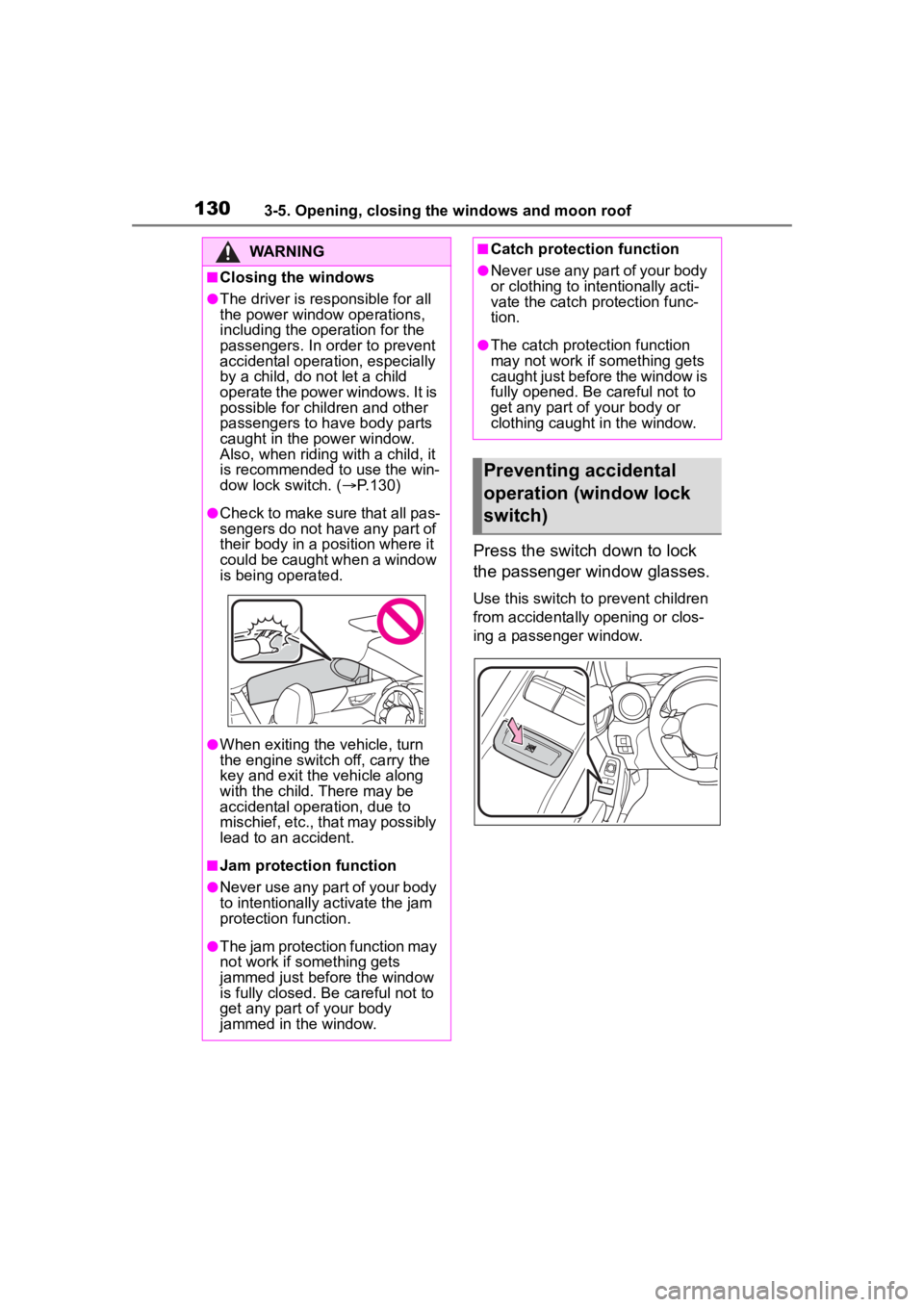
Press the switch down to lock
the passenger window glasses.
Use this switch to prevent children
from accidentally opening or clos-
ing a passenger window.
WARNING
■Closing the windows
●The driver is responsible for all
the power window operations,
including the operation for the
passengers. In or der to prevent
accidental operation, especially
by a child, do n ot let a child
operate the power windows. It is
possible for children and other
passengers to have body parts
caught in the power window.
Also, when riding with a child, it
is recommended to use the win-
dow lock switch. ( P.130)
●Check to make sure that all pas-
sengers do not have any part of
their body in a position where it
could be caught when a window
is being operated.
●When exiting the vehicle, turn
the engine switch off, carry the
key and exit the vehicle along
with the child. There may be
accidental operation, due to
mischief, etc., that may possibly
lead to an accident.
■Jam protection function
●Never use any part of your body
to intentionally a ctivate the jam
protection function.
●The jam protection function may
not work if something gets
jammed just before the window
is fully closed. Be careful not to
get any part of your body
jammed in the window.
■Catch protection function
●Never use any part of your body
or clothing to intentionally acti-
vate the catch protection func-
tion.
●The catch protection function
may not work if something gets
caught just before the window is
fully opened. Be careful not to
get any part of your body or
clothing caught in the window.
Preventing accidental
operation (window lock
switch)
Page 132 of 449
1324-1. Before driving
4-1.Before driving
■Starting the engine
P. 1 4 5
■Driving
Automatic transmission
1 With the brake pedal
depressed, shift the shift
lever to D. ( P.149)
2 Release the parking brake.
( P.156)
3 Gradually release the brake
pedal and gently depress the
accelerator pedal to acceler-
ate the vehicle.
Manual transmission
1 While depressing the clutch
pedal, shift the shift lever to
1. ( P.153)
2 Release the parking brake.
( P.156)
3 Gradually release the clutch
pedal. At the same time, gen-
tly depress the accelerator
pedal to accelerate the vehi-
cle.
■Stopping
Automatic transmission
1 With the shift lever in D,
depress the brake pedal. 2
If necessary, set the parking
brake.
If the vehicle is to be stopped for an
extended period of time, shift the
shift lever to P. ( P.149)
Manual transmission
1 While depressing the clutch
pedal, depress the brake
pedal.
2 If necessary, set the parking
brake.
If the vehicle is to be stopped for an
extended period of time, shift the
shift lever to N. ( P.153)
■Parking the vehicle
Automatic transmission
1 With the shift lever in D,
depress the brake pedal to
stop the vehicle completely.
2 Set the parking brake
( P.156), shift the shift lever
to P. ( P.149)
Check the parking brake indicator
is illuminated.
3 Press the engine switch to
stop the engine.
4 Slowly release the brake
pedal.
5 Lock the door, making sure
that you have the key on your
person.
If parking on a hill, block the wheels
as needed.
Manual transmission
1 While depressing the clutch
pedal, depress the brake
pedal to stop the vehicle
completely.
Driving the vehicle
The following procedures
should be observed to
ensure safe driving:
Driving procedure
Page 133 of 449
1334-1. Before driving
4
Driving
2Set the parking brake.
( P.156)
Check that the park ing brake indi-
cator is illuminated.
3 Shift the shift lever to N.
( P.153)
If parking on a hill, shift the shift
lever to 1 or R and block the wheels
as needed.
4Press the engine switch to
stop the engine.
5 Slowly release the brake
pedal.
6 Lock the door, making sure
that you have the key on your
person.
■Starting off on a steep
uphill
Automatic transmission
1 Make sure that the parking
brake is set and shift the shift
lever to D.
2 Gently depress the accelera-
tor pedal.
3 Release the parking brake.
Manual transmission
1 Make sure that the parking
brake is set and shift the shift
lever to 1.
2 Lightly depress the accelera-
tor pedal at the same time as
gradually releasing the clutch
pedal.
3 Release the parking brake.
■When starting off on an uphill
The hill-start assis t control will acti- vate. (
P.258)
■Driving in the rain
●Drive carefully whe n it is raining,
because visibility will be reduced,
the windows may become
fogged-up, and the road will be
slippery.
●Drive carefully whe n it starts to
rain, because the road surface will
be especially slippery.
●Refrain from hig h speeds when
driving on an expressway in the
rain, because there may be a
layer of water between the tires
and the road surface, preventing
the steering and brakes from
operating properly.
■Engine speed while driving
(vehicles with an automatic
transmission)
In the following conditions, the
engine speed may become high
while driving. This is due to auto-
matic up-shifting control or
down-shifting implementation to
meet driving conditions. It does not
indicate sudden acceleration.
●The vehicle is judged to be driving
uphill or downhill
●When the accele rator pedal is
released
●When driving on curves
●When the brake p edal is firmly
depressed
■Restraining the engine output
(Brake Override System)
When the accelerator and brake
pedals are depressed at the same
time, the engine output may be
restrained.
■New vehicle break-in driving
(the first 1000 miles [1600 km])
The performance a nd long life of
your vehicle are dependent on how
you handle and care for your vehicle
while it is new. Follow these instruc-
tions during the first 1000 miles
(1600 km):