light TOYOTA 86 2022 Workshop Manual
[x] Cancel search | Manufacturer: TOYOTA, Model Year: 2022, Model line: 86, Model: TOYOTA 86 2022Pages: 449, PDF Size: 8.5 MB
Page 135 of 449
1354-1. Before driving
4
Driving
WARNING
●Do not drive the vehicle over or
stop the vehicle near flammable
materials.
The exhaust system and
exhaust gases can be
extremely hot. These hot parts
may cause a fire if there is any
flammable material nearby.
●Vehicles with a manual trans-
mission: Do not release the
clutch pedal too quickly. Doing
so may propel the vehicle for-
ward, possibly causing an acci-
dent.
●During normal driving, do not
turn off the engine. Turning the
engine off while driving will not
cause loss of steering or brak-
ing control, but the power assist
to these systems will be lost.
This will make it more difficult to
steer and brake, so you should
pull over and stop the vehicle as
soon as it is safe to do so.
However, in the event of an
emergency, such as if it
becomes impossible to stop the
vehicle in the normal way:
P. 3 3 8
●Use engine braking (downshift)
to maintain a safe speed when
driving down a steep hill.
Using the brakes continuously
may cause the brakes to over-
heat and lose effectiveness.
(
P.149, 153)
●Do not adjust the positions of
the steering wheel, the seat, or
the inside or outside rear view
mirrors while driving.
Doing so may result in a loss of
vehicle control.
●Always check that all passen-
gers’ arms, heads or other parts
of their body are not outside the
vehicle.
●Do not drive in excess of the
speed limit. Even if the legal
speed limit permits it, do not
drive over 85 mph (140 km/h)
unless your vehicle has
high-speed capability tires. Driv-
ing over 85 mph (140 km/h)
may result in tire failure, loss of
control and possible injury. Be
sure to consult a tire dealer to
determine whether the tires on
your vehicle are high-speed
capability tires or not before
driving at such speeds.
■When driving on slippery
road surfaces
●Sudden braking, acceleration
and steering may cause tire
slippage and reduce your ability
to control the vehicle.
●Sudden acceleration, engine
braking due to shifting, or
changes in engine speed could
cause the vehicle to skid.
●After driving through a puddle,
lightly depress the brake pedal
to make sure that the brakes
are functioning properly. Wet
brake pads may prevent the
brakes from functioning prop-
erly. If the brakes on only one
side are wet and not functioning
properly, steering control may
be affected.
■When shifting the shift lever
●Vehicles with an automatic
transmission: Do not let the
vehicle roll backward while the
shift lever is in a driving posi-
tion, or roll forw ard while the
shift lever is in R.
Doing so may cause the engine
to stall or lead to poor brake and
steering performance, resulting
in an accident or damage to the
vehicle.
Page 137 of 449
1374-1. Before driving
4
Driving
WARNING
■When the vehicle is parked
●Do not leave glasses, cigarette
lighters, spray cans, or soft
drink cans in the vehicle when it
is in the sun.
Doing so may result in the fol-
lowing:
• Gas may leak from a cigarette lighter or spray can, and may
lead to a fire.
• The temperature inside the vehicle may cause the plastic
lenses and plastic material of
glasses to deform or crack.
• Soft drink cans may fracture, causing the contents to spray
over the interior of the vehicle,
and may also caus e a short cir-
cuit in the vehicle’s electrical
components.
●Do not leave cigarette lighters in
the vehicle. If a cigarette lighter
is in a place such as the glove
box or on the floor, it may be lit
accidentally when luggage is
loaded or the seat is adjusted,
causing a fire.
●Do not attach adhesive discs to
the windshield or windows. Do
not place containers such as air
fresheners on the instrument
panel or dashboard. Adhesive
discs or containers may act as
lenses, causing a fire in the
vehicle.
●Do not leave a door or window
open if the curved glass is
coated with a metallized film
such as a silver-colored one.
Reflected sunlight may cause
the glass to act as a lens, caus-
ing a fire.
●Always apply the parking brake,
shift the shift lever to P (vehicles
with an automatic transmission),
stop the engine and lock the
vehicle.
Do not leave the vehicle unat-
tended while the engine is run-
ning.
If the vehicle is parked with the
shift lever in P but the parking
brake is not set, the vehicle may
start to move, possibly leading
to an accident.
●Do not touch the exhaust pipes
while the engine is running or
immediately after turning the
engine off.
Doing so may cause burns.
■When taking a nap in the vehi-
cle
Always turn the engine off. Other-
wise, if you accidentally move the
shift lever or depress the acceler-
ator pedal, this could cause an
accident or fire due to engine
overheating. Additionally, if the
vehicle is parked in a poorly venti-
lated area, exhaust gases may
collect and enter the vehicle, lead-
ing to death or a serious health
hazard.
■When braking
●When the brakes are wet, drive
more cautiously.
Braking distance increases
when the brakes are wet, and
this may cause one side of the
vehicle to brake d ifferently than
the other side. Also, the parking
brake may not securely hold the
vehicle.
Page 147 of 449
1474-2. Driving procedures
4
Driving
Automatic transmission
1 Stop the vehicle completely.
2 Set the parking brake
( P.156), and shift the shift
lever to P.
Check the parking brake indicator
is illuminated.
3 Press the engine switch.
The engine will stop, and the meter
display will be extinguished.
4Release the brake pedal and
check that “ACCESSORY” or
“IGNITION ON” is not shown
on the meters.
Manual transmission
1 Stop the vehicle completely.
2 Set the parking brake.
( P.156)
Check the parking brake indicator
is illuminated.
3Shift the shift lever to N.
( P.153)
4 Press the engine switch.
The engine will stop, and the meter
display will be extinguished.
5Release the brake pedal and
check that “ACCESSORY” or
“IGNITION ON” is not shown
on the meters.
Modes can be changed by NOTICE
■Symptoms indicating a mal-
function with the engine
switch
If the engine switch seems to be
operating somewh at differently
than usual, such as the switch
sticking slightly, there may be a
malfunction. Contact your Toyota
dealer immediately.
Stopping the engine
WARNING
■Stopping the engine in an
emergency
If you want to stop the engine in
an emergency while driving the
vehicle, press and hold the engine
switch for more than 2 seconds,
or press it briefly 3 times or more
in succession. ( P.338)
However, do not touch the engine
switch while driving except in an
emergency. Turning the engine off
while driving will not cause loss of
steering or braking control, but the
power assist to these systems will
be lost. This will make it more dif-
ficult to steer a nd brake, so you
should pull over and stop the
vehicle as soon as it is safe to do
so.
●If the engine switch is operated
while the vehicle is running, a
warning message will be shown
on the multi-information display
and a buzzer sounds.
●Vehicles with an automatic
transmission: To restart the
engine after performing an
emergency shutdown, shift the
shift lever to N and then press
the engine switch.
●Vehicles with a manual trans-
mission: To restart the engine
after performing an emergency
shutdown, depress the clutch
pedal and then press the engine
switch.
Changing engine switch
modes
Page 152 of 449
1524-2. Driving procedures
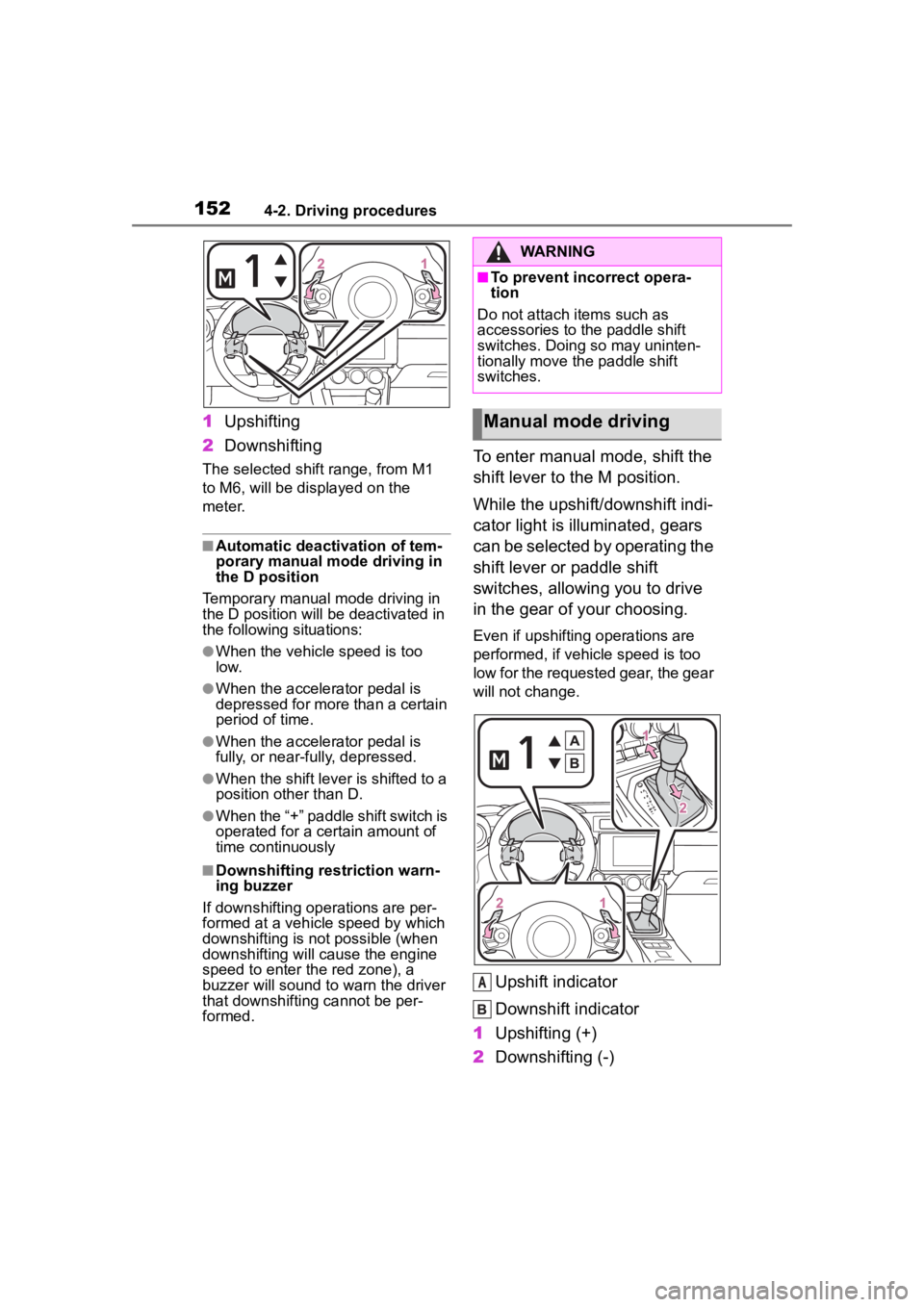
1Upshifting
2 Downshifting
The selected shift range, from M1
to M6, will be dis played on the
meter.
■Automatic deactivation of tem-
porary manual mode driving in
the D position
Temporary manual mode driving in
the D position will be deactivated in
the following situations:
●When the vehicle speed is too
low.
●When the accelerator pedal is
depressed for more than a certain
period of time.
●When the accelerator pedal is
fully, or near-fully, depressed.
●When the shift lever is shifted to a
position other than D.
●When the “+” paddle shift switch is
operated for a certain amount of
time continuously
■Downshifting restriction warn-
ing buzzer
If downshifting operations are per-
formed at a vehicle speed by which
downshifting is not possible (when
downshifting will cause the engine
speed to enter the red zone), a
buzzer will sound to w arn the driver
that downshifting cannot be per-
formed.
To enter manual mode, shift the
shift lever to the M position.
While the upshift/downshift indi-
cator light is illuminated, gears
can be selected by operating the
shift lever or paddle shift
switches, allowing you to drive
in the gear of your choosing.
Even if upshifting operations are
performed, if vehicle speed is too
low for the requested gear, the gear
will not change.
Upshift indicator
Downshift indicator
1 Upshifting (+)
2 Downshifting (-)
WARNING
■To prevent inc orrect opera-
tion
Do not attach items such as
accessories to the paddle shift
switches. Doing so may uninten-
tionally move the paddle shift
switches.
Manual mode driving
A
Page 155 of 449
1554-2. Driving procedures
4
Driving
■Shift position indicator display
The selected shift position will not
appear in the following situations:
●When the shift lever is in N.
●When the vehicle speed is 6 mph
(10 km/h) or less (except when the
shift lever is in R).
●When the clutch pedal is
depressed.
To help enable fuel-efficient driv-
ing, shift-up indicator illuminate
to indicate upshift timing.
The indicator can be turned on/off.
( P.400)
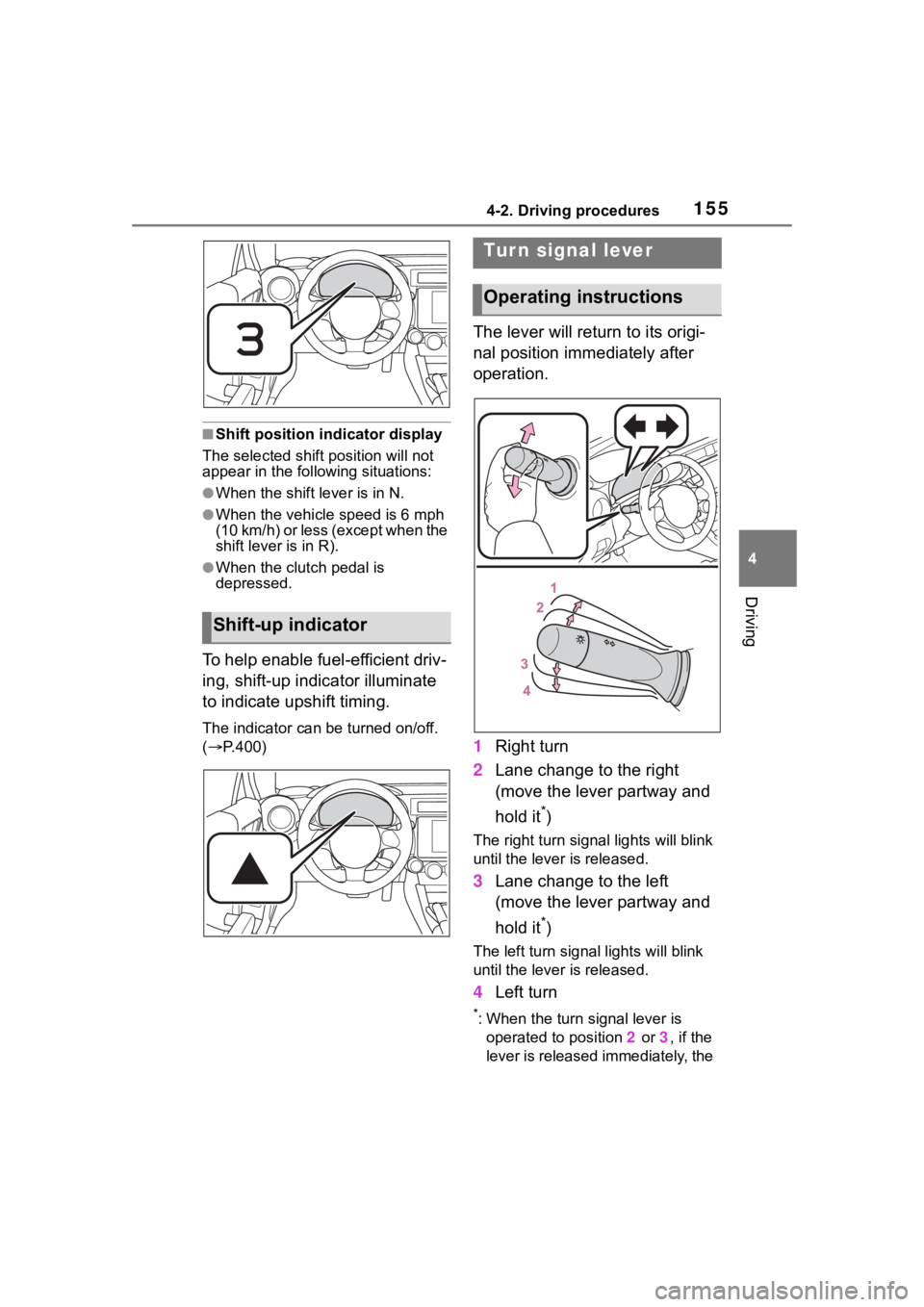
The lever will return to its origi-
nal position immediately after
operation.
1 Right turn
2 Lane change to the right
(move the lever partway and
hold it
*)
The right turn signal lights will blink
until the lever is released.
3Lane change to the left
(move the lever partway and
hold it
*)
The left turn signal lights will blink
until the lever is released.
4Left turn
*: When the turn signal lever is
operated to position 2 or 3, if the
lever is released immediately, the
Shift-up indicator
Tur n signal lever
Operating instructions
Page 156 of 449
1564-2. Driving procedures
turn signal lights will blink 3 times.
■If the turn signals do not
stop flashing after turning
left or right, or if you want
to stop them flashing
Operate the lever in the oppo-
site direction to either position 2
or 3. If you move the lever to
either position 1 or 4, the
selected turn signals will flash.
■Turn signals can be operated
when
The engine switch is in ON.
■If the indicator flashes faster
than usual
Check that a light bulb in the front or
rear turn signal lights has not
burned out.
■If the turn signals stop flashing
before a lane change has been
performed
Operate the lever again.
■Customization
Some functions can be customized.
( P.400)
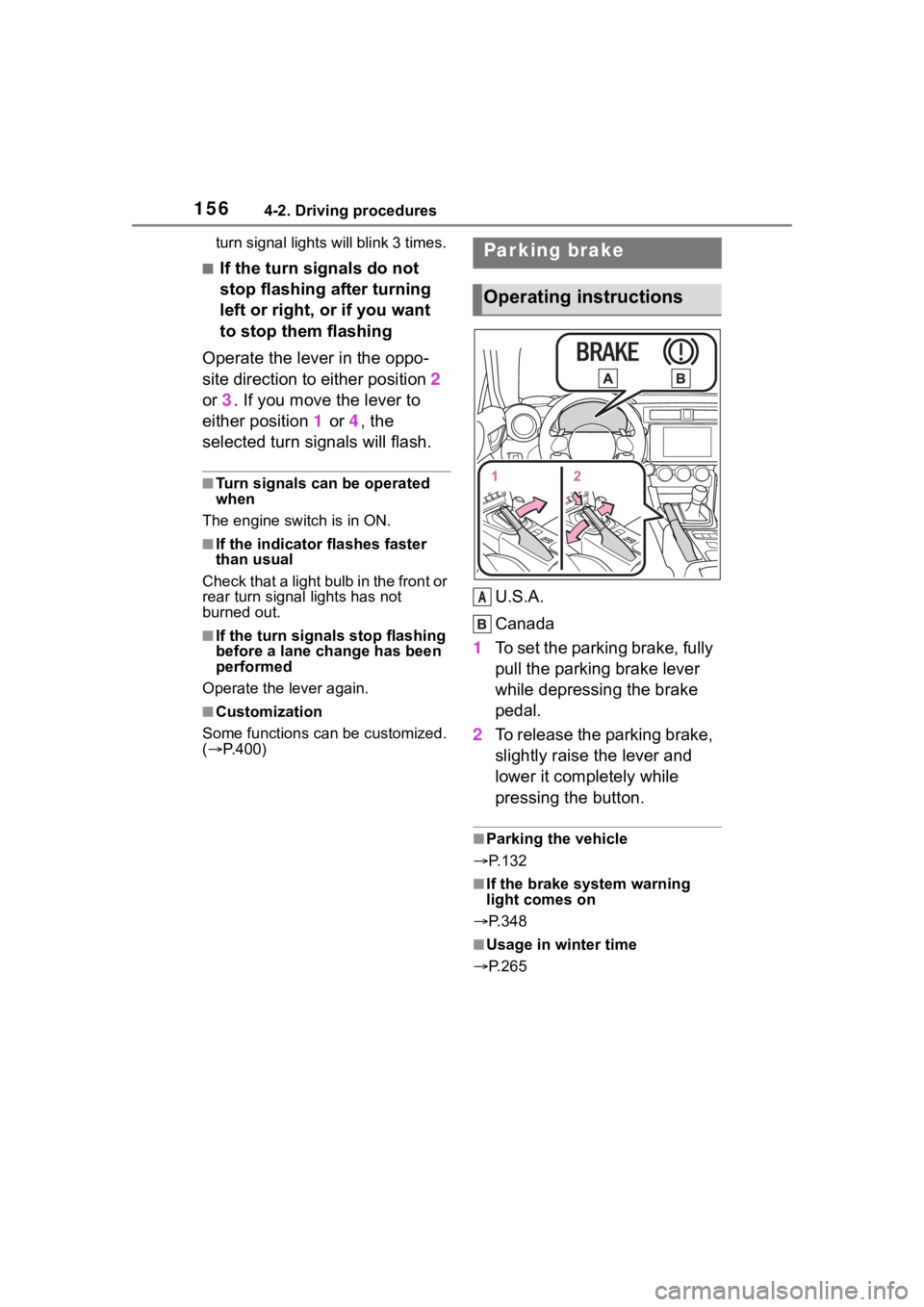
U.S.A.
Canada
1 To set the parking brake, fully
pull the parking brake lever
while depressing the brake
pedal.
2 To release the parking brake,
slightly raise the lever and
lower it completely while
pressing the button.
■Parking the vehicle
P.132
■If the brake system warning
light comes on
P.348
■Usage in winter time
P.265
Parking brake
Operating instructions
A
Page 158 of 449
1584-3. Operating the lights and wipers
4-3.Operating the lights and wipers
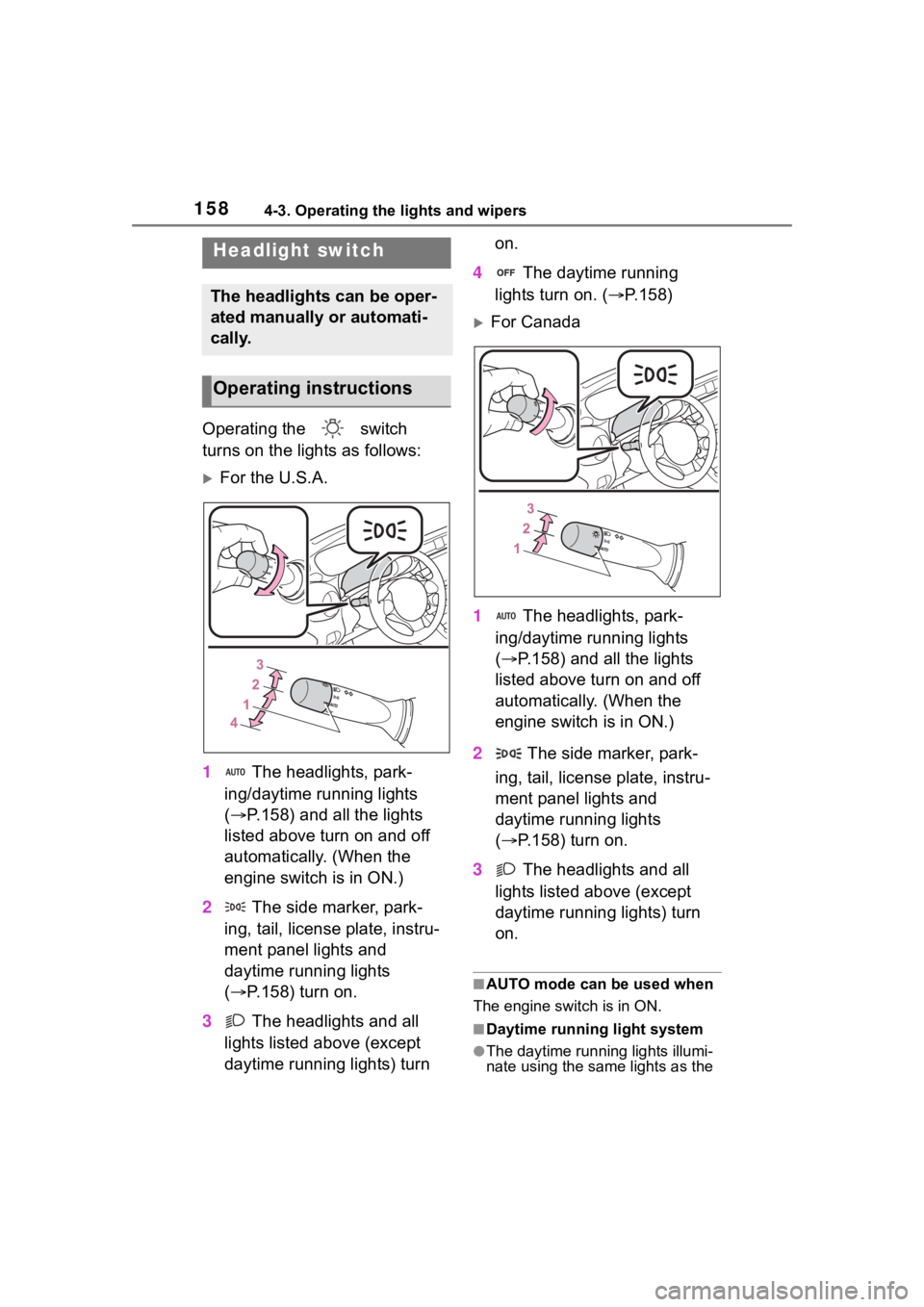
Operating the switch
turns on the lights as follows:
For the U.S.A.
1 The headlights, park-
ing/daytime running lights
( P.158) and all the lights
listed above turn on and off
automatically. (When the
engine switch is in ON.)
2 The side marker, park-
ing, tail, license plate, instru-
ment panel lights and
daytime running lights
( P.158) turn on.
3 The headlights and all
lights listed above (except
daytime running lights) turn on.
4 The daytime running
lights turn on. ( P.158)
For Canada
1 The headlights, park-
ing/daytime running lights
( P.158) and all the lights
listed above turn on and off
automatically. (When the
engine switch is in ON.)
2 The side marker, park-
ing, tail, license plate, instru-
ment panel lights and
daytime running lights
( P.158) turn on.
3 The headlights and all
lights listed above (except
daytime running lights) turn
on.
■AUTO mode can be used when
The engine switch is in ON.
■Daytime running light system
●The daytime runn ing lights illumi-
nate using the same lights as the
Headlight switch
The headlights can be oper-
ated manually or automati-
cally.
Operating instructions
Page 159 of 449
1594-3. Operating the lights and wipers
4
Driving
parking lights and illuminate
brighter than the parking lights.
●To make your vehicle more visible
to other drivers during daytime
driving, the daytime running lights
turn on automatically when all of
the following conditions are met.
(The daytime running lights are
not designed for use at night.)
• The engine is running
• The shift lever is shifted out of P (vehicles with an automatic trans-
mission)
• The parking brake is released
• The headlight s witch is in the
(U.S.A. only), or
* position
*: When the surroundings are bright
The daytime running lights remain
on after they illumi nate, even if the
parking brake is set again.
●When the turn signal indicators
are flashing, the daytime running
light on the side that the turn sig-
nals are flashing will turn off.
●When the emergency flashers are
flashing, both daytime running
lights will turn off.
●Compared to turning on the head-
lights, the daytime running light
system offers gr eater durability
and consumes less electricity, so
it can help improve fuel economy.
■Headlight control sensor
In the following si tuations, the auto-
matic light control system may not
operate correctly.
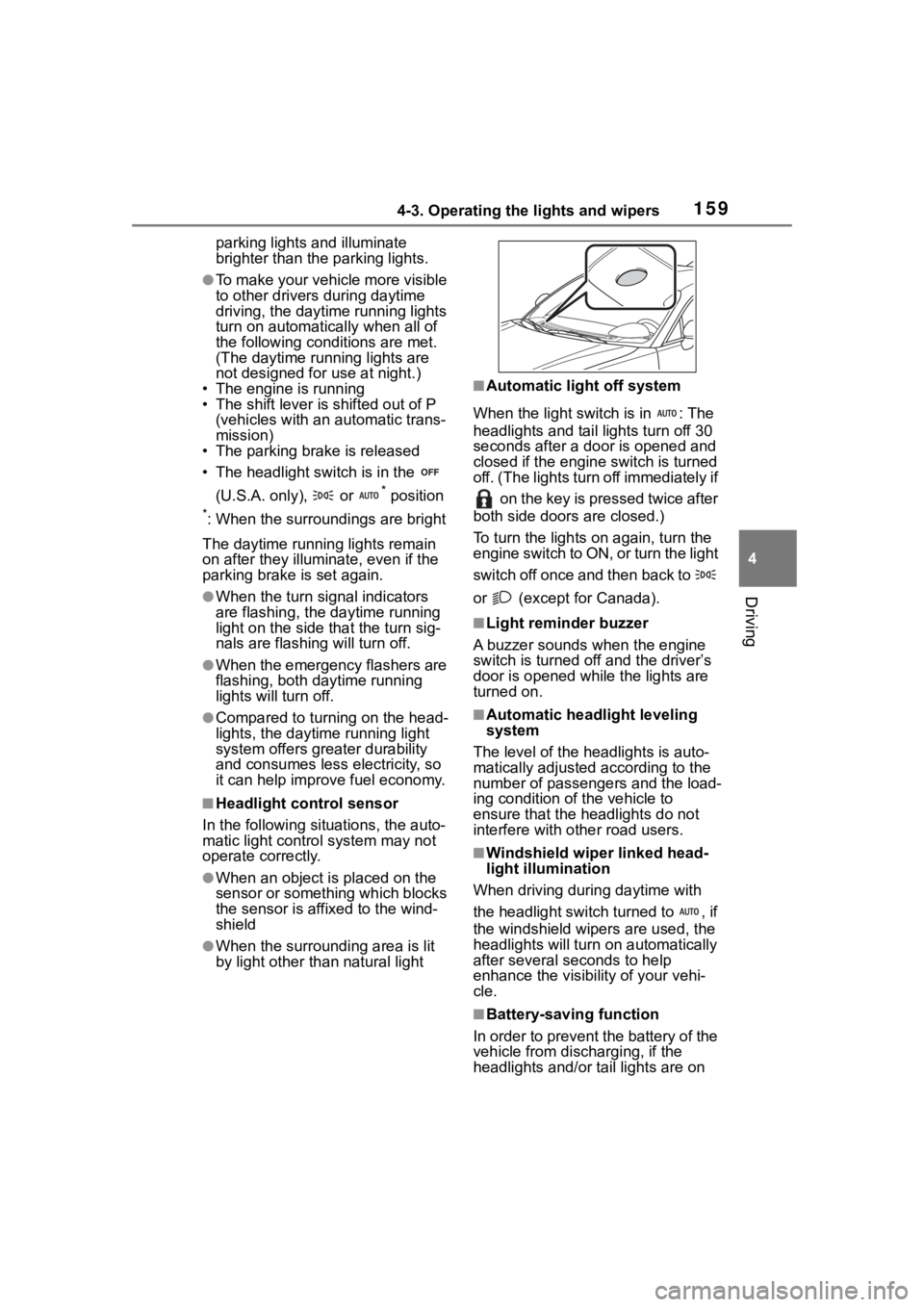
●When an object is placed on the
sensor or something which blocks
the sensor is affixed to the wind-
shield
●When the surrounding area is lit
by light other than natural light
■Automatic light off system
When the light switch is in : The
headlights and tail lights turn off 30
seconds after a door is opened and
closed if the engine switch is turned
off. (The lights turn off immediately if on the key is pressed twice after
both side doors are closed.)
To turn the lights on again, turn the
engine switch to ON, or turn the light
switch off once and then back to
or (except for Canada).
■Light reminder buzzer
A buzzer sounds when the engine
switch is turned off and the driver’s
door is opened wh ile the lights are
turned on.
■Automatic headlight leveling
system
The level of the headlights is auto-
matically adjusted according to the
number of passengers and the load-
ing condition of the vehicle to
ensure that the headlights do not
interfere with o ther road users.
■Windshield wiper linked head-
light illumination
When driving during daytime with
the headlight switch turned to , if
the windshield wipers are used, the
headlights will turn o n automatically
after several se conds to help
enhance the visibility of your vehi-
cle.
■Battery-saving function
In order to prevent the battery of the
vehicle from discharging, if the
headlights and/or tail lights are on
Page 160 of 449
1604-3. Operating the lights and wipers
when the engine switch is turned off
the battery saving function will oper-
ate and automatically turn off all the
lights after approximately 20 min-
utes.
When any of the fo llowing are per-
formed, the battery -saving function
will be disabled.
●When the engine switch is turned
to ACC or ON
●When the headlight switch is in
the position (U.S.A. only)
●When a door is opened or closed
■Welcome light illumination con-
trol
The headlights and t ail lights auto-
matically turn on at night when the
doors are unlocked using the wire-
less remote control if the light switch
is in the position. The headlights
and tail lights will turn off automati-
cally after approximately 30 sec-
onds.
■Customization
Some functions can be customized.
( P.400)
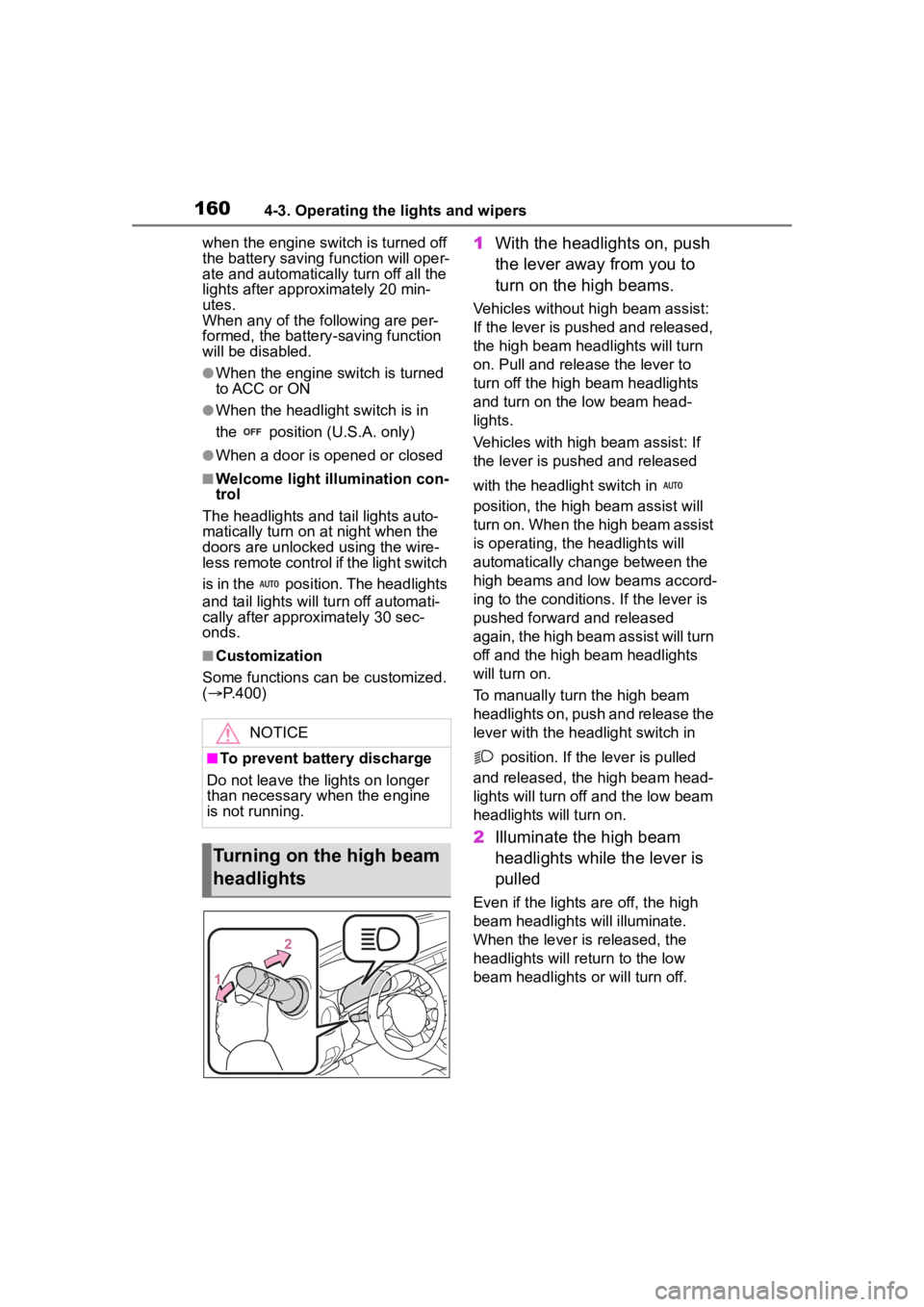
1 With the headlights on, push
the lever away from you to
turn on the high beams.
Vehicles without high beam assist:
If the lever is pushed and released,
the high beam he adlights will turn
on. Pull and releas e the lever to
turn off the high beam headlights
and turn on the low beam head-
lights.
Vehicles with high beam assist: If
the lever is pushed and released
with the headlight switch in
position, the high beam assist will
turn on. When the high beam assist
is operating, the headlights will
automatically change between the
high beams and low beams accord-
ing to the conditio ns. If the lever is
pushed forward and released
again, the high beam assist will turn
off and the high beam headlights
will turn on.
To manually turn the high beam
headlights on, push and release the
lever with the headlight switch in
position. If the lever is pulled
and released, the high beam head-
lights will turn off and the low beam
headlights will turn on.
2 Illuminate the high beam
headlights while the lever is
pulled
Even if the lights are off, the high
beam headlights will illuminate.
When the lever is released, the
headlights will retu rn to the low
beam headlights or will turn off.
NOTICE
■To prevent battery discharge
Do not leave the lights on longer
than necessary when the engine
is not running.
Turning on the high beam
headlights
Page 161 of 449
1614-3. Operating the lights and wipers
4
Driving
*: If equipped
The SRH (Steering Responsive
Headlights) is a function which,
according to the steering wheel
operation and vehicle speed
when the vehicle is being driven
forward, automatically adjusts
the angle of the headlights to
illuminate intersections and cor-
ners, improving visibility.
This function operates when the
vehicle speed is 8 km/h or higher.
■Tu r n i n g S R H o f f
The SRH can be turned off
through a setting on the meter.
( P.400)
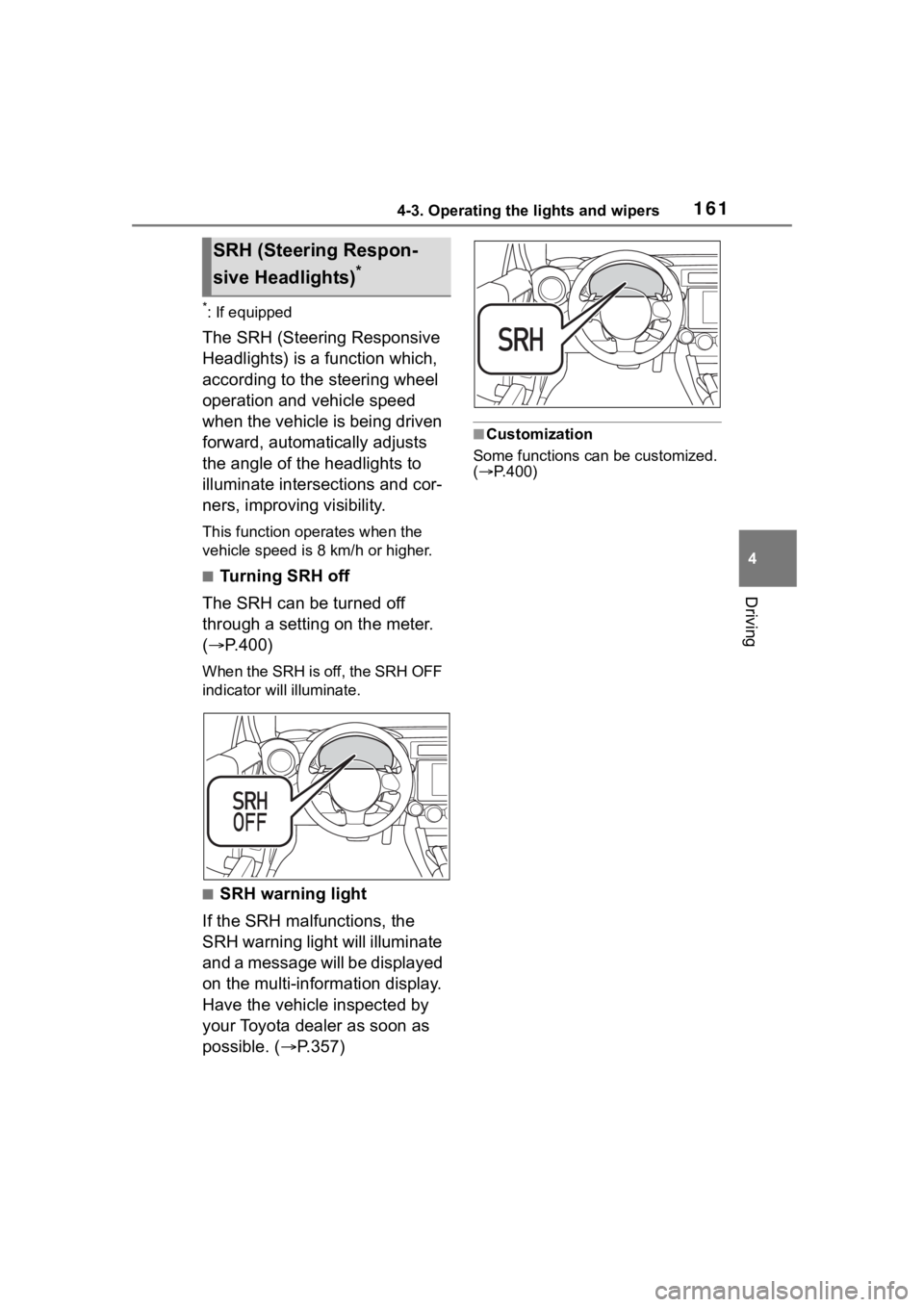
When the SRH is off, the SRH OFF
indicator will illuminate.
■SRH warning light
If the SRH malfunctions, the
SRH warning light will illuminate
and a message will be displayed
on the multi-information display.
Have the vehicle inspected by
your Toyota dealer as soon as
possible. ( P.357)
■Customization
Some functions can be customized.
( P.400)
SRH (Steer ing Respon-
sive Headlights)
*