light TOYOTA 86 2022 Repair Manual
[x] Cancel search | Manufacturer: TOYOTA, Model Year: 2022, Model line: 86, Model: TOYOTA 86 2022Pages: 449, PDF Size: 8.5 MB
Page 162 of 449
1624-3. Operating the lights and wipers
*: If equipped
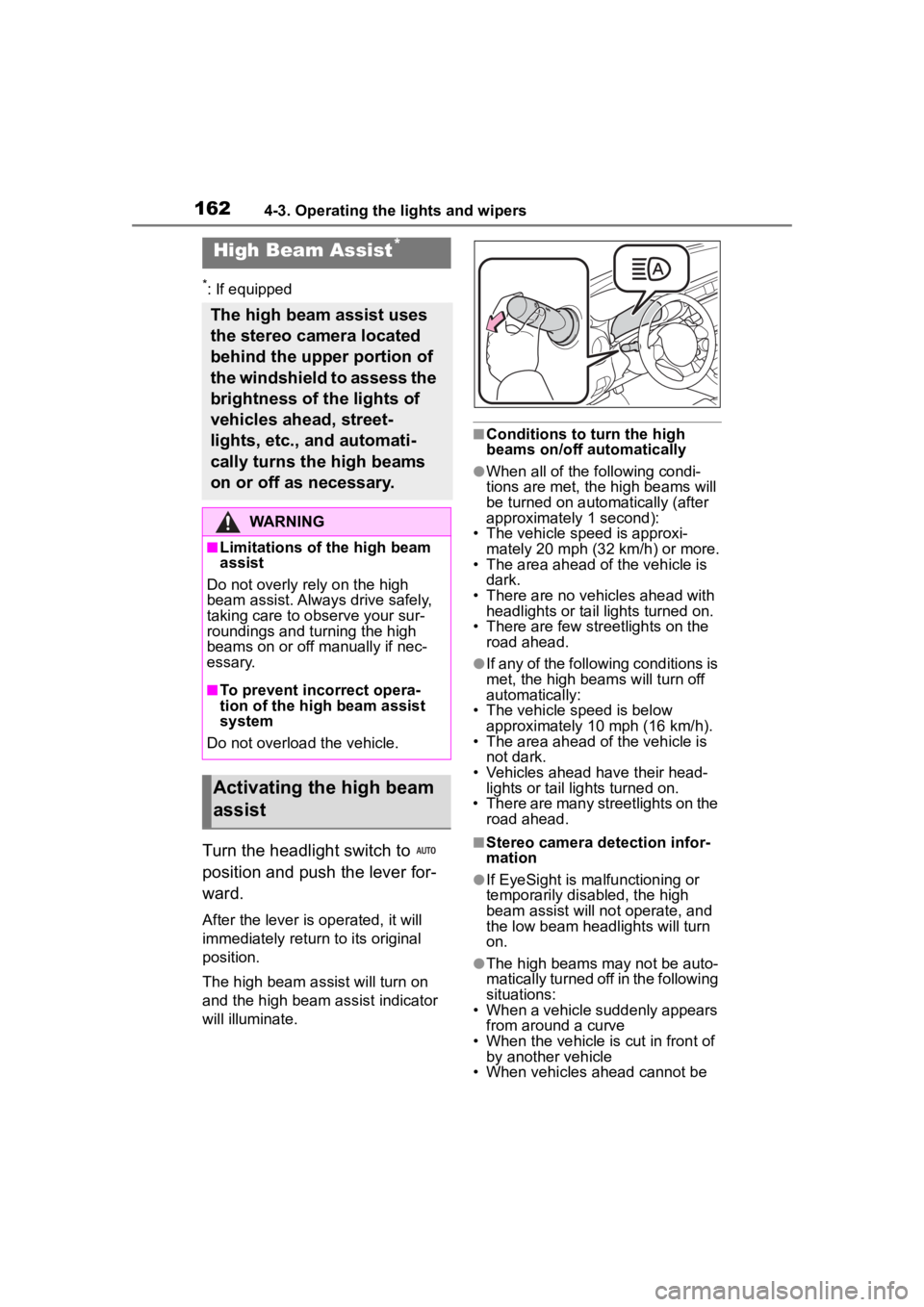
Turn the headlight switch to
position and push the lever for-
ward.
After the lever is operated, it will
immediately return to its original
position.
The high beam ass ist will turn on
and the high beam assist indicator
will illuminate.
■Conditions to turn the high
beams on/off automatically
●When all of the following condi-
tions are met, the high beams will
be turned on autom atically (after
approximately 1 second):
• The vehicle speed is approxi-
mately 20 mph (32 km/h) or more.
• The area ahead of the vehicle is dark.
• There are no vehicles ahead with headlights or tail lights turned on.
• There are few str eetlights on the
road ahead.
●If any of the following conditions is
met, the high beams will turn off
automatically:
• The vehicle speed is below
approximately 10 mph (16 km/h).
• The area ahead of the vehicle is not dark.
• Vehicles ahead have their head- lights or tail lights turned on.
• There are many streetlights on the
road ahead.
■Stereo camera detection infor-
mation
●If EyeSight is malfunctioning or
temporarily disabled, the high
beam assist will no t operate, and
the low beam headlights will turn
on.
●The high beams m ay not be auto-
matically turned off in the following
situations:
• When a vehicle suddenly appears
from around a curve
• When the vehicle is cut in front of by another vehicle
• When vehicles ahead cannot be
High Beam Assist*
The high beam assist uses
the stereo camera located
behind the upper portion of
the windshield to assess the
brightness of the lights of
vehicles ahead, street-
lights, etc., and automati-
cally turns the high beams
on or off as necessary.
WARNING
■Limitations of the high beam
assist
Do not overly rely on the high
beam assist. Always drive safely,
taking care to o bserve your sur-
roundings and turning the high
beams on or off manually if nec-
essary.
■To prevent incorrect opera-
tion of the high beam assist
system
Do not overload the vehicle.
Activating the high beam
assist
Page 163 of 449
1634-3. Operating the lights and wipers
4
Driving
detected due to repeated curves,
road dividers or roadside trees
• When vehicles ahead appear in a
faraway lane on a wide road
• When the lights of vehicles ahead are not on
●The high beams may be turned off
if a vehicle ahead that is using fog
lights without its headlights turned
on is detected.
●House lights, street lights, traffic
signals, and illumi nated billboards
or signs and other reflective
objects may cause the high
beams to change to the low
beams, or the low beams to
remain on.
●The following factors may affect
the amount of time taken for the
high beams to turn on or off:
• The brightness of the headlights,
fog lights, and ta il lights of vehi-
cles ahead
• The movement and direction of
vehicles ahead
• When a vehicle ahead only has operational lights on one side
• When a vehicle ahead is a two-wheeled vehicle
• The condition of the road (gradi-
ent, curve, condi tion of the road
surface, etc.)
• The number of passengers and
amount of luggage in the vehicle
• When there is a lag in response due to the limitat ions of the detec-
tion range of the stereo camera
●The high beams may turn on or off
unexpectedly.
●Bicycles or similar vehicles may
not be detected.
●In the following situations the sys-
tem may not be abl e to correctly
detect the surrounding brightness
level. This may cause the low
beams to remain on or the high
beams to flash or dazzle pedestri-
ans or vehicles ahead. In such a
case, it is necess ary to manually
switch between the high and low
beams.
• When driving in inclement weather (heavy rain, snow, fog, sand-
storms, etc.)
• When the windshi eld is obscured
by fog, mist, ice, dirt, etc.
• When the windshield is cracked or damaged
• When the stereo camera is deformed or dirty
• When the temperature of the ste-
reo camera is extremely high
• When the surrounding brightness level is equal to that of headlights,
tail lights or fog lights
• When headlights or tail lights of vehicles ahead are turned off,
dirty, changing color, or not aimed
properly
• When the vehicle is hit by water,
snow, dust, etc. from a preceding
vehicle
• When driving through an area of
intermittently changing brightness
and darkness
• When frequently and repeatedly
driving ascending/descending
roads, or roads with rough, bumpy
or uneven surfaces (such as
stone-paved roads, gravel roads,
etc.)
• When frequently and repeatedly
taking curves or driving on a wind-
ing road
• When there is a h ighly reflective
object ahead of the vehicle, such
as a sign or mirror
• When the back of a preceding
vehicle is highly reflective, such as
a container on a truck
• When the vehicle’s headlights are
damaged or dirty, or are not aimed
properly
• When the vehicle is listing or titling
due to a flat tire, a trailer being
towed, etc.
• Immediately after the engine is
started
• When the headlights are changed between the high beams and low
beams repeatedly in an abnormal
manner
• When the driver believes that the high beams may be flashing or
dazzling pedestrians or other driv-
ers
Page 164 of 449
1644-3. Operating the lights and wipers
The sensitivity of the high beam
assist function can be lowered
by using the following opera-
tions.
1After turning the engine
switch to ON, turn the head-
light switch to position
and push the lever forward.
2 After the high beam assist
indicator on the meter will
illuminate, turn the engine
switch off.
3 Turn the engine switch to ON
and within approximately 15
seconds, press the switch
more than 10 times consecu-
tively.
When the sensitivity of the high
beam assist function is lowered, the
high beam assist i ndicator on the
meter will flash.
■The sensitivity of the high beam
assist function
●The sensitivity of the high beam
assist function cannot be lowered
in the following conditions:
• Adaptive Cruise Control or Con- ventional Cruise Control indicator
is illuminated.
• The EyeSight warning light is illu- minated.
●The sensitivity of the high beam
assist function re turns to normal
level the next time the engine
switch is turned off and the engine
is restarted.
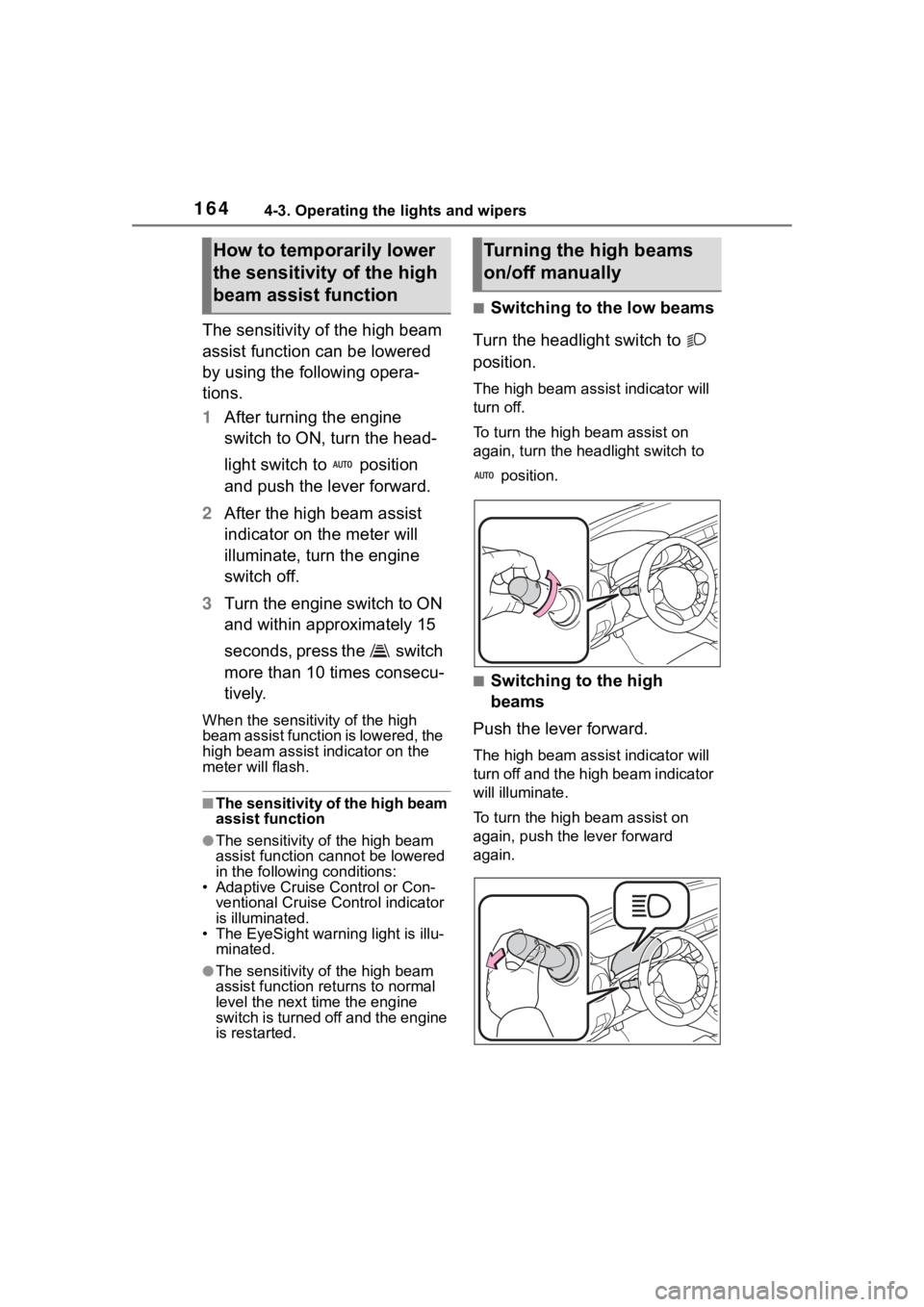
■Switching to the low beams
Turn the headlight switch to
position.
The high bea m assist indicator will
turn off.
To turn the high beam assist on
again, turn the headlight switch to
position.
■Switching to the high
beams
Push the lever forward.
The high bea m assist indicator will
turn off and the high beam indicator
will illuminate.
To turn the high beam assist on
again, push the lever forward
again.
How to temporarily lower
the sensitivity of the high
beam assist functionTurning the high beams
on/off manually
Page 165 of 449
1654-3. Operating the lights and wipers
4
Driving
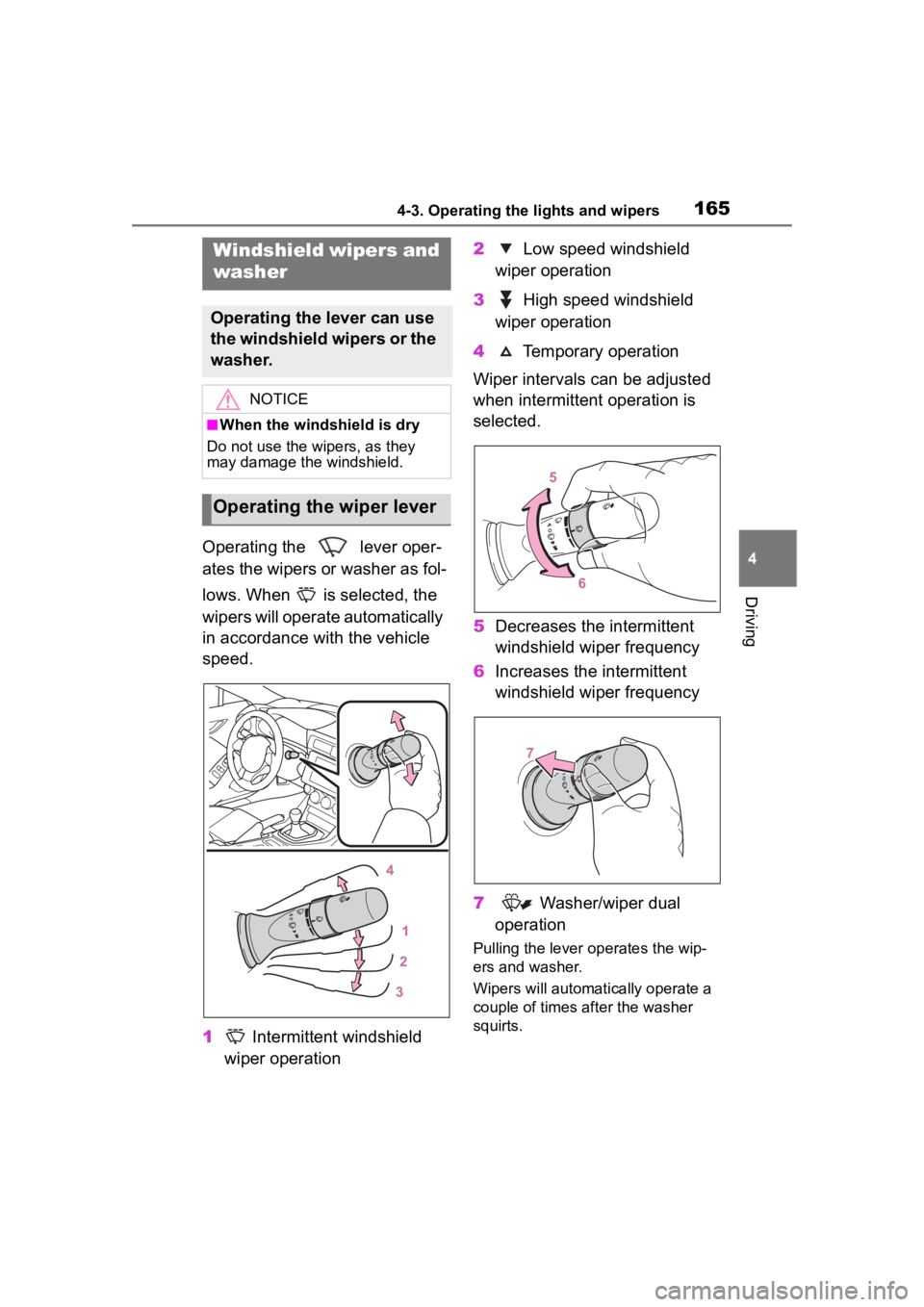
Operating the lever oper-
ates the wipers or washer as fol-
lows. When is selected, the
wipers will operate automatically
in accordance with the vehicle
speed.
1 Intermittent windshield
wiper operation 2
Low speed windshield
wiper operation
3 High speed windshield
wiper operation
4 Temporary operation
Wiper intervals can be adjusted
when intermittent operation is
selected.
5 Decreases the intermittent
windshield wiper frequency
6 Increases the intermittent
windshield wiper frequency
7 Washer/wiper dual
operation
Pulling the lever operates the wip-
ers and washer.
Wipers will automatically operate a
couple of times after the washer
squirts.
Windshield wipers and
washer
Operating the lever can use
the windshield wipers or the
washer.
NOTICE
■When the windshield is dry
Do not use the wipers, as they
may damage the windshield.
Operating the wiper lever
Page 166 of 449
1664-3. Operating the lights and wipers
■The windshield wiper and
washer can be operated when
The engine switch is in ON.
■If no windshield washer fluid
sprays
Check that the wash er nozzles are
not blocked if there is washer fluid in
the windshield washer fluid reser-
v oi r.
WARNING
■Caution regarding the use of
washer fluid
When it is cold, do not use the
washer fluid until the windshield
becomes warm. The fluid may
freeze on the windshield and
cause low visibility. This may lead
to an accident, resulting in death
or serious injury.
NOTICE
■When the washer fluid tank is
empty
Do not operate the switch continu-
ally as the washer fluid pump may
overheat.
■When a nozzle becomes
blocked
In this case, contact your Toyota
dealer. Do not try to clear it with a
pin or other object. The nozzle will
be damaged.
Page 168 of 449
1684-4. Refueling
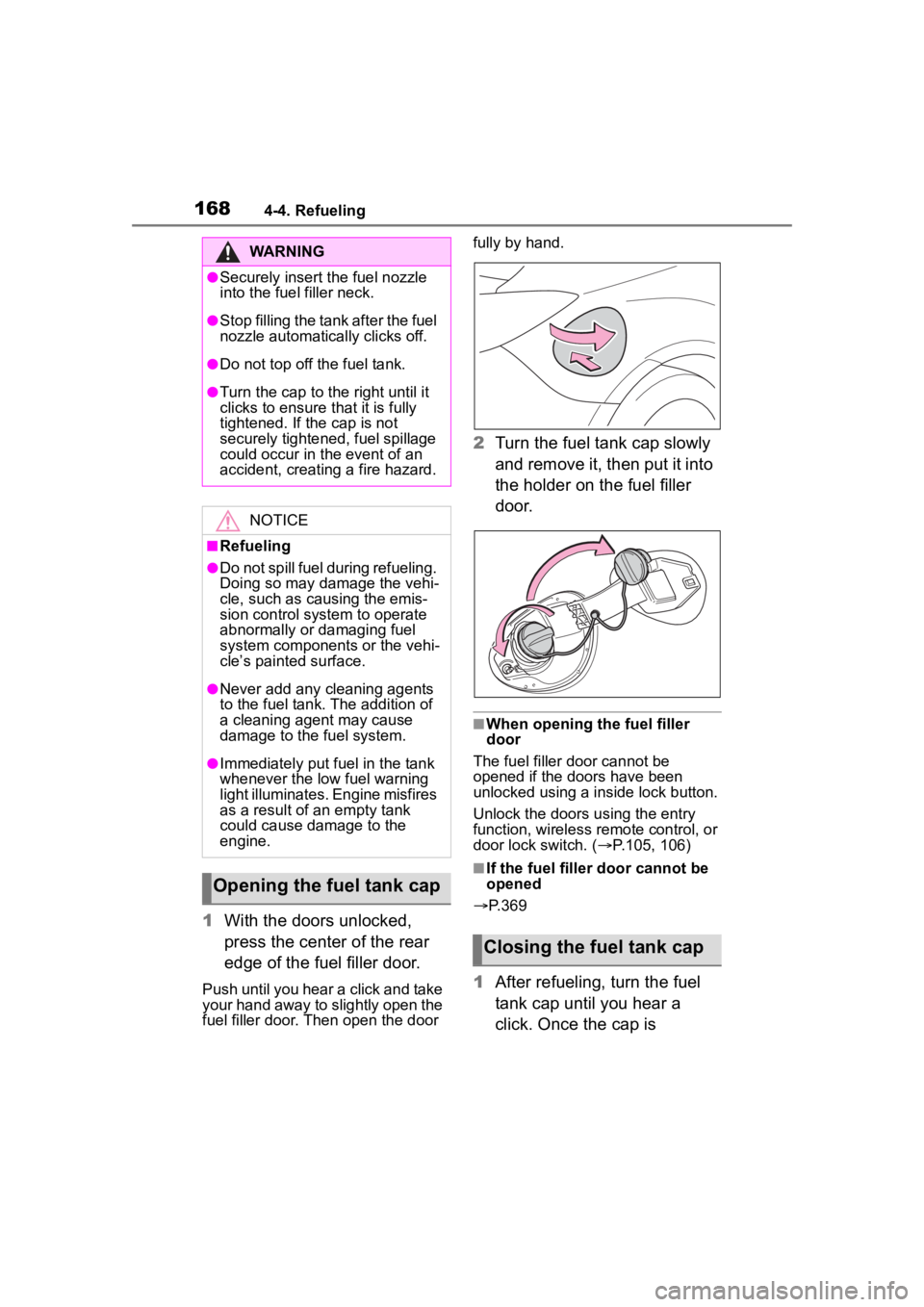
1With the doors unlocked,
press the center of the rear
edge of the fuel filler door.
Push until you hear a click and take
your hand away to slightly open the
fuel filler door. Then open the door fully by hand.
2
Turn the fuel tank cap slowly
and remove it, then put it into
the holder on the fuel filler
door.
■When opening the fuel filler
door
The fuel filler door cannot be
opened if the doo rs have been
unlocked using a inside lock button.
Unlock the doors u sing the entry
function, wireless remote control, or
door lock switch. ( P.105, 106)
■If the fuel filler door cannot be
opened
P.369
1 After refueling, turn the fuel
tank cap until you hear a
click. Once the cap is
WARNING
●Securely insert the fuel nozzle
into the fuel filler neck.
●Stop filling the tank after the fuel
nozzle automatically clicks off.
●Do not top off the fuel tank.
●Turn the cap to the right until it
clicks to ensure that it is fully
tightened. If the cap is not
securely tightened, fuel spillage
could occur in t he event of an
accident, creating a fire hazard.
NOTICE
■Refueling
●Do not spill fuel during refueling.
Doing so may damage the vehi-
cle, such as causing the emis-
sion control system to operate
abnormally or damaging fuel
system components or the vehi-
cle’s painted surface.
●Never add any cleaning agents
to the fuel tank. The addition of
a cleaning agent may cause
damage to the fuel system.
●Immediately put fuel in the tank
whenever the low fuel warning
light illuminates. Engine misfires
as a result of an empty tank
could cause damage to the
engine.
Opening the fuel tank cap
Closing the fuel tank cap
Page 169 of 449
1694-4. Refueling
4
Driving
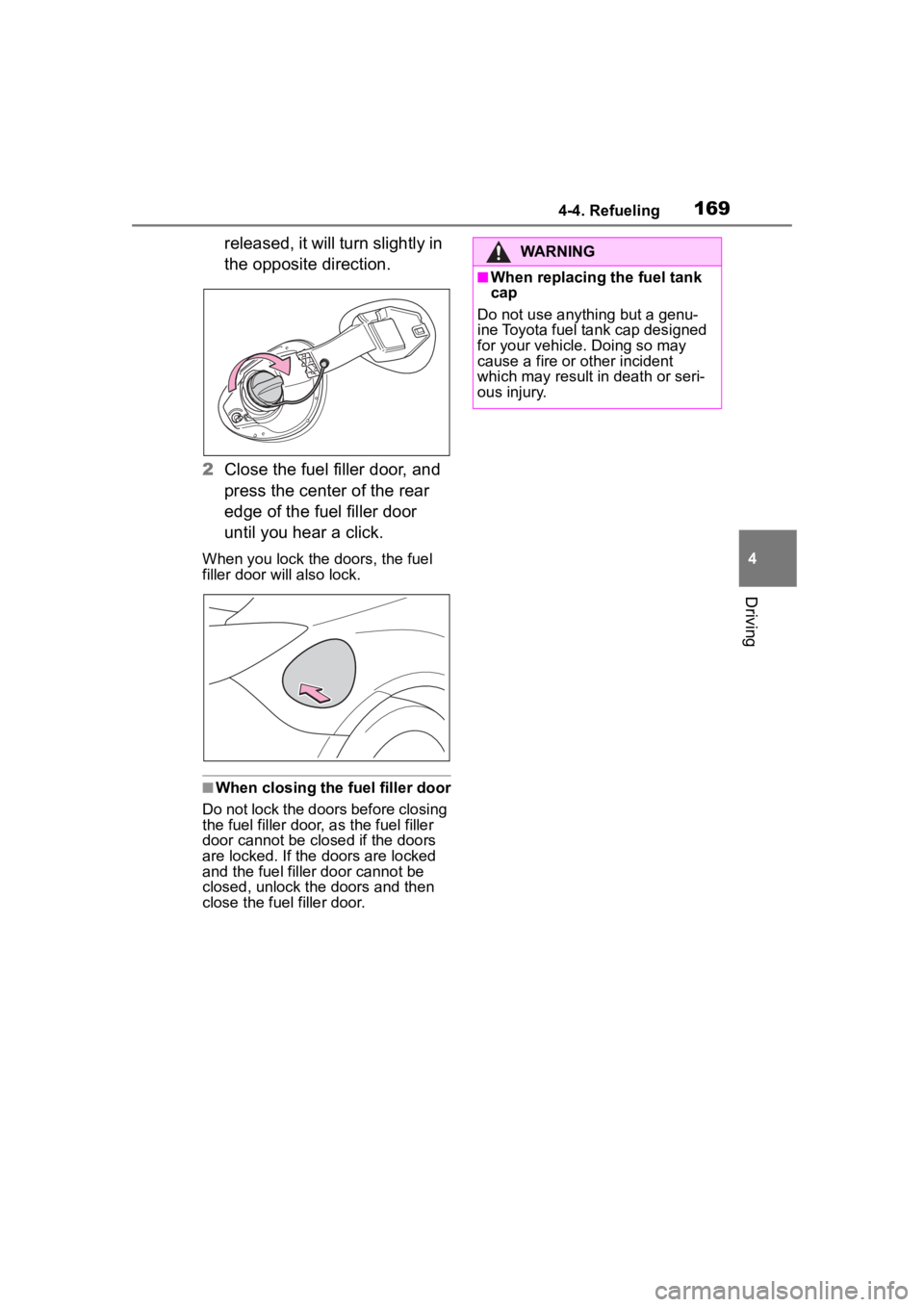
released, it will turn slightly in
the opposite direction.
2 Close the fuel filler door, and
press the center of the rear
edge of the fuel filler door
until you hear a click.
When you lock the doors, the fuel
filler door will also lock.
■When closing the fuel filler door
Do not lock the doors before closing
the fuel filler door , as the fuel filler
door cannot be closed if the doors
are locked. If the doors are locked
and the fuel filler door can not be
closed, unlock the doors and then
close the fuel filler door.
WARNING
■When replacing the fuel tank
cap
Do not use anything but a genu-
ine Toyota fuel tank cap designed
for your vehicle. Doing so may
cause a fire or other incident
which may result i n death or seri-
ous injury.
Page 171 of 449
1714-5. EyeSight
4
Driving
WARNING
There are limits to the EyeSight
recognition performance and con-
trol performance. Be sure to read
the instructions for each function
before using the system, and
always use it properly. Improper
use may lead to failure of control
performance, which could cause
an accident.
Refer to the fo llowing pages for
each function:
●For Pre-Collision Braking Sys-
tem, refer to P.179.
●For Adaptive Cruise Control,
refer to P.190.
●For Conventional Cruise Con-
trol, refer to P.207.
●For Pre-Collision Throttle Man-
agement, refer to P.215.
●For Lane Departure Warning,
refer to P.219.
●For Lane Sway Warning, refer
to P.221.
●For Lead Vehicle Start Alert,
refer to P.223.
In left-hand drive vehicles, Eye-
Sight is configured for driving on
the right-hand side of the road.
However, it can be reconfigured
by changing the driving lane set-
ting for driving o n the left-hand
side.
* (P.400)
If the setting for the traffic lane
(driving side of the road) does not
match the traffic lane, full Eye-
Sight performance may not be
available.
*: Characteristics and settings that are affected by specific differ-
ences between right-hand drive
and left-hand drive vehicles
cannot be changed.
●The system may not operate
correctly under the conditions
listed below. When these condi-
tions occur, turn off Pre-Colli-
sion Braking Sy stem. Also, do
not use Adaptive Cruise Control
or Conventional Cruise Control.
• The tire pressure is not cor- rect.
*1
• The temporary spare tire is installed.*1
• Tires that are unevenly worn or tires with uneven wear patterns
are installed.
*1
• Tires that are the wrong size are
installed.*1
• A flat tire has been fixed tempo-rarily with a tire repair kit.
• The suspension has been modi- fied (including a genuine Toyota
suspension that has been modi-
fied).
• An object that obstructs the ste- reo camera’s view is installed
on the vehicle.
• Tire chains are installed.
• The headlights are dirty or they have snow and ice or dirt on
them. (Objects are not correctly
illuminated and are difficult to
detect.)
• The optical axes are not aligned correctly. (Objects are not cor-
rectly illuminated and are diffi-
cult to detect.)
Page 172 of 449
1724-5. EyeSight
WARNING
• The lights including headlights and fog lights have been modi-
fied.
• Vehicle operation has become unstable due to an accident or
malfunction.
• The brake system warning light is illuminated in red.
*2
• A heavy cargo is inside the vehicle.
• The maximum number of occu- pants is exceeded.
• The meter is not operating prop- erly; such as when the lights do
not illuminate, the beeps do not
sound, the display is different
from when it is normal, etc.
*3
●The system will not operate cor-
rectly in the following condi-
tions. Do not use Adaptive
Cruise Control or Conventional
Cruise Control.
• The wheels are out of balance (e.g., the balance weight is
removed or misaligned).
*1
• The wheels are out of align-
ment.*1
• A trailer or another vehicle, etc. is being towed.
*1: The wheels and tires have
functions that are critically
important. Be sure to use the
correct ones. (
P.386)
*2: If the brake system warning
light (red) does not turn off,
immediately pull the vehicle
over in a safe place and con-
tact a Toyota dealer to have the
system inspected.
*3: For details about the meter, refer to P.88.
NOTICE
●The characteristics of the stereo
camera are simila r to those of
human eyes. For this reason,
conditions that make it difficult
for the driver to see in the for-
ward direction have the same
effect on the stereo camera.
They also make it difficult for the
system to detect vehicles,
obstacles, and traffic lanes.
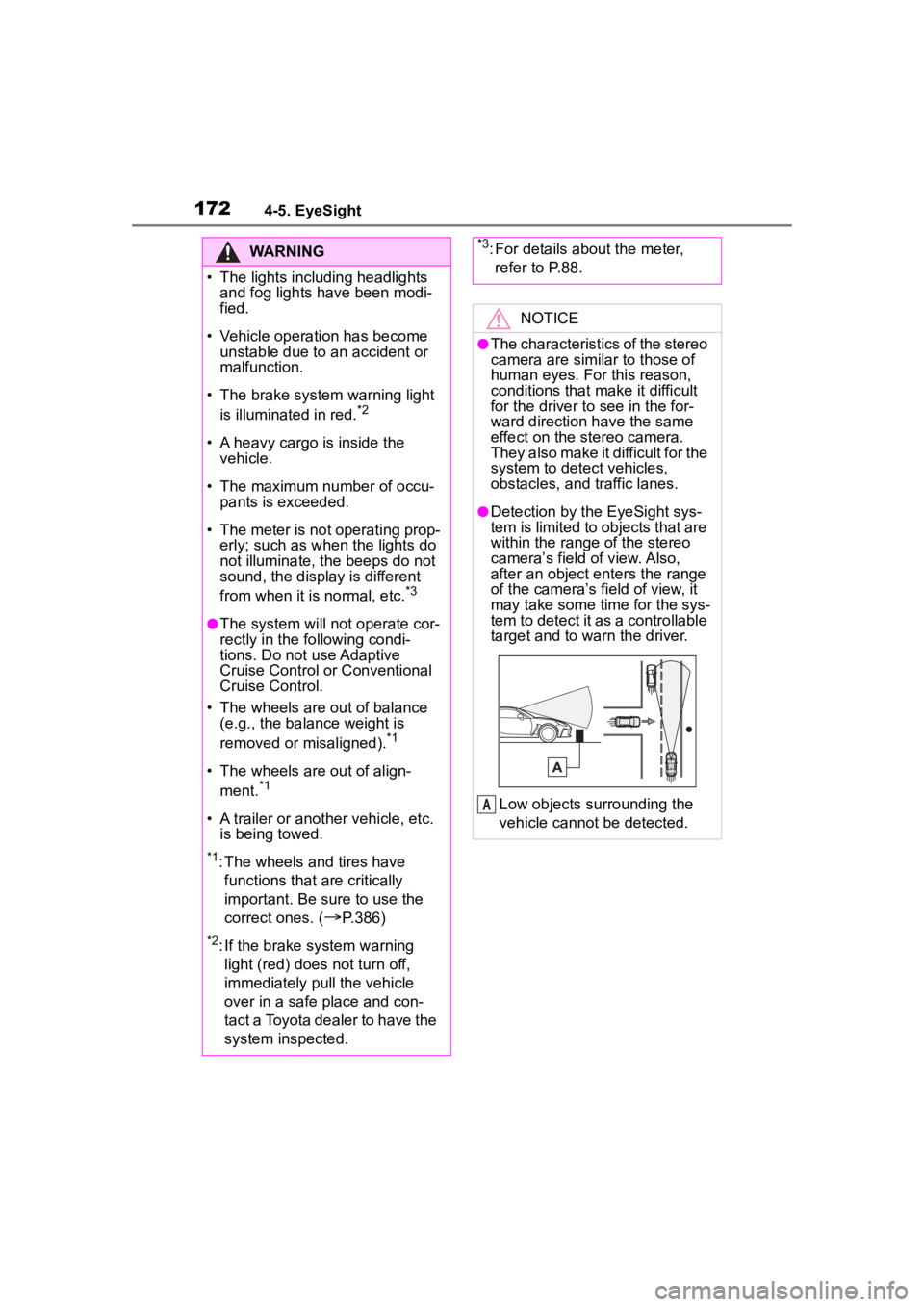
●Detection by the EyeSight sys-
tem is limited to objects that are
within the range of the stereo
camera’s field of view. Also,
after an object enters the range
of the camera’s field of view, it
may take some time for the sys-
tem to detect it as a controllable
target and to warn the driver.
Low objects surrounding the
vehicle cannot be detected.
A
Page 173 of 449

1734-5. EyeSight
4
Driving
NOTICE
●Under the conditions listed
below, it will become more diffi-
cult for the system to detect the
vehicle in front, motorcycles,
bicycles, pedestrians and obsta-
cles on the road, and lane mark-
ers. Also, EyeSight may
temporarily stop operating.
However, the temporary stop
will be canceled once these
conditions have improved and
the vehicle is driven for a short
period of time.
• Bad weather (for example heavy rain, a blizzard or thick
fog). In particular, the system is
more likely to temporarily stop
operating when there is an oil
film adhering to the windshield,
a glass coating has been
applied, or poorly performing
wipers are used.
• Strong light is coming from the front (sunlight or headlight
beams of oncoming traffic, etc.).
• The windshield washer is in use.
• Raindrops, water drops, or dirt on the windshield are not wiped
off sufficiently.
• The windshield has become fogged, scratched or smeared,
or snow, dirt ,dust or frost has
adhered to it, or it is otherwise
affected. These will reduce the
stereo camera’s field of view.
Also, light is reflecting off the
dirt, etc.
• The vehicle is tilted at an extreme angle due to loaded
cargo or other factors.
• Visibility is poo r due to sand,
smoke or water vapor blowing in
the wind, or the front vision is
obscured due to water
splashes, snow, dirt or dust stir
up generated by the vehicle in
front or oncoming traffic.
• The stereo came ra’s field of
view is obstructed.
• Through the entra nce or exit of
a tunnel
• The rear aspect of the vehicle in front is low, small or irregular
(for example a low bed trailer,
etc.).
• The obstacle is a fence, a wall or a shutter, etc. with a uniform
pattern (a striped pattern, brick,
etc.) or with no pattern in front.
• The obstacle is a wall or door made of glass or a mirror in
front.
• Driving at night or in a tunnel when there is a ve hicle in front
that does not ha ve its taillights
on
• Driving through a banner or flag, low branches on a tree or
thick/tall vegetation
• On steep uphill or downhill grades
• The stereo camera is obstructed by a hand, etc. (If
even one of the lenses is
obstructed, the system does not
operate properly.)
• It is completel y dark and no
objects are detected.
• The area around the vehicle has a uniform color (such as when
completely covered in snow,
etc.).