lock TOYOTA 86 2023 Owner's Manual
[x] Cancel search | Manufacturer: TOYOTA, Model Year: 2023, Model line: 86, Model: TOYOTA 86 2023Pages: 449, PDF Size: 8.5 MB
Page 88 of 449
882-1. Instrument cluster
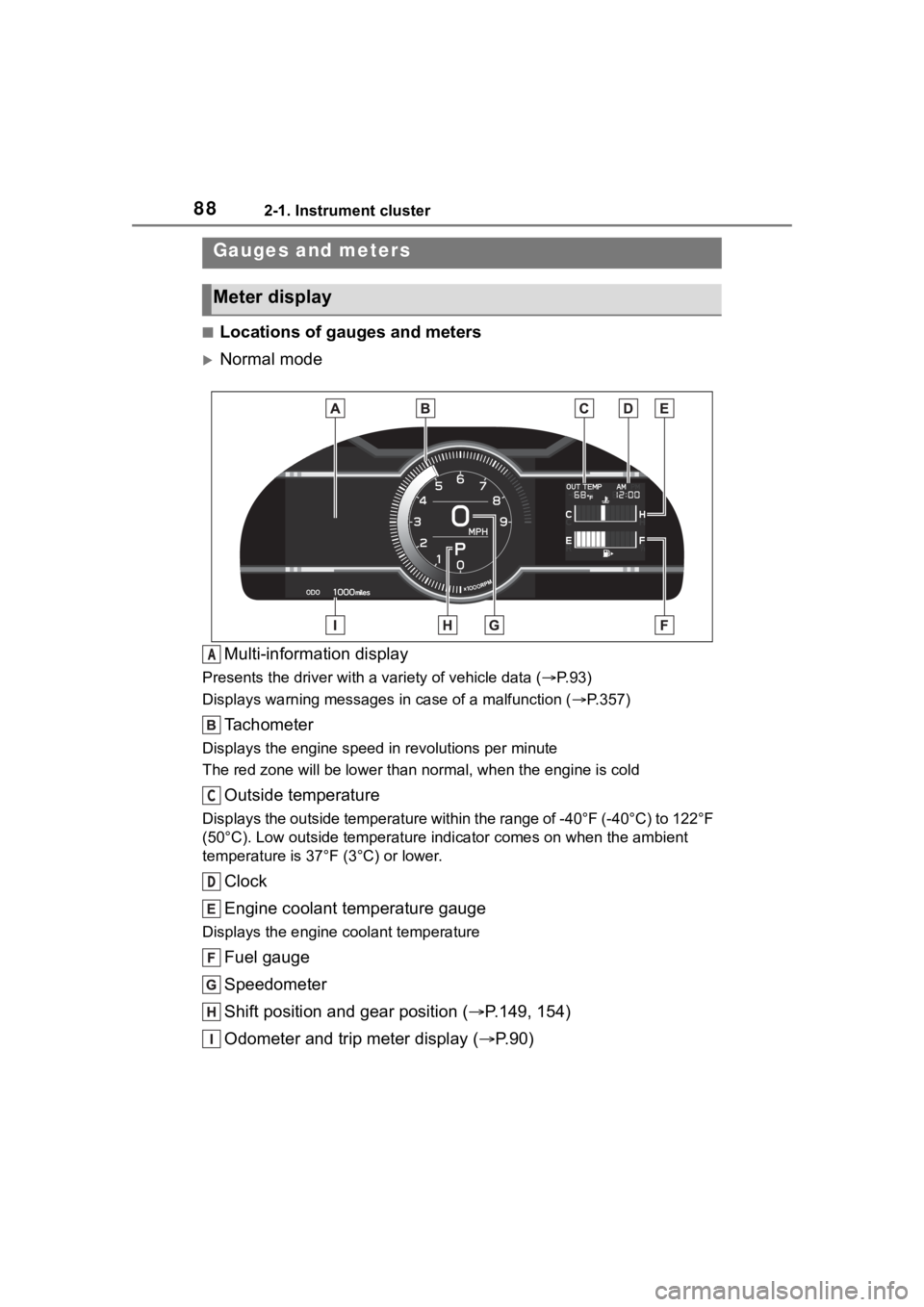
■Locations of gauges and meters
Normal modeMulti-information display
Presents the driver with a variety of vehicle data (P.93)
Displays warning messages in case of a malfunction (P.357)
Tachometer
Displays the engine speed in revolutions per minute
The red zone will be lower than n ormal, when the engine is cold
Outside temperature
Displays the outside temperature within the range of -40°F (-40 °C) to 122°F
(50°C). Low outside temperature indicator comes on when the amb ient
temperature is 37°F (3°C) or lower.
Clock
Engine coolant temperature gauge
Displays the engine c oolant temperature
Fuel gauge
Speedometer
Shift position and gear position ( P.149, 154)
Odometer and trip meter display ( P.90)
Gauges and meters
Meter display
A
C
D
Page 89 of 449
892-1. Instrument cluster
2
Vehicle status information and indicators
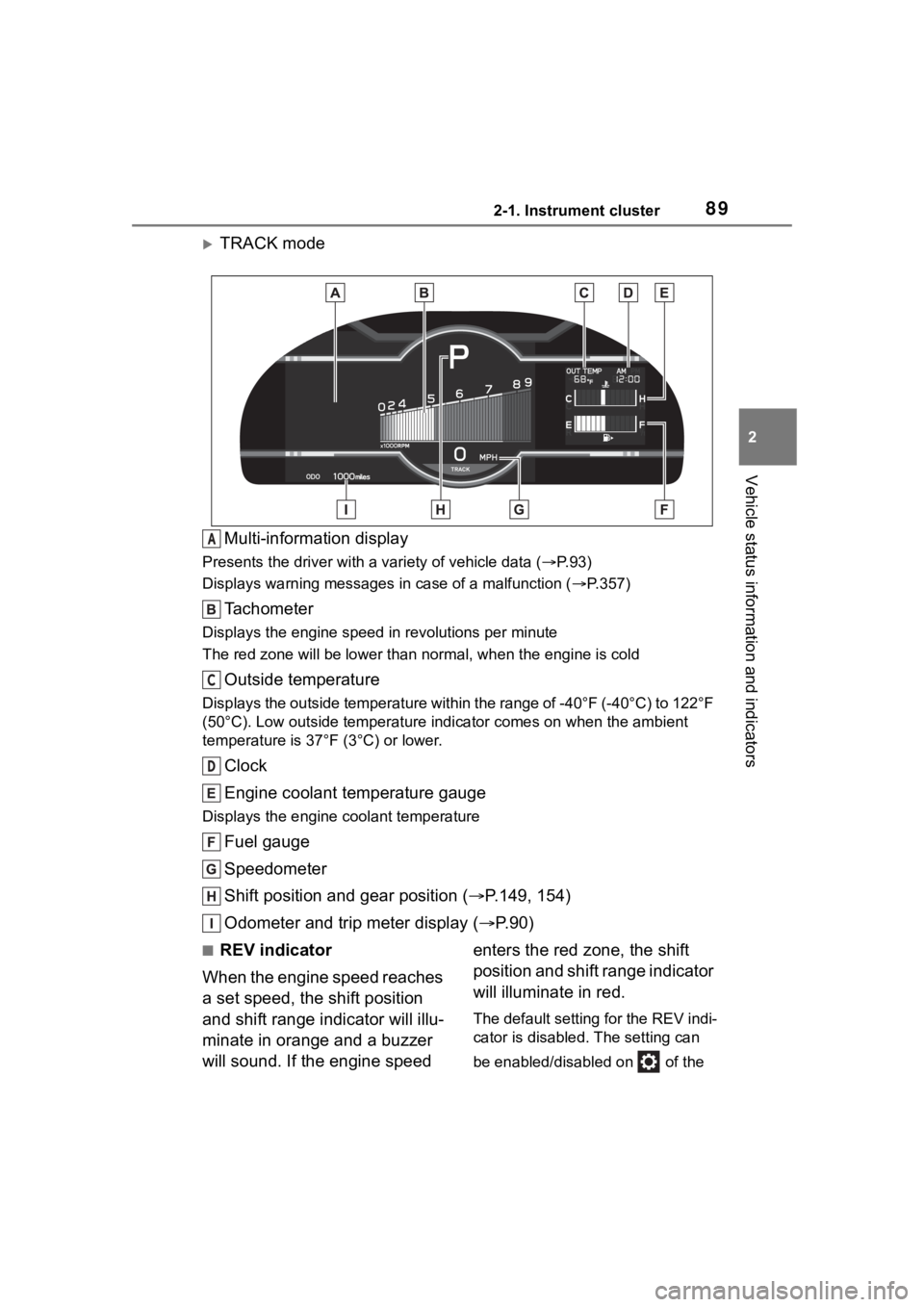
TRACK modeMulti-information display
Presents the driver with a variety of vehicle data (P.93)
Displays warning messages in case of a malfunction (P.357)
Tachometer
Displays the engine speed in revolutions per minute
The red zone will be lower than n ormal, when the engine is cold
Outside temperature
Displays the outside temperature within the range of -40°F (-40 °C) to 122°F
(50°C). Low outside temperature indicator comes on when the amb ient
temperature is 37°F (3°C) or lower.
Clock
Engine coolant temperature gauge
Displays the engine c oolant temperature
Fuel gauge
Speedometer
Shift position and gear position ( P.149, 154)
Odometer and trip meter display ( P.90)
■REV indicator
When the engine speed reaches
a set speed, the shift position
and shift range indicator will illu-
minate in orange and a buzzer
will sound. If the engine speed enters the red zone, the shift
position and shift range indicator
will illuminate in red.
The default setting for the REV indi-
cator is disabled. The setting can
be enabled/disabled on of the
A
C
D
Page 91 of 449
912-1. Instrument cluster
2
Vehicle status information and indicators
played.
■Display items
Odometer
Displays the total distance the vehi-
cle has been driven.
Trip meter A/Trip meter B
Displays the distan ce the vehicle
has been driven si nce the meter
was last reset. Trip meters A and B
can be used to record and display
different distances independently.
To reset, display the desired trip
meter and press and hold the dis-
play change button.
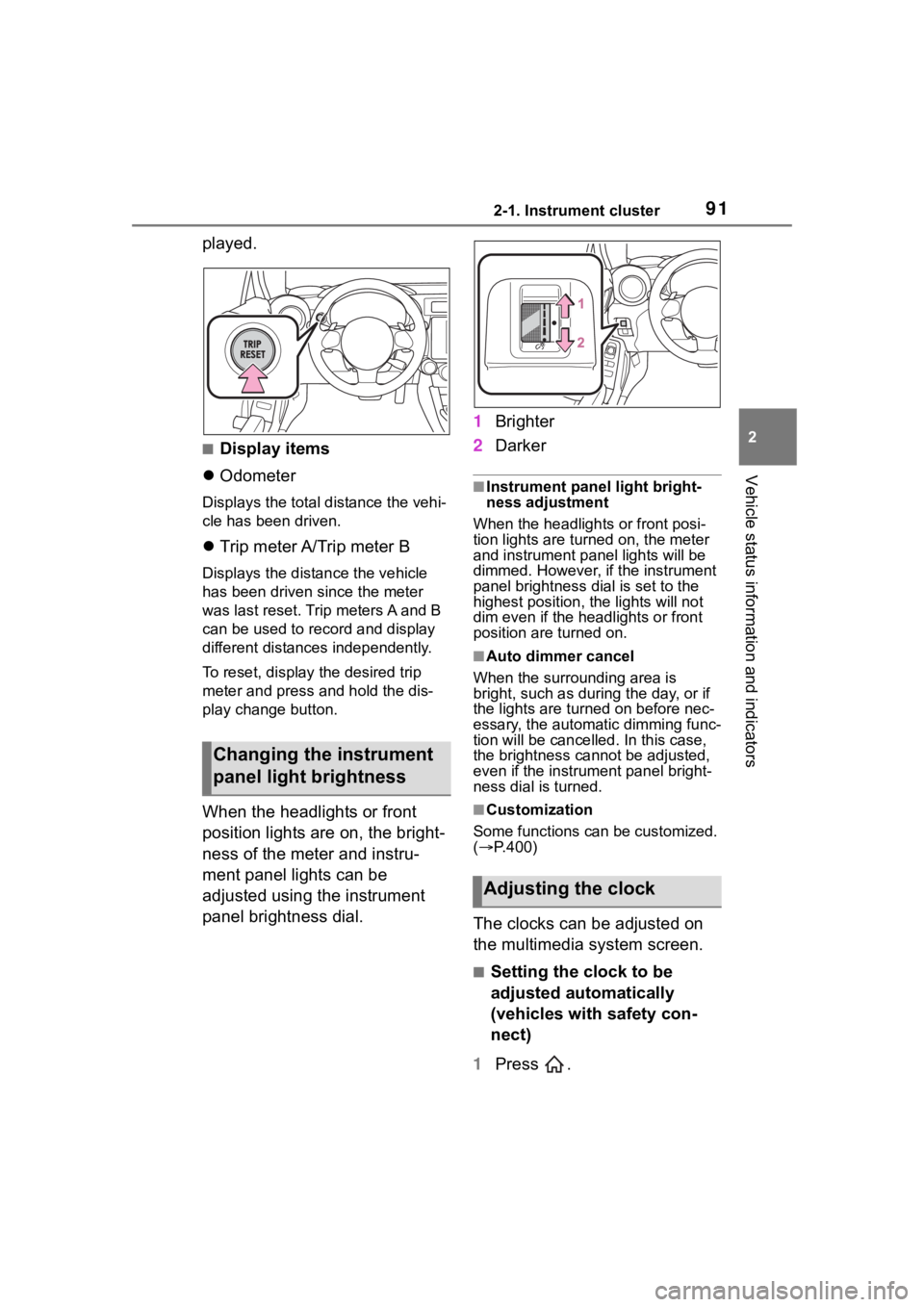
When the headlights or front
position lights are on, the bright-
ness of the meter and instru-
ment panel lights can be
adjusted using the instrument
panel brightness dial. 1
Brighter
2 Darker
■Instrument panel light bright-
ness adjustment
When the headlights or front posi-
tion lights are turned on, the meter
and instrument pa nel lights will be
dimmed. However, if the instrument
panel brightness dial is set to the
highest position, the lights will not
dim even if the headlights or front
position are turned on.
■Auto dimmer cancel
When the surrounding area is
bright, such as during the day, or if
the lights are turned on before nec-
essary, the automatic dimming func-
tion will be cancelled . In this case,
the brightness cannot be adjusted,
even if the instrument panel bright-
ness dial is turned.
■Customization
Some functions can be customized.
( P.400)
The clocks can be adjusted on
the multimedia system screen.
■Setting the clock to be
adjusted automatically
(vehicles with safety con-
nect)
1 Press .
Changing the instrument
panel light brightness
Adjusting the clock
Page 92 of 449
922-1. Instrument cluster
2Select .
3 Select “General”.
4 Select “Clock”.
5 Select “Time Setting”.
6 Select “AUTO”.
The clock will be set automati-
cally where a GPS signal is
available.
■Setting the clock to be
adjusted automatically
(vehicles without safety
connect)
1 Press .
2 Select .
3 Select “General”.
4 Select “Clock”.
5 Select “Time Setting”.
6 Select “Sync With Phone”.
The clock will be set and
adjusted automatically when a
smartphone is connected via
Bluetooth
®for transferring
phonebook data. For details,
refer to the “MULTIMEDIA
OWNER’S MANUAL”.
■Adjusting the clock manu-
ally
1 Press .
2 Select .
3 Select “General”.
4 Select “Clock”.
5 Select “Time Setting”. 6
Select “Manual” then adjust
the clock.
7 Select “OK”.
■Changing the clock
between 12H/24H format
1 Press .
2 Select .
3 Select “General”.
4 Select “Clock”.
5 Select “12H” or “24H”.
■Clock settings screen
The clock setting screen can also be
displayed by touch ing the clock on
the status bar.
Page 101 of 449
101
3
3
Before driving
Before driving
.3-1. Key informationKeys ............................ 102
3-2. Opening, closing and locking the doors and
trunk
Doors .......................... 105
Trunk ........................... 107
Smart key system ....... 111
3-3. Adjusting the seats Front seats .................. 119
Rear seats................... 121
Head restraints............ 123
3-4. Adjusting the steering wheel and mirrors
Steering wheel ............ 125
Inside rear view mirror .................................. 126
Outside rear view mirrors .................................. 127
3-5. Opening, closing the win- dows
Power windows ........... 129
Page 103 of 449
1033-1. Key information
3
Before driving
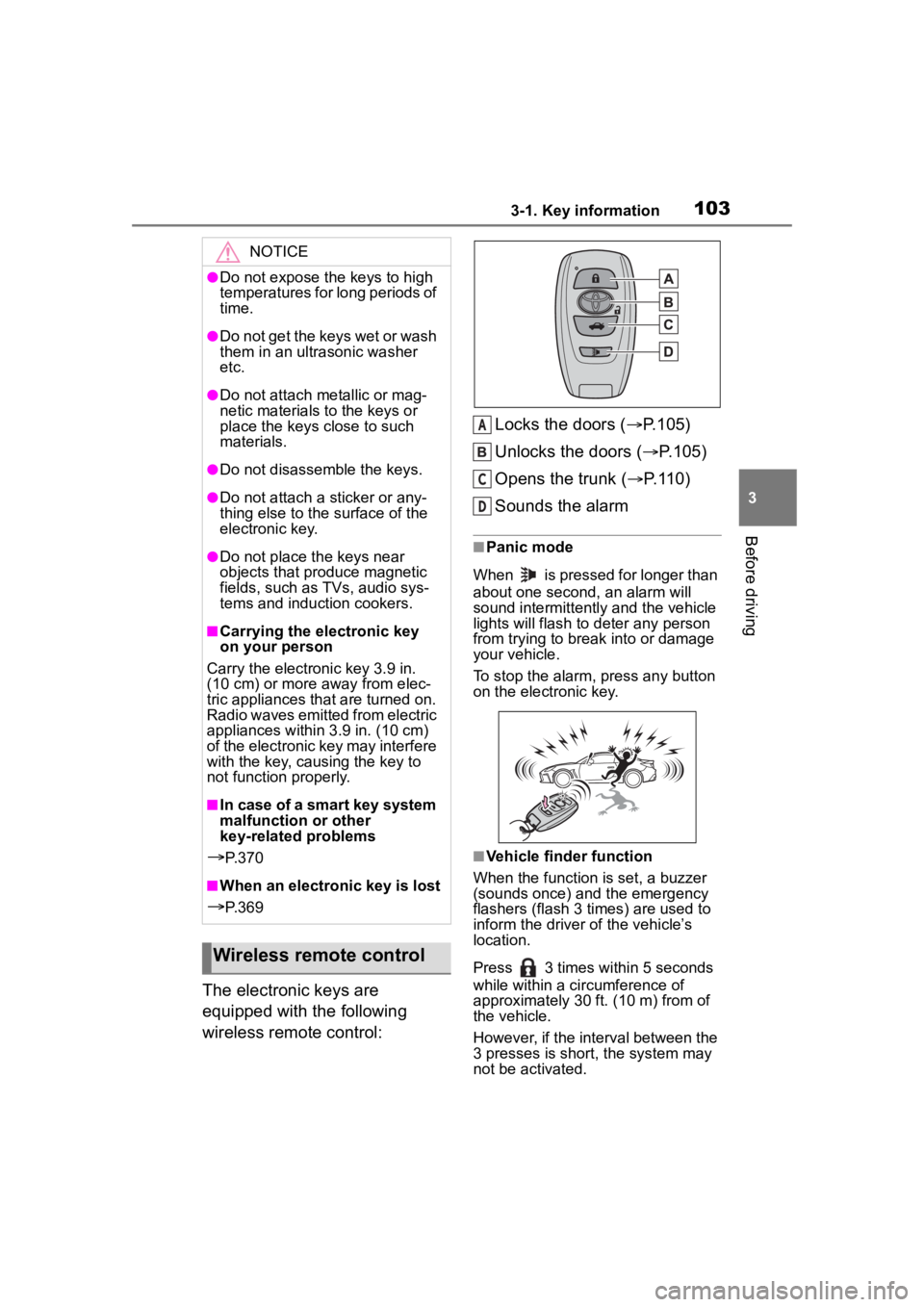
The electronic keys are
equipped with the following
wireless remote control:Locks the doors (
P.105)
Unlocks the doors ( P.105)
Opens the trunk ( P.110)
Sounds the alarm
■Panic mode
When is pressed for longer than
about one second, an alarm will
sound intermittently and the vehicle
lights will flash to deter any person
from trying to break into or damage
your vehicle.
To stop the alarm, press any button
on the electronic key.
■Vehicle finder function
When the function is set, a buzzer
(sounds once) and the emergency
flashers (flash 3 times) are used to
inform the driver of the vehicle’s
location.
Press 3 times within 5 seconds
while within a ci rcumference of
approximately 30 ft. (10 m) from of
the vehicle.
However, if the interval between the
3 presses is short, the system may
not be activated.
NOTICE
●Do not expose the keys to high
temperatures for long periods of
time.
●Do not get the keys wet or wash
them in an ultrasonic washer
etc.
●Do not attach metallic or mag-
netic materials to the keys or
place the keys close to such
materials.
●Do not disassemble the keys.
●Do not attach a sticker or any-
thing else to the surface of the
electronic key.
●Do not place th e keys near
objects that produce magnetic
fields, such as TVs, audio sys-
tems and induction cookers.
■Carrying the electronic key
on your person
Carry the electronic key 3.9 in.
(10 cm) or more away from elec-
tric appliances that are turned on.
Radio waves emitted from electric
appliances within 3.9 in. (10 cm)
of the electronic key may interfere
with the key, causing the key to
not function properly.
■In case of a smart key system
malfunction or other
key-related problems
P. 3 7 0
■When an electronic key is lost
P. 3 6 9
Wireless remote control
A
C
D
Page 104 of 449
1043-1. Key information
■Customization
Some functions can be customized.
( P.400)
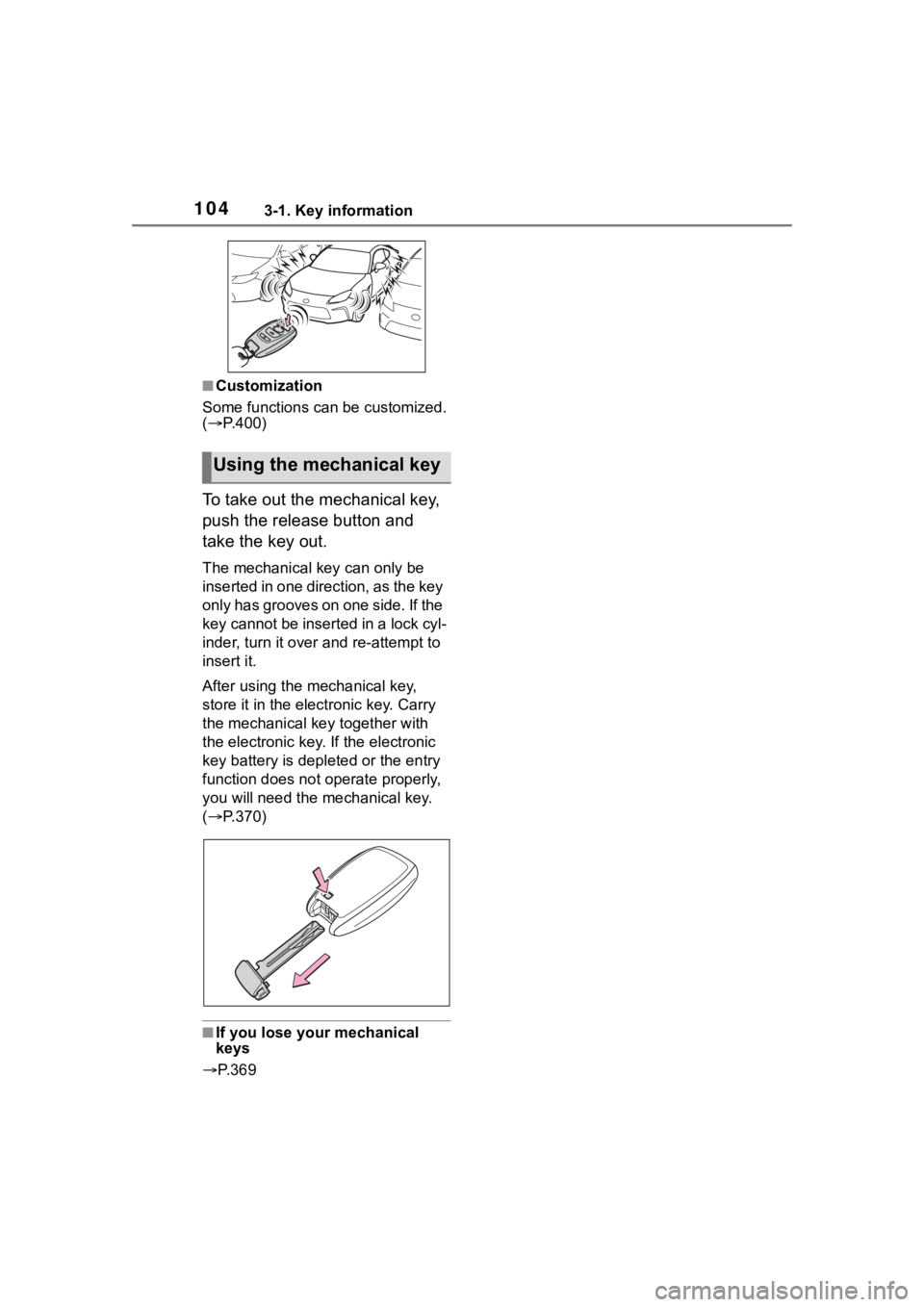
To take out the mechanical key,
push the release button and
take the key out.
The mechanical key can only be
inserted in one direction, as the key
only has grooves on one side. If the
key cannot be inserted in a lock cyl-
inder, turn it over and re-attempt to
insert it.
After using the mechanical key,
store it in the electronic key. Carry
the mechanical k ey together with
the electronic key. If the electronic
key battery is dep leted or the entry
function does not operate properly,
you will need the m echanical key.
( P.370)
■If you lose your mechanical
keys
P. 3 6 9
Using the mechanical key
Page 105 of 449
1053-2. Opening, closing and locking the doors and trunk
3
Before driving
3-2.Opening, closing and locking the doors and trunk
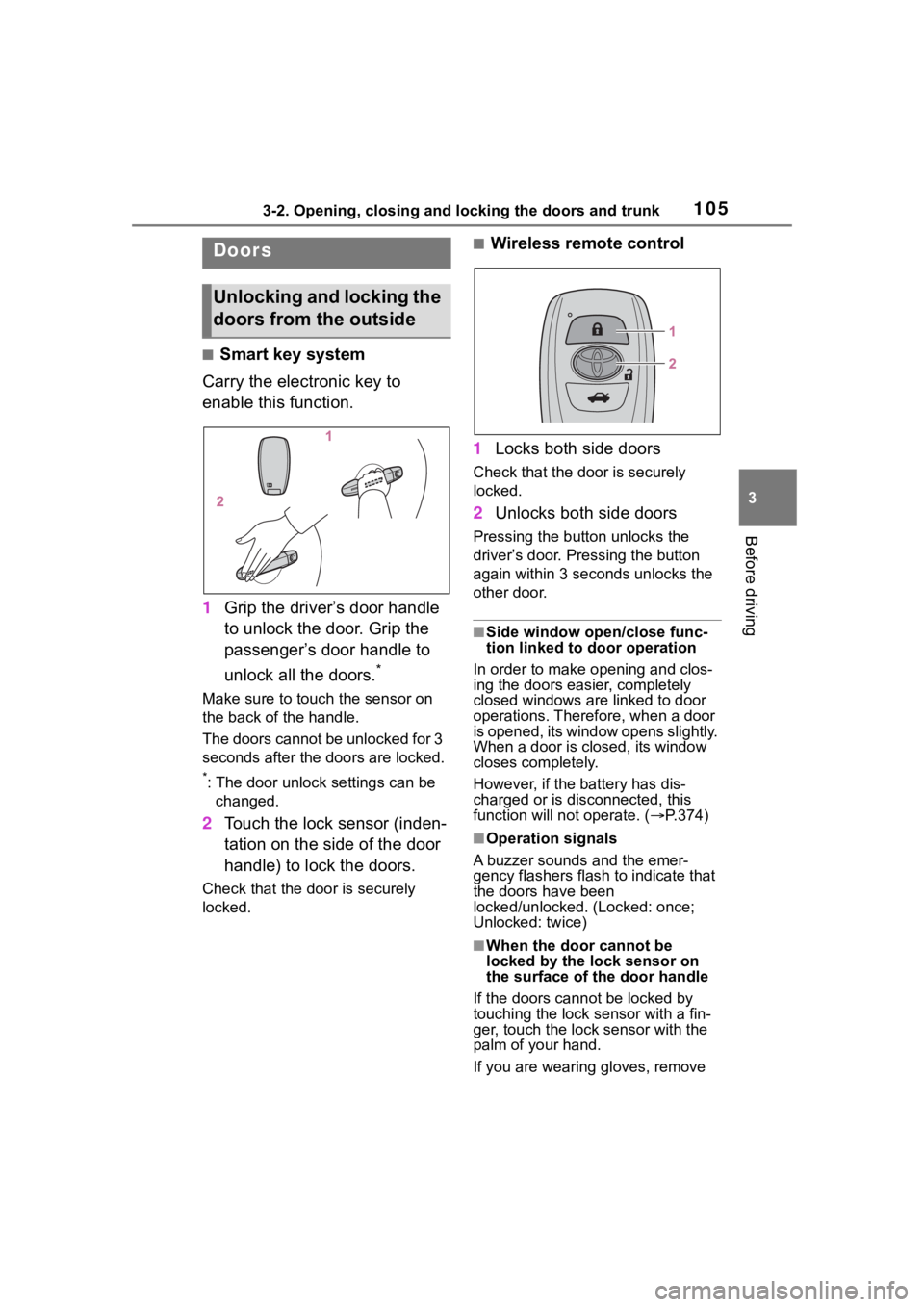
■Smart key system
Carry the electronic key to
enable this function.
1 Grip the driver’s door handle
to unlock the door. Grip the
passenger’s door handle to
unlock all the doors.
*
Make sure to touch the sensor on
the back of the handle.
The doors cannot be unlocked for 3
seconds after the doors are locked.
*: The door unlock settings can be
changed.
2 Touch the lock sensor (inden-
tation on the side of the door
handle) to lock the doors.
Check that the door is securely
locked.
■Wireless remote control
1 Locks both side doors
Check that the d oor is securely
locked.
2 Unlocks both side doors
Pressing the button unlocks the
driver’s door. Pressing the button
again within 3 seconds unlocks the
other door.
■Side window open/close func-
tion linked to door operation
In order to make opening and clos-
ing the doors easier, completely
closed windows are linked to door
operations. Therefore, when a door
is opened, its window opens slightly.
When a door is closed, its window
closes completely.
However, if the battery has dis-
charged or is di sconnected, this
function will not operate. ( P.374)
■Operation signals
A buzzer sounds and the emer-
gency flashers flash to indicate that
the doors have been
locked/unlocked. (Locked: once;
Unlocked: twice)
■When the door cannot be
locked by the lock sensor on
the surface of the door handle
If the doors cannot be locked by
touching the lock se nsor with a fin-
ger, touch the lock sensor with the
palm of your hand.
If you are wearing gloves, remove
Doors
Unlocking and locking the
doors from the outside
Page 106 of 449
1063-2. Opening, closing and locking the doors and trunk
them.
■Door lock buzzer
If an attempt to lock the doors using
the entry function or wireless remote
control is made w hen a door is not
fully closed, a buzzer will sound
continuously for 5 seconds. Fully
close the door to stop the buzzer,
and lock the doors again.
■Alarm
Locking the doors will set the alarm
system. ( P.81)
■Conditions affecting the opera-
tion of the smart key system or
wireless remo te control
P. 1 1 2
■If the smart key system or the
wireless remote control does
not operate properly
Use the mechanical key and/or
inside lock buttons to lock and
unlock the doors. ( P.370)
Replace the key battery with a new
one if it is depleted. ( P.328)
■If the battery is discharged
The doors cannot be locked and
unlocked using the smart key sys-
tem or wireless remote control. Lock
or unlock the doors using the
mechanical key. ( P.370)
■Customization
Some functions can be customized.
( P.400)
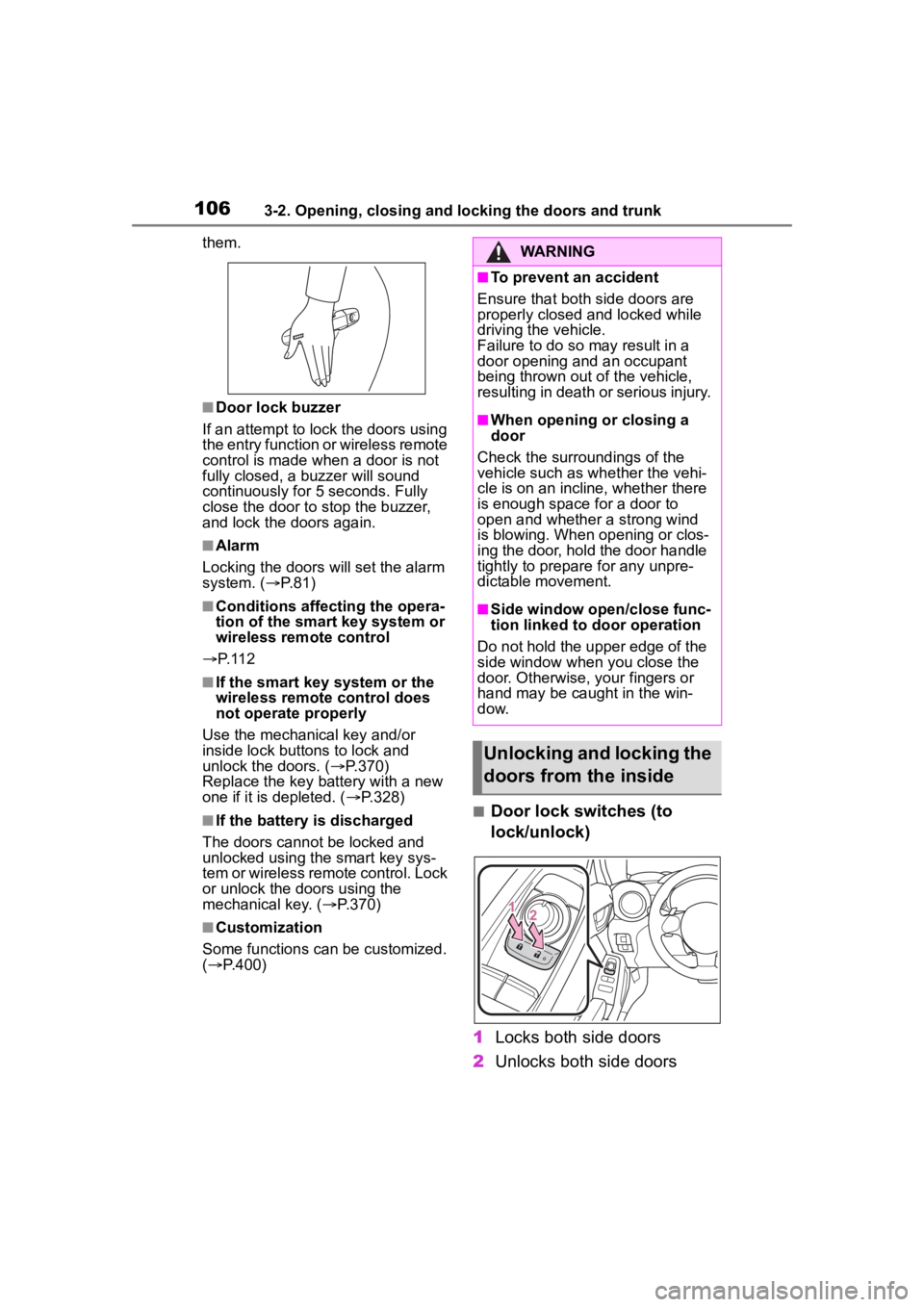
■Door lock switches (to
lock/unlock)
1 Locks both side doors
2 Unlocks both side doors
WARNING
■To prevent an accident
Ensure that both side doors are
properly closed and locked while
driving the vehicle.
Failure to do so may result in a
door opening and an occupant
being thrown out o f the vehicle,
resulting in death o r serious injury.
■When opening or closing a
door
Check the surroundings of the
vehicle such as wh ether the vehi-
cle is on an incline, whether there
is enough space for a door to
open and whether a strong wind
is blowing. When opening or clos-
ing the door, hold the door handle
tightly to prepare for any unpre-
dictable movement.
■Side window open/close func-
tion linked to door operation
Do not hold the upper edge of the
side window when you close the
door. Otherwise, your fingers or
hand may be caught in the win-
dow.
Unlocking and locking the
doors from the inside
Page 107 of 449
1073-2. Opening, closing and locking the doors and trunk
3
Before driving
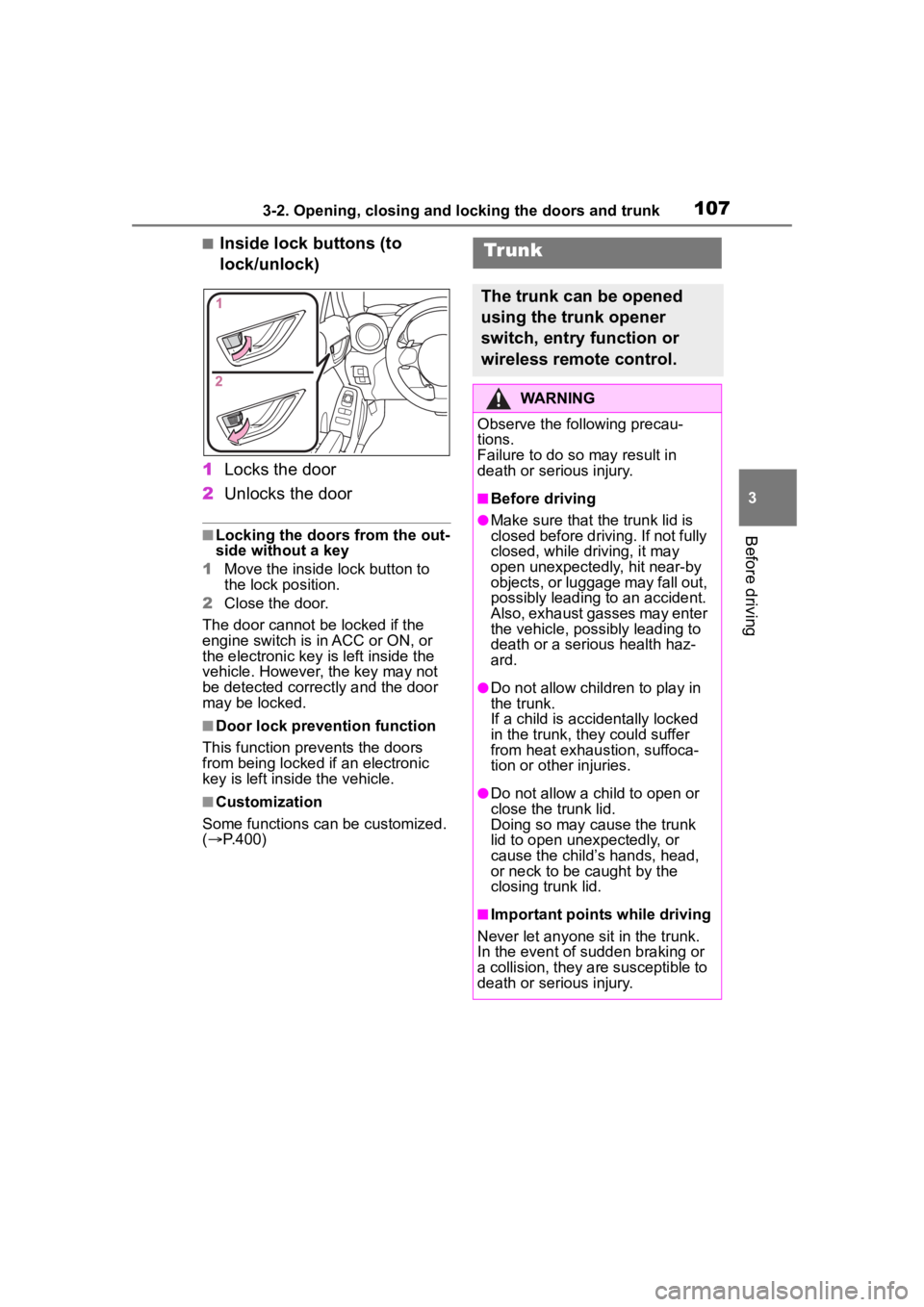
■Inside lock buttons (to
lock/unlock)
1 Locks the door
2 Unlocks the door
■Locking the doors from the out-
side without a key
1 Move the inside lock button to
the lock position.
2 Close the door.
The door cannot be locked if the
engine switch is in ACC or ON, or
the electronic key is left inside the
vehicle. However, the key may not
be detected correctly and the door
may be locked.
■Door lock prevention function
This function prevents the doors
from being locked if an electronic
key is left inside the vehicle.
■Customization
Some functions can be customized.
( P.400)
Tr unk
The trunk can be opened
using the trunk opener
switch, entry function or
wireless remote control.
WARNING
Observe the following precau-
tions.
Failure to do so may result in
death or serious injury.
■Before driving
●Make sure that the trunk lid is
closed before driving. If not fully
closed, while driving, it may
open unexpectedly, hit near-by
objects, or luggage may fall out,
possibly leading to an accident.
Also, exhaust gasses may enter
the vehicle, possibly leading to
death or a serious health haz-
ard.
●Do not allow child ren to play in
the trunk.
If a child is accidentally locked
in the trunk, they could suffer
from heat exhaustion, suffoca-
tion or other injuries.
●Do not allow a child to open or
close the trunk lid.
Doing so may cause the trunk
lid to open unexpectedly, or
cause the child’s hands, head,
or neck to be caught by the
closing trunk lid.
■Important points while driving
Never let anyone sit in the trunk.
In the event of sudden braking or
a collision, they are susceptible to
death or serious injury.