ECO mode TOYOTA AURIS 2011 (in English) User Guide
[x] Cancel search | Manufacturer: TOYOTA, Model Year: 2011, Model line: AURIS, Model: TOYOTA AURIS 2011Pages: 524, PDF Size: 25.6 MB
Page 177 of 524
177 2-1. Driving procedures
2
When driving
UK_AURIS_HV_EE
CAUTION
When starting the hybrid system
Always start the hybrid system while sitting in the driver's seat. Do not
depress the accelerator pedal while starting the hybrid system under any cir-
cumstances. Doing so may cause an accident resulting in death or serious
injury.
Stopping the hybrid system in an emergency
If you want to stop the hybrid system in an emergency while driving the vehi-
cle, press and hold the “POWER” switch for more than 3 seconds.
However, do not touch the “POWER” switch while driving except in an emer-
gency. Turning the hybrid system off while driving will not cause loss of
steering or braking control, but the power assist to these systems will be lost.
This will make it more difficult to steer and brake, so you should pull over
and stop the vehicle as soon as it is safe to do so.
NOTICE
To prevent 12-volt battery discharge
Do not leave the “POWER” switch in ACCESSORY or ON mode for long
periods if the hybrid system is not operating.
If the hybrid system is off, but the indicator on the “POWER” switch is illu-
minated, this indicates that the “POWER” switch is still turned on. When
exiting the vehicle, always check that the “POWER” switch is off.
When starting the hybrid system
If the hybrid system becomes difficult to start, have the hybrid system
checked immediately.
Page 179 of 524
179 2-1. Driving procedures
2
When driving
UK_AURIS_HV_EE
Situations in which EV-Drive Mode cannot be turned on
The followings are examples of situations under which the EV-Drive Mode
may not be turned on. If it cannot be turned on, a buzzer will sound and a
message will be shown on the multi-information display.
The temperature of the hybrid system is high.
The vehicle has been left in the sun, driven on a hill, driven at high
speeds, etc.
The temperature of the hybrid system is low.
The vehicle has been left in freezing temperatures for a long period of
time etc.
The gasoline engine is warming up.
The hybrid battery (traction battery) is low.
The remaining battery level indicated in the “Energy Monitor” display is
low. (P. 36)
Vehicle speed is high.
The accelerator pedal is depressed firmly or the vehicle is on a hill etc.
The windshield defogger is in use.
Switching to EV-Drive Mode when the gasoline engine is cold
If the hybrid system is started while the gasoline engine is cold, the gasoline
engine will start automatically after a short period of time in order to warm
up. In this case, you will become unable to switch to EV-Drive Mode.
After the hybrid system has started and the “READY” indicator has illumi-
nated, press the “EV” switch before the gasoline engine starts to switch to
EV-Drive Mode.
Automatic cancellation of EV-Drive Mode
When driving in EV-Drive Mode, the gasoline engine may automatically
restart in the following situations. When EV-Drive Mode is canceled, a
buzzer will sound and the EV-Drive Mode indicator will flash and go off.
The hybrid battery (traction battery) becomes low.
The remaining battery level indicated in the “Energy Monitor” display is
low. (P. 36)
Vehicle speed becomes high.
The accelerator pedal is depressed firmly or the vehicle is on a hill etc.
Page 180 of 524
180 2-1. Driving procedures
UK_AURIS_HV_EE
Possible driving distance when driving in EV-Drive Mode
Possible driving distance when driving in EV-Drive Mode is up to about 1 km
(1/2 mile) if driven at a speed of about 40 km/h (25 mph) or less. (Possible
driving distance depends on the hybrid battery [traction battery] level and
driving conditions.)
Changing a driving mode when in EV-Drive Mode
EV-Drive Mode can be used in conjunction with Eco drive mode and power
mode.
However, EV-Drive Mode may be automatically canceled when used in con-
junction with power mode.
Fuel economy
Your Toyota is designed to achieve the best possible fuel economy during
normal driving (using the gasoline engine and electric motor [traction
motor]). Driving in EV-Drive Mode more than necessary may lower fuel
economy.
CAUTION
While driving
When driving in EV-Drive Mode, pay special attention to the area around the
vehicle. Because there is no engine noise, pedestrians, people riding bicy-
cles or other people and vehicles in the area may not be aware of the vehicle
starting off or approaching them, so take extra care while driving.
Page 182 of 524
182 2-1. Driving procedures
UK_AURIS_HV_EE
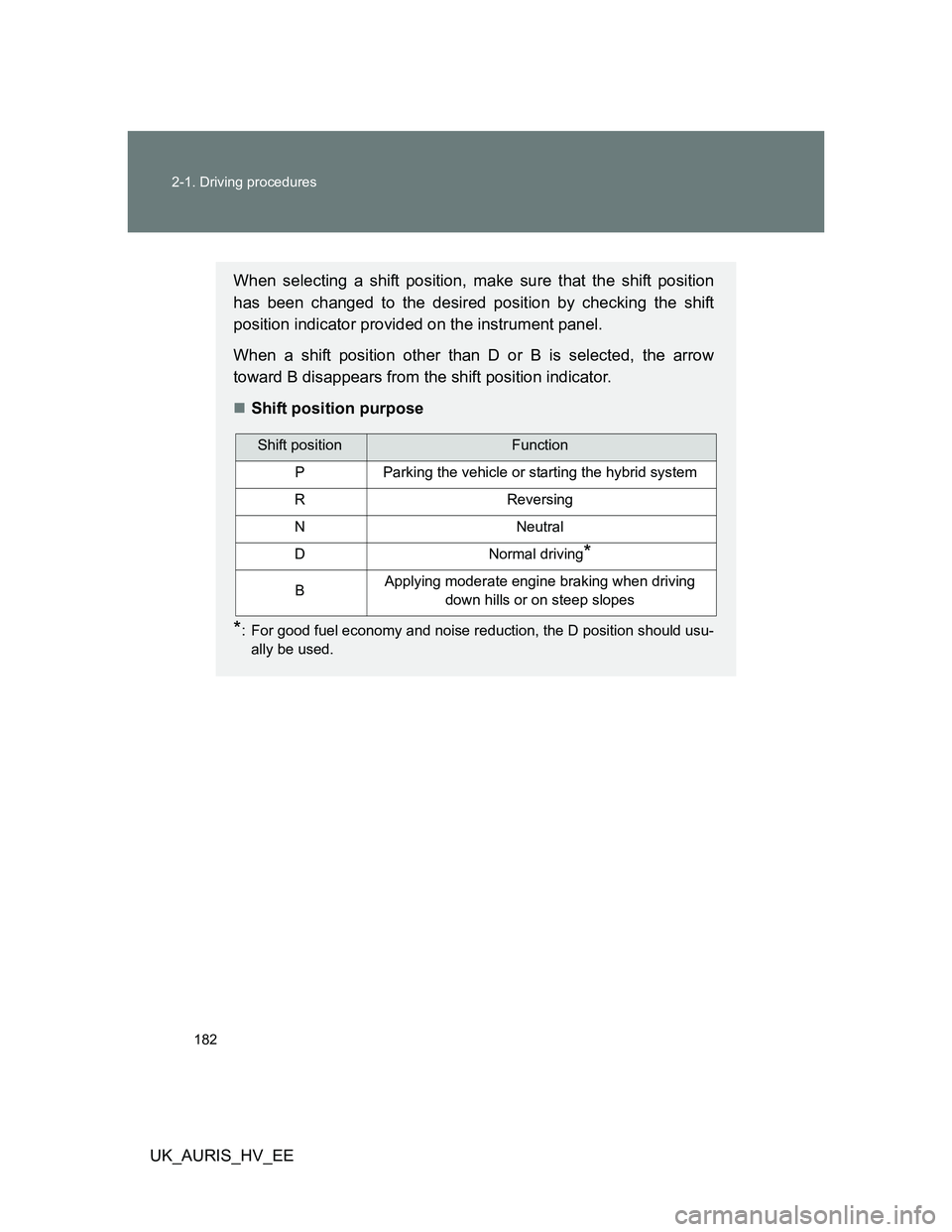
When selecting a shift position, make sure that the shift position
has been changed to the desired position by checking the shift
position indicator provided on the instrument panel.
When a shift position other than D or B is selected, the arrow
toward B disappears from the shift position indicator.
Shift position purpose
*: For good fuel economy and noise reduction, the D position should usu-
ally be used.
Shift positionFunction
PParking the vehicle or starting the hybrid system
RReversing
NNeutral
DNormal driving*
BApplying moderate engine braking when driving
down hills or on steep slopes
Page 184 of 524
184 2-1. Driving procedures
UK_AURIS_HV_EE
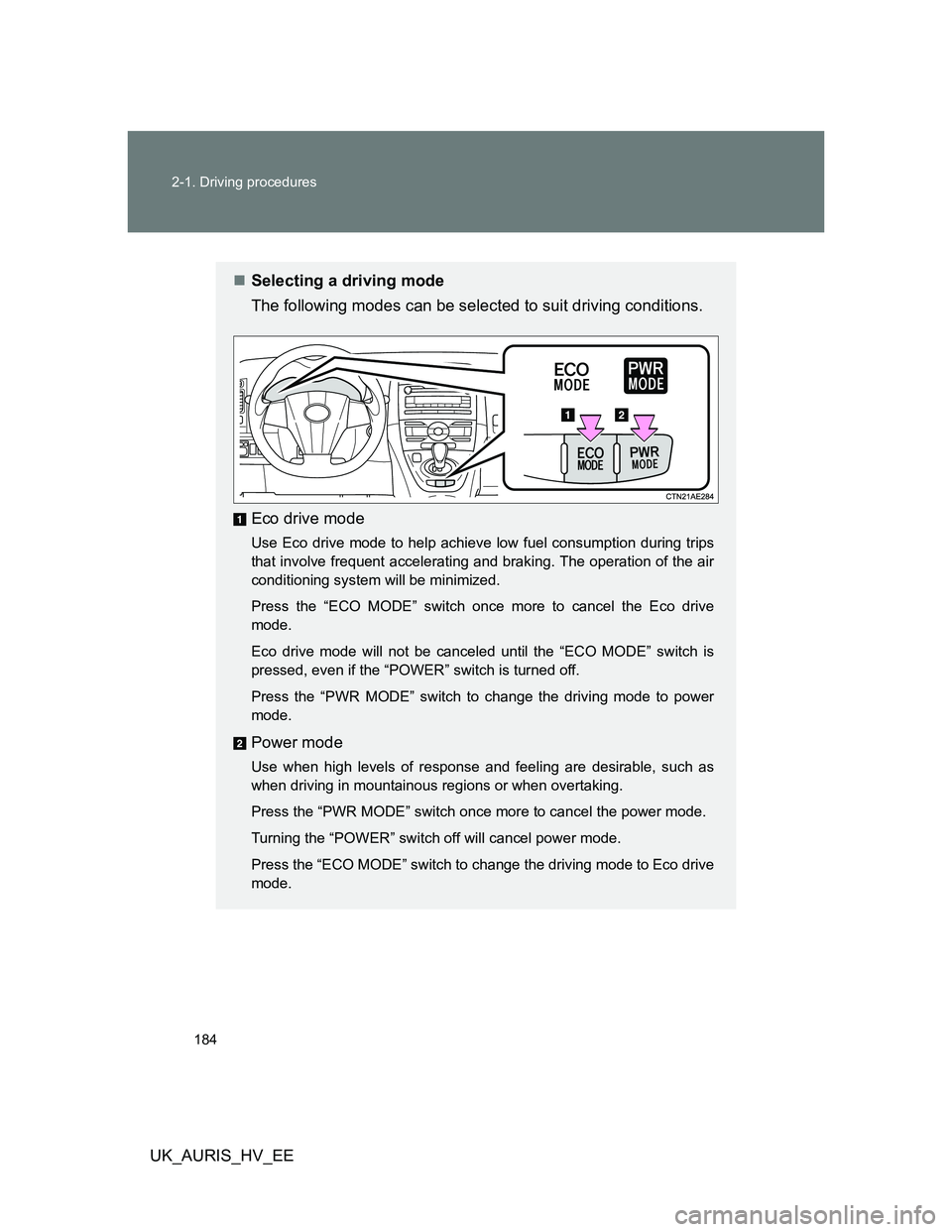
Selecting a driving mode
The following modes can be selected to suit driving conditions.
Eco drive mode
Use Eco drive mode to help achieve low fuel consumption during trips
that involve frequent accelerating and braking. The operation of the air
conditioning system will be minimized.
Press the “ECO MODE” switch once more to cancel the Eco drive
mode.
Eco drive mode will not be canceled until the “ECO MODE” switch is
pressed, even if the “POWER” switch is turned off.
Press the “PWR MODE” switch to change the driving mode to power
mode.
Power mode
Use when high levels of response and feeling are desirable, such as
when driving in mountainous regions or when overtaking.
Press the “PWR MODE” switch once more to cancel the power mode.
Turning the “POWER” switch off will cancel power mode.
Press the “ECO MODE” switch to change the driving mode to Eco drive
mode.
Page 185 of 524
185 2-1. Driving procedures
2
When driving
UK_AURIS_HV_EE
Using engine braking
To use engine braking, select the B position.
During high speed driving, you may feel that deceleration by engine brak-
ing is less than that of a conventional vehicle.
Do not continue normal driving with the transmission in B for a long time.
This may cause decreased fuel economy. To prevent this, use D for nor-
mal driving.
Reverse warning buzzer
When shifting into R, a buzzer will sound to inform the driver that the shift
lever is in R.
Eco drive mode
When the accelerator pedal is depressed in Eco drive mode, it may take
more time to accelerate than usual. This is normal operation.
Alarms
If the shift position is changed in any of the following situations, a buzzer will
sound and the shifting operation will be disabled or the shift position will
automatically change to N. When this happens, select an appropriate shift
position.
Situations where the shifting operation will be disabled:
• When the shift lever is changed from P to another position without
depressing the brake pedal.
• When the shift position is changed from P or N to B.
Situations where the shift position will automatically change to N:
• When the P position switch is pushed while the vehicle is moving.
• When shift position R is selected while the vehicle is moving forward.
• When shift position D is selected while the vehicle is moving in reverse.
• When the shift position is changed from R to B.
Page 193 of 524
193 2-2. Instrument cluster
2
When driving
UK_AURIS_HV_EE
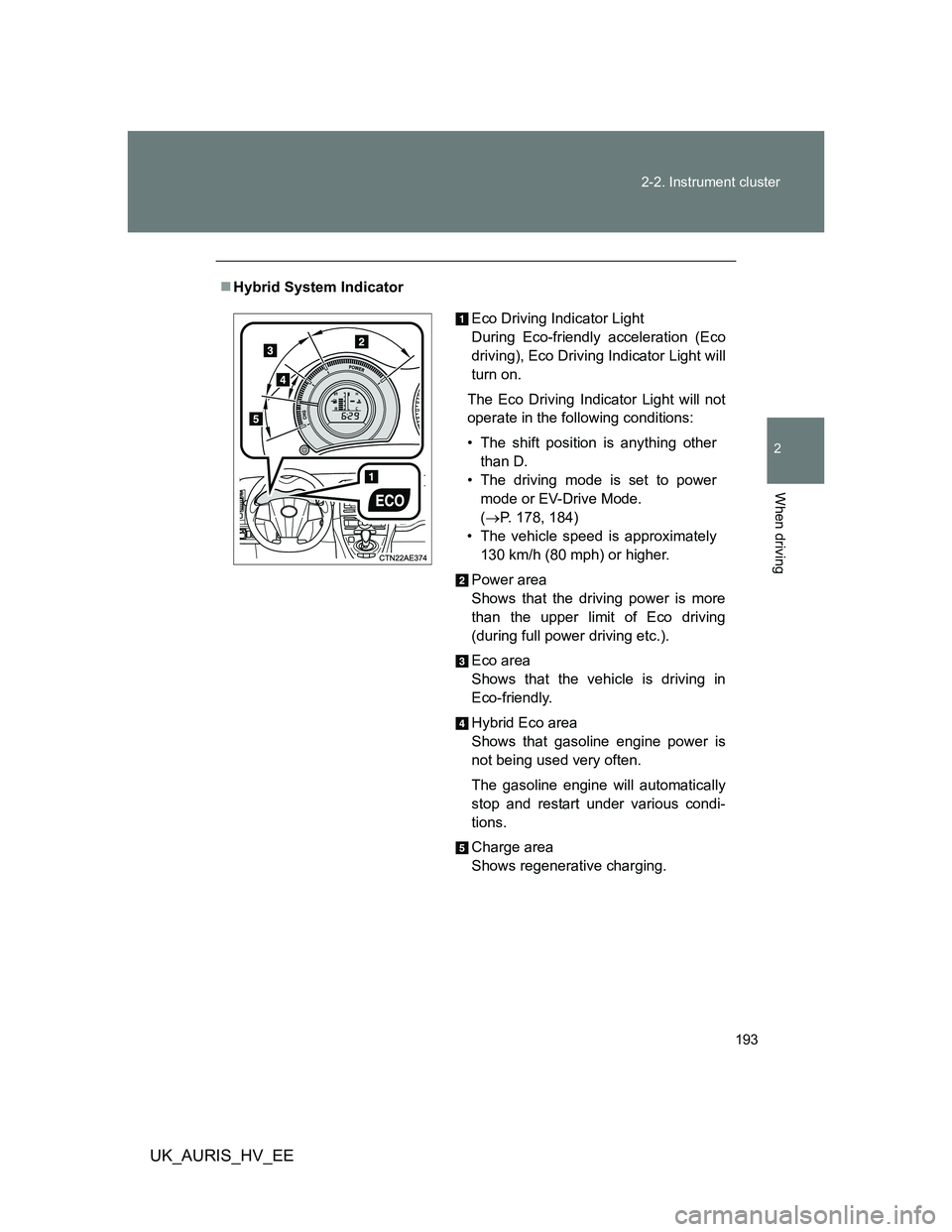
Hybrid System Indicator
Eco Driving Indicator Light
During Eco-friendly acceleration (Eco
driving), Eco Driving Indicator Light will
turn on.
The Eco Driving Indicator Light will not
operate in the following conditions:
• The shift position is anything other
than D.
• The driving mode is set to power
mode or EV-Drive Mode.
(P. 178, 184)
• The vehicle speed is approximately
130 km/h (80 mph) or higher.
Power area
Shows that the driving power is more
than the upper limit of Eco driving
(during full power driving etc.).
Eco area
Shows that the vehicle is driving in
Eco-friendly.
Hybrid Eco area
Shows that gasoline engine power is
not being used very often.
The gasoline engine will automatically
stop and restart under various condi-
tions.
Charge area
Shows regenerative charging.
Page 196 of 524
196 2-2. Instrument cluster
UK_AURIS_HV_EE
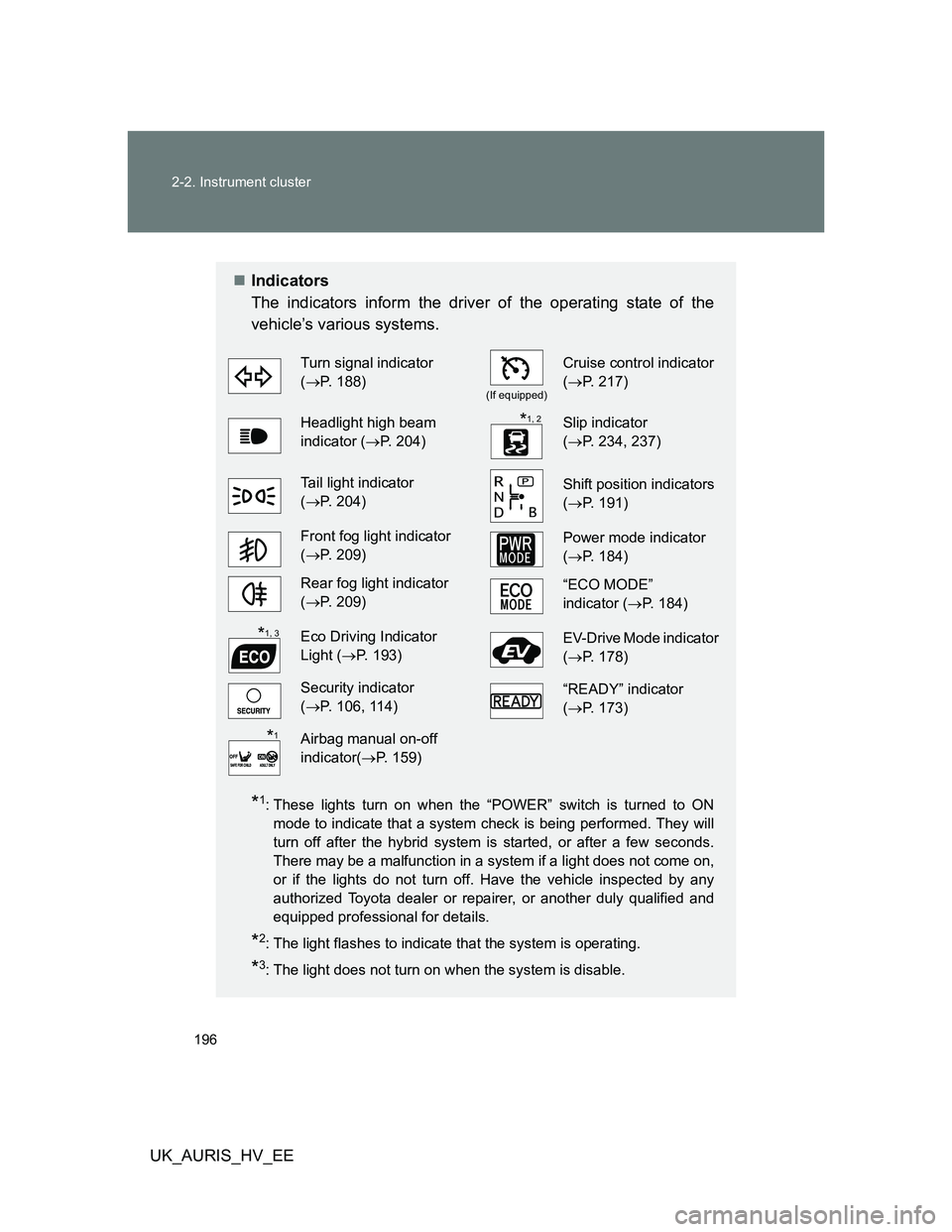
Indicators
The indicators inform the driver of the operating state of the
vehicle’s various systems.
*1: These lights turn on when the “POWER” switch is turned to ON
mode to indicate that a system check is being performed. They will
turn off after the hybrid system is started, or after a few seconds.
There may be a malfunction in a system if a light does not come on,
or if the lights do not turn off. Have the vehicle inspected by any
authorized Toyota dealer or repairer, or another duly qualified and
equipped professional for details.
*2: The light flashes to indicate that the system is operating.
*3: The light does not turn on when the system is disable.
Turn signal indicator
(P. 188)
(If equipped)
Cruise control indicator
(P. 217)
Headlight high beam
indicator (P. 204)Slip indicator
(P. 234, 237)
Tail light indicator
(P. 204)Shift position indicators
(P. 191)
Front fog light indicator
(P. 209)Power mode indicator
(P. 184)
Rear fog light indicator
(P. 209)“ECO MODE”
indicator (P. 184)
Eco Driving Indicator
Light (P. 193)EV-Drive Mode indicator
(P. 178)
Security indicator
(P. 106, 114)“READY” indicator
(P. 173)
Airbag manual on-off
indicator(P. 159)
*1, 2
*1, 3
*1
Page 197 of 524
197 2-2. Instrument cluster
2
When driving
UK_AURIS_HV_EE
CAUTION
If a safety system warning light does not come on
Should a safety system light such as the ABS and SRS airbag warning light
not come on when you start the hybrid system, this could mean that these
systems are not available to help protect you in an accident, which could
result in death or serious injury. Have the vehicle inspected by any autho-
rized Toyota dealer or repairer, or another duly qualified and equipped pro-
fessional, immediately if this occurs.
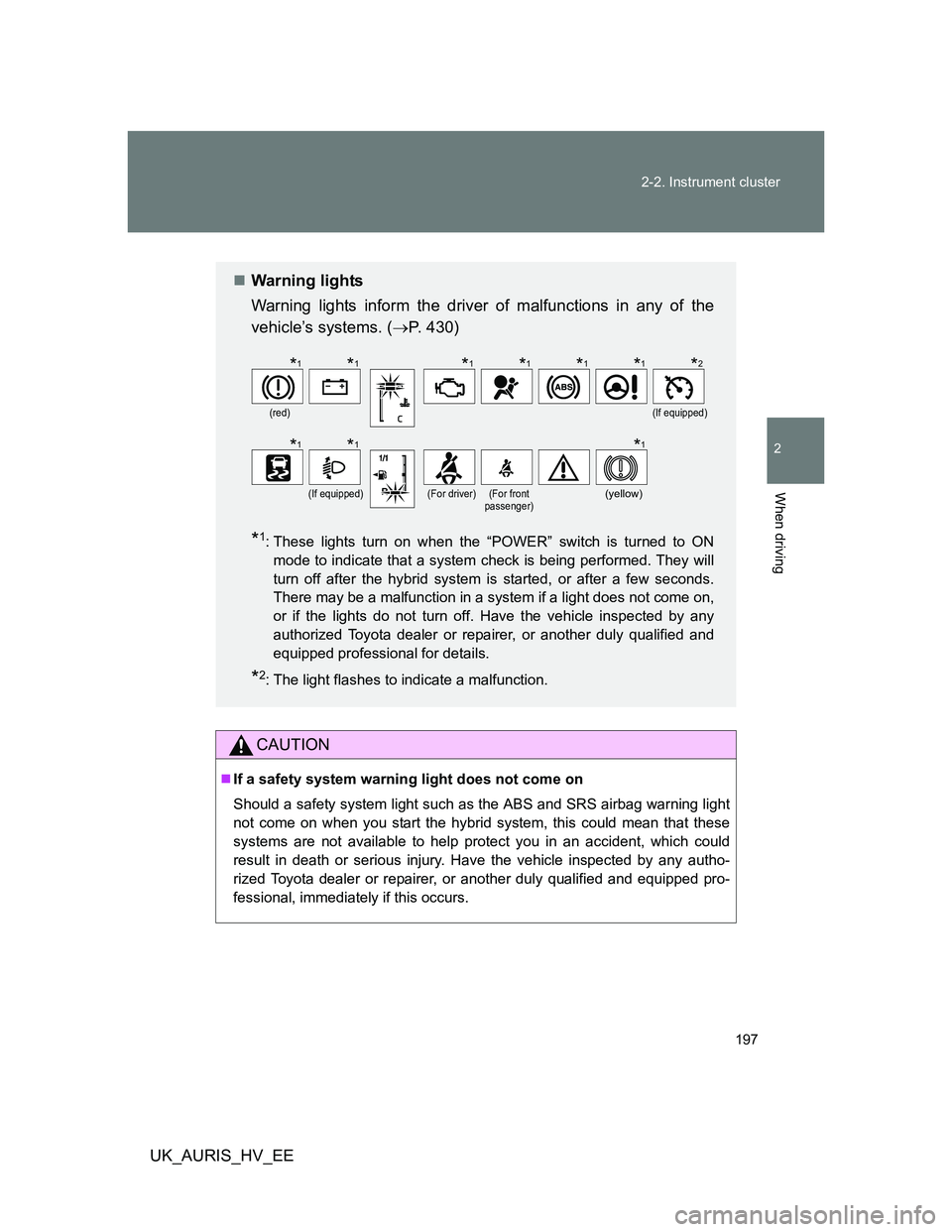
Warning lights
Warning lights inform the driver of malfunctions in any of the
vehicle’s systems. (P. 430)
*1: These lights turn on when the “POWER” switch is turned to ON
mode to indicate that a system check is being performed. They will
turn off after the hybrid system is started, or after a few seconds.
There may be a malfunction in a system if a light does not come on,
or if the lights do not turn off. Have the vehicle inspected by any
authorized Toyota dealer or repairer, or another duly qualified and
equipped professional for details.
*2: The light flashes to indicate a malfunction.
(red)(If equipped)
(If equipped)(For driver)(For front
passenger)(yellow)
*1*1*1*1*1*1*2
*1*1*1
Page 201 of 524
201 2-2. Instrument cluster
2
When driving
UK_AURIS_HV_EE
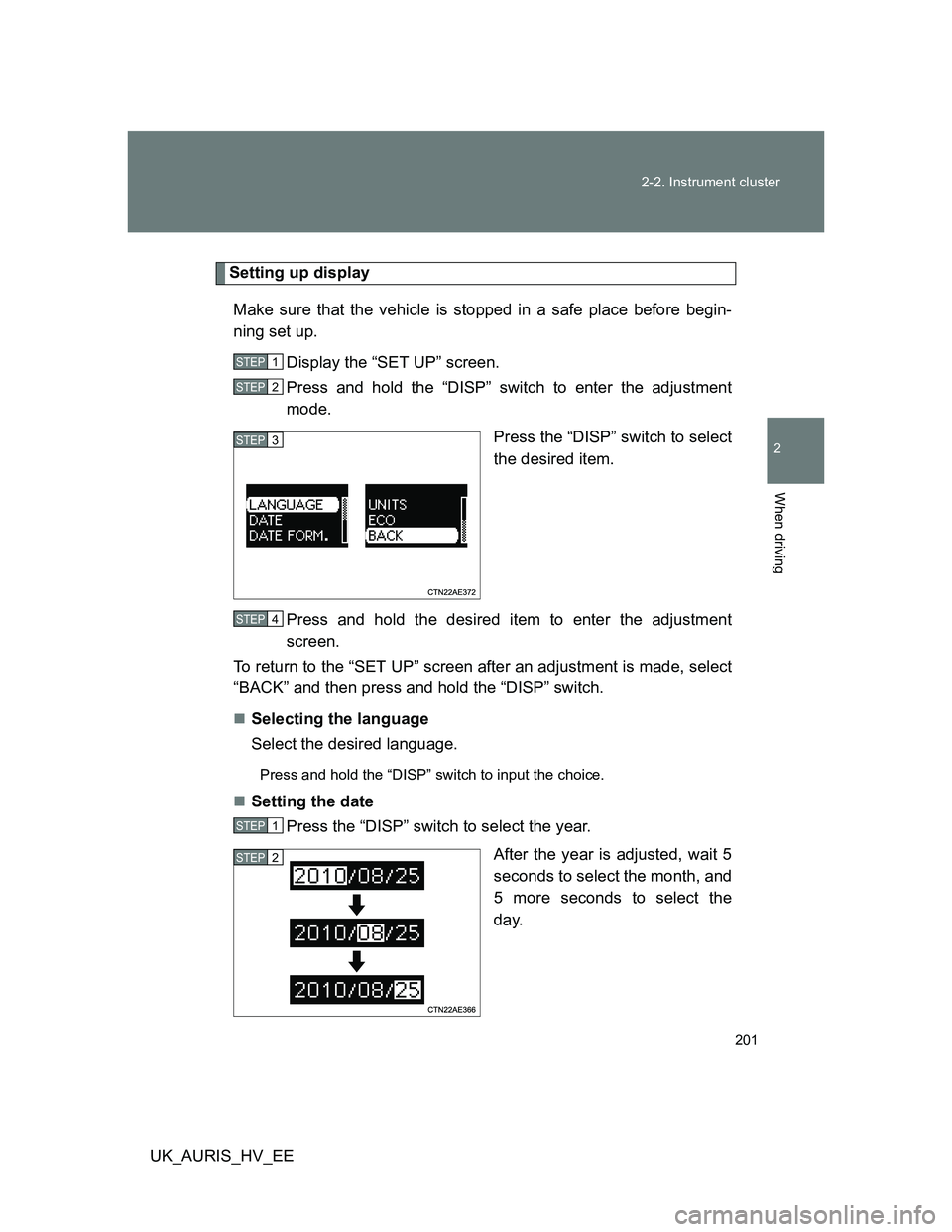
Setting up display
Make sure that the vehicle is stopped in a safe place before begin-
ning set up.
Display the “SET UP” screen.
Press and hold the “DISP” switch to enter the adjustment
mode.
Press the “DISP” switch to select
the desired item.
Press and hold the desired item to enter the adjustment
screen.
To return to the “SET UP” screen after an adjustment is made, select
“BACK” and then press and hold the “DISP” switch.
Selecting the language
Select the desired language.
Press and hold the “DISP” switch to input the choice.
Setting the date
Press the “DISP” switch to select the year.
After the year is adjusted, wait 5
seconds to select the month, and
5 more seconds to select the
day.
STEP1
STEP2
STEP3
STEP4
STEP1
STEP2