ECO mode TOYOTA AURIS 2011 (in English) Owner's Manual
[x] Cancel search | Manufacturer: TOYOTA, Model Year: 2011, Model line: AURIS, Model: TOYOTA AURIS 2011Pages: 524, PDF Size: 25.6 MB
Page 213 of 524
213 2-3. Operating the lights and wipers
2
When driving
UK_AURIS_HV_EE
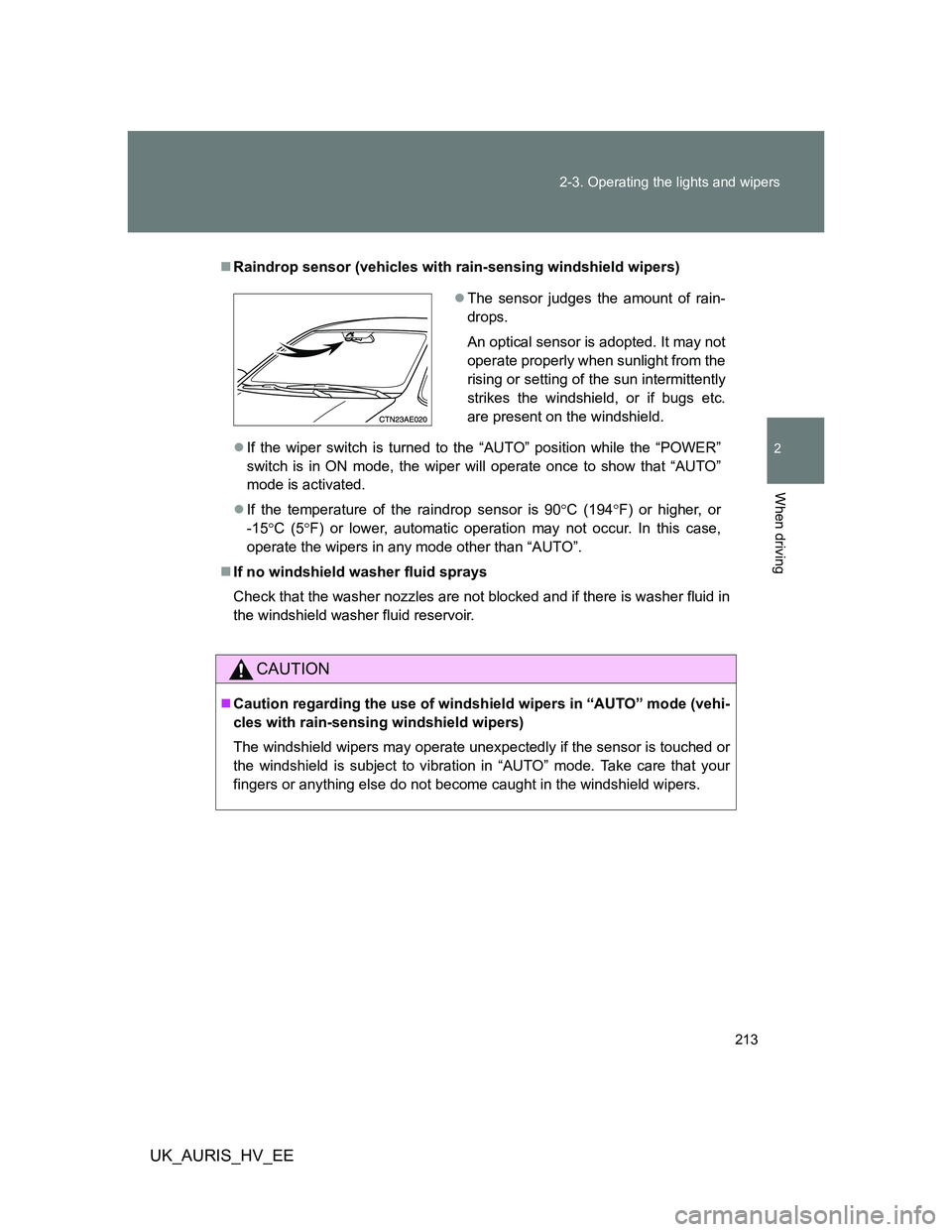
Raindrop sensor (vehicles with rain-sensing windshield wipers)
If the wiper switch is turned to the “AUTO” position while the “POWER”
switch is in ON mode, the wiper will operate once to show that “AUTO”
mode is activated.
If the temperature of the raindrop sensor is 90C (194F) or higher, or
-15C (5F) or lower, automatic operation may not occur. In this case,
operate the wipers in any mode other than “AUTO”.
If no windshield washer fluid sprays
Check that the washer nozzles are not blocked and if there is washer fluid in
the windshield washer fluid reservoir.
CAUTION
Caution regarding the use of windshield wipers in “AUTO” mode (vehi-
cles with rain-sensing windshield wipers)
The windshield wipers may operate unexpectedly if the sensor is touched or
the windshield is subject to vibration in “AUTO” mode. Take care that your
fingers or anything else do not become caught in the windshield wipers.
The sensor judges the amount of rain-
drops.
An optical sensor is adopted. It may not
operate properly when sunlight from the
rising or setting of the sun intermittently
strikes the windshield, or if bugs etc.
are present on the windshield.
Page 215 of 524
215
2-3. Operating the lights and wipers
2
When driving
UK_AURIS_HV_EE
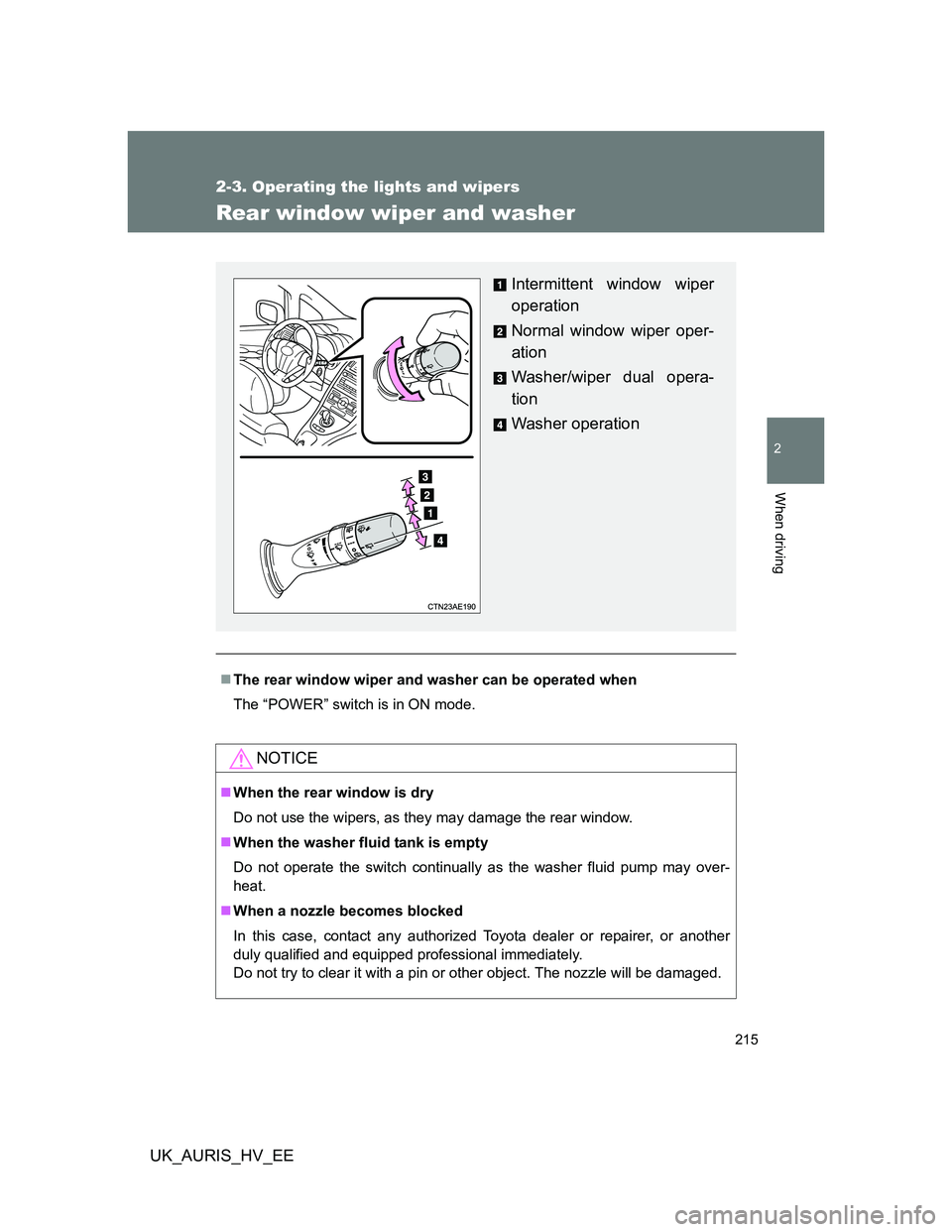
Rear window wiper and washer
The rear window wiper and washer can be operated when
The “POWER” switch is in ON mode.
NOTICE
When the rear window is dry
Do not use the wipers, as they may damage the rear window.
When the washer fluid tank is empty
Do not operate the switch continually as the washer fluid pump may over-
heat.
When a nozzle becomes blocked
In this case, contact any authorized Toyota dealer or repairer, or another
duly qualified and equipped professional immediately.
Do not try to clear it with a pin or other object. The nozzle will be damaged.
Intermittent window wiper
operation
Normal window wiper oper-
ation
Washer/wiper dual opera-
tion
Washer operation
Page 231 of 524
231 2-4. Using other driving systems
2
When driving
UK_AURIS_HV_EE
CAUTION
When using the rear view monitor system, observe the following pre-
cautions to avoid an accident that could result in death or serious inju-
ries.
Never depend solely on the monitor system when reversing.
Always check visually and with the mirrors to confirm your intended path is
clear.
Use your own eyes to confirm the vehicle’s surroundings, as the displayed
image may become faint or dark, and moving images will be distorted, or
not entirely visible when the outside temperature is low. When backing up,
be sure to check behind and all around the vehicle visually and with the
mirrors before proceeding.
Always check the vehicle surrounding area, because the guide lines are
ancillary lines.
The guide lines are ancillary lines and do not change even if the steering
wheel is turned.
Depicted distances between objects and flat surfaces differ from actual
distances.
Do not use the system if the back door open.
Conditions which may affect the rear view monitor system
If the back of the vehicle has been hit, the camera’s position and mounting
angle may have changed. Have the vehicle inspected by any authorized
Toyota dealer or repairer, or another duly qualified and equipped profes-
sional.
Rapid temperature changes, such as when hot water is poured on the
vehicle in cold weather, may cause the system to function abnormally.
If the camera lens is dirty, it cannot transmit a clear image. Rinse with
water and wipe with a soft cloth. If extremely dirty, wash with a mild
cleanser and rinse.
The displayed image may be darker and moving images may be slightly
distorted when the system is cold.
Caution while driving in reverse
Do not change modes while the vehicle is moving.
Page 253 of 524
253 3-1. Using the air conditioning system and defogger
3
Interior features
UK_AURIS_HV_EE
Switching between outside air and recirculated air modes
Recirculated air mode or outside air mode may be automatically switched to
in accordance with the temperature setting and the inside temperature.
Window defogger feature
Recirculated air mode may automatically switch to outside air mode in situa-
tions where the windows need to be defogged.
When outside air temperature approaches 0°C (32°F)
The air conditioning system may not operate even when
is pressed.
When
is selected for the air outlets used
For your driving comfort, air flowing to the feet may be warmer than air flow-
ing to the upper body depending on the temperature setting.
When Eco drive mode is on
If the outside temperature exceeds a preset temperature, the system will
switch to recirculated air mode.
The effectiveness of the air conditioning will be lower than normal.
The fan speed level drops below the normal rate.
CAUTION
To prevent the windshield from fogging up
Do not use during cool air operation in extremely humid weather.
The difference between the temperature of the outside air and that of the
windshield can cause the outer surface of the windshield to fog up, blocking
your vision.
NOTICE
To prevent 12-volt battery discharge
Do not leave the air conditioning system on longer than necessary when the
hybrid system is off.
Page 270 of 524
270 3-2. Using the audio system
UK_AURIS_HV_EE
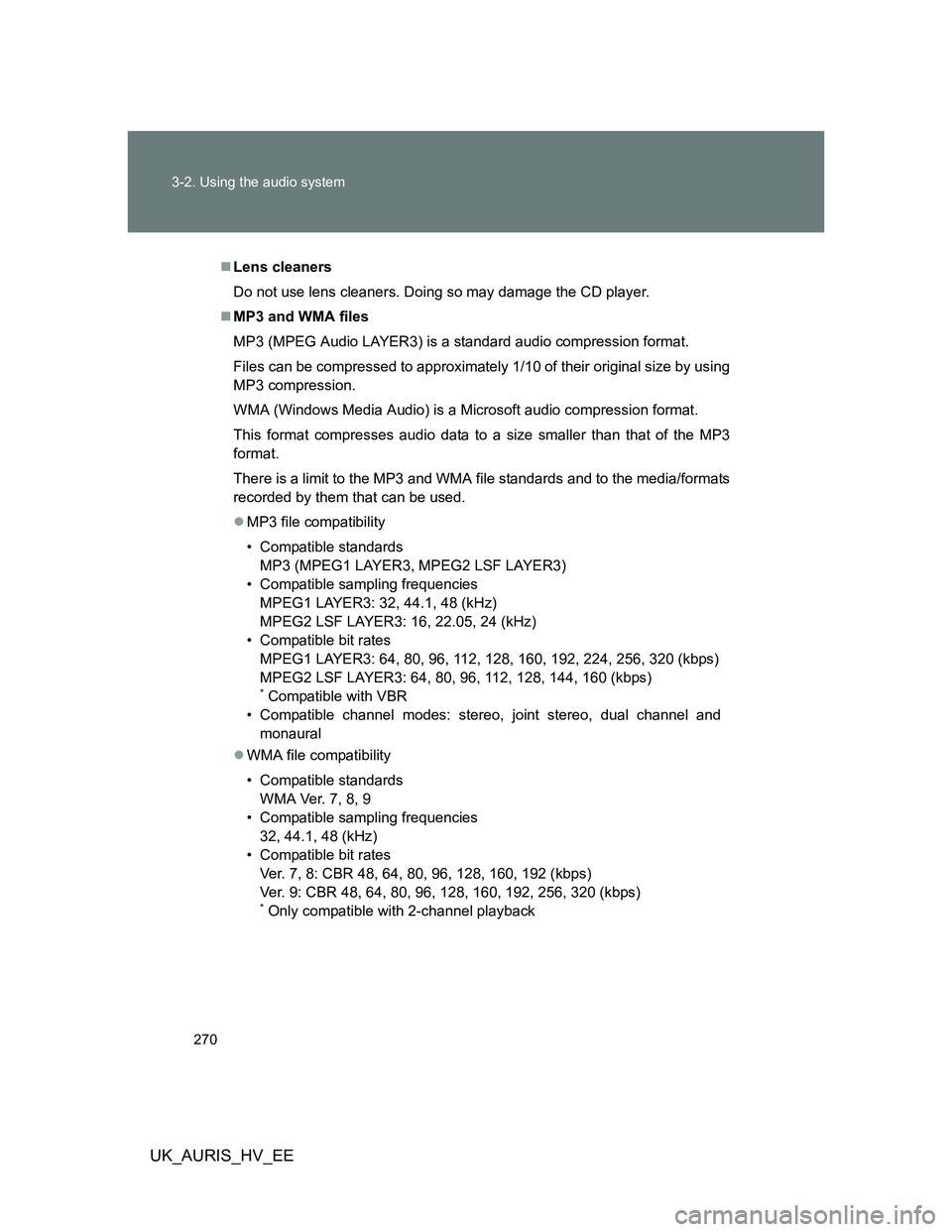
Lens cleaners
Do not use lens cleaners. Doing so may damage the CD player.
MP3 and WMA files
MP3 (MPEG Audio LAYER3) is a standard audio compression format.
Files can be compressed to approximately 1/10 of their original size by using
MP3 compression.
WMA (Windows Media Audio) is a Microsoft audio compression format.
This format compresses audio data to a size smaller than that of the MP3
format.
There is a limit to the MP3 and WMA file standards and to the media/formats
recorded by them that can be used.
MP3 file compatibility
• Compatible standards
MP3 (MPEG1 LAYER3, MPEG2 LSF LAYER3)
• Compatible sampling frequencies
MPEG1 LAYER3: 32, 44.1, 48 (kHz)
MPEG2 LSF LAYER3: 16, 22.05, 24 (kHz)
• Compatible bit rates
MPEG1 LAYER3: 64, 80, 96, 112, 128, 160, 192, 224, 256, 320 (kbps)
MPEG2 LSF LAYER3: 64, 80, 96, 112, 128, 144, 160 (kbps)
* Compatible with VBR
• Compatible channel modes: stereo, joint stereo, dual channel and
monaural
WMA file compatibility
• Compatible standards
WMA Ver. 7, 8, 9
• Compatible sampling frequencies
32, 44.1, 48 (kHz)
• Compatible bit rates
Ver. 7, 8: CBR 48, 64, 80, 96, 128, 160, 192 (kbps)
Ver. 9: CBR 48, 64, 80, 96, 128, 160, 192, 256, 320 (kbps)
* Only compatible with 2-channel playback
Page 271 of 524
271 3-2. Using the audio system
3
Interior features
UK_AURIS_HV_EE
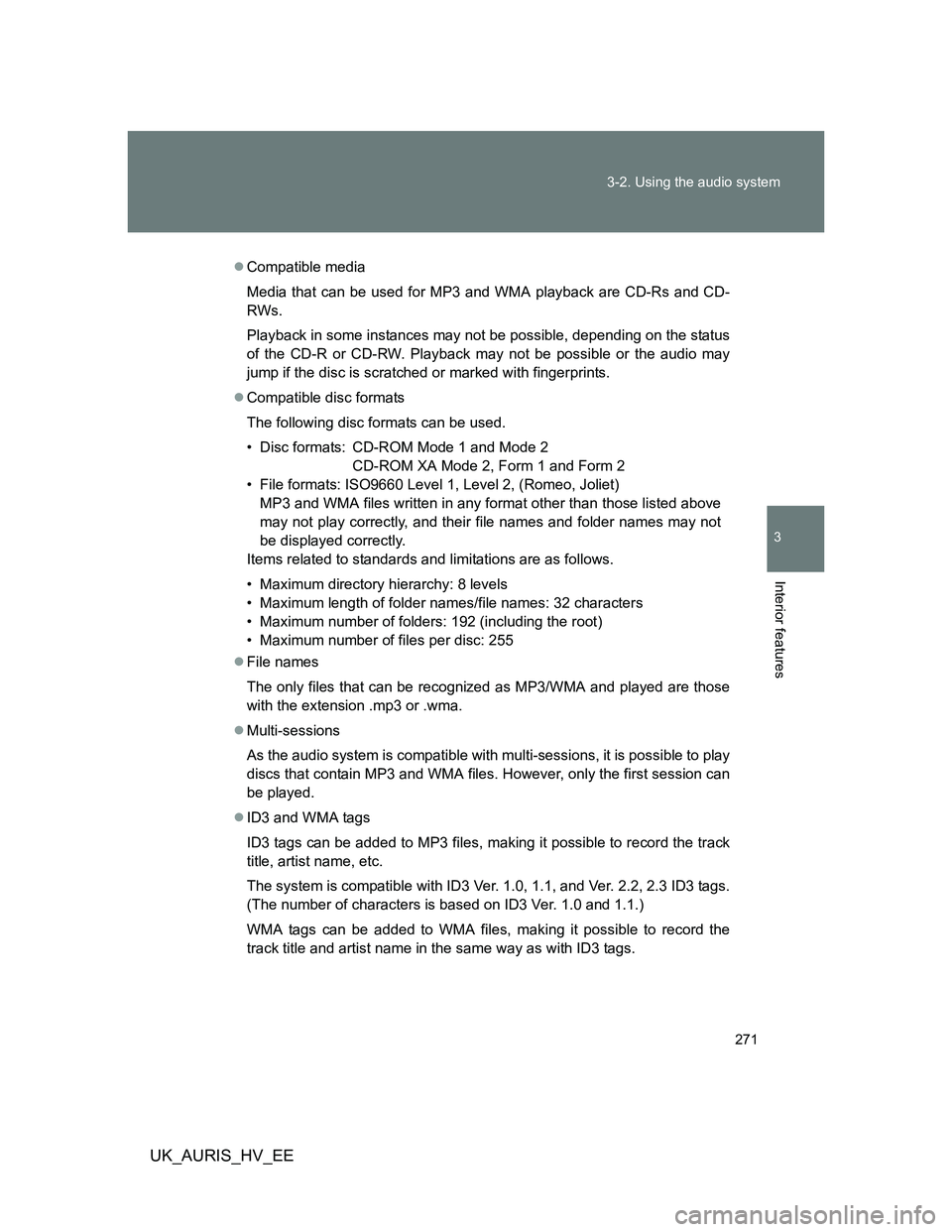
Compatible media
Media that can be used for MP3 and WMA playback are CD-Rs and CD-
RWs.
Playback in some instances may not be possible, depending on the status
of the CD-R or CD-RW. Playback may not be possible or the audio may
jump if the disc is scratched or marked with fingerprints.
Compatible disc formats
The following disc formats can be used.
• Disc formats: CD-ROM Mode 1 and Mode 2
CD-ROM XA Mode 2, Form 1 and Form 2
• File formats: ISO9660 Level 1, Level 2, (Romeo, Joliet)
MP3 and WMA files written in any format other than those listed above
may not play correctly, and their file names and folder names may not
be displayed correctly.
Items related to standards and limitations are as follows.
• Maximum directory hierarchy: 8 levels
• Maximum length of folder names/file names: 32 characters
• Maximum number of folders: 192 (including the root)
• Maximum number of files per disc: 255
File names
The only files that can be recognized as MP3/WMA and played are those
with the extension .mp3 or .wma.
Multi-sessions
As the audio system is compatible with multi-sessions, it is possible to play
discs that contain MP3 and WMA files. However, only the first session can
be played.
ID3 and WMA tags
ID3 tags can be added to MP3 files, making it possible to record the track
title, artist name, etc.
The system is compatible with ID3 Ver. 1.0, 1.1, and Ver. 2.2, 2.3 ID3 tags.
(The number of characters is based on ID3 Ver. 1.0 and 1.1.)
WMA tags can be added to WMA files, making it possible to record the
track title and artist name in the same way as with ID3 tags.
Page 275 of 524
275 3-2. Using the audio system
3
Interior features
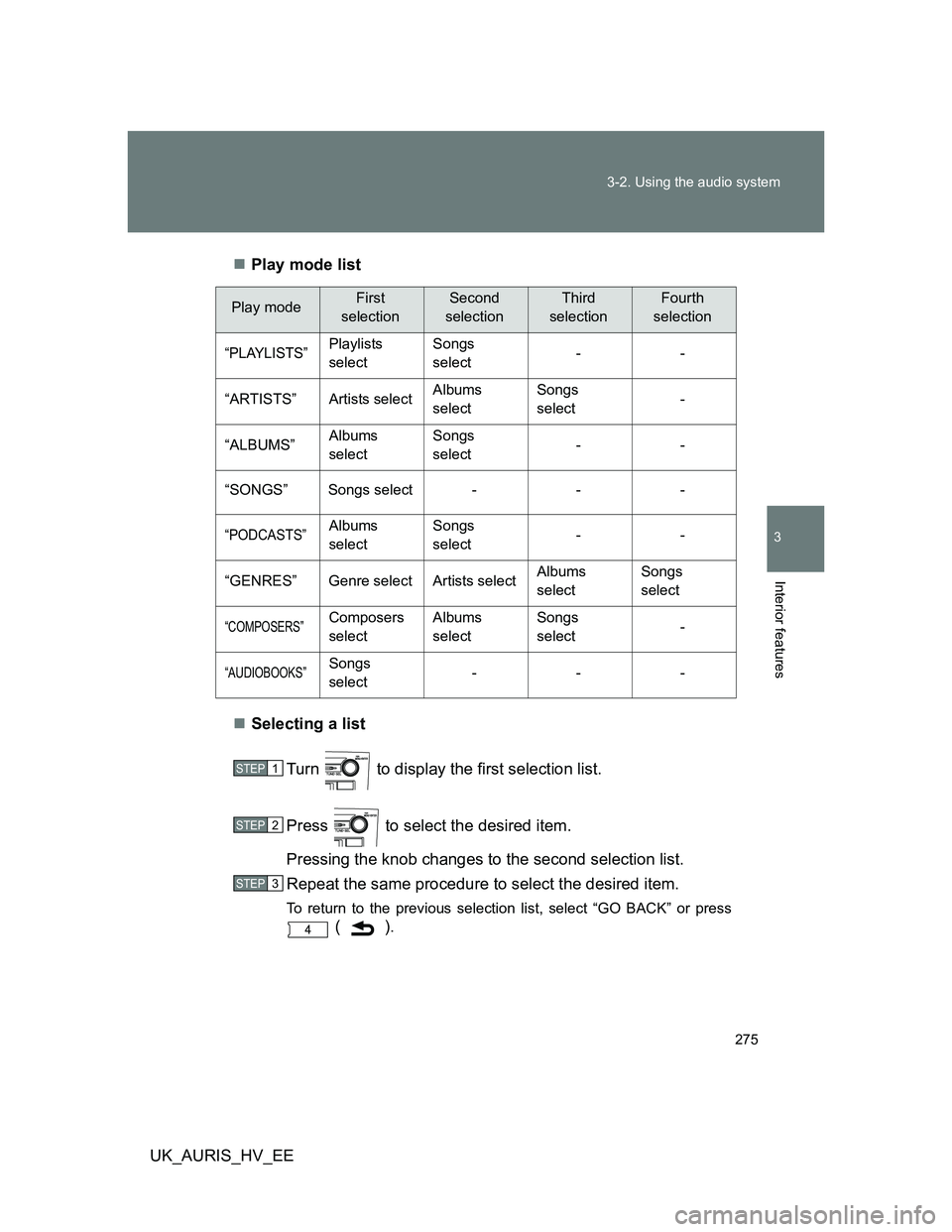
UK_AURIS_HV_EEPlay mode list
Selecting a list
Turn to display the first selection list.
Press to select the desired item.
Pressing the knob changes to the second selection list.
Repeat the same procedure to select the desired item.
To return to the previous selection list, select “GO BACK” or press
().
Play modeFirst
selectionSecond
selectionThird
selectionFourth
selection
“PLAYLISTS”Playlists
selectSongs
select--
“ARTISTS” Artists selectAlbums
selectSongs
select-
“ALBUMS”Albums
selectSongs
select--
“SONGS” Songs select - - -
“PODCASTS”Albums
selectSongs
select--
“GENRES” Genre select Artists selectAlbums
selectSongs
select
“COMPOSERS”Composers
selectAlbums
selectSongs
select-
“AUDIOBOOKS”Songs
select---
STEP1
STEP2
STEP3
Page 277 of 524
277 3-2. Using the audio system
3
Interior features
UK_AURIS_HV_EE
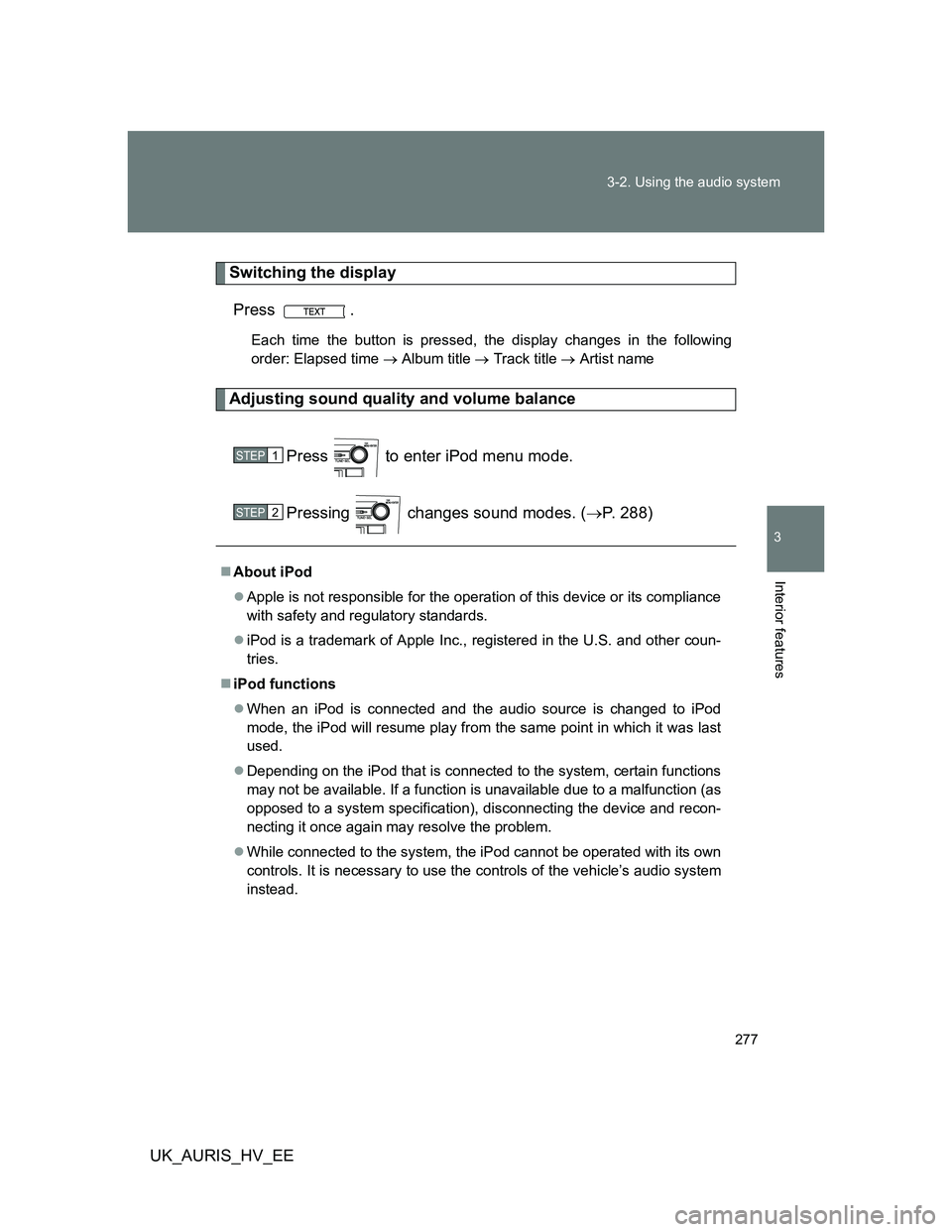
Switching the display
Press .
Each time the button is pressed, the display changes in the following
order: Elapsed time Album title Track title Artist name
Adjusting sound quality and volume balance
Press to enter iPod menu mode.
Pressing changes sound modes. (P. 288)
About iPod
Apple is not responsible for the operation of this device or its compliance
with safety and regulatory standards.
iPod is a trademark of Apple Inc., registered in the U.S. and other coun-
tries.
iPod functions
When an iPod is connected and the audio source is changed to iPod
mode, the iPod will resume play from the same point in which it was last
used.
Depending on the iPod that is connected to the system, certain functions
may not be available. If a function is unavailable due to a malfunction (as
opposed to a system specification), disconnecting the device and recon-
necting it once again may resolve the problem.
While connected to the system, the iPod cannot be operated with its own
controls. It is necessary to use the controls of the vehicle’s audio system
instead.
STEP1
STEP2
Page 285 of 524
285 3-2. Using the audio system
3
Interior features
UK_AURIS_HV_EE
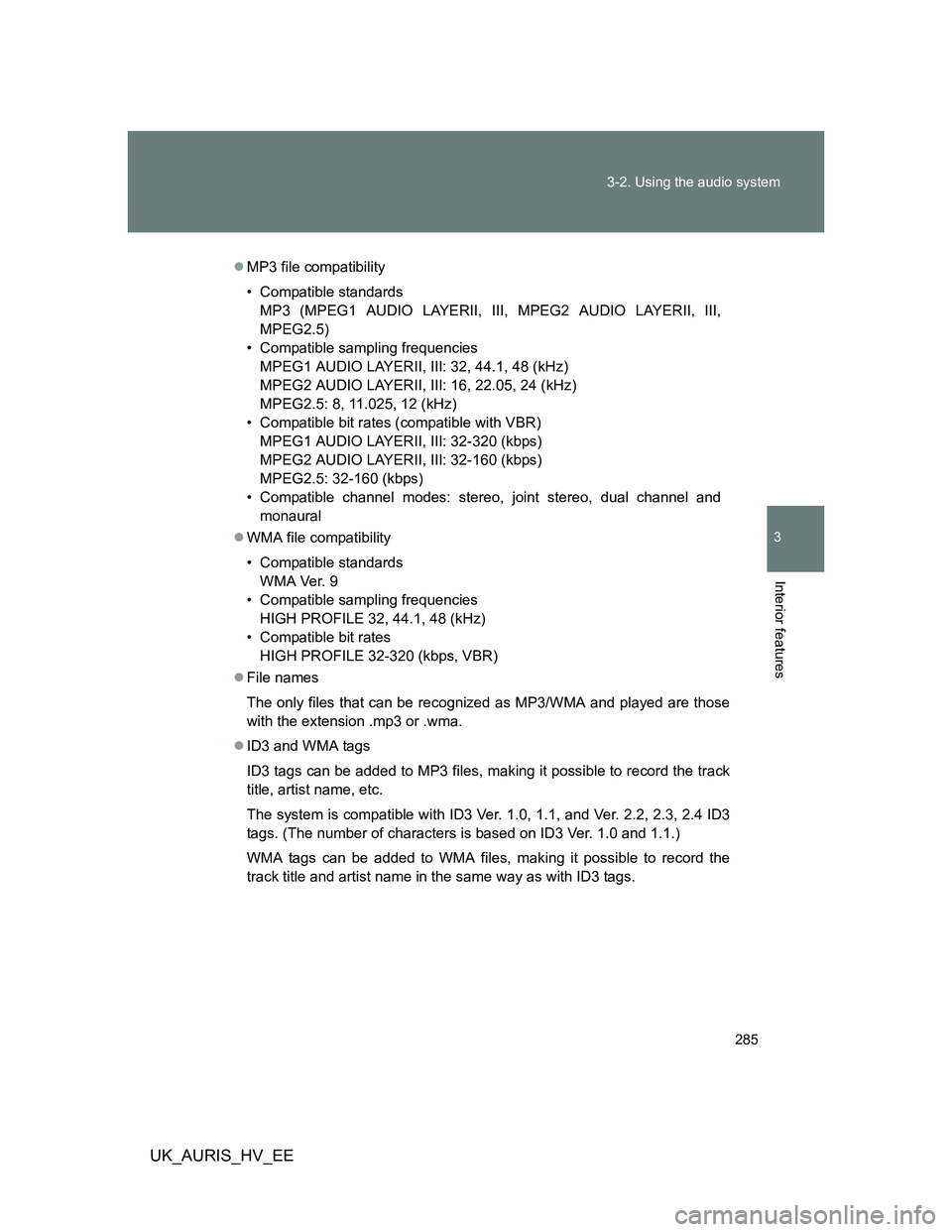
MP3 file compatibility
• Compatible standards
MP3 (MPEG1 AUDIO LAYERII, III, MPEG2 AUDIO LAYERII, III,
MPEG2.5)
• Compatible sampling frequencies
MPEG1 AUDIO LAYERII, III: 32, 44.1, 48 (kHz)
MPEG2 AUDIO LAYERII, III: 16, 22.05, 24 (kHz)
MPEG2.5: 8, 11.025, 12 (kHz)
• Compatible bit rates (compatible with VBR)
MPEG1 AUDIO LAYERII, III: 32-320 (kbps)
MPEG2 AUDIO LAYERII, III: 32-160 (kbps)
MPEG2.5: 32-160 (kbps)
• Compatible channel modes: stereo, joint stereo, dual channel and
monaural
WMA file compatibility
• Compatible standards
WMA Ver. 9
• Compatible sampling frequencies
HIGH PROFILE 32, 44.1, 48 (kHz)
• Compatible bit rates
HIGH PROFILE 32-320 (kbps, VBR)
File names
The only files that can be recognized as MP3/WMA and played are those
with the extension .mp3 or .wma.
ID3 and WMA tags
ID3 tags can be added to MP3 files, making it possible to record the track
title, artist name, etc.
The system is compatible with ID3 Ver. 1.0, 1.1, and Ver. 2.2, 2.3, 2.4 ID3
tags. (The number of characters is based on ID3 Ver. 1.0 and 1.1.)
WMA tags can be added to WMA files, making it possible to record the
track title and artist name in the same way as with ID3 tags.
Page 286 of 524
286 3-2. Using the audio system
UK_AURIS_HV_EE
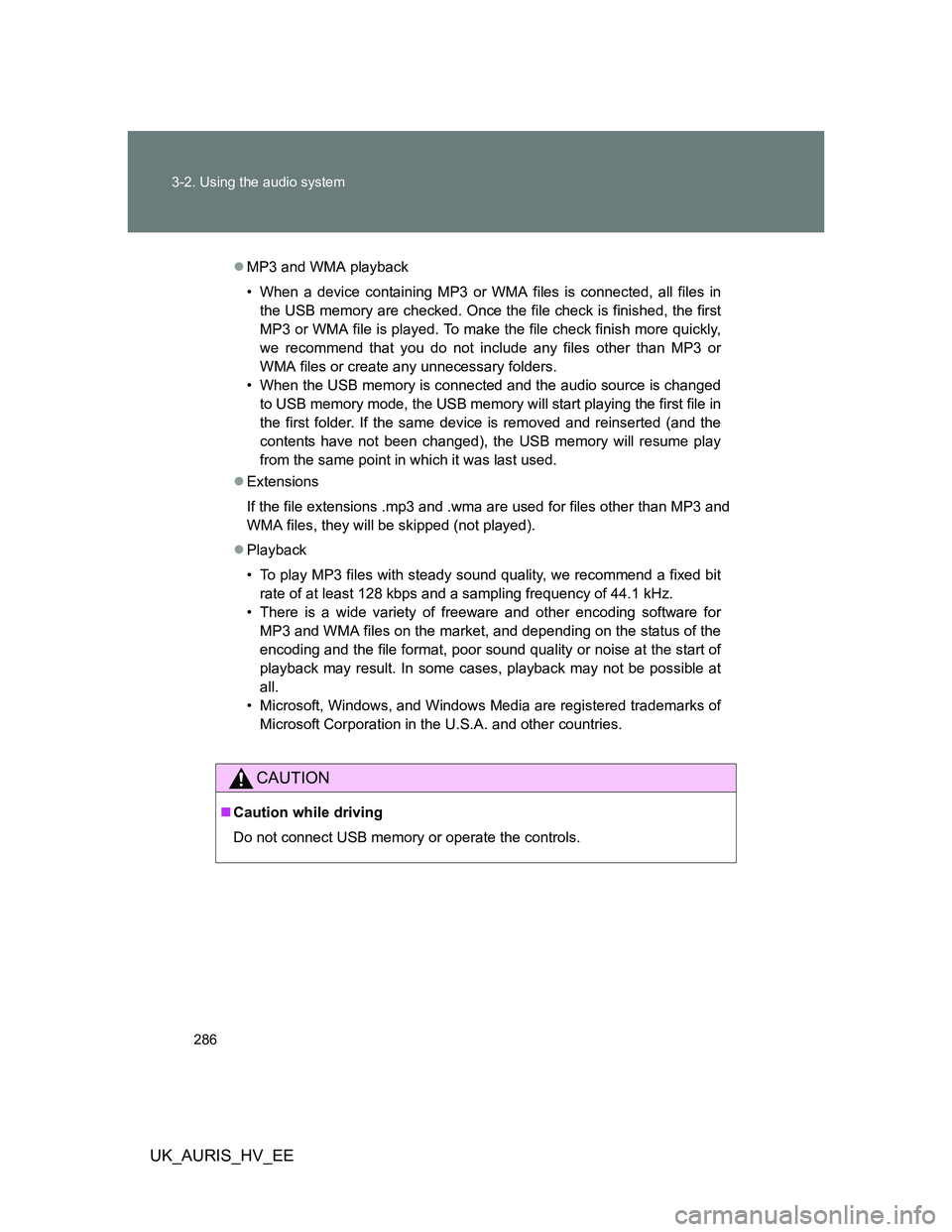
MP3 and WMA playback
• When a device containing MP3 or WMA files is connected, all files in
the USB memory are checked. Once the file check is finished, the first
MP3 or WMA file is played. To make the file check finish more quickly,
we recommend that you do not include any files other than MP3 or
WMA files or create any unnecessary folders.
• When the USB memory is connected and the audio source is changed
to USB memory mode, the USB memory will start playing the first file in
the first folder. If the same device is removed and reinserted (and the
contents have not been changed), the USB memory will resume play
from the same point in which it was last used.
Extensions
If the file extensions .mp3 and .wma are used for files other than MP3 and
WMA files, they will be skipped (not played).
Playback
• To play MP3 files with steady sound quality, we recommend a fixed bit
rate of at least 128 kbps and a sampling frequency of 44.1 kHz.
• There is a wide variety of freeware and other encoding software for
MP3 and WMA files on the market, and depending on the status of the
encoding and the file format, poor sound quality or noise at the start of
playback may result. In some cases, playback may not be possible at
all.
• Microsoft, Windows, and Windows Media are registered trademarks of
Microsoft Corporation in the U.S.A. and other countries.
CAUTION
Caution while driving
Do not connect USB memory or operate the controls.