reset TOYOTA AURIS HYBRID 2016 User Guide
[x] Cancel search | Manufacturer: TOYOTA, Model Year: 2016, Model line: AURIS HYBRID, Model: TOYOTA AURIS HYBRID 2016Pages: 592, PDF Size: 16.67 MB
Page 323 of 592
323
UK AURIS_HV_HB_EE (OM12K47E)
5
Audio system
5-3. Using the radio
Search for a desired station by pressing the “
Press and hold a desired station selector button until you hear a
beep.
Radio operation
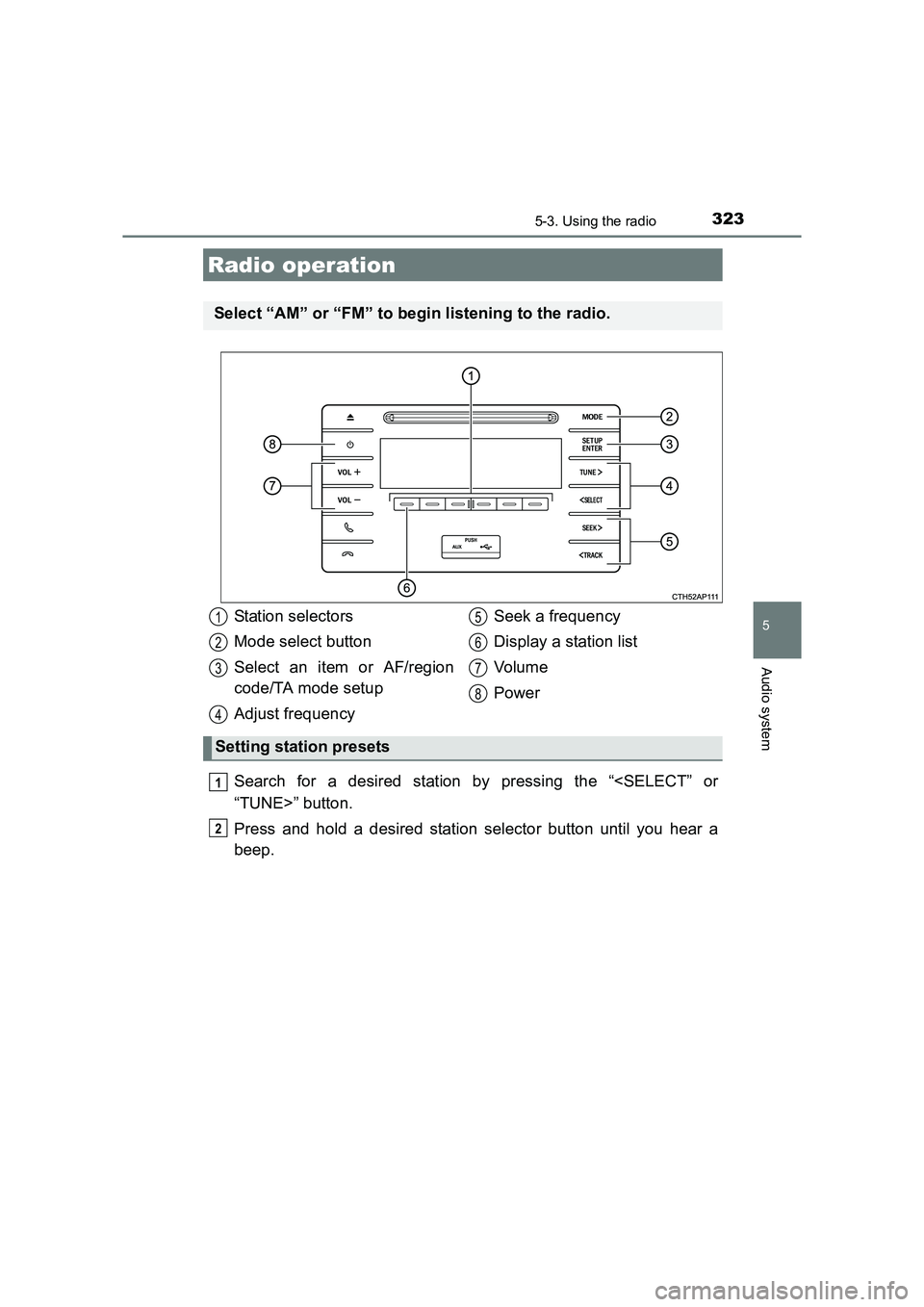
Select “AM” or “FM” to begin listening to the radio.
Station selectors
Mode select button
Select an item or AF/region
code/TA mode setup
Adjust frequencySeek a frequency
Display a station list
Vol um e
Power
Setting station presets
1
2
3
4
5
6
7
8
1
2
Page 325 of 592
3255-3. Using the radio
UK AURIS_HV_HB_EE (OM12K47E)
5
Audio system
■Traffic informationPress the “SETUP/ENTER” button.
Press the “
press the “SETUP/ENTER” button.
Press the “
mode.
Press the “SETUP/ENTER” button to select “On” or “Off”.
TA mode: The system automatically switches to traffic information when a broadcast with a traffic information signal is
received.
The station returns to the previous one when the traffic infor-
mation ends.
■EON (Enhanced Other Network) system (for traffic announcement func-
tion)
If the RDS station (with EON data) you are listening to is not broadcasting a
traffic information program and the audio system is in the TA (traffic
announcement) mode, the radio will be switched automatically to a station
broadcasting a traffic information program in the EON AF list when traffic
information begins.
■ When the 12-volt battery is disconnected
Station presets are erased.
■ Reception sensitivity
●Maintaining perfect radio reception at a ll times is difficult due to the continu-
ally changing position of the antenna, differences in signal strength and sur-
rounding objects, such as trains, transmitters, etc.
● The radio antenna is mounted on the rear side of the roof.
1
2
3
4
Page 339 of 592
3395-5. Using an external device
UK AURIS_HV_HB_EE (OM12K47E)
5
Audio system
■iPod problems
To resolve most problems encountered when using your iPod, disconnect
your iPod from the vehicle iPod connection and reset it.
For instructions on how to reset your iPod, refer to your iPod Owner’s Man-
ual.
■ Display
→ P. 329
■ Error messages
If an error message is displayed, refer to the following table and take the
appropriate measures. If the problem is not rectified, take the vehicle to any
authorized Toyota dealer or repair er, or another duly qualified and equipped
professional.
MessageCause/Correction procedures
“iPod error”This indicates that the data in the iPod cannot
be read.
“Error 3”This indicates that the iPod may be malfunc-
tioning.
“Error 4”This indicates that an over current error has
occurred.
“Error 5”This indicates that an iPod communication
error has occurred.
“Error 6”This indicates that an authentication error has
occurred.
“No songs”This indicates that there is no music data in
the iPod.
“No playlists”This indicates that some available songs are
not found in a selected playlist.
“Update your iPod”
This indicates that the version of the iPod is
not compatible. Upgrade your iPod software
to the latest version.
Page 353 of 592
3535-6. Using Bluetooth® devices
UK AURIS_HV_HB_EE (OM12K47E)
5
Audio system
To enter a menu, press the “SETUP/ENTER” button and navigate
menus by using the “
tons:
Menu list of the Bluetooth® audio/phone
First menuSecond menuThird menuOperation details
“Bluetooth*”
“Pairing”-
Register a
Bluetooth®
device
“List phone”-
List the regis-
tered cellular
phones
“List audio”-
List the regis-
tered portable
players
“Passkey”-Change the
passkey
“BT power”-
Set automatic
connection of the
device on or off
“Bluetooth* info”
“Device Name”
“Device
Address”Display the
device status
“Display setting”-
Set the auto-
matic connec-
tion confirmation
display on or off
“Reset”-Initialize the set-
tings
Page 361 of 592
3615-7. “SET UP” menu
UK AURIS_HV_HB_EE (OM12K47E)
5
Audio system
Select “Reset” using the “
buttons. (→P. 353)
● Initializing the sound settings
Select “Sound settings” using the “
“SETUP/ENTER” buttons and press “Yes”.
For details about sound settings: →P. 365
● Initializing the device information
Select “Car Device Info” using the “
“SETUP/ENTER” buttons and press “Yes”.
The user set passkey and automatic confirmation display will be returned
to their default settings.
●Initializing all the settings
Select “Reset all” using the “
ENTER” buttons and press “Yes”.
Initialization
Page 362 of 592
3625-7. “SET UP” menu
UK AURIS_HV_HB_EE (OM12K47E)
Select “Add contacts” using the “
ENTER” buttons. (→P. 353)
● Transferring all contacts from the cellular phone
Select “Overwrite all” using the “
ENTER” buttons and press “Yes”.
● Transferring one contact from the cellular phone
Select “Add contact” using the “
ENTER” buttons and press “Yes”.
Select “Add SD” using the “
ENTER” buttons. ( →P. 353)
Select the desired data using the “
“SETUP/ENTER” buttons.
Press and hold the desired preset button.
For details about setting speed dials from the call history: →P. 3 7 1
For details about deleting speed dials: →P. 3 7 0
Using the “SET UP” menu (“Phone” menu)
Adding a new phone number
Setting speed dials
1
2
3
Page 370 of 592
370
UK AURIS_HV_HB_EE (OM12K47E)
5-9. Bluetooth® Phone
Select “Phonebook” using the “
ENTER” buttons.
Select the desired name using the “
“SETUP/ENTER” buttons and press the off-hook switch.
By pressing “Add S. Dial” and then one of the speed dial but-
tons while the desired name is selected, the selected item can be reg-
istered as a speed dial.
Press “A-Z” to display the registered names in alphabetical
order of the initial.
Select “Speed dials” using the “
ENTER” buttons.
Press the desired preset button and press the off-hook switch.
To delete a registered speed dial, after selecting the desired preset
button press “Delete” and then press “Yes”.
Select “Dial by number” using the “
“SETUP/ENTER” buttons.
Enter the phone number and press the off-hook switch.
Making a phone call
To enter the “PHONE” or “TEL” mode, press the off-hook switch.
Dialing by selecting a name
Speed dialing
Dialing by entering the number
1
2
1
2
1
2
Page 371 of 592
3715-9. Bluetooth® Phone
UK AURIS_HV_HB_EE (OM12K47E)
5
Audio system
Select “All calls”, “Missed calls”, “Incoming calls” or “Outgoing calls”
using the “
Select the desired number using the “
“SETUP/ENTER” buttons and press the off-hook switch.
The following operations can be performed:
● Registering a number as a speed dial
Press “Add S. Dial” and then press the desired preset but-
ton.
● Deleting the selected number
Press “Delete” and press “Yes”.
Dialing from call histories
1
2
Page 441 of 592
4417-3. Do-it-yourself maintenance
UK AURIS_HV_HB_EE (OM12K47E)
7
Maintenance and care
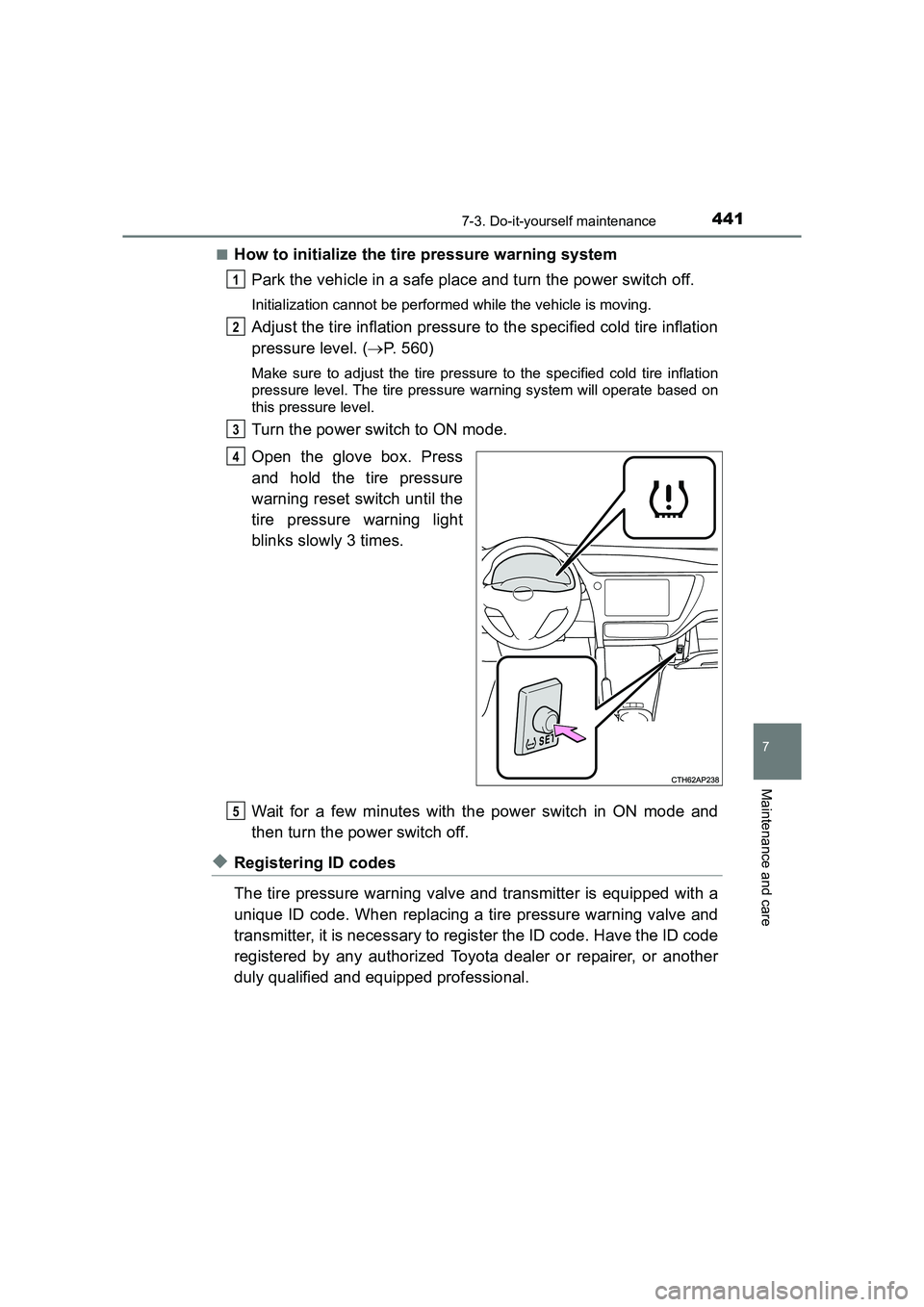
■How to initialize the tire pressure warning systemPark the vehicle in a safe place and turn the power switch off.
Initialization cannot be performed while the vehicle is moving.
Adjust the tire inflation pressure to the specified cold tire inflation
pressure level. ( →P. 560)
Make sure to adjust the tire pressure to the specified cold tire inflation
pressure level. The tire pressure warning system will operate based on
this pressure level.
Turn the power switch to ON mode.
Open the glove box. Press
and hold the tire pressure
warning reset switch until the
tire pressure warning light
blinks slowly 3 times.
Wait for a few minutes with the power switch in ON mode and
then turn the power switch off.
◆Registering ID codes
The tire pressure warning valve and transmitter is equipped with a
unique ID code. When replacing a tire pressure warning valve and
transmitter, it is necessary to register the ID code. Have the ID code
registered by any authorized Toyota dealer or repairer, or another
duly qualified and equipped professional.
1
2
3
4
5
Page 444 of 592
4447-3. Do-it-yourself maintenance
UK AURIS_HV_HB_EE (OM12K47E)■
The initialization operation (vehic les with a tire pressure warning sys-
tem)
● Make sure to carry out initialization after adjusting the tire inflation pressure.
Also, make sure the tires are cold before carrying out initialization or tire
inflation pressure adjustment.
● If you have accidentally turned the power switch off during initialization, it is
not necessary to press the reset switch again as initialization will restart
automatically when the power switch has been turned to ON mode for the
next time.
● If you accidentally press the reset switch when initialization is not necessary,
adjust the tire inflation pressure to the specified level when the tires are
cold, and conduct initialization again.
■ Warning performance of the tire pr essure warning system (vehicles with
a tire pressure warning system)
The warning of the tire pressure warning system will change in accordance
with driving conditions. For this reason, the system may give a warning even
if the tire pressure does not reach a low enough level, or if the pressure is
higher than the pressure that was adjusted to when the system was initial-
ized.
■ When initialization of the tire pr essure warning system has failed (vehi-
cles with a tire pressure warning system)
Initialization can be completed in a few minutes. However, in the following
cases, the settings have not been recorded and the system will not operate
properly. If repeated attempts to record tire inflation pressure settings are
unsuccessful, have the vehicle inspected by any authorized Toyota dealer or
repairer, or another duly qualified and equipped professional as soon as pos-
sible.
● When operating the tire pressure warning reset switch, the tire pressure
warning light does not blink 3 times.
● After driving for a certain period of time since the initialization has been
completed, the warning light comes on after blinking for 1 minute.
■ Registering ID codes (vehicles with a tire pressure warning system)
The ID codes of the tire pressure wa rning valve and transmitters for two sets
of wheels can be registered.
It is not necessary to register the ID codes when replacing normal tires with
snow tires, if the ID codes for the wheels of both normal tires and snow tires
are registered beforehand.
For information about changing ID codes, ask any authorized Toyota dealer
or repairer, or another duly qualified and equipped professional.